
Seenergy SVR- 632 Manuale utente

SVR$632(User’s(Manual!
1
Version 2.2.5
SVR-632
User’s Manual
!
32CH Network Video Recorder with Local Display
04222013

2(
SVR$632(User’s(Manual!
Table of Contents
System Overview ..................................................................... 6!
Front View .................................................................................... 6!
Rear View ..................................................................................... 6!
LED Definition ............................................................................... 7!
Installation .............................................................................. 8!
HDD Installation .............................................................................8!
Connect to the NVR.......................................................................11!
Use NVR Search Utility.................................................................. 11!
Access the NVR with its default IP address....................................... 16!
Set up Password .......................................................................... 17!
Camera Installation ......................................................................19!
Add a Camera -- Automatic Search................................................. 19!
Add a camera manually ................................................................ 21!
Live View................................................................................ 22!
(!) Note ...................................................................................... 23!
Retrieve camera’s video stream ..................................................... 25!
Retrieve camera’s status ............................................................... 25!
Perform Sequence Viewing ............................................................ 26!
PTZ Control................................................................................. 28!
Perform PTZ Preset Viewing........................................................... 30!
Preset Point Viewing..................................................................... 30!
Auto Pan Viewing ......................................................................... 31!
Preset Point Sequence Viewing ...................................................... 32!
Live Video Controls ...................................................................... 33!
Display ratio and full screen .......................................................... 33!
Take a snapshot of a live video ...................................................... 34!
Perform Digital PTZ ...................................................................... 40!
Adjust Brightness for the Live Video ............................................... 43!
Adjust Contrast For the Live Video.................................................. 44!
Change Web UI Display Language .................................................. 45!
Live View through iPhone Safari Browser......................................... 46!
Live View through Blackberry Phones.............................................. 51!
Playback................................................................................. 57!
Methods to Search Playback Videos ................................................ 57!
Search by time chart .................................................................... 58!
Search by event........................................................................... 60!
Play by specific time..................................................................... 62!
Search by event (Most Recent) ...................................................... 64!
Certain functions you can perform to the playback video ................... 66!
Take a snapshot of a playback video............................................... 67!
Adjust Brightness for the Playback Video......................................... 73!

SVR$632(User’s(Manual!
3
Adjust Contrast For the Playback Video ........................................... 74!
Export Playback Videos to AVI Files ................................................ 75!
Export Playback Videos to JPEG images........................................... 77!
Play Exported Playback Videos with NVR Media Player....................... 80!
Open Event Snapshot images with NVR Media Player ........................ 82!
NVR Setup -- System Configurations ...................................... 84!
Network Setup..............................................................................84!
Network Settings ......................................................................... 84!
DHCP Server ............................................................................... 86!
DDNS Service.............................................................................. 87!
Time and Date ..............................................................................93!
User Account ................................................................................94!
Add a new user............................................................................ 95!
Change the password of the “admin” account .................................. 96!
Group Privilege .............................................................................97!
Disk Setup ....................................................................................99!
Build RAID Volume ......................................................................100!
Deleting RAID.............................................................................105!
Notes for RAID function ...............................................................105!
NVR Setup -- Channel Configurations ................................... 107!
Add a camera..............................................................................107!
Automatic Search........................................................................107!
Add a camera manually ...............................................................113!
OSD Settings...............................................................................114!
PTZ Setting .................................................................................117!
PTZ Preset Settings .....................................................................117!
PTZ Preset Sequence ...................................................................119!
E-Map Setting .............................................................................121!
Local E-Map Setting.....................................................................121!
Google Map Setting .....................................................................124!
NVR Setup -- Event Configurations....................................... 126!
Event Configuration ....................................................................126!
General Settings .........................................................................126!
I/O Settings ...............................................................................127!
Event Servers .............................................................................129!
Configuring an FTP server ............................................................129!
Configuring an SMTP server..........................................................131!
Event Triggers ............................................................................132!
NVR Setup -- Recording Configurations ................................ 134!
General Settings .........................................................................134!
Schedule Recording ....................................................................138!
To configure a schedule recording .................................................139!
NVR Setup -- System Options ............................................... 141!
Device Information.....................................................................141!
Logs and Reports ........................................................................142!

4(
SVR$632(User’s(Manual!
Maintenance ...............................................................................143!
Reboot the NVR at a specific time automatically ... Error! Bookmark not
defined.!
Firmware Upgrade.......................................................................143!
Through the web interface............................................................144!
Upgrade through USB thumb drive ................................................146!
Reset the NVR to Factory Default ..................................................147!
Disk Status .................................................................................147!
USB Backup ................................................................................148!
Things to pay attention to the USB Backup function .........................150!
Play the backup file with the NVR Media Player ...............................151!
UPS Configuration ......................................................................155!
Live View (VGA output Interface) ........................................ 157!
Live View ....................................................................................157!
Video Area .................................................................................167!
Snapshot ...................................................................................171!
Digital PTZ .................................................................................174!
Keep Ratio .................................................................................177!
NVR Configuration (VGA output Interface)........................... 178!
System Configuration .................................................................178!
Service ......................................................................................178!
Display ......................................................................................179!
Network.....................................................................................180!
User Account -- User setting.........................................................182!
User Account -- User group setting................................................184!
Disk ..........................................................................................187!
Channel Configurations -- Add a camera (Automatic Search) ............189!
Channel Configurations -- Add a camera (Add manually) ..................194!
E-Map .......................................................................................196!
Add new E-map ..........................................................................197!
Change E-map Image..................................................................198!
Schedule Recording.....................................................................205!
Record Buffer .............................................................................207!
Event Handling ...........................................................................208!
General Setting ..........................................................................209!
DI Setting ..................................................................................212!
FTP Servers................................................................................214!
SMTP Servers .............................................................................215!
System Log................................................................................217!
Maintenance...............................................................................218!
UPS Configuration ......................................................................223!
Playback (VGA output Interface) ......................................... 225!
Playback .....................................................................................225!
E-Map Monitor ...................................................................... 229!
E-Map Monitor ............................................................................229!

SVR$632(User’s(Manual!
5
Event Monitor....................................................................... 233!
Event Monitor .............................................................................233!
History Event Monitor ..................................................................236!

6(
SVR$632(User’s(Manual!
System Overview
Front View
Rear View
SVR$632(User’s(Manual!
7
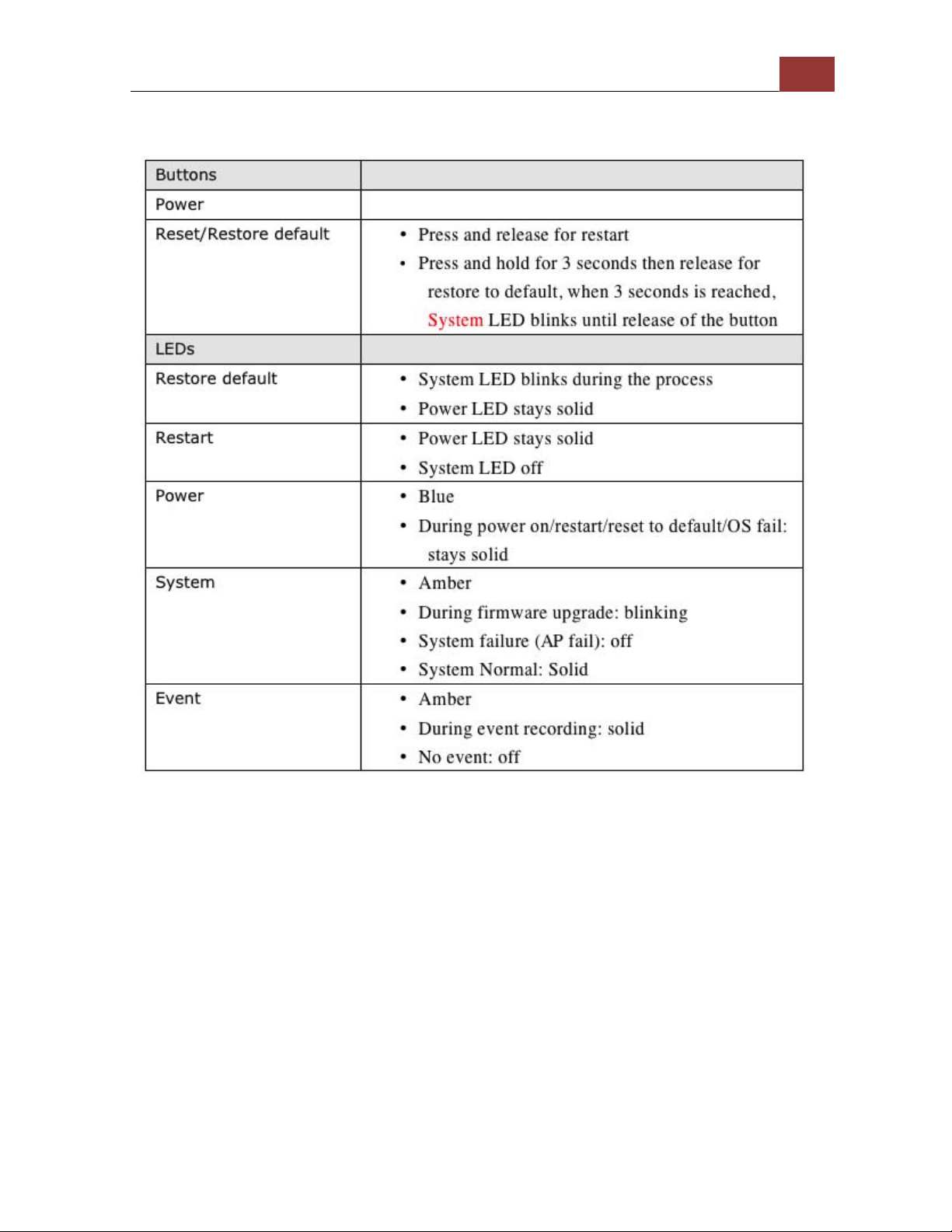
LED Definition

8(
SVR$632(User’s(Manual!
Installation
HDD Installation
Release the HDD tray by pulling the lock to the right.
Pull the HDD tray out of the case.

SVR$632(User’s(Manual!
9
Place the HDD in the tray and Put the HDD tray back to the
case. Secure it with the screws at
the bottom of the tray.

10(
SVR$632(User’s(Manual!
Push the tray door back to the case to secure it.
Indice
Altri manuali Seenergy Registratore digitale


