
Sena TUFFTALK M Manuale utente

Tufftalk M Hard Hat Mount Earmuff
Quick Start Guide
DC Power
Charging &
Firmware
Upgrade Port
Status LED
(-) Button
Center Button
(+) Button
Mesh Intercom Button
Left Ear Cup
Microphone
1.1.0
ENGLISH
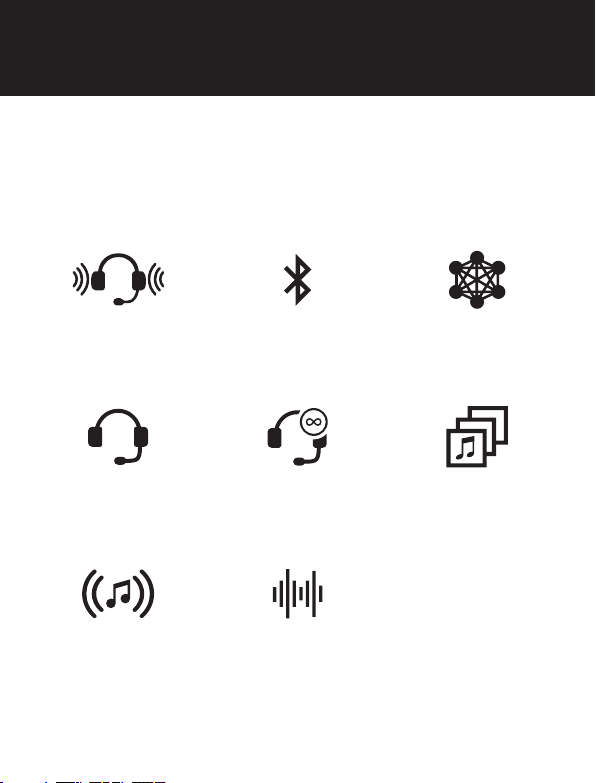
Blast your favorite tunes, talk over the intercom with your buddies,
all through your headset. With built-in Bluetooth
®
capabilities, Audio
Multitasking™, HD speakers and a microphone using Advanced Noise
Control™, technology has never felt so minimal or freeing.
NRR of 24 dB
SNR of 28 dB
BLUETOOTH 4.1 MESH INTERCOM™
1.1 KM / 0.7 MILES*
INTERCOM
400 M / 430 YARDS*
MULTI-WAY
INTERCOM
AUDIO MULTITASKING™
MUSIC SHARING ADVANCED NOISE
CONTROL
* in open terrain
Product Features

1. This product comes with a Quick Start Guide, which is a basic
version of the User’s Guide. A FULL VERSION OF THE USER’S
GUIDE CAN BE DOWNLOADED AT SENAINDUSTRIAL.COM.
2. Update this product for free with the latest rmware to fully
enjoy the new advanced features built into this product. Visit
senaindustrial.com to see how to update your product.
Sena Technologies, Inc.
Customer Support: senaindustrial.com
Getting Started
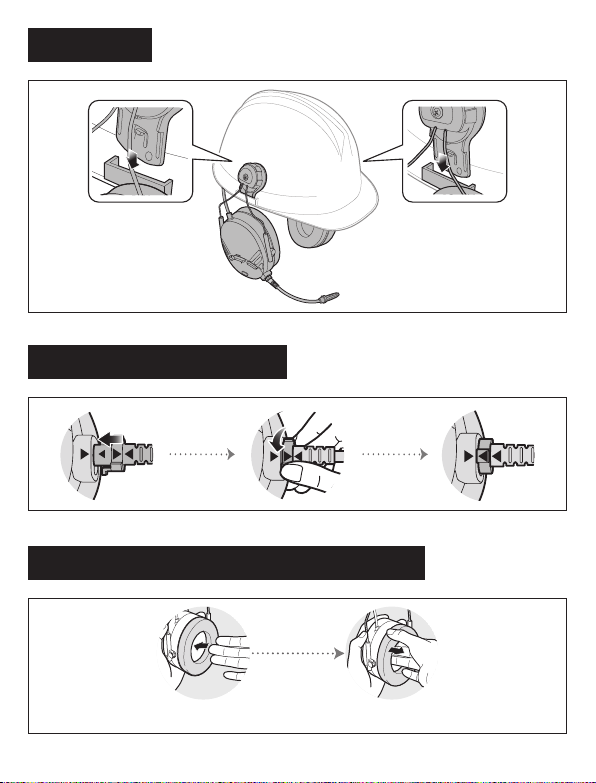
Installation
Replacing the Ear Pads of the Tufftalk M
Installing the Microphone
Use your ngers to remove the ear pads and insert the included ear pads.

Charging
• Red: Charging
• Blue: Fully charged
AC adapter
or
Sena Utility App
Sena Device Manager
The Sena Device Manager allows you to upgrade the rmware
and congure its settings directly from your PC or Apple computer.
Download the Sena Device Manager from senaindustrial.com.
By simply pairing your phone with your headset, you can use the
Sena Utility App for quicker and easier set up and management.
• App Features
- Music, FM Radio, Device settings, Quick Start Guide, and User’s
Guide.
• Download
- Android: Google Play Store > ‘Sena Utility’
- iOS: App Store > ‘Sena Utility’

Power On/Off Volume Adjustment
Button Operation
Press for 1 sec Press and Hold
1” 5” 10”
Tapping
Tap Tap
Tap
Double Tapping
1”
Press
+or
Battery Check
Power On
LED
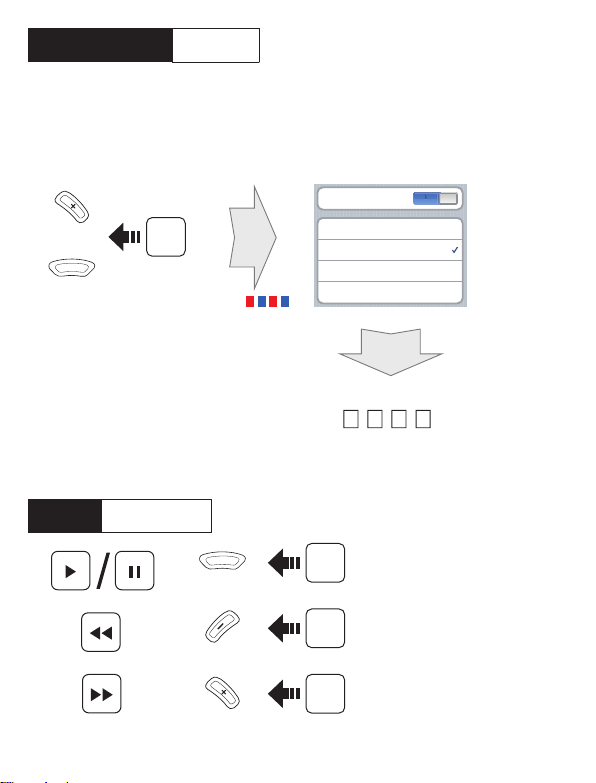
Phone, Music Pairing
Music Operation
1”
Press
1”
Press
1”
Press
Select Sena Tufftalk M
Device A
Device B
......
Sena Tufftalk M v1.0
Bluetooth
l
l
l
l
l
0 0 0 0
10”
Press
LED
Device A
Device B
......
Sena Tufftalk M v1.0
Bluetooth
l
l
l
l
l
0 0 0 0
Device A
Device B
......
Sena Tufftalk M v1.0
Bluetooth
l
l
l
l
l
0 0 0 0
Device A
Device B
......
Sena Tufftalk M v1.0
Bluetooth
l
l
l
l
l
0 0 0 0
Enter
PIN
Press and hold the (+) Button and Center Button for 10 seconds
when the Tufftalk M is turned off.
+

Mobile Phone Call Making and Answering
Reject
Answer
End
Voice Dial
Speed Dial
2”
3”
3”
2”
Press
Press
Press
Press
Tap

Headset A Headset B
Pairing
Intercom Pairing
Tap
Mesh Intercom On/Off
5”
Press
LED
5”
Press
LED
Tap
Tap
Intercom Start/End
When Mesh Intercom is enabled, the Tufftalk M will automatically
connect to nearby Tufftalk M users and allow them to talk to each
other by pressing the Mesh Intercom Button.
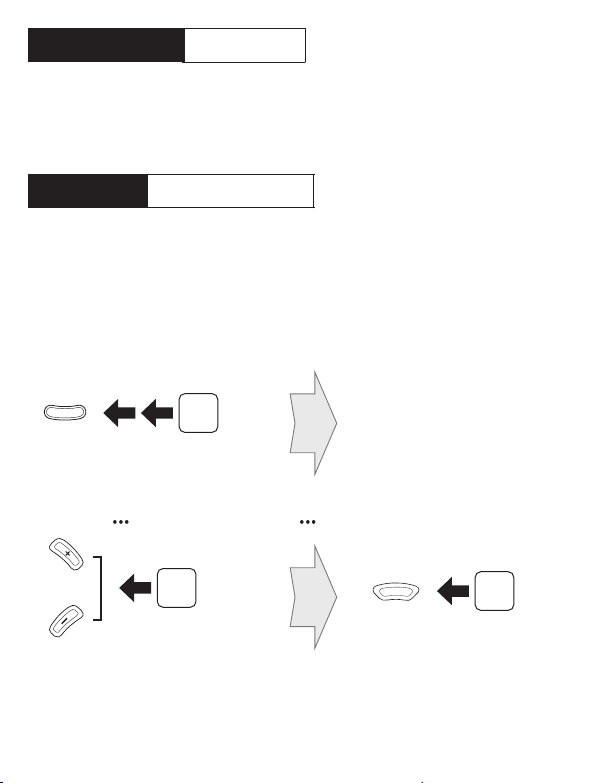
Using the Sena Utility App
You can select the channel through the Sena Utility App.
Mesh Intercom Open Mesh
Open Mesh Channel Setting
Tap Tap
or
When Mesh Intercom is enabled, the headset will be in Open Mesh™
(default: channel 1) initially.
Enter into the Channel Setting
Navigate between the channel
(1 →2 →→8 →9 →Exit →1 →)Save the channel
If the Open Mesh communication experiences interference because
other groups are also using the channel 1 (default), change the
channel. You can select one of 1 to 9 channels.
Using the Button
Device A
Device B
......
Sena Tufftalk M v1.0
Bluetooth
l
l
l
l
l
0 0 0 0
Device A
Device B
......
Sena Tufftalk M v1.0
Bluetooth
l
l
l
l
l
0 0 0 0
Tap
Double Tap
Altri manuali per TUFFTALK M
1
Indice


