SENSTAR FPS 2-2 Manuale utente

Installation &
FPS 2-2
Fence Protection Systems
Operation Manual
G2DA0102-001, Rev A
First Edition
August 7, 2009

Senstar Corporation
119 John Cavanaugh Drive
Carp, Ontario
Canada K0A 1L0
Tel: +1 (613) 839-5572
Fax: +1 (613) 839-5830
Website: www.senstar.com
Email: info@senstar.com
G2DA0102-001, Rev A
August 7, 2009
First edition
Senstar is a registered trademark, and the Senstar logo is a trademark of Senstar Corporation. Product names and Company
names used in this manual are included for identification purposes only, and are the property of, and may be trademarks of,
their respective owners. Copyright © 2009, Senstar Corporation. All rights reserved. Printed in Canada.
The information provided in this guide has been prepared by Senstar Corporation to the best of its ability. Senstar Corporation
is not responsible for any damage or accidents that may occur due to errors or omissions in this manual. Senstar Corporation is
not liable for any damages, or incidental consequences, arising from the use of, or the inability to use, the software and
equipment described in this guide. Senstar Corporation is not responsible for any damage or accidents that may occur due to
information about items of equipment or components manufactured by other companies. Features and specifications are
subject to change without notice. Any changes or modifications to the software or equipment that are not expressly approved
by Senstar Corporation void the manufacturer’s warranty, and could void the user’s authority to operate the equipment.
Senstar’s Quality Management System is IS0 9001:2000 registered.

SENSTAR Corporation
website: www.senstar.com
email: [email protected]
INSTALLATION AND OPERATION INSTRUCTIONS
FENCE PROTECTION SYSTEMS
August 2009

Limited Warranty
a) The Company warrants that the electronic components of the products manufactured by the Company are free from all
manufacturing defects. The Company's warranty does not extend to the performance of the products, which may vary depending
on environmental conditions, use and installation practices. The Company's liability under this warranty shall be limited to, at its
option, either repairing or replacing the defective components of the products or granting a credit for the products or parts thereof.
The Company's liability shall apply only to products which are returned to the factory or authorized repair point, transportation
charges prepaid by the Buyer within one (1) year from the shipment date of the product from the Company and which are, after
examination, disclosed to Company's satisfaction to be defective due to defects in workmanship and/or materials. This warranty
shall not apply to any products which have been installed, repaired or altered by other than personnel certified by the Company, or
to products which have been subject to physical or electrical abuse, misuse, or improper storage or to products which have not
been used or maintained in compliance with any applicable recommendations of the Company. This warranty does not apply to
any parts or components of the products, which are normally consumed in operation, including but not limited to batteries, fuses
and light bulbs.
b) The Company specifically disclaims any and all warranties, expressed or implied, including but not limited to any warranties
or merchantability or fitness for a particular purpose. Under no circumstances be it due to a breach ofwarranty or any other
cause arising out of the performance or non-performance of the Product shall the Company be liable to the Buyer for incidental or
consequential damages, including but not limited to: lost profits, loss of property due to the freight, plant downtimes, or suits by
third parties.

5
INSTALLATION AND OPERATION INSTRUCTIONS — FENCE PROTECTION SYSTEMS
CONTENTS
PAGE
1 QUICK START ...................................................................... 9
2 GENERAL ...........................................................................18
3 THEORY OF OPERATION .................................................. 20
4 FENCE CONDITIONS ......................................................... 23
5 INSTALLATION .................................................................. 27
6 INITIAL SETUP AND ADJUSTMENT ................................. 57
7 SYSTEM START UP AND TESTING .................................... 63
8 MAINTENANCE/TROUBLESHOOTING ............................. 67
ADDENDUM I - FPS-2 AND FPS-EX SPECIAL INSTALLATION
PROCEDURES.................................................................. A-1

INSTALLATION AND OPERATION INSTRUCTIONS — FENCE PROTECTION SYSTEMS
6
LIST OF FIGURES PAGE
Figure 1 Typical MX-1000/5000/FPS System Conn ........ 10
Figure 2 Fence Mounted FPS Processor ............................. 11
Figure 3 Cable Tie Installation................................................ 12
Figure 4 Transducer Cable Connections ............................ 12
Figure 5 FPS Processor Wiring Connections ..................... 13
Figure 6 MPS Microwave Installation .................................. 14
Figure 7 MPS Connections ...................................................... 15
Figure 8 MX-1000/5000 Power Supply Connections..... 16
Figure 9 MX-1000/5000 Loop Connections ...................... 17
Figure 10 FPS Alarm Zone Connections ............................... 21
Figure 11 FPS Block Diagram .................................................... 22
Figure 12 Loose Fabric at Fence Posts ................................... 23
Figure 13 Loose Fabric at Diagonal Stiffeners .................... 23
Figure 14 Loose Fabric at Wire Stiffeners ............................. 24
Figure 15 Dangling Barbed Wire ............................................. 24
Figure 16 Improperly Secured Brackets................................ 24
Figure 17 Missing Vertical Locking Posts.............................. 24
Figure 18 Excessive Play ............................................................. 25
Figure 19 Loose Chain and Lock.............................................. 25
Figure 20 Roller and Rail Play ................................................... 25
Figure 21 Signs Not Securely Attached................................. 25
Figure 22 Fence-mounted Processor ..................................... 28
Figure 23 Processor Remote Mounting ................................ 30
Figure 24 Processor Pedestal Mounting ............................... 31
Figure 25 Unreeling Cable ......................................................... 32
Figure 26 Cable Tie Installation................................................ 33
Figure 27 Transducer Cable Around Fence Post ................ 34
Figure 28 Transducer Cable Service Loop ............................ 34
Figure 29 Increasing Transducer Cable Sensitivity ........... 35
Figure 30 Zone Overlap .............................................................. 36
Figure 31 Helisensor Termination ........................................... 39
Figure 32 Helisensor Installation/Termination to
NEMA Enclosure ........................................................ 40
Figure 33 Retrofit Helisensor Termination to
Standard FPS Processor .......................................... 41
Figure 34 Transducer Cable Routing in Condulet ............. 42
Figure 35 Transducer Cable Connection .............................. 42
Figure 36 End-of-Line Termination ......................................... 43

7
INSTALLATION AND OPERATION INSTRUCTIONS — FENCE PROTECTION SYSTEMS
LIST OF FIGURES .............................................................................. PAGE
Figure 37 Splice Termination .................................................... 43
Figure 38 End-of-Line Termination with 2 Megaohm
Resistor.......................................................................... 43
Figure 39 EOL Condulet attached to Fence......................... 44
Figure 40 Condulet Splice Attached to Fence .................... 44
Figure 41 Condulet“G”Attached to Fence .......................... 44
Figure 42 Transducer Service Kit ............................................. 46
Figure 43 Transducer Cable Preparation .............................. 46
Figure 44 Hinged Gate Installation......................................... 47
Figure 45 Telegate Installation ................................................. 48
Figure 46 Telegate Support Post Location........................... 49
Figure 47 MPS Microwave System .......................................... 51
Figure 48 Transducer Cable Connection .............................. 52
Figure 49 FPS-2-2M Wiring Connections.............................. 54
Figure 50 FPS-2-2R Wiring Connections ............................... 55
Figure 51 Relay Jumper Options ............................................. 56
Figure 52 Processor Adjustments ........................................... 57
Figure 53 FPS Main Board Jumper Settings ........................ 59
Figure 54 Revision F Transponder Board .............................. 60
Figure 55 Revision G Transponder Board ............................. 61
Addendum Figures:
Figure A-1 FPS-2 Connections.................................................. A-3
Figure A-2 FPS-EX Connections ............................................... A-4
LIST OF TABLES
Table 1 FPS Features ................................................................ 19
Table 2 Sensor Cable Capacitance...................................... 22
Table 3 FPS-2-2(*) Troubleshooting Table........................ 70
Table 4 FPS-2-2(*) Voltage Measurements ...................... 71
Addendum:
Table A-1 Troubleshooting Measurement Chart ............. A-5

INSTALLATION AND OPERATION INSTRUCTIONS — FENCE PROTECTION SYSTEMS
8
This page intentionally left blank.

9
INSTALLATION AND OPERATION INSTRUCTIONS — FENCE PROTECTION SYSTEMS
FENCE PROTECTION SYSTEMS
1 QUICK START
Qualified technicians may follow these simplified procedures to install and test the typical MX-1000/
5000/ Fence Protection System, including installation of the MX-1000/5000, FPS-2-2M fence protection,
and MPS microwave system. Prerequisites for using the quick start procedures are:
• Attendance at one or more Senstar MX-1000/5000/ training class.
• Prior MX-1000/5000 field installation experience.
Before proceeding, VERIFY that you have a complete site layout showing zone extents, processor
locations, and conduit interconnections. If you are not familiar with any of the procedures described in
this section, refer to the appropriate manual for more detailed information.
NOTE: If you are installing a G-Line system, please contact the factory for additional
instructions.
IMPORTANT PROCEDURES
Throughout the installation it is very important that certain procedures are observed:
Install ground rods and proper grounding at the MX-1000/5000, all FPS proces-
sors, and all microwave locations.
Use only the approved multiconductor shielded cable for connecting the MX-
1000/5000 to the FPS and MPS units.
Terminate wiring and shields exactly as shown. Improper terminations will cause
system noise and degrade performance.

INSTALLATION AND OPERATION INSTRUCTIONS — FENCE PROTECTION SYSTEMS
10
Installation
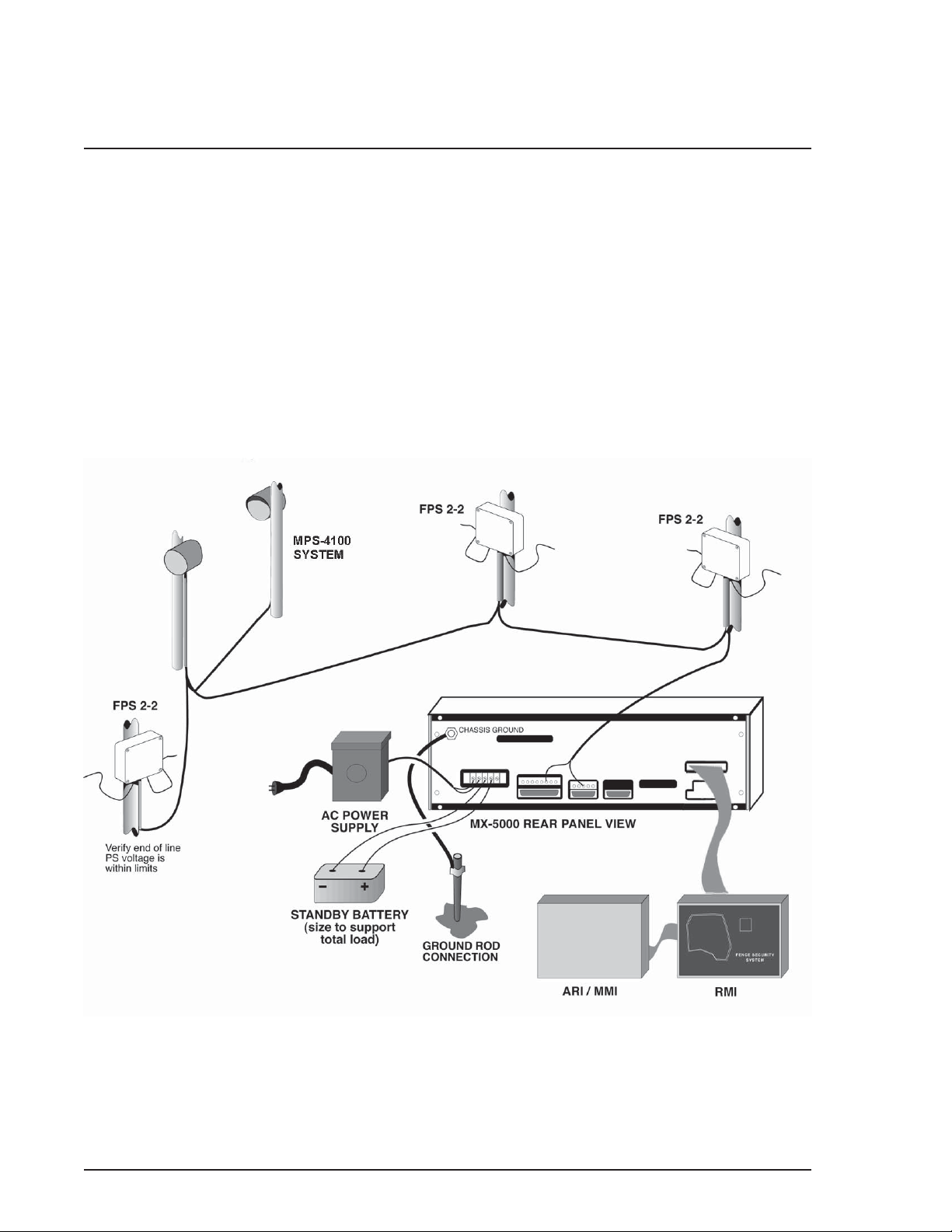
Figure 1 shows the typical wiring interconnection of components.
• The interconnect wiring should be run in conduit, either underground or along the base of the
fence.
• The interconnect cable must be an approved three-pair, 18-gauge, individually shielded twisted
pair cable, with overall foil shield, braid shield, and high density polyethylene jacket, such as the
Senstar Interconnect Cable or factory-approved equal.
Figure 1. Typical MX-1000/5000 / FPS System Connections
Questo manuale è adatto per i seguenti modelli
1
Indice
Altri manuali SENSTAR Accessori

SENSTAR
SENSTAR FlexZone WGS Manuale utente

SENSTAR
SENSTAR UltraWave BR100 Manuale utente

SENSTAR
SENSTAR FiberPatrol FP1100X Series Manuale tecnico

SENSTAR
SENSTAR FlexZone Manuale utente

SENSTAR
SENSTAR IntelliFIBER Manuale utente

SENSTAR
SENSTAR FiberPatrol FP400 Manuale utente

SENSTAR
SENSTAR OmniTrax Manuale utente

SENSTAR
SENSTAR FlexPS Manuale utente

SENSTAR
SENSTAR FiberPatrol FP1150 Series Manuale utente