SGM IDEA SCANNER 250 Manuale utente

USER’S MANUAL REL. 1.00
SGM TECHNOLOGY FOR LIGHTING SPA
VIA PIO LA TORRE, 1 _ 61010 TAVULLIA (PU), ITALY
TEL. +39 0721 476477 _ FAX +39 0721 476170
GB
I
D
F
E
P
XM126
SCANNERS
IDEA SCANNER 250

Vi ringraziamo per aver acquistato un prodotto SGM.
Per ottenere i migliori risultati dal suo utilizzo, vi preghiamo di leggere attentamente questo manuale di istruzioni.
Al suo interno troverete le informazioni tecniche e le specifiche d’uso del prodotto. Nelle pagine in appendice tro-
verete inoltre schemi e diagrammi destinati all’assistenza tecnica.
Nell’ottica di qualità SGM, è possibile che l’Azienda apporti migliorie ai suoi prodotti, per cui consigliamo di alle-
gare il manuale al prodotto stesso e di trascrivere il numero di serie nell’ultima pagina della copertina: utilizzando
il presente manuale con un apparecchio fabbricato prima o dopo la sua stampa, potrebbero esserci discrepanze
fra l’apparecchio e quanto riportato nel manuale stesso.
Thank you for buying an SGM product.
To obtain the best results, please carefully read this instruction manual in which you will find technical information
and specifications for use of the product, as well as diagrams for technical service in the appendix.
In light of SGM quality, the company may make improvements to its products. Therefore, we recommend that the
manual be attached to the product and the serial number copied onto the back cover: using this manual with
equipment manufactured before or after its printing, might show discrepancies between the equipment and the
information listed in the manual.
Wir danken Ihnen für den Kauf eines Produkts von SGM.
Zur Erzielung der besten Resultate bei der Benutzung bitten wir Sie, die vorliegende Bedienungsanleitung aufmerk-
sam zu lesen. Darin finden Sie die technischen Informationen sowie die Anweisungen für die Benutzung des
Produkts. Im Anhang befinden sich auBerdem die Schaltpläne undv Diagramme für den Kundendienst.
SGM behält sich das Recht vor, Verbesserungen an den Produkten vorzunehmen und deshalb empfehlen wir, die
Bedienungsanleitung dem Produkt stets beizulegen und die Seriennummer auf der letzten Seite des Umschlags
einzutragen. Bei der Verwendung dieses Handbuches mit einem Gerät, das vor oder nach der Drucklegung produ-
ziert wurde, können sich Abweichungen zwischen Gerät und dem Inhalt des Handbuches ergeben.
Nous vous remercions d’avoir acheté un produit SGM.
Pour optimiser son utilisation, nous vous prions de bien vouloir lire attentivement cette notice où vous trouverez
les informations techniques et les caractéristiques d’utilisation du produit. En outre, vous trouverez également,
dans les pages en appendice, les schémas et les diagrammes concernant l’assistance technique.
Le concept de qualité SGM, lui permet d’améliorer continuellement ses produits et c’est pourquoi nous vous con-
seillons de joindre la notice au produit et d’inscrire le numéro de sèrie sur la page de couverture. En effet, si on
l’utilise avec un appareil fabriqué avant ou après son impression, il peut y avoir des différences entre l’appareil et
ce qui figure dans la notice.
Les estamos sumamente agradecidos por haber elegido un producto SGM.
Para obtener los mejores resultados, les rogamos leer detenidamente el presente manual de instrucciones. El
mismo contiene las informaciones técnicas y las indicaciones de uso del producto. Las páginas anexas contienen
además los esquemas y diagramas necesarios para la asistencia técnica.
Para mantener la calidad SGM, es posible que la Empresa aporte mejoras sus productos, por ello les aconsejamos
conservar el manual junto con el aparato correspondiente y escribir su número de serie en la última página del
manual; si en cambio se utiliza el presente manual con un aparato frabicado antes o después de su impresión, es
probable que existan discrepancias entre el aparato y las indicaciones del mismo.

GB SGM Technology for Lighting
Idea Scanner 250 - 1 - XM126 V1.0-N
Table of Contents
INT ODUCTION: ................................................................................................................................................... 2
Features................................................................................................................................................................ 2
SAFETY INST UCTIONS ..................................................................................................................................... 3
GENE AL GUIDELINES........................................................................................................................................ 4
INSTALLATION INST UCTIONS....................................................................................................................... 4
a) Installing or replacing the lamp............................................................................................................. 4
b) Mounting the device.................................................................................................................................... 6
Installation via the Omega holders:.................................................................................................................... 7
DMX-512 control connection............................................................................................................................... 8
Projector DMX start address selection.............................................................................................................. 9
Control Board......................................................................................................................................................... 9
Main functions ......................................................................................................................................................11
DMX channel´s functions and their values (14 DMX channels):...................................................... 19
E O CODES:.................................................................................................................................................... 22
CLEANING AND MAINTENANCE..................................................................................................................... 23
TECHNICAL SPECIFICATIONS ........................................................................................................................ 23

SGM Technology for Lighting GB
XM126 V1.0-N - 2 - Idea Scanner 250
KEEP THIS MANUAL FOR FUTURE NEEDS
For your own safety, please read this user manual carefully before installing the device.
CAUTION !
Keep this device away from rain and moisture!
Unplug mains lead before opening the housing
Every person involved with the installation, operation and maintenance of this device has to:
-be qualified
-follow carefully the instructions of this manual
INTRODUCTION:
Thank you for having chosen this professional product.
You will see you have acquired a powerful and versatile device.
Unpack the device. Inside the box you should find: the fixture device, a power cable, an
XL connection cable, a safety cable, a pain of quick lock brackets and this manual. Please check carefully
that there is no damage caused by transportation. Should there be any, consult your dealer and don’t install
this device.
Feat res
Lamp: Philips MSD 250/2
Control signal: Standard DMX-512, 14 channels (16 bit), 12 channels (8 bit)
Stand alone operation with master/slave function, can be sound activated
Pan/tilt movement: 8 bit and 16 bit resolution for smooth and precise resolution
Pan: 180° movement, Tilt: 50° movement
8 colors plus white, with two direction rainbow effect,
otating gobo wheel has 6 rotating gobos plus open, with gobo indexing and gobo shake
Static gobo wheel has 7 static gobos plus open with different speed gobo shaking
Simple replacement system for gobos enable freely customization
Prism and prism rotating , with 16 prism macros
Motorized Focus
Strobe effect: 0~13 flashes per second or random strobe
Dimmer intensity from 0%~100%
4 digit LED display
Local and remote lamp on/off
Preset program: 8 built in programs can be called up via DMX controller
Editable program: Edit and save the program to inside EEP OM via the control board or external
controller, up to 48 scenes can be saved and then can be run in Stand alone or sound activated.
Number of scenes in Program un can be changed individually

GB SGM Technology for Lighting
Idea Scanner 250 - 3 - XM126 V1.0-N
SAFETY INSTRUCTIONS
CAUTION
Be very careful during installation. Since you will be working with a
dangerous voltage tou can suffer a life-threatening electric shock when to
uching live wires
This device has left the factory in perfect condition. In order to maintain this condition and to ensure a safe
operation, it is absolutely necessary for the user to follow the safety instructions and warning notes written
in this user manual.
IMPORTANT
Damages caused by the disgregard of this user manual are not subject to warrenty.
The dealer will not accept liability for any resulting defects or problems.
If the device has been exposed to temperature changes due to environmental changes, do not switch it on
immediately. The arising condensation could damage the device. Leave the device switched off until it has
reached room temperature.
This device falls under protection-class I. Therefore it is essential that the device be earthed.
The electric connection must carry out by qualified person.
Make sure that the available voltage is not higher than stated at the end of this manual.
Make sure the power cord is never crimped or damaged by sharp edges. If this would be the case,
replacement of the cable must be done by an authorized dealer.
Always disconnect from the mains, when the device is not in use or before cleaning it. Only handle the power
cord by the plug. Never pull out the plug by tugging the power cord.
During initial start-up some smoke or smell may arise. This is a normal process and does not necessarily
mean that the device is defective, it should decrease gradually.
CAUTION
Never touch device during operation!The housing may heat up
Never look directly into the light source, as sensitive persons may suffer an epileptic
shock.
Please be aware that damages caused by manual modifications to the device are not subject to warranty.
Keep away from children and non-professionals.

SGM Technology for Lighting GB
XM126 V1.0-N - 4 - Idea Scanner 250
GENERAL GUIDELINES
This device is a lighting effect for professional use on stages, in discotheques, theatres, etc.
This fixture is only allowed to be operated with the max alternating current which stated in the technical
specifications in the last page of this manual, the device was designed for indoor use only.
Lighting effects are not designed for permanent operation. Consistent operation breaks may ensure that the
device will serve you for a long time without defects. Do not shake the device.
Avoid brute force when installing or operating the device.
While choosing the installation-spot, please make sure that the device is not exposed to extreme heat,
moisture or dust. The minimum distance between light-output from the
projector and the illuminated surface must be more than 0,5 meter.
Always fix the fixture with an appropriate safety cable if you use the quick lock cam in hanging up the fixture,
please make sure the 4 quick lock fasteners turned in the quick lock holes correctly.
Operate the device only after having familiarized with its functions. Do not permit operation by persons not
qualified for operating the device. Most damages are the result of unprofessional operation.
Please use the original packaging if the device is to be transported.
For safety reasons, please be aware that all modifications on the device are forbidden.
If this device will be operated in any way different to the one described in this manual, the product may
suffer damages and the guarantee becomes void. Furthermore, any other operation may lead to
short-circuit, burns, electric shock, lamp explosion, crash, etc.
INSTALLATION INSTRUCTIONS
a) Installing or replacing the lamp
CAUTION
Only install the lamp with the device unplugged from the mains
.
The lamp has to be replaced when it is damaged or deformed.
Before replacing the lamp let the lamp cool down, because during operation, the lamp can
reach very high temperature.
During the installation of halogen lamps do not touch the glass bulbs bare handed. Always use a cloth to
handle the lamps during insertion and removal.
Do not install lamps with a higher wattage. They generate higher temperatures than which the device was
designed for.

GB SGM Technology for Lighting
Idea Scanner 250 - 5 - XM126 V1.0-N
For the installation, you need one: PHILIPS MSD 250/2
Proced re:
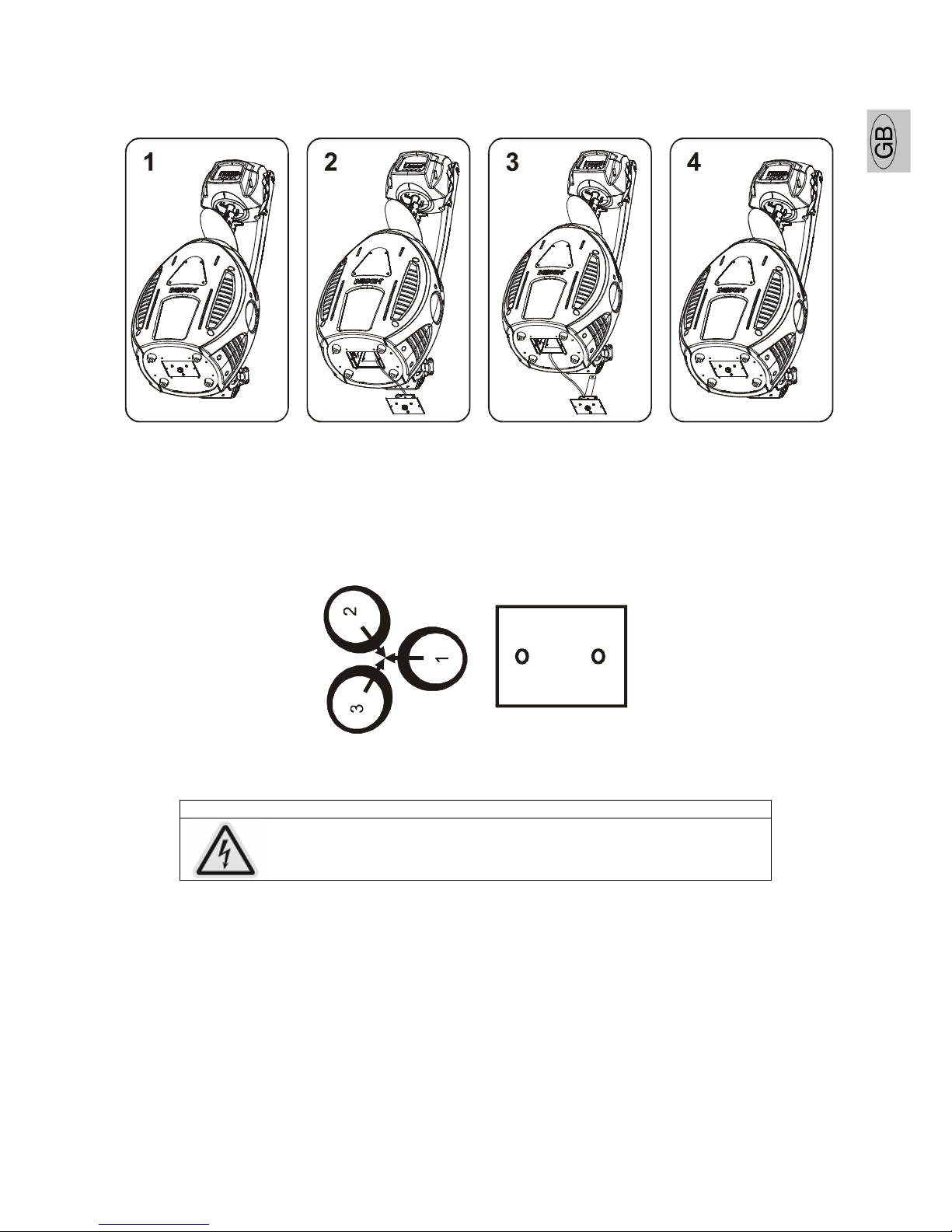
1) Unscrew the 2 screws (A, B) on the back of the housing, holding the plate where the lamp is
underneath.
2) Gently pull the socket holder using the knob in the middle.
3) Carefully insert the lamp into the socket. Please remember there is only one way to insert the lamp.
Gently slide the lamp and its lamp holder back into place and fasten the 2 screws.
4) On the access plate there are 3 small screws marked 1, 2, 3, which are used to adjust the lamp holder
in the lamp housing. You can adjust the 3 screws to fine-turn the position of the lamp to get the
maximum light output as shown below.
AB
Please remember the lamp is not a hot-restrike type, you must wait for approximately 15 minutes after
having turned off the lamp before you can turn it back on again.
CAUTION
Do not operate this device with open cover

SGM Technology for Lighting GB
XM126 V1.0-N - 6 - Idea Scanner 250
b)
Mo nting the device
CAUTION
Pleas consider the EN 60598-2-17 and the other respective
national norms during the installation. The installation must
only be carried out by a qualified person.
The installation of the effect has to be built and constructed in a way that it can hold 10 times the weight for
1 hour without any harming deformation.
The installation must always be secured with a secondary safety attachment, e.g. an appropriate safety
cable.
Never stand directly below the device when mounting, removing or servicing the fixture.
The operator has to make sure the safety relating and machine technical installations are approved by an
expert before taking the device into operation for the first time.
These installations have to be approved by a skilled person once a year.
CAUTION
Before taking into operation for the first time, the
installation has to be approved by an expert.
Ca tions:
The effect should be installed outside areas where persons may reach it, walk by or be seated.
CAUTION
When installing the device, make sure there in no highly
inflamm able material within a distance of min. 0,5m
Overhead mounting requires extensive experience, including amongst others calculating
working load limits, installation material being used, and periodic safety inspection of all
installation material and the device. If you lack these qualifications, do not attempt the
installation yourself. Improper installation can result in bodily injury.
CAUTION
The electric connection must only be carried out by a
qualified electrician.
Before mounting make sure that the installation area can hold a minimum point load of 10 times the device’s
weight.
Connect the fixture to the mains with the power plug.

GB SGM Technology for Lighting
Idea Scanner 250 - 7 - XM126 V1.0-N
Installation via the Omega holders:
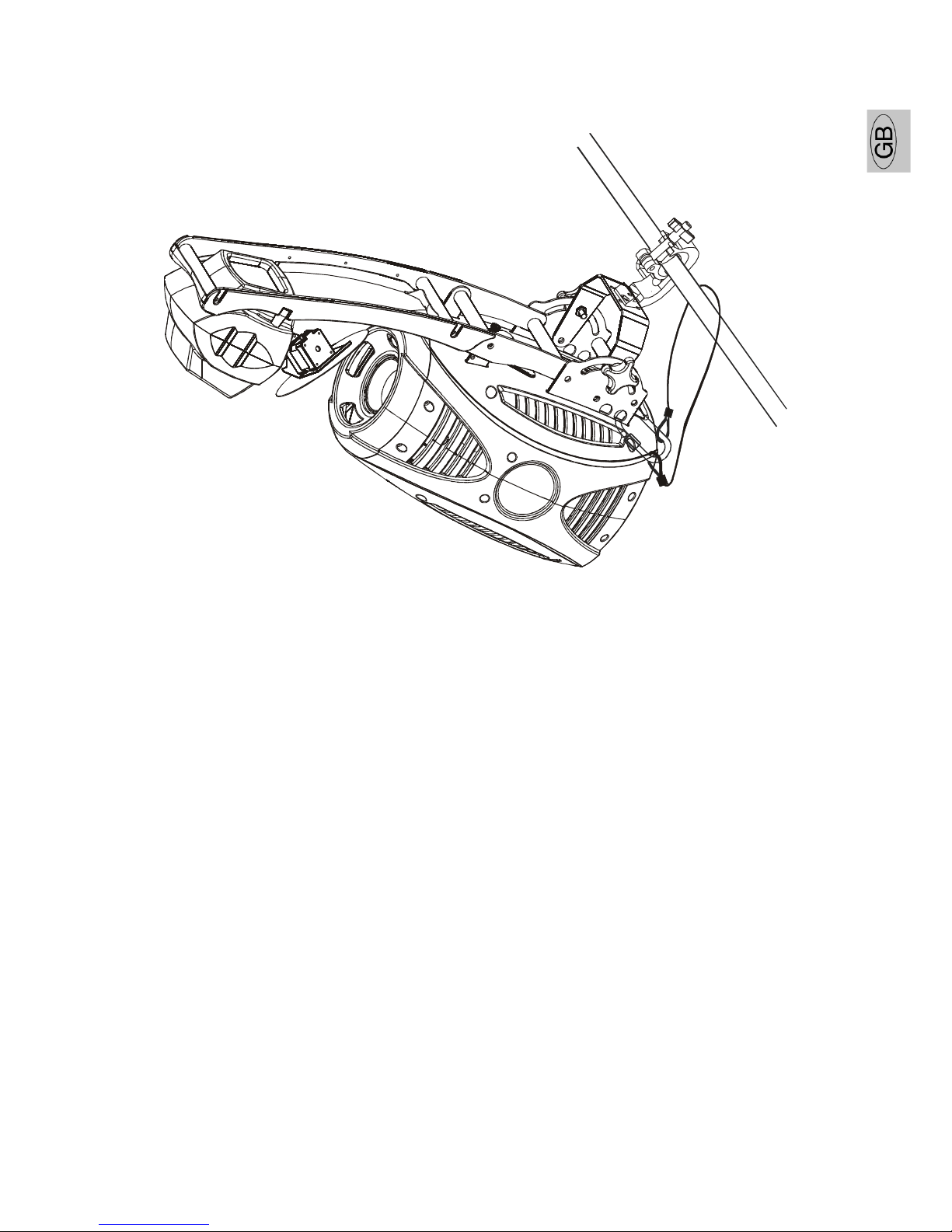
Screw one clamp each via a M12 screw and nut onto the Omega holders.
Insert the quick-lock fasteners of the first Omega holder into the respective holes on the bottom of the
device. Tighten the quick-lock fasteners fully clockwise. Install the second Omega holder.
Pull the safety-rope through the holes on the two side of the base and over the trussing system or a safe
fixation spot. Insert the end in the carabine and tighten the safety screw.

SGM Technology for Lighting GB
XM126 V1.0-N - 8 - Idea Scanner 250
DMX-512 control connection
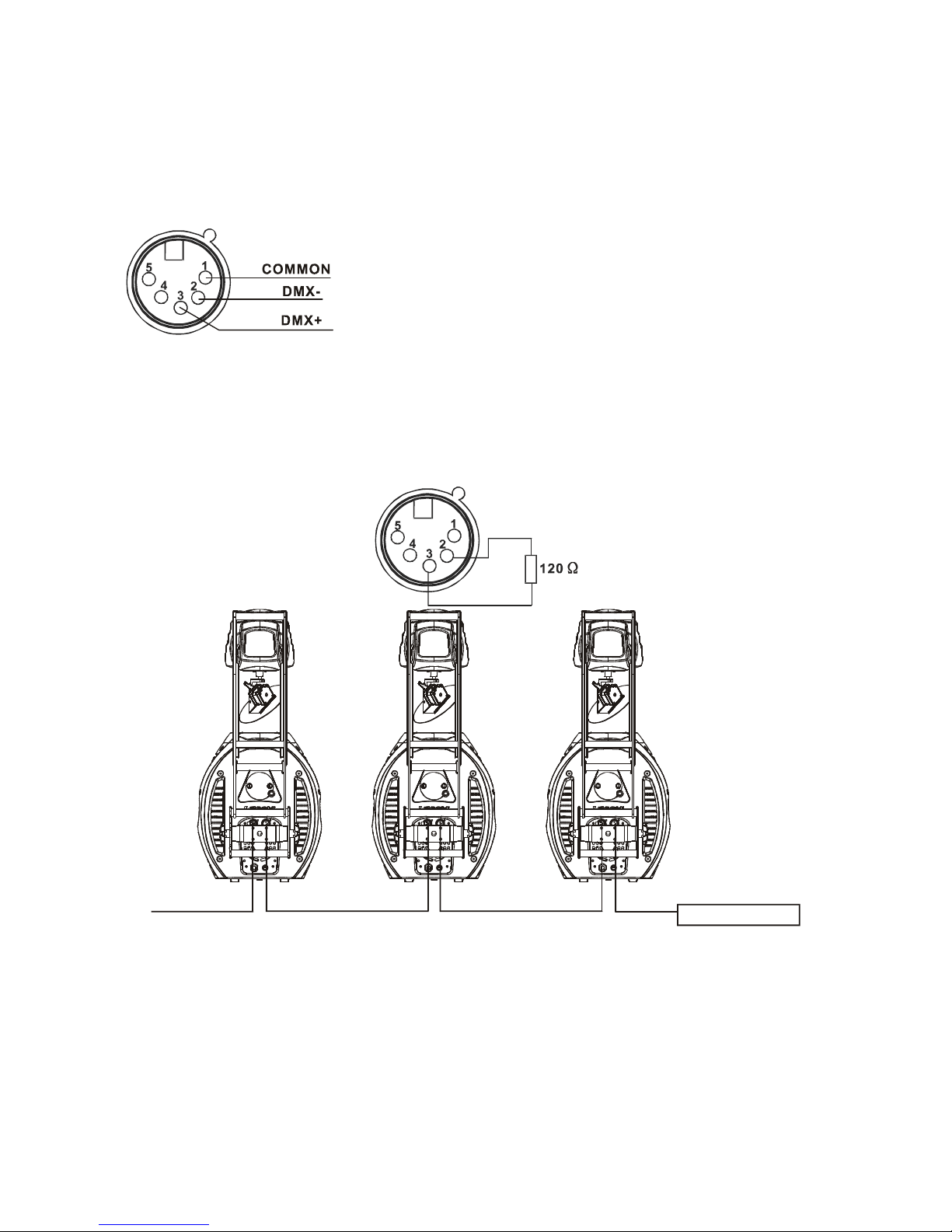
The product has a DMX 512 input fitted with standard 5-pin XL connectors. Screened cables in compliance
with EIA S-485 specifications and the following characteristics must be used for connections:
- 2 conductors plus screen
- 120Ohm impedance
- low capacitance
- max. transmission rate 250kBaud.
Cable connections:
See illustration, taking care with the screen, which must be connected to Pin1
DMX-512 connection with DMX terminator
For installations where the DMX cable has to run a long distance or is in an electrically noisy environment,
such as in a discotheque, it is recommended to use a DMX terminator. This helps in preventing corruption of
the digital control signal by electrical noise. The DMX terminator is simply an XL plug with a 120 Ω resistor
connected between pins 2 and 3,which is then plugged into the output XL socket of the last fixture in the
chain. Please see illustrations below.
CONTROLLER
Starting address 29 starting address 15 starting address 1
Indice
Altri manuali SGM Attrezzatura di illuminazione

SGM
SGM G-7 BEAST Manuale utente

SGM
SGM Hazer 400 Manuale utente

SGM
SGM Powerlight 1212D Manuale utente

SGM
SGM P Series Manuale utente

SGM
SGM Q?7 Manuale utente

SGM
SGM P-1 Manuale utente

SGM
SGM P-1 Manuale utente

SGM
SGM IDEA BEAM 300 Manuale utente

SGM
SGM P Series Manuale utente

SGM
SGM Q?2 White Manuale utente

SGM
SGM Q?7 Manuale utente

SGM
SGM Q-8 Manuale utente

SGM
SGM Pilot 2000 Manuale dell'operatore

SGM
SGM Regia 2048 Manuale utente

SGM
SGM VPL Series Manuale utente

SGM
SGM G-SPOT Manuale utente

SGM
SGM P Series Manuale utente

SGM
SGM X Line IDEA WASH 575 Manuale utente

SGM
SGM i-6 Manuale utente

SGM
SGM Q-SERIES Manuale utente