
ShanWan Q11A Manuale utente
ShanWan
手机拉伸手柄
产品说明书(Q11A)
适用说明:
因手机系统问题,个别手机可能不支持此设备 因官方游戏平台软件升级或源代码变更等不可抗拒的因素造成部分游戏无法与本产品 连接操作,我公司不负任何责任。对此我公司保留最终解释权。1、本产品采用人体工学设计,手感舒适。2、具有拉伸收缩功能,可以拉伸收纳不同长度为 135-165mm 的手机。3、采用蓝牙 5.0 BLE 连接,手柄通过蓝牙与手机等各主机连接。4、支持 ShootingPlus V3 APP,APP 可以通过各手机应用市场下载。5、支持安卓与鸿蒙 HID 标准模式,可玩支持 HID 标准模式的各类游戏厅游戏。 6、支持安卓 6.0 以上系统(即 ShootingPlus V3 安卓模式)。7、支持 iOS 10.1 至 13.3.1 系统(即 ShootingPlus V3 iOS 模式)多个触控;支持 iOS13.4及以上系统单点触控。8、支持 iOS 13.0 以上系统 MFi 游戏,MFi 游戏可以到 ShanWan MFi app 下载。 9、支持 PS3 /PS4/SWITCH 游戏主机蓝牙连接玩游戏,但没有陀螺仪功能。10、支持 Windows 10 系统笔记本电脑蓝牙连接,玩 X-Input 游戏。11、支持 USB 有线,可以玩 PC/PS3/SWITCH 的游戏。 12、按键带炫酷 LED 背光(同时按下 R3+ 键可开启或关闭按键背光)。售后客服QQ群:群名称:ShanWan手柄官方群QQ售后群
625179327
SELXYBASTA
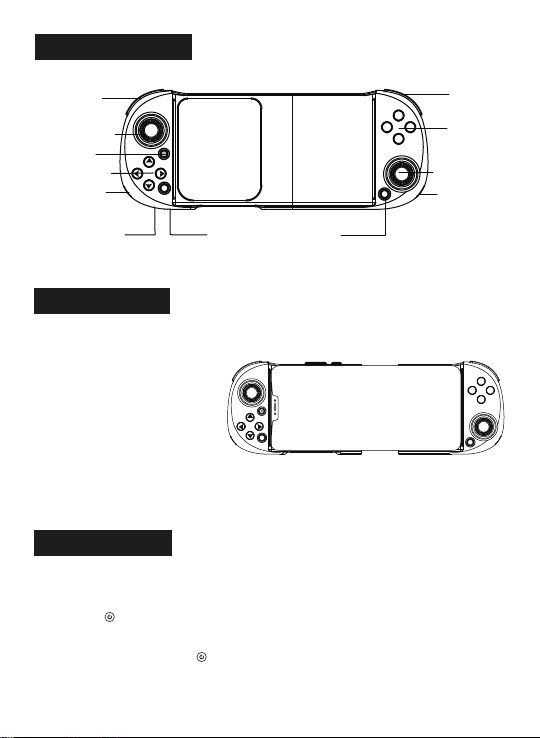
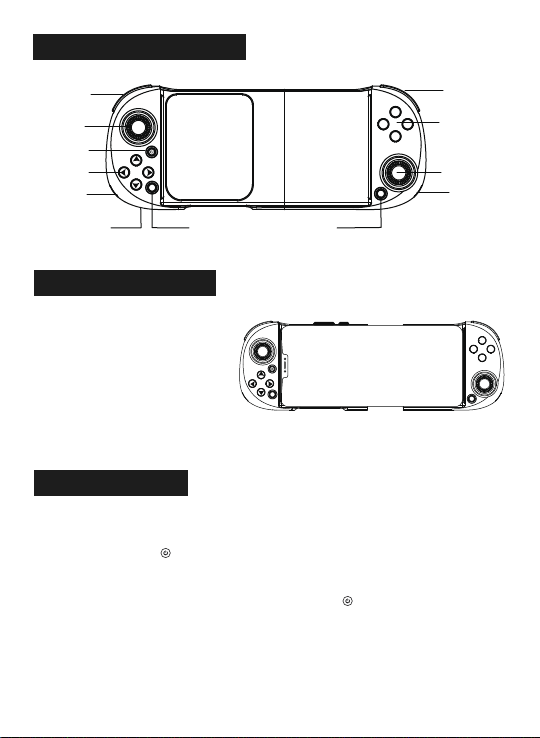
功能按键示意图:
电源键左摇杆/L3键右摇杆/R3键LED3&LED4A/B/X/Y键RT/RB键LT/LB键LED1&LED2充电接口SELECT键START键上下左右键SELASTAXYB
产品使用说明:产品特性参数:
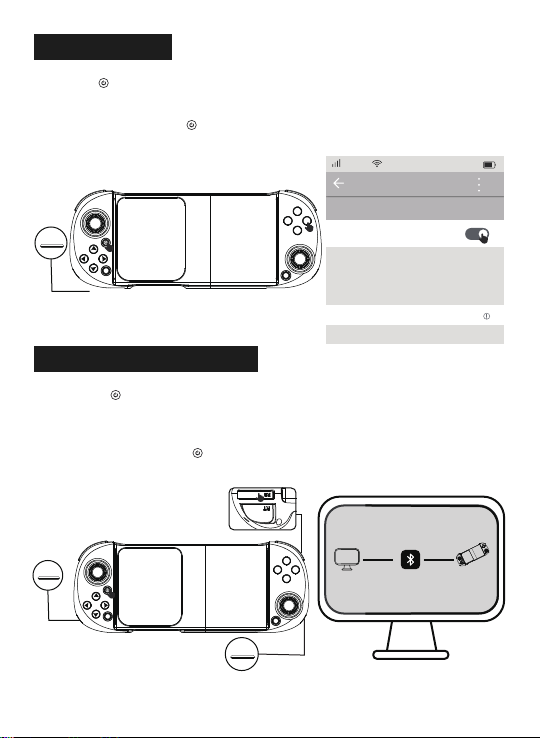
1、工作电压:DC3.7V 2、工作电流:约 10mA 3、持续使用时间:>20H 4、休眠电流:<5uA 5、充电电压/电流:DC5V/500mA 6、蓝牙传输距离:〈=8M 7、电池容量:350mAh 8、待机时间:满电放置 60 天安卓 ShootingPlus V3 模式(鸿蒙系统与安卓 ShootingPlus V3 模式相同):同时按 A + 2 秒进入 V3 安卓模式,手柄 LED1 快闪,当安卓手机搜索到“ShanWan Q11”设备名时,选择连接。连接成功后,手柄 LED1 亮蓝色。已成功连接过,可以直接按 ,LED1 灯慢闪,自动回连。使用本产品时,请保持设备横向放置,且确保摄像头在左边,并将游戏的键位恢复默认设置。
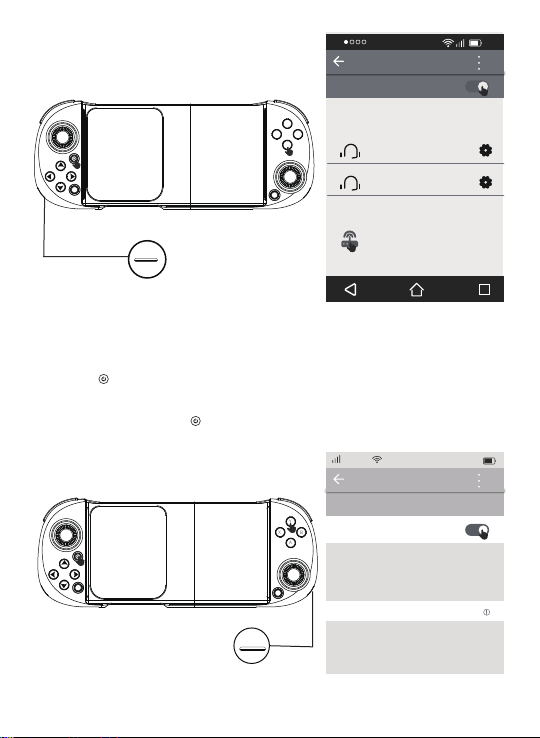
SELASTAXYB同时按 Y+ 2 秒进入 V3 iOS 模式,手柄 LED4 快闪,当苹果手机搜索到“ShanWan Q11”设备名时,选择连接。连接成功后,手柄 LED4 亮绿色。已成功连接过,可以直接按 ,LED4 灯慢闪,自动回连。
蓝色LED1
12:00我的设备
ShanWan Q11
现在可被发现为“张小燕的iphone”。已连接
中国移动
iOS ShootingPlus V3 模式:
绿色LED412:00开启已配对的设备可用设备
BTIP-G2IDKYX X2ShanWan Q11SELASTAXYB
SELASTAXYB
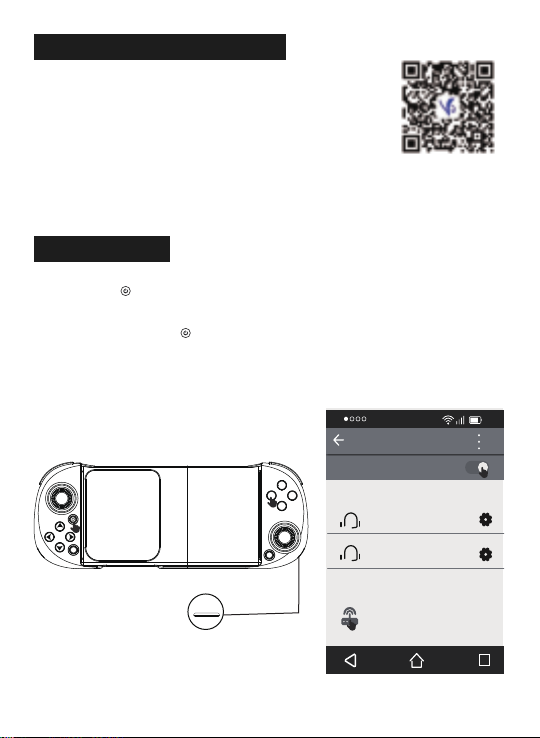
蓝色LED3
12:00
开启已配对的设备可用设备
BTIP-G2IDKYX X2
Q11 Gamepad
安卓/鸿蒙/iOS 按键映射功能:
关注公众号“ShootingPlus”,查看公众号内的默认操作说明,如需设置映射键位,请下载安装“ShootingPlus V3”APP,在 APP 内进行按键映射以及调整按键位。ShootingPlus V3 App,iOS 系统可以到 APP Store 下载,安卓与鸿蒙系统可以到各手机应用市场下载。1、同时按 X+ 进入标准安卓模式,手柄 LED3 快闪,当安卓/鸿蒙手机搜索到“Q11 Gamepad”设备名时,选择连接。连接成功后,手柄 LED3 亮蓝色。已成功连接过,可以直接 ,LED3 灯慢闪,自动回连。2、安卓/鸿蒙标准模式游戏下载,可下载各种游戏厅,进入平台下载所需要的游戏。
安卓标准模式:
ShootingPlus 公众号
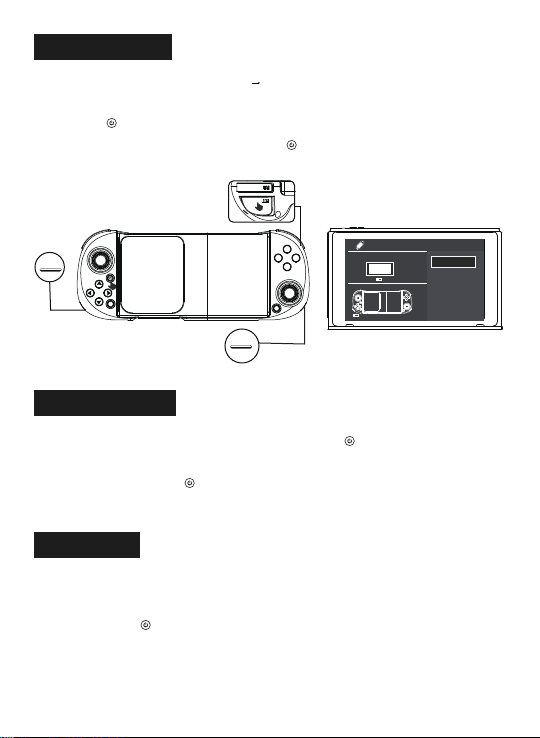
SELASTAXYBSELASTAXYB同时按 B+ 2 秒进入 iOS MFi 模式,手柄 LED2 快闪,当苹果手机搜索到“DUALSHOCK 4 Wireless Controller”设备名时,选择连接。连接成功后,手柄 LED2 亮绿色。已成功连接过,可以直接按 ,LED2 灯慢闪,自动回连。MFi 游戏可以到 ShanWan MFi app 下载。
PC X-input 蓝牙模式
同时按 RB + 2 秒进入 X-input 蓝牙模式,手柄 LED1 与 LED3 快闪,当 PC 搜索到“Xbox Wireless Controller”设备名时,选择连接。连接成功后,手柄 LED1 蓝亮与 LED3 蓝亮。
iOS MFi 模式:绿色LED2
蓝亮LED1
控制面板LENOVO-PC
Xbox Wireless Controller
(此计算机)(已连接,已配对)已成功连接过,可以直接按 ,LED1 与 LED3 灯慢闪,自动回连。
蓝亮LED3
12:00我的设备
DUALSHOCK4 Wireless ...
现在可被发现为“张小燕的iphone”。已连接
中国移动
SEL
A
STA
XYB
在 SWITCH 主机,选择 手柄 Controllers 更改握把/顺序 Change Grip/order,进入到 SWITCH 主机配对模式界面 Press L+R on the controller。同时按 RT+ 2 秒进入 SWITCH 模式配对,手柄 LED2 与 LED4 快闪,配对成功为 LED2 绿灯与LED4绿灯长亮。成功连接过,可以直接按 ,LED2 与 LED4 灯慢闪,自动回连。SELASTAXYB有线模式下自动识别各个系统平台,可以支持的系统平台有安卓、PC(D-input 与 X-input)、PS3 与Switch。 1、 在 PC 上,按 2 秒可以对 D-input 与 X-input 之间切换。2、 有线模式连接成功后右边 LED 亮青灯。将手柄用 TYPE-C USB 数据线直接与 PS3/PS4主机连接,按 进行对码,对码成功LED1 蓝灯与 LED4绿灯长亮。已成功连接过,可以直接按 ,LED1 与 LED4灯慢闪,自动回连。
SWITCH 模式:PS3/PS4 模式:绿灯长亮LED2有线模式:绿灯长亮LED4
手柄主机手柄更改握法/顺序搜索手柄新手柄的匹配方法关闭SELASTAXYB
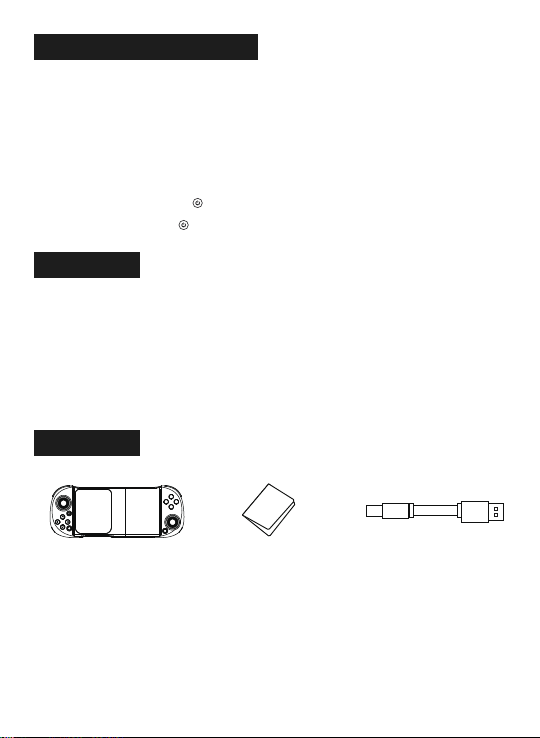
1、手柄充电功能:A、低电时,右边青色LED指示灯快闪提示;B、充电时,右边青色LED指示灯慢闪提示;C、充满时,右边青色LED指示灯长亮提示;2、手柄休眠/唤醒/关机功能: A、手柄在 15 分钟内没有任何按键操作时自动关机休眠; B、当需要重新使用时需按 键唤醒即可回连; C、在开机状态下,长按 键 3 秒,产品关机,所有 LED 指示灯熄灭。1、 请不要把本产品放在潮湿或高温地方存储;2、 不要敲击、摔打、棒打、刺穿、或试图去分解本产品,以免对产品造成不必要的损害;3、 产品内置电池,请勿和垃圾一起丢弃;4、 不要在靠近火或其它热源的地方对手柄进行充电;5、 非专业人员请勿拆卸本产品,否则不在售后保修服务内。
手柄充电/休眠/唤醒功能:产品清单:注意事项:
无线手柄 X1 说明书 X1 TYPE-C USB 线 X1。 SELASTAXYB

ShanWan
Retractable Gamepad
User Manual(Q11A)Description of application:
Due to the problem of mobile phone system, some mobile phones may not support this device Some games cannot be connected to this product due to irresistible factors such as software upgrade or source code change of the official game platformOur company is not responsible for the operation. Our company reserves the right of final interpretation.1. This product adopts ergonomic design and feels comfortable.
2. With stretch and shrink function, it can stretch and store mobile phones with different lengths of
135-165mm.
3. Bluetooth 5.0 ble connection is adopted, and the controller is connected with mobile
phones and other hosts through Bluetooth.
4. It supports shootingplus V3 app, which can be downloaded through various mobile application
markets.
5. Support Android and Hongmeng hid standard mode, and can play all kinds of game hall games
that support HID standard mode.
6. Support systems above Android 6.0 (i.e. shootingplus V3 Android mode).
7. Support multiple touch of IOS 10.1 to 13.3.1 systems (i.e. shootingplus V3 IOS mode);
Support single touch for IOS 13.4 and above systems
8. Support MFI games for systems above IOS 13.0. MFI games can be downloaded from Shanwan MFI
app.
9. PS3 /PS4/ switch game console is supported to play games with Bluetooth connection, but there is
no gyroscope function.
10. Support Bluetooth connection of windows 10 system laptop and play X-input games.
11. Support USB cable and can play PC / PS3 / switch games.
12. The key is equipped with cool LED backlight (press R3 + at the same time to turn on or off the
key backlight).
SELXYBASTA
Operation instructions:Characteristic parameters:1. Working voltage: DC3.7v
2. Working current: About 10mA
3. Duration: > 20h
4. Sleep current: < 5uA
5. Charging voltage / current: DC5V / 500mA
6. Bluetooth transmission distance: <= 8M
7. Battery capacity: 350mAh
8. Standby time: 60 days at full power
Android shootingplus V3 mode (Hongmeng system is the same as Android shootingplus
V3 mode):
At the same time, press A + 2 seconds to enter the V3 Android mode, and the controller LED1 flashes. When
the Android phone searches the "ShanWan Q11" setting
When the alternate name is selected, select the connection. After successful connection, controller LED1 will be
bright blue.It has been successfully connected. You can press it directly . LED1 light flashes slowly and
connects back automatically.
When using this product, keep the device
laterally positioned, make sure the camera
is on the left, and restore the game keys
to their default settings.
Function key diagram:
HOME ButtonLeft joystickL3 ButtonRight joystickrR3 ButtonLED3 & LED4A/B/X/Y ButtonRT/RB ButtonLT/LB ButtonLED1 & LED2Charging interfaceSELECT Button
START Button
Up Down LeftRight ButtonSELASTAXYB
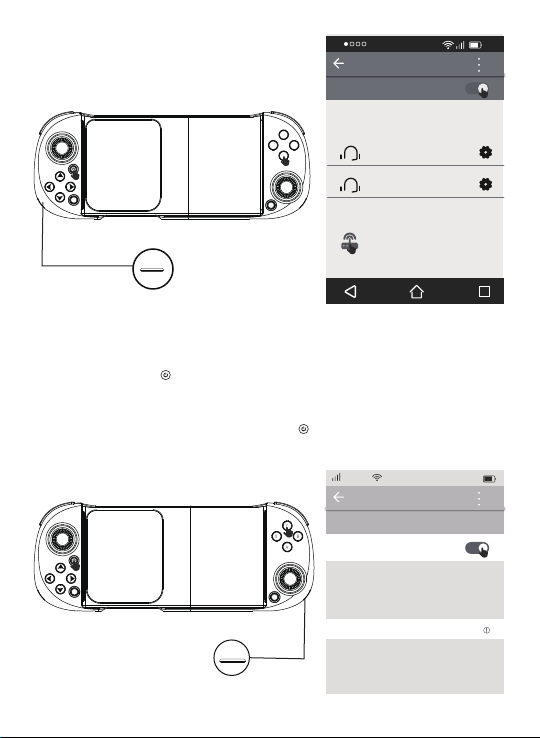
At the same time, press Y + for 2 seconds to enter the V3 IOS mode, and the controller LED4 flashes. When
the Applephone searches for the "ShanWan Q11" setting When the alternate name is selected, select the
connection. After theconnection is successful, the controller LED4 is bright green.
It has been successfully connected. You can press it directly . The LED4 light flashes slowly and connects
automatically.
SELASTAXYBSELASTAXYBShootingPlus V3 IOS mode:
12:00My device
ShanWan Q11
Now it can be found as "Zhang Xiaoyan's iPhone".
Connected
中国移动Green
LED4 12:00open
Paired devices
Available equipment
BTIP-G2
IDKYX X2
ShanWan Q11
Blue
LED1
Indice


