Sharp WX03SH Manuale utente

i
BeforeYouBegin
.Wearenotliableforanydamagesresultingfromuseof
thisproduct.
.Savedfilesanddatamaybelost/alteredduetomisuseor
malfunctionofhandset,afterexposinghandsettostatic
electricityorelectricalnoise,orduringhandsetrepair.
.Keepseparatecopiesofimportantfilesanddata.
.Thisproductandtheinformationinthisguidearesubject
tochangewithoutpriornotice.
.Unlessnotedotherwise,descriptionsarebasedondefault
settingsinStandby.Operationsandresultsmaydifferby
handsetstatus.
.Samplescreenshotsareprovidedforreferenceonly;actual
handsetwindows,menus,etc.maydifferinappearance.
PackageContents
Battery(XN-BTWP03)
BatteryCover
Handset(WX03SH)
JapaneseUserGuide
(includingwarranty
information)
.Ifanyitemismissingfromthepackage,pleasecontact
yourdealer.
.ACChargerisnotincludedinthepackage;purchase
WILLCOMACCharger01(AC01-MU-K)separately.
ThankyouforpurchasingWX03SH.
Readthisguidethoroughlybeforehandforproperusage.
ReadSafetyPrecautions(P.13-1-P.13-8)beforeusinghandset.
ii
Contents
1 GettingStarted
Parts&Functions・・・・・・・・・・・・・・・・・・・・・・・・・・・・・・ 1-1
Inserting&RemovingBattery・・・・・・・・・・・・・・・・・ 1-3
ChargingBattery・・・・・・・・・・・・・・・・・・・・・・・・・・・・・・ 1-5
PowerOn/Off・・・・・・・・・・・・・・・・・・・・・・・・・・・・・・・・・ 1-6
SwitchingInterfaceLanguagetoEnglish・・・・・・ 1-7
Display&Indicators・・・・・・・・・・・・・・・・・・・・・・・・・・・・ 1-8
AccessingFunctionsfromMainMenu・・・・・・・・1-10
HandsetPhoneNumber・・・・・・・・・・・・・・・・・・・・・・1-11
MobileManners・・・・・・・・・・・・・・・・・・・・・・・・・・・・・・1-12
SecurityCodes・・・・・・・・・・・・・・・・・・・・・・・・・・・・・・・・1-13
WhenUsingInternetorMessagingfortheFirstTime
・・1-15
UsingHandsetbyConnectingwithOtherDevices
・・1-16
2 Calling
CallingOverview・・・・・・・・・・・・・・・・・・・・・・・・・・・・・・・ 2-1
PlacingCalls・・・・・・・・・・・・・・・・・・・・・・・・・・・・・・・・・・・・ 2-2
AnsweringCalls・・・・・・・・・・・・・・・・・・・・・・・・・・・・・・・・ 2-4
EngagedCallOperations・・・・・・・・・・・・・・・・・・・・・・ 2-5
UsingCallFunctionsofOtherDevices・・・・・・・・・ 2-6
3 TextEntry
TextEntryOverview・・・・・・・・・・・・・・・・・・・・・・・・・・・ 3-1
EnteringCharacters・・・・・・・・・・・・・・・・・・・・・・・・・・・・ 3-2
UsingVariousConversionMethods ・・・・・・・・・・・ 3-4
EditingCharacters・・・・・・・・・・・・・・・・・・・・・・・・・・・・・ 3-5
4 PhoneBook
PhoneBookOverview・・・・・・・・・・・・・・・・・・・・・・・・・ 4-1
SavingContactstoPhoneBook・・・・・・・・・・・・・・・ 4-2
UsingPhoneBook・・・・・・・・・・・・・・・・・・・・・・・・・・・・・ 4-5
UsingSpeedDial・・・・・・・・・・・・・・・・・・・・・・・・・・・・・・・ 4-7
EditingPhoneBook・・・・・・・・・・・・・・・・・・・・・・・・・・・ 4-8
5 Messaging
MessagingOverview・・・・・・・・・・・・・・・・・・・・・・・・・・・ 5-1
SendingE-mail・・・・・・・・・・・・・・・・・・・・・・・・・・・・・・・・・ 5-3
SendingLightMail
・・・・・・・・・・・・・・・・・・・・・・・・・・・・・ 5-4
OpeningReceivedMessages・・・・・・・・・・・・・・・・・・ 5-5
Replyingto/ForwardingMessages・・・・・・・・・・・・ 5-7
ManagingMessages・・・・・・・・・・・・・・・・・・・・・・・・・・・ 5-8
6 Internet
InternetOverview・・・・・・・・・・・・・・・・・・・・・・・・・・・・・ 6-1
AccessingtheInternet・・・・・・・・・・・・・・・・・・・・・・・・・ 6-2
BrowsingOperations・・・・・・・・・・・・・・・・・・・・・・・・・・ 6-4
UsingBookmarks・・・・・・・・・・・・・・・・・・・・・・・・・・・・・・ 6-7
BrowserSettings
・・・・・・・・・・・・・・・・・・・・・・・・・・・・・・・ 6-9

iii
Contents
7 Camera
CameraOverview・・・・・・・・・・・・・・・・・・・・・・・・・・・・・・ 7-1
CapturingImages・・・・・・・・・・・・・・・・・・・・・・・・・・・・・・ 7-2
OpeningCapturedImages・・・・・・・・・・・・・・・・・・・・・ 7-3
8 Tools
UsingJava™Applications・・・・・・・・・・・・・・・・・・・・・・ 8-1
UsingWorldClock・・・・・・・・・・・・・・・・・・・・・・・・・・・・・ 8-3
9 FileManagement&Connectivity
FileLocations・・・・・・・・・・・・・・・・・・・・・・・・・・・・・・・・・・ 9-1
UsingFiles ・・・・・・・・・・・・・・・・・・・・・・・・・・・・・・・・・・・・・ 9-2
ManagingFiles&Folders・・・・・・・・・・・・・・・・・・・・・・ 9-3
UsingInfrared・・・・・・・・・・・・・・・・・・・・・・・・・・・・・・・・・ 9-4
UsingBluetooth®・・・・・・・・・・・・・・・・・・・・・・・・・・・・・・ 9-6
10 Settings
SettingHandsetResponses・・・・・・・・・・・・・・・・・・・10-1
SettingOperationSounds・・・・・・・・・・・・・・・・・・・・10-3
SettingDisplay・・・・・・・・・・・・・・・・・・・・・・・・・・・・・・・・10-4
SettingDate&Time・・・・・・・・・・・・・・・・・・・・・・・・・・10-5
11 Services
UsingCallServices・・・・・・・・・・・・・・・・・・・・・・・・・・・・11-1
12 Appendix
SoftwareUpdates・・・・・・・・・・・・・・・・・・・・・・・・・・・・12-1
Specifications・・・・・・・・・・・・・・・・・・・・・・・・・・・・・・・・・12-3
HandsetMaterials・・・・・・・・・・・・・・・・・・・・・・・・・・・・12-4
MenuList・・・・・・・・・・・・・・・・・・・・・・・・・・・・・・・・・・・・・12-5
CustomerService・・・・・・・・・・・・・・・・・・・・・・・・・・・・・12-9
13 SafetyPrecautions
SafetyPrecautions・・・・・・・・・・・・・・・・・・・・・・・・・・・・13-1
GeneralNotes・・・・・・・・・・・・・・・・・・・・・・・・・・・・・・・・13-9
Water&DustResistance・・・・・・・・・・・・・・・・・・・ 13-12
CleaningHandset・・・・・・・・・・・・・・・・・・・・・・・・・・・ 13-14
1-1
4
1 2 3
5
cb
6
7
8
9
a
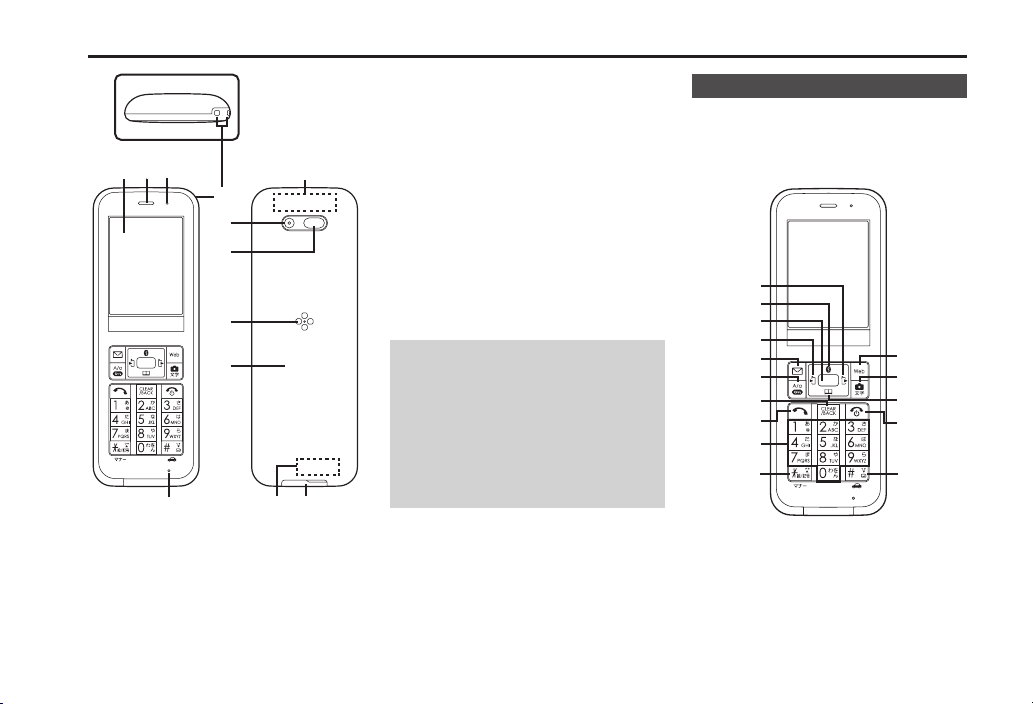
1Display
2Earpiece
3NotificationLamp
4Mic
5StrapEyelet
6Camera(LensCover)
7InfraredPort
8Speaker
9BatteryCover
aMainInternalAntennaArea
bSubInternalAntennaArea
cExternalDevicePort(withPort
Cover)
PortCover
.ClosePortCoverafterExternalDevice
Portuse.
StrapEyelet
.AvoidmetalStraps;mayaffectsignal
reception.
InternalAntennaAreas
.Donotcoverorplacestickers/labels
overInternalAntennaareas.
HandsetKeys
.Keysareindicatedinthisguideas
showninparentheses.
.Changeassignedfunctionsindicated
*withSetKeyShortcut.
1
2
3
4
5
d
e
f
c
6
8
7
9
a
b
Parts&Functions

1-2
Parts&Functions
1OutgoingHistoryKey(E)
OpenCallLog(Dialed).
2BluetoothKey(H)
OpenBluetoothmenu.LongPress
toreconnectpaireddevices*.
3CenterKey(%)
OpenMainMenu.
4IncomingHistoryKey(F)
OpenCallLog(Received).Long
Presstoopenprofile(MyDetails)*.
5MailKey(B)
OpenMessagingmenu.Long
PresstoopenE-mailcomposition
window*.
6Lock&A/aKey(C)
OpenSpeedDial/Mail.LongPress
toactivate/cancelKeypadLock.
7Clear/BackKey($)
PlayAnswerPhonemessages.
LongPresstoactivate/cancel
AnswerPhone.
8StartKey(!)
Opendialwindow.LongPressto
sendlocationinformation.
9Dialpad(0-9)
Enternumbers.LongPressto
openPhoneBook.
a
NKey(()
EnterNandP.LongPressto
activate/cancelMannermode.
bWebKey(A)
OpenBrowsermenu.LongPress
toactivateBrowser(accesshome
page)*.
cCamera&TextKey(D)
ActivateCamera.LongPressto
openCameramenu.
dPhoneBookKey(G)
OpenPhoneBook.LongPressto
opencontactentrywindow*.
ePowerKey(")
Show/hideSoftkeys;outof
Standby,canceloperations.Long
Presstopoweroff.
f#Key(#)
Enter#.LongPresstoactive/
cancelDrivemode.
■MultiSelector
H,G,FandEcanalsobeused
toselectmenuitems,word/phrase
(fortextentry),etc.
Moveup
MoverightMoveleft
Movedown
.Inthisguide,someMultiSelector
operationsareindicatedasfollows.
ePressHorG
fPressForE
gPressH,G,ForE
■TogglingView
Whenamenu/listextendsoff
Display,press#or(forhidden
items.

1-3
IfBatteryisnotinsertedinto
handset,insertitasfollows.
1RemoveBatteryCover
BatteryCover
.UsenotchtoliftBatteryCover.
PushupBatteryCoveralong
edgestoremoveit.
2InsertBattery
.Withlogosidefacingup,align
Batteryterminalswithcontacts.
3ReplaceBatteryCover
Tab
Dent
.Aligndentsonbothsidesof
handsetwithBatteryCovertabs,
thenpressdownshadedareasof
BatteryCover.
4ConfirmBatteryCoveris
closedproperly
.Ifthereisagapbetweenhandset
andBatteryCover,firmlypress
downBatteryCover.
.IfBatteryCoverisnotclosed
properly,debrismaygetcaught
betweengasketandbase,allowing
ingressofliquid/dust.
RemovingBattery
.Poweroff,removeBatteryCover,then
liftBatteryasshown.
■BatteryCoverCautions
.Donotapplyexcessiveforceto
BatteryCover;damagemayresult.
.Tomaintainwater/dustresistance,
closeBatteryCoverproperly.
.IfBatteryCoverisdamaged,replace
itwithanewone.Useofdamaged
BatteryCovermaycauseelectric
shock,batterycorrosion,etc.dueto
waterseepage.
Inserting&RemovingBattery
1-4
Inserting&RemovingBattery
■AboutBattery
.ChargeBatteryatleastonceevery6
months;unchargedBatterymaydie
oraffectfiles/settings.
.Dependingonusage,bulgesmay
appearnearendofbatterylife;this
doesnotaffectsafety.
.ReplaceBatteryifoperatingtime
shortensnoticeably.
.CleanBatteryterminalsandcharging
terminalswithadrycottonswabor
thelike.
.Batteryisnotwaterordustproof.
Lithium-ionBattery
.Handsetrequiresa
lithium-ionbattery.
Lithium-ionbatteriesare
recyclable.
.Torecycleausedlithium-
ionbattery,takeitto
anyshopdisplayingthe
symboltotheright.
.Toavoidfireorelectricshock,donot
short-circuitordisassembleBattery.

1-5
ACChargerisnotincludedinthe
package;purchaseWILLCOMAC
Charger01(AC01-MU-K)separately.
.ACChargerisnotwaterordust
proof.DonotchargeBatterywhile
handsetiswet.
.Batterycanalsobechargedby
connectinghandsettoaPC.
AC100VOutlet
PortCover
External
DevicePort
MicroUSBPlug
Blades
AC
Charger
NotificationLamp
ACChargerCautions
.Handset/ACChargermaybecome
warmwhilecharging.
.Retractbladesaftercharging.Donot
pull,bendortwistcable.
.Donotusecommercialchargersthat
allowheadphoneusewhilecharging;
maycausemalfunction.
1OpenPortCoveras
shown
2InsertMicroUSBplugof
ACChargerintoExternal
DevicePort
MicroUSBPlug
.InsertMicroUSBplugincorrect
orientation;otherwise,External
DevicePortmaybedamaged.
Confirmcontoursandorientation
ofMicroUSBplugbefore
insertingit.
3Extendbladesandplug
ACChargerintoACoutlet
2
1
.NotificationLampilluminatesred
whilecharging,andgoesout
whenchargeisfull.
4UnplugACChargerand
retractblades
5RemoveMicroUSBplug
fromhandset
6ClosePortCoverfirmly
.Otherwise,debrismayget
caughtbetweengasketand
base,allowingingressofliquid/
dust.
ChargingBattery

1-6
PowerOn/Off
1"(LongPress)
2Afterawhile...
.Standbyappears.
PoweringOff
"(LongPress)
.AfterPowerOffGraphics,handset
shutsdown.
■DisplaySaving
Displaygoescompletelydarkafter
DisplaySavingtimeelapses.Press
anykey(except"duringacall)to
turnonDisplayagain.
Backlight
.BacklightturnsoffafterTimeOut
periodelapses.Press0-9toturn
itbackon(keypressmayaffectactive
function).
.Displaygoescompletelydarkduringa
call.(Backlightdoesnotturnofffirst.)
ActivatingKeypadLock
Preventaccidentaloperationsuchas
whencarryinghandsetinabagor
pocket.
1C(LongPress)
WhenKeypadLockisActive
.Press!toanswercalls;KeypadLock
reactivatesafterthecall.
."doesnotpowerhandsetoff.
CancelingKeypadLock
C(LongPress)
.WhenDisplayisturnedoff,pressany
keytoturnitbackon,thencancel
KeypadLock.
1-7
1%S設定S%Sf音・表示
2LanguageS%
3EnglishS%
SwitchingBacktoJapanese
%SSettingsS%SfSound/Display
S言語選択S%S日本語S%
SwitchingInterfaceLanguagetoEnglish
Indice
Altri manuali Sharp Accessori per telefoni