
SHENGYA A-203HD Manuale utente
使用说明书 / User's Manual
中山市声雅音响电器有限公司
地址:广东省中山市小榄镇民安南路广进横街8号
电话:0760-22109328/22109821
传真:0760-22109328
邮箱:[email protected]om
www.shengya-audio.com
ZHONGSHAN SHENGYA AUDIO ELECTRONIC CO.,LTD
Address:No.8,Guangjin Heng Street,Min'an South Road,
Xiaolan Town,Zhongshan City,Guangdong Province
Tel:0760-22109328/22109821
Fax:0760-22109328
E-mail:[email protected]om
因产品改进,规格及外观如有小许变化,恕不另行通知,最终解释权归声雅音响电器有限公司所有。
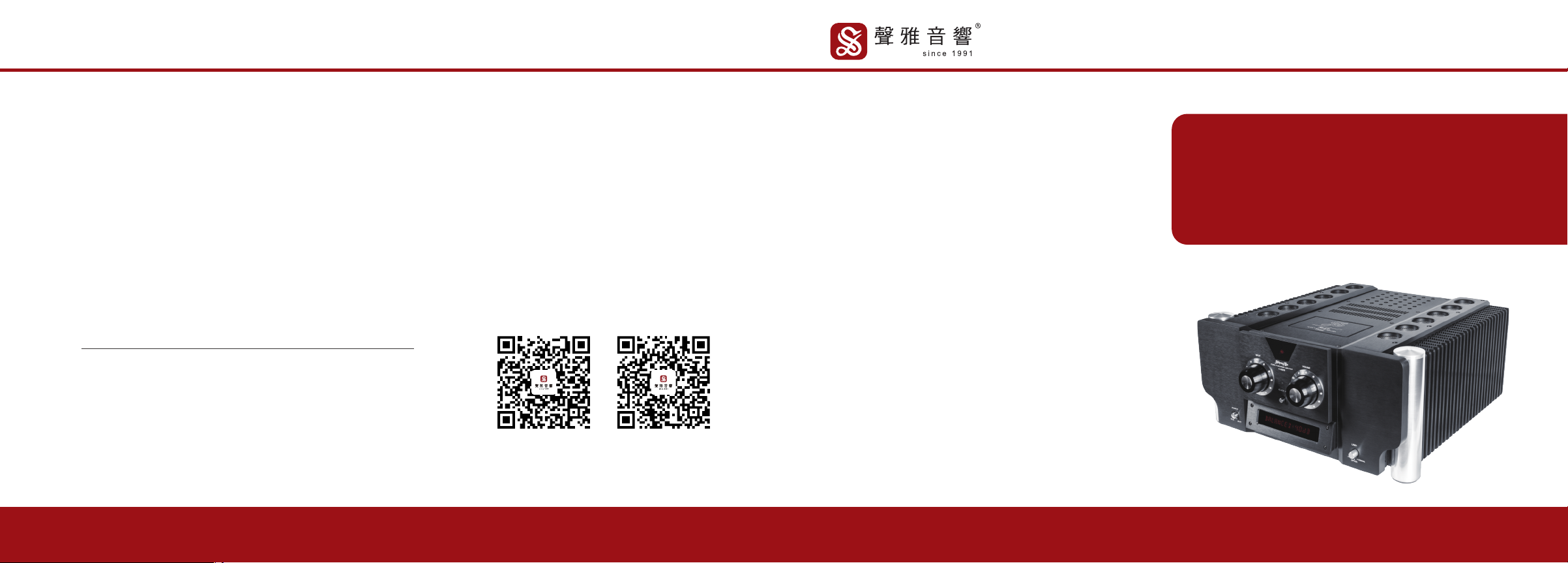
A-203HD
甲类合并式全平衡放大器
Class A Balanced Hybrid Amplifier
声雅微信公众号
ShengYa WeChat
Official Accounts
声雅微信客服号
ShengYa WeChat
Customer service
VER: S2.0
中文
·····················
·····················
·····················
·····················
·····················
·····················
·····················
·····················
01
02
03
04
07
09
10
11
目录
CONTENTS 感谢
感谢您购买声雅音响的 Hi-Fi 产品 !
我们相信,对高品位音响产品的不懈追求,是我们的责任,也是您的理想。
为使A-203HD甲类合并式全平衡放大器更好地发挥它的性能,给你带来更大的乐趣,我
们建议您在连接及操作本系统之前,认真阅读本说明书。
安全警告
警告:为防止起火或触电事故,请不要让机器暴露在雨中或潮湿环境里。机内有危
险的高电压配件,因而不要打开机盖维修时只可委托给合资格的维修人员。
危险电压:为减少电击危险,请勿擅自拆卸盖子(或后板)。
请注意:装置内部并无用户自行检修的零部件,需要检修时,请委托经销商或合资
格的人员。
设备仅适用于热带气候条件下安全使用,最高操作温度为45°C;
设备仅适用于海拔5000m及以下地区安全使用;
设备使用器具耦合器作为断接装置;
01
02
03
04
07
09
10
11
性能特点························································
前面板功能····················································
后面板功能····················································
系统连接························································
遥控器····························································
注意事项························································
故障指导························································
技术参数························································
中文
CHARACTERISTICS ·······································
FRONT PANEL FUNCTION ····························
BACK PANEL FUNCTION ·······························
REMOTE CONTROL ·······································
SYSTEM CONNECTION ··································
PRECAUTIONS ···············································
FAULT GUIDANCE ·········································
PARAMETERS ················································
13
15
16
17
19
22
23
24
EN
0201
性能特点 前面板功能
A-203HD甲类合并式全平衡放大器是代表我公司多年来对晶体管/电子管功放开发设计经验和制造能力
的综合表现。采用了国际上众多的高级音响产品制造商和发烧友所认同的全平衡放大电路,令音质、音色、音场
的表现达至业界相当高的水准。
前级音量控制采用美国水晶公司制造的电子音量控制芯片CS3310,令声道之间误差电平控制在0.5dB之
内,大大优于四联机械式电位器±3dB控制精度。后级输入级由电子管作差分电压放大,名品晶体管作第二级差
分电压放大,末级由32支大功率晶体管组成强大功率输出级,轻易推动低至2欧姆阻抗的大型音箱。
机内放置带屏蔽盒的环形大功率变压器,整个变压器由环氧树脂充填,有效地减少变压器工作时所产生的
振动噪声干扰,两声道独立使用音响专用滤波电容和整流器,总容量高达12万微法,每声道250W8Ω纯甲类输出
功率, 除了细腻润厚音色表现之外还有力拔山河的音质表现。
本机可作独立后级功率放大器使用,可选用LINE5信号输入档位连接其它前级作前后级放大器使用,提供
平衡与不平衡两种输入接口。
本机带有光纤,同轴,USB数码接口。USB使用美国"XMOS"方案,解码芯片采用ES9038Q2M。
在50W内为甲类输出状态,音色细腻润厚。当超过50W后自动转为甲乙类输出模式,使播放大动态音乐软件
时有力拔山河之势。
A-203HD引入了CPU全功能操控和数据信息荧屏显示方式,使高级HIFI功放进入了划时代的数码科技领
域,为了让爱好者更方便的使用本机, 特设置了红外线全功能遥控系统, 实现了全数据信息交流的人机对话的操
控效果。
A-203HD功放的外观设计以体现产品内涵的主要宗旨,秉弃了很多大功率放大器的单调粗犷的风格,采取
整体造型与细节刻划的相互作用的手法,使其具有后级的力量象征又有前级的操控魅力,解决了大功率合并机
造型后级化呆板难题。细节丰富考究,每一个细节都是由内到外,由大到小衍生而来,自然精彩而毫无做作。在当
今一片银装机的世界里大胆地采用黑色,并以少量的铝金属本色部件装点其中, 从而不但增强了视觉冲击,使那
黑色产生了前所未有的魅力、稳重大气、整体与细节的关系演绎得非常精彩、美妙、十分耐看,流露着永恒气质。
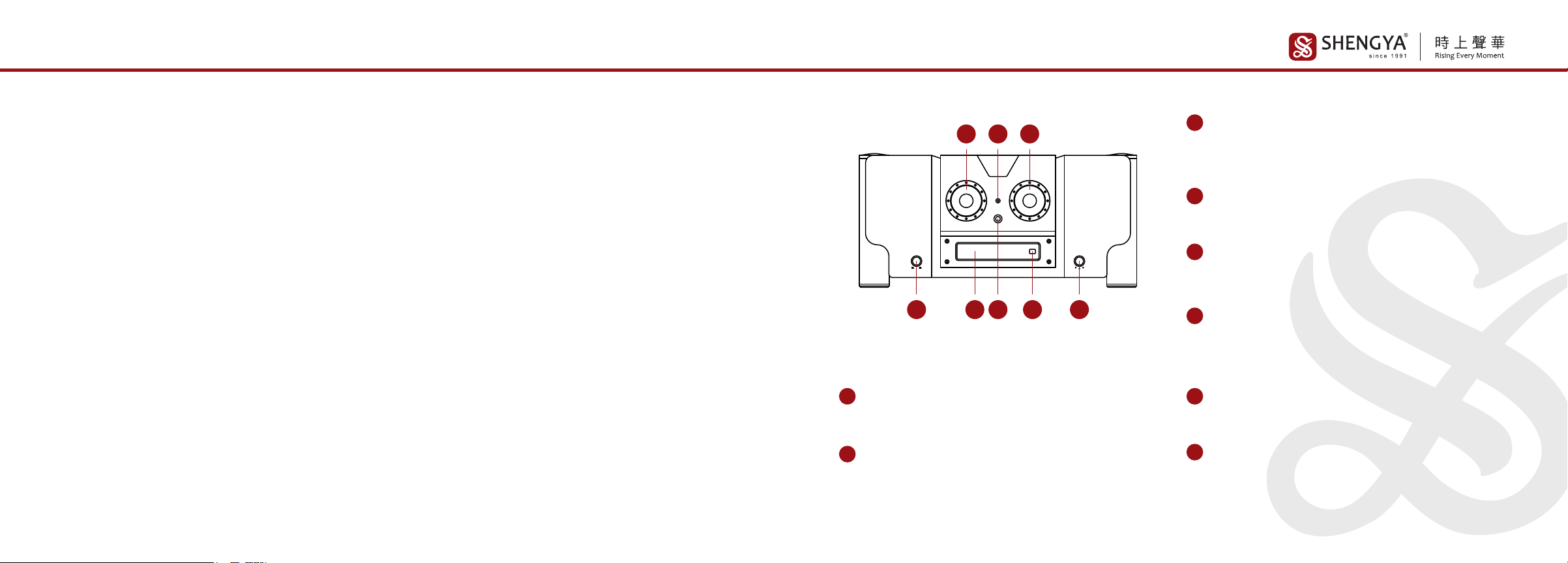
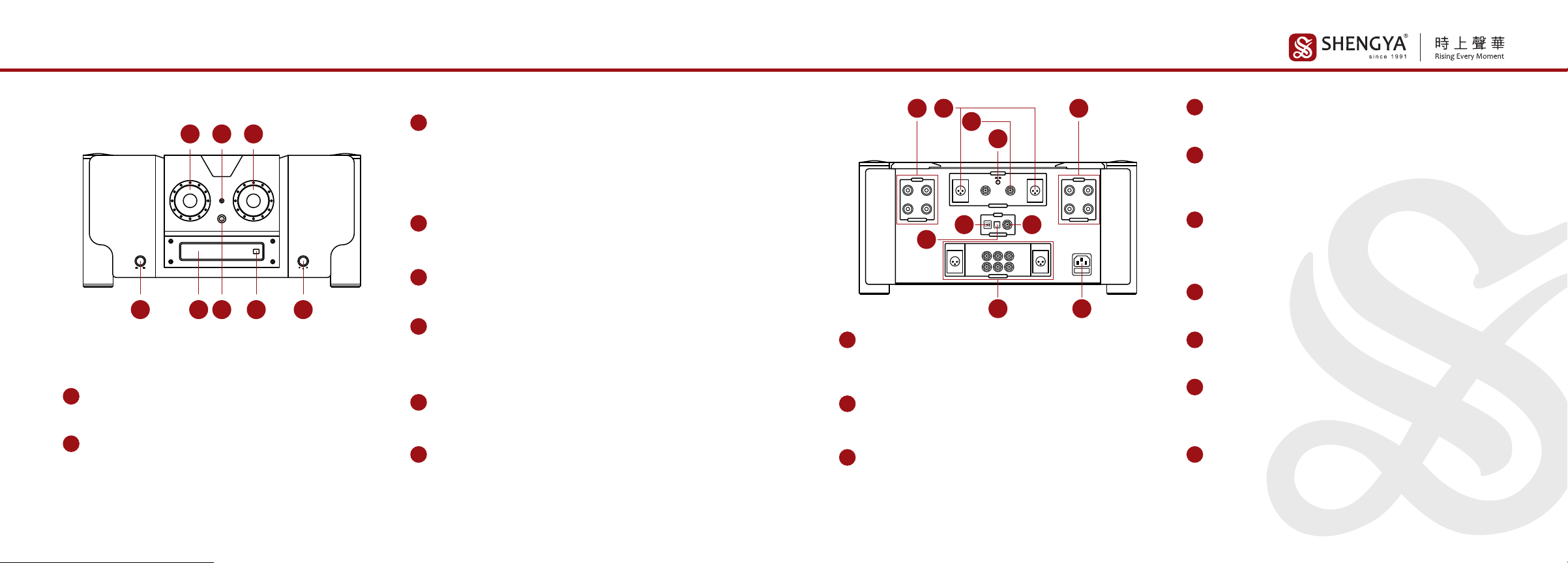
音频输入选择旋钮
此旋钮是对六组不同的音频信号进行输入选择。
1
甲类工作模式指示灯
此灯点亮时,机器处于甲乙类工作状态(绿色指示灯点亮);
熄灭时,机器处于甲类状态。
2数码输入切换旋钮
当显示屏显示时,此旋钮用于切换选择同轴、光纤和USB等三个数
码输入挡位。
8
音量按钮
此旋钮用作音量控制;向右旋时音量增大,向左旋时音量减少。
注意:0dB为音量最大,-99dB为音量最小。音量设置在0到-19dB之间时关机后不作记忆
(重启后音量会恢复在-40dB)。音量设置在-20到-99dB之间时关机后重启会有记忆。
3
电源开关按钮
此开关用于接通或切断整机交流电源。
4
显示屏
显示机器的各种工作状态和数据。
注意:开机预热时间为28秒,显示屏显示“PROTECT”
5
遥控接收器
接收遥控器发出的红外线遥控指令信号。
7
甲类工作模式设定开关按钮
此开关是对本机工作模式进行设定;
按下开关时机器以甲类(CLASS A)工作模式运行(绿色指示灯熄灭);
复位时机器以甲乙类(CLASS AB)工作模式运行(绿色指示灯点亮)。
6
1
65 8
2 3
4 7
0403
后面板功能 系统连接
不平衡接线法
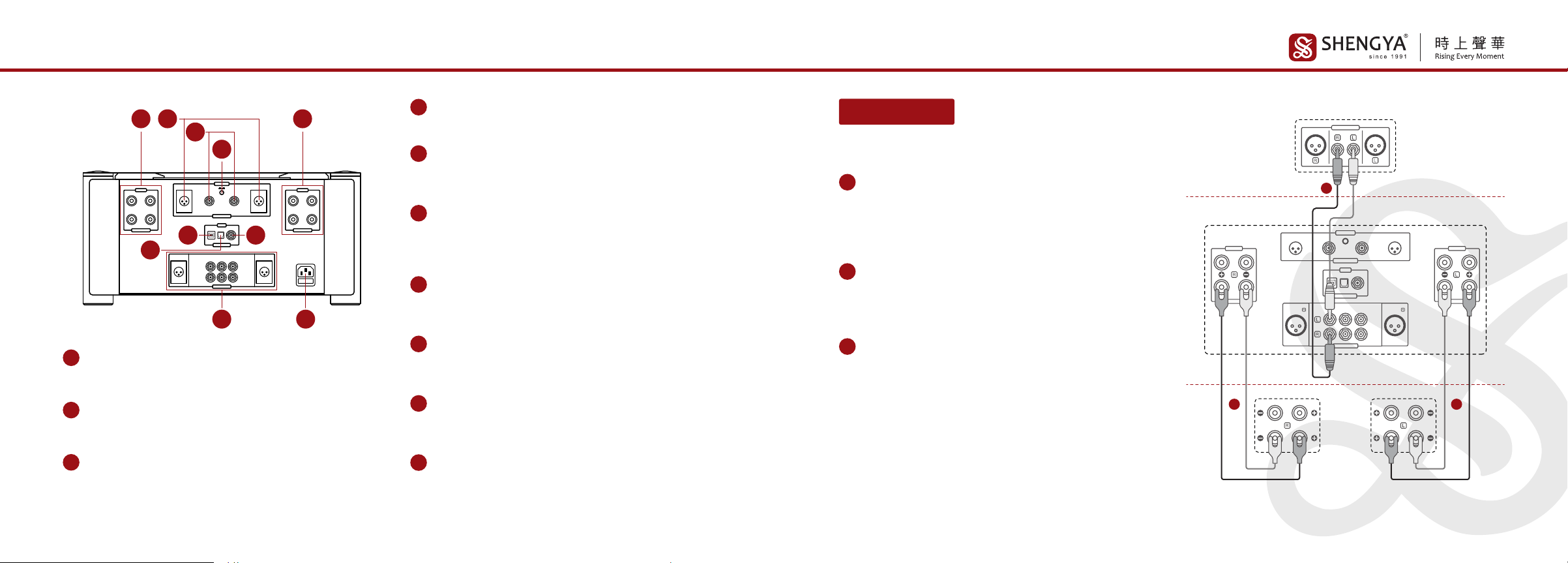
右声道输出接线柱
可连接阻抗为4-8Ω的音箱; 设有两组接线柱, 可进行双线分音接法;
其中红色为正极, 白色为负极。
1
2后级平衡音频信号输入端子(XLR)
此端子用于外接其他前置放大器平衡音频输出端子。(本机可作为
一台两声道纯后级功率放大器使用)
3后级不平衡音频信号输入端子(RCA)
此端子用于外接其他前置放大器不平衡音频输出端子。(本机可作
为一台两声道纯后级功率放大器使用)
音频信号输入端子(BALANCED、LINE 1、LINE 2、LINE 3)
此端子用于连接音源的输出端子。(设有三组不平衡输入端子,一组
平衡输入端子)
9
4后级RCA/XLR切换按钮
按钮按下时是XLR音频信号输入,复位时是RCA音频信号输入。
左声道输出接线柱
可连接阻抗为4-8Ω的音箱; 设有两组接线柱, 可进行双线分音接法;
其中红色为正极, 白色为负极。
5
USB数码输入端子
此端子用作连接数字设备的USB接口。(电脑/数播等)
注意:苹果系统,数码播放器免装驱动,window系统需要到声雅官网下载中心下载驱动并
安 装 。( http://www.shengya-audio.com/downloads.html)
6
光纤数码输入端子
此端子用作连接数字设备的光纤接口。(电脑/数字游戏机/DVD播
放机/高清电视机顶盒)
7
带交流电源保险丝的电源插座
此电源插座用作连接交流电源, 保险丝在电源插座下部, 更换保险
丝时一定要将电源线拔下方可更换。
10
同轴数码输入端子
此端子用作连接数字设备的同轴接口。(电脑/数字游戏机/高清电
视机顶盒)
8
SPEAKER
IMPEDANCE(4-8Ω)
SPEAKER
IMPEDANCE(4-8Ω)
BALANCED BALANCED
ANALOG INPUT
LINE 1 LINE 2 LINE 3
DIGITAL INPUT
LINE 1
LINE 5 MAX
ANALOG INPUT
CD唱机
A-203HD功放
音箱
1
23
HF
LF
ANALOG OUTPUT
BALANCED BALANCED
RCA
HF
LF
注意:
红色为正极,白色为负极,音箱与输出接线柱连接时请对应相同极性,否
则会影响听音效果。
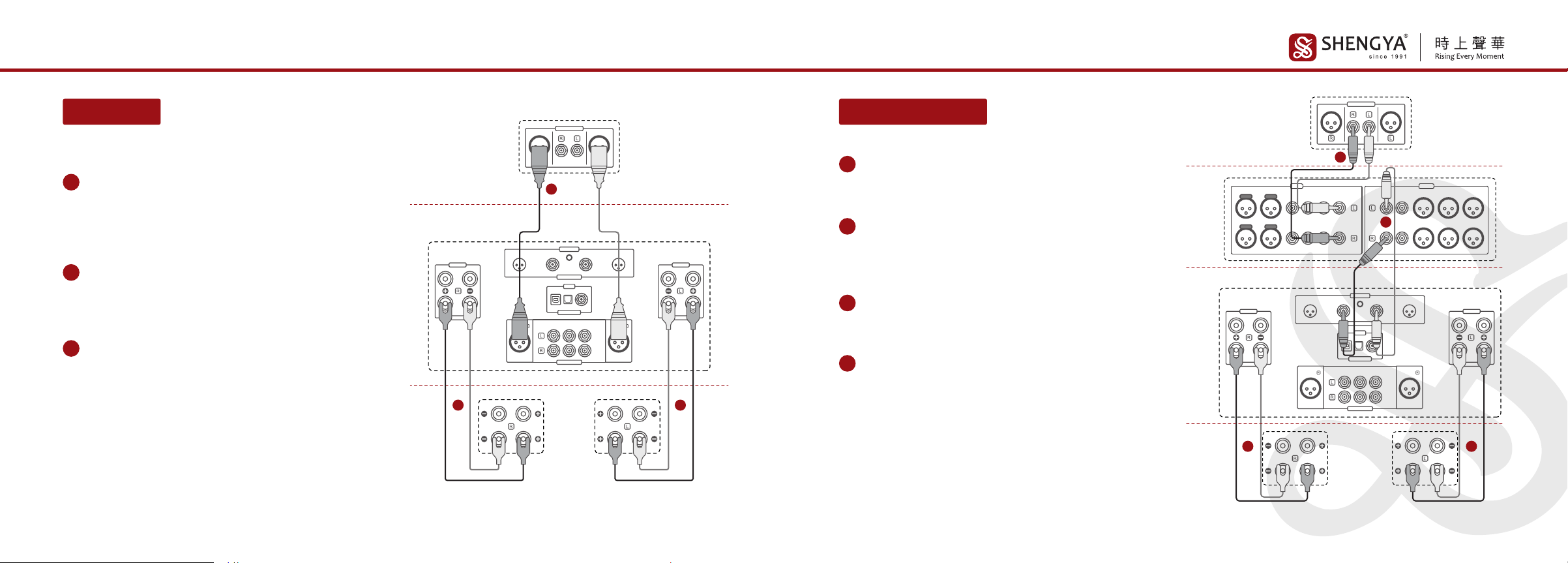
1信号源(CD唱机)的音频输出端子RCA(不平衡)与左,右
声道输入端子RCA对应连接。
(本机设有三组RCA音频输入端子)
2右声道输出接线柱连接右声道音箱。
(可采用普通接法或双线分音接法;如图示普通接法)
3左声道输出接线柱连接左声道音箱。
(可采用普通接法或双线分音接法;如图示普通接法)
不平衡接线法
2
3
4
6
15
7
8
910
0605
系统连接系统连接
纯后级使用接线法
SPEAKER
IMPEDANCE(4-8Ω)
SPEAKER
IMPEDANCE(4-8Ω)
BALANCED BALANCED
ANALOG INPUT
LINE 1 LINE 2 LINE 3
DIGITAL INPUT
LINE 1
LINE 5 MAX
ANALOG INPUT
CD唱机
A-203HD功放
音箱
1
23
HF
LF
ANALOG OUTPUT
BALANCED BALANCED
RCA
HF
LF
注意:
红色为正极,白色为负极,音箱与输出接线柱连接时请对应相同极性,否
则会影响听音效果。
1信号源(CD唱机)的音频输出端子XLR(平衡)与左,右声
道输入端子XLR对应连接。
(本机设有一组XLR音频输入端子)
2右声道输出接线柱连接右声道音箱。
(可采用普通接法或双线分音接法;如图示普通接法)
3左声道输出接线柱连接左声道音箱。
(可采用普通接法或双线分音接法;如图示普通接法)
平衡接线法 纯后级使用接线法
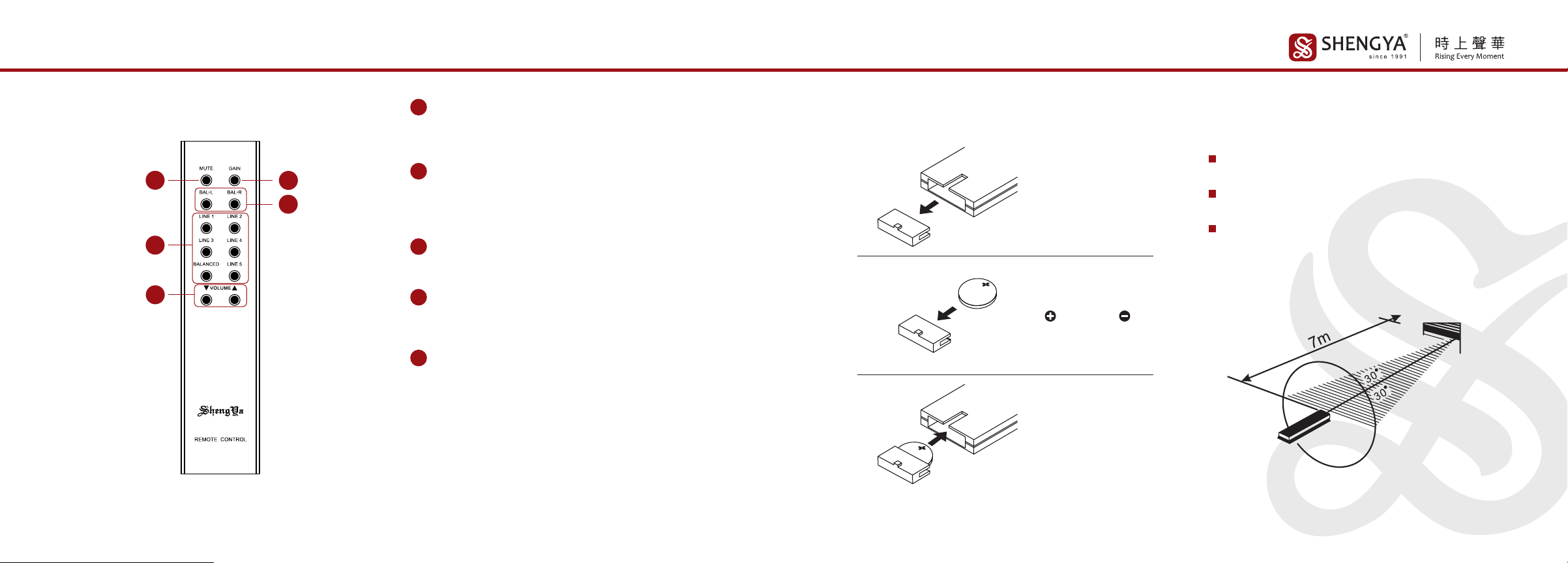
1信号源(CD唱机)的音频输出端子RCA(不平衡)与单独
一台前级音频输入端子RCA对应对接。
2前置放大器RCA音频输出端子与本机“LINE 5 MAX档”
音频输入端子连接,输入选择对应设LINE 5档。
(此时本机作为两声道纯后级使用)
注意:
红色为正极,白色为负极,音箱与输出接线柱连接时请对应相同极性,否
则会影响听音效果。
3右声道输出接线柱连接右声道音箱。
(可采用普通接法或双线分音接法;如图示普通接法)
4左声道输出接线柱连接左声道音箱。
(可采用普通接法或双线分音接法;如图示普通接法)
SPEAKER
IMPEDANCE(4-8Ω)
SPEAKER
IMPEDANCE(4-8Ω)
BALANCED BALANCED
ANALOG INPUT
LINE 1 LINE 2 LINE 3
DIGITAL INPUT
LINE 1
LINE 5 MAX
ANALOG INPUT
INPUT OUTPUT
CD唱机
前级
A-203HD功放
音箱 HF
LF
HF
LF
ANALOG OUTPUT
BALANCED BALANCED
RCA
1
2
4
3
0807
遥控器遥控器
注意:
1.遥控器不应靠近过热或过潮之处, 更不应受阳光直射或强光照射。
2.遥控器请勿受到强烈碰撞或从高处跌下, 否则会损坏遥控器使其不能
正常工作。
3.请使用CR2032扭扣电池;勿混用新旧或不同型号的扭扣电池。
4.当遥控器长期不用时, 请将电池取出, 请勿将电池投入火中。
5.正常使用情况下, 每6个月更换电池一次。
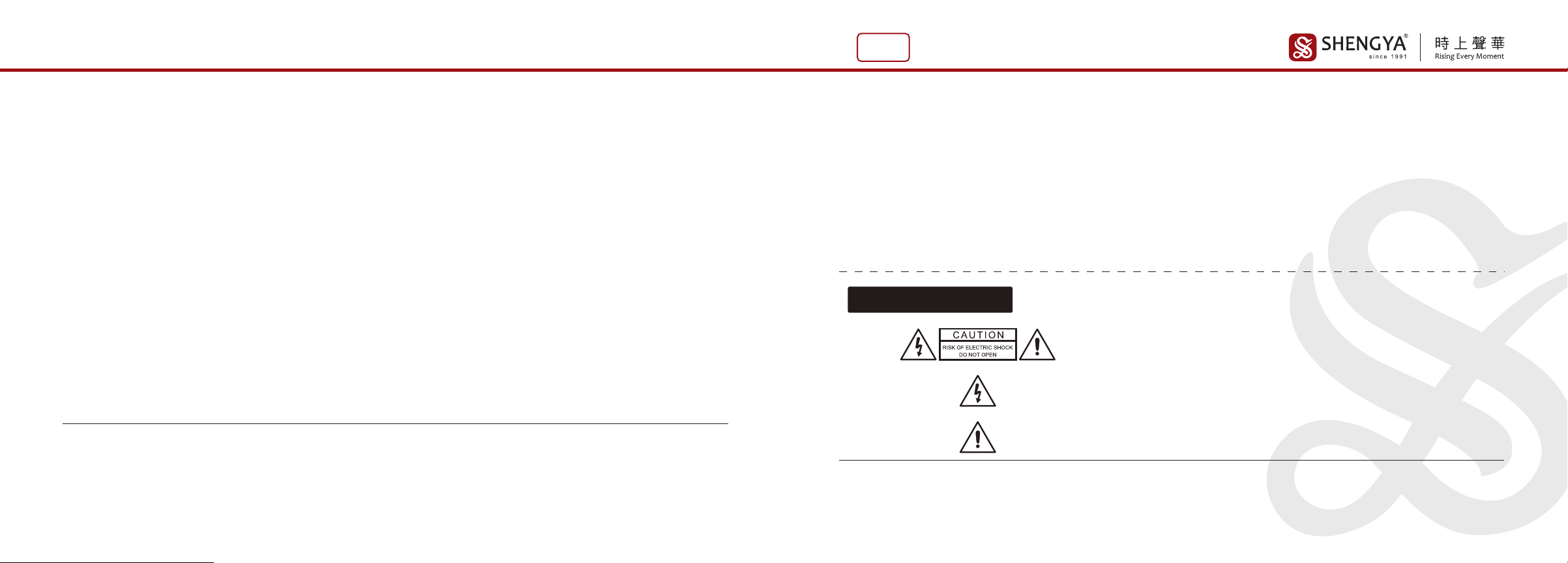
GAIN(前级增益):(增益按键)
用户可根据音源的输出电平高低来选择0dB或-8dB档位;
当音源输出电平过高时(超过2.5V),请选择-8dB档位。
1
BAL-L、BAL-R:(左右声道输出平衡度控制按键)
按动BAL-L键时,左声道音量增加;按动BAL-R键时,右声道音量增
加;此功能用作修正由于听音环境或音箱系统造成的左右声道音量
不平衡。控制范围为0至10dB但在正常使用情况下应调整为0dB。
2
MUTE:(静音按键)
按一下此键,机器停止信号输出;再按一下此键则恢复信号输出。
3
BALANCED、LINE 1、LINE 2、LINE 3、LINE 4、LINE5:
(信号输入选择按键)
分别为平衡、线路1、线 路 2、线 路 3、线 路 4、线 路 5(后级专用)。
4
▲VOLUME▼:(音量控制按键)
按此键可控制音量的大小;"▲"为增加音量,"▼"为减小音量。
5
按键说明
2
5
4
31
遥控器
遥控感应器
使用操作
遥控器有效距离大约7米之内。
遥控器的接收角度为30度之内。
不可将机器的遥控感应器置于阳光或强光直射之
下;因这会导致遥控器无法操作。
推出电池盒
装入电池盒
将纽扣电池插入电池
盒, (正)极向上 (负)
极向下
1
2
3
使用准备

1009
故障指导注意事项
当您一段长时间不使用本机时请将
电源线从插座拔下。
不要随便拆开机壳拔弄内部器件,这
样会有触电危险。
清洁机壳时,请勿使用具有强烈挥发
性有机溶剂(如汽油,苯等)洗擦机面
机壳,应用柔软干净的布轻擦。
请将本机放置于通风良好以及干燥
的地方工作,不要放置在阳光直接照
射或靠近热源地方;并注意支承机器
的柜台四周要有一定空间,10cm内
无任何障碍物;以便机器通风散热。
机器上不能放置带液体的容器(如花
瓶、水杯、油瓶等),更不可将任何类
型的液体洒入机器内,这会造成短路
或漏电事故。
使用电源时请手执插头绝缘部分插
入或拔下电源插座,不要直接扯电源
线。
原因 解决方法
1.电源线没接好
2.交流保险管熔断
3.电源开关未按下
1.音量旋钮在最小位置
2.输入信号线没有接好
3.音源未工作或音源不良
4.输入选择不对位
5.音箱连线未接好
1.机器负载过重
2.负载端短路
1.更换符合4-8Ω阻抗的音箱
2.关机并检查音箱线是否短接
1.将音量调整到适当位置
2.接好输入信号线
3.开启音源或更换其他音源
4.切换到对应输入位置
5.接好音箱线
1.接好电源线
2.请合格维修人员更换保险管
3.按下电源开关
1.一边信号线未接好
2.一边音箱线未接好
1.接好信号线
2.接好音箱线
1.信号线接触不良或插得不够深入
2.信号线不良
1.插紧信号线或用力把插头插入
2.更换信号线
异常现象
无声
显示屏不亮
显示屏亮
显示屏出现
“PROTECT”
有一边
声道无声
声音伴有很大
交流声(嗡嗡声)
遥控器失灵
1.遥控器没有对准功放机遥控接收器
2.遥控器距离功放机太远
3.有物体阻挡在遥控器与功放机之间
4.遥控器中的电池耗尽
1.将遥控器指向功放机
2.在7米之内使用遥控器
3.将阻挡物体拿走
4.换上新电池
1211
EN
技术参数
本公司产品保养维修委托当地经销商负责联络接洽。
我公司产品奉行不断改进与更新,产品规格及指标如有变更,恕不另行通知。
如有对本说明书不解之处,请向零售商咨询,或直接向本公司查询。
本产品的执行标准 :GB8898、GB/T10406-93、Q/SHYA01-1997
9.低电平输入灵敏度 ················· : 250 mV
10.高电平输入灵敏度(LINE 5档) ····· : 650 mV
8.信噪比 ···································· : 90 dB(宽带)
11.输入阻抗 ······························ : 47 KΩ
12.体积(W×H×D) ······················· : 446×216×503(mm)
13.重量 ······································ : 36 kg
7.谐波失真 ································ : ≤0.005%(1kHz 1W)
4.频率响应 ································ : 10Hz-20kHz±0.5 dB
6.甲类输出功率 ························ : 50W+50W(8Ω)
5.额定输出功率 ························ : 250W+250W(8Ω)
500W+500W(4Ω)
2.USB支持 ································· : PCM:16-32Bit,44.1-384kHz,
DSD64,DSD128,DSD256,
DSD512
3.USB支持系统 ························· : 苹果、window、数码播
放器等系统
1.光纤、同轴数码数字支持 ············ : 16-24Bit,44.1-192kHz,
DOP64
Thank you for purchasing Hi-Fi products of Shengya Audio!
We believe that the unremitting pursuit of high-quality audio products is our responsibility
and your ideal.
In order to make A-203HD(Class A Balanced Hybrid Amplifier)better performance and
bring you greater pleasure, we recommend that you read this manual carefully before
connecting and operating the system.
GRATITUDE
Warning: In order to prevent fire or electric shock, please do not expose the
machine to rain or humid environment. There are dangerous high-voltage accesso-
ries in the machine, so do not open the machine cover and only entrust it to qualified
maintenance personnel.
Dangerous voltage: In order to reduce the risk of electric shock, please do not
remove the cover (or rear panel)without authorization.
Note: There are no user-overhauled parts inside the device. When overhauling is
required, please entrust the dealer or qualified personnel.
The equipment is only suitable for safe use in tropical climates, with a maximum operating temperature of 45°C;
The equipment is only suitable for safe use in areas with an altitude of 5000m and below;
The equipment uses an appliance coupler as a disconnect device.
SAFETY WARNING
1413
CHARACTERISTICS CHARACTERISTICS
A-203HD(Class A Balanced Amplifier)is designed by Shengya feature on vacuum
tube and transistor hybrid power amplifiers. It adopts fully balanced Class A amplifier
circuit recognized by many international high-end audio product manufacturers and
enthusiasts, so the sound quality, tone, and sound field performance reach a fairly
high level in the industry.
The volume control adopts the electronic volume control chip CS3310 made by
American Crystal Company, which controls the error level between two channels
within 0.5dB, offering better control accuracy of the quadruple mechanical
potentiometer in ±3dB.The power amplifier input stage is made of electronic tubes for
differential voltage amplification, and famous transistors are used for the second
stage of differential voltage amplification. The final stage is composed of 32
high-power transistors to form a powerful power output stage, which can easily drive
large speakers with an impedance of as low as 2 ohms.
The toroidal high-power transformer is filled with epoxy resin with a shielding box,
which effectively reduces the vibration and noise interference.Two channels
independently use special audio filter capacitors and rectifiers, with a total capacity of
up to 120,000 microfarads to form 250W (8Ω) pure Class A output power per channel.
In addition to the exquisite and thick sound performance, there is also the outstanding
sound quality performance.
This machine can be used as an independent power amplifier. You can use the
LINE5 high-level signal input terminal to connect to other pre-amplifier. It provides
XLR and RCA input interfaces.
This machine has optical, coaxial, USB digital interface. USB uses the American
"XMOS" solution, and the decoder chip uses ES9038Q2M.
Within 50W, it is a Class A output state, and the sound is delicate and thick. When it
exceeds 50W, it will automatically switch to Class A and B output mode, making it a
powerful force when playing big dynamic music software.
The appearance design of the A-203HD power amplifier is designed to reflect the
main purpose of the product connotation. It abandons the monotonous and rough
style of many high-power amplifiers. It has the control charm of the previous stage,
which solves the rigid problem of the post-stage modeling of the high-power
combined machine. The details are rich and exquisite, every detail is derived from the
inside to the outside, from the big to the small, naturally wonderful and unpretentious.
In today's world of silver-mounted machines, boldly adopt black and decorate it with a
small amount of aluminum metal parts, which not only enhances the visual impact,
but also makes the black produce unprecedented charm, stability, and the relationship
between the whole and the details. Very exciting, beautiful, very attractive, showing
eternal temperament.
1615
FRONT PANEL FUNCTION BACK PANEL FUNCTION
RIGHT CHANNEL OUTPUT TERMINAL
It can be connected to speakers with an impedance of 4-8Ω; there
are two sets of binding posts, which can be used for two-wire
split-tone connection; the red is the positive pole and the white is
the negative pole.
1
2POWER AMPLIFIER XLR INPUT TERMINAL
This terminal is used to connect other preamplifier XLR output
terminals.(This machine can be used as a two-channel pure
power amplifier)
3POWER AMPLIFIER RCA INPUT TERMINAL
This terminal is used to connect other preamplifier RCA output
terminals.(This machine can be used as a two-channel pure
power amplifier)
LEFT CHANNEL OUTPUT TERMINAL
It can be connected to speakers with an impedance of 4-8Ω; there
are two sets of binding posts, which can be used for two-wire
split-tone connection; the red is the positive pole and the white is
the negative pole.
2
5
INPUT
This knob is for input selection of six different audio signals.
1
CLASS A MODE INDICATOR LIGHT
When this light is on, the machine is in Class AB working state
(green indicator light is on);
When it is off, the machine is in Class A state.
2
3VOLUME
This knob is used as a volume control; when it is turned to the
right, the volume increases, and when it is turned to the left, the
volume decreases.
Note: 0dB is the maximum volume,-99dB is the minimum volume. When the volume is
set between 0 and -19dB,it will not be memorized after shutdown (the volume will be
restored to -40dB after restarting). When the volume is set between -20and -99dB,it will
be remembered after shutting down and restarting.
POWER
This button is used to turn on or off the AC power supply of the
whole machine.
4
DIGITAL INPUT SWITCH KNOB
When the screen is on, this knob is used to switch between the
three digital input gears of coaxial, optical and USB.
8
SCREEN
Display various working status and data of the machine.
Note: The preheating time is 28 seconds, and the display shows "PROTECT"
5
REMOTE CONTROL RECEIVER
Receive the infrared remote control command signal sent by the
remote control.
7
CLASS A/AB SWITCH
When the switch is pressed, the machine runs in CLASS A
working mode (The green indicator light is off);
When reset, the machine runs in CLASS AB working mode (The
green indicator light is on).
6
1
65 8
2 3
4 7
USB DIGITAL INPUT TERMINAL
This terminal is used as a USB interface for connecting digital
devices. (Computer/Digital player, etc.)
Note: Apple system and the digital player is free of driver installation, and the window
system needs to go to the download center of Shengya official website to download the
driver and install it.(http://www.shengya-audio.com/downloads.html)
6
OPTICAL DIGITAL INPUT TERMINAL
This terminal is used as an optical interface for connecting digital
equipment.(Computer/digital game console/DVD player/HD TV set-top box)
7
COAXIAL DIGITAL INPUT TERMINAL
This terminal is used as an optical interface for connecting digital
equipment.(Computer/digital game console/HD TV set-top box)
8
AUDIO SIGNAL INPUT TERMINAL
(BALANCED.LINE 2.LINE 3.LINE 4)
This terminal is used to connect the output terminal of the audio
source.(Equipped with three groups of unbalanced input terminals
and one group of balanced input terminals).
9
POWER AMPLIFIER RCA/XLR SWITCH BUTTON
When the button is pressed, it is the XLR audio signal input;
and when the button is reset, it is the RCA audio signal input.
4
POWER SOCKET WITH AC POWER FUSE
This power socket is used to connect to AC power. The fuse is at
the bottom of the power socket. When replacing the fuse,be sure
to pull out the power cord to replace it.
10
2
3
4
6
15
7
8
910
Indice
Altri manuali SHENGYA Amplificatore

SHENGYA
SHENGYA PSM-500T Manuale utente

SHENGYA
SHENGYA A28 Manuale utente

SHENGYA
SHENGYA A25CS Manuale utente

SHENGYA
SHENGYA PSM-368 Manuale utente

SHENGYA
SHENGYA A30 Manuale utente

SHENGYA
SHENGYA PSM-300T Manuale utente

SHENGYA
SHENGYA CV-1HD Manuale utente

SHENGYA
SHENGYA A-238 II Manuale utente

SHENGYA
SHENGYA PSM-350T Manuale utente


