
Sigma 500 Manuale di servizio

OPERATING AND MOUNTING INSTRUCTIONS

1 EOX®REMOTE 500 3
1.1 Safety notes 4
1.2 Operation and display elements 5
1.2.1 Battery level display 6
1.2.3 Push Assistance 7
1.2.2 Assist mode display 7
1.2.3 Error messages 7
1.3 Operation 8
1.3.1 Turn on the E-Bike 8
1.3.2 Turn off the E-Bike 8
1.3.3 Switch assist mode 9
1.3.4 Trigger start-up assistance 9
1.3.5 Switch light status 10
1.3.6 Remote control 10
1.4 Technical information 11
1.5 Product care 11
1.5.1 Transport and storage 11
1.6 Disposal 11
2 EOX®VIEW 1200 14
2.1 Safety notes 15
2.2 Display elements 16
2.2.1 Battery level 17
2.2.2 Assist Mode 18
2.2.3 Power 18
2.2.4 Heart rate and benefit indicator 19
2.2.5 Light status 19
2.2.6 Komoot turn-by-turn instructions 20
2.2.7 All functions of the
multifunctional area 21
2.3 Operation 23
2.3.1 Controlling the ride menu 23
2.3.2 Settings 23
2.3.3 Trip Reset 23
2.3.4 Connect heart rate sensor 24
2.4 Technical information 26
2.5 Product care 26
2.5.1 Transport and storage 26
2.6 Disposal 26
3EOX®ASSEMBLY 29
3.1 EOX®Remote 500 30
3.2
EOX®Remote 500 und EOX®View 1200
30
4 EOX®APP 33
Contents
4 I EOX®REMOTE 500 I Safety notes
Read the safety notes and the manual before putting the EOX®REMOTE 500 into operation! Improper use can cause
damage of the component and/or injuries.
Save the safety notes and the manual for your future reference!
−Make sure not to be distracted by the EOX®REMOTE 500 during the ride! Do not be distracted by the LED indicator.
During the ride you should not perform any operation other than changing the assist mode, changing the light,
and changing the values display on the EOX®VIEW.
−Do not use the EOX®REMOTE 500 as a handle to lift up your E-Bike!
This can lead to irreparable damage of the component.
1.1 Safety notes
EOX®REMOTE 500 I Operation and display elements I 5
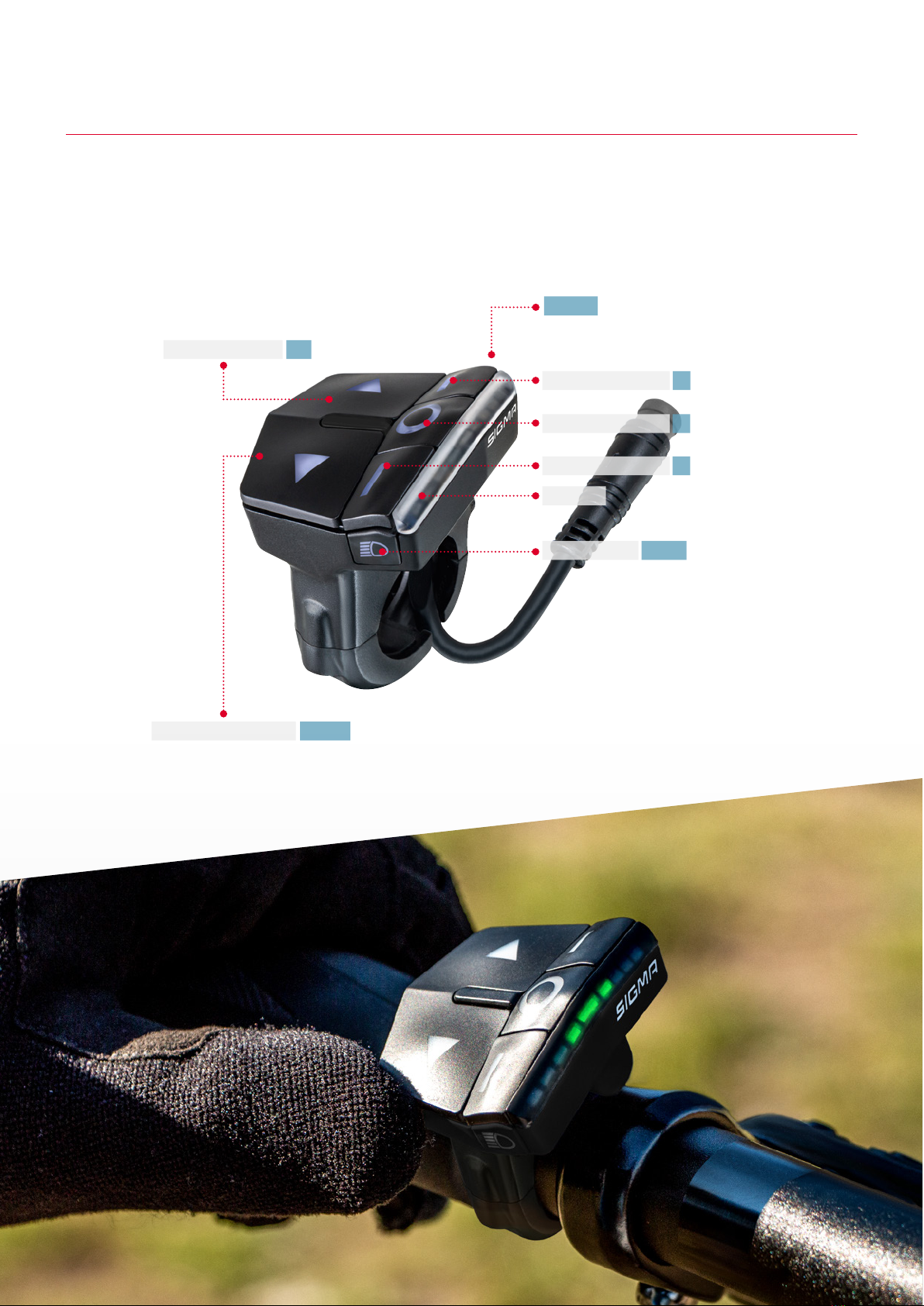
−The EOX®REMOTE 500 has seven ergonomical designed buttons.
−The button backlight will be automatically triggered once the environment becomes dark.
−The LED bar consists of 9 RGB LEDs and provides feedback for different E-Bike specific information.
1.2 Operation and display elements
ASSIST MODE UP
ASSIST MODE DOWN
LIGHT MODES
LED BAR
REMOTE CONTROL
REMOTE CONTROL
REMOTE CONTROL
A
POWER
B
C
UP
DOWN
LIGHT
6 I EOX®REMOTE 500 I Operation and display elements
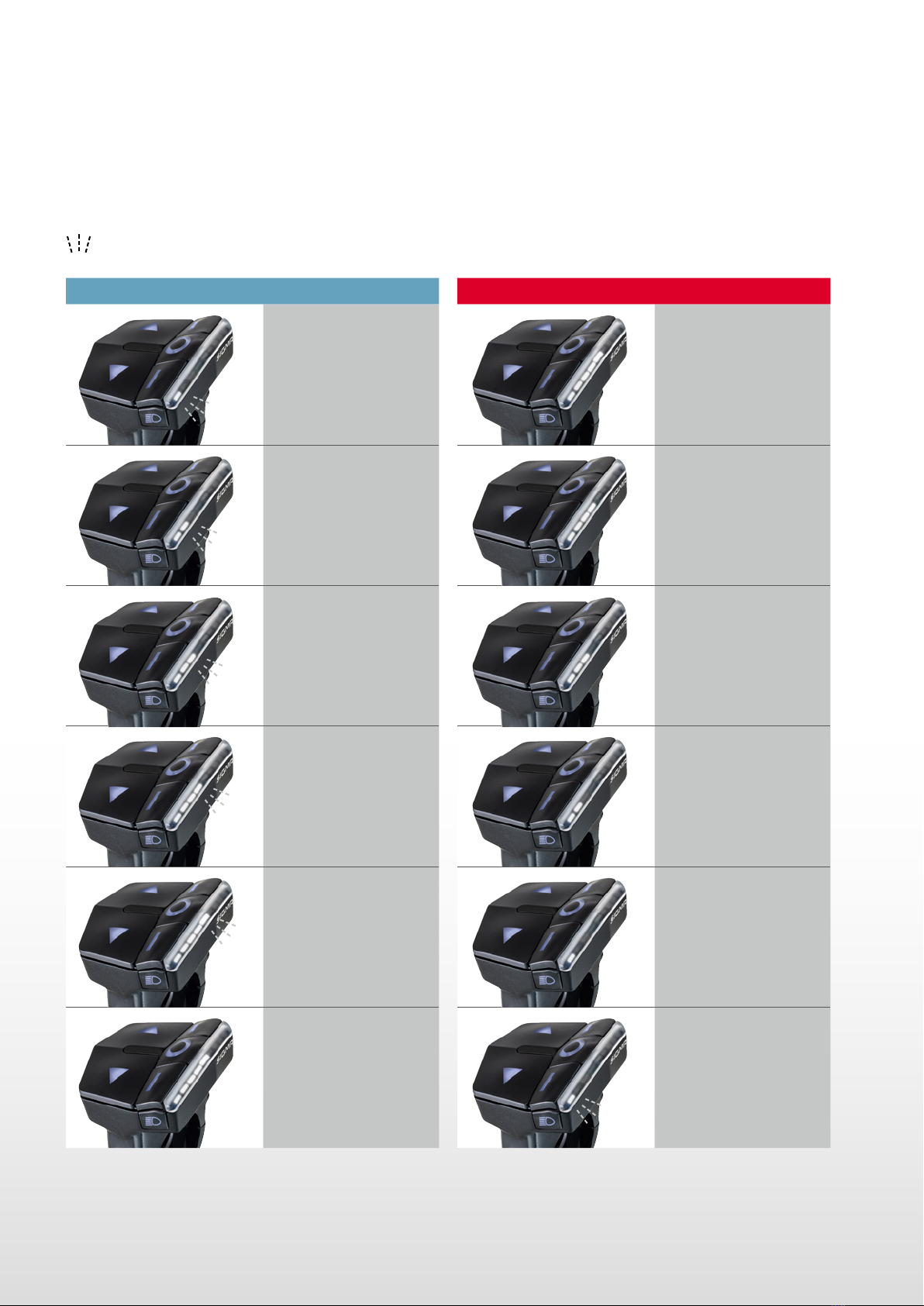
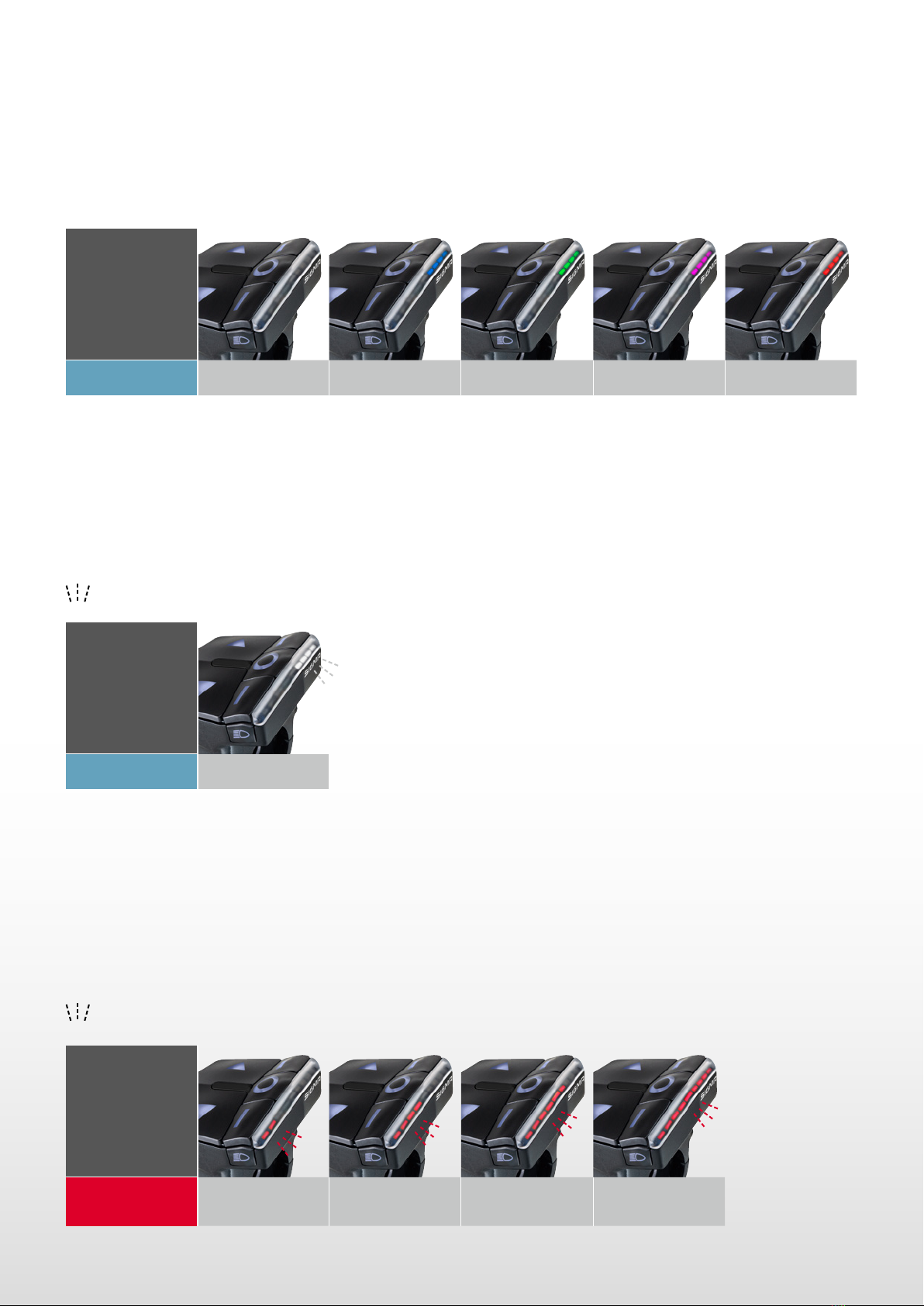
−The LED bar of the EOX®REMOTE 500 shows the current level of your E-Bike‘s battery.
−Six levels are distinguished.
−Threshold values may vary slightly depending on the system.
= LED flashing
1.2.1 Battery level
Charging Discharging
0 - 19 % 100 - 80 %
20 - 39 % 79 - 60 %
40 - 59 % 59 - 40 %
60 - 79 % 39 - 20 %
80 - 99 % 19 - 10 %
100 % 9 - 0 %
EOX®REMOTE 500 I Operation and display elements I 7
1.2.2 Assist Mode
1.2.4 Error messages
1.2.3 Push Assistance
−The EOX®REMOTE 500 indicates the assistance level currently selected by the upper four LEDs of the status bar.
−Five assistance levels are color-differentiated.
−The EOX®REMOTE 500 shows error messages of your E-Bike.
−Four severity levels are distinguished.
−Please contact your professional workshop in any case.
= LED flashing
−The EOX®REMOTE 500 indicates on the upper four LEDs of the status bar whether pushing assistance is activated
−The four LEDs flash white
= LED flashing
LED bar
Assist Mode Off 1 (Minimum) 2 3 4 (Maximum)
LED bar
Assistance
Level Level 1 Level 2 Level 3 Level 4
LED bar
Status On
8 I EOX®REMOTE 500 I Operation
1.3.1 Turn on the E-Bike
1.3.2 Turn off the E-Bike
1.3 Operation
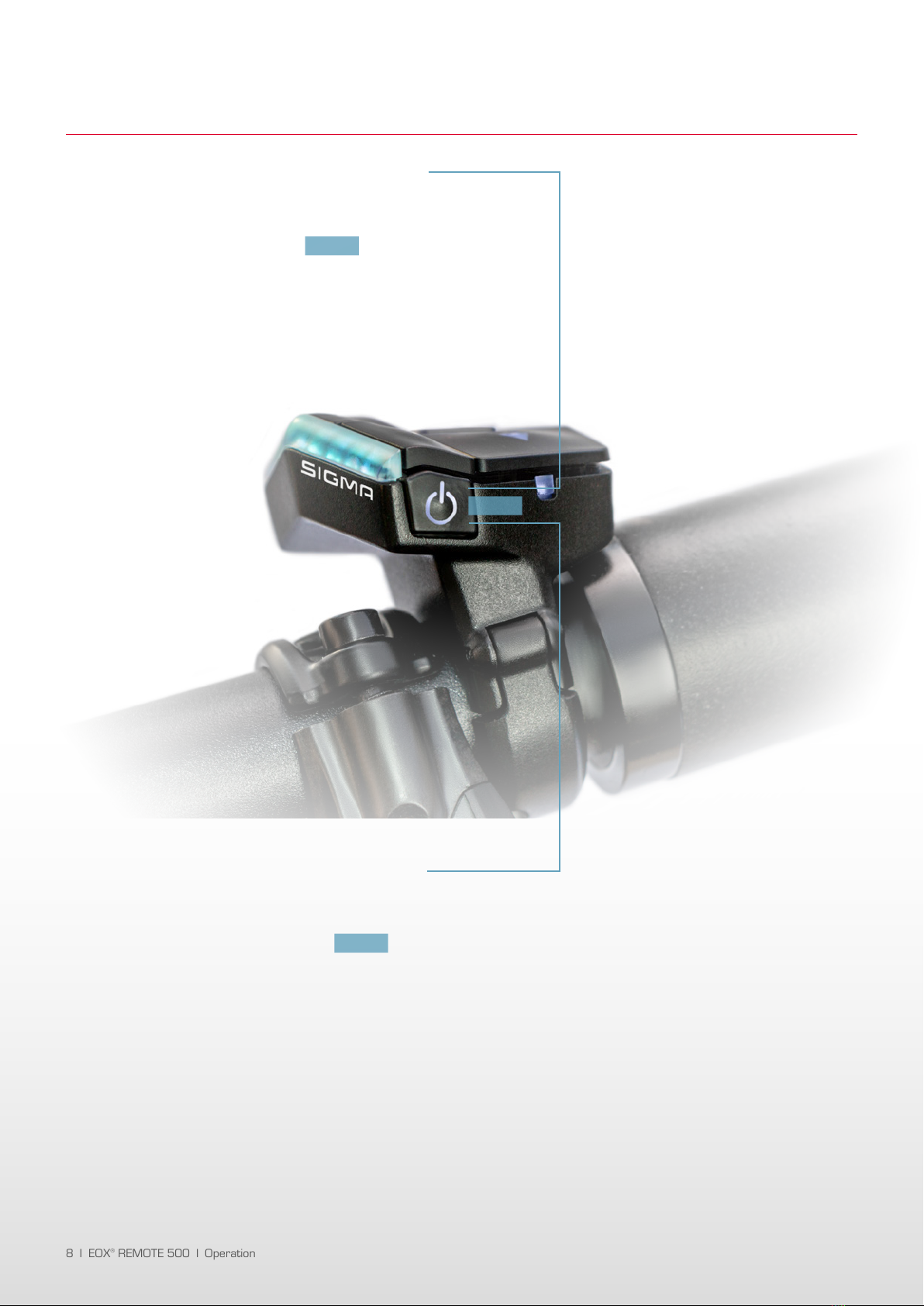
−To turn on your E-Bike press the button
of the EOX®REMOTE 500 briefly.
−The LED bar of the EOX®REMOTE 500 turns on.
−If an EOX®VIEW 1200 is connected the display
turns on automatically.
−To turn off your E-Bike long-press the button
of the EOX®REMOTE 500 (>2 s).
−If an EOX®VIEW 1200 is connected the display
turns off automatically.
POWER
POWER
POWER
EOX®REMOTE 500 I Operation I 9
1.3.3 Switch assist mode
1.3.4 Trigger start-up assistance
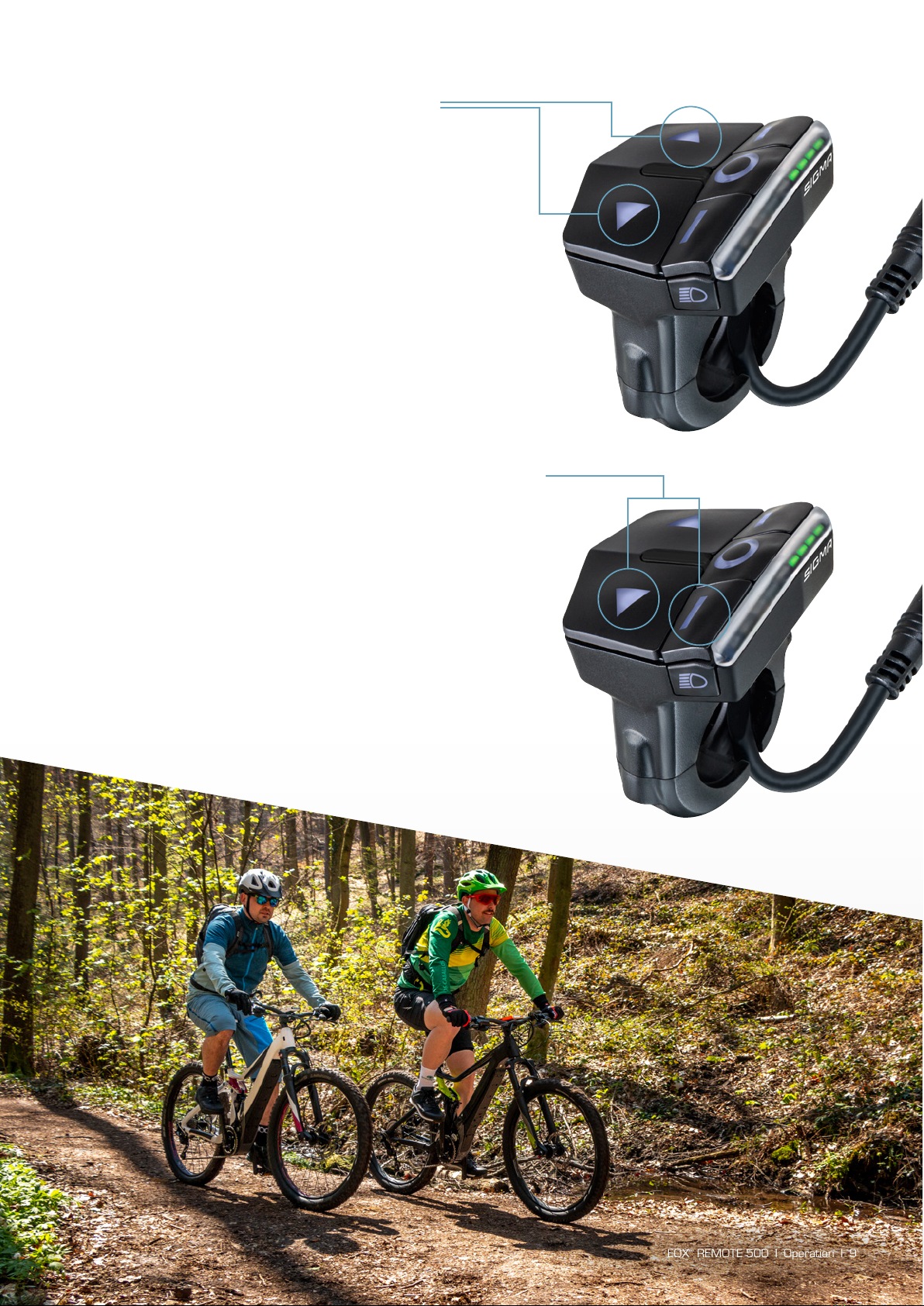
−To switch to the next higher assist mode
press the UP button briefly.
−To switch to the next lower assist mode
press the DOWN button briefly.
−The staus bars‘ upper four LEDs are color-changing
according to the selected level of assistance
(see chapter 1.2.2).
−To trigger the start-up assistance long-press
the DOWN and the Cbutton simultaneously.
−Once you release one of the buttons the start-up
assistance stops.
−The start-up assistance of the EOX®REMOTE 500
has been proven to be functional safe in accordance
to EN15194.
10 I EOX®REMOTE 500 I Operation
1.3.5 Switch light status
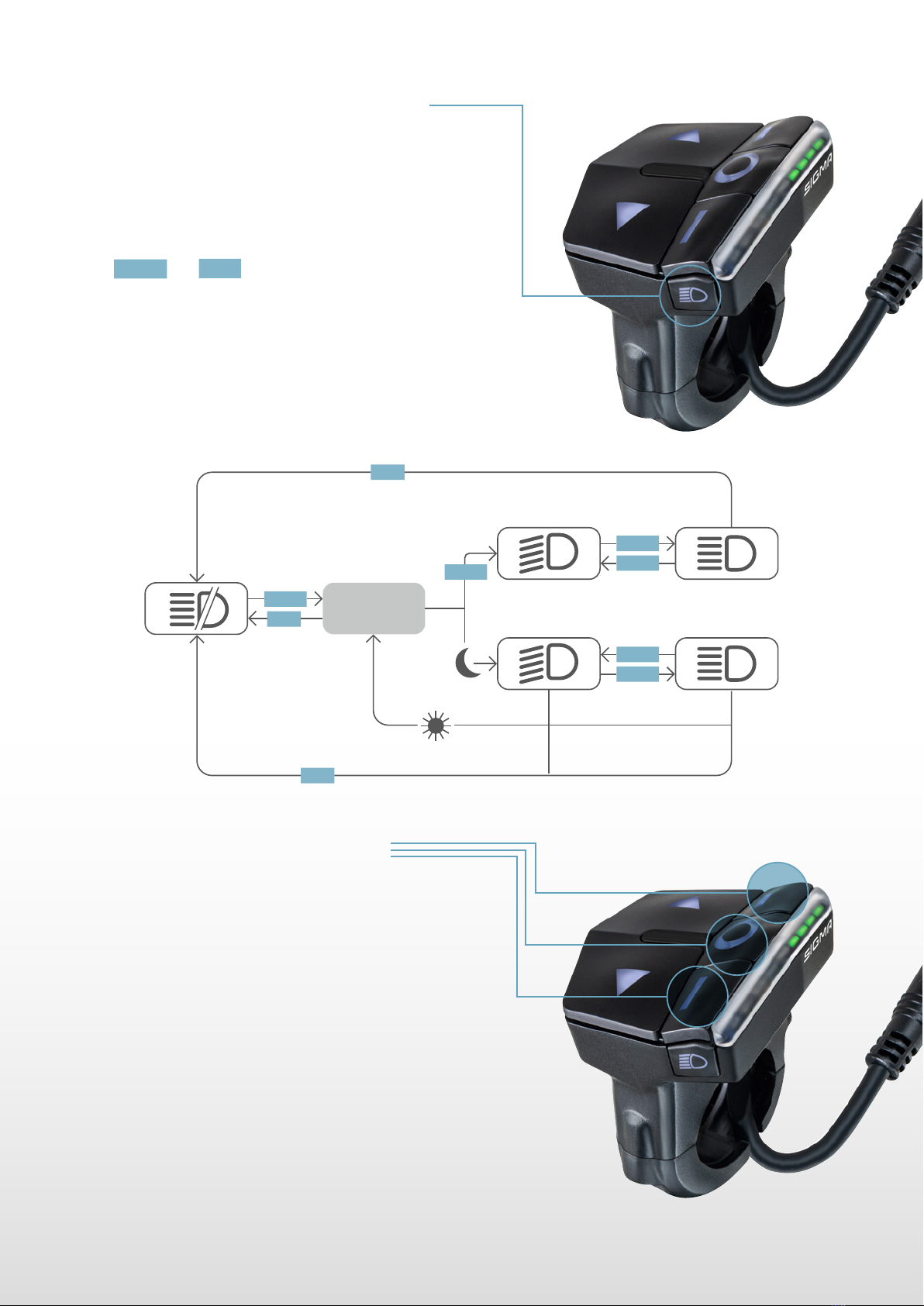
−By the integrated ambient light sensor the
EOX®REMOTE 500 can control the light
of your E-Bike automatically.
−The light status can always be switched manually
by and pressing the LIGHT button.
−If the light is turned on you can press the LIGHT button
to switch between low beam and high beam mode
(in case your E-Bike light supports these modes).
SINGLE LONG
1.3.6 Remote control
−The functionality of the three remote control buttons (A, B, C)
changes if an EOX®VIEW 1200 is connected or not.
−With EOX®VIEW 1200 connected, the purpose of the
three buttons is to remotely operate the display (see chapter 2)
−If no EOX®VIEW 1200 is connected, the three remote control
buttons can be used to control the EOX®App (see chapter 4).
A
B
C
AUTO
MODE
LONG
SINGLE
SINGLE
LONG
SINGLE
SINGLE
SINGLE
SINGLE
LONG
Altri manuali per 500
5
Questo manuale è adatto per i seguenti modelli
1
Indice


