
Silicon Image SV-HBA3124-2 Manuale utente

SV-HBA3124-2
SV-HBA3124-4
PCI-X to SATA II (3Gbps)
Host Bus Adapter
User’s Guide
Version 1.0
Document Number: MAN-003124-000

Document Number: MAN-003124-000 Version 1.0
Copyright © 2004-2005, Silicon Image, Inc.
All rights reserved. No part of this publication may be reproduced, transmitted, transcribed, or translated into any
language or computer format, in any form or by any means without prior written permission of:
Silicon Image, Inc.
1060 East Arques Ave.
Sunnyvale CA 94085
Silicon Image, Inc. reserves the right to make changes to the product(s) or specifications to improve performance,
reliability, or manufacturability. Information furnished is believed to be accurate and reliable, but Silicon Image, Inc. shall
not be responsible for any errors that may appear in this document. Silicon Image, Inc. makes no commitment to update
or keep current the information contained in this document. However, no responsibility is assumed for its use; nor any
infringement of patents or other rights of third parties which may result from its use. No liability is assumed as a result of
their use or application. No rights under any patent accompany the sale of any such product(s) or information.
Silicon Image, Inc. products are not designed or intended for use in Life Support Systems. A Life Support System is a
product or system intended to support or sustain life, which if it fails, can be reasonably expected to result in significant
personal injury or death. If Buyer or any of its direct or indirect customers applies any product purchased or licensed from
Silicon Image, Inc. to any such unauthorized use, Buyer shall indemnify and hold Silicon Image, Inc., its affiliates and their
respective suppliers, harmless against all claims, costs, damages and expenses arising directly or indirectly, out of any
such unintended or unauthorized use, even if such claims alleges that Silicon Image, Inc. or any other person or entity
was negligent in designing or manufacturing the product.
Specifications are subject to change without notice.

Document Number: MAN-003124-000 Version 1.0
Contents
1Getting Started ............................................................................................................................... 1
Package Contents ....................................................................................................................................... 1
System Requirements ................................................................................................................................ 1
SV-HBA3124 Specifications ....................................................................................................................... 2
References ................................................................................................................................................... 3
2Installing the SV-HBA3124 ............................................................................................................ 4
Install the SV-HBA Card ............................................................................................................................. 4
Install the Disk Drives/Devices .................................................................................................................. 5
Install Internal Devices on the SV-HBA3124-2 .....................................................................................................5
Install External Devices on the SV-HBA3124-2 & SV-HBA3124-4.....................................................................5
Install the Driver .......................................................................................................................................... 6
Microsoft Windows 2003 Server............................................................................................................................6
To confirm the driver installation....................................................................................................................6
Microsoft Windows XP..........................................................................................................................................7
To complete the driver installation..................................................................................................................7
To confirm the driver installation....................................................................................................................8
Microsoft Windows 2000 .......................................................................................................................................9
To complete the driver installation..................................................................................................................9
To confirm the driver installation..................................................................................................................12
Mac OS X Installation ..........................................................................................................................................13
To complete the driver installation................................................................................................................13
To confirm the driver installation..................................................................................................................16
Regulatory Compliance Statements ....................................................................................................... 17
Federal Communications Commission Radio Frequency Interference Statement............................ 17
European Union Compliance Statement ................................................................................................ 18

Document Number: MAN-003124-000 Version 1.0
SV-HBA3124-2 / SV-HBA3124-4 User's Guide
Page 1
1 Getting Started
This Installation Guide describes how to install the Silicon Image SV-HBA3124-4/SV-HBA3124-2 card, Serial
ATA (SATA) devices, and device drivers.
Package Contents
Your SV-HBA3124-2/SV-HBA3124-4 Serial ATA Host Bus Adapter includes:
• SV-HBA3124-2 or SV-HBA3124-4 PCI-X to Serial ATA Card
• CD-ROM which includes drivers and documentation
• Quick Installation Guide
System Requirements
• An Intel Pentium, Celeron, or Xeon system (or equivalent AMD Opteron or Athlon system)
• Windows 2000, Windows XP, Windows 2003, or Mac OS X
• An available PCI-X 1.0 or PCI 2.3 compliant slot
• An available SATA device
• CD-ROM or DVD-ROM drive

Document Number: MAN-003124-000 Version 1.0
SV-HBA3124-2 / SV-HBA3124-4 User's Guide
Page
2
SV-HBA3124 Specifications
Figure 1 SV-HBA3124-2
Figure 2 SV-HBA3124-4
SV-HBA3124-2
SV-HBA3124-4

Document Number: MAN-003124-000 Version 1.0
SV-HBA3124-2 / SV-HBA3124-4 User's Guide
Page
3
Specification HBA Description
SV-HBA3124-2 Two external SATA ports and two internal SATA ports.
SV-HBA3124-4 Four internal SATA ports.
Ports
All ports (internal or external) are capable of running 3Gbps to SATA hard disk drives
or Port Multiplier devices.
SV-HBA3124-2
Sockets SV-HBA3124-4 32-pin surface mount socket is used for the FLASH memory.
SV-HBA3124-2 Two SATA external connectors (type C) that are mounted on
the component side along the edge to the PCI bracket.
Two SATA internal connectors that are mounted on the top side
of the board.
The custom PCI bracket has two openings to accommodate the
SATA external connectors.
SATA
Connectors
SV-HBA3124-4 Four SATA external connectors (type C) that are mounted on the
component side along the edge to the PCI bracket. The custom PCI
bracket has four openings to accommodate these SATA external
connectors.
SV-HBA3124-2
LED
Connector SV-HBA3124-4
2x4 right-angle connector header is mounted on the top edge of the
HBA for access to external LEDs.
SV-HBA3124-2
LEDs SV-HBA3124-4
Four green LEDs corresponding to each SATA Port/ or Channel.
Each channel can drive an LED to indicate channel activity. The
LED is surface mounted to the PCB.
SV-HBA3124-2
Power SV-HBA3124-4
3.3V - The HBA does not use 5V; it uses the PCI 3.3V from the
PCI edge connector.
1.8V - A 1.5 amp linear regulator converts the 3.3V to 1.8V.
SV-HBA3124-2
Form Factor SV-HBA3124-4
PCI 64-bit Universal voltage keyed form factor. A custom PCI
bracket is installed on the left side of the board.
SV-HBA3124-2 16.8 cm by 6.4 cm
Dimensions SV-HBA3124-4 16.8 cm by 10.8 cm
References
• PCI Local Bus Specification Revision 2.3
• PCI-X Addendum to the Local PCI Bus Specification Revision 1.0a
• Serial ATA / High Speed Serialized AT Attachment specification, Revision 1.0a
• Serial ATA II/ Extensions to Serial ATA 1.0, Revision 1.0
• Silicon Image SiI3124-2 Design Specification Revision 1.0
Document Number: MAN-003124-000 Version 1.0
SV-HBA3124-2 / SV-HBA3124-4 User's Guide
Page
4
2 Installing the SV-HBA3124
Install the SV-HBA Card
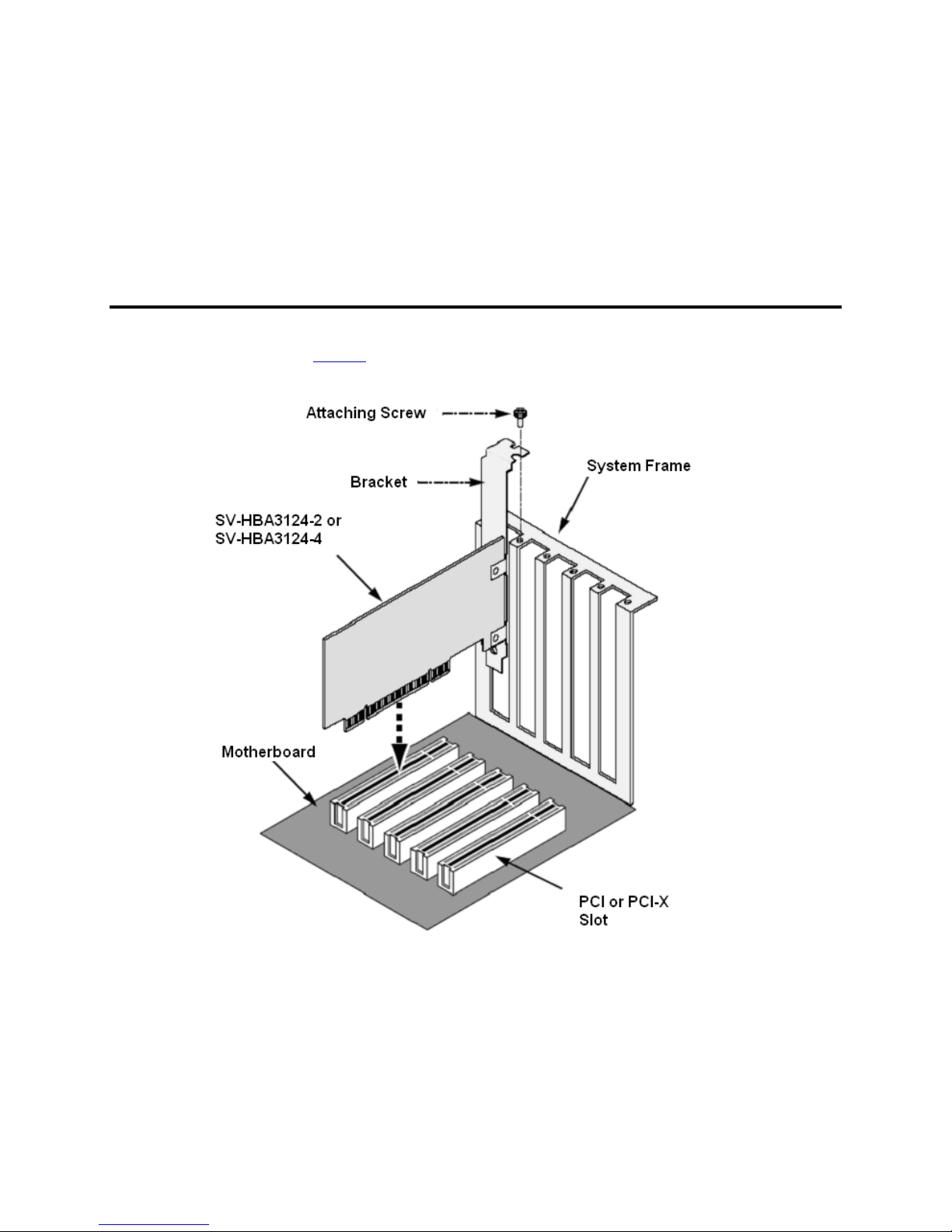
The SV-HBA3124-2 or SV-HBA3124-4 Serial ATA card fits into any available PCI or PCI-X slot on your PC
or Server motherboard (see Figure 3).
Figure 3 PCI or PCI-X slot on motherboard
1. Turn off your system.
2. Remove the cover of your system.
3. Remove the inside slot cover of an available PCI or PCI-X slot on the motherboard.
4. Install the SV-HBA card into the open PCI or PCI-X slot. Secure the bracket to the system’s frame.
5. Attach the Serial ATA cables to the external or internal ports on the card.
6. Fasten the controller card bracket to the system case.

Document Number: MAN-003124-000 Version 1.0
SV-HBA3124-2 / SV-HBA3124-4 User's Guide
Page
5
Install the Disk Drives/Devices
The SV-HBA3124-2 card supports up to two external Serial ATA devices and two internal Serial ATA devices.
The SV-HBA3124-4 card supports up to four external devices. For optimal performance, install Serial ATA
drives of the same model and capacity. The drives’ matched performance allows the logical disk to function
better as a single drive.
Install Internal Devices on the SV-HBA3124-2
1. Install the internal disk drives into the drive bays of your system.
2. Attach the power cables to the disk drives.
3. Attach one Serial ATA data cable to each Serial ATA disk drive.
4. Attach the other ends of the cables to the connectors on the SV-HBA card.
5. Put the cover back on the system.
6. Boot up the system.
Install External Devices on the SV-HBA3124-2 & SV-HBA3124-4
1. Attach one Serial ATA data cable to each Serial ATA device (for example, an SV2000).
2. Then attach the other ends of the cables to the connectors on the SV-HBA card.
3. Power on the external SATA device.
4. Put the cover back on the system.
5. Boot up the system.

Document Number: MAN-003124-000 Version 1.0
SV-HBA3124-2 / SV-HBA3124-4 User's Guide
Page
6
Install the Driver
The procedures in this section assume that the Windows or Mac operating system has already been installed on
your PC or Server.
Note: Drivers for the Silicon Image SiI 3124 SATALink Controller have been fully tested and
certified to work with the SV-HBA3124-2 and SV-HBA3124-4.
Microsoft Windows 2003 Server
Windows 2003 Server comes preloaded with the software drivers necessary to run the SV-HBA3124-2 and SV-
HBA3124-4. You do not have to install the driver.
To confirm the driver installation
1. Right-mouse click the My Computer icon on your desktop and choose Manage from the pop-up
menu.
2. Double-click Device Manager.
3. Double-click SCSI and RAID controllers.
4. Verify that the Silicon Image SiI 3124 SATALink Controller appears, as shown here.
Document Number: MAN-003124-000 Version 1.0
SV-HBA3124-2 / SV-HBA3124-4 User's Guide
Page
7
Microsoft Windows XP
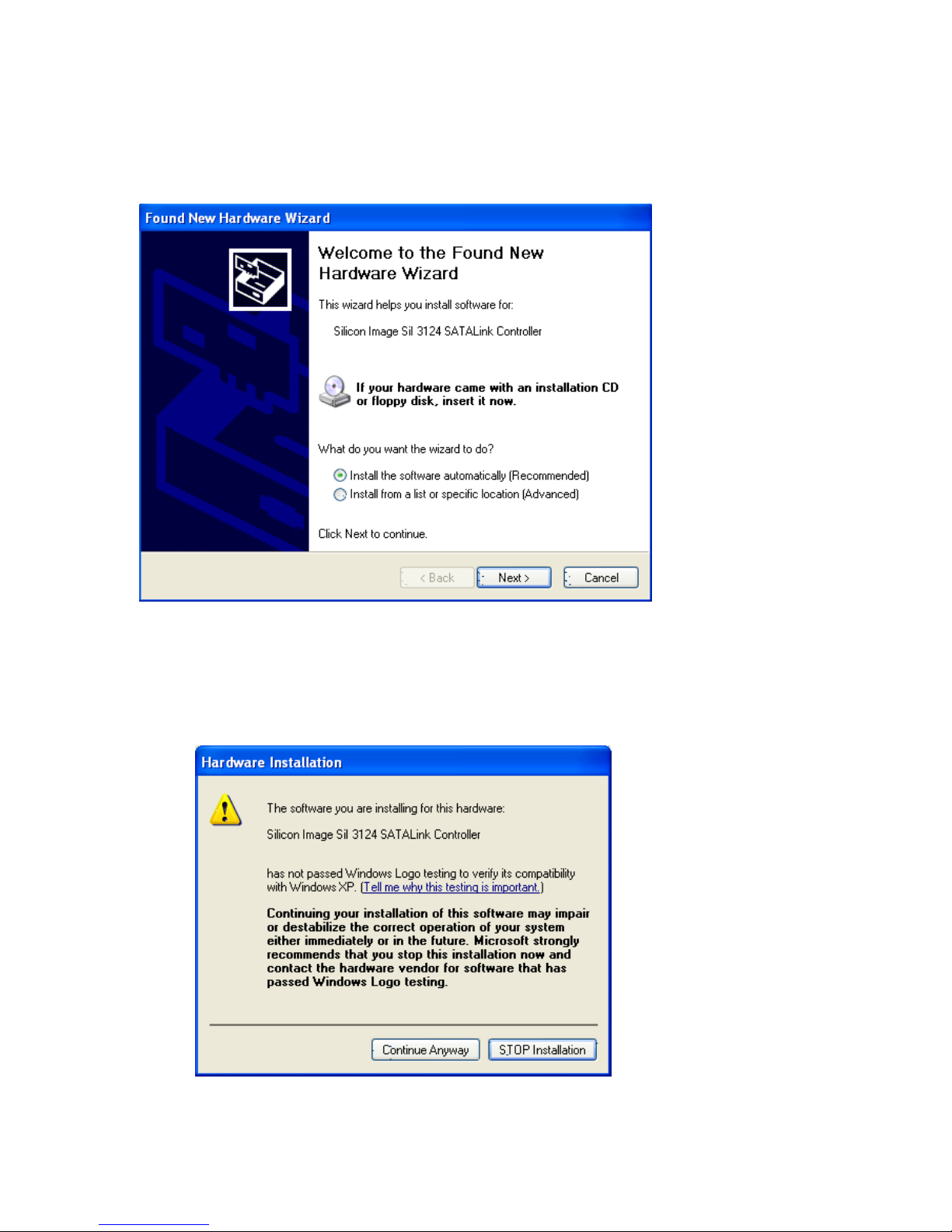
After you install the SV-HBA3124-2 or SV-HBA3124-4 and devices, and then power on your computer, the
Found New Hardware Wizard opens.
To complete the driver installation
1. Insert the SV-HBA3124 CD-ROM.
2. Select Install the software automatically (Recommended) and click Next.
3. If you get the Hardware Installation notice, click Continue Anyway.
Questo manuale è adatto per i seguenti modelli
1
Indice
Manuali Adattatore host popolari di altre marche

Digital Equipment
Digital Equipment StorageWorks EK-KZPCM-UG Manuale utente

ATTO Technology
ATTO Technology ExpressPCI UL4S Manuale utente

Sun Microsystems
Sun Microsystems Sun StorEdge Manuale utente

LSI
LSI LSI21320-R Manuale utente

LSI
LSI Ultra160 Manuale utente

ATTO Technology
ATTO Technology ATTO ExpressPCI FC 3321 Manuale utente


Tekram Technology
Tekram Technology DC-820B Manuale utente

HighPoint
HighPoint RocketRAID 174x Manuale utente

Adaptec
Adaptec AHA-2944UW Manuale utente

ATTO Technology
ATTO Technology ATTO Celerity FC-81EN Manuale utente

ATTO Technology
ATTO Technology UL4D PCI Manuale utente

IBM
IBM System Storage DS4000 Manuale utente