
Silvercrest DS-1020T Foglio di istruzioni

HOME TECH
TARGA GmbH
Lange Wende 41
D-59494 Soest
www.silvercrest.cc
User manual and
service information
Digital Camera
with video function
1471833
6
GB
IE
CY
hb-ds-1020_lb6_0903.qxd:Layout 1 01.04.2009 8:15 Uhr Seite 1
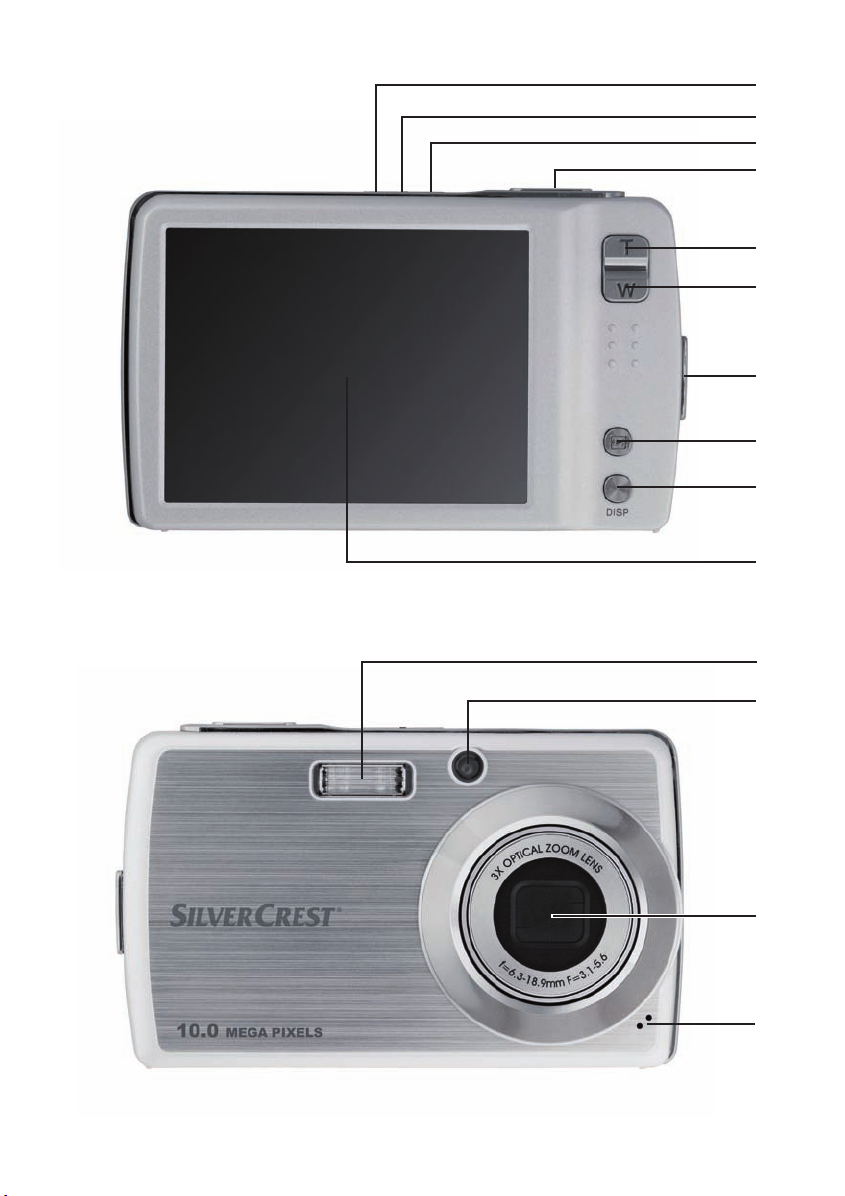
1
2
3
4
5
6
8
9
10
11
12
13
14
7
hb-ds-1020_lb6_0903.qxd:Layout 1 01.04.2009 8:15 Uhr Seite 2

SilverCrest DS-1020T English
1
Contents
Important Notice ..............................................................................................5
Safety Instructions........................................................................................5
Children ....................................................................................................7
Charger and Rechargeable Battery .........................................................7
Cables ..........................................................................................................8
Maintenance and Care.................................................................................8
Intended Use................................................................................................9
Conformity....................................................................................................9
Disposal of Old Devices .............................................................................10
Note on this Manual ...................................................................................10
Introduction ....................................................................................................11
Package Contents......................................................................................11
Controls and buttons..................................................................................12
Getting started............................................................................................13
Charging the Battery ..............................................................................13
Inserting the Battery ...............................................................................14
Inserting the SD Card.............................................................................15
Write-Protecting a Memory Card............................................................17
Switching the Camera On and Off .........................................................17
Power-Saving Function ..........................................................................17
Toggling Between Recording and Playback Mode ................................18
LCD Display............................................................................................18
Recording Mode .....................................................................................19
Playback Mode.......................................................................................20
Changing the Displayed Information ......................................................21
Setting the Menu Language ...................................................................22
Setting Date and Time............................................................................23

English SilverCrest DS-1020T
2
Capturing Pictures ........................................................................................ 24
Quick Guide............................................................................................... 24
Using the Zoom Function .......................................................................... 25
Using the Flash ......................................................................................... 26
Histogram .................................................................................................. 27
Stabilizer.................................................................................................... 28
Record Menu............................................................................................. 28
Resolution.............................................................................................. 31
Quality.................................................................................................... 32
ISO......................................................................................................... 32
Metering................................................................................................. 33
White balance........................................................................................ 33
Effect...................................................................................................... 35
AF Area.................................................................................................. 35
Flash Intensity ....................................................................................... 36
EV Compensation.................................................................................. 36
Photo Frame.......................................................................................... 38
Sharpness ............................................................................................. 38
Saturation .............................................................................................. 39
Contrast ................................................................................................. 39
Date Stamp............................................................................................ 40
Focus mode........................................................................................... 40
Drive Mode ............................................................................................ 41
Flash...................................................................................................... 42
AF Lamp ................................................................................................ 42
Scene modes ............................................................................................ 43
Smile Capture........................................................................................ 45
Recording Video Clips .................................................................................. 46
Quick Guide............................................................................................... 46
Video Menu ............................................................................................... 47
Movie Size ............................................................................................. 50
Quality.................................................................................................... 50

SilverCrest DS-1020T English
3
Frame Rate.............................................................................................50
White balance.........................................................................................51
Effect ......................................................................................................51
Sharpness ..............................................................................................51
Saturation ...............................................................................................51
Contrast ..................................................................................................51
Focus mode............................................................................................51
Voice Recording ............................................................................................52
Playing Back Images and Video Clips...........................................................53
Quick Guide ...............................................................................................53
Playback Menu...........................................................................................54
Saving Your Changes ............................................................................56
Resize.....................................................................................................56
Voice Memo............................................................................................57
Protect ....................................................................................................57
Delete .....................................................................................................58
Rotate .....................................................................................................58
Z-Lighting................................................................................................59
Add Memo ..............................................................................................59
DPOF......................................................................................................59
My Drawings...........................................................................................62
Photo Frame...........................................................................................63
Red-eye Correct .....................................................................................63
Effect ......................................................................................................63
Using the Thumbnail View .........................................................................64
Trimming Pictures ......................................................................................65
Advanced settings .........................................................................................67
Setup Menu................................................................................................67
Memory Kit .............................................................................................68
Auto Review ...........................................................................................68
Digital Zoom ...........................................................................................69

English SilverCrest DS-1020T
4
System Sound ....................................................................................... 69
Volume................................................................................................... 69
LCD Brightness ..................................................................................... 70
Power-Saving Function ......................................................................... 70
Date & Time........................................................................................... 70
TV Out ................................................................................................... 70
Hot Key .................................................................................................. 71
Startup Image ........................................................................................ 72
Reset ..................................................................................................... 72
Language............................................................................................... 73
Connectors and Ports ................................................................................... 74
Viewing Recordings on a Television Screen............................................. 74
Copying Recordings to a Computer .......................................................... 75
Using the USB Cable............................................................................. 75
Using a Card Reader............................................................................. 77
Installing the Software .................................................................................. 78
System Requirements ............................................................................... 78
Supplied Software ..................................................................................... 78
Appendix ....................................................................................................... 79
Tips for Taking Better Pictures.................................................................. 79
Subject................................................................................................... 79
Background ........................................................................................... 79
Camera Angle........................................................................................ 79
Golden Section ...................................................................................... 79
Lighting .................................................................................................. 79
Troubleshooting......................................................................................... 80
Technical Specifications............................................................................ 82
Product Label ............................................................................................ 83
Details of Guarantee ................................................................................. 84

SilverCrest DS-1020T English
5
Important Notice
Safety Instructions
- Before you use this device for the first time, please read the following
notes in this manual and heed all warnings, even if you are familiar with
handling electronic devices. Always check the camera works correctly.
- Keep this manual with the instructions in a safe place for future reference.
- If you sell the device or pass it on, it is essential you hand over this
manual also.
- Do not try to open the camera housing or reassemble the camera. Inside
there are components and high voltage. You are at risk of receiving an
electric shock. Maintenance and repairs should only be carried out by
qualified technicians.
- Do not look at the sun or other sources of intense light. Doing so may
damage your eyesight.
- Never activate the flash near the eyes of persons or animals. This is
especially dangerous for children. The flash is dangerous to your eyesight.
When using the flash, stand at least one meter (3 feet) away from your
subject.
- Keep the device away from water and other liquids. Do not operate the
camera with wet hands. Do not use the camera in rain or snow.
Dampness can cause danger through fire or electric shock.
- Keep the device out of the reach of children and animals to avoid
accidents or camera damage.
- Switch the device off immediately if you notice it emitting smoke or strange
noises. Contact customer service. Never try to repair the camera yourself.
- Only use the supplied charger Scope DJ04V20500A to recharge the
camera battery.
- Only use this device with the supplied rechargeable battery (Emore NP40)
in order to avoid overheating, deformation of the cover, fire, electric
shocks, explosion and other dangers.
- Unplug the charger power cord from the wall outlet before removing any
battery from the charger.
- In the event of a defect of the product or its accessories, unplug the power
cord from the mains immediately.

English SilverCrest DS-1020T
6
- Also, when there is the possibility of thunderstorms, unplug the power cord
from the wall outlet.
- Never try to heat, disassemble or short-circuit the rechargeable battery.
Do not throw the rechargeable battery into fire.
Warning: Notice concerning separation from the mains
In order to completely disconnect the charger from the mains, unplug the
power cord from the wall outlet. The wall outlet where the device is
connected must be easy to access so that the power cord can be pulled out
quickly in case of emergency. Unplug the power cord from the mains when
you will not be using the charger for a long while (e.g. when going on
holiday) in order to avoid the danger of fire. Do not hold the power cord with
wet hands.
The device is not for use in rooms with a high temperature or humidity and
must be kept free of dust. Position the device on a stable, even surface and
do not place any objects on the device.
Always make sure that:
- no direct heat sources (e.g. heating) can affect the device;
- no direct sunlight or bright artificial light reaches the device;
- contact with spray, dripping water and corrosive liquids must be avoided
and the device should never be operated near water, and it must
especially never be immersed (do not place any objects filled with liquids
such as vases or drinks near the device);
- no fire sources (e.g. burning candles) are placed on or near the device;
- no foreign bodies are introduced into the device;
- the device must not be subject to any great temperature changes as this
may cause moisture through condensation;
- the device should not be subject to excessive shock and vibrations.

SilverCrest DS-1020T English
7
Children
Electrical appliances do not belong in the hands of children. Do not allow
children to use electrical devices when not under supervision. Children may
not comprehend the presence of potential risks. Rechargeable batteries and
small parts represent potential choking hazards. Keep the rechargeable
battery out of reach of children. If a rechargeable battery is swallowed, seek
medical help immediately. Keep all packaging away from children as this can
cause suffocation.
Charger and Rechargeable Battery
Insert the rechargeable battery with the correct polarity. Never throw a
rechargeable battery into fire. Remove the rechargeable battery from the
camera when the device is not to be used for a long time.
Danger of Explosion!
Non-intended use may cause explosion and danger to life. Only replace the
rechargeable battery with an equivalent or a type recommended by the
manufacturer. Never replace the battery in an explosion-sensitive
environment. While inserting or removing the battery a spark may be
produced causing an explosion. Explosion-sensitive areas will normally (but
not always) be labelled. These include any fuel storage areas such as below
deck on a boat, fuel line or tank areas, environments where the air contains
inflammable substances (e.g. cereals, metal dust or powder, etc.) and any
areas where you should normally switch off your car engine.
Respect the environment. Old rechargeable batteries do not belong in with
domestic waste. They must be handed in to a collection point for old
batteries.

English SilverCrest DS-1020T
8
Cables
Always hold cables by the plug and never pull on the cable itself. Never hold
the power cord with wet hands as this may cause a short circuit or electric
shock. Never place the device, heavy objects or furniture on the cable and
take care that the cord does not become trapped, especially at the plug and
sockets. Never make knots in the cable and do not tie it together with other
cords. All cables should be positioned so that nobody can trip over them or
be obstructed by them. A damaged power cord can cause a fire or an electric
shock. Inspect the power cord from time to time. Do not use any adapter plug
or extension cable that does not meet the required safety standards.
Maintenance and Care
Servicing is required when this device has been damaged in any way, for
example, when the charger or the camera housing is damaged, when liquid
or objects have entered the device, when the product has been exposed to
rain or moisture, when the product does not work normally or if the product
has been dropped. If you notice any smoke, unusual noise or strange smells,
switch off the device immediately and unplug the power cord from the power
supply. In this case the device should not be used further and should be
inspected by authorized service personnel. Please contact qualified
personnel when servicing is needed.
Indice
Altri manuali Silvercrest Macchina fotografica digitale


