
Silvercrest SGT 10.6 A2 Manuale utente


V 1.93
English.............................................................................................................. 2
Dansk.............................................................................................................34
Deutsch ..........................................................................................................66

SilverCrest graphics tablet SGT 10.6 A2
2 - English
Contents
Registered trademarks ....................................................................................... 3
Introduction ........................................................................................................ 3
Intended use....................................................................................................... 3
Supplied items .................................................................................................... 4
Supplied software.............................................................................................................................5
Licence terms –licence agreement ...................................................................... 5
Operating elements and connections .................................................................. 6
Technical data..................................................................................................... 8
Minimum system requirements .........................................................................................................8
Safety instructions .............................................................................................. 9
General precautions.........................................................................................................................9
EMC and safety precautions............................................................................................................9
Operating environment/Environmental conditions.........................................................................9
Operational safety............................................................................................................................9
Prior to use ....................................................................................................... 10
Step 1: Inserting the battery into the digital pen.......................................................................... 10
Step 2: Installing the graphics tablet driver and Macro Key Manager..................................... 11
Step 3: Connecting the graphics tablet........................................................................................ 12
Step 4: Adjusting the active area to the screen format ............................................................... 13
Step 5: Installing "Free Notes / Office Ink" ................................................................................. 14
Step 6: Installing "Power Presenter RE II" ..................................................................................... 15
Step 7: Installing "CorelDRAW®Essentials OEM" ...................................................................... 16
First use ............................................................................................................ 19
Working with the function keys and the control button............................................................... 19
Working with the digital pen (for example when using "Free Notes") ...................................... 21
Configuration ................................................................................................... 23
Programming macro keys.............................................................................................................. 23
Customising the digital pen........................................................................................................... 27
Troubleshooting................................................................................................ 29
Replacing the battery..................................................................................................................... 30
Replacing the pen nib.................................................................................................................... 30
Cleaning / maintenance.................................................................................... 31
Disposal of old devices ................................................................................................................. 31
Conformity information .................................................................................... 31
Warranty and servicing information................................................................. 32
SilverCrest graphics tablet SGT 10.6 A2
English - 3
Registered trademarks
Intel and Pentium are registered trademarks of Intel Corporation.
USB is a registered trademark of USB Implementers Forum, Inc.
Microsoft and Windows are registered trademarks of Microsoft Corporation in the United States of
America and/or other countries.
CorelDRAW is a registered trademark of Corel Corporation.
Introduction
Thank you for purchasing the SilverCrest graphics tablet SGT 10.6 A2.
Before using this device for the first time, please read the following instructions carefully, even if you
are familiar with the use of electronic devices. Please keep this manual safe for future reference. If
you pass on the device to someone else, be sure to always include these instructions.
This symbol in the following text indicates possible hazards resulting from the use of the device
that can lead to personal injury or material damage.
Intended use
The graphics tablet is an information technology device. It is used in keeping with its intended
purpose when it is used exclusively to enter graphics or texts on a computer. Any other use is not as
intended.
The manufacturer does not assume any liability if the device ...
is not used as intended.
is damaged or modified prior to connection and use.
The graphics tablet may only be used indoors and for private purposes. Its use in a company or for
commercial purposes is expressly excluded, as it is not designed for use at computer workstations in
compliance with the provisions of the German Ordinance for Work with Visual Display Units.
Please observe the regulations and laws in the country of use.

SilverCrest graphics tablet SGT 10.6 A2
4 - English
Supplied items
1 x graphics tablet SGT 10.6 A2 with USB socket
1 x digital pen with nib
1 x battery type AAA (1.5 V R03) for the digital
pen
2 x replacement nibs for the digital pen
1 x nib extractor
1 x pen stand
1 x installation CD with Macro Key Manager, Free
Notes / Office Ink and Power Presenter RE II
1 x DVD with CorelDRAW®Essentials OEM 1)
1 x user manual
1) The OEM version may only be used with the purchased graphics tablet. The scope and appearance of OEM
versions can differ from the original versions.

SilverCrest graphics tablet SGT 10.6 A2
English - 5
Supplied software
The Macro Key Manager is special application software for your new graphics tablet. It is
used to program frequently used key combinations (e.g. copy = <Ctrl>+<C>) or hyperlinks to
so-called macro keys and save these as a macro key profile.
Free Notes / Office Ink is a tool for making sketches or notes by hand on your computer –
either in the same way as on a sheet of paper (Free Notes) or directly on the open screen
(Office Ink). You can switch interactively between both applications.
Power Presenter RE II is a program for editing presentations.
CorelDRAW®Essentials OEM is a powerful software package for creating illustrations,
page layouts and editing photos. It is based on the basic functions of CorelDRAW®Graphics
Suite.
Licence terms –licence agreement
The licence terms of software explain the ways in which you are entitled to use the software. This
already touches on a significant difference in the viewpoint of the customer/user and the
manufacturer. While the customer/user thinks he has bought the software and thus owns it, the
manufacturer of the software only sells/offers its customers a “restricted”right of use under specific
circumstances. Ordinarily the software may only be used in conjunction with the purchased system.
In addition, use may be restricted for commercial use. Under certain circumstances the software
may not be used to control machines or for the development of weapons. The terms also contain
restrictions with respect to the liability of the manufacturer.
If you do not fully agree with the licence agreement, then according to the manufacturer you are
not entitled to use the respective software. Under certain circumstances individual clauses in the
licence agreement may be questionable from a legal standpoint. This may mean that these are
invalid and are then no longer binding for you. If you do not agree to the licence agreement, you
may be entitled to return the software.
Please note that this right to return the software concerns the manufacturer of the software, not the
manufacturer of the hardware. In this case you should contact the manufacturer of the software to
exercise your right to return the software. Since your system was sold at a package price, a price
evaluation of individual components and software components is not a part of the offer.
Comparison prices are therefore intentionally not specifiable and for this reason the difference can
also not be reimbursed.

SilverCrest graphics tablet SGT 10.6 A2
6 - English
Operating elements and connections
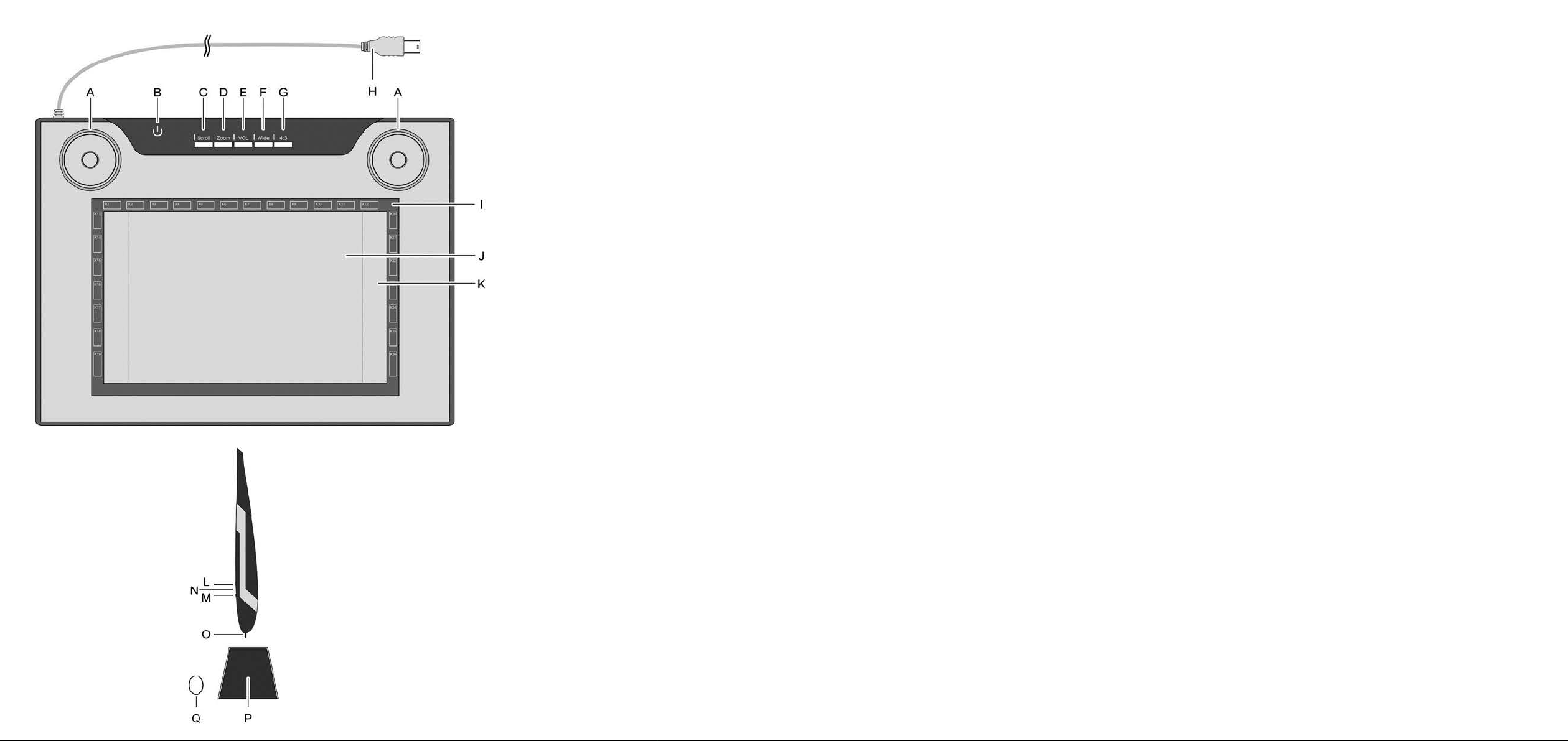
Graphics tablet:
A: Control button (rotating control pad and
button) for scroll, zoom and volume
functions
B: Status indicator
Flashing: No pen nearby
On: Pen not on active area
Off: Pen on active area
C: Select scroll function; LED lights up when
the function is active
D: Select zoom function; LED lights up when
the function is active
E: Select VOL (volume) function; LED lights up
when the function is active
F: Switch graphics tablet to widescreen
mode; LED lights up when the function is
active
G: Switch graphics tablet to standard screen
(4:3) mode; LED lights up when the
function is active
H: USB connector
I: Frame with programmable sensor keys
(macro keys)
J: Active area in 4:3 format (when LED "G"
lights up)
K: Active area in widescreen format (when
LED "F" lights up)

SilverCrest graphics tablet SGT 10.6 A2
English - 7
Pen:
L: Rear pen button, programmable (default:
left double click)
M: Front pen button, programmable (default:
right mouse click)
N: LED lights up when the battery is running
low
O: Nib; communicates the commands to the
active area (J, K) or sensor keys (I)
P: Pen stand; protects the nib when the pen
is not in use
Q: Nib extractor; used to pull the nib from
the pen when it requires replacement.
Note: The pen does not have an on/off switch. It switches on automatically when it is near the
active area and switches off when it is taken away.
SilverCrest graphics tablet SGT 10.6 A2
8 - English
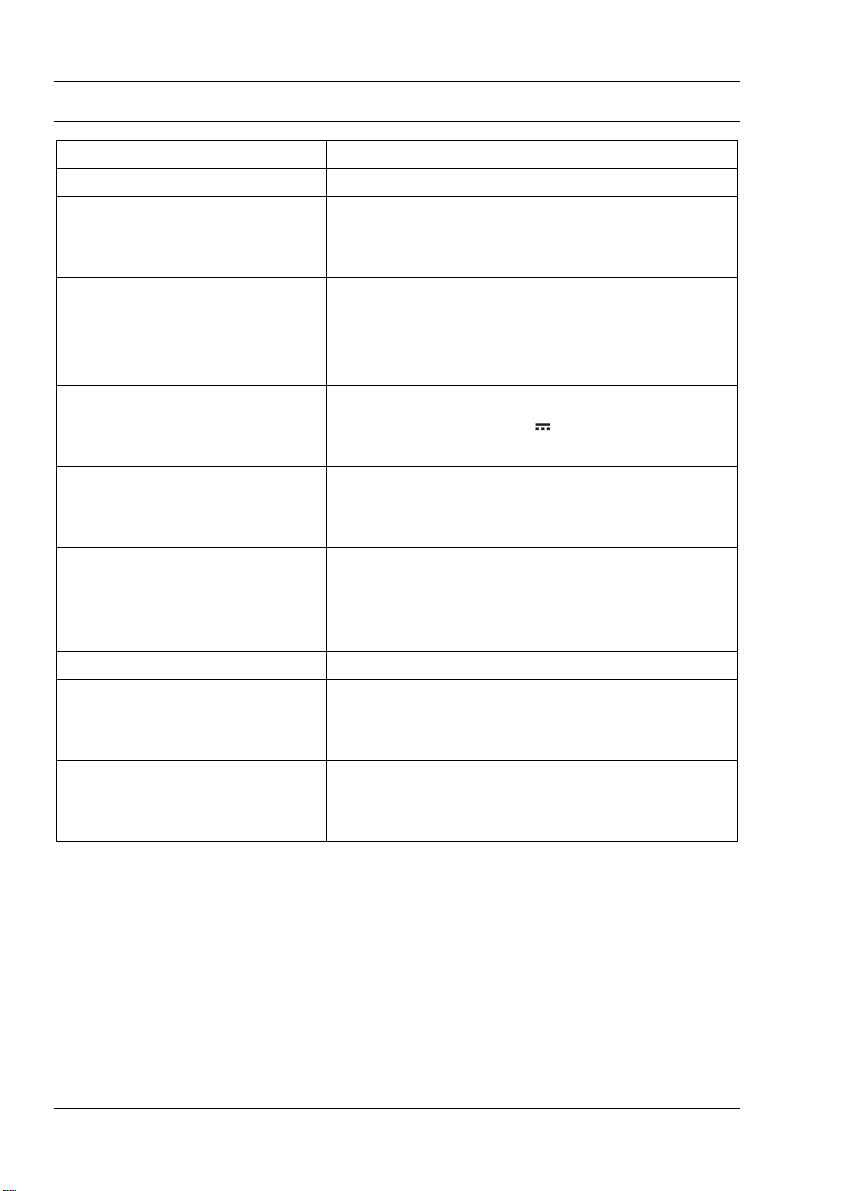
Technical data
Model SGT 10.6 A2
Technology Electromagnetic
Dimensions
Graphics tablet
Pen
340 x 19 x 260 mm
160 x 14,7 x 17,7 mm
Weight
Graphics tablet
Pen
Pen stand
919 g
24 g
42 g
Power supply
Graphics tablet
Pen
Via USB connection (DC 5 V 75 mA)
Battery-powered (1 x 1.5 V, type AAA)
Active area
4:3 format
16:10 format
18.4 x 14 cm (7.25" x 5.5")
22,9 x 14 cm (9" x 5.5")
Resolution
Windows®XP
Windows Vista®/ Windows®7
4000 lpi (lines per inch)
2000 lpi (with Windows default driver)
4000 lpi (with installed SilverCrest driver)
Report rate 200 rps (reports per second)
Pen
Pressure levels
Reading distance
1024 levels
10 mm max.
Operating environment
Temperature
Air humidity
5 to 35 °C
85 % rel. air humidity max.
Minimum system requirements
PC with Pentium 3 processor or higher with 800 MHz and USB socket (for CorelDRAW®
Essentials OEM: PC with Intel®Pentium®4, AMD Athlon®64 or AMD Opteron®processor and
1 GB RAM)
16-bit colour graphics card with 256 MB RAM (512 MB recommended)
Colour screen with a resolution of 1024 x 768
DVD drive for installing the drivers and software
Operating system: Windows®XP, Windows Vista®or Windows®7
Altri manuali per SGT 10.6 A2
2
Indice
Lingue:
Altri manuali Silvercrest tavoletta grafica


