Simmons SD5Xpress Manuale utente

Electronic Drum Kit
user manual
The First Name in Electronic Drums.
www.simmonsdrums.net
SD5Xpress
Electronic Drum Kit
www.simmonsdrums.net

FCC Statements
1. Caution: Changes or modifications to this unit not expressly approved by the party responsible for compliance could void
the user’s authority to operate the equipment.
2. Note: This equipment has been tested and found to comply with the limits for a Class B digital device, pursuant to Part 15
of the FCC Rules. These limits are designed to provide reasonable protection against harmful interference in a residential
installation. This equipment generates, uses, and can radiate radio frequency energy and, if not installed and used in
accordance with the instructions, may cause harmful interference to radio communications. However, there is no
guarantee that interference will not occur in a particular installation. If this equipment does cause harmful interference to
radio or television reception, which can be determined by turning the equipment off and on, the user is encouraged to
try to correct the interference by one or more of the following measures:
•Reorient or relocate the receiving antenna.
•Increase the separation between the equipment and receiver.
•Connect the equipment into an outlet on a different circuit.
•Consult an experienced radio/TV technician for help.
Two (2) Year Limited Warranty
Subject to the limitations set forth below, Simmons®hereby represents and warrants that the components of this product shall
be free from defects in workmanship and materials, including implied warranties of merchantability or fitness for a particular
purpose, subject to normal use and service, for two (2) years to the original owner from the date of purchase.
Retailer and manufacturer shall not be liable for damages based upon inconvenience, loss of use of product, loss of time,
interrupted operation or commercial loss or any other incidental or consequential damages including but not limited to
lost profits, downtime, goodwill, damage to or replacement of equipment and property, and any costs of recovering,
reprogramming, or reproducing any program or data stored in equipment that is used with Simmons®products. This
guarantee gives you specific legal rights. You may have other legal rights which vary from state to state. Some states do
not allow limitations on how long an implied warranty lasts, so the above limitation may not apply to you.
Simmons
P.O. Box 5111
Thousand Oaks, CA 91359-5111
Customer Support
Monday - Friday 8:00 a.m.- 5:00 p.m. MST
(888)-621-4008.
All trademarks and registered trademarks mentioned herein are recognized as the property of their respective holders.
Made in China
1406-10159

3
www.simmonsdrums.net
The First Name in Electronic Drums.
… on your purchase of Simmons’ SD5Xpress Electronic Drum Kit. To get the most enjoyment from this
kit, we recommend that you skim through this manual at least once, then refer back to it to learn more
about specific functions.
Taking Care of Your Digital Drum Kit
Location
• To avoid deformation, discoloration, or more serious damage, do not expose the unit to direct
sunlight, high temperature sources, or excessive humidity.
Power Supply
• Turn the power switch OFF when the SD5Xpress is not in use.
• The AC adapter should be unplugged from the AC outlet if the SD5Xpress is not to be used for an
extended period of time.
• Avoid plugging the AC adapter into an AC outlet that is also powering high-consumption appliances
such as electric heaters or televisions. Also avoid using multi plug adapters since these can reduce
sound quality, cause operation errors and result in possible damage.
• To avoid damage, turn OFF the SD5Xpress’s power switch and all related devices prior to
connecting or disconnecting cables.
Handling and Transport
• Never apply excessive force to controls, connectors, and other parts.
• Unplug cables by gripping the plug firmly. Do not pull on the cable.
• Disconnect all cables before moving the module.
• Physical shocks caused by dropping, bumping, or placing heavy objects on the module can result
in scratches and more serious damage.
Cleaning
• Clean the module with a dry, soft cloth.
• A slightly damp cloth may be used to remove stubborn grime and dirt.
• Never use cleaners such as alcohol or thinner.
• To avoid discoloration, do not place vinyl objects on top of module.
Electrical Interference
• The module contains digital circuitry and may cause interference if placed too close to radio or
television receivers. If this occurs, move the SD5Xpress further away from the affected equipment.
Service and Modification
• There are no user serviceable parts in the drum module.
• Do not attempt to open the drum module or make any change in the circuits or parts of the unit. This
would void the warranty.
Congratulations!

4
SD5Xpress digital drum kit User manual
The First Name in Electronic Drums.

5
www.simmonsdrums.net
The First Name in Electronic Drums.
Table of Contents
Panel Controls
User Interface 6
Rear Panel 7
Connections
Pads and Pedal 8
Mixer or Amplification 9
MP3 (Aux in jack) 9
Headphones 9
Power Supply 9
MIDI and USB 10
Operation
Turning the Power On 11
Auto Power Off 11
Setting the Main Volume 11
Pattern
Selecting a Pattern 12
Adjusting the Accompaniment Volume 12
Adjusting the Drum Volume 12
Drum Kit
Selecting a Kit 13
Adjusting the Kit Volume 13
Toggling Reverb On/Off 13
Voice
Selecting the Voice 14
Adjusting the Voice Volume 14
Adjusting the MIDI Note 15
Tempo
Adjusting the Tempo 15
Click
Adjusting the Click Time Signature 16
Adjusting the Click Interval 16
Adjusting the Click Instrument 16
Adjusting the Click Volume 16
Playing
Playing the Demo 17
Playing the Pattern 17
Playing the Click 17
Appendices
Restoring factory Presets 18
Specifications 18
Preset Drum Kit List 19
Preset Pattern List 19
Preset Drum Instrument List 20
General MIDI Voice List 21
Percussion Set List 22
MIDI Implementation Chart 24

6
SD5Xpress digital drum kit User manual
The First Name in Electronic Drums.
PANEL CONTROLS
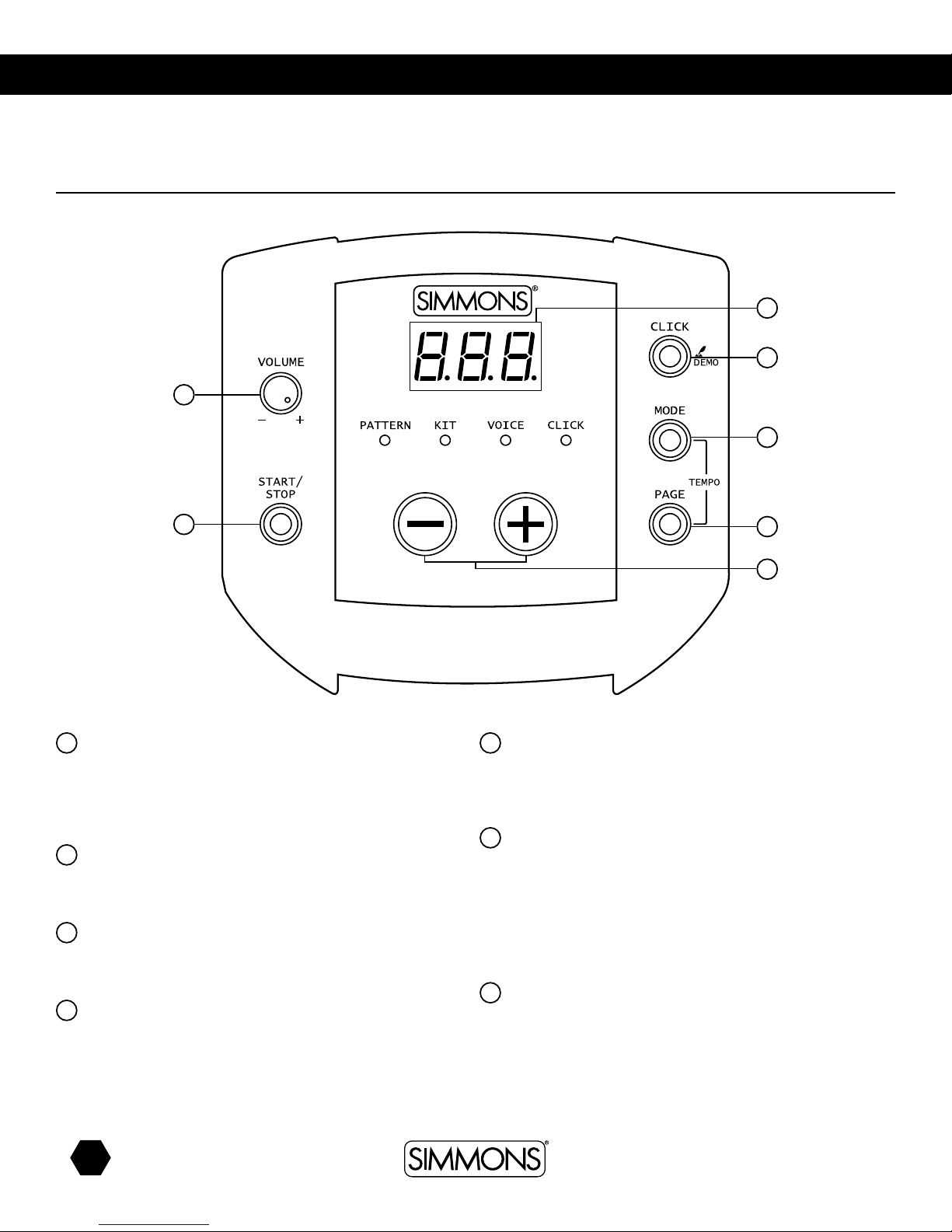
1Master Volume Control
Control the volume of phone and line outputs. Turn knob
clockwise to increase the volume and counter-clockwise to
decrease the volume.
2[START/STOP] Button
Start or stop Pattern playing.
3LED Display
3-digit LED and LED indicators.
4[CLICK] BUTTON
Press [CLICK] button to start/stop the click.
Hold the [CLICK] button 2 seconds to enter the demo mode
and play the demo.
5[MODE] Button
Press [MODE] button to select the mode from PATTERN, KIT,
VOICE, CLICK.
6[PAGE] Button
Press [PAGE]button to browse the menu pages of current
selected mode.
Press both [MODE] and [PAGE]buttons, the 3-digit LED will
display the tempo page, it will display for 3 seconds, then
press [+]/[-] to adjust the value.
7[+]/[-] Button
Press [+]/[-] button to adjust the parameters.
User Interface
SD5Xp
7
1
3
4
5
6
2

7
www.simmonsdrums.net
The First Name in Electronic Drums.
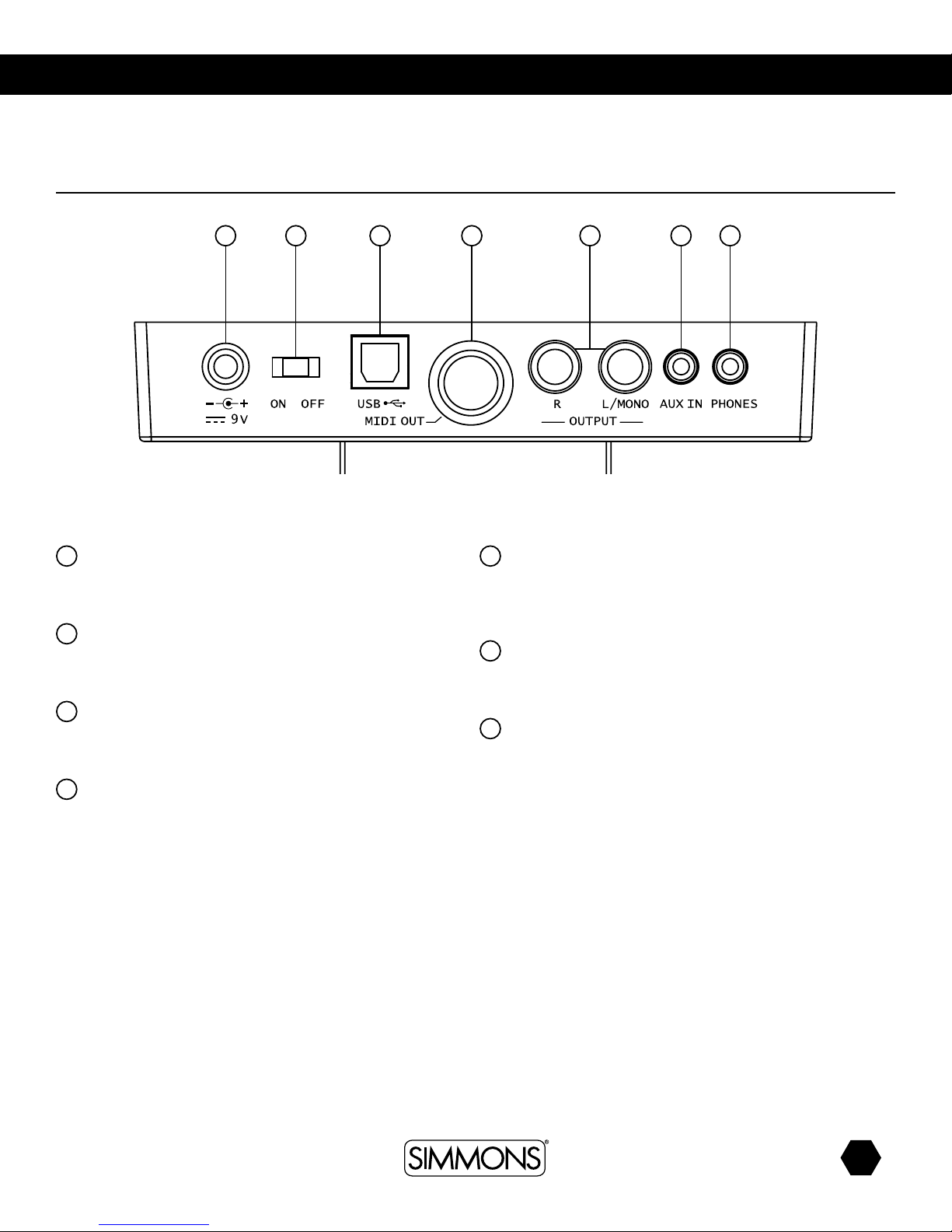
1Power Supply Jack
Connect the 9V AC adaptor to this jack.
2Power Switch
Turn the power on/off.
3USB Port
Connect to computer (MIDI via USB).
4MIDI Out Jack
Connect with external sound module.
5Line Output Jacks (R, L/MONO)
Right channel output and left channel output. Left channel
used as mono line output.
6AUX In
Connect with external sound source.
7Phones Jack
Connect a pair of stereo headphones to this jack (connection
of the headphones will not mute the output jack).
Rear Panel
SD5Xp
1 2 3 4 5 6 7

8
SD5Xpress digital drum kit User manual
The First Name in Electronic Drums.
connections
CAUTION!
To prevent electric shock and damage to the device, make sure the power is switched
OFF on the sound module and all related devices before making any connection.
Bass Drum
Pads and Pedal
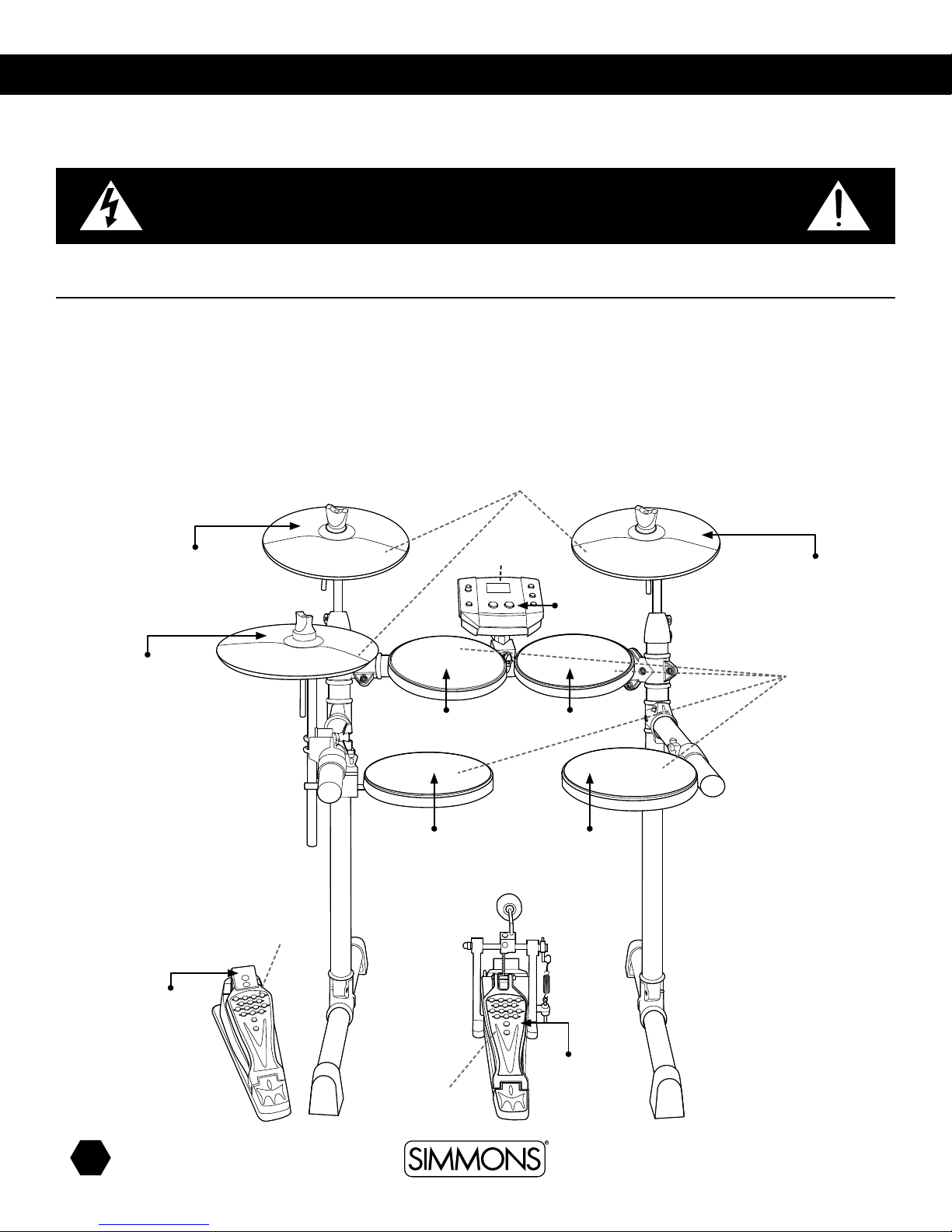
Using the provided cables, connect the 1/8” jacks to the corresponding drum
pads, cymbal pads and 1/4” jack to kick pad. The pin connection will attach
to the serial port of the sound module. (See illustration.)
Note: The voice of the hi-hat pad is controlled by the hi-hat pedal. Similar to
a real drum kit, the hi-hat pad functions as an ‘open hi-hat’ when the pedal is
released. When the pedal is pressed down, it functions as a ‘closed hi-hat’.
Note: The striking area of cymbal pad (ride, crash or hi-hat) is near the edge
of the pad.
Cymbal Pad
Drum Pad
Hi-Hat Pedal
Drum Module To Ride
To Tom 3
To Kick
To Hi-Hat
Control
From Drum
Module
To Hi-Hat
To Crash
To Tom 1
To Snare
To Tom 2

9
www.simmonsdrums.net
The First Name in Electronic Drums.
Mixer or Amplification
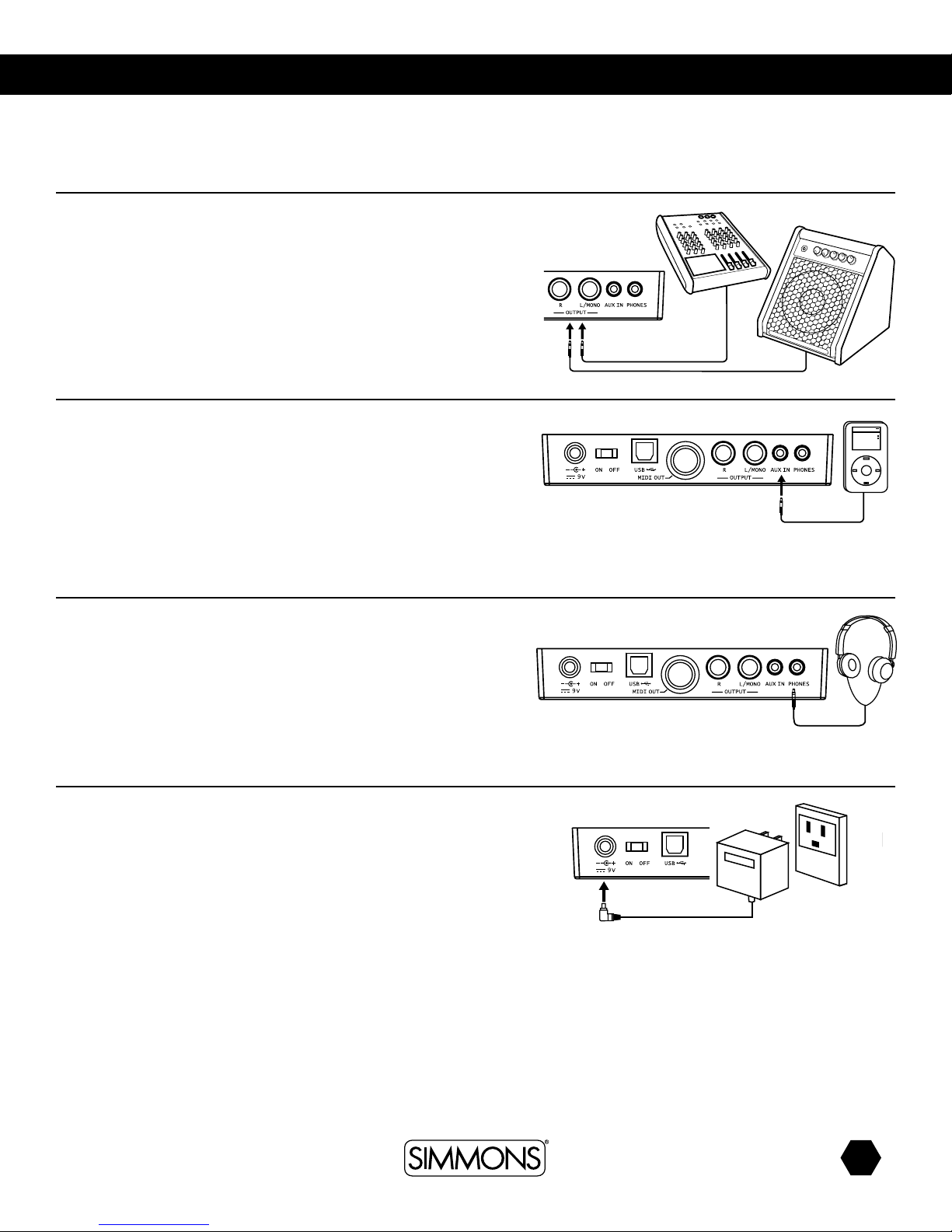
1. When you want to listen to the voices send the drum to a mixer or amplifier.
Connect using the Output L/MONO and R jacks on the rear panel (for
monaural playback, use the L/MONO jack; for stereo playback, connect
both L/MONO and R jacks.)
2.The volume is adjusted with the VOLUME knob.
MP3 (Aux in Jack)
1. Use audio output of MP3 player, or other audio source, to connect with the
AUX IN jack on the rear panel. Play along with a pre-recorded track.
2.The volume of the external signal is adjusted with the VOLUME knob.
Headphones
An optional set of stereo headphones can be connected with the PHONES
jack located on the rear panel of the drum module. Adjust the volume to a
comfortable level.
Power Supply
Make sure the power is switched OFF and connect the power adaptor with the
DC IN jack on the rear panel.
Note: To protect the speakers, amplifier and the drum module from damage,
lower the volume to the minimum level before switching the power ON.
Make sure the power is switched OFF when connecting the drum module with
external devices.
Amplifier Amplifier
Amplifier Amplifier
Amplifier Amplifier
Amplifier Amplifier

10
SD5Xpress digital drum kit User manual
The First Name in Electronic Drums.
MIDI and USB
MIDI stands for Musical Instrument Digital Interface, this is a world-wide
standard communication interface that enables electronic musical instruments
and computers (of all brands) to communicate with each other so that
MIDI command and other data can pass between them. This exchange
of information makes it possible to create a system of MIDI instruments and
devices that offer greater versatility and control than is available with isolated
instruments. Whether you interface with computers, sequencers, expanders or
other controllers, your musical horizons will be greatly enhanced.
MIDI connection
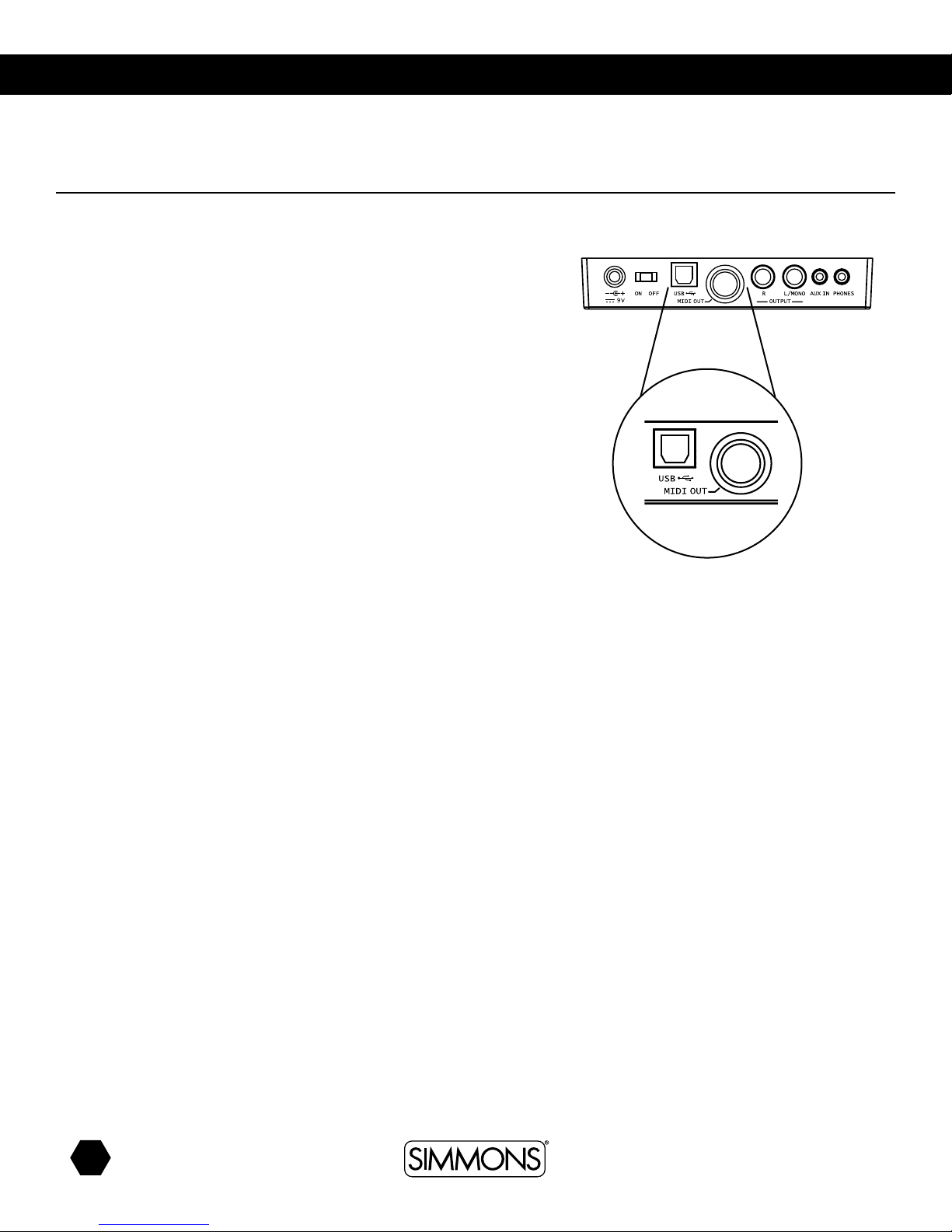
MIDI OUT: This terminal transmits data from this instrument to other MIDI
devices.
USB connection
The USB connector allows you to connect the module directly to your computer.
It can be connected without driver installation under the Windows XP\Vista\
Windows 7 & MAC OSX environment.
The module will be recognized as ‘USB Audio device’ to receive and transmit
MIDI messages through a single USB cable, USB is used only for MIDI
messages (MIDI via USB).
Note: When the USB is connected to a computer, all MIDI messages will be
received and transmitted via USB.
Amplifier Amplifier
Amplifier Amplifier
Indice
Altri manuali Simmons Tamburo

Simmons
Simmons SD1500 Manuale utente

Simmons
Simmons SD500 Manuale utente

Simmons
Simmons SD7K Manuale utente

Simmons
Simmons TITAN 20 Manuale utente

Simmons
Simmons SDMK4 Manuale utente

Simmons
Simmons Five Manuale utente

Simmons
Simmons SD1500 Manuale utente

Simmons
Simmons SD5K Manuale utente

Simmons
Simmons TITAN 50 Manuale utente

Simmons
Simmons SDMP1 Manuale utente

Simmons
Simmons SD 100 Manuale utente

Simmons
Simmons SD300KIT Manuale utente

Simmons
Simmons SDS 9 Manuale utente

Simmons
Simmons SD550 Manuale utente

Simmons
Simmons SDMP1 Manuale utente

Simmons
Simmons SDS 8 Manuale utente

Simmons
Simmons SD1 Manuale utente

Simmons
Simmons SD5X Manuale utente

Simmons
Simmons SD1250 Manuale utente

Simmons
Simmons SD1000 Manuale utente