Sintrones SBOX-2320 Manuale utente

User’s manual
EMBEDDED COMPUTING

SBOX-2320 Manual
1
SINTRONES® Technology Corp.
User Manual
Copyright
©2009 by SINTRONES® Technology Corp. All Rights Reserved.
No part of this publication may be reproduced, transcribed, stored in a retrieval system,
translated into any language, or transmitted in any form or by any means such as
electronic, mechanical, magnetic, optical, chemical, photocopy, manual, or otherwise,
without prior written permission from SINTRONES® Technology Corp.
Other brands and product names used herein are for identification purposes only and
may be trademarks of their respective owners.
Disclaimer
SINTRONES® Technology Corp. shall not be liable for any incidental or consequential
damages resulting from the performance or use of this product.
SINTRONES® Technology Corp. makes no representation or warranty regarding the
content of this manual. Information in this manual had been carefully checked for
accuracy; however, no guarantee is given as to the correctness of the contents. For
continuing product improvement, SINTRONES® Technology Corp. reserves the right to
revise the manual or make changes to the specifications of this product at any time
without notice and obligation to any person or entity regarding such change. The
information contained in this manual is provided for general use by customers.
This device complies to Part 15 of the FCC Rules. Operation is subject to the following
two conditions:
1. This device may not cause harmful interference.
2. This device must withstand any background interference including those that may
cause undesired operation.

SBOX-2320 Manual
2
Safety Information
Read the following precautions before setting up a SINTRONES Product.
Electrical safety
To prevent electrical shock hazard, disconnect the power cable from the electrical
outlet before relocating the system.
When adding or removing devices to or from the system, ensure that the power
cables for the devices are unplugged before the signal cables are connected. If
possible, disconnect all power cables from the existing system before you add a
device.
Before connecting or removing signal cables from the motherboard, ensure that
all power cables are unplugged.
Seek professional assistance before using an adapter or extension cord. These
devices could interrupt the grounding circuit.
Make sure that your power supply is set to the correct voltage in your area. If you
are not sure about the voltage of the electrical outlet you are using, contact your
local power company.
If the power supply is broken, do not try to fix it by yourself. Contact a qualified
service technician or your retailer.
Operation safety
Before installing the motherboard and adding devices on it, carefully read all the
manuals that came with the package.
Before using the product, make sure all cables are correctly connected and the
power cables are not damaged. If you detect any damage, contact your dealer
immediately.
To avoid short circuits, keep paper clips, screws, and staples away from
connectors, slots, sockets and circuitry.
Avoid dust, humidity, and temperature extremes. Do not place the product in any
area where it may become wet.
Place the product on a stable surface.
If you encounter technical problems with the product, contact a qualified service
technician or your retailer.

SBOX-2320 Manual
3
CAUTION
Incorrectly replacing the battery may damage this computer. Replace only with the
same or its equivalent as recommended by SINTRONES® Technology Corp. Dispose
used battery according to the manufacturer's instructions.
Technical Support
Please do not hesitate to call or e-mail our customer service when you still cannot fix
the problems.
Tel : +886-2-82280101
Fax : +886-2-82280100
E-mail : sales@sintrones.com
Website : www.sintrones.com

SBOX-2320 Manual
4
Content
1. Introduction ................................................................................................................................6
Specification..............................................................................................................................6
2. Illustration (MB/System) ..............................................................................................................8
Mainboard.................................................................................................................................8
System......................................................................................................................................9
3. Architecture..............................................................................................................................10
4. Principal component Specification...............................................................................................10
CPU .......................................................................................................................................10
5. boot up the system ..................................................................................................................... 11
6. Internal Connector .....................................................................................................................12
VGA Connector .......................................................................................................................12
USB Connector........................................................................................................................12
GPIO Connector ......................................................................................................................13
UART and GPIO Connector ......................................................................................................14
LED Connector........................................................................................................................14
COM Port Connector................................................................................................................15
AUDIO Connector ...................................................................................................................17
SATA Connector ......................................................................................................................17
Mini PCI-E connector...............................................................................................................18
Power Input Connector .............................................................................................................19
SATA Power Connector ............................................................................................................20
7. External connector specification ..................................................................................................21
USB Connector........................................................................................................................21
LAN connector ........................................................................................................................21
DVI-I connector.......................................................................................................................22
HDMI connector ......................................................................................................................23

SBOX-2320 Manual
5
AUDIO connector ....................................................................................................................23
8. System Introduction...................................................................................................................24
I/O Panel.................................................................................................................................24
Opening Chassis ......................................................................................................................25
Installing Memory....................................................................................................................27
Installing MINI PCIe Expansion Card (MINICARD1)..................................................................28
Installing MINI PCIe Expansion Card (MINICARD2)..................................................................29
Installing Internal Antenna Cable ...............................................................................................30
Installing SIM Card ..................................................................................................................31
9. System Resource .......................................................................................................................32
10. BIOS........................................................................................................................................36
Enter The BIOS .......................................................................................................................36
Main.......................................................................................................................................38
Advanced ...............................................................................................................................39
Chipset...................................................................................................................................46
Boot .......................................................................................................................................50
Security..................................................................................................................................52
Exit ........................................................................................................................................53
11. Packing List..............................................................................................................................54
System....................................................................................................................................54
Accessory ...............................................................................................................................54

SBOX-2320 Manual
6
INTRODUCTION
Specification
System
CPU
Intel N3710 Quad Core CPU up to 2.56HGz
Intel N3160 Quad Core CPU up to 2.24HGz
Intel N3060 Dual Core CPU up to 2.48HGz
Memory
1 x DDR3L-1600 SO-DIMM up to 8GB
Graphics
ATA
Intel HD Graphics
2 x Serial ATA ports with 6GB/s HDD Transfer Rate
LAN Chipset
2 x Intel i210-AT Gigabit Ethernet
Watchdog
1 ~ 255 Level Reset
I/O
Serial Port
2 x RS-232 Ports (2 x RS-232/422/485), Optional Max. 4 x RS-232
USB Port
2 x USB 2.0 and 2 x USB 3.0 Ports
LAN
2 x RJ45 ports for GbE
Video Port
HDMI/ DVI/ VGA (Though DVI-I), Max. 3 Display Outputs
DIO Port
4 In and 4 Out GPIO Ports (5V Level)
Audio
Line-out
Expansion Bus
3 x Mini-card Slots (1 with SIM for LTE/3G Only)
Storage
Type
1 x 2.5” Drive Bay for SATA Type Hard Disk Drive / SSD
1 x SATA DOM
Software
Operating system
Windows 7, WES 7, Windows 10, Ubuntu 14.04 above

SBOX-2320 Manual
7
Qualification
Certifications
CE, FCC Class A
Environment
Operating Temp.
-30 ~ 60ºC (SSD), ambient w/ air
Storage Temp.
-40 ~ 85ºC
Relative Humidity
10 ~ 95% @ 40ºC (non-condensing)
Vibration (random)
DC 9-36V Input with Reverse Polarity OCP and OVP Protection
Mechanical
Construction
Aluminum Alloy
Mounting
Wall-mount, VESA-mount, Din Rail Mounting Kit
Weight
1200g (Barebone)
Dimensions
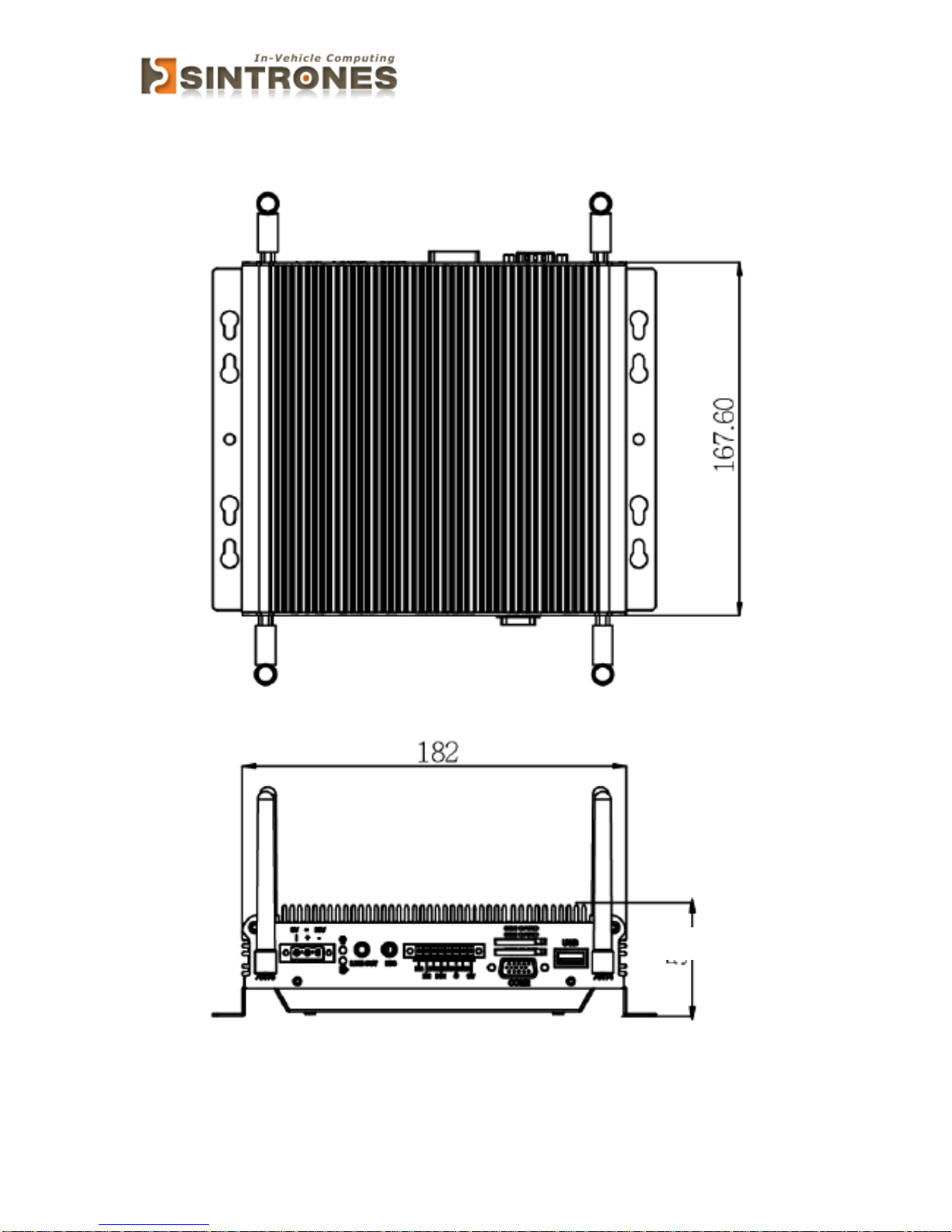
182 x 167.6 x 54 mm

SBOX-2320 Manual
8
ILLUSTRATION (MB/SYSTEM)
Mainboard

SBOX-2320 Manual
9
System
54
Indice
Altri manuali Sintrones Accessori per automobili

Sintrones
Sintrones VBOX-3120 Manuale utente

Sintrones
Sintrones VBOX-3110 Manuale utente

Sintrones
Sintrones VBOX-3600 Manuale utente

Sintrones
Sintrones VBOX-3150 Manuale utente

Sintrones
Sintrones VBOX-3600 Manuale utente

Sintrones
Sintrones VBOX-3200 Manuale utente

Sintrones
Sintrones SBOX-2300 Manuale utente