SIYI ZR30 Manuale utente

ZR30 User Manual V1.0
1 2022 SIYI Technology Copyright
ZR30
4K AI 180X HYBRID ZOOM
OPTICAL POD
USER MANUAL
V1.0
Jan 2023

ZR30 User Manual V1.0
2 2022 SIYI Technology Copyright
Thank you for purchasing SIYI’s product.
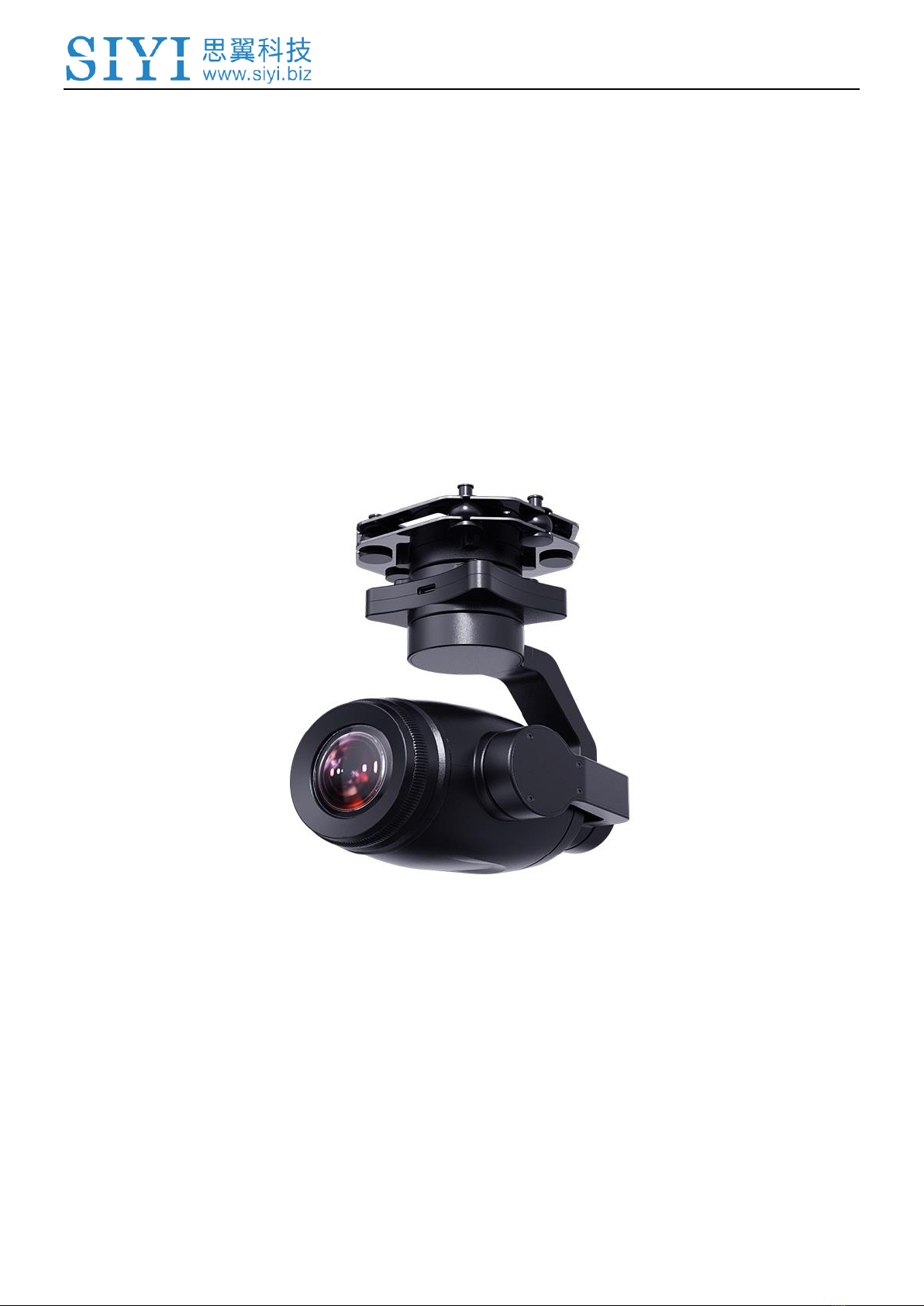
ZR30 is the first SIYI gimbal with quick release structure. Up to 180X hybrid zoom
and 30X optical zoom, carrying a 4K 1/2.7-inch Sony CMOS, coming with powerful
AI identify and tracking based on neural network processing unit, and 4K video
recording and photography, Ethernet and HDMI output are compatible with both
SIYI links and third-party links. ZR30's industry-level 3-axis stabilizing technology
and high-precision FOC control algorithms ensure absolutely stable imaging and
zooming ability during flight. HDR and starlight night vision feature can extend the
application of gimbal camera in both day and night. ZR30 is a rare and good payload
for multi-rotors, VTOLs, and robotics.
To ensure you a good experience of the product, please read this manual carefully.
If you encounter any issue using the product, please consult the manual or check
the online pages of this product on SIYI official store (https://shop.siyi.biz). You can
also write an email to SIYI official A/S center (support@siyi.biz).

ZR30 User Manual V1.0
4 2022 SIYI Technology Copyright
CONTENT
READ TIPS.................................................................................................................................................................1
Icons.........................................................................................................................................................................1
Safety.......................................................................................................................................................................1
Storage / Carrying / Recycling.............................................................................................................................2
1 INTRODUCTION....................................................................................................................................................3
1.1 Product Features.............................................................................................................................................3
1.2 Parts..................................................................................................................................................................6
1.2.1 At a Glance...............................................................................................................................................6
1.2.2 Pinouts.......................................................................................................................................................9
1.3 Technical Specification.................................................................................................................................10
1.4 Packing List....................................................................................................................................................12
1.5 Indicator Definition ........................................................................................................................................13
2 GET READY TO USE ZR30...............................................................................................................................14
2.1 Installation......................................................................................................................................................14
2.2 Connection and Power.................................................................................................................................15
3 GIMBAL CONTROL.............................................................................................................................................16
3.1 Control Gimbal Camera from SIYI FPV App or SIYI QGC on SIYI Handheld Ground Station.........16
3.1.1 Preparation..............................................................................................................................................16
3.1.2 Gimbal Pitch and Yaw Rotation...........................................................................................................18
3.1.3 Zoom and Focus....................................................................................................................................18
3.1.4 Take pictures and Record Video.........................................................................................................19
3.2 Control Gimbal through S.Bus Signal (Taking an Example of MK15) ..................................................19
3.2.1 Preparation..............................................................................................................................................20
3.2.2 Gimbal Pitch and Yaw Rotation (Taking an Example of MK15 Dials)...........................................22
3.2.3 Zoom and Focus (Taking an Example of MK15 Switches).............................................................23
3.2.4 Take Pictures and Record Video (Taking an Example of MK15 Buttons)....................................24
3.3 UART / UDP Control (through SDK)..........................................................................................................25
3.3.1 SDK Protocol Format.............................................................................................................................25
3.3.2 SDK Communication Commands........................................................................................................25
3.3.3 ZR10 SDK Communication Interface..................................................................................................30
3.3.4 ZR10 SDK Communication Code Examples.....................................................................................31

ZR30 User Manual V1.0
5 2022 SIYI Technology Copyright
3.3.5 SDK CRC16 Code.................................................................................................................................32
4 VIDEO OUTPUT...................................................................................................................................................35
4.1 Output and Display Video on SIYI Handheld Ground Station................................................................35
4.2 Output Video Stream through HM30 Full HD Image Transmission System........................................35
4.3 Output Video to Third-Party Link.................................................................................................................37
4.4 Output by HDMI.............................................................................................................................................38
4.5 Solutions to No Image..................................................................................................................................39
4.5.1 Video Output to Android Device..........................................................................................................39
4.5.2 Video Output to Windows Device........................................................................................................41
4.6 Common IP Addresses ................................................................................................................................42
5 SIYI FPV APP.......................................................................................................................................................43
5.1 Settings...........................................................................................................................................................45
5.2 Link Status......................................................................................................................................................46
5.3 Gimbal Camera..............................................................................................................................................47
5.4 About SIYI FPV..............................................................................................................................................48
6 Firmware Upgrade and Configuration...............................................................................................................49
6.1 Gimbal / Zoom Firmware Update................................................................................................................49
6.2 Camera Firmware Update............................................................................................................................52
6.3 Gimbal Camera Configuration.....................................................................................................................54
6.3.1 Channel Settings....................................................................................................................................54
6.3.2 Camera Specs........................................................................................................................................55
7 After-sale Service.................................................................................................................................................57
7.1 Repair Service...............................................................................................................................................57
7.2 Warranty.........................................................................................................................................................58
7.2.1 7-Day Return & Refund.........................................................................................................................58
7.2.2 15-Day Replacement.............................................................................................................................59
7.2.3 1-Year Warranty Repair........................................................................................................................61

ZR30 User Manual V1.0
1 2022 SIYI Technology, All Rights Reserved
READ TIPS
Icons
Please pay more attention to content indicated with the following marks:
DANGER Dangerous manipulation probably leads to human injuries.
WARNING Warnings on manipulation possibly leads to human injuries.
CAUTION Cautions on what manipulation may lead to property loss.
Prohibited Mandatory Mark
Safety
ZR30 optical pod is designed for professional application in specific scenes, which
has been done necessary configuration before delivery, it is forbidden to
disassemble the gimbal or to change its mechanical structure. And don’t add more
payload to the gimbal other than its own camera. Gimbal camera is designed with
very precise structure, users who approach to the equipment should have the basic
knowledge of how to operate it. Irregular or irresponsible manipulations to the
device may cause damage, property loss, or human injuries, and SIYI Technology
is not obliged to any of the damage, loss, or injury. It is prohibited to use SIYI
products for military purpose. Users under 14 years’ old should follow an

ZR30 User Manual V1.0
2 2022 SIYI Technology, All Rights Reserved
experienced trainer’s guide. Disassembling or modification to the system is
prohibited without permission from its manufacturer, SIYI Technology.
Storage / Carrying / Recycling
When your SIYI products are stand idle, or you are bringing it outdoors, or the
system reached service life, then please do read the precautions below.
CAUTION
Always place your SIYI products at places where babies or kids do not reach.
DANGER
SIYI products should be placed in places with below conditions:
Not too hot (above 60℃) or too cold (under -20℃).
Not under direct sunshine or too dusty or too wet.
Not on an unstable holder which lacks solid supports or may cause vibration.
Not nearby steam or other heat sources.

ZR30 User Manual V1.0
3 2022 SIYI Technology, All Rights Reserved
1 INTRODUCTION
1.1 Product Features
180X Hybrid Zoom, 30X Optical Zoom
ZR30 gimbal camera supports 180x hybrid zoom and up to 30x optical zoom,
offering crystal clear and very far view. ZR30’s fast and accurate algorithm makes
it focus quickly and quite easy to output high-quality videos.
AI Smart Identify and Tracking
Embedded in brand-new AI algorithms developed by SIYI, ZR30 gimbal camera can
autonomously identify moving objects like vehicles, boats, and people. Companion
with gimbal rotation and UAV flight control system, ZR30 will accomplish an overall
smart operation from identifying and locating to continuously tracking. The zoom
camera will always maintain the tracking object in the center of the image.
*The AI feature is under development and can be updated later.
Quick Release, Fast Payload Change
As the first gimbal pod carrying the quick release structure, ZR30 can be changed
quickly to meet the requirement of different application scenes. There will be more
interesting SIYI payloads joining in the quick release ecology. Welcome to pay an
attention.

ZR30 User Manual V1.0
4 2022 SIYI Technology, All Rights Reserved
Professional Imaging System
ZR30 carries a 1/2.7-inch Sony image sensor, a megapixels CMOS with remarkable
photosensitivity ability, impressive 4K video recording and photography. Those
combined features make distant beautiful sceneries nicely seen in motion pictures.
Upside Down Mode
ZR30 gimbal automatically activates upside down mode when it is placed upside
down, very convenient to be mounted on multiple kinds of vehicles like UGV, USV,
robot dog, and robotics.
Gimbal Motion Mode
Follow | Lock | FPV
Follow Mode
Horizontally, gimbal follows when aircraft rotates.
Lock Mode
Horizontally, gimbal does not follow when aircraft rotates.
FPV Mode
Gimbal rotates simultaneously as aircraft rolls to get FPV view, and output
enhanced stable images.

ZR30 User Manual V1.0
5 2022 SIYI Technology, All Rights Reserved
Starlight Night Vision Camera
ZR30 comes with an ultra-sensitive starlight CMOS can keep image bright even in
low light environment. HDR feature can precisely capture details of highlights and
shadows in dynamic scenes, getting away of low light or backlight.
3-Axis Gimbal Stabilizing Control Algorithms
High-Precision FOC Motor Control
ZR30 gimbal camera is applied with industry-level 3-axis stabilizing technology and
high-precision FOC control algorithms, which reduces most image shaking and
ensure image is always stable even if aircraft or vehicle is vigorously moving.
Meanwhile, camera continuously outputs smooth and clear images even in zooming.
ZR30’s yaw axis supports up to 540-degree rotation, which provides much freer
observation angle during flight especially on VTOL drones and planes.

ZR30 User Manual V1.0
6 2022 SIYI Technology, All Rights Reserved
1.2 Parts
1.2.1 At a Glance
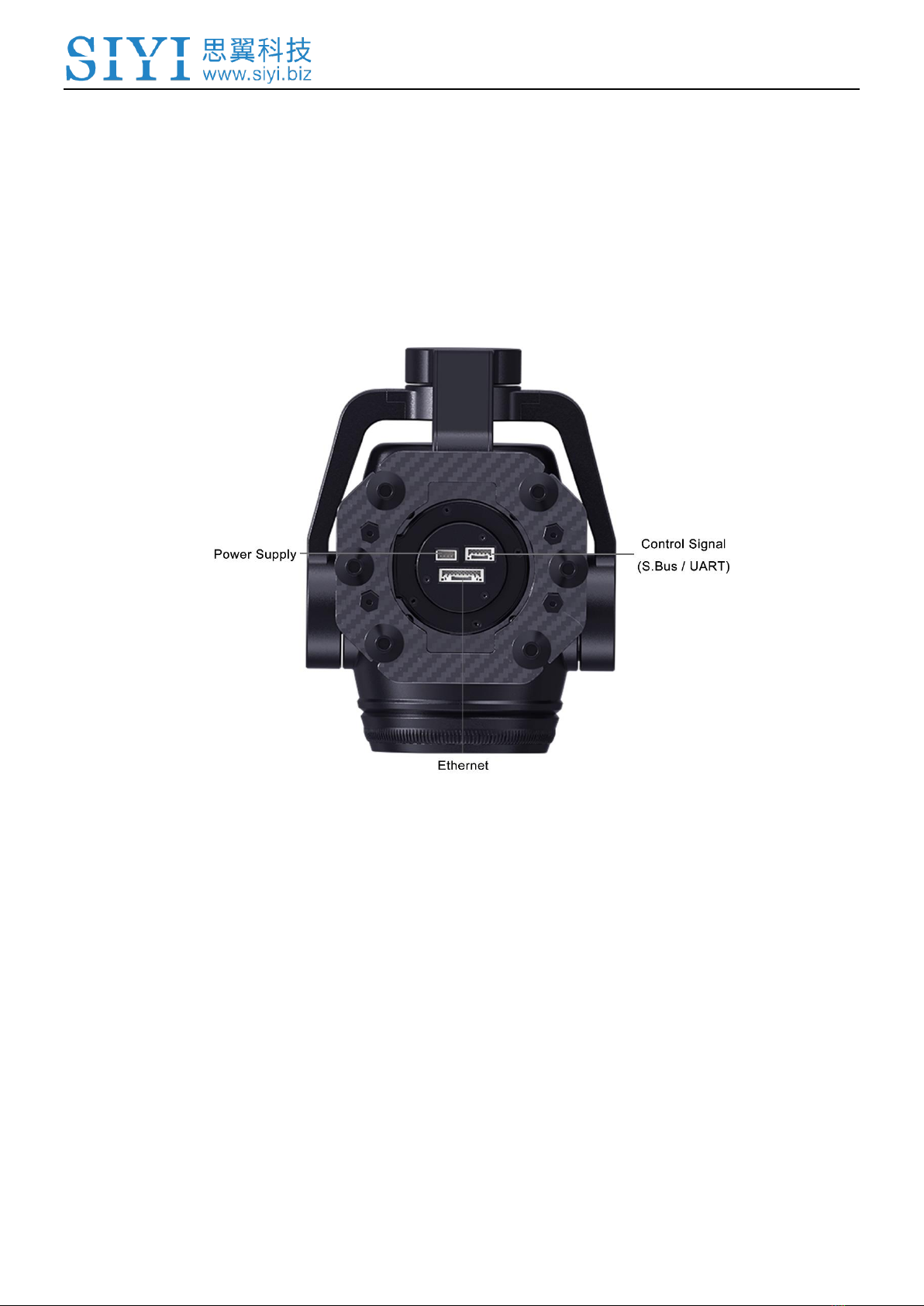
Interface of SIYI Quick Release Board
Altri manuali per ZR30
1
Indice
Altri manuali SIYI Accessori per fotocamere