
Skullcandy MacGyver Manuale utente


IGENERAL DESCRIPTIONS-----------------------------------
Basic Functions----------------------------------------------------
Accessories---------------------------------------------------------
II OPERATION-----------------------------------------------------
Button function overview-----------------------------------------
Function light overview-------------------------------------------
Power on/off--------------------------------------------------------
Mode switch--------------------------------------------------------
Playing MP3 music------------------------------------------------
Equalizer modes--------------------------------------------------
Playing voice recording------------------------------------------
Voice recording----------------------------------------------------
Shortcut keys torecording funtion----------------------------
Volume &music/recording control------------------------------
Deleting music/voice recording---------------------------------
PC connection------------------------------------------------------
Battery power indicator-------------------------------------------
Time setting---------------------------------------------------------
Battery recharging-------------------------------------------------
1
1
4
5
5
6
7
7
8
9
10
10
10
10
11
11
12
12
12
TABLE OFCONTENT

14
14
14
15
21
23
24
28
29
30
CAUTIONS----------------------------------------------------------
ⅥHELPFUL TIPS-----------------------------------------------------
CABLE-----------------------------------
System requirements-------------------------------------------------
USB connection-------------------------------------------------------
Installation guide------------------------------------------------------
Firmware download---------------------------------------------------
ⅦPRODUCT SPECIFICATIONS----------------------------------
NOTE--------------------------------------------------------------------
III INSTALLATIONOF MP3 PLAYER-----------------------------
ⅤCHANGING THE USB
Ⅳ

1
ⅠGENERAL DESCRIPTIONS
Basic Functions
1.Playable music format:MP3 / WMA/ ADPCM
2.USB1.1 interface
3.Portable storage disk(USB1.1)
4.Playing order: Sequence, Random, Pause, Resuming
5.different equalizer modesChoose between
6.Delete (current track / voice recording)
7.Built in Microphone:ADPCM voice recording
8.Stereo earphone jack:standard φ2.5mm
9.Automatic detecting of battery voltage and power indicator
10.Power saving:
※Automatic power offif no buttonpushed in 2minutes under
pause status
※Automatic power offin 2 minuteswhen all tracksplayed
11.Battery:Rechargeable Li-ion battery (3.7V)
12.Standard USB portfor recharging, downloadand upload

2
13.11 LED lights:
MP3 (MP3): lights up/MP3 mode;flashing per second
/playing MP3
PLAY REC (voice recording /playing): lights up/playing
mode of voicerecording;flashing per second/playing
voice recording
RECORDING (voice recording): lightsup/voice record-
ing mode;flashing per second/recording
POWER (power supply indicator):lights up/power on;
off/power off orno power
(also as battery powerindicator):lights up/full power;
flashing per second/1/5 power remained;flashing per 0.5
sec/out of powersoon;off/out of powerand automatic
power off
CHARGE (recharging): lights up/recharging;off/rech-
arging over
USB : lights up/ in properconnection with PC
POP: lights up/ equalizer setas POP mode
ROCK : lights up/ equalizer setas ROCK mode

3
JAZZ : lights up/ equalizer setas JAZZ mode
CLASSIC: lights up/ equalizer setas CLASSIC mode
RANDOM: lights up/ random playing
14.5 buttons:
----working mode (MODE)/ power on(ON) / pow-
er off (OFF)
----forward (FORWARD) / increasevolume
(VOLUME+)
----reverse (REVERSE) /decrease volume
(VOLUME-)
----delete (DELETE)
----play (PLAY)/pause (PAUSE)

4
Accessories
USB extension cable
MP3 Watch Instruction Manual Earphone
Installation CD
Charging adapter(optional)
Earphone Plug Converter
(2.5mm to 3.5mm)(optional)

5
ⅡOPERATION
working mode /power on/
power off
play / pause
Delete
earphone jack
function light
Forward /
increase volume
Crown
Reverse /
decrease volume
Voice recording
microphone
Button function overview

6
POP
ROCK
JAZZ
CLASSIC
USB
MP3
Recharging
/ CHARGE
Voice recording
/ RECORDING
Play voice
recording
/ PLAY REC
Random
playing
/ RANDOM
Power indicator
/ POWER
Function light overview
7
Power on/off
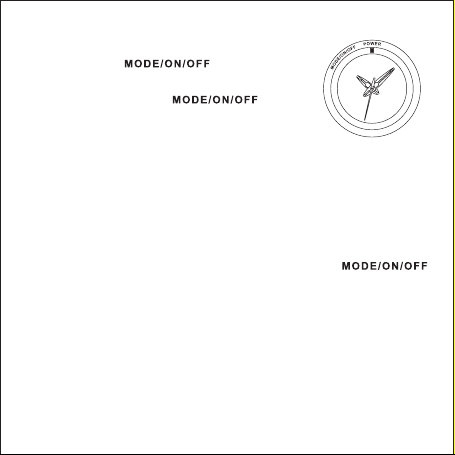
Press button momentarily
---- POWER light lightsup, power on
Press and holdbutton for
3 seconds
----POWER light off, power off
※Note: default modewhen power on :1) MP3 playing mode, MP3
light lights up. 2) equalizer mode,same as when poweroff last time
3) play the lasttrack of voice recordingonce motivated. 4)playing
starts from thetrack stopped atlast time.
Mode switch
Under pause statusof MP3 playing/ voice recordingplaying
or when voicerecording is stopped,press button
momentarily to switchbetween the followingmodes:
Indice


