Smappee EV Base Ultra Manuale utente

English –Version 1.5 –March 2023
Smappee EV Ultra
Installation manual

Document Accuracy
The specifications and other information in this document were verified to be accurate and complete at the time of its publication. Due to
ongoing product improvement, this information is subject to change at any time without prior notice. For the latest information, see our
online documentation: https://www.smappee.com/downloads

Smappee EV Ultra –Installation manual –English
3
Table of contents
1. Introduction ....................................................................................................4
2. Safety instructions...........................................................................................5
3. Models ............................................................................................................6
4. Components....................................................................................................7
5. Technical specifications...................................................................................9
6. Preparing the installation..............................................................................13
7. Installation and activation.............................................................................15
8. Maintenance .................................................................................................37
9. Using the EV Ultra .........................................................................................38
10. Declaration of conformity.............................................................................43

Smappee EV Ultra –Installation manual –English
4
1. Introduction
Thank you for purchasing this Smappee EV Ultra charging station for electric vehicles, the smartest
DC charging station for businesses.
This installation and user manual tells you how to install and use the Smappee EV Ultra. We advise
you to read the contents of this manual carefully, to ensure a safe and proper installation and enable
you to use all the advanced features of this product to the full.
Support
Only qualified electricians or equivalent may install the Smappee EV Ultra. If you have any questions,
please contact your service partner.
Please have the following information ready to hand to speed up the process: Article number and
serial number which you can find on the identification label of the charging station.
Should your local distributor be unable to help you, or you have a suggestion for us, you can contact
Smappee at: support@smappee.com.
Smappee n.v.
Evolis 104
8530 Harelbeke
Belgium

Smappee EV Ultra –Installation manual –English
5
2. Safety instructions
Safety warning
Fully read and follow the safety instructions below before you install, service or use your Smappee
EV Ultra. The installer must ensure that the charging station is installed in accordance with the
relevant national and local regulations.
Carrying out activities on this charging station without the relevant knowledge and qualifications can
lead to serious accidents and death. Only carry out tasks for which you are qualified and have been
fully instructed.
Incorrect installation, repairs or modifications can result in danger to the user and may void the
warranty and liability.
Safety precautions
CAUTION: Risk of electric shock.
CAUTION: Refer to the accompanying documentation whenever you see this symbol.
Please observe the following safety precautions to avoid potential electric shock, fire, or personal
injury:
•The charging station is intended exclusively for charging electric vehicles and, when installed
correctly, may be used by untrained individuals.
•Switch off electrical power supply to your charging station before installation or maintenance
work.
•Do not use the charging station if damaged / defective.
•Do not immerse the charging station in water or any other liquids.
•Do not expose the charging station to heat, flame or extreme cold.
•Do not attempt to open, repair, or service any parts. Contact Smappee or your service partner
for further information.
•Only use the charging station under the specified operating conditions.
•Do not allow children to operate a charging station.
•When a charging station is in use, adult supervision of any children present is required.
•While charging the charging cable must be completely unwound and connected to the electric
car without overlapping loops. This to avoid the risk of overheating the charging cable.
Keeping order
•After charging, store the charging cable properly so it does not present a tripping hazard.
•Make sure the charging cable cannot become damaged (kinked, compressed or driven over).
•Do not place any objects on the charging station.

Smappee EV Ultra –Installation manual –English
6
3. Models
Article no.
EAN
Description
EVBU-80-CCS3R
5425036933873
Smappee EV Ultra 80S
EVBU-200-CCS3R
5425036933767
Smappee EV Ultra 200S

Smappee EV Ultra –Installation manual –English
7
4. Components
Components included
80 kW version
•1x EV Ultra 80S
•1x Charging cable CCS 250A 3.25m
•3x Inverter
•1x Mounting anchor
200 kW version
•1x EV Ultra 200S
•1x Charging cable CCS 250A 3.25m
•5x Inverter
•1x Mounting anchor
Article codes
Article no.
EAN
Description
EVBU-CNV40-1
5425036933774
EV Ultra Inverter 40 kW
EVBU-ANCHOR
5425036933828
EV Ultra Mounting anchor
EVBU-CBL-CSS250-3
5425036933842
EV Ultra Charging Cable CCS 250A 3.25m

Smappee EV Ultra –Installation manual –English
8
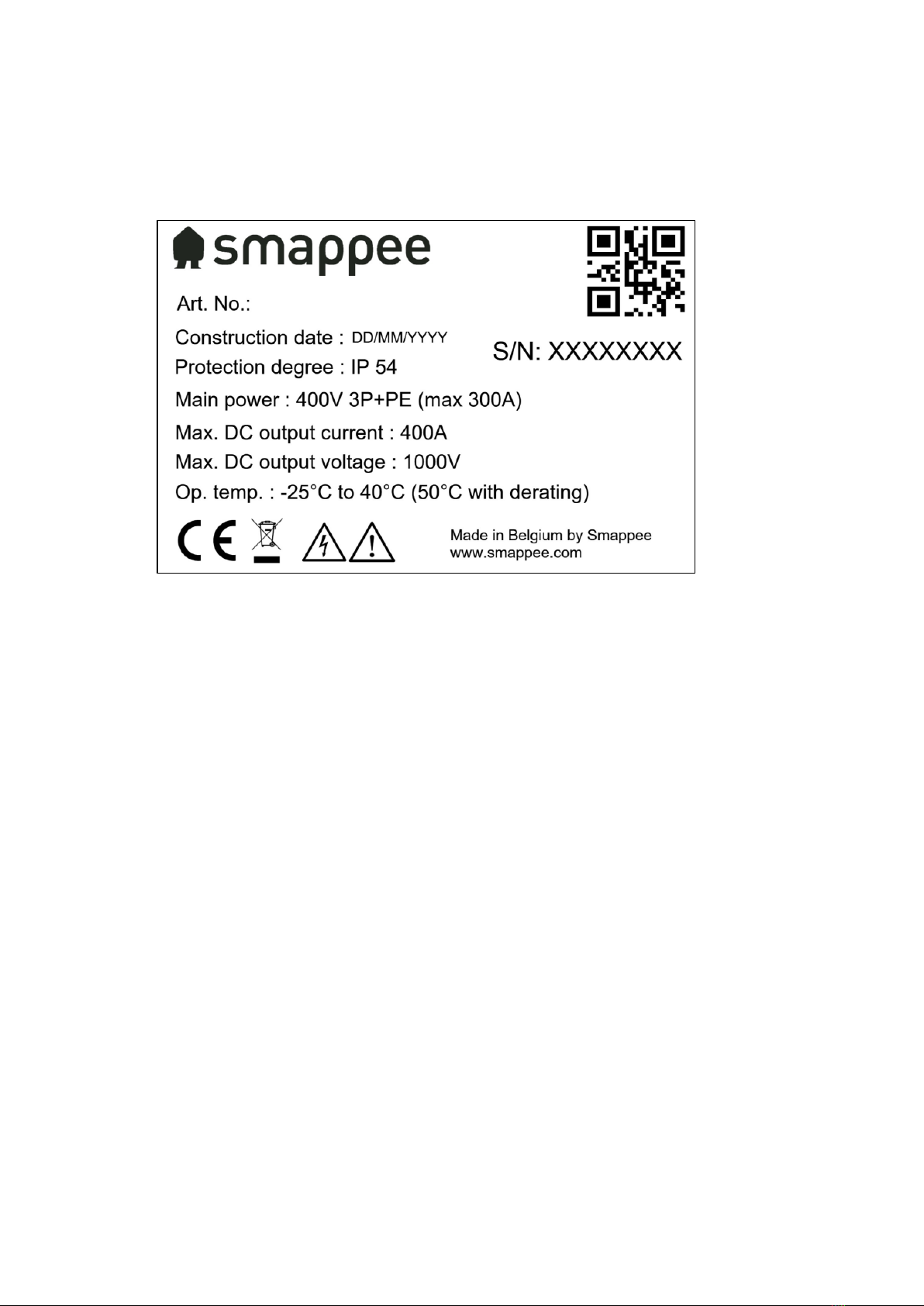
Identification label
The identification label of your charging station is located near the emergency stop button, on the
bottom of the front panel.
1. Manufacturer
2. Article number
3. Manufacturing date
4. Degree of protection
5. Rating
6. Maximum DC output current
7. Maximum DC output voltage
8. Operating temperature
9. QR code containing article number and serial number
10. Serial number

Smappee EV Ultra –Installation manual –English
9
5. Technical specifications
Feature
Description
EV Ultra 80S
EV Ultra 200S
Nominal input
Power supply
3P + PE
Auxiliary Power supply
5G2.5 mm²
Rated voltage (Un)
400 Vac ± 10%
Rated frequency (fn)
50 Hz
Nominal input current
125 A
300 A
Power factor
>0.98 at full capacity
Efficiency
95% at full capacity
Connection method
AC, permanently connected
DC output
Charge mode
Mode 4 (IEC 61851)
DC Plug
CCS2
Connection case
Case C (fixed cable)
Maximum current
266 A
400 A
Voltage
100 V –1000 V
Nominal power
80 kW at 300 V –1000 V
200 kW at 500 V –1000 V
Interfaces & Connectivity
Information status
RGB LED
Session activation
Plug and Charge, Scan QR code, Swipe RFID card, Smart EV
schedules
Connectivity
Ethernet 100BASE-T
LTE Cat M1 (4G)
Communication protocol
OCPP 1.6 JSON, ready for update to OCPP 2.0
Metering
kWh meter compliant with IEC 62053-21
Certifications and Standards
Product certification
CE
Standards
IEC 61851, ISO 15118
Environment
Enclosure material
Magnelis
Enclosure standard colours
RAL9016 (star white) + RAL7021 (black grey)

Smappee EV Ultra –Installation manual –English
10
Protection degree
IP 54
Mechanical impact protection
IK10
Pollution degree
3
Electrical safety class
I
Stand-by use
LED brightness 0%: 90 W
LED brightness 100%: 100 W
Acoustic noise
0 dB –60 dB
Environmental conditions
Indoor and outdoor use
Operating temperature
-25 °C to 40 °C (50 °C with derating)
Storage temperature
-25 °C to 60 °C
Relative humidity
0 % - 95 %, non-condensing
Maximum installation altitude
0 –2.000 m
Access
Locations with restricted and non-restricted access
Physical properties
Dimensions
1800 x 900 x 225 mm
Total Weight (excl. packaging)
Front panel
Rear panel
Central unit
Inverter (each)
Charging cable
Anchor
230 kg
31 kg
26 kg
84 kg
20 kg
9 kg
20 kg
270 kg
31 kg
26 kg
84 kg
20 kg
9 kg
20 kg
Charging cable length
3.25 m
Stationary / moveable
Fixed installation
External design
Enclosed assembly
Mounting method
Floor / Ground-mounted
Altri manuali per EV Base Ultra
1
Indice
Altri manuali Smappee Accessori per automobili

Smappee
Smappee EV Base Manuale utente

Smappee
Smappee EV One Home Manuale utente

Smappee
Smappee Infinity Manuale utente

Smappee
Smappee EV One Home Manuale utente

Smappee
Smappee EVB-2332-B-E Manuale utente

Smappee
Smappee EV Base Ultra Manuale utente

Smappee
Smappee EV Base Manuale utente

Smappee
Smappee EV Base Manuale utente

Smappee
Smappee EV One Home Manuale utente