
SMART Hussar Manuale utente

Hussar Robot Chassis Manual
Smart Restaurant Solutions 1
Hussar Robot Chassis Manual
Version : 2.1.4G
Date : 2022-1-6
Note: This document provides the deployment process and precautions
related to the machine. Follow the instructions in the document to avoid
abnormal situations when the machine is used later.

Hussar Robot Chassis Manual
Smart Restaurant Solutions 2
Catalogue
1, Introduction of Robot.......................................................................................................................................... 4
Environmental Requirements for Robots.................................................................................................... 4
Hardware parameters....................................................................................................................................... 5
Meet your robot................................................................................................................................................. 5
2,Use your robot..................................................................................................................................................... 7
1. Boot........................................................................................................................................................... 7
2. Charging .................................................................................................................................................. 8
3. Navigation deployment.....................................................................................................................10
The step 1 [ Connect to the Internet ]........................................................................................10
The step 2 [ Build a map ]..............................................................................................................12
The Step 3 [ Position ].....................................................................................................................19
The step 4 [ Virtual wall ]...............................................................................................................21
3, Explanation of other functions........................................................................................................................24
a [ Special Area ] ..............................................................................................................................24
b [ Modify map ]..............................................................................................................................25
c [ Map ] .............................................................................................................................................27
d [ Upgrade ].....................................................................................................................................27
e [ Debug ].........................................................................................................................................28
4, About infrared vision camera ..........................................................................................................................30

Hussar Robot Chassis Manual
Smart Restaurant Solutions 3

Hussar Robot Chassis Manual
Smart Restaurant Solutions 4
1, Introduction of Robot
Environmental Requirements for Robots
Please use this product in accordance with the instructions of the
manual. Any loss caused by improper use shall be borne by the user.
✓Do not use in places with stairs or where the drop is more than 2cm
✓There should not be a lot of black marble and black reflective cabinets
at the floor height of 30 cm
✓Do not travel on the ground with high friction: thicker, softer carpet
✓Do not use in an environment with a slope greater than 5°
✓Do not use in bathrooms and similar environments
✓There should be no densely placed thin-legged chairs in the travel area
✓Do not use in an environment above 50°C and below 0°C
✓Do not use on uneven roads
✓There are a large number of transparent glass and thin-legged tables
and chairs, which can be used depending on the construction and
testing conditions

Hussar Robot Chassis Manual
Smart Restaurant Solutions 5
Hardware parameters
Hardware parameters
Index performance
Product specification
Product Size
Length 540mm * Width 360mm * Height 372mm
Product Weight
32kg
Product color
white
product material
Cold rolled steel sheet
Environmental requirements
Storage temperature: -15°C~55°C; Working
temperature: -10°C ~ +50°C Humidity (RH): 10%~90%
Infrared camera
Two-dimensional code positioning (the height of the
two-dimensional code from the camera is 1-3m or
1-5m); 5 million pixels
Android specifications
operating system
Android 5.1
language support
Chinese,English
Processor type
RK3128
Memory LPDDDR3
1G
Built-in NAND FLASH
8GB
USB Debug port
Micro USB interface
Display screen
7 inch, IPS screen (16:9) resolution 1024X600
External I/O port
1 USB 2.0 (MICROUSB), RJ45 network port

Hussar Robot Chassis Manual
Smart Restaurant Solutions 6
speaker
4Ω/3W mono speaker
Wireless technology
AP6255
Support dual frequency 2.4&5G
WIFI 802.11b/g/n Wireless local area network,
11ac 5.15GHz-5.825GHz
ROS navigation specifications
Operating system
LINUX
Lidar
Laser wavelength 905 nm working area 270°
Single axis gyroscope
sensor
Yaw angle measurement
hard disk
32G high-speed solid state drive
motor driven
5.5 inch hub motor
Infrared sensor
Communicate with charging piles within 1 meter
4G router to 2.4GWIFI
4GCPE-M6 ( optional )
512AN_HMW Module
Intel WIFI
Support dual frequency 2.4&5G
WIFI&BT4.1 802.11b/g/n Wireless local area
network11ac 5.15GHz-5.825GHz
Moving speed
Minimum 0.1 m/s,Maximum 1 m/s
Navigation board
Intel Core I5 motherboard
Power system
charging method
Automatic recharge, DC direct charge
adapter
Input: AC110-240V.50-60HZ

Hussar Robot Chassis Manual
Smart Restaurant Solutions 7
Output: DC42V-5A
Robot input power
42V--5A
battery
37 V/10 AH lithium battery(20AH Optional)
Charging pile parameters
Overcurrent protection, intelligent power off, output
rated voltage: 42VDC, output rated current: 5A
Remote function
Support remote video monitoring, remote navigation
status monitoring, remote online update navigation
system, Android system
noise
At rest:45dB
Under exercise:50~75dB(Different floor materials are
slightly different)

Hussar Robot Chassis Manual
Smart Restaurant Solutions 8
Meet your robot
①Laser
②Universal wheel
③Driving wheel
④Emergency stop switch
⑤Infrared sensor
⑥In-line power hole
⑦Power button
⑧Automatic charging shrapnel
⑨Uitrasound
Cleaning precautions: ①Laser navigation, please do not wipe it with a wet
towel toavoid water ingress!
Precautions for use:①Laser: Do not block the laser with objects
④Emergency stop switch: the emergency stop switch can only be
rotated to the right, do not rotate to the left

Hussar Robot Chassis Manual
Smart Restaurant Solutions 9
Hardware structure
①Usb board
②Android Wi-Fi cable
③master computer
④Red:12v Black:GND
⑤Speaker
⑥Visual infrared camera
⑦4g Router secondary antenna
⑧4g Router main antenna
Hussar Robot Chassis Manual
Smart Restaurant Solutions 10
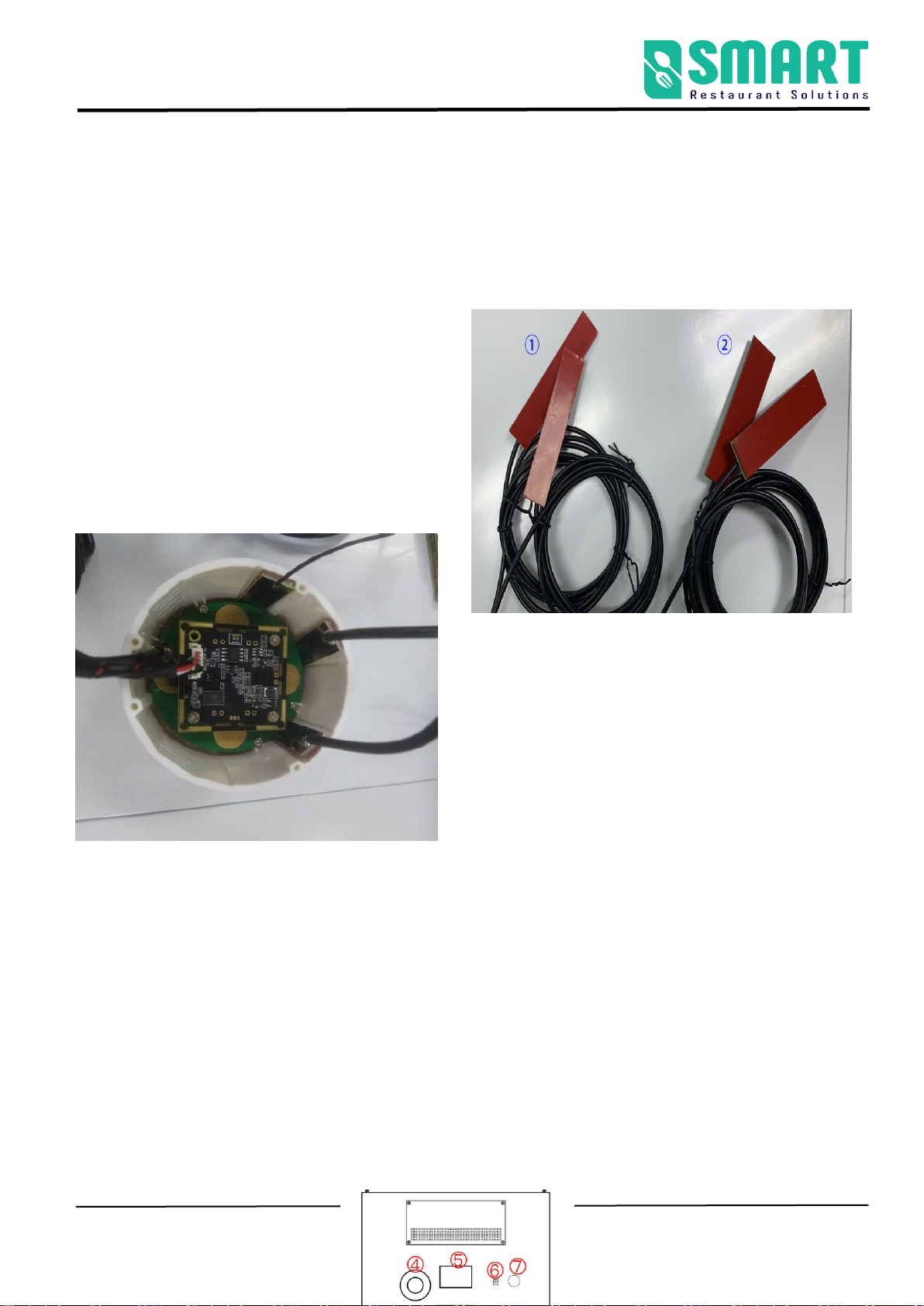
Installation of 4G router main and secondary antenna
Note: The antenna cannot be pasted on metal parts, nor can it be pasted in the surrounding metal part
shielding cover; it should be pasted on the
surrounding plastic parts to prevent the antenna
signal from being shielded by the metal parts. (It
can also be pasted inside the infrared vision camera
module shell)
①4G router secondary antenna ②4G router main antenna
2,Use your robot
A. Boot
The power button is located on the base ⑦on the back of the robot. It is
a button switch. Press it once to turn it on, and press and hold the power
button for 3 seconds to turn it off.
Indice
Altri manuali SMART Robotica


