
Snooper Pro Sound DAB2000 Manuale utente

Vehicle DAB Adaptor
User Guide

DAB2000 User Guide
TABLE OF CONTENTS
INTRODUCTION
CONTENTS OF PACKAGE
INSTALLATION
DAB2000 Installation
Antenna Installation
OVERVIEW OF CONTROLS AND CONNECTORS
STARTING UP THE SYSTEM
USING REMOTE CONTROL KEYS
To turn on or off DAB2000
To listen to the DAB stations
To display station’s information
To set a DAB preset mode
To save a DAB memory preset
To recall a DAB memory preset
To set the auxiliary input mode
To recall the last listened DAB station
To display the current FM transmitting frequency
To set the FM transmitting frequency
To save a desired FM transmitting frequency in memory
To recall FM transmitting frequency saved in memory
To perform an immediate frequency change
MENU SETTINGS
To reset FM transmitting frequency setting
To set FM transmitting frequency setting to preset F1
To scan for the DAB stations
To enable AFC (Automatic Frequency Change)
To enable auto scan
To set antenna power
To reset DAB presets
To restore to factory settings
To display software version
To upgrade software
TROUBLESHOOTING
TECHNICAL SPECIFICATIONS
INFORMATION ON WASTE DISPOSAL

INTRODUCTION
The DAB2000 is a vehicle audio adaptor that offers a flexible and cost effective
way to apply modern digital audio technology to your existing analogue vehicle
audio system.
The existing analogue system in your vehicle can be easily upgraded to receive
DAB/DAB+ digital radio services. DAB2000 uses an FM-RDS micro-transmitter
and no complex cabling to connect to your vehicle’s audio system. The
DAB2000 receiver is operated using a remote control , while all messages
related to th e DAB2000’s operations, such as servi ce name, memory preset,
etc., are converted to RDS text and displayed on the LCD screen of your vehicle
audio system. The flexible configuration options of the DAB2000 make it easy to
install in different vehicle makes and models.
Furthermore, DAB2000 has an AFC (Automatic Frequency Change) function
that allows you to listen to your favourite DAB programs through your vehicle
radio system without the need to change the FM frequency manually when you
drive into a metropolitan area where FM stations are highly concentrated.
Without AFC, the manual frequency change can be hazardous and inconvenient,
as the driver will have to find an unused FM frequency by manually retuning the
vehicle radio, then changing the FM transmitter to use the same unused
frequency, and repeat this process each time the FM transmi tter frequency is
subjected to interference by another FM radio station.
Consult your vehicle radio manual or contact the vehicle dealer to determine if
your vehicle radio has an AF (alternative frequency) function, and how to enable
the AF function before using the AFC function on the DAB2000.
If your vehicle’s radio does not have the AF function, you can use the DAB2000’s
‘auto scan’ function to scan automatically for three unused FM frequencies; you
will need to choose a frequency from the scanned frequencies to set and
synchronize between the vehicle’s radio and the DAB2000 manually.
Alternatively, you can use the DAB2000 to set a new FM transmitting frequency
manually or to set a frequency from one of the FM transmitting frequency
presets, which have been previously saved, and then set the vehicle’s radio FM
frequency to match.
Note:
The DAB2000 needs to operate with an RDS vehicle radio to display the
relevant system message from the DAB2000 via the vehicle radio
display.

CONTENTS OF PACKAGE
DAB2000 Module Power Cable with
Vehicle Power Adaptor
DAB Antenna with
Mini Clip x3
Rotary Knob
Remote Control CR2032 Battery Hook & Loop Tape x2
25mm x 55 mm
Hook & Loop Tape x1
25mm x 35mm Screw x2 User Guide

INSTALLATION
DAB2000 Installation
Procedure:
1. Please read the entire installation instruction procedure carefully before
commencing with the actual installation. Consult a professional installer if
you have any issues or concerns with the installation.
2. Select a location to place the DAB2000 module. For the best performance,
please place it in the centre front of the vehicle or behind the vehi cle’s
glove compartment. For any other locations you may consider, please place
it away from metal objects and in an open area.
3. Position the DAB2000 module with the bottom cover up and the cables and
connectors to the back.

4. Secure the DAB2000 module with the supplied hook & loop tape and
screws. Please refer to the section on Securing the DAB2000 module,
Step by Step later in this user guide for further information.
5. Install the suppl ied DAB antenna; pl ease refer to Antenna Installation
Guide later in this user guide for installation instructions.
ATTENTION
1. We have fully tested the supplied DAB antenna to work with
DAB2000. If you replace it with a third party DAB antenna,
the performance may suffer.
2. For DAB2000 to work with the suppl ied active antenna, the
antenna power must be set to ON. DAB2000 can also work
with a passive antenna; t he antenna power must be set to
OFF. If you replace the supplied antenna with any third party
antenna, you must set the antenna power to OFF.
3. If you need to disconnect/connect the antenna from the
DAB2000, please unplug the DAB2000 from the vehicle power
adaptor first, to avoid possible damage to the antenna.
4. Damage resulting from the incorrect installation of the
antenna is not covered by the warranty.
5. Consult a professional installer if you have any issues or
concerns with the installation.

6. Minimize coiling loops of excessive power and antenna cables, and do not
secure them on to the DAB2000 module. Please refer to the section on
Installation do’s and don’ts later in this user guide.
7. Plug one end of the power cable into the D AB2000 module, and the
cigarette-lighter plug end into the vehicles power point. There i s a lock
mechanism on the pl ug of the power connection to the DAB2000 module.
First, plug the power cable into the 12V DC jack (1), and then turn the power
plug 90 degrees clockwise (2) as illustrated below. This will ensure that the
power cable will be connected to the DAB2000 module at all times.
8. Start to use the D AB2000 with the remote control; please refer to the
sections on OVERVIEW OF CONTROLS AND CONNECTORS and
STARTING UP THE SYSTEM later in this user guide for further
information.

Antenna Installation
Caution:
1. Please read all of the installation instructions carefully before commencing the
actual installation.
2. This glass-mount DAB antenna is exclusively for use inside the vehicle.
3. It is not suitable for use on reflective-coated glass. In situations like these, the
DAB antenna needs to be placed on the rear view window.
4. Do not bend or damage the antenna.
5. The antenna should be fitted either on the passenger side of the front
windscreen, or on the rear windscreen as a safety precaution.
6. The DAB2000 provides a 12v phantom power supply to the SMB connector for
the DAB antenna to operate.
7. Warning: Once the antenna is adhered to the windscreen it cannot be
relocated. Please test the antenna in the location you intend to fit it before
removing the adhesive separator and permanently fixing it to the windscreen.
Once the DAB antenna has been adhered to its location, then it cannot be
returned for credit or warranty claims.
❶
➌
❷❶Antenna 1
❷ Antenna 2
➌ Signal Booster
➍Antenna Cable
➎ SMB Connector
➎
➍

Procedure:
1Front windscreen installation
1.1 For the best digital reception performance, the glass-mount antenna
must be placed in the top left hand corner and on the inside of the front
windscreen. If there is a UV protection layer across the top of the
windscreen then you must place the DAB antenna with Antenna 1 at least
5cm below this layer.
1.2 The glass-mount antenna must be placed outside the sweeping area of
the windscreen wipers (see below).
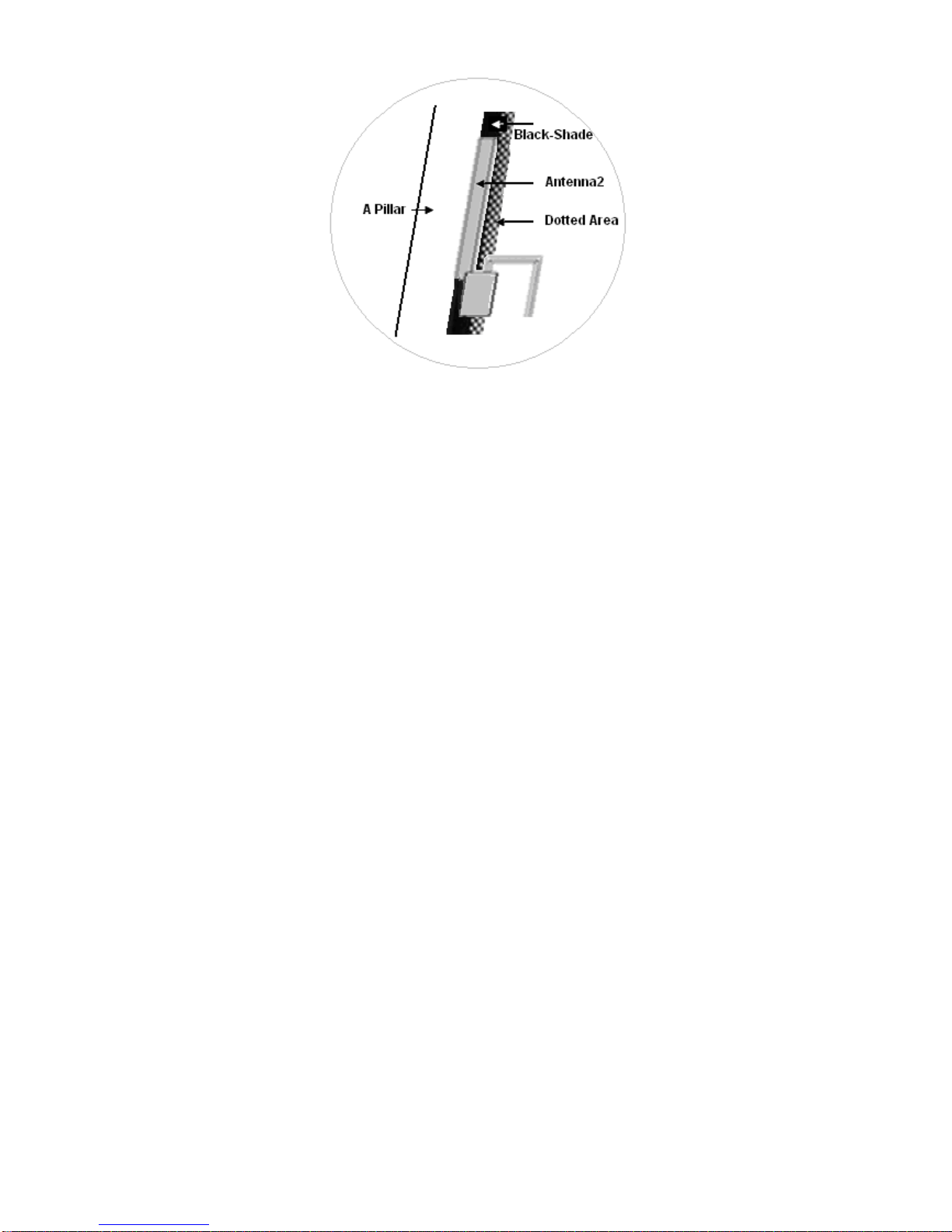
1.3 The windscreen usually has a black enamel band around the edges that
contains a border of dots and a black-shaded area. Please place Antenna
2 over at least part of the black-shaded area and not just over the dotted
area only. Please also position, as close to, but not inside the A pillars
cover (shown below) to get a better signal reception.
2Rear windscreen installation
2.1 If the cable length for the antenna can reach to the rear windscreen, the
glass-mount antenna can be placed in the top left hand corner and on the
inside of the rear windscreen that is not reflective-coated. As with the
front windscreen installation, attach the antenna 2 over the black band,
and as close to the edge of the windscreen as possible.
2.2 For ‘heated’ windscreens (these have tiny electric lines across the glass to
assist with defrosting); for the best digital reception performance, the
antenna 1 must not be aligned with the electric lines as illustrated below:
Fig 1: This is the recommended antenna installation for the best digital
reception.
Fig 2: This illustrates that the top of antenna 1 is aligned with an electric
line; this will reduce the reception quality and it is not
recommended.
Indice


