
Solid State Logic XLogic SDI-MADI Manuale utente
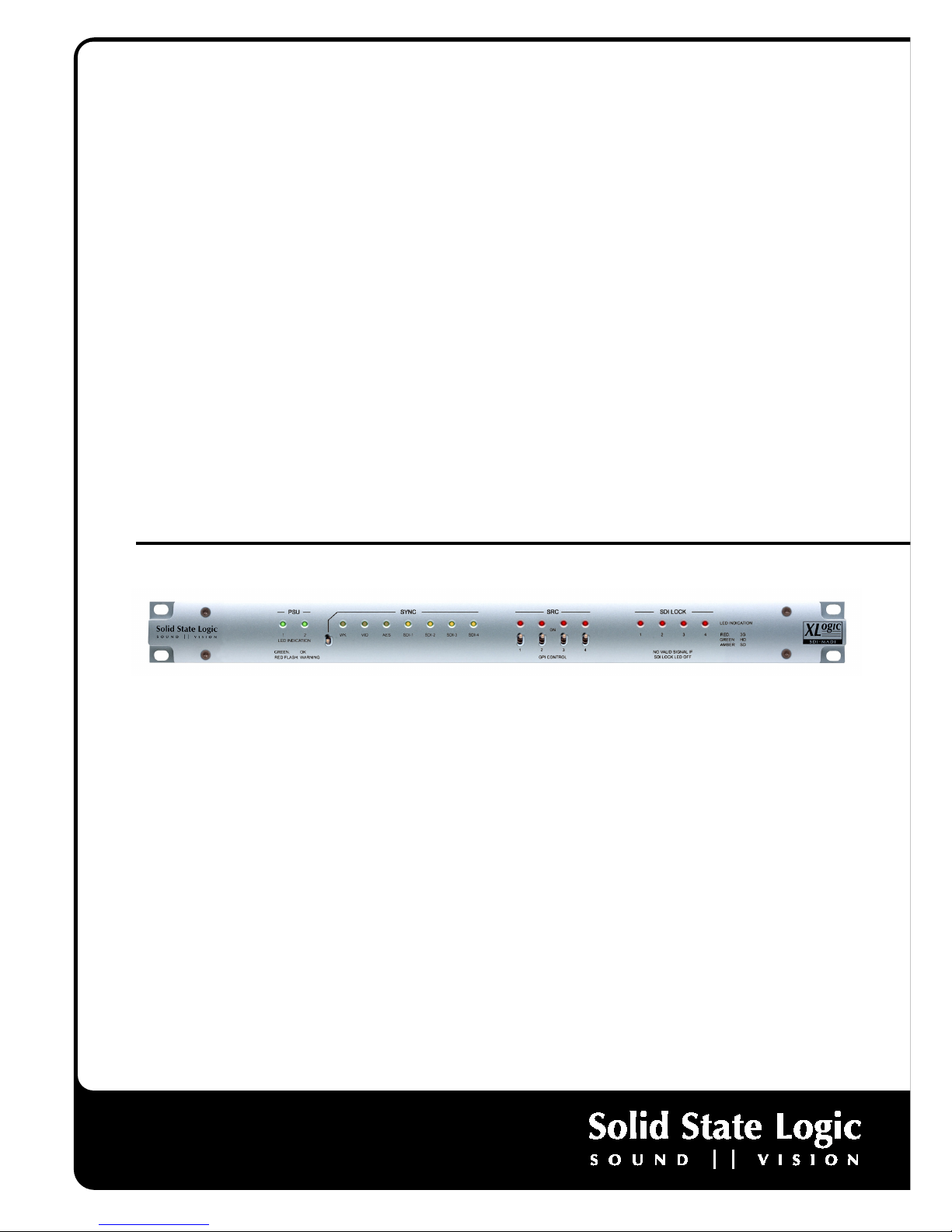
XLogic SDI-MADI This is SSL.
Installation and User Guide
XLogic SDI-MADI
www.solid-state-logic.com

Important Safety and Installation Instructions
This section contains definitions, warnings, and practical information to ensure a safe working environment.
Please take time to read this section before installing or using this unit. Please do not dispose of these instructions.
Please take time to read this section before installing or using this unit. Please do not dispose of these instructions.Please take time to read this section before installing or using this unit. Please do not dispose of these instructions.
Please take time to read this section before installing or using this unit. Please do not dispose of these instructions.
2
22
2
•
Read these instructions
•
eep these instructions
•
Heed all warnings
•
Follow all instructions
•
Do not use this apparatus near water
•
Do not expose this apparatus to rain or moisture.
•
Clean only with a dry cloth
•
Do not block any ventilation openings. Install with accordance
with the manufacturer’s instructions.
•
No naked flames, such as lighted candles, should be placed
on the apparatus.
•
Do not install near any heat sources such as radiators, heat
registers, stoves or other apparatus (including amplifiers) that
produce heat.
•
There are no user-adjustments, or user-serviceable items,
inside this apparatus. Do not remove the covers of this
apparatus; doing so will invalidate your warranty.
•
Adjustments or alterations to this apparatus may affect the
performance such that safety and/or international compliance
standards may no longer be met.
•
Refer all servicing to qualified service personnel. Servicing is
required when the apparatus has been damaged in any way,
such as power-supply cord or plug is damaged, liquid has
been spilled or objects have fallen into the apparatus, the
apparatus has been exposed to rain or moisture, does not
operate normally or has been dropped.
Caution
CautionCaution
Caution
•
Hazardous voltages may be present inside this apparatus.
•
Do not operate this apparatus with the covers removed.
•
To reduce the risk of electric shock, do not perform any
servicing other than that contained in these Installation
Instructions unless you are qualified to do so. Refer all
servicing to qualified service personnel and ensure that all
power cords are disconnected when servicing this apparatus.
•
Only use attachments/accessories specified by the
manufacturer.
Power Safety
Power SafetyPower Safety
Power Safety
•
This apparatus is fitted with a universal power supply,
approved and certified for operation in this apparatus. There
are no user-replaceable fuses.
•
An external over-current protection device is required to
protect the wiring to this apparatus. This protection device
must be installed according to current wiring regulations. In
certain countries this function is supplied by use of a fused
plug.
•
If an extension power cable or adaptor is used, ensure that
the total power rating of the power cable and/or adaptor is not
exceeded.
•
An external disconnect device is required for this apparatus; a
detachable power cord is a suitable disconnect device.
•
The apparatus should be located close enough to an AC outlet
so that you can easily grasp the power cord plug at any time.
•
This apparatus is a Class I construction and shall be
connected to an AC outlet with a protective grounding
connection.
•
Protect the power cord from being walked on or pinched,
particularly at plugs, convenience receptacles, and the point
where they exit from the apparatus.
•
Unplug this apparatus during lightning storms or when
unused for long periods of time.
•
All power cords must be disconnected to isolate this
apparatus completely.
•
Caution: To reduce the risk of electric shock, plug each power
supply cord into separate branch circuits employing separate
service grounds
•
This equipment is not supplied with a detachable power cord.
The device should be connected to a power supply only of the
type described in the Installation Guide or as marked on the
device. The power cord must be earthed and precautions
should be made so that the grounding is not defeated. A
mains cord, fitted with an IEC 60320 C13 type socket,
appropriate sized conductors and plug to suit local electrical
requirements.
•
The power supply cord (i.e. conductor, coupler [IEC 60320 C13]
and plug combination) must be suitably rated for the
apparatus and the country of use (meeting local electrical
requirements). A power supply cord with a rating of not less
than 125% of current rating is suitable. The minimum rating
for the power supply cord at 110 / 230V ac to be 1A.
Installation
InstallationInstallation
Installation
•
When installing this apparatus, either fix it into a standard 19”
rack or place the apparatus on a secure level surface. When
this apparatus is rack mounted, fit all rack screws.
•
Ensure that no strain is placed on the cables connecting to
this apparatus. Ensure also that such cables are not placed
where they can be stepped on, pulled or tripped over.
•
Do not operate this apparatus whilst it is covered or boxed in
any way.
3
33
3
Contents
Item
ItemItem
Item
Page
PagePage
Page
Safety and Installation Instructions 2 & 3
Introduction 5
Un Pack 5
ey Features 6
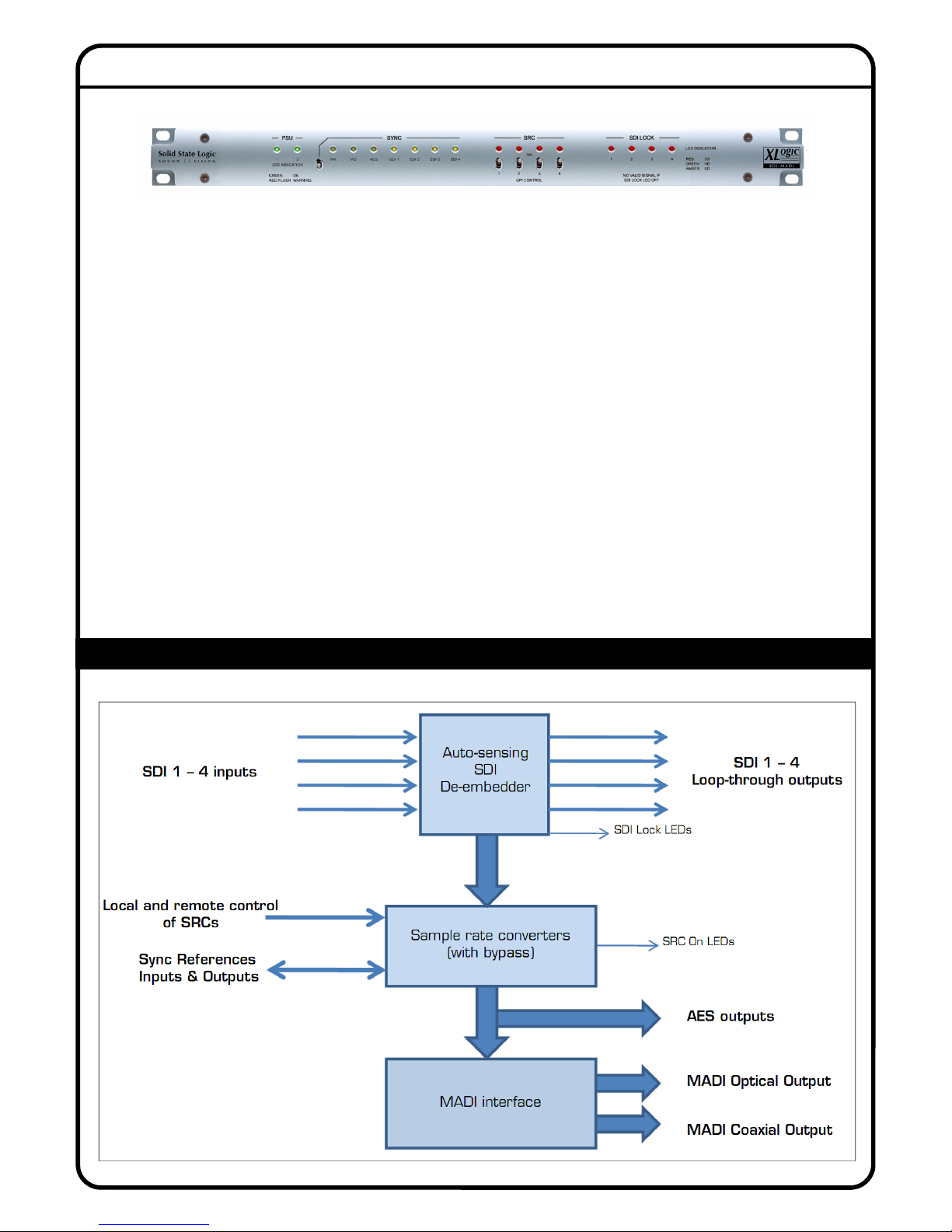
Block Diagram 6
Specifications 7
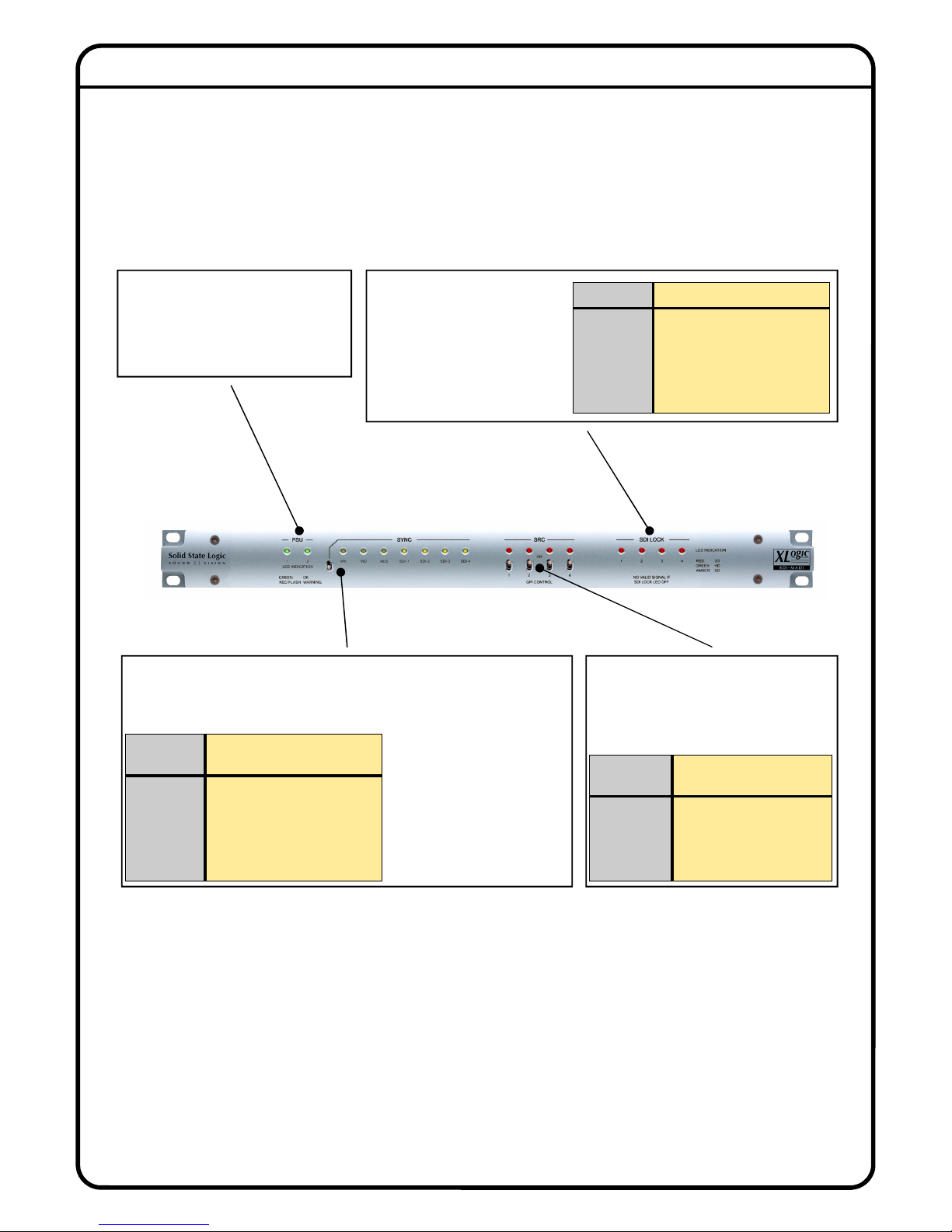
Front Panel Description 8
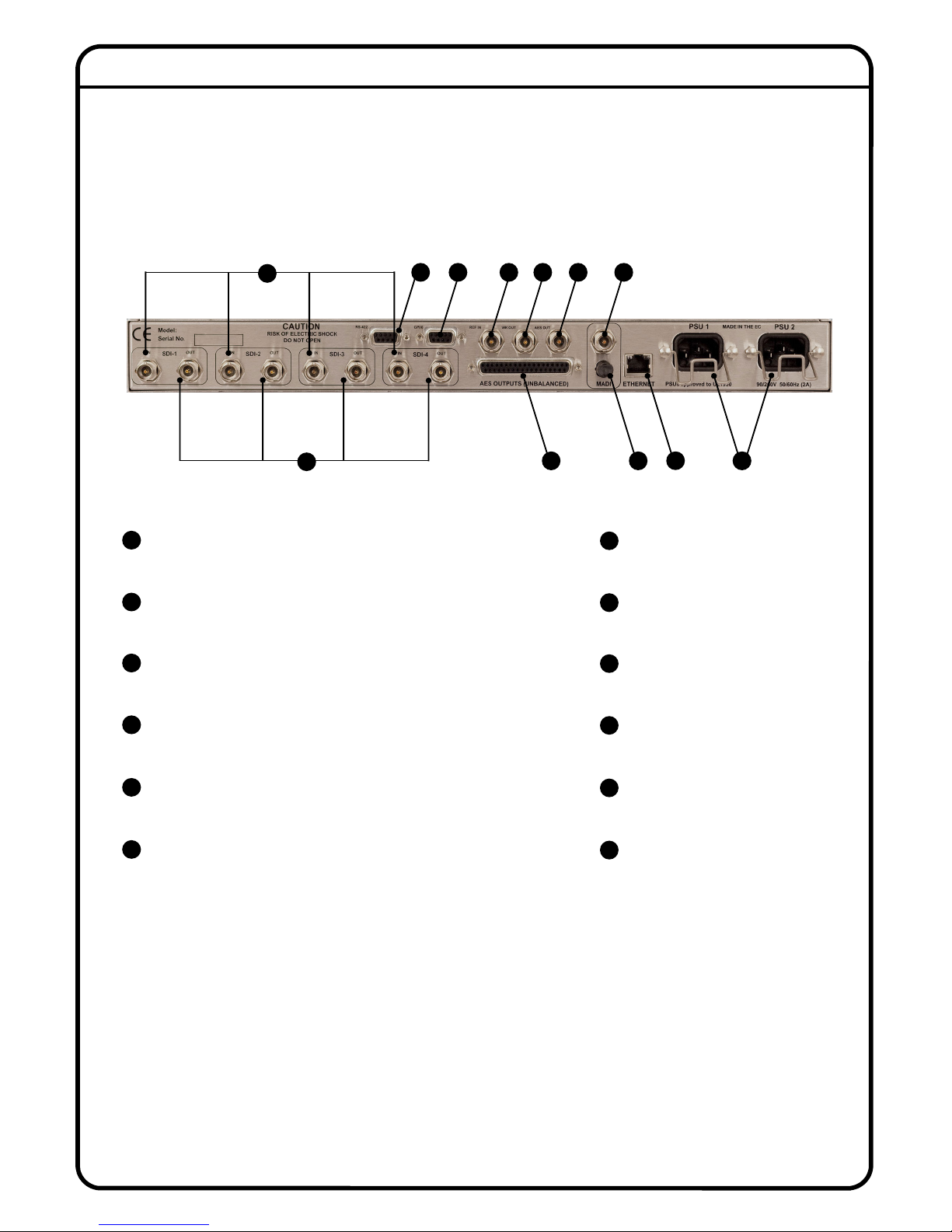
Rear Panel Description 9
Installation 10 - 12
Setting Up and Operation 13
Synchronisation 14
Frequently asked Questions 15
Conformity & Warranty 4
CAUTION: TO REDUCE THE RIS OF ELECTRIC SHOC , DO NOT REMOVE COVER (OR BAC ). NO USER-SERVICEABLE
PARTS INSIDE. REFER SERVICING TO QUALIFIED SERVICE PERSONNEL
CAUTION: RIS OF ELECTRIC SHOC . THIS EQUIPMENT HAS MORE THAN ONE POWER CORD. TO REDUCE THE RIS S OF
ELECTRIC SHOC DISCONNECT BOTH POWER SUPPLY CORDS BEFORE SERVICING
The lightning flash with arrowhead symbol, within equilateral triangle, is intended to alert the user to the
presence of un-insulated “dangerous voltage” within the product’s enclosure that may be of sufficient
magnitude to constitute a risk of electric shock to persons.
The exclamation point within an equilateral triangle is intended to alert the user to the presence of
important operating instructions and maintenance (servicing) instructions in the literature accompanying
the appliance.
Important Safety Information
Important Safety InformationImportant Safety Information
Important Safety Information
This apparatus has no mains switch or other user-operated control for disconnecting the AC mains power. The mains
plugs or the appliance couplers (IEC sockets) are used as the disconnect devices. Either device must remain readily
operable and accessible when the apparatus is installed for use.
This unit includes thermally resettable fuses that are integral to the power supply circuitry, but the unit must always
be powered from a supply fitted with an HRC type (High In-Rush Current) fuse with a rating of 1 A.
Important Safety Precautions
Important Safety PrecautionsImportant Safety Precautions
Important Safety Precautions
4
44
4
Instructions for Disposal of WEEE by Users in the European Union
Instructions for Disposal of WEEE by Users in the European UnionInstructions for Disposal of WEEE by Users in the European Union
Instructions for Disposal of WEEE by Users in the European Union
The symbol shown here is on the product or on its packaging, which indicates that this product must not be disposed of with other
waste. Instead, it is the user’s responsibility to dispose of their waste equipment by handing it over to a designated collection point for
recycling of waste electrical and electronic equipment. The separate collection and recycling of your waste equipment at the time of
disposal will help to conserve natural resources and ensure that it is recycled in a manner that protects human health and the
environment. For more information about where you can drop off your waste equipment for recycling, please contact your local city office, your
household waste disposal service or where you purchased the product.
Standards Conformance
Standards ConformanceStandards Conformance
Standards Conformance
Conformity and Warranty
This document confirms that products bearing the CE label meet all the requirements in the EMC directive 2004/108/EC and LV directive 2006/95/EC laid
down by the Member States Council for adjustment of legal requirements. Furthermore the products comply with the rules and regulations from 30 August
1995 referring to the electromagnetic compatibility of devices. SSL SDI-MADI units bearing the CE label comply with the following harmonised or national
standards:
EMC:
EMC: EMC:
EMC:
BS EN 55103-1 :1997
BS EN 55103-2 :1997
Safety:
Safety: Safety:
Safety:
BS EN 60950-1:2006 (ed.2) + A11:2009
Insulation:
Insulation:Insulation:
Insulation:
Class 1
FCC Notice
FCC NoticeFCC Notice
FCC Notice
This equipment has been tested and found to comply with the limits for a Class A digital device, pursuant to part 15 of the FCC Rules. These limits are designed
to provide reasonable protection against harmful interference when the equipment is operated in a commercial environment. This equipment generates, uses,
and can radiate radio frequency energy and, if not installed and used in accordance with the instruction manual, may cause harmful interference to radio
communications. Operation of this equipment in a residential area is likely to cause harmful interference in which case the user will be required to correct the
interference at his own expense.
Limited Warranty
Limited WarrantyLimited Warranty
Limited Warranty
Warranty claims will only be accepted if the purchased product has been used for its intended purpose. Any purchased product used for an
unintended purpose will not be eligible for warranty protection. For all warranty inquiries or claims please address your claim to the dealer
that you purchased the product from – or to Solid State Logic if the purchase was directly from Solid State Logic – within a period of two
months from the date on which you detected its lack of conformity with the terms of the warranty. Please include your original proof of
Please include your original proof of Please include your original proof of
Please include your original proof of
purchase when initiating the claim
purchase when initiating the claimpurchase when initiating the claim
purchase when initiating the claim.
• Within the EU:
Within the EU: Within the EU:
Within the EU:
Pursuant to the Solid State Logic Terms and Conditions under European consumer law the purchaser has full
statutory warranty rights for two years from the date of delivery of the product. The warranty is valid only in those Member
States of the European Union (EU) who have adopted the applicable EU law into their national legislation. The applicable
national legislation governing the sale of consumer goods is not affected by this warranty.
• Outside of the EU:
Outside of the EU: Outside of the EU:
Outside of the EU:
Outside of the European Union a 12 month warranty from date of purchase is applicable.
Out of Warranty Repairs
Out of Warranty RepairsOut of Warranty Repairs
Out of Warranty Repairs
In the event of a fault arising after the warranty period has expired the unit should be returned to Solid State Logic either directly or via your
local dealer. You will be charged for the time spent on the repair (at Solid State Logic's current repair rate) plus the cost of parts and
shipping. Note that no units can be accepted for repair without prior arrangement (see below).
All Returns
All ReturnsAll Returns
All Returns
• No unit will be accepted for repair by Solid State Logic unless accompanied by a valid RMA (Return Material Authorisation) number,
obtainable from Solid State Logic prior to shipping.
• All units should be shipped to Solid State Logic in suitable rigid packaging – Solid State Logic cannot be held responsible for any damage
caused by shipping units in other packaging. In such cases Solid State Logic will return the unit in a suitable box, which you will be charged
for.
• Do not include the power cable, manual or any other items – Solid State Logic can not guarantee to return them to you.
© Solid State Logic
© Solid State Logic© Solid State Logic
© Solid State Logic—
——
—All Rights reserved under International and Pan
All Rights reserved under International and PanAll Rights reserved under International and Pan
All Rights reserved under International and Pan-
--
-American Copyright Conventions
American Copyright ConventionsAmerican Copyright Conventions
American Copyright Conventions
SSL, Solid State Logic are registered trademarks of Solid State Logic
XLogic, XLogic SDI-MADI, MADI-Coax are trademarks of Solid State Logic
All other product names and trademarks are the property of their respective owners and are hereby acknowledged
No part of this publication may be reproduced in any form or by any means, whether mechanical or electronic, without the written permission of
Solid State Logic, Oxford, OX5 1RU, England
As research and development is a continual process, Solid State Logic reserves the right to change the features and specifications described
herein without notice or obligation.
Solid State Logic cannot be held responsible for any loss or damage arising directly or indirectly from any error or omission in this manual.
E&OE
Visit SSL at: www.solidstatelogic.com
This Document is SSL Part No. 82B4HM01A
82B4HM01A82B4HM01A
82B4HM01A
5
55
5
Introduction
Congratulations on your purchase of this Solid State Logic XLogic SDI-MADI unit. Please be assured that it will provide
you with many years of reliable service while delivering the pristine audio quality you expect from any Solid State Logic
product.
The SSL SDI-MADI is a cost-effective solution to the problem of connecting audio equipment to the SDI-based
infrastructure found in many broadcast facilities today. Occupying only 1U of rack space, the SDI-MADI provides the
interface between SDI video bit streams and digital audio. SDI-MADI extracts up to 16 audio channels from each of the
unit’s four SDI inputs to provide a total of up to 64 audio channels in both MADI (AES10id-2008) and AES3 (AES3-1992)
formats. All SDI inputs independently auto-sense between 3G, HD and SD standards and are provided with loop-
through connectivity for downstream equipment.
With a comprehensive range of synchronising options and switchable sample rate convertors, the SDI-MADI is designed
to reliably
and seamlessly integrate into any broadcast environment where SDI-embedded audio channels require format
conversion.
This manual covers the XLogic SDI-MADI’s connections and indications, including its various options for
synchronisation and external control. Please keep the manual in a safe place once you have installed the XLogic SDI-
MADI unit.
IMPORTANT
IMPORTANTIMPORTANT
IMPORTANT
Please register your XLogic SDI-MADI unit on our website. This will ensure that you receive notification of future updates and other important
information, and that your guarantee is registered. Registration will also make you eligible for technical support.
The Solid State Logic home page is at: www.solidstatelogic.com
From there you can access our Support page, which includes links to the Product Registration and Download pages. You can also visit the
Frequently Asked Questions (FAQ) area for any questions you might have or to contact our Technical Support staff.
Un-pack
Your XLogic SDI-MADI box
should contain the following:
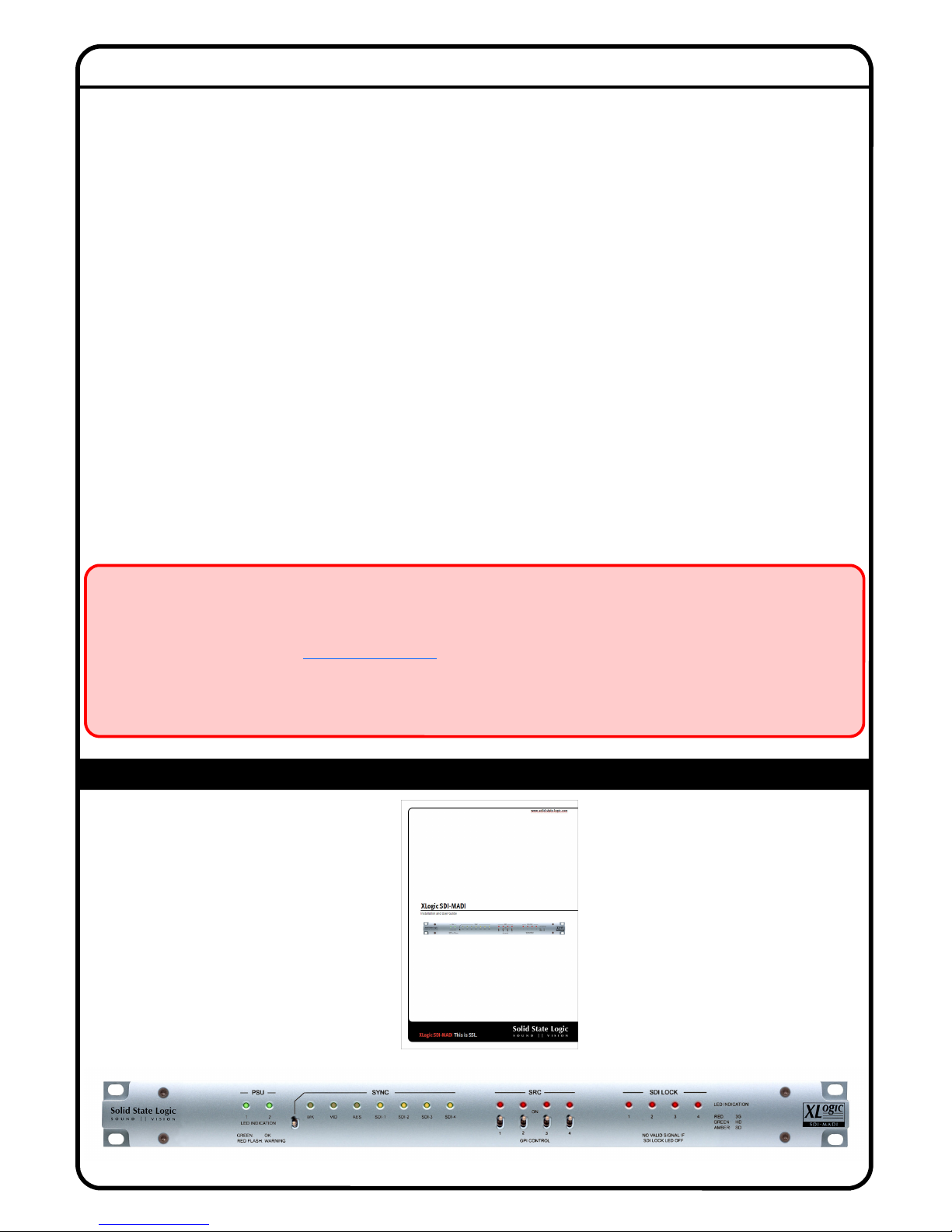
The XLogic SDI-MADI Unit
User & Installation Guide (this document)
Block Diagram
6
66
6
Key Features
• 4 x SDI inputs on 75
Ω
BNC connection. 16 audio channels per input
• Auto-detection of SD/HD/3G input format
• Active loop-through of each input to 75
Ω
BNC output connection
• Full Dolby® E/Dolby® Digital transparency for loop through
• 32 x AES digital audio output via 37 pin D-Sub
• Dual 64 Ch MADI digital audio output via ST Multimode Optical and Coax
• Front Panel LED status indication for PSU, SYNC, SRC and SDI Lock
• Comprehensive sync options (Wordclock, AES, Black and Burst, SDI1 - 4)
• Wordclock and AES sync outputs
• On-board sample rate convertors (SRCs), enabled locally or remotely via GPI
• Dual power supplies, with separate IEC mains connectors
• Optional 19” AES Signal Breakout panel providing AES3-id outputs on 32 x
BNC connectors (75
Ω
)
7
77
7
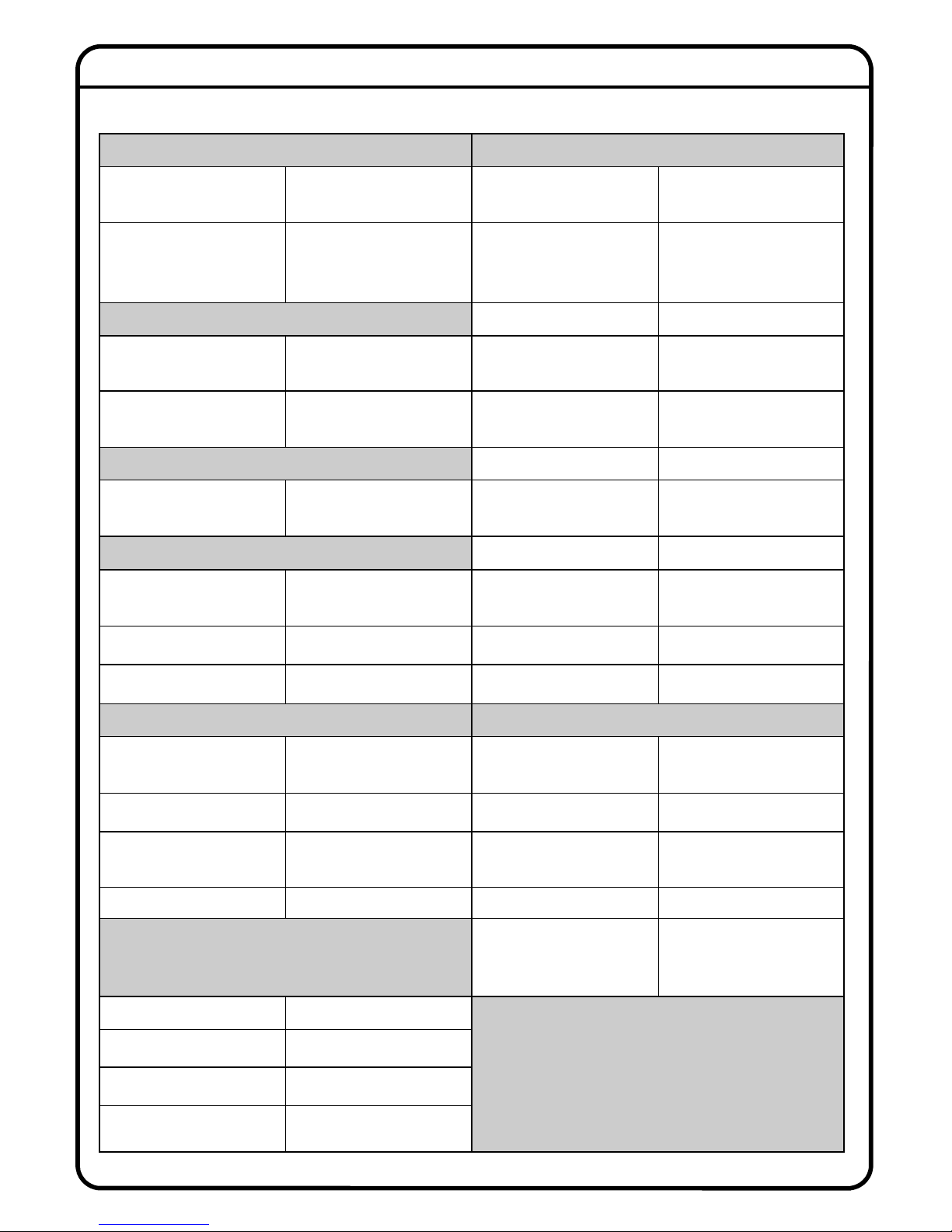
Specifications
VIDEO INPUTS SYNCHRONISATION
Connector/input impedance 4 x BNC sockets, 75 Ω Sample Rate Conversion SRC available on all inputs,
switc able in banks of 16
Compatible formats
SDI, SD/HD/3G, compliant
wit SMPTE 259M, 296M,
274M, 292M, 424M or
425M
Sources
(External): SDI1 to 4,
AES3, Video black-and-
burst, Wordclock
VIDEO OUTPUTS Video sync input PAL/NTSC 50/60 Hz (SD)
Connector/output
impedance 4 x BNC sockets, 75 Ω Wordclock input 48 kHz ±50ppm, DC
coupled, positive going
Format Active, re-clocked loop-
t roug of SDI inputs AES3 input AES3 input at fs=48kHz
AUDIO INPUTS Wordclock output 48 kHz nominal
Format Extracted from SDI video
inputs AES3 output Digital audio signal
compliant wit AES3-1992
AES3 AUDIO OUTPUTS GPIO PORT
Connector/output
impedance
37-way female Dsub, 32 x
75 Ω unbalanced GPIO port – connector 9-pin female Dsub
Format Compliant to AES3-1992 Input functions 4 x SRC select (s ort-to-
ground)
Sampling frequency 48 kHz nominal Output functions 4 x SRC status (open-
collector)
MADI AUDIO OUTPUT POWER SUPPLY
Connector/output
impedance (coaxial) BNC socket, 75 Ω Type
2 x independent switc -
mode regulated, auto-
ranging
Connector (optical) ST Multimode Inputs 2 x 90 to 264 V AC, 50/60
Hz
Format 64-c annel, compliant wit
AES10id-2008 Power consumption 16 W
Data rate 125 Mbps ±25ppm Connectors 2 x IEC wit retaining clips
PHYSICAL Fuse data
Internal fixed resettable
(non-user-accessible). Use
a 1 A HRC externally-fused
supply
Dimensions (w x d x ) 483 x 200 x 44.5 mm (1U)
Weig t 4 kg / 8.8 lbs
Operating temperature
range 0ºC to +40ºC
Relative umidity range 70% max, (non-
condensing)
Front anel Description
Sync Source Selection
Sync Source SelectionSync Source Selection
Sync Source Selection
A 3-position toggle switch for selecting the audio sync source. The switch’s ‘down’
position is latching, while its ‘up’ position is momentary. Repeated ‘upward’
presses on the switch scroll through the possible external sync sources. The
adjacent amber LEDs indicate the
currently-selected source.
When the LED for the desired
source is on, the switch may be
placed in the latching ‘down’
position to prevent inadvertent
further changes of sync source.
Switch
osition Function
Centre No Action
Up
(Momentary)
Increments Sync Source
Selection
Down
(Latches) Locks Sync To Chosen Source
SRC Control
SRC Control SRC Control
SRC Control
Four 2-position toggle switches controlling
the four 16-channel output SRCs. The switch
also enables external GPI control of each
SRC.
PSU Status
PSU StatusPSU Status
PSU Status
Two bi-colour LEDs confirming the current
status of each PSU. The LEDs are green in
normal operation and flash red if a PSU
fault condition is detected.
SDI Lock LEDs
SDI Lock LEDsSDI Lock LEDs
SDI Lock LEDs
Four tri-colour LEDs, for SDI inputs 1
to 4. Each illuminates when a valid
SDI video signal is detected at its
input, and the colour indicates the
interface standard in use.
Colour SDI Format
Yellow SD-SDI
Green HD-SDI
Red 3G-SDI
Off No Valid SDI Signal Detected
Switch
osition Function
Up SRC On
Down SRC Off, but under external
GPI control
8
88
8
9
99
9
Rear anel Description
3 4
9
1 5 6 7 8
2 10 11 12
6 12
Wordclock out
Wordclock out Wordclock out
Wordclock out (BNC) AC inputs
AC inputs AC inputs
AC inputs –
––
– 2 x IEC sockets
2 x IEC sockets 2 x IEC sockets
2 x IEC sockets
1 7
SDI video inputs 1 to 4 (4 x BNCs)
SDI video inputs 1 to 4 (4 x BNCs) SDI video inputs 1 to 4 (4 x BNCs)
SDI video inputs 1 to 4 (4 x BNCs) – internally illuminated green AES3 sync out (BNC)
AES3 sync out (BNC)AES3 sync out (BNC)
AES3 sync out (BNC)
2 8
SDI video active loop through outputs 1 to 4 (4 x BNCs)
SDI video active loop through outputs 1 to 4 (4 x BNCs) SDI video active loop through outputs 1 to 4 (4 x BNCs)
SDI video active loop through outputs 1 to 4 (4 x BNCs) - internally illuminated red Co
CoCo
Co-
--
-axial MADI output (BNC)
axial MADI output (BNC)axial MADI output (BNC)
axial MADI output (BNC)
3 9
RS
RSRS
RS-
--
-422 port
422 port 422 port
422 port (9-pin female Dsub) AES3 outputs
AES3 outputs AES3 outputs
AES3 outputs (37-way female Dsub)
4 10
GPI/O port
GPI/O port GPI/O port
GPI/O port (9-pin female Dsub) Optical MADI output
Optical MADI output Optical MADI output
Optical MADI output (ST)
5 11
Ext. Sync input
Ext. Sync input Ext. Sync input
Ext. Sync input (BNC) Ethernet port
Ethernet port Ethernet port
Ethernet port (RJ45)

10
1010
10
Installation
Hardware Considerations
Hardware ConsiderationsHardware Considerations
Hardware Considerations
The XLogic SDI-MADI is built in a 1U 19” enclosure. It is intended to be permanently installed in a standard 19” equipment rack. The unit has no
internal fans and is cooled by natural convection. There are ventilation grilles in the top, bottom and both sides of the enclosure, and care must
be taken to ensure that these are not blocked by cables or other equipment when the unit is installed. Do not install any other items of
equipment immediately above or below to the SDI-MADI; the use of 1U blanking panels is recommended.
Power Supply Considerations
Power Supply ConsiderationsPower Supply Considerations
Power Supply Considerations
The SDI-MADI is fitted with two separate, auto-ranging switch-mode power supplies (PSUs). The operating voltage range is 90 to 264 V AC,
50/60 Hz. The internal power rails are diode-paralleled to the two supplies, and the unit will operate normally if only one PSU is powered or
functional. For maximum protection when using both PSUs, the two AC inlet cables should be connected to mains circuits which are as
independent of each other as possible. If redundant operation is not required, only one AC supply cable need be connected; either AC inlet may
be used.
Fuses And Ratings
Fuses And RatingsFuses And Ratings
Fuses And Ratings
Each of the SDI-MADI’s PSUs has an internal resettable fuse for PSU protection. These fuses are no accessible to the user. The unit should be
powered from a mains supply (supplies) fitted with an external HRC-type fuse (High Inrush Current) rated at 1 A.
Unit Connections
Unit ConnectionsUnit Connections
Unit Connections
SDI Inputs
SDI InputsSDI Inputs
SDI Inputs
The SDI-MADI can simultaneously de-embed the 16 audio channels in each of four separate SD video signals. Four BNC sockets are provided a
the rear panel for connecting the SDI inputs. The characteristic impedance is 75
Ω
. The SDI-MADI is compatible with all SDI formats up to 3G
(2.9 Gbps and auto-detects between them. See the Technical Specifications on page 16 for full list of compatible
formats.
Each SDI input has an active “loop through” output to simplify the connection of further equipment. The outputs are fully buffered from the
inputs and are re clocked. The SDI bit stream is otherwise unaltered.
Altri manuali per XLogic SDI-MADI
1
Indice
Altri manuali Solid State Logic Attrezzatura musicale

Solid State Logic
Solid State Logic XLogic SDI-MADI Manuale utente

Solid State Logic
Solid State Logic XL-Desk Manuale utente

Solid State Logic
Solid State Logic XLogic Super-Analogue Manuale utente

Solid State Logic
Solid State Logic XLogic Super-Analogue X-Rack Manuale utente
Solid State Logic
Solid State Logic SSL12 Manuale utente

Solid State Logic
Solid State Logic 82S6XL090A Manuale utente

Solid State Logic
Solid State Logic XLogic Super Analogue Manuale utente


