
Sonitrol GS3LFM Manuale utente
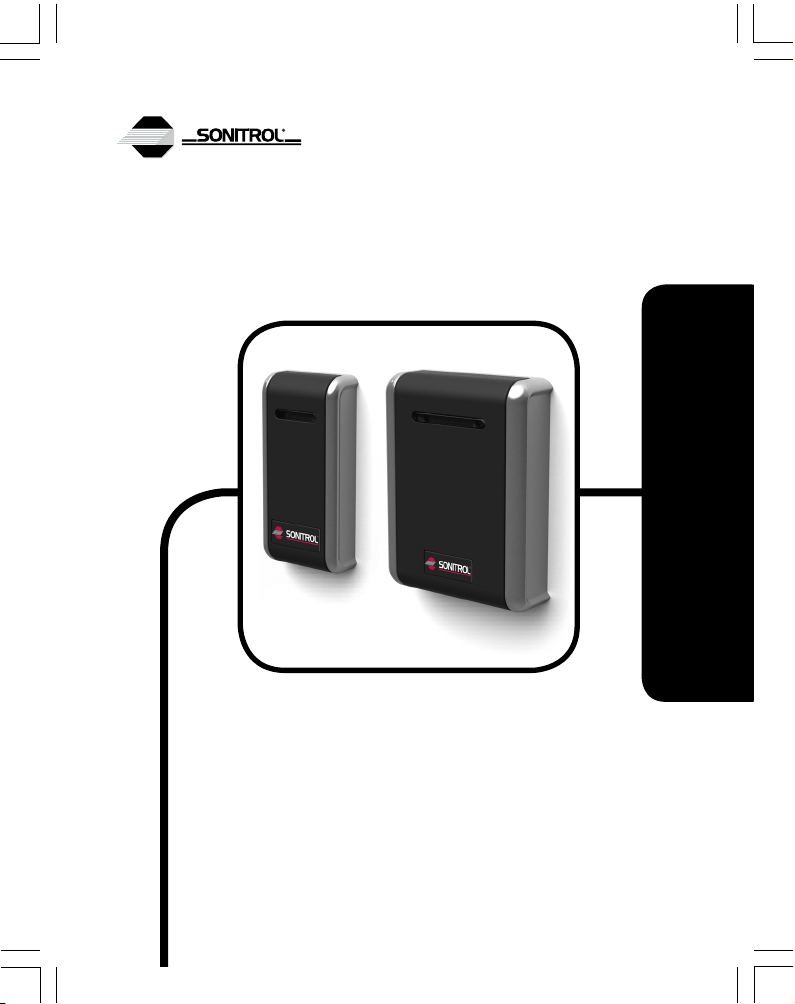
GS3-LF Mullion / Standard Reader
Installation Guide
17998 v3.03 DRAFT 53 May 2013

2

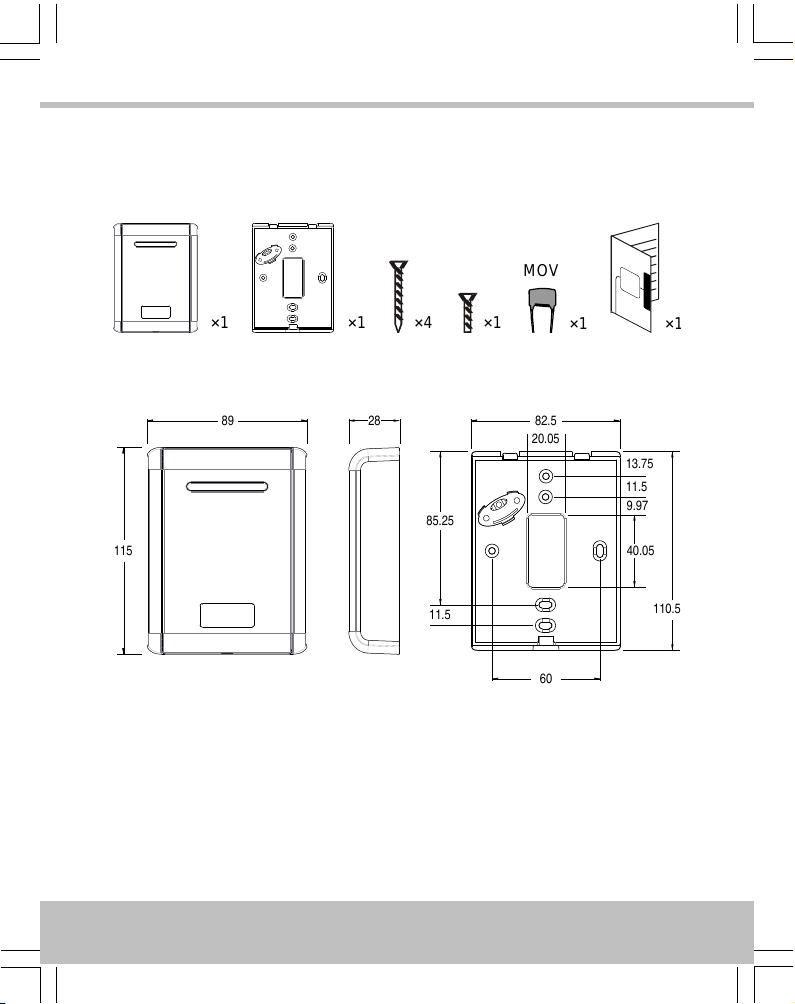
Standard Reader · Lecteur standard · Lector estándar
P/N 909070111
Parts · Pièces · Piezas
×4×1×1
MOV
×1×1×1
Dimensions · Dimensions · Dimensiones
20.05
13.75
11.5
85.25
11.5
9.97
40.05
60
82.5
110.5
115
89 28
All dimensions mm · Toutes dimensions en mm · Todas las dimensiones en mm
4
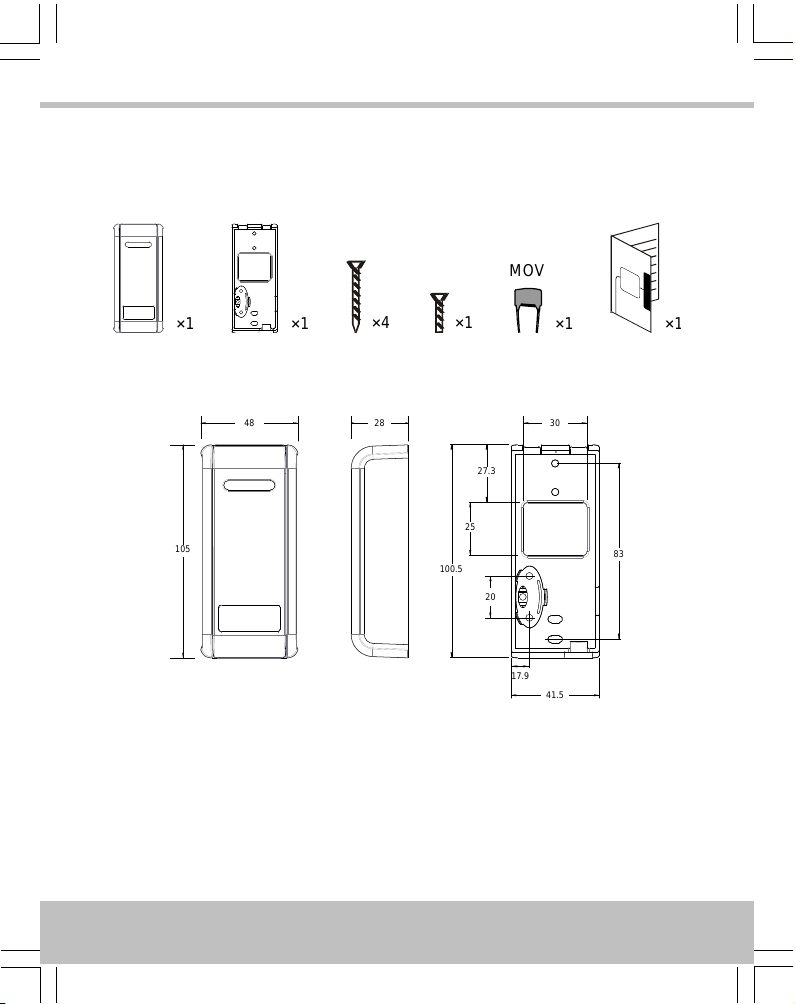
Mullion Reader · Lecteur profilé · Lector columelar
P/N 909070110
Parts · Pièces · Piezas
×1×4×1×1×1
MOV
×1
Dimensions · Dimensions · Dimensiones
48
105
28
20
83
100.5
41.5
25
27.3
30
17.9
All dimensions mm · Toutes dimensions en mm · Todas las dimensiones en mm
5
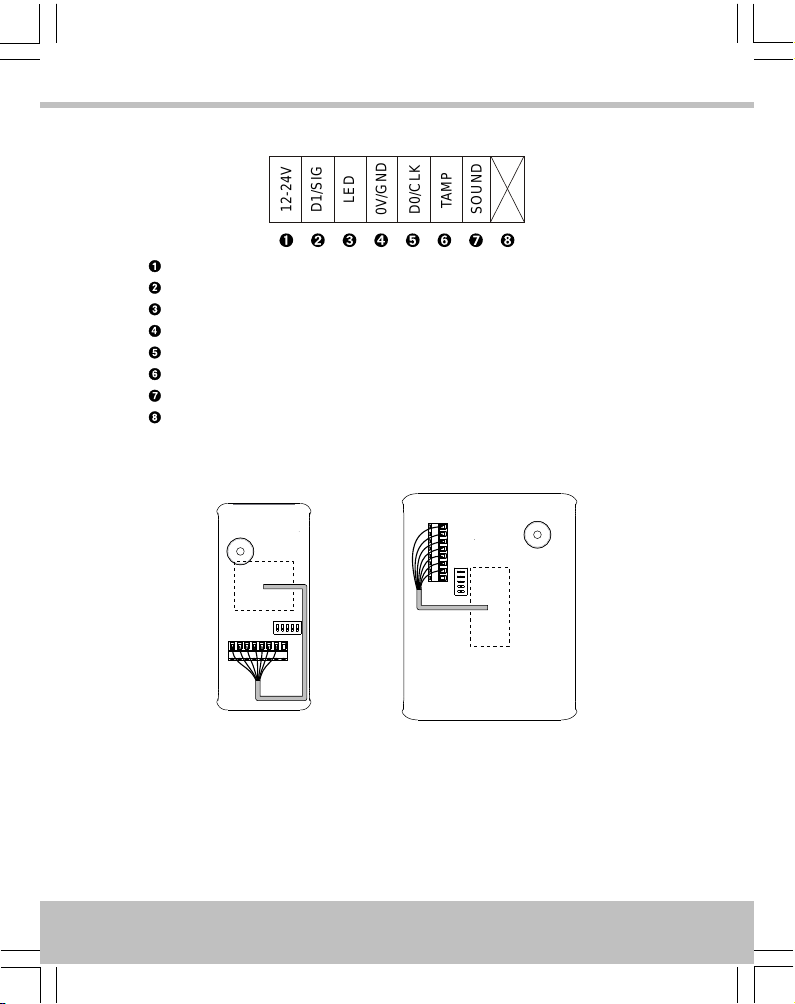
Connections · Connexions · Conexiones
12-24V
D1/SIG
LED
0V/GND
D0/CLK
TAMP
SOUND
+V / 12V–24V
D1 / SIG
LED
0V / GND
D0 / CLK
Tamper · Effraction · Manip. fraud.
Sounder · Alarme sonore · Sonido
Do not use · N’utiliser pas · No utilice
Cable Routing · Routage du câble · Recorrido del cable
6
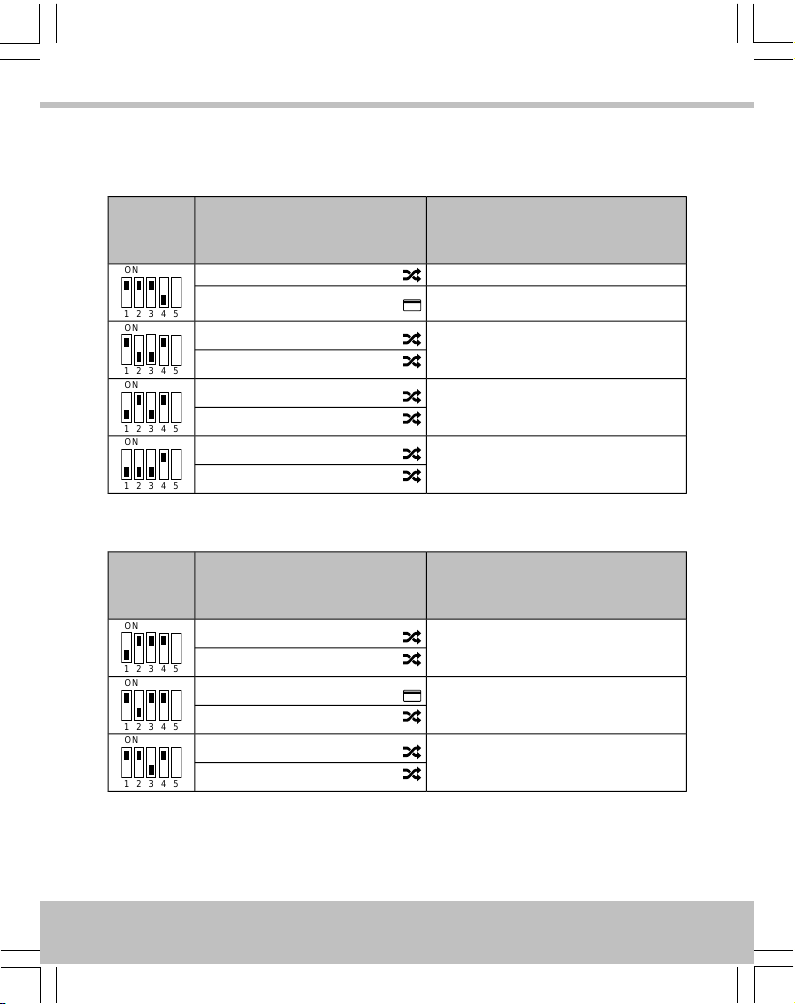
Output Format · Format de Sortie · Formato de Salida
Default Settings · Paramètres standards · Ajustes estándares
Output Format
Format de sortie
Formato de Salida
Card / Token
Carte / Fiche
Tarjeta / Ficha
DIP
Wiegand 74-bit
ON
1 2 3 4 5
PAC / KeyPAC
WiegandWiegand Prox
Wiegand 34-bit
ON
1 2 3 4 5
PAC / KeyPAC
Wiegand Prox
Wiegand 26-bit
ON
1 2 3 4 5
PAC / KeyPAC
Wiegand Prox
Wiegand 74-bit
ON
1 2 3 4 5
PAC / KeyPAC
Wiegand Prox
Other Settings · Autres paramètres · Otros ajustes
Output Format
Format de sortie
Formato de Salida
Card / Token
Carte / Fiche
Tarjeta / Ficha
DIP
Magstripe
ON
1 2 3 4 5
PAC / KeyPAC
Wiegand Prox
PAC
ON
1 2 3 4 5
PAC / KeyPAC
Wiegand Prox
PAC 64
ON
1 2 3 4 5
PAC / KeyPAC
Wiegand Prox
7
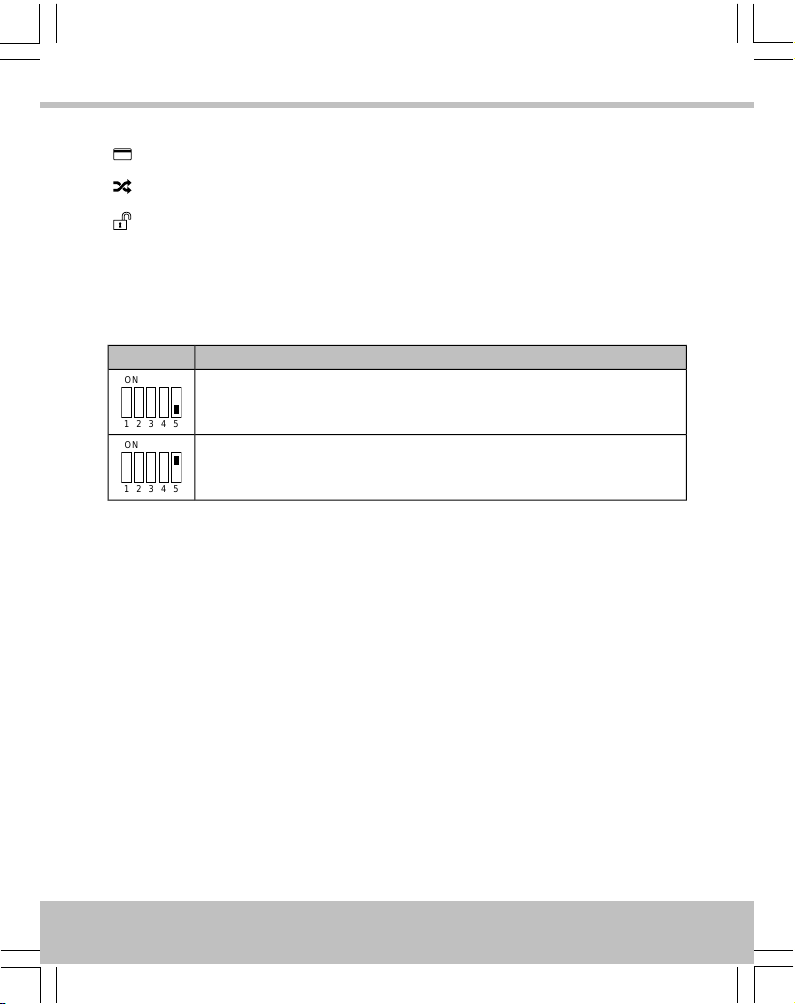
Symbols · Symboles · Símbolos
Data from card · Les données de la carte · Los datos de tarjeta
Processed data · Les données sont traitées · Los datos se procesan
Decrypted and processed data · Les données sont traitées et décryptées · Los datos
se descifra y se procesa
Reader Configuration · Configuration du lecteur · Configuración de
lector
Result · Résultat · ResultadoDIP
Reader beeps when token presented
Le lecteur émet un bip lorsque la fiche est présenté
Lector pita cuando una tarjeta es presentada
ON
1 2 3 4 5
Reader silent when token presented
Le lecteur reste silencieux lorsque la fiche est présenté
Lector silencia cuando una tarjeta es presentada
ON
1 2 3 4 5
8

English
Installation
1. Ensure your product comes with the items indicated on pages 4–5; if not please
contact your dealer.
2. Feed cables through backplate.
3. Use two screws to attach backplate to wall.
4. Use two screws to attach tamper plate to wall.
5. Connect cable to circuit board — see page 6.
6. Set output format — see page 7.
7. Configure reader — see page 8.
8. Snap reader to backplate and secure with final screw.
9. Apply power when all readers are installed.
Notes
•If power is applied when the reader is not properly attached to the wall, a wall
tamper condition is generated.
•Do not distort the back plate or tamper plate when mounting, e.g. to a back box,
or a spurious wall tamper / case tamper condition may be generated.
•Mount readers >3’ / 1m apart, e.g. on either side of the door. Mounting on metal
surfaces will reduce the reading range.
•If the reader is being used to enter credential information to arm a system, the
reader must be located within 3’ / 1m of the panel’s main keypad or display.
•For outside readers, use corrosion-resistant fixings and apply silicone sealant to
the backplate before fixing to the wall.
•The supplied MOV (Metal Oxide Varistor, Anglia Components P/N B72207S250K101)
should be fitted across the power terminals of the lock to suppress back EMF. Any
suppression diodes fitted in the lock / lock circuit must be removed.
•Output format and reader configuration can be changed without disconnecting the
power supply. The reader automatically restarts with the new configuration.
9
English
Reader Tamper
If the backplate is pulled away from the wall, the tamper plate remains attached to the wall
and a wall tamper condition is generated. Likewise, if the reader is removed from the backplate,
acase tamper condition is generated.
The voltage on the Tamper line is normally low. If case tamper or wall tamper is detected, the
voltage on the Tamper line becomes high and the reader sounds 3 long beeps every 5 seconds
for two minutes, then stops.
To clear a wall tamper condition, reattach the backplate to the tamper plate. To clear a case
tamper condition, reattach the reader to the backplate.
Usage
LEDs
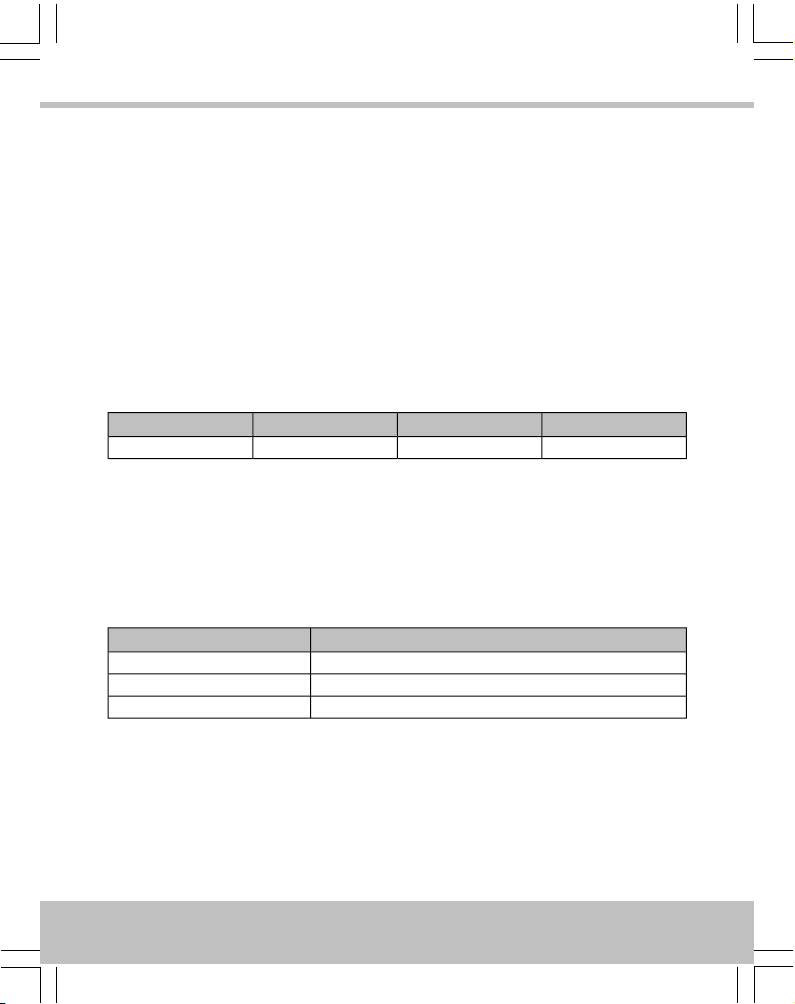
YellowRed / GreenGreenRed
Arming systemAccess deniedAccess permittedDefault
Sounder
•The reader sounds 4 rapid beeps when it is powered up or restarted.
•If specified, the reader beeps once when a token is presented.
Cable Lengths
Sonitrol door controllers only
Distance from Reader to ControllerCable Gauge
230’ / 70m *7/0.2 0.34mm² 22AWG
230’ / 70m *16/0.2 0.5mm² 20AWG
230’ / 70m *32/0.2 1.0mm² 18AWG
10
English
Questo manuale è adatto per i seguenti modelli
1
Indice
Lingue:


