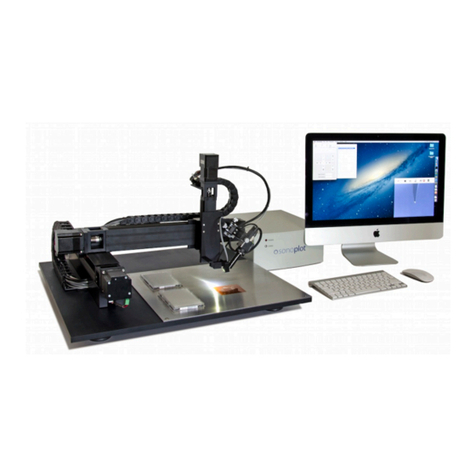
SONOPLOT MICROPLOTTER II Manuale utente

MICROPLOTTER™ II
MANUAL
REVISION 2.2

SONOPLOT, INC.
3030 LAURA LANE, SUITE 120
MIDDLETON, WI 53562
(608) 824-9311
CONTACT@SONOPLOT.COM!
2

CONTENTS
Introduction 6
Ultrasonic fluid dispensing 6
Surface height sensing 8
Precision robotic positioner 8
Installation 9
Unpacking and setup 9
Positioning system 9
Connecting the system to a computer 11
Installing the SonoGuide software 13
Loading a dispenser cartridge 17
Powering on the system 18
Sample Application 20
One-component oligonucleotide microarray 20
Wires from nanometallic inks 28
SonoGuide 30
Overview 30
Main interface 30
Directional controls 32
Toolbar items 33
Saving positions 34
Robotic positioner settings 35
Printing patterns 37
Camera display 40
Camera settings 41
Dispenser control 43
Dispenser calibration 45
Solution well locations 46
Surface cant calibration 49
Rotational calibration 50
Diagnostics 51
Useful Keyboard Shortcuts 54
Troubleshooting 55
Technical Specifications 58
3

Copyright
Copyright ©2015 SonoPlot, Inc. All rights reserved.
Trademarks and Patents
SonoPlot, the SonoPlot logo, SonoDraw, SonoGuide, and Microplotter, among others, are
trademarks of SonoPlot, Inc. in the United States and other countries. Other parties’ trademarks
or service marks are the property of their respective owners and should be treated as such. The
Microplotter products and accessories are protected by one or more of the following U.S.
Patents: 6874699, 7467751.
5


INTRODUCTION
Congratulations on your purchase of a SonoPlot Microplotter instrument! A Microplotter system
is a leading-edge tool for the fabrication of biological microarrays, polymer electronics, or any
other application that requires precise and accurate dispensing of extremely small liquid
volumes. It can dispense picoliters of a wide variety of solutions onto almost any planar surface
in discrete spots or continuous traces such as lines or arcs.
This document will guide you through the installation and setup process for your Microplotter
system in Chapter 2, followed by walkthroughs of simple dispensing applications in Chapter 3.
The software package that controls the dispenser and automate the dispensing of patterns on a
surface, SonoGuide, will be described in Chapters 4. Solutions to common problems will be
listed in Chapter 5 and the technical specifications will be described in detail in Chapter 6. How
to refurbish a dispenser will be covered in Chapter 7.
Before that, however, it would be appropriate to describe the fundamental operating principles of
a Microplotter instrument.
Ultrasonic fluid dispensing
A Microplotter instrument is capable of applying picoliters of fluid to a surface in order to create
features as small as 20 micrometers (microns) wide due to its use of a novel form of fluid
ejection based on ultrasonic pumping.
The dispenser at the core of a Microplotter system is composed of a hollow, tapered glass
needle attached to a piezoelectric element. When an alternating current is supplied to the
piezoelectric, it vibrates. At certain frequencies, the resonant frequencies of the dispenser, a
pumping action occurs within the needle or, if the amplitudes of vibration are high enough, fluid
is sprayed out of the end of the needle. This electronically controlled pumping action makes it
possible for microscale fluid features to be put down by a Microplotter instrument. The spraying
action allows for rapid switching between different solutions while minimizing cross-
contamination.
To dispense a spot of fluid on a surface, a Microplotter dispense head is first loaded with fluid
and then brought near the surface. The ultrasonic pumping action is activated by the controlling
computer either automatically when running a preset pattern or manually by the user. This
pumping causes the fluid meniscus at the tip of the dispenser to bow outward. When the
dispenser is brought close enough to the surface, a droplet will be touched off. The ultrasonics
are then deactivated and the dispenser is retracted from the surface.
6
1

Fluid deposition via ultrasonic pumping
A Microplotter system also has the unique capability of dispensing continuous lines. This is
accomplished by starting as if to create a spot on a surface, but not deactivating the dispenser
after fluid contact has been made with the surface. Instead, the dispenser is moved along the
surface in a straight line, leaving behind a smooth line wherever it passes. Only when the line is
finished is the dispenser deactivated and retracted from the surface.
Aqueous solution being deposited in a 50 micron diameter spot
7

Surface height sensing
The detection of the surface height is handled by an electronic feedback system that
uses changes in the vibrational properties of the dispenser to detect whether or not it
has contacted a physical object, no matter how gently. This surface sensing capability
allows for the cant of a surface to be calibrated, so that the control software can
maintain a consistent height of the dispenser above the surface for reliable dispensing.
Precision robotic positioner
The Microplotter picoliter dispenser would not be of much use without a precision
positioning system to place that dispenser at select locations, and do so in an
automated fashion. The robotic positioner of the Microplotter system occupies most of
its physical volume, and can move the dispenser over a 31 x 31 x 7 cm volume with a
10 micron resolution in the X, Y, and Z axes. All of this movement is controlled through
the SonoGuide software package (described in Chapter 4) either manually by the user
or automatically through the running of a pattern.
As you read through the following chapters, you will learn how to install, configure, and
operate your Microplotter II instrument in order to take advantage of its unique
capabilities in your line of research or development.
8

Indice
Altri manuali SONOPLOT Plotter