Sony EX480CP Manuale utente

2005 Sony Corporation
Color Camera Module
FCB-EX480C/EX480CP
FCB-EX48C/EX48CP
A-C4J-100-11 (1)
Technical Manual

2
Table of Contents
Features ..................................................................... 3
Precautions ................................................................ 4
Locations of Controls ............................................... 5
Basic Functions ......................................................... 7
Overview of Functions ................................................ 7
Eclipse ...................................................................... 30
Spectral Sensitivity Characteristics .......................... 30
Vibration Specifications ............................................ 30
Key Switch Circuitry ................................................. 31
Key Function Specifications ..................................... 32
Initial Settings, Custom Preset and Backup ............. 34
Mode Condition ........................................................ 36
Command List ......................................................... 39
VISCA/RS-232C Commands ................................... 39
FCB Camera Commands ......................................... 45
Specifications .......................................................... 59

3
Overview
Features
•The EXview HADTM CCD features 380,000 (NTSC)
or 440,000 (PAL) effective picture elements and
high-sensitivity shooting. The minimum illumination
required is 0.7 lux (1/60 s (NTSC), 1/50 s (PAL), ICR
OFF).
•18×optical zoom.
•Supports external synchronization (V-lock).
•Adopts a newly developed DSP for improved picture
quality when using the digital zoom or the slow
shutter.
•An infrared (IR) Cut-Filter can be disengaged from
the image path for increased sensitivity in low light
environments. The ICR will automatically engage
depending on the ambient light, allowing the camera
to be effective in day/night environments (FCB-
EX480C/EX480CP only).
•VISCA is a communications protocol, which enables
the camera to be controlled remotely by commands
from a host computer/controller.
•Six memory locations are provided to temporarily
save and recall up to six sets of camera settings.
•Enhanced Spherical Privacy Zone Masking
(max. 24 blocks)
•E-FLIP function
•Alarm function
With consideration given to environmental
protection, this module is designed to operate with
low power consumption and also incorporates lead-
free and halogen-free circuit boards.

4
Overview
Software
Use of the demonstration software developed by Sony
Corporation or use of the software with customer
developed application software may damage hardware,
the application program or the camera. Sony
Corporation is not liable for any damages under these
conditions.
Operation
Start the camera control software on your computer
after you turn on the camera and the image is
displayed.
Operation and Storage Locations
Do not shoot images that are extremely bright (e.g.,
light sources, the sun, etc.) for long periods of time. Do
not use or store the camera in the following extreme
conditions:
•Extremely hot or cold places (operating temperature
0 ˚C to +40 ˚C (32 ˚F to 104 ˚F))
•Close to generators of powerful electromagnetic
radiation such as radio or TV transmitters
•Where it is subject to fluorescent light reflections
•Where it is subject to unstable (flickering, etc.)
lighting conditions
•Where it is subject to strong vibration
Care of the Unit
Remove dust or dirt on the surface of the lens with a
blower (commercially available).
Precautions
Other
Do not apply excessive voltage. (Use only the
specified voltage.) Otherwise, you may get an electric
shock or a fire may occur.
In case of abnormal operation, contact your authorized
Sony dealer or the store where you purchased the
product.

5
Locations of Controls
FCB-EX480C/EX480CP Main Unit
1Lens
2CN991 connector
3CN992 connector
4CN601 connector (for key SW)
5TELE button
6WIDE button
7Tripod screw holes
When a tripod is used, please use
10 mm (13/32 in.) screws to attach it
to the camera. Also, please be
sure to attach the tripod securely.
Front
Rear Bottom
Left side
7
3
2
1
6
5
4

6
Locations of Controls
FCB-EX48C/EX48CP Main Unit
1Lens
2CN991 connector
3CN992 connector
4CN601 connector (for key SW)
5TELE button
6WIDE button
7Tripod screw holes
When a tripod is used, please use
10 mm (13/32 in.) screws to attach it
to the camera. Also, please be
sure to attach the tripod securely.
Front
Rear Bottom
Left side
7
3
2
1
6
5
4

7
Basic Functions
Basic Functions
Overview of Functions
VISCA commands are the basis of camera control.
Timing Chart
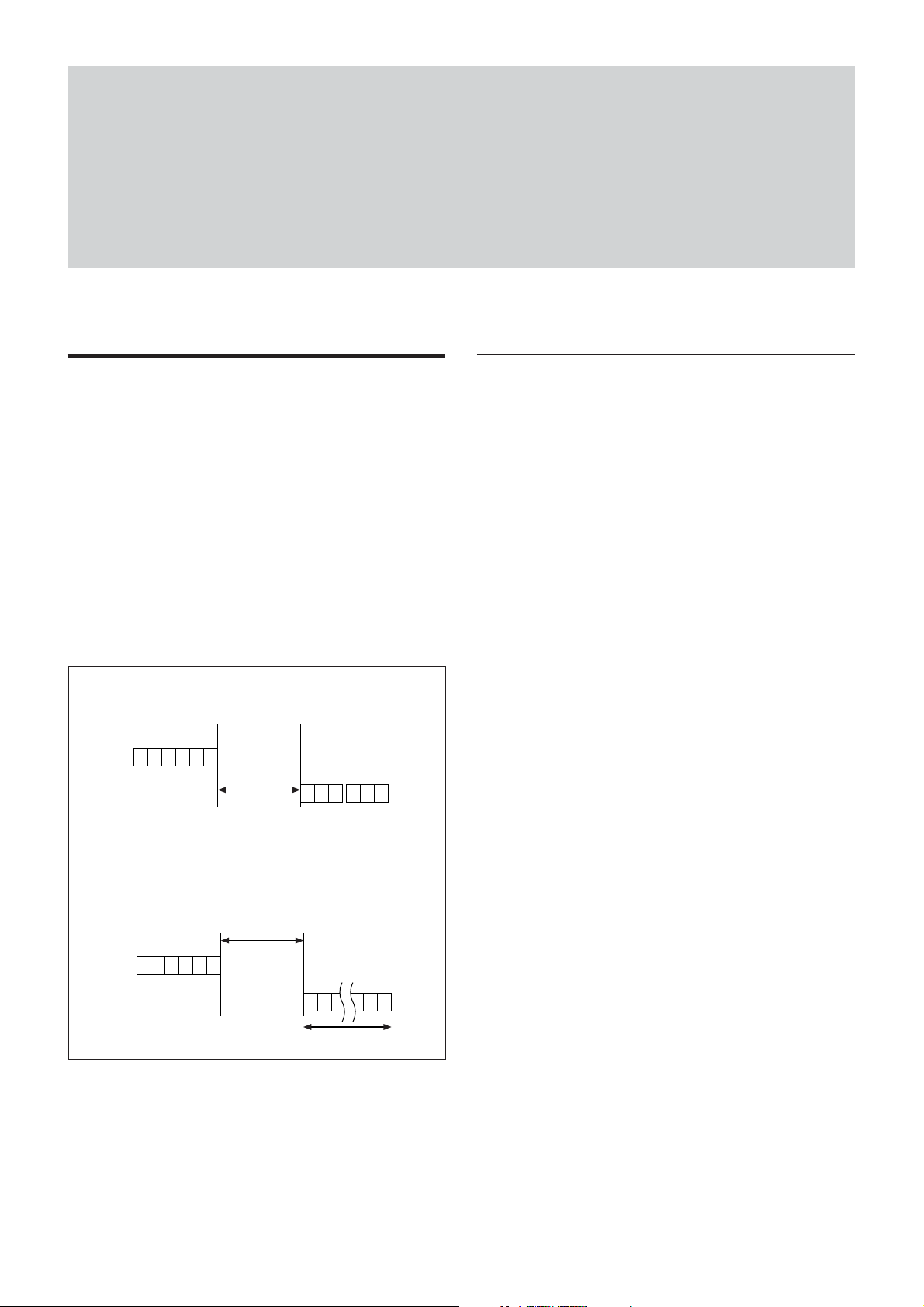
As VISCA Command processing can only be carried
out one time in a Vertical cycle, it takes the maximum
1V cycle time for an ACK/Completion to be returned.
If the Command ACK/Completion communication
time can be cut shorter than the1V cycle time, then
every 1V cycle can receive a Command.
Commands
• Power On/Off
Powers the camera on and off. When the power is off,
the camera is able to accept only the lowest level of
VISCA Commands; the display and other features are
turned off.
• I/F clear
Clears the Command buffer of the FCB camera.
Clearing the buffer can also be carried out from the
control application software when the power is on.
• Address set
VISCA is a protocol, which normally can support a
daisy chain of up to seven attached devices.
However, the FCB camera does not support camera
connections in a daisy chain. Therefore, whenever a
camera is connected for the first time, be sure to use
the address set to confirm the address.
• ID Write
Sets the camera ID.
• Mute
Blanks the screen and sends out a synchronizing
signal.
• Lens Initialization
Initializes the zoom and focus of the lens. Even when
power is already on, it initializes the zoom and the
focus.
• Comp Scan
A pixel blemish-masking feature is used to reevaluate
overall CCD pixel blemishes and mask severely
flawed pixels automatically upon receiving the
COMP SCAN command. This feature helps to mask
the flaws found in CCD imagers, even after the
camera has been powered on for some time.
Query Commands
Command
16.7msec(20msec*PAL)
RxD
TxD
ACK Completion
16.7msec(20msec*PAL)
RxD
TxD
Completion
Command
General Commands
16 Byte
Within
Within

8
Basic Functions
Zoom
The FCB camera employs an 18×optical zoom lens
combined with a digital zoom function allowing you to
zoom up to 216×.
Lens specifications: Optical 18×, f = 4.1 to 73.8 mm
(F1.4 to F3.0)
The horizontal angle of view is approximately 48
degrees (wide end) to 2.8 degrees (tele end).
Digital Zoom enlarges the center of the subject by
expanding each image in both the vertical and
horizontal directions. When 216×zoom is used, the
number of effective picture elements in each direction
reduces to 1/12 and the overall resolution deteriorates.
You can activate the zoom in the following two ways:
•By pressing the TELE or WIDE buttons on the
camera itself.
•Using a VISCA Command
Using Standard Mode
Using Variable Mode
There are eight levels of zoom speed.
Direct Mode
Setting the zoom position enables quick
movement to the designated position.
Digital Zoom ON/OFF
In these standard and variable Speed Modes, it is necessary
to send a “Stop Command” to stop the zoom operation.
• The Zoom Mode supports a Combined Mode and a
Separate Mode.
Combined Mode
This is the previously existing zoom method.
After the optical zoom has reached its maximum
level, the camera switches to Digital Zoom Mode.
Separate Mode
In this mode, Optical Zoom and Digital Zoom can
be operated separately. You can use digital zoom
magnification at any time from within any level of
optical magnification.
Focus
Focus has the following modes, all of which can be set
using VISCA Commands.
• Auto Focus Mode
The minimum focus distance is 290 mm at the optical
wide end and 800 mm at the optical tele end (distance
from the front end of the lens), and is independent of
the digital zoom.
The AutoFocus (AF) function automatically adjusts
the focus position to maximize the high frequency
content of the picture in a center measurement area,
taking into consideration the high luminance and
strong contrast components.
- Normal AF Mode
This is the normal mode for AF operations.
- Interval AF Mode
The mode used for AF movements carried out at
defined intervals. The time intervals for AF
movements and for the timing of the stops can be
set in one-second increments using the Set Time
Command. The initial value for both is set to five
seconds.
- Zoom Trigger Mode
When the zoom is changed with the TELE or the
WIDE buttons, the pre-set value (initially set at 5
seconds) becomes that for AF Mode. Then, it
returns to Manual Focus mode.
AF sensitivity can be set to either Normal or LOW.
- Normal
Reaches the highest focus speed quickly. Use this
when shooting a subject that moves frequently.
Usually, this is the most appropriate mode.
- LOW
Improves the stability of the focus. When the
lighting level is low, the AF function does not take
effect, even though the brightness varies,
contributing to a stable image.
• Manual Focus Mode
Manual Focus has both a Standard Speed Mode and a
Variable Speed Mode. Standard Speed Mode focuses
at a fixed rate of speed. Variable Speed Mode has
eight speed levels that can be set using a VISCA
Command.
In these standard and variable Speed Modes, it is necessary to
send a “Stop Command” to stop the zoom operation.
• One Push Trigger Mode
When a Trigger Command is received, the lens
moves to adjust the focus for the subject. The focus
lens then holds the same position until the next
Trigger Command is input.
• Infinity Mode
The lens is forcibly moved to a position suitable for
an unlimited distance.
• Near Limit Mode
Can be set in a range from 1000 (∞) to C000 (10 mm).
The focus range is narrowed by excluding the
unnecessary range.

9
Basic Functions
White Balance
White Balance has the following modes, all of which
can be set using VISCA Commands.
• Auto White Balance
This mode computes the white balance value output
using color information from the entire screen. It
outputs the proper value using the color temperature
radiating from a black subject based on a range of
values from 3000 to 7500K.
This mode is the default setting.
• ATW
Auto Tracing White balance (2000 to 10000 K)
• Indoor
3200 K Base Mode
• Outdoor
5800 K Base Mode
• One Push WB
The One Push White Balance mode is a fixed white
balance mode that may be automatically readjusted
only at the request of the user (One Push Trigger),
assuming that a white subject, in correct lighting
conditions and occupying more than 1/2of the image,
is submitted to the camera.
One Push White Balance data is lost when the power
is turned off. If the power is turned off, reset the One
Push White Balance.
• Manual WB
Manual control of R and B gain, 256 steps each
Automatic Exposure Mode
The variety of AE functions, which allow video signal
to output the optimum image for subjects from low
light conditions to bright light conditions, are
available.
• Full Auto
Auto Iris and Gain, Fixed Shutter Speed (NTSC: 1/60
s, PAL: 1/50 s)
• Shutter Priority 1)
Variable Shutter Speed, Auto Iris and Gain
(1/1to 1/10,000 s, 22 steps, std. shutter: 16 steps, slow
shutter: 6 steps)
• Iris Priority
Variable Iris (F1.4 to Close, 18 steps), Auto Gain and
Shutter speed.
• Manual
Variable Shutter, Iris and Gain.
• Bright
Variable Iris and Gain (Close to F1.6, 17 steps at
0 dB: F1.4, 15 steps from 0 to 28 dB)
AE – Shutter Priority
The shutter speed can be set freely by the user to a
total of 22 steps – 16 high speeds and 6 low speeds.
When the slow shutter is set, the speed can be 1/30,
1/15, 1/8, or 1/4 s. The picture output is read at a normal
rate from the memory. The memory is updated at a low
rate from the CCD. AF capability is low.
In high speed mode, the shutter speed can be set up to
1/10,000 s. The iris and gain are set automatically,
according to the brightness of the subject.
a) For AE-Manual only.
Note
When the shutter speed 1/1 s or 1/2 s is used, Auto
Focus and White Balance may not function fully.
AE – Iris Priority
The iris can be set freely by the user to 18 steps
between F1.4 and Close.
The gain and shutter speed are set automatically
according to the brightness of the subject.
Data NTSC PAL
15 10000 10000
14 6000 6000
13 4000 3500
12 3000 2500
11 2000 1750
10 1500 1250
0F 1000 1000
0E 725 600
0D 500 425
0C 350 300
0B 250 215
0A 180 150
09 125 120
08 100 100
07 90 75
06 60 50
05 30 25
04 15 12
03 8 6
02 4 3
01 a) 22
00 a) 11
Data
Setting value
Data
Setting value
11 F1.4 08 F6.8
10 F1.6 07 F8.0
0F F2.0 06 F9.6
0E F2.4 05 F11
0D F2.8 04 F14
0C F3.4 03 F16
0B F4.0 02 F19
0A F4.8 01 F22
09 F5.6 00 CLOSE
1) Flicker can be eliminated by setting shutter to:
t1/100 s for NTSC models used in countries with a 50 Hz power supply
frequency.
.................................................................................................................................................................................................................................
t1/120 s for PAL models used in countries with a 60 Hz power supply
frequency.

10
Basic Functions
AE – Manual
The shutter speed (22 steps), iris (18 steps) and gain
(16 steps) can be set freely by the user.
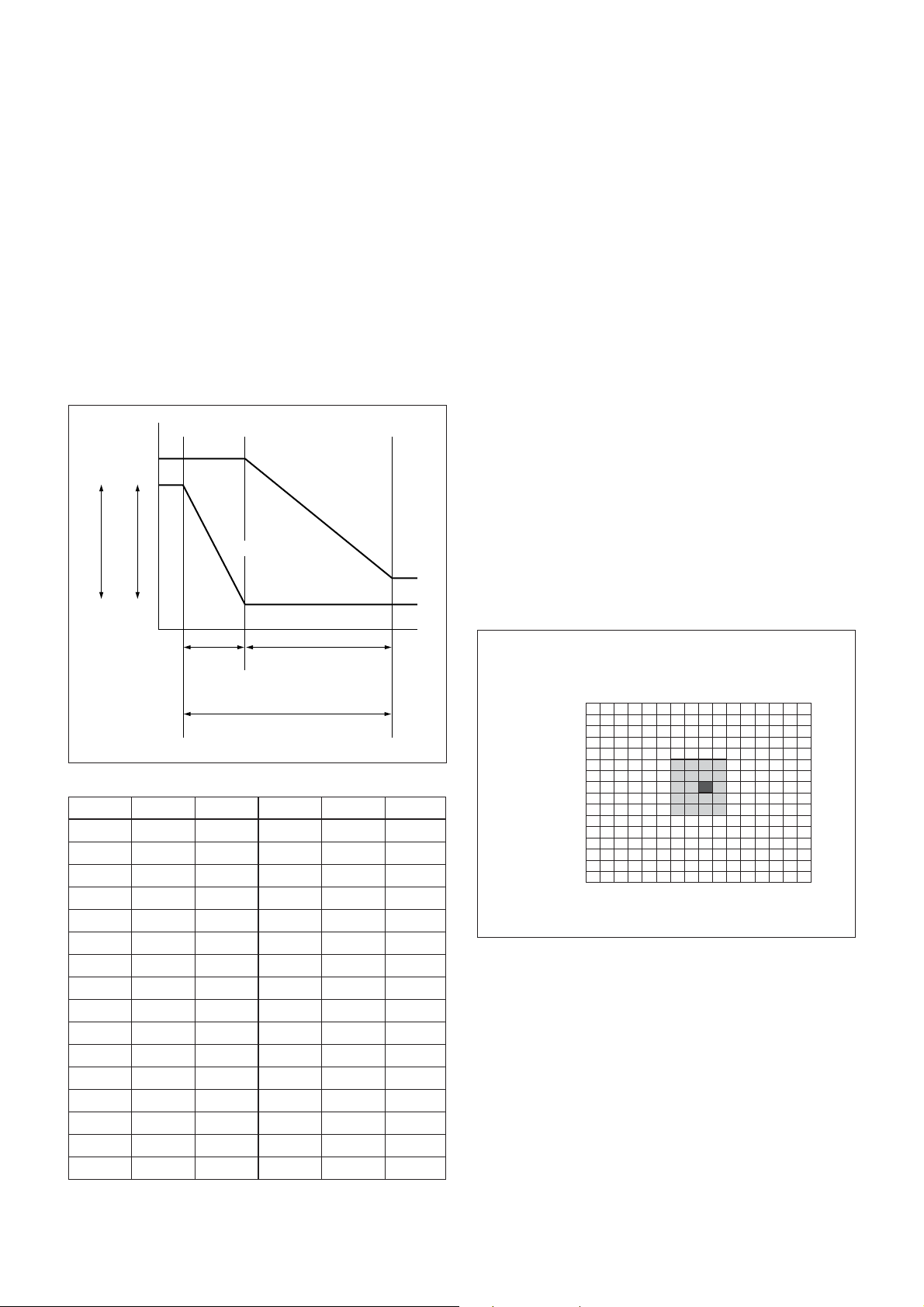
AE – Bright
The bright control function adjusts both the gain and
iris using an internal algorithm according to a
brightness level freely set by the user. Exposure is
controlled by gain when dark and by iris when bright.
As both gain and iris are fixed, this mode is used when
exposing at a fixed camera sensitivity. When switching
from Full Auto or Shutter Priority Mode to Bright
Mode, the current status will be retained for a short
period of time.
Only when the AE mode is set to “Full Auto” or
“Shutter Priority,” the user can switch it to “Bright.”
MIN
MAX
AGC
CLOSE
OPEN
IRIS
Gain
Dark Bright
IRIS curve
Gain curve
Controlled
by gain
Controlled by IRIS
Bright limit which controllable
for this unit
Data Iris Gain Data Iris Gain
1F F1.4 28 dB 0F F2.0 0 dB
1E F1.4 26 dB 0E F2.4 0 dB
1D F1.4 24 dB 0D F2.8 0 dB
1C F1.4 22 dB 0C F3.4 0 dB
1B F1.4 20 dB 0B F4.0 0 dB
1A F1.4 18 dB 0A F4.8 0 dB
19 F1.4 16 dB 09 F5.6 0 dB
18 F1.4 14 dB 08 F6.8 0 dB
17 F1.4 12 dB 07 F8.0 0 dB
16 F1.4 10 dB 06 F9.6 0 dB
15 F1.4 8 dB 05 F11 0 dB
14 F1.4 6 dB 04 F14 0 dB
13 F1.4 4 dB 03 F16 0 dB
12 F1.4 2 dB 02 F19 0 dB
11 F1.4 0 dB 01 F22 0 dB
10 F1.6 0 dB 00 CLOSE 0 dB
When switching from the Shutter Priority mode to the
Bright mode, the shutter speed set in the Shutter
Priority mode is maintained.
Spot Exposure Mode
In Full Auto AE, the level for the entire screen is
computed and the optimum Auto Iris and Gain levels
are determined. In Spot AE, a particular section of the
subject can be designated, and then that portion of the
image can be weighted and a value computed so that
Iris and Gain can be optimized to obtain an image.
For example, in an image with a lot of movement and
with varying levels of brightness, portions without
much change can be designated as such a “spot,” and
changes to the screen can be minimized in that area.
As shown in the diagram below, a range of 16 blocks
vertically and 16 blocks horizontally can be
designated.
In the case where the center is designated (shown in
black), the level is computed along with a weighted
value for the surrounding block (shaded), including the
specified portions; and then the Gain and Iris are set.
The value of the designated portions and the
surrounding areas should be calculated as 90% and the
rest should be set to 10%. The range of the Spot AE
frame is fixed to five blocks vertically and four blocks
horizontally.
(8,8)
Horizontal 16
Ver tical 16
0
0
1
2
3
4
5
6
7
8
9
A
B
C
D
E
F
123456789ABCDEF
Questo manuale è adatto per i seguenti modelli
5
Indice
Altri manuali Sony Accessori per fotocamere

Sony
Sony XCD-V50 Manuale utente

Sony
Sony PCS-STG1 Manuale utente

Sony
Sony MPK-THF Manuale utente

Sony
Sony CA4000 Manuale utente

Sony
Sony AKA-FL1 Manuale utente

Sony
Sony VCL-DH0758 Manuale utente

Sony
Sony FCB-H10 Manuale utente

Sony
Sony Party-Shot IPT-DS2 Manuale utente

Sony
Sony AKA-SF1 Manuale utente

Sony
Sony CA-TX7/TX7P Manuale utente

Sony
Sony DC-700 Manuale utente

Sony
Sony VCT-VPR100 Manuale utente

Sony
Sony XCST70 Manuale utente

Sony
Sony VCT-870RM Manuale utente

Sony
Sony CCU-590 Manuale utente

Sony
Sony MPK-THB Manuale utente

Sony
Sony HDVF-9900 Manuale utente

Sony
Sony XCD-V60 Manuale utente

Sony
Sony VCT-D480RM Manuale utente

Sony
Sony XLR-H1 Manuale utente