SOYO Dymond DYLT032A Manuale utente

1
Communication Regulation & Safety Information
FCC Compliance
This equipment has been tested and found to comply with the limits for a class B digital device, pursuant
to Part 15 of the FCC Rules. These limits are designed to provide reasonable protection against harmful
interference in a residential installation. This equipment generates, uses, and can radiate radio frequency
energy and, if not installed and used in accordance with the instructions, may cause harmful interference
to radio communications. However, there is no guarantee that interference will not occur in a particular
installation. If this equipment does cause harmful interference to radio or television reception, which
can be determined by turning the equipment off and on, the user is encouraged to try to correct the
interference by one or more of the following measures:
hReorient or relocate the receiving antenna;
hIncrease the separation between the equipment and receiver;
hConnect the equipment into an outlet on a circuit different from that to which the receiver is connected;
hConsult the dealer or an experienced radio/TV technician for help.
This device complies with Part 15 of the FCC Rules. Operation is subject to the following two conditions:
1. This device may not cause harmful interference, and
2.Thisdevicemustacceptanyinterferencereceived,includinginterferencethatmaycauseundesiredoperation.
Canada Class B Statement
This Class B device meets all requirements of the Canadian interference-causing equipment regulations.
Cet appareil numérique de la Class B respecte toutes les exigencies du Réglement sur le materiel
brouilleur du Canada.
Important Safety Instructions
1. Read these instructions. All the safety and operating instructions should be read before the product is
operated.
2. Keep these Instructions. The safety and operating instructions should be retained for future reference.
3. Heed all Warnings. All warnings on the product and in the operating instructions should be adhered to.
4. Follow all Instructions. All operating and use instructions should be followed.
5. Cleaning. Unplug this product from the wall outlet before cleaning. Clean only with dry cloth
6. Do not use this apparatus near Water and Moisture.
7. Ventilation. Do not block any ventilation openings. Install in accordance with the manufacturer’s
instructions.
8. Do not install near any heat sources such as radiators, heat registers, stoves, or other apparatus (including
amplifiers) that produce heat.
9. Grounding or Polarization. Do not defeat the safety purpose of the polarized or grounding-type plug. A
polarized plug has two blades with one wider than the other. A grounding type plug has two blades and a
third grounding prong. The wide blade or the third prong are provided for your safety. If the provided plug
does not fit into your outlet, consult an electrician for replacement of the obsolete outlet.

2
11. Only use attachments/accessories specified by the manufacturer.
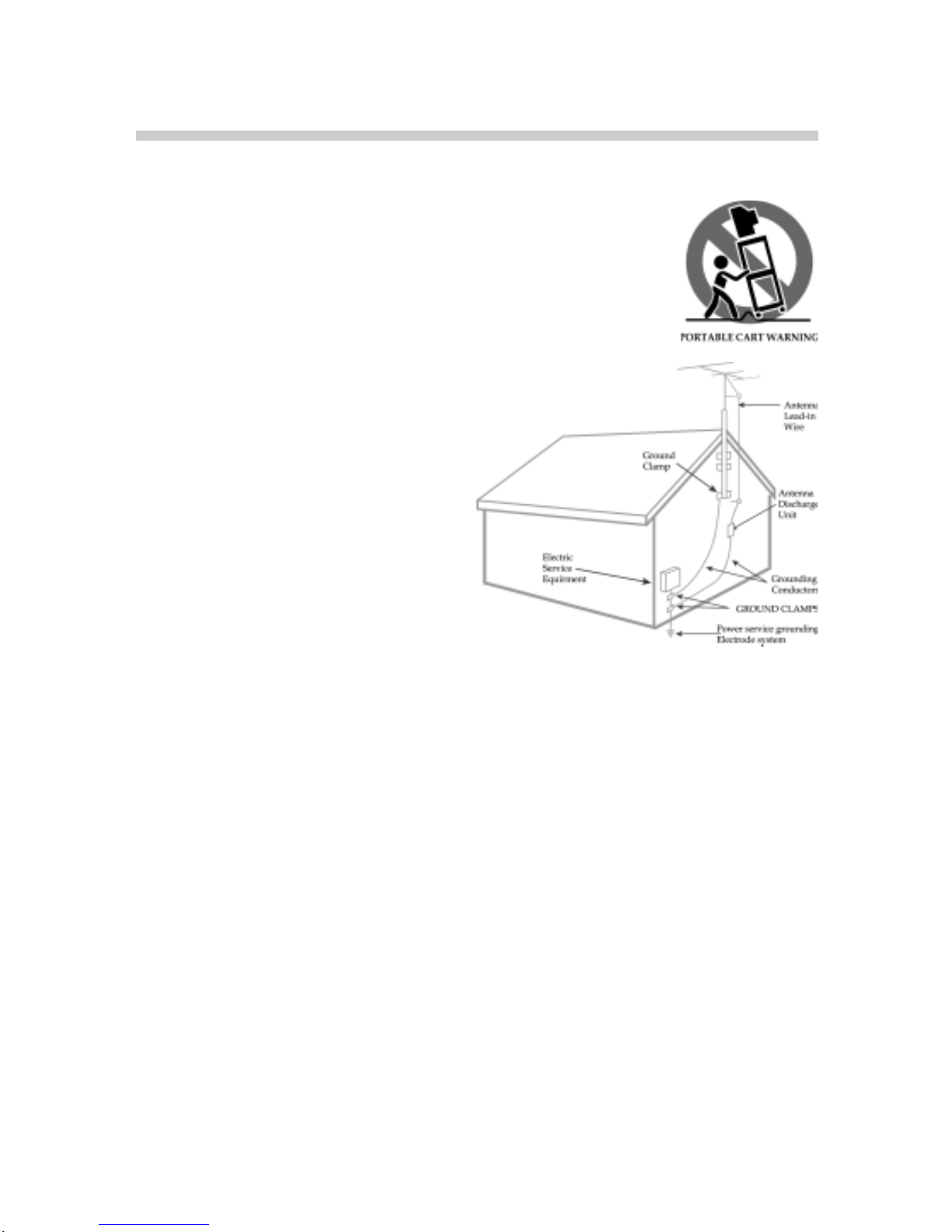
12. Use only with the cart, stand, tripod, bracket, or table specified by the
manufacturer, or sold with the apparatus. When a cart is used, use caution when
moving the cart/apparatus combination to avoid injury from top-over.
13. Unplug this apparatus during lightning storms or when unused for long periods
of time.
14. Outdoor Antenna Grounding. If an outside
antenna or cable system is connected to the
product, be sure the antenna or cable system is
groundedsoastoprovidesomeprotectionagainst
voltage surges and built-up static charges. Article
810 of the National Electrical Code, ANSI/NFPA
70, provides information with regard to proper
grounding of the mast and supporting structure,
grounding of the lead-in wire to an antenna dis-
charge unit, size of grounding conductors, loca-
tion of antenna-discharge unit, connection to
grounding electrodes, and requirements for the
groundingelectrode.
15.Power Lines. An outside antenna system should not be located in the vicinity of overhead power lines or
other electric light or power circuits, or where it can fall into such power lines or circuits. When installing an
outside antenna system, extreme care should be taken to keep from touching such power lines or circuits as
contact with them might be fatal.
16. Overloading. Do not overload wall outlets, extension cords, or integral convenience receptacles as this can
result in a risk of fire or electric shock.
17. Servicing. Do not attempt to service this product yourself as opening or removing covers may expose you
to dangerous voltage or other hazards. Refer all servicing to qualified service personnel.
18. Damage Requiring Service. Unplug this product from the wall outlet and refer servicing to qualified
servicepersonnel underthe followingconditions:
hWhen the power-supply cord or plug is damaged,
hIf liquid has been spilled, or objects have fallen into the product,
hIf the product has been exposed to rain or water,
hIf the product does not operate normally ,
hIf the product has been dropped or damaged in any way, and
hWhen the product exhibits a distinct change in performance–this indicates a need for service.
19. Wall or Ceiling Mounting. The product should be mounted to a wall or ceiling only as recommended by
the manufacturer.
10. Power–Cord Protection. Protect the power cord from being walked on or pinched particularly at plugs,
convenience receptacles, and the point where they exit from the apparatus.


3
Safety/Regulatory Information
Caution
To prevent fire, shock hazard, or annoying interference, use only the recommended accessories. To
prevent electric shock, do not use this (polarized) plug with an extension cord, receptacle, or other outlet
unless the blades can be fully inserted to prevent blade exposure. To reduce the risk of electric shock, do
not remove the unit cover or back. There are no serviceable parts inside. Refer servicing to qualified
personnel only.
User/Installer Caution
Your authority to operate this FCC certified equipment could be voided if you make changes or modi-
fications not expressly approved by the manufacturer, who is responsible for compliance with Part 15
FCC rules.
Note to CATV System Installer
This reminder is provided to call the CATV system installer’s attention to Article 820-40 of the National
Electronic Code that provides guidelines for proper grounding and, in particular, specifies that the cable
ground shall be connected to the grounding system of the building, as close to the point of cable entry as
practical.
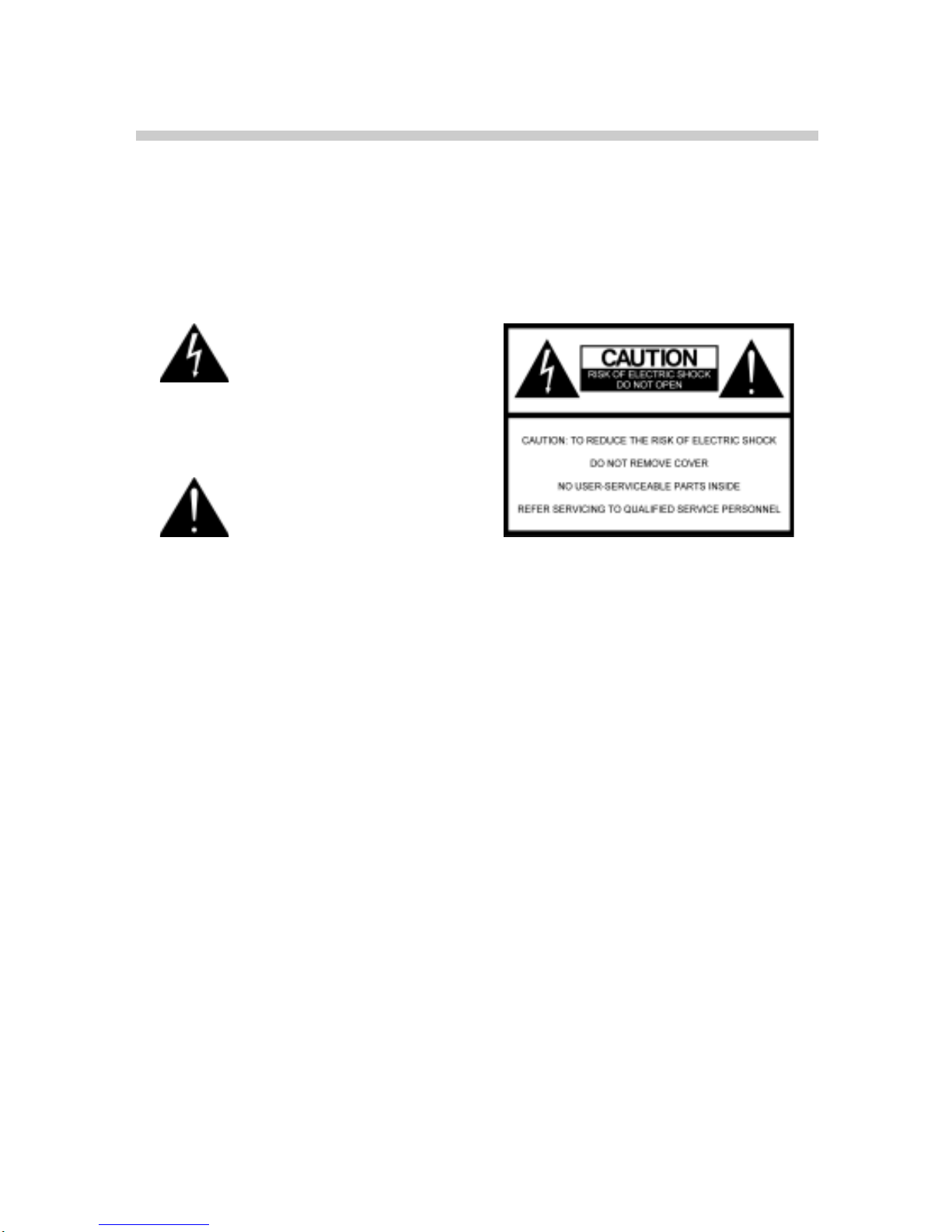
This symbol is intended to alert the
user to the presence of uninsulated
dangerous voltage within the
product’s enclosure that may be of
sufficient magnitude to constitute
risk of fire or electric shock.
This symbol is intended to alert the
user to the presence of important
operating and maintence instruc-
tions in the literature accompany-
ing this product.

4
About This Manual
This manual is designed to make operating our 32” LCD multimedia TV as easy as possible. Informa-
tion in this document has been carefully checked for accuracy; however, no guarantee is given to the
correctness of the contents. Due to continuing system improvements, these changes will be incorpo-
rated in newer editions.
Copyright
cCopyright 2005
This document contains proprietary information protected by copyright. All rights are reserved. No
part of this manual may be reproduced in any form by any mechanical, electronic or other means,
without written consent.
Trademarks
All trademarks and registered trademarks are the property of their respective owners.
Preface

5
Safety Information
This equipment generates, uses, and can radiate radio frequency energy and, if not installed and used in
accordance with the instructions, may cause harmful interference to radio or television reception. However,
there is no guarantee that interference will not occur in a particular installation. If this equipment does
cause interference to radio and television reception, which can be determined by turning the equipment
off and on, the user is encouraged to try to correct the interference by one or more of the following
measures:
hReorient or relocate the receiving antenna.
hIncrease the separation between the equipment and receiver.
hConnect the equipment to an outlet on a different circuit from that to which the receiver is connected.
hConsult the dealer or an experienced radio/TV technician for help.
Compliance Accessories: The accessories associated with this equipment are: shielded video cable when
an external monitor is connected. These accessories are required to be used in order to ensure compli-
ance with FCC rules.

6
Table of Contents
Preparation ............................................................................................................................ 7
Supplied Accessories ..................................................................................................... 8
Introducing the 32” LCD TV ..................................................................................... 9
How to Connect ................................................................................................................. 10
Connecting to DVI or RGB ....................................................................................... 13
Control Functions .............................................................................................................. 14
Understand your remote control first ................................................................ 15
Icon Description ................................................................................................................ 16
Tuning to off-air programs via antenna or analog cable TV................. 17
Settings ........................................................................................................................................ 17
Layout .......................................................................................................................................... 19
Picture .......................................................................................................................................... 20
Window ....................................................................................................................................... 21
Audio ........................................................................................................................................... 22
Option .......................................................................................................................................... 23
Basic Trouble Shooting ................................................................................................ 24
RGB Frequency Table ................................................................................................... 26
32” LCD TV General Specifications .................................................................. 27
Other Information ............................................................................................................ 28

7
Preparation
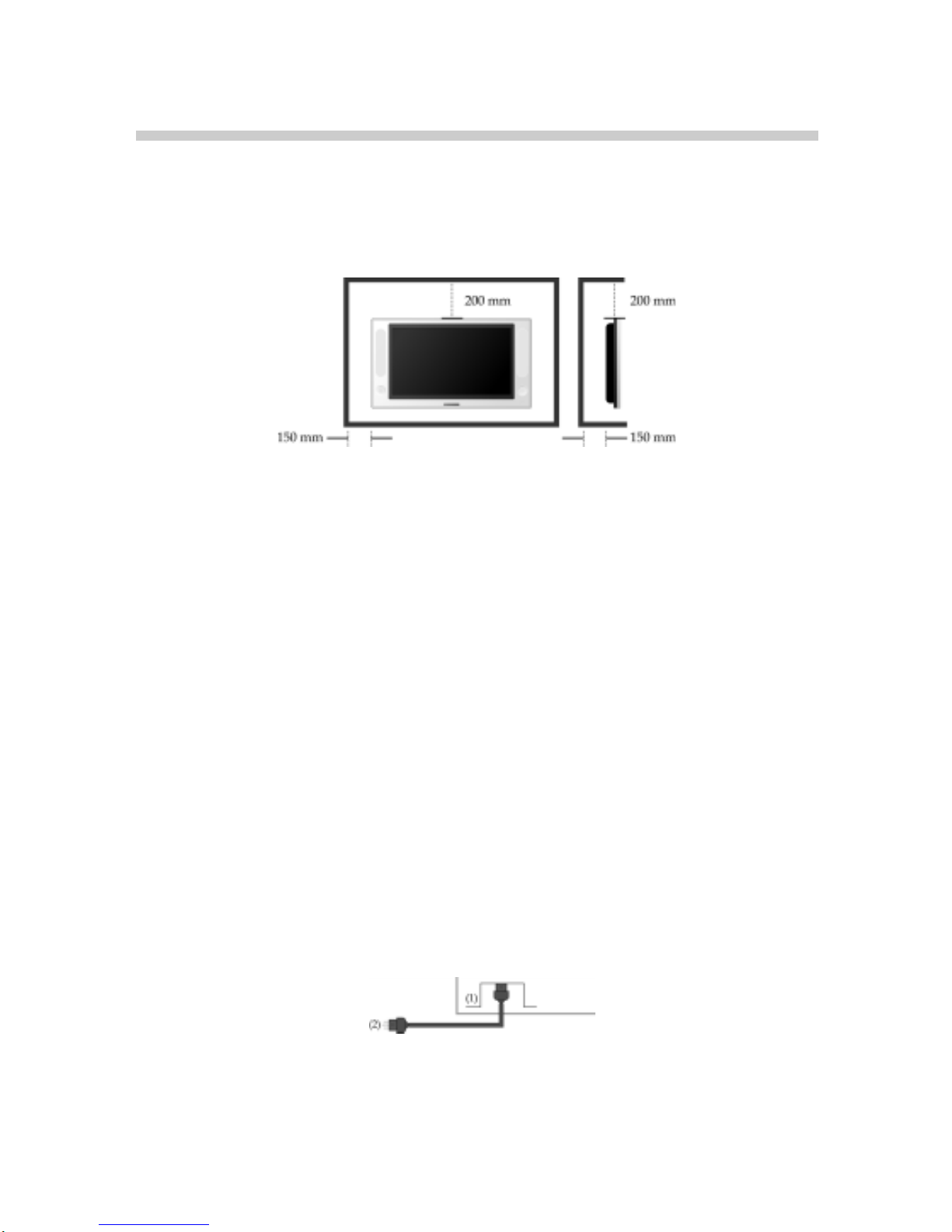
Distance recommendations:
Avoid improper installation and never position the unit where good ventilation is impossible. When
installing this TV, distance recommendations must be maintained between the set and the wall, as well
as inside a tightly enclosed area or piece of furniture. Keep to the minimum distance guidelines shown
for safe operation.
Cleaning the screen:
The screen is coated with a special thin film to reduce reflection. If this film is damaged, uneven colors,
discoloration, scratches, and other problems that cannot be repaired may occur. Pay attention to the
following when handling the screen.
hDo not use glue or adhesive tape on the screen.
hDo not write on the screen.
hDo not allow the screen to come in contact with any hard objects.
hDo not allow condensation to form on the screen.
hDo not use alcohol, thinner, benzene or other solvents on the screen.
hDo not rub the screen hard.
CAUTION:
hOperate only from the power source specified (AC 120V, 60 Hz) on the unit.
hAvoid damaging the AC plug and cord
hWhen you are not using this unit for a long period of time, it is recommended that you disconnect the power
cord from the main outlet.
POWER CORD CONNECTION:
Connect the power cord, after completing all other connections.
1. Connect the power cord to this device.
2. Connect the power cord to the power outlet. (The type of plug is different from this drawing for some
countries.)

8
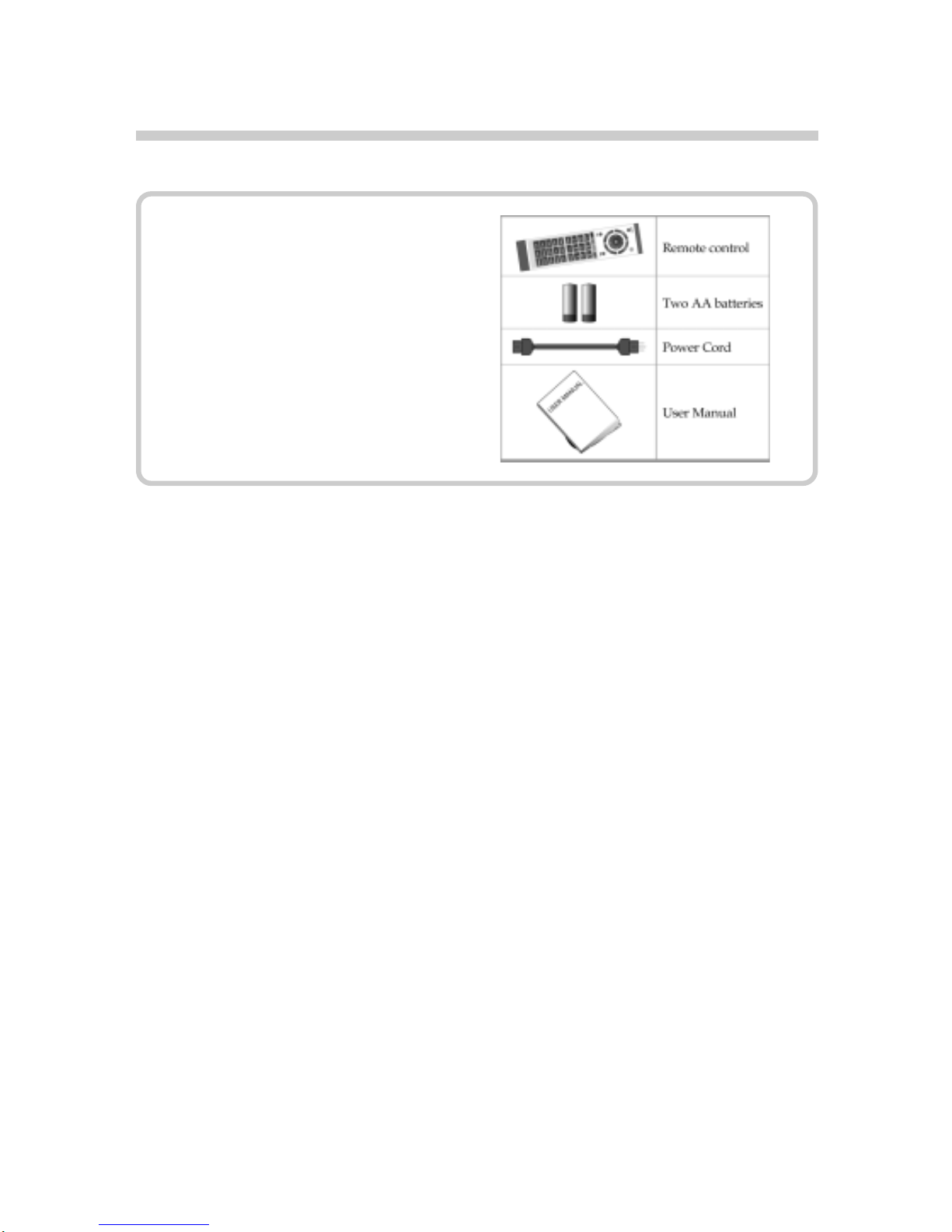
Supplied Accessories
The following items come along with
your LCD TV:

9
Introducing the 32” LCD TV
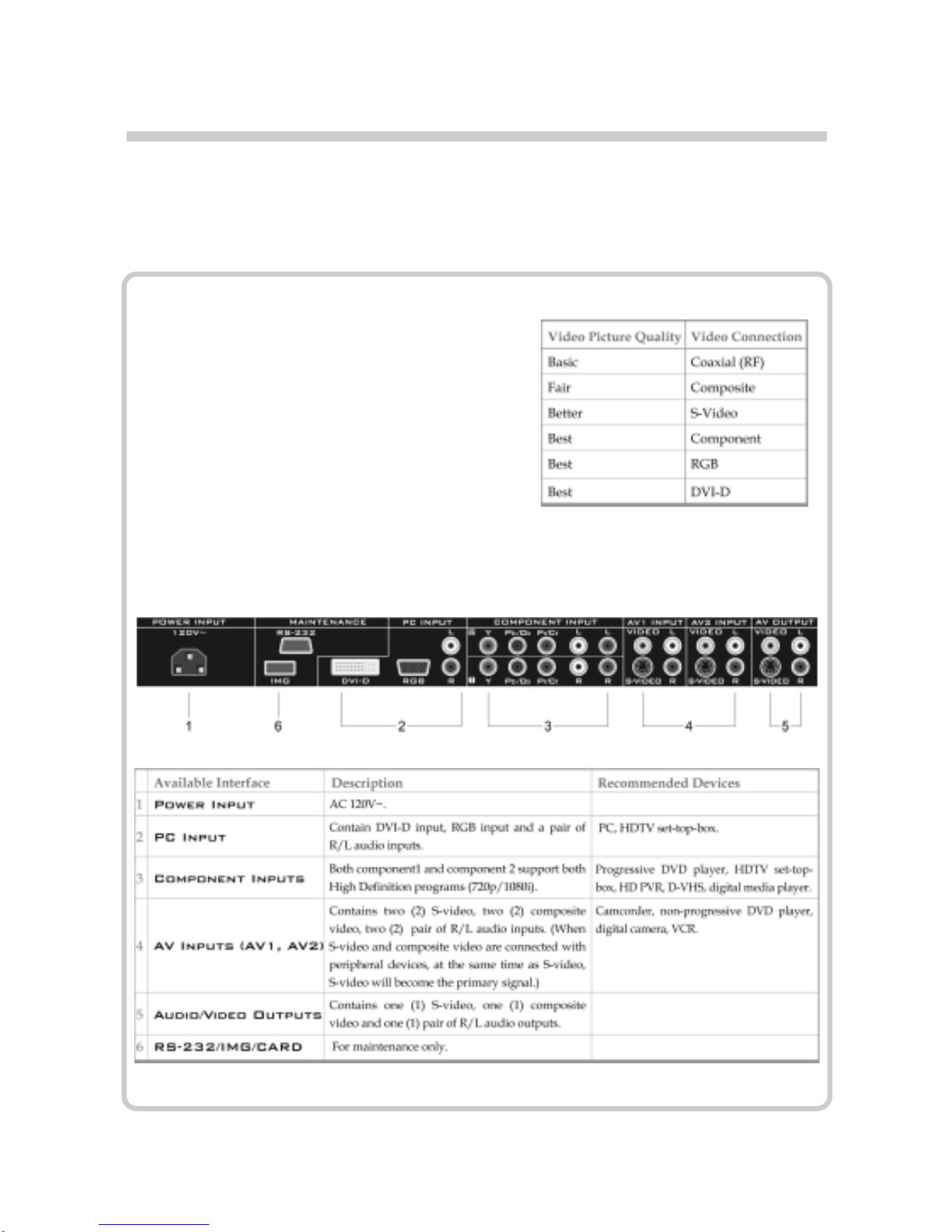
LCD TV’s Rear Inputs and Outputs
Thank you for choosing our 32” LCD TV. We designed the product with the aim to make it one of
the world’s best, bringing the best display technology and viewing experience to you.
Your LCD TV has six types of standard video
connections. You should capitalize on the best
connection available from your LCD TV to get
the best display quality. For example, if you have
a progressive DVD player that supports a com-
ponent video connection, you should connect the
DVD player to your LCD TV using component
video connections instead of composite video or
S-video.

10
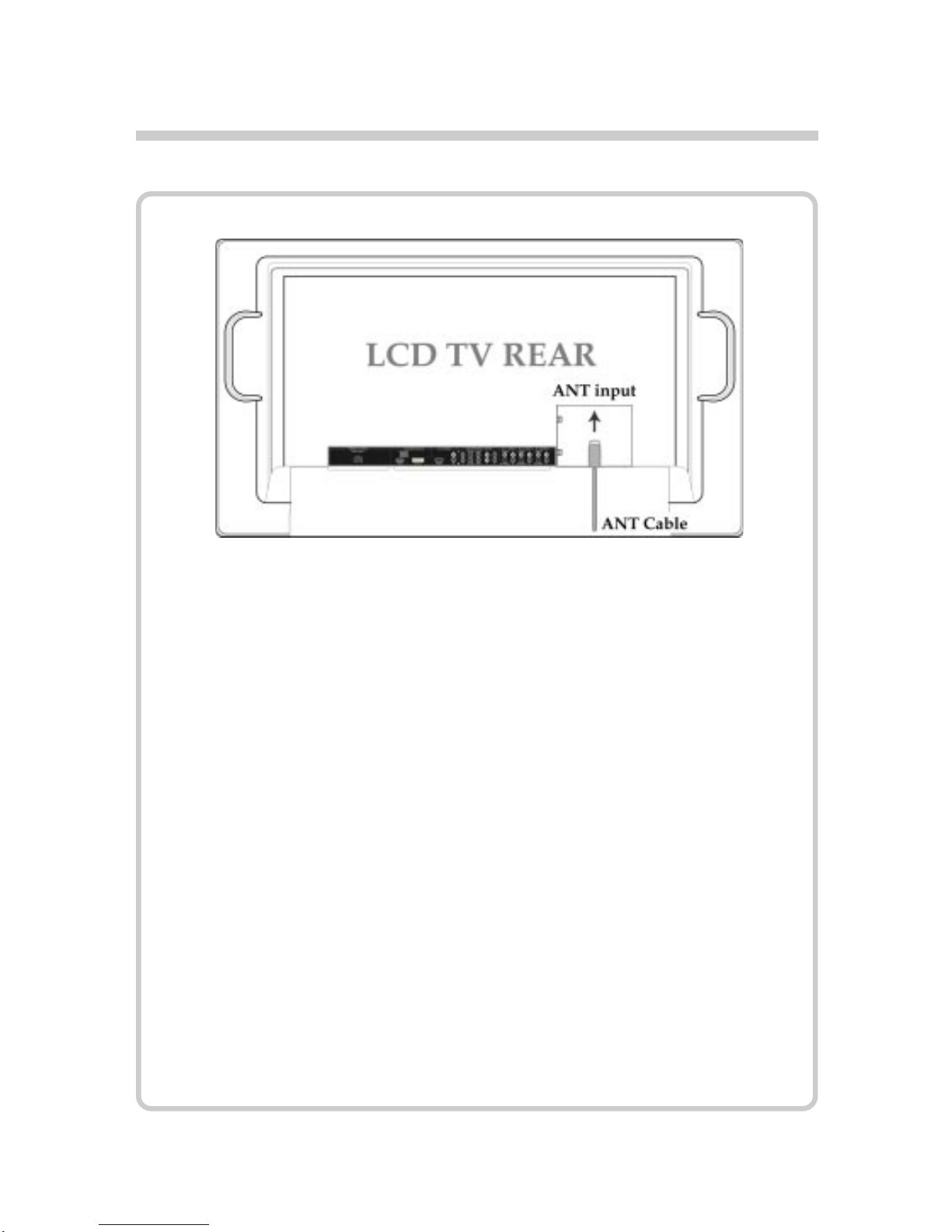
Connecting to TV Antenna
ANT: Connect analog coaxial cable.
How to Connect
Altri manuali per Dymond DYLT032A
1
Indice
Altri manuali SOYO TV LCD