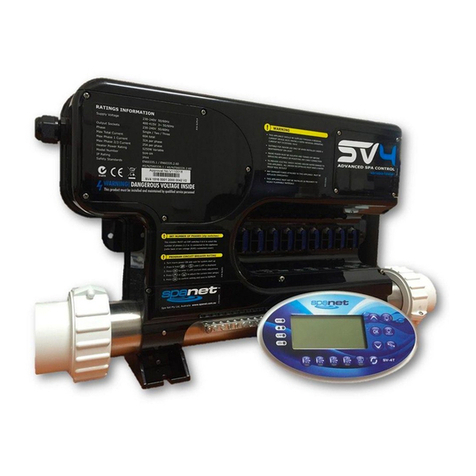
SpaNet XS-2000 Manuale utente

DISPLAY MODES
The XS-2000 topside panel features a large LCD
screen which displays three items: (1) Actual Water
Temperature (2) Set Temperature Point (3) Time &
Day. By default the set temperature point is displayed
in the large digits (refer below).
There are three possible items that can be displayed
in the large digits: (1) Actual Water Temperature
[W.TMP]; (2) Set Temperature [S.TMP]*; (3) Time
Clock [TIME]. Each display mode has a unique icon
shown at the top of the screen to indicate the current
item being viewed (refer below).
Press the UP ( ) or DOWN ( ) button to scroll
through these different display modes. As you scroll
through each item a brief title screen will be shown
followed by the actual display mode (note change in
icon).
Note: There is a ten (10) second timeout on viewing non
default display modes. If no button press is sensed after 10
seconds the screen will return to the default display.
LED INDICATOR LIGHTS
The AUTO LED indicator turns ON when
the filtration pump is in automatic mode.
The Heater LED indicator turns ON when
the heater element is active.
The Ozone LED indicator turns ON when
the ozonator / UV sanitiser is active.
The Sleep Cycle LED indicator turns ON when
in a designated sleep cycle (if programmed).
ADJUST SET TEMPERATURE POINT
The SpaNET intelligent software constantly monitors
the spa water, automatically controlling the heater
and circulation pump to ensure the desired set water
temperature is maintained. The user can adjust the
o o
set temperature point from 5 C - 41 C in steps of
o o
0.2 C increments(Default: 38 C).
To adjust the set temperature point:
1) Press and hold the UP ( ) or DOWN ( )
button. The set temperature point will begin
o
adjusting up or down in 0.2 C increments.
2) Once the desired set temperature is displayed
press the OK ( ) button to confirm selection.
Notes: 1) f the standard in-heater temperature sensor is
used (i.e. no optional in-pool temperature sensor fitted) the
o
heater works off a 2 C hysteresis (thermostat). The heater
will raise the water to the set temperature point but
thereafter will not be re-activated until the water
o
temperature falls by at least 2 C.Therefore if the spa user
o
selects a set temperature point of 38 C the actual water
o o
temperature will be anywhere between 36 C - 38 C
depending on when the user checks the temperature.
2) If the optional in-pool temperature sensor is fitted the
o
heater works off a 0.5 C hysteresis (thermostat). The
heater will raise the water to the set temperature point but
thereafter will not be re-activated until the water
o
temperature falls by at least 0.5 C. Therefore if the spa
o
user selects a set temperature point of 38 C the actual
o o
water temperature will be anywhere between 37.5 C - 38 C
depending on when the user checks the temperature.
CLOCK
For convenient user reference and to assist in
filtration & sleep time functions, your spa controller
includes a built-in real time clock. The user can
choose to display the time in either 12 or 24 hour
format. For ease of reference the current time and
day is displayed at the bottom left of the LCD
screen.
To set the clock:
1) Press the UP ( ) or DOWN ( ) button to
toggle the screen to the TIME ( ) display
mode.
2) Press the OK ( ) button to enter set time
adjustment.
3) Press the UP ( ) or DOWN ( ) button to
select the time format (12 or 24 HR). Press
the OK ( ) button to confirm selection.
4) Press the UP ( ) or DOWN ( ) button to
modify the weekday (Mon - Sun). Press the
OK ( ) button to confirm selection.
5) Press the UP ( ) or DOWN ( ) button to
modify the hour. Press the OK ( ) button to
confirm selection.
6) Press the UP ( ) or DOWN ( ) button to
modify the minutes. Press the OK ( ) button
to confirm selection.
WATER TEMP / TIME TOGGLE BUTTON
By default the XS-2000 will display the set
temperature point on the screen. The water temp /
time toggle button is a shortcut key designed to
quickly switch between the actual water temperature
[W.TMP] and the time clock [TIME] display modes.
Press the W.TMP / TIME ( ) button to toggle
the screen between the actual water temperature
and time clock display modes (refer below).
XS-2000 Quick Reference Guide
OK
Buttons:
1. UP
2.
3.
4. Water Temp / Time
5.
6.
7.
8. Air Blower
9. Light (On /Off)
Indicator Lights
10. Auto Mode LED
11. Element On LED
12. Ozone/UV On LED
13. Sleep Cycle LED
One-Touch Sanitise
OK
DOWN
Pump A
Pump B
AUTO
3
O
zZz
W.TMP Water Temperature
S.TMP Set Temperature*
TIME Clock
* Default Display
OK
OK
OK
OK
OK
Safety Notes:
The appliance must be connected to a suitably rated and
weather protected power supply. The supply line should be a
dedicated power circuit and means for disconnection must
be incorporated in the fixed wiring in accordance with your
local wiring regulations. Means for disconnection from the
supply mains should have a contact separation in all poles
that provide full disconnection under overvoltage category III
conditions. The appliance must be supplied through a
residual current device (RCD) having a rated residual
operating current not exceeding 30mA. This appliance is
not intended for use by young children or infirm persons
without supervision.
AM
PM
OFF
ON
°C
°F
MODE
SPD
BRT
SAT SUN MON TUE WED THU FRI
38.00
S.TMP Display Mode Icon
Set Water Temperature
W.TMP Display Mode
TIME Display Mode
AM
PM
OFF
ON
°C
°F
MODE
SPD
BRT
SAT SUN MON TUE WED THU FRI
37.60
AM
PM
OFF
ON
°C
°F
MODE
SPD
BRT
SAT SUN TUE WED THU FRI MON
:
1000
SV-2T
1
3
4
9
8
5
6 7
10
11
12
13
2

PUMP BUTTONS
There are two pump buttons on the bottom left hand
of the touch pad: Pump A and Pump B. The
functions of the two buttons change depending on
pump / controller configuration. The intention is to
make best possible use of both these buttons for all
possible configurations. For every press of a pump
button, the display will temporarily show the selected
pump state: ON / OFF / LOW / HIGH / AUTO then
revert to the default display mode. Possible pump configurations & button sequences are referenced in the table
below (Please tick your spa configuration for ease of future reference).
Notes:
1) If left ON pumps will automatically time-out and turn off 30 minutes after the last sensed button press.
2) In some configurations if heater is ON activating multiple pumps OR turning the blower ON may cause the spa control to
load shed and turn the heater OFF. This is to keep the system within its maximum power load.
side
Spa Configuration Button A Button B
No small circ pump
Pump 1 = 1 speed
Jet pump 1 :
On / Off / Auto
No Function
No small circ pump
Pump 1 & 2 = 1 speed
Jet pump 1 :
On / Off / Auto
Jet pump 2:
On / Off
No small circ pump
Pump 1 = 2 speed (P2 N/A)
Jet pump 1 :
Low / Off / Auto
Jet pump 1:
High / Low
Small circ pump fitted
Pump 1 = 1 speed
Jet pump 1:
On / Off
No Function
Small circ pump fitted
Pump 1 & 2 = 1 speed
Jet pump 1 :
On / Off
Jet pump 2:
On / Off
Small circ pump fitted
Pump 1 = 2 speed (P2 N/A)
Small circ pump :
On / Off / Auto
Jet pump 1:
Low / High / Off
ERROR CODES / DIAGNOSTICS
Note: most error conditions require mains power to be turned OFF
and back ON before the error is cleared.
ER2 - HEATER PLUG: Heater sensor cable fault. Check the
"Heater" sensor lead is plugged firmly into the spa control.
ER3 - WATER PRIME: Heater tube failed to fill with water. Press
Pump A button to retry water prime. Check spa water level, clean
and soak filters, bleed potential air locks from pipework.
ER4 - THERMAL TRIP: Low or NO water flow over element whilst
heating has activated thermal cut-out device on heater. Turn mains
power OFF and wait 20~30 minutes for heater to cool and thermal
cut-out to reset. Check spa water level, clean & soak filters, check
all shut-off valves are open, bleed potential air locks from pipework.
ER5 - POOL TOO HOT: Temperature sensor has reported a
o
temperature reading in excess of 45 C. Remove spa cover & allow
spa to cool. Check daily filtration time & reduce setting if required.
ER6 - HEATER SENSOR: Communication between spa control
and heater has been lost. Turn mains power OFF and unplug and
reconnect "Heater" sensor lead from spa control.
ER7 - IN POOL SENSOR: In Pool Temperature Sensor has
faulted. Contact your local dealer. Disconnect "In Pool Sensor" lead
from spa control to continue spa operation.
ER8 - CTRL FAULT: An internal controller fault has been detected.
Reset mains power. Contact your local dealer if problem persists.
RAMPING BLOWER MODE
The spa controller features a ramping blower mode,
were the blower speed gradually fluctuates between
high and low in a ramping manner.
To turn the blower on in ramping mode:
1) Press the BLOWER ( ) button twice to start
the blower in ramping mode. The blower will turn
ON and the screen will display [RAMP] to indicate
ramping mode.
2) Press the BLOWER ( ) button again to turn
the blower OFF.
ONE-TOUCH SANITISE BUTTON
A sanitise cycle runs the filtration pump and ozone /
uv (if fitted) to filter the spa water to restore and
refresh water quality after use.
In addition, at the start and end of the cycle, the
controller will sequentially run any additional pumps
and the blower (if fitted) for one minute each to
purge the plumbing and clear any unfiltered water
trapped in those lines.
To activate a 20 minute water clean-up cycle:
1) Press the SANITISE ( ) button once after spa
use to activate the water clean [W.CLN] cycle.
Note:
SANITISE
If cycle running, cycle can be cancelled by
pressing the button again.
AIR BLOWER BUTTON
The BLOWER ( ) button is used to control the air
blower and allow adjustment of the blower speed.
The last used speed is saved and will be restored the
next time the blower is turned on, for future ON/OFF
use. Note: that when the blower is first turned on it will run
at maximum speed for approx three seconds before
changing to your preset speed; this is normal.
To turn the blower on/off:
1) Press the BLOWER ( ) button once to turn
the blower ON in variable speed mode.
2) The blower will turn ON (at the last used speed)
and the screen will display the blower speed
[B.SPD] adjustment screen (refer below).
3) Use the UP ( ) or DOWN ( ) buttons to
adjust the blower speed. Note: the bar graph will
change indicating current blower speed.
4) Press the OK ( ) button to confirm selection.
5) Press the BLOWER ( ) button again to turn
the blower OFF.
Note: The B.SPD adjustment screen is displayed for 10
seconds when the blower is first turned ON. If no
adjustment is made the blower will run at the last used
speed setting, and the screen will time-out and revert to the
default display mode. If you wish to adjust the blower speed
once the blower has been running for a period of time, the
blower must be turned OFF and back ON again to restore
the B.SPD adjustment screen.
OK
SA SU MO TU WE TH FR
SET TEMP
SET TEMP
°C
°F
°C
°F
°C
°F
MODE
SPD
BRT
MODE
BRT
SPD
OFF
ON
AM
PM
AM
PM
:
2000
6.SPD
:
10 30
:
2 35 4 0.0
Bargraph indicates blower speed
LIGHT BUTTONS
The light button is used to control the many features
of the multi colour LED spa light.
( ) LIGHT ON / OFF BUTTON
Press to toggle light ON and OFF. The button is
backlit green to indicate when the light has been
turned ON.
When the light is first turned on the light mode menu
will be displayed. The current light mode in use will be
shown. Use the UP ( ) or DOWN ( ) button to
step through the four colour modes:
(1) White [WHTE]
(2) User Colour [U.CLR]
(3) Fade Effect [FADE]
(4) Step Effect [STEP]
Press OK ( ) to confirm selection of desired light
mode or wait for the 10 second idle menu timeout
where the screen steps to the light speed [L.SPD] or
user colour [CL:xx] adjustment screens. If FADE or
STEP effect modes are selected the current light
speed [L.SPD] will be displayed. If the user colour
[U.CLR] light mode is selected the current colour
number will be displayed (refer below).
Press the UP ( ) or DOWN ( ) button to adjust
the light effect transition speed OR select from 20
colour choices. Press OK ( ) to confirm selection
or wait for the 10 second idle menu timeout where the
screen steps to the light brightness [L.BRT] screen.
Note: If White [WHTE] colour mode is selected the Light
Speed / Colour adjustment screens will NOT be displayed.
[L.BRT] LIGHT BRIGHTNESS
When the [L.BRT] adjustment screen is displayed
press the UP ( ) or DOWN ( ) button to adjust
the light brightness.
OK
OK
AM
PM
OFF
ON
°C
°F
MODE
SPD
BRT
SAT SUN MON TUE WED THU FRI
L.SPD
AM
PM
OFF
ON
°C
°F
MODE
SPD
BRT
SAT SUN MON TUE WED THU FRI
:
CL 0 1
Light speed screen User colour screen
SV-2T
Altri manuali SpaNet Pannello di controllo