
SPC FORTUNE 2 Manuale utente

SPC FORTUNE 2

1
TABLE OF CONTENTS
1. Introduction ----------------------------------------------------------------------------- 3
2. Position of the controls --------------------------------------------------------------- 3
3. Useful tips -------------------------------------------------------------------------------- 4
4. First steps before switching on ----------------------------------------------------- 4
5. Switch on telephone ------------------------------------------------------------------ 6
6. Unlock or turn on the phone screen ---------------------------------------------- 7
7. Call ---------------------------------------------------------------------------------------- 8
a. Call a contact from the address book
b. Call from history
c. Accept / reject call
d. Answering and hanging up calls by opening/closing the cover
e. During a call
f. Display for missed calls
8. Speed dial ----------------------------------------------------------------------------- 9
a. Direct memory
b. Indirect storage
9. Ringtones, sounds and volume --------------------------------------------------- 9
10. Address book -------------------------------------------------------------------------- 10
a. View address book
b. Quick search
c. Contact options
d. Add a contact
11. Messages --------------------------------------------------------------------------- 10
a. Receive new message
b. Write a message
12. SOS Button ---------------------------------------------------------------------------- 11
a. Configuration of the SOS button
b. Using the SOS button
13. Smart Help --------------------------------------------------------------------------- 13
a. What is Smart Help?
b. Remote configuration
c. Intelligent ringtone
d. Smart notifications
14. Multimedia --------------------------------------------------------------------------- 15
a. Cameras
b. Images
c. Video camera
d. Music player
e. Sound recording
f. Radio
g. File manager
15. Setting ------------------------------------------------------------------------- 17

2
16. Battery and charging ------------------------------------------------------------- 18
17. Other functions / tool menu --------------------------------------------------- 20
a. Bluetooth
b. Calculator
c. Calendar
d. Alarm
e. World clock
18. Flashlight ----------------------------------------------------------------------------- 21
19. Technical data ----------------------------------------------------------------------- 21
20. Frequently Asked Questions ----------------------------------------------------- 21
3
1. INTRODUCTION
This document is a user manual for the FORTUNE 2 push-button phone from SPC.
Here you will find information about the first steps you need to take in order to use
your cell phone and about its various functions.
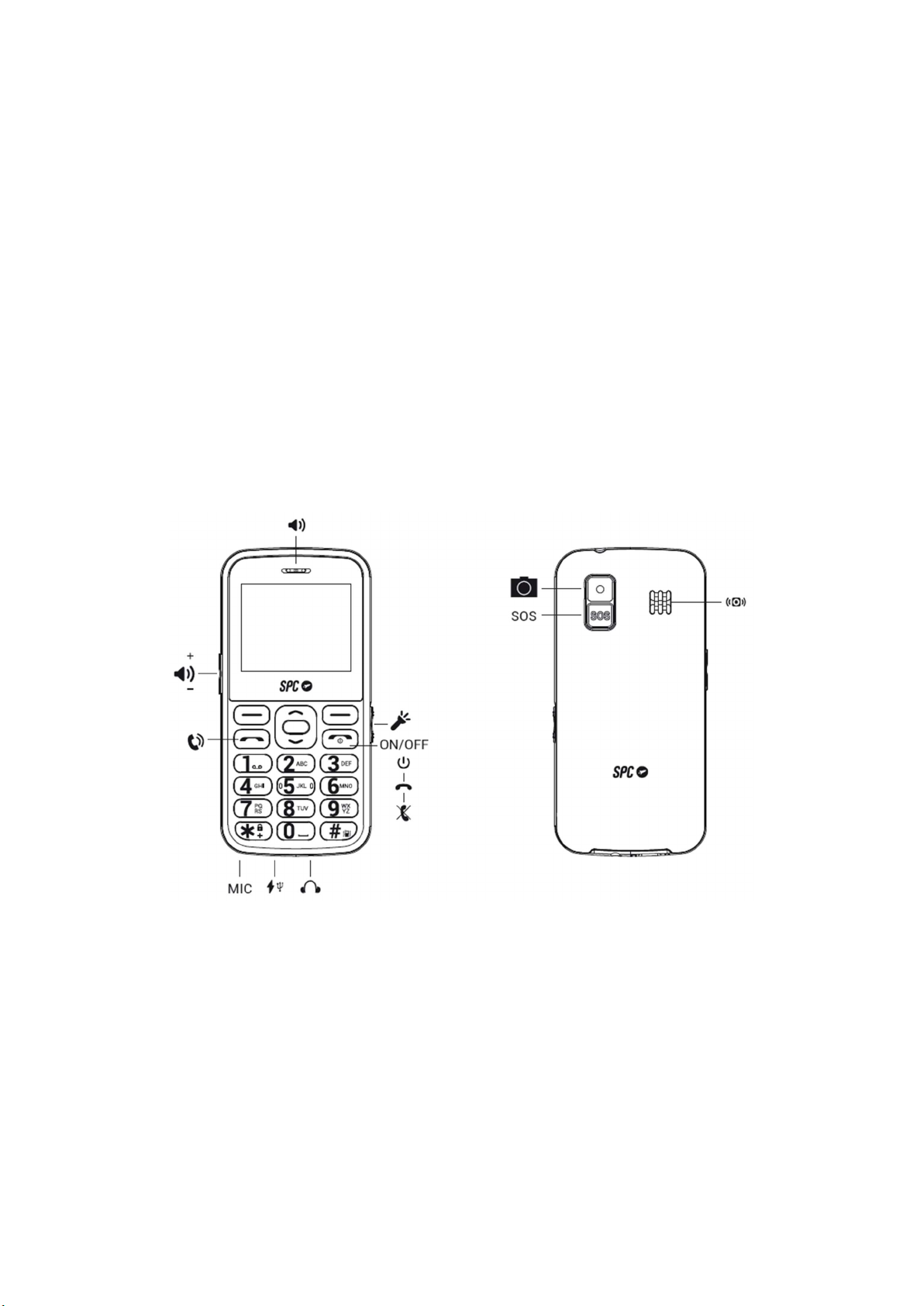
2. POSITION OF THE CONTROLS
3. USEFUL TIPS
- To access the main menu, open the flap and press the upper left button (PONER
ICONO) while the phone is in standby mode.
- To navigate through the main menu and the various submenus, press the edges
of the middle round button up or down.
- The top left button performs the action shown at the bottom left of the screen.
- The top right button performs the action shown at the bottom right of the screen.
- To confirm a selection, press the middle OK button or the corresponding upper
button.
4
- To return to the home screen, simply press the hang up button .
4. FIRST STEPS BEFORE SWITCHING ON
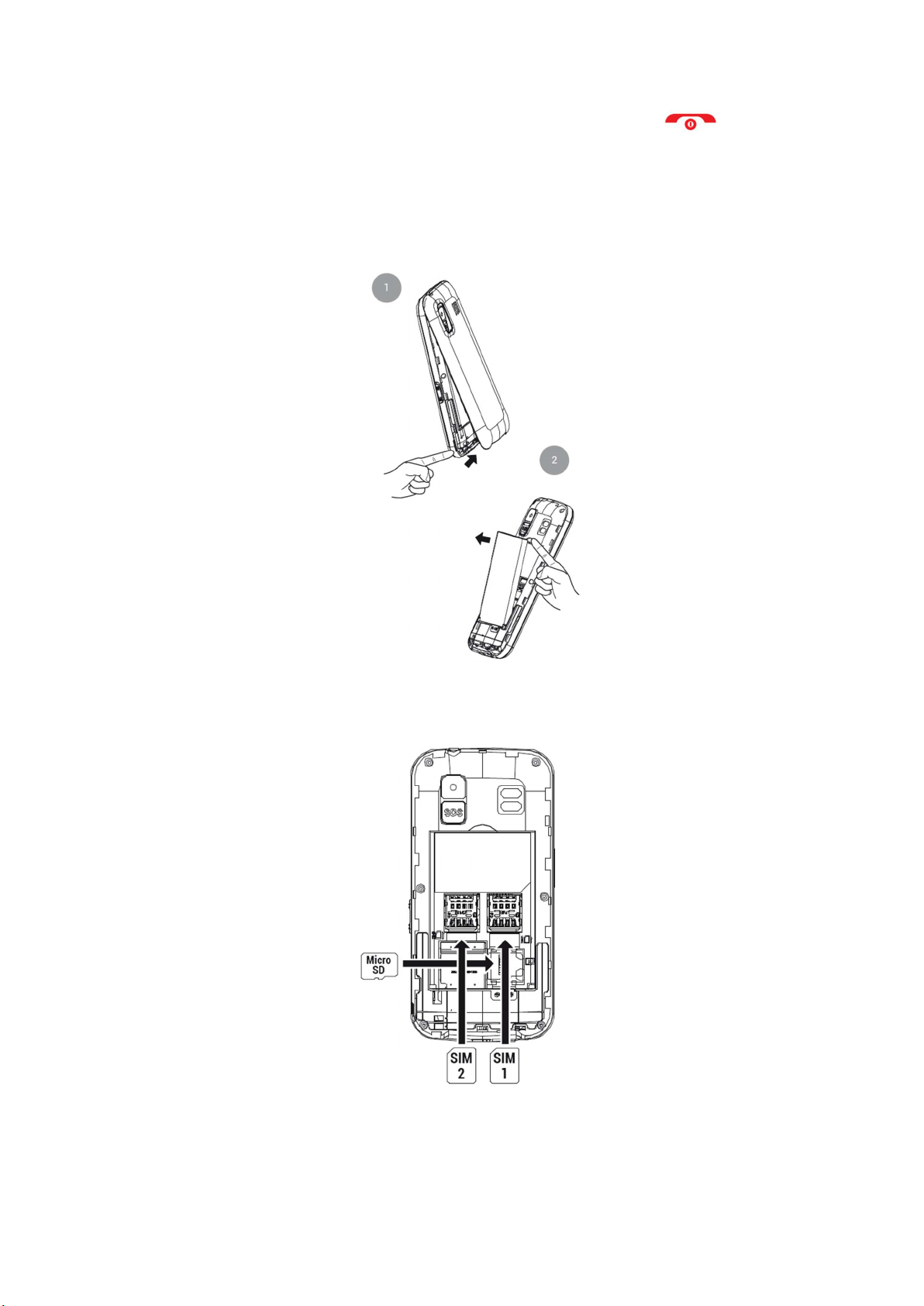
Lift the battery cover by the tab on the bottom of the phone and remove the battery by
lifting it out of the recess at the top of the battery compartment.
Insert the SIM card(s) (MicroSIM format) in the indicated position, paying attention to the
gold contacts on the phone and card(s).
If necessary, insert the Micro SD memory card in the specified location.

5
Insert the battery by matching the gold contacts on the phone and the battery.
To charge the phone, plug the power adapter into the USB port on the bottom of the phone.
The port is USB Type-C, which means it does not have a specific orientation. However, you
should not force the connection if it is not instantaneous.
You can also connect the power supply to the charging station. As already described, you
should not force the connection if it does not happen immediately.
6
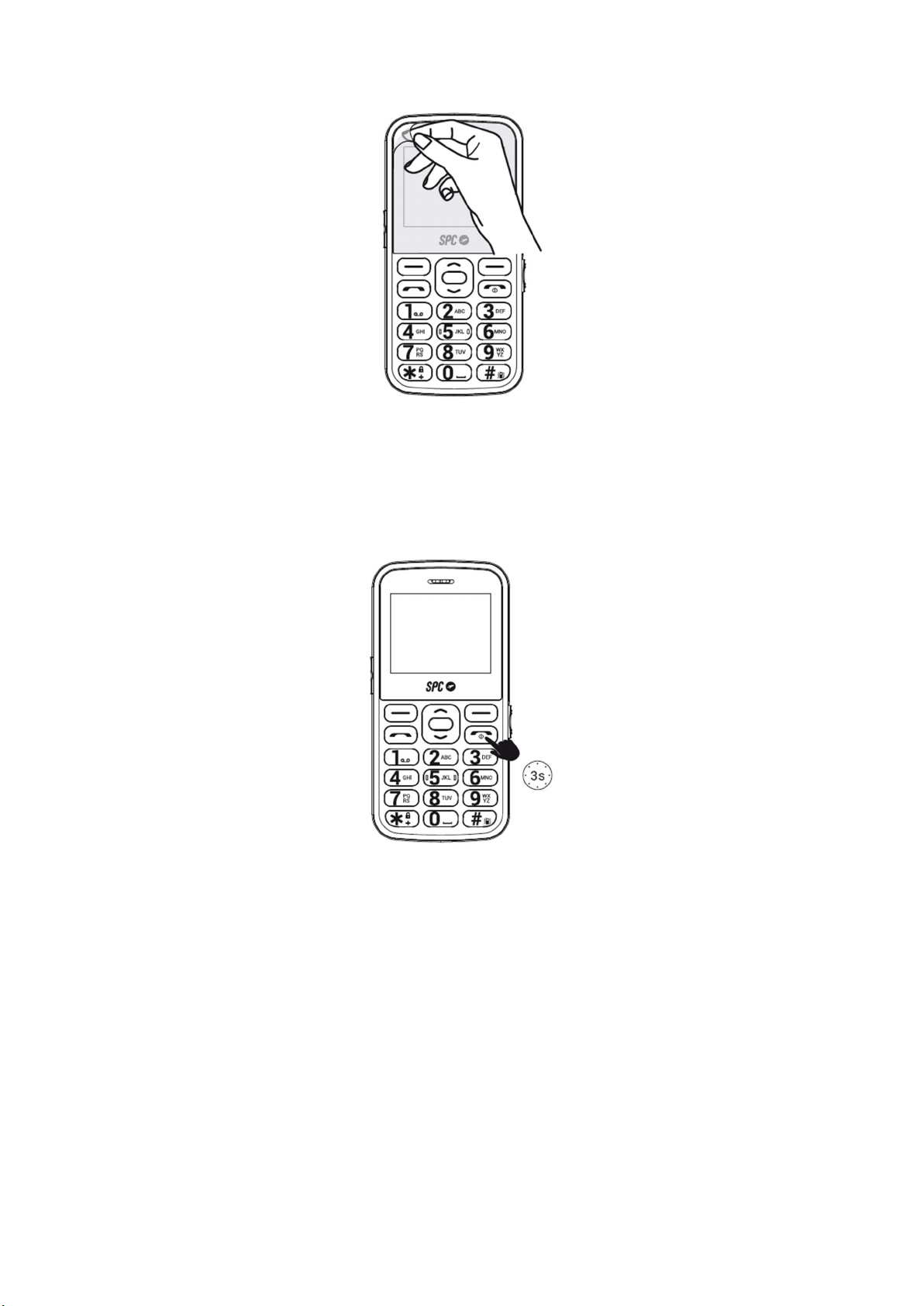
Remember to remove the screen protector before using the device.
5. SWITCH ON TELEPHONE
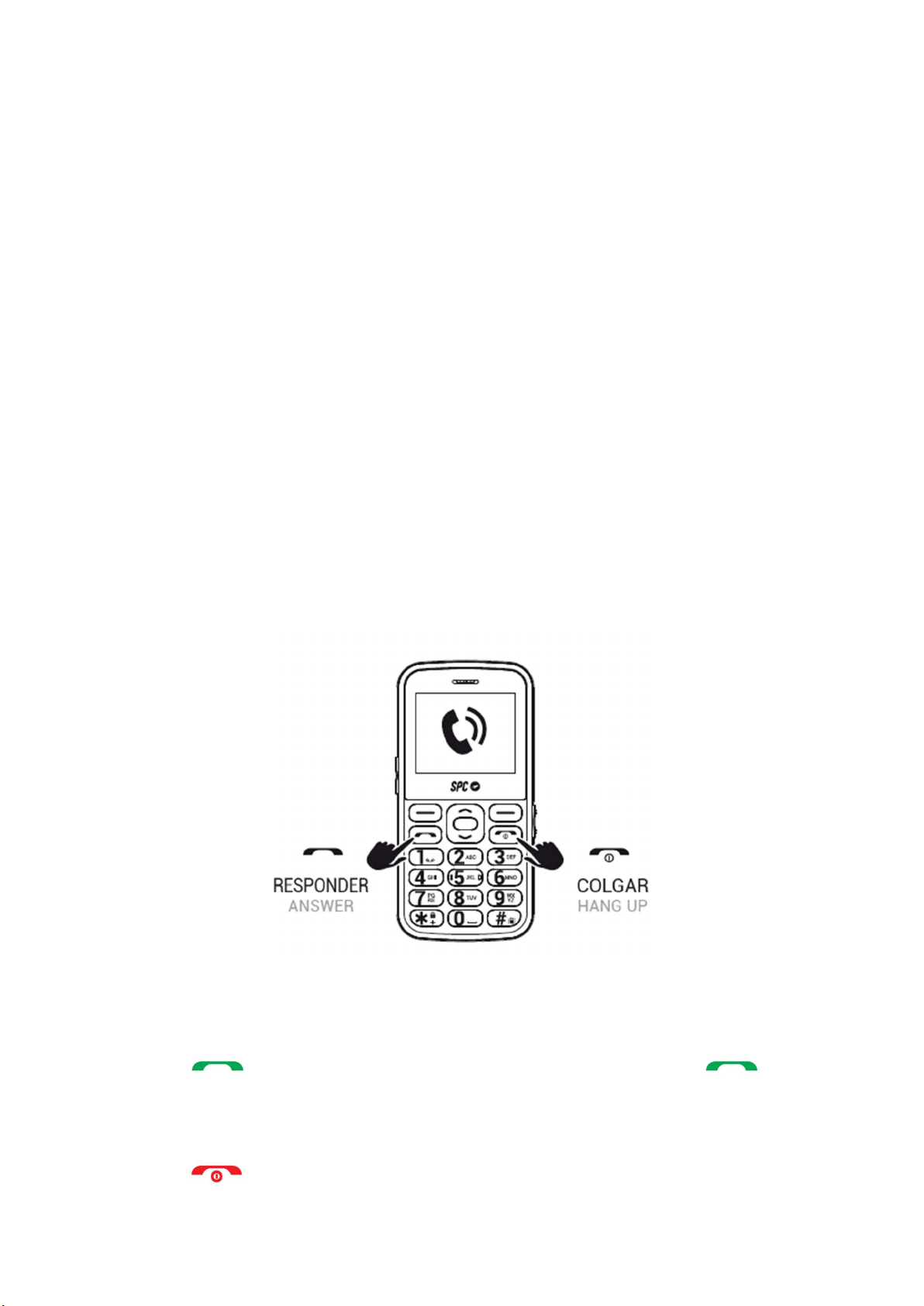
Press and hold the power button for a few seconds to turn on the phone. Enter the PIN
displayed on your SIM card. If two SIM cards are inserted, the phone will first ask for the
PIN of SIM 1 and then SIM 2.
Press and hold this button to turn off the phone.
NOTE: The personal identification number (PIN) protects the SIM card from unauthorized use.
You can use the PIN unlock key (PUK number) to unlock a locked PIN. The PIN and PUK are
supplied with the SIM card. For further details, please contact your mobile network provider
7
6. UNLOCK OR TURN ON THE PHONE SCREEN
The phone is set by default to turn off the screen if it is not used for a few seconds. The
keypad is not locked. So, if you touch any key, the screen will turn back on without you having
to enter an unlock password.
You have the option to lock the keyboard if needed by pressing the hang up key or even the
menu key and then the * (asterisk) key on the bottom left with the padlock design. To unlock
it, you need to follow the exact same steps: Menu ...>* (asterisk).
Also, if you want to configure the phone to lock the keypad when it has not been used for a
while, you can do that from here:
- Menu>Settings>Phone settings>Display>Automatic key lock and select the time you
want it to be locked.
7. CALL
If you use two SIM cards, the phone will ask you to confirm the SIM card you want to use
before making calls.
During a call, you can make and receive other calls from/to the same number, but you
cannot make or receive calls from/to the other SIM card.
1. Dial the number you want to call.
2. Press "Delete" to delete the incorrectly entered digits.
3. Press and select the SIM card you want to use to make the call. Press .
4. When you make a call and the number is stored in the address book, the contact's name
is displayed on the screen.
5. Press to end the call.

8
Call a contact from the address book
1. Press "Address Book" on the home screen with the right soft key. The screen displays
the list of contacts in alphabetical order.
2. Use the up/down keys to scroll through the list to the desired contact.
3. Press the call button to call the selected contact.
4. Press the hang-up button to end the call.
Call from history
1. With the phone switched on, press the key to call up the list of sent calls. You
can also call up the call list from the main menu.
2. Use the navigation keys to scroll through the list, select an entry and press to
call.
Accept / reject call
When you receive a call, the number or name is displayed on the screen. Press the
key to accept the call or to reject it.
During a call
Press "Handsfree" during the call to activate the handsfree mode.
Press "Options" during the call to access the various options:
Second call
End call
Address book
Call history
Messages
Sound recorder
Mute
8. SPEED DIAL
The phone has eight indirect storage options.

9
Indirect memories or speed dial numbers are numbers that are activated by pressing and
holding one of the digits 2 to 9.
To set up these numbers, you must have a SIM card installed and:
- Go to Menu -> Address Book -> Options -> Address Book Settings -> Speed Dial
- Activate the function (status: On),
- and set the number. The number 1 is reserved for the answering machine and is set
by pressing and holding 1.
9. RINGTONES, SOUNDS AND VOLUME
This setting can be found in the "Profiles" menu. Here you can select and configure the type
of ringtone for calls, volume, message tone, etc. The selected profile is General by default.
Use the arrow keys to switch between the available profiles (General, Silent, Meeting and
Outdoor) and confirm your selection with the center key.
Select a profile and click Options to enable, customize, or reset it.
You can customize a profile according to your taste and needs and set the following
parameters:
- Select the notification type and choose between sound only, vibration only, vibration
and sound, or vibration and then sound.
- Type of ringing (repetition or only one beep).
- Select the ringtone for incoming calls on SIM 1 (from a choice of 7 ringtones or select
a melody stored in the phone files).
- Select the ringtone for incoming calls on SIM 2 (from a choice of 7 ringtones or select
a melody stored in the phone files).
- Select the call volume.
- Select the ringtone for messages received on SIM 1 (from a choice of 6 ringtones or
select a melody stored in the phone files).
- Select the ringtone for messages received on SIM 2 (from a choice of 6 ringtones or
select a melody stored in the phone files).
- Select the volume of the received messages (6 levels).
- Choose the type of key sound between a click, a tone or mute.
- Select the volume of the key tone (7 levels).
- Activate or deactivate the system alarm (e.g. low battery...).
10. ADDRESS BOOK
a. View address book
1. When the phone is in standby mode, press the "address book" key.
2. Or access the address book from the main menu.
Indice
Altri manuali SPC Telefono cellulare


