
Spectrum Industries 55499 Manuale utente

Assembly Instructions
Note: Be sure the display
stand wall brackets are in
place and securely anchored
to studs before assembly.
0191543 Page 1 of 2
Assembly Instructions
Important
Before you begin, read and comply with all safety and operating instructions,
and ensure all parts and correct quantities are included.
Any parts damaged during shipment must be reported within 5 days of receipt.
To report information regarding missing parts or damage, to purchase parts
or accessories, or if you have any questions, please contact us.
www.spectrumfurniture.com
800-235-1262, 715-723-6750
Thank you for purchasing Spectrum products!
Dual Display Stand for AV Credenza
55499
(4) 052605
1/4-20 x 15mm
JC bolt
Tools
Required
(2) 0146050
Dual Monitor
Mount Tube
(1) 0119747
Monitor mount
4mm
• Accommodates two monitors up to 42”
• Adjustable left-to-right
• Requires Display Stand 55498
(4) 026301
1”x1” Endcap
(4) 053310
1/4-20 x 40mm
JC bolt
1. Display stand prep
1. If your stand currently has a monitor mount installed, remove the
(4) 1/4-20 x 40mm JC bolts securing it to the stand. Figure 1.
Retain the monitor mount plate and JC bolts-they will be used in
step 3.
Note: The display stand panel should be fully assembled and attached
to the credenza before proceeding with 55499 assembly. Be sure your
ceiling height provides enough clearance for the installed monitors.
Figure 1
1/4-20 x 40mm
JC bolts
(4 required)
Monitor
mount plate
Display stand panel
0191543 Page 2 of 2
925 FIRST AVENUE, CHIPPEWA FALLS, WI 54729 / 800-235-1262 / 715-723-6750 / WWW.SPECTRUMFURNITURE.COM
© 2019 Spectrum Industries Inc., All rights reserved.
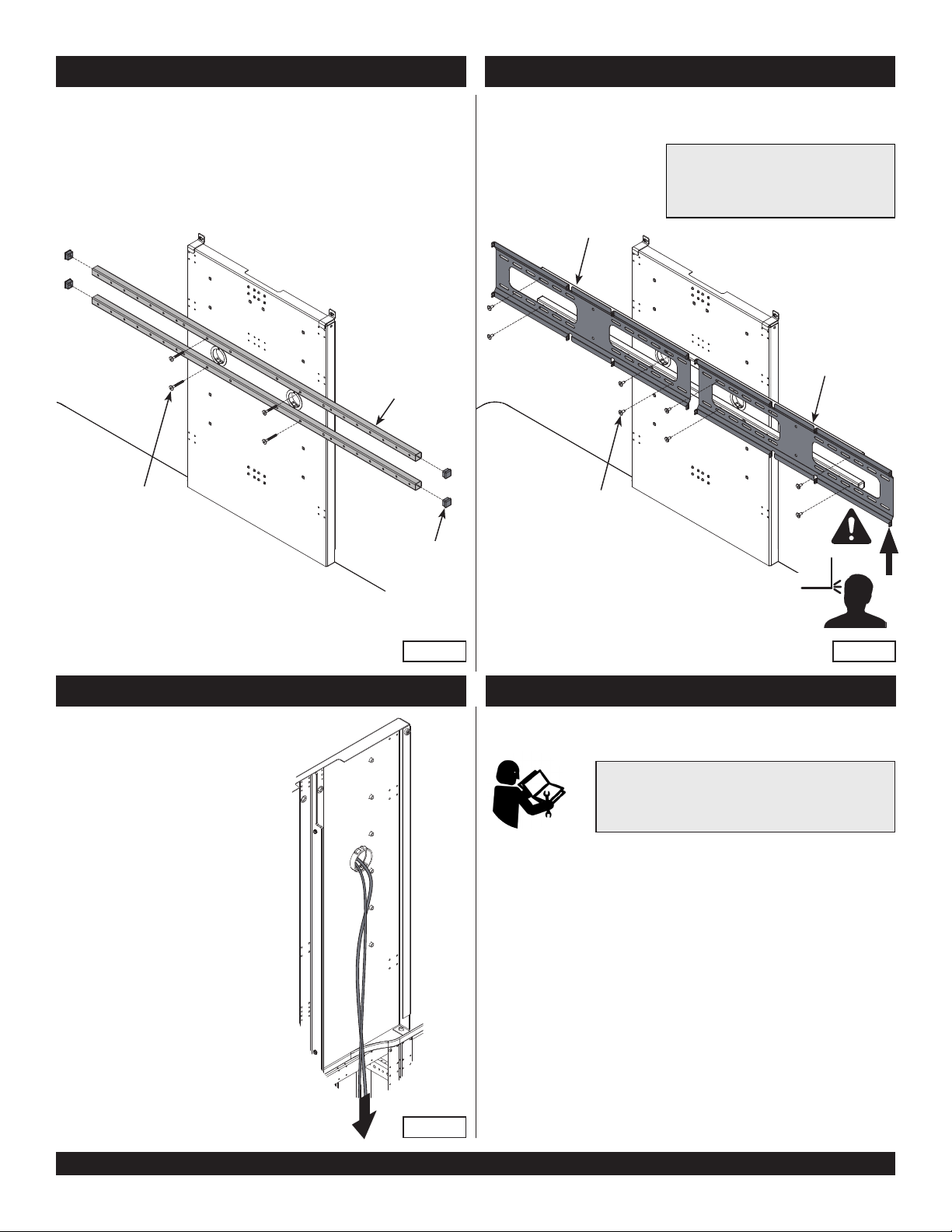
2. Install dual mount tubes
1. Multiple sets of mounting holes are available for the dual monitor
mount. Choose a set of holes based on your monitor size and
preferred height. Figure 2.
2. Attach each tube to the display stand with (2) 1/4-20 x 40mm JC
bolts and tighten bolts securely.
3. Install endcaps onto tube ends.
Figure 2
Tube
Display Stand panel
3. Install monitor mounts
1. Attach the monitor mounts to the tubes with 1/4-20 x 15mm JC bolts
as shown. Figure 3.
2. Tighten securely.
Figure 3
Monitor
mount
1/4-20 x 15mm
JC bolts
(4 per mount)
Note: Multiple holes are provided in the
tubes and plates to accept and adjust to
most monitors up to 42” diagonal. Do not
use monitors larger than 42”.
Endcap
(2 per tube)
1/4-20 x 40mm
JC bolts
(2 per tube)
Monitor
mount
Figure 4
Display stand
4. Route wires
1. Route monitor wires through the
grommets and down into the credenza.
Figure 4.
5. Install monitors
• Refer to the instructions included with the monitor
mount for complete monitor installation and setup.
• Total weight of both monitors should not exceed
125 lbs.
Altri manuali Spectrum Industries Rack e supporto

Spectrum Industries
Spectrum Industries 95500 Manuale utente

Spectrum Industries
Spectrum Industries 95036 Manuale utente

Spectrum Industries
Spectrum Industries 55491 Manuale utente

Spectrum Industries
Spectrum Industries 97525 Manuale utente

Spectrum Industries
Spectrum Industries LT-30 Manuale utente

Spectrum Industries
Spectrum Industries 37141 Manuale utente

Spectrum Industries
Spectrum Industries 95532 Manuale utente

Spectrum Industries
Spectrum Industries 55490 Manuale utente

Spectrum Industries
Spectrum Industries LT-30 Manuale utente

Spectrum Industries
Spectrum Industries 95513 Manuale utente


