
SpinTouch RapidScreen PLUS V3 Manuale utente

TABLE OF CONTENTS
Quick Start Note………………………………………………………………………………….2
User Manual Note………………………………………………………………………………..3
Connecting to the eFace software……………………………………………………..…...4-7
Adding staff to facial recognition system………………………………………………..8-10
Attribute Settings……..……………………………………………………...………………….11
Software Settings……..………………………………………………………...……………….12
Detailed Attribute Settings..……………...………………………………………………..13-17
Detailed Software Settings..……………...………………………………….….…………18-22
Email Alert Setup ………………........................................................................................23
Email Alert Via Text....…………………………………………………………………………..24
1
User Manual
In this User Manual, we're going to walk through how to set up the RapidScreen.
Right out of the box this unit will already be capable of scanning users and taking their
temperatures. Some changes may need to be made to the application based on your
individual requirements.
Compatible with the following model: RapidScreen Plus V3

Quick Start Guide
2
2
If you are just getting started you should first read the Quick Start Guide
that can be found here:
https://drive.google.com/file/d/184GuNMx1IZ8I2UUUPYu2gJx3l2fhG2Ed/
view?usp=sharing
The Quick Start Guide section of this User Manual is designed to give you
just the basic setup information you need to get started using the device
as a temperature scanner. It will not cover the advanced features, which
will be discussed further on in the User Manual here.

User Manual
2
3
The rest of this document covers the advanced features of the device and
also just document in detail the various menu options.
While it is good to read through these sections to get a better
understanding of how the device works, it is not necessary unless you run
into any issues and want to troubleshoot them.
You can download the eFace management software here:
https://drive.google.com/file/d/1dnpForzdvW5NnVb6da9L0N3KhrMS9LZU
/view
Please note that there is an additional document that is the user manual
for the eFace software itself.
You can find this user manual for eFace here:
https://drive.google.com/file/d/1CV7vPQ0guVP_BcdKSNxpJvBD7woGhV
Qr/view
Another important note about eFace is that you should NOT use the Kiosk
Settings section of eFace - the default values there are not what the
default values of the device are so if you change anything there and push
those changes to your device it will break the functionality until the device
is recovered.

Connecting the Kiosk to the Eface Software
Port 8085 needs to be open on your network for the Kiosk and Eface to function properly. Also you will
need to register your device with its MAC in eFace before connecting this way.
Pointing the Kiosk to the Eface Software:
● Perform a right mouse click and enter in the default password: 123456
● Click on Server Connection
● Enter the IP address for the computer/server running the Eface software. The
port number remains the same 8085.
4

● With the phone, open the camera app and scan the QR code displayed. This will give you the
MAC address for the Kiosk for later use in this setup process.
● Using the Eface software, login.
● click on Devices on the left hand side.
● Then click on Kiosks
● Click on the Add button in blue.
5

● Next Name your Device (reception).
● Enter in the MAC address of your Kiosk. This should be the Ethernet MAC address.
● Enter in the Department that you want your Kiosk to be associated with by clicking in the
provided space. This will bring up your available departments.
● Once done, click on Confirm.
● Now that the device is added in the Eface software go to the Kiosk and click on the
connect to server button.
6

● In the Eface software, refresh your browser screen to show that the Kiosk is connected. You
should see the Status area change from Grey to Green.
● Now your Kiosk is connected to the Eface software you can remotely view scans from the Kiosk
and change and add settings as needed from the Eface software.
● When the Kiosk has successfully connected it will show Connected as below.
Note: you may get an error, ignore this if it shows that you are connected.
● Now your Kiosk is connected to the Eface software you can remotely view scans from the Kiosk
and change and add settings as needed from the Eface software.
7

ADDING STAFF TO THE FACE DATABASE ON DEVICE
You should not use this feature if you are going to use the eFace management software, instead register with eFace
1. From the application’s main screen, press the right mouse button to bring up the password prompt.
2. After entering the password (default 123456) click on the Personal Registration button.
3. On the next screen select the ADD button at the top to enter a new registration
4. Enter the desired Name, Mobile phone, Card number, gender. Click on the image icon to add an
image from Photograph using the kiosk camera or from the kiosk local hard drive.
5. Once the photograph is taken click on the blue outline layer to bring up the visual grid to choose the
best position for the image and click on DONE in the upper right corner when ready
6. Once everything is correct, click on the ADD button. 8

Do not register staff at the device this way if you are going to use eFace, register with eFace instead
● Personal Registration – Click the ADD button to register personnel information locally.
1. Fill in all required fields below. Click on the person icon to add a photo for the person.
2. Choose photograph to take a picture from the kiosk camera.
3. Then click ADD to finish the registration.
9
10
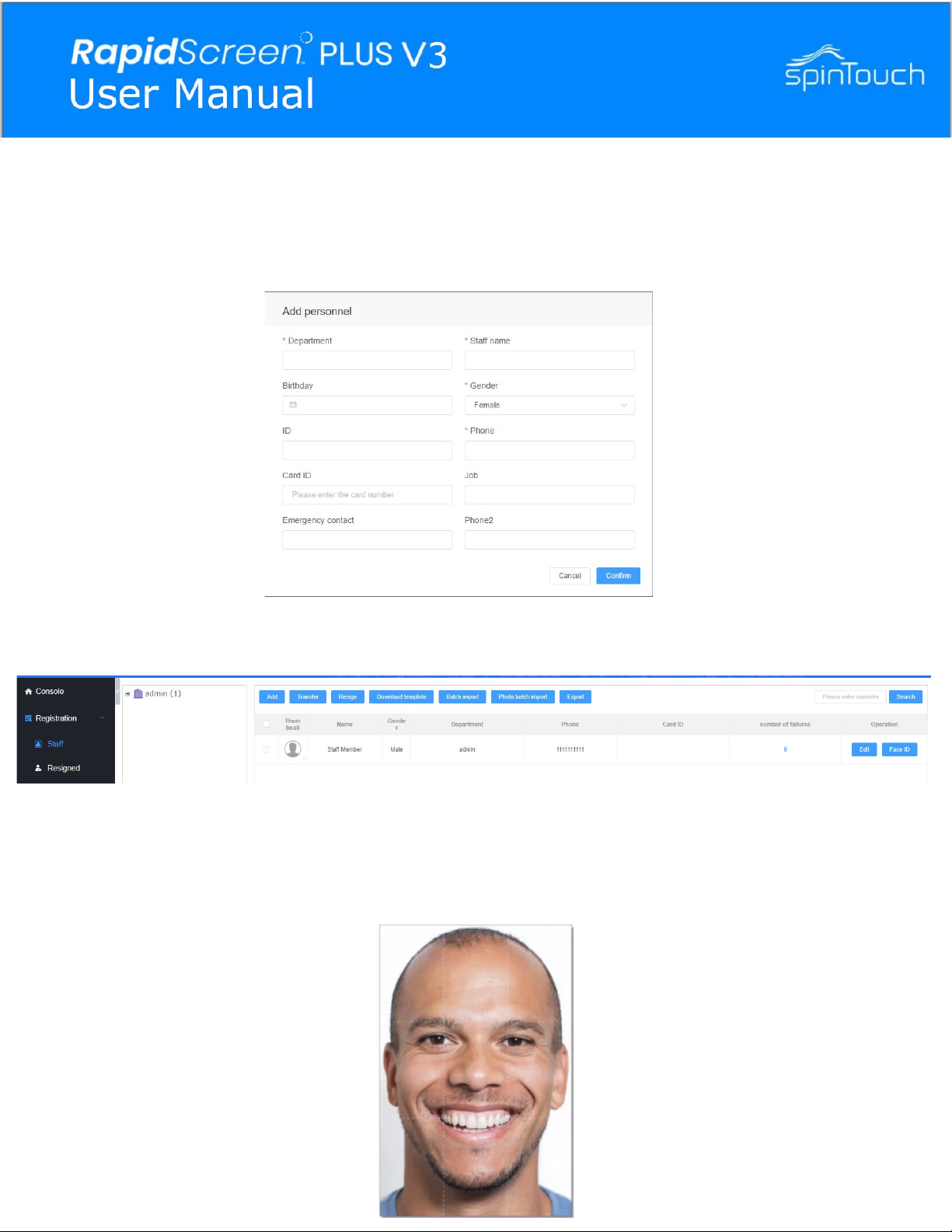
In the Eface software go to Registration -> Staff and then you can
click on the blue Add button to register someone.
Then you can click on the blue Face ID button at the right of the entry
You can then upload a photo to attach to the entry - make sure the
photo is no larger than 640 px * 480 px and that the file size does
not exceed 500 kb. Only jpg and png files are supported.
EXAMPLE
Adding Staff using the eFace software
Altri manuali per RapidScreen PLUS V3
1
Indice


