
SPORTS AFIELD INSTINCT BIOMETRIC Series Manuale utente

IMPORTANT:
Please read this information and follow all safety rules carefully before
operating your gun safe. Failure to do so will void your warranty.
INSTINCT BIOMETRIC SERIES
INSTRUCTION MANUAL FOR SA5520INS-BIO
111521

TABLE OF CONTENTS
1www.saproducts.com
IMPORTANT INFORMATION ............................................................................................... 2
1. REGISTRATION ................................................................................................................ 3
2. UNDERSTANDING YOUR SAFE ........................................................................................ 4
3. UNBOXING ...................................................................................................................... 4
4. INSPECTION .................................................................................................................... 4
5. INITIAL ENTRY.................................................................................................................. 5
6. PROGRAMMING YOUR FINGERPRINT............................................................................. 6
7. ACCESS TEST.................................................................................................................... 7
8. PROGRAMMING ADDITIONAL FINGERPRINTS................................................................ 7
9. TROUBLE SHOOTING....................................................................................................... 8
10. CLEARING ALL PROGRAMMED FINGERPRINTS............................................................8
11. LOW BATTERY WARNING...............................................................................................9
12. LOCKOUT MODE/ TAMPER PROTECTION........................................................................9
13. SILENT ENTRY MODE................................................................................................. 10
14. PROPER PLACEMENT AND MOVING OF SAFE.............................................................. 10
15. KEEPING YOUR SAFE DRY ............................................................................................ 11
16. SHIPPING SKID REMOVAL............................................................................................. 11
17. SECURING YOUR SAFE.................................................................................................. 12
18. GUN REST INSTALLATION............................................................................................. 13
19. LOADING YOUR SAFE .................................................................................................. 14
20. MAINTENANCE............................................................................................................ 14
WARRANTY........................................................................................................................ 15
2
DISCLAIMER - READ BEFORE SAFE SETUP
FIREARM STORAGE
SAFETY
Thank you for choosing a Sports Afield Safe to protect your valuables. We are
commied to securing, organizing and protecng your most important documents,
valuables and keepsakes.
Your safe is built to last a lifeme. However, please understand that the locking
mechanism has precision parts. If you experience ANY difficulty opening or closing
your safe. DO NOT FORCE THE SAFE OPEN. Doing so may jam the components in
the lock, which will require a safe technician to unlock your safe. This causes an
inconvenience to you and may lead to a claim denial.
If you experience problems or challenges with your safe, please contact us.
Many issues can be quickly resolved without the product being returned.
Safe bodies and doors are extremely heavy thus SA Consumer Products requires a
minimum of two people to insure stability of the safe during installaon. Always ensure
proper installaon, as laid out in this manual, and do not open the door with the safe
on an uneven or unstable floor. Ignoring this could result in serious injury or death.
If you choose to ulize this safe to store a firearm always follow proper firearm and
local laws.
SA Consumer Products strongly recommends that you do not store loaded firearms.
Always follow the firearm safety rules set out by the firearm’s manufacturer.
A Sports Afield Safe or any other firearm storage device cannot take the place
of other safety procedures including advising children of the dangers of firearms.
SA Consumer Products and its distributors of the Sports Afield Safes do not
recommend, suggest, advise, promote, or otherwise condone the ownership
or use of firearms. We believe the decision to own or use a firearm is a serious
decision that should only be made by an adult who has carefully considered
the risks and benefits of such a decision.
PLEASE READ THIS INFORMATION CAREFULLY BEFORE OPERATING YOUR
SPORTS AFIELD SAFE.
DO NOT LOCK THIS MANUAL OR THE BACKUP KEYS IN YOUR SAFE.
3
REGISTRATION INFORMATION
Customer Service - (888) 792-4264
PURCHASE DATE:
PURCHASE PRICE (BEFORE TAX):
MODEL NUMBER:
SERIAL NUMBER:
KEY NUMBER (IF APPLICABLE):
RETAILER NAME:
Theinformaon you record onto this page will be required in the event you
cannot access thecontents of your Sports Afield Safe. Pleasefill out all the
required informaon below and retain for your records and safe keeping.
PLEASEHAVE THIS INFORMATION READY PRIOR TOCALLING FOR TECHNICAL
ASSISTANCE AT:
Register your safe at www.saproducts.com
1. REGISTRATION
By registering your Sports Afield safe we will be able to expedite and address
any problems or challenges you may have which would otherwiserequirea
notary leer and proof of payment.

2. UNDERSTANDING YOUR SAFE
4
4. INSPECTION
3. UNBOXING
Make sureto inspect your safefor shipping damagebefore accepng delivery.
If you find any damage, please contact the delivery company (or carrier) immediately.
Any damage not noted upon delivery must be reported within fieen (15) days
or there will be no recourse. Any noted damage at the me of delivery must be
resolved with the delivery company and/or retailer. Shipping damage is not
warrantable by SA Consumer Products.
WARNING: SAFES ARE HEAVY AND CAN BE UNSTABLE ON UNEVEN GROUND.
PLEASE ENSURE EXTRA CAUTION WHEN DEALING WITH OR MOVING UNSECURED
SAFES. WHILE UNBOXING BE SURE TO HAVE A SECOND PERSON HOLD AND
STABILIZE THE SAFE TO KEEP IT FROM TIPPING, CAUSING INJURY, AND/OR
DAMAGE TO THE SAFE AND SURROUNDING STRUCTURES.
Remove thepackaging. If your safe is sll on shipping feet you can simply li
theboxup and offthesafeoncethestrapping has been removed. If your safe
does not have shipping feet you will needto carefully remove thebox, ensuring
not to damage thesafeand/or injure yourself. You will want to have someone
stabilize the safe when removing the cardboard and other packing material
from underneath the safe.
External
Hinges
Adjustable
Shelf Rails
Active
Locking
Bolts
Fully
Wrapped
Adjustable
Shelf
Gun
Rack
Bolt Down
Holes Carpeted Door
Panel
Reset
Button
Fire
Seal
Biometric
Scanner
AA Battery
Compartment
Backup
Key Entry
Key Cover

5
5. INITIAL ENTRY
1.
Locate the user manual, and
backup keys inside the plasc
bag hanging on the front of
the safe.
Step 1
CONTENTS: USER MANUAL,
AND BACKUP KEYS
Step 2
Step 3
2. Remove key cover.
Insert and turn the backup key
clockwise from 12 o’clock to
3 o’clock to unlock. Rotate drop
handle counter-clockwise to
open safe.
Once open, turn the handle
back to its starng posion
so the bolts are open and
extended. Remove key and set
aside.
3.
Baery Holder
AA
AA
AA
AA
WARNING: Thebaeries must be inserted with the correct polarity. Exhausted baeries must be removed
from theproduct and discarded safely. Do not mix old and new baeries. Do not use standard (carbon-zinc)
or rechargeable (nickel-cadmium) baeries.
Locate the (4) AA Alkaline
baeriesand insert in the
baery compartment on
the inside of the door
panel. Unit will beep when
baeries are successfully
installed. Replace baery
cover.
6
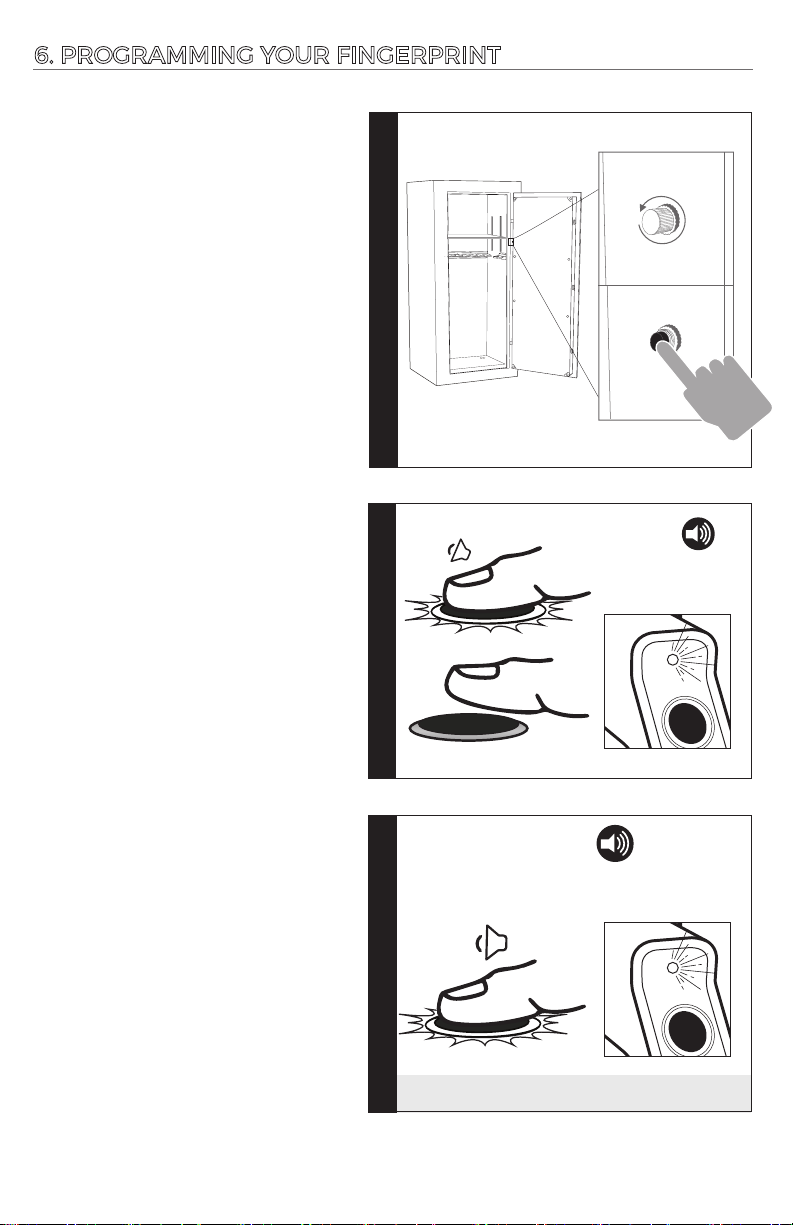
6. PROGRAMMING YOUR FINGERPRINT
2. PLACE AND HOLD the pad of your
finger on the scanner unl indicator
ring flashes green once and beeps
once.
3. Quickly REPEAT Step 2 at least 3
more mes unl there are 2
consecuve beeps and 2 green
flashes. That finger is now
programmed.
If unsuccesful, the indicator Ring
will flash red 5 mes and beep 5
mes. Repeat this secon again.
1.
On the inside of the safe, near
the baery compartment, locate
the brass cap. Unscrew and
remove the cap. Press the reset
buon. You will hear 1 beep and
the indicator ring will illuminate
white on the front of the door
indicang that you are now in
programming mode.*Keep safe
door open while programming
new fingerprint*
Inacvity Timeout: If this
programming sequence is not
completed within 10 seconds the
indicator ring will flash red 5 mes
and beep 5 mes. Return to step 2
to restart this process.
LIFT FINGER
Step 2Step 3
Step 1
x
1
x
1
GREEN
LED
x
2
x
2
GREEN
LED
Red Reset Button
Brass Cap
BEEP
BEEP
BEEP
HOLD FOR BEEP
2 BEEPS + 2 GREEN FLASHES = SUCCESS!

7. ACCESS TEST
7
With keys in hand, close and lock the door.
PLACE AND HOLD the PROGRAMMED finger
pad on scanner, indcator ring will flash white
1 me and beep 1 me to alert scanner is
acvated.
If fingerprint is accepted, indicator ring will
illuminate green. You now have access to your
safe.
If fingerprint is rejected, the indicator Ring
will flash red 5 mes and beep 5 mes.
GREEN LED = SUCCESS!
*Now that your fingerprint is successfully programmed, re-install the magnec branding
badge and store your backup keys in a secure secondary locaon outside of the safe.
8. PROGRAMMING ADDITIONAL FINGERPRINTS
INDIVIDUALLY MAPPING ALL
ZONES OF YOUR FINGERPRINT
WILL ENSURE A RELIABLE
READING BY THE SCANNER.
To ensure each programming
sequence is properly captured, the
scanner needs to read the exact
same place on your finger four
mes in a row.
This counts as one programmed
fingerprint of the 100 fingerprints
this unit can keep in memory.
Once programming sequence has
been successfully completed you
can move onto the next zone of
your fingerprint.
TIP
RIGHT
TOP
MIDDLE
LEFT
When accessing your safe quickly, there is a chance you might press
the scanner with a part of your finger that you have not registered before.
For this reason, we recommend programming addional areas of your
fingerprint to ensure fast and reliable entry to your safe.

8
9. TROUBLESHOOTING
In the event that you run into issues with programming and accessing your
safe, please read through this secon for answers to your quesons.
YOUR PROGRAMMED
FINGERPRINT IS NOT
READING AT ALL TIMES
SOLUTIONPROBLEM
Placing a poron of a fingerprint on the scanner
that has not been programmed can result in an
error. We recommend programming mulple
areas of each fingerprint.
Make sure to hold down your finger on the
scanner instead of tapping. Scanner needs me
to complete the scanning process.
Fingerprints may lack definion due to excessive
skin dryness. We recommend applying
moisturizer or slide your fingerprint against your
forehead before scanning process.
THE SCANNER IS NOT
READING YOUR
FINGERPRINT
10. CLEARING ALL PROGRAMMED FINGERPRINTS
NOTE:
If 100 max fingerprints have already
been programmed the indicator ring
will flash 5 mes and beep 5 mes.
We recommend clearing all
programmed fingerprints and starng
the programming process over.
Hold the reset buon for 5
seconds. Aer 5 seconds, the
indicator ring will flash green two
mes and beep two mes to
signal that all fingerprints have
now been cleared. The safe will
not open to any fingerprints unl
a new fingerprint has been
programmed.
x
2 x
2
GREEN
LIGHT
Red Reset Button
9
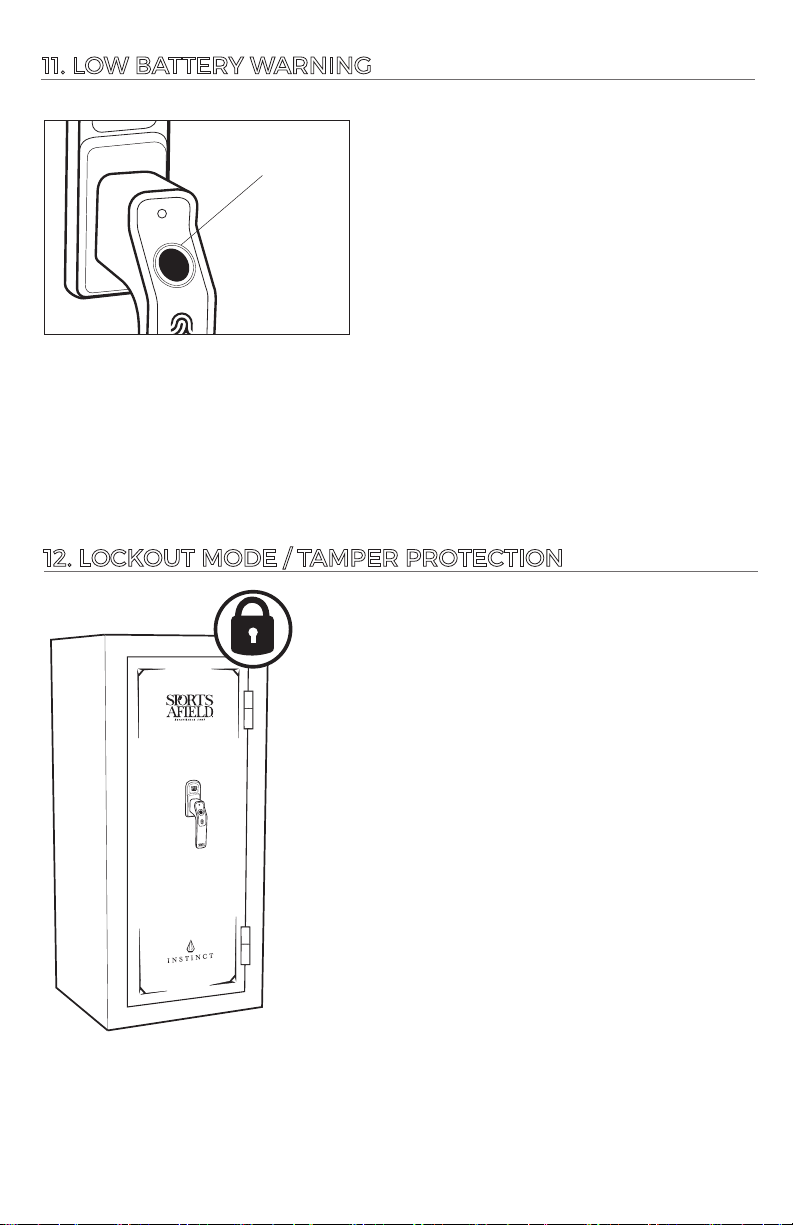
This safe is equipped to alert you of Low
Baery Mode. This Low Baery Warning is
iniated immediately aer an accepted
fingerprint scan. The indicator ring will first
illuminate green followed by a 3 second long
beep and the indicator ring flashing purple for
3 seconds. It is highly advised to immediately
replace the safe's baeries to avoid being
locked out of your safe.
BATTERIES ARE LOW
IF THE INDICATOR RING
FLASHES PURPLE
11. LOW BATTERY WARNING
12. LOCKOUT MODE / TAMPER PROTECTION
1. Three consecuve rejected scans put the safe
in “Basic Lockout” mode. The Bio Scanner is
deacvated for 30 seconds.
2. Six consecuve rejected scans result in
“Severe Lockout” mode. The Bio Scanner is
deacvated for 5 minutes.
3. Aer the safe enters basic or severe lockout mode,
the tamper indicator will trigger to warn you that
someone has unsuccessfully aempted to gain
access to your safe. This tamper indicator will signal
immediately aer the next successful fingerprint is
accepted. The indicator ring will flash red 3 mes in
addion to a 3 second long beep.
Note: During lockout mode, the indicator ring will
light up red once every 10 seconds. When lockout
mode has ended, the indicator ring will flash green
1 me and you will hear 1 beep . You now have access
to your bio scanner.
Altri manuali per INSTINCT BIOMETRIC Series
1
Questo manuale è adatto per i seguenti modelli
1
Indice


