Thank you for purchasing this product. To help famili-
arize yourself with :1s operation, please read this
manual carefully before aftempting lo use the product,
and save this manual for fulure reference.
Multimedia Head Up Displayer.
iHUD is the world's first high resolutlon HUD capable
for Smartphones, 2-Din Car System or any composile/
HDMI video/audio outputted device, Mainly display
any conlains from any video/ audio devices into HUD
mode to project onto the windshield while driving,
therefore, driver can always easily have the key
information such as Speed, Road lnformation, OBDll,
lncoming Calls, Webcam Calls, or Navigations without
any inattention by leaving eyes on the road which
great'y enhances driving safety.
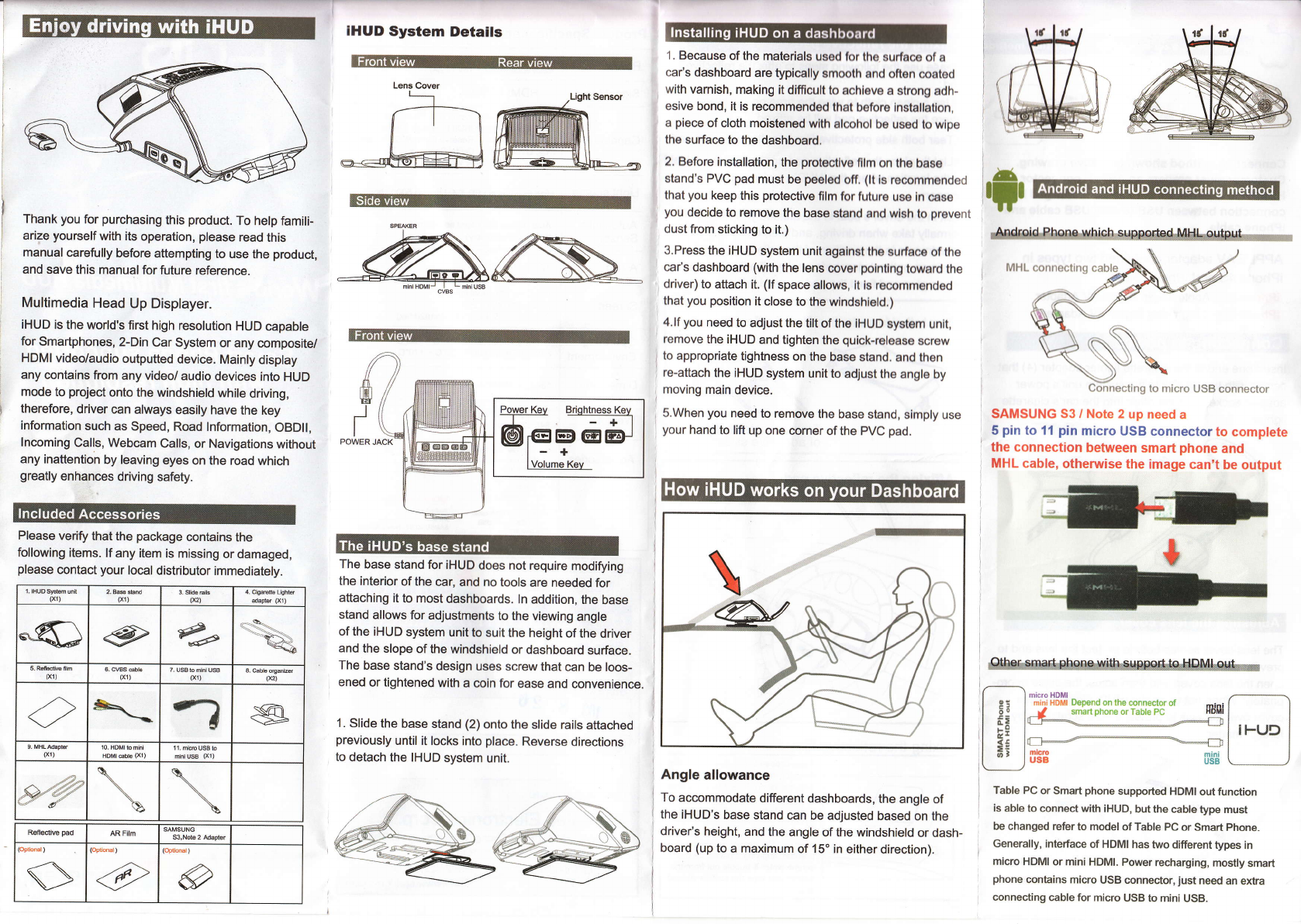
Please verifu that the package conlains the
following items. ll any item is missing or damaged,
please contact your local distributor immediately.
IHUD System Details
The base stand for iHUD does not require modifying
the interior of the car, and no tools are needed for
attaching it 1o most dashboards. ln addition, the base
stand allows for adjustments to the viewing angle
of the iHUD system unit to suit the height of the driver
and the slope of the windshield or dashboard surface.
The base stand's design uses screw that can be loos-
ened or tightened with a coin for ease and convenience.
1. Slide the base stand (2) onto the slide rails attached
previously until it locks into place. Reverse directions
to detach the IHUD system unit.
1 . Because of the materials usod for the surface of a
car's dashboard are typically smooth and often coated
with varnish, making it difficult to achleve a strong adh-
esive bond, it is recommended that before installailon,
a piece of cloth moistoned wlth alcohol be used to wipe
the surface to the dashboard.
2. Before installation, the protoctlvo fllm on the base
stand's PVC pad must be peeled ofi. (lt is recommended
that you keep this protective film for future use in case
you decide to remove the base stand and wl8h to prevenl
dust from sticking to it.)
3.Press the iHUD system unit against the surface of the
car's dashboard (with the lens cover polntlng toward the
driver) to attach it. (lf space allows, it is recommended
that you position it close to the windshield.)
4.lf you need to adjust the tilt of the |HUD system untt,
remove the iHUD and tighten the quick-release Bcrew
to appropriate tightness on the base stand. and then
re-attach the |HUD system unit to adjust the angle by
moving main device.
S.When you need to remove the base stand, simply use
your hand to lift up one corner of the PVC pad.
Angle allowance
To accommodate different dashboards, the angle of
the iHUD's base stand can be adjusted based on the
driver's height, and the angle of the windshield or dash-
board (up to a maximum of 15" in either direction).
lxl) (x1) tnt
*m *
61) (xl) 7. USB b dd USA
(xl) (e)
s
(x1) mhw8 (x1)
ea
R9fledive pad AR film
(Optional )
,.\
v
la
r;r
SAMSUNG 53 / Note 2 up need a
5 pin to 11 pin micro USB connector to complete
the connection between smart phone and
MHL cable, otherwise the image can't be output
Table PC or Smart phone supported HDMI out function
is able to connect with iHUD, but the cable type must
be changed refer to model of Table PC or Smart Phone.
Generally, interface of HDMI has two different types in
micro HDMI or mini HDMI. Power recharging, mosfly smart
phone contains micro USB connector, iust need an extra
connecting cable for micro USB to mini USB.
Depend on the conneclor ot mini
smarl phone or Table PC HDtl