
Sprog S-Nano Manuale utente
S-Nano User Guide 1
Version 1.0 Oct 2012 © Copyright 2012 SPROG DCC
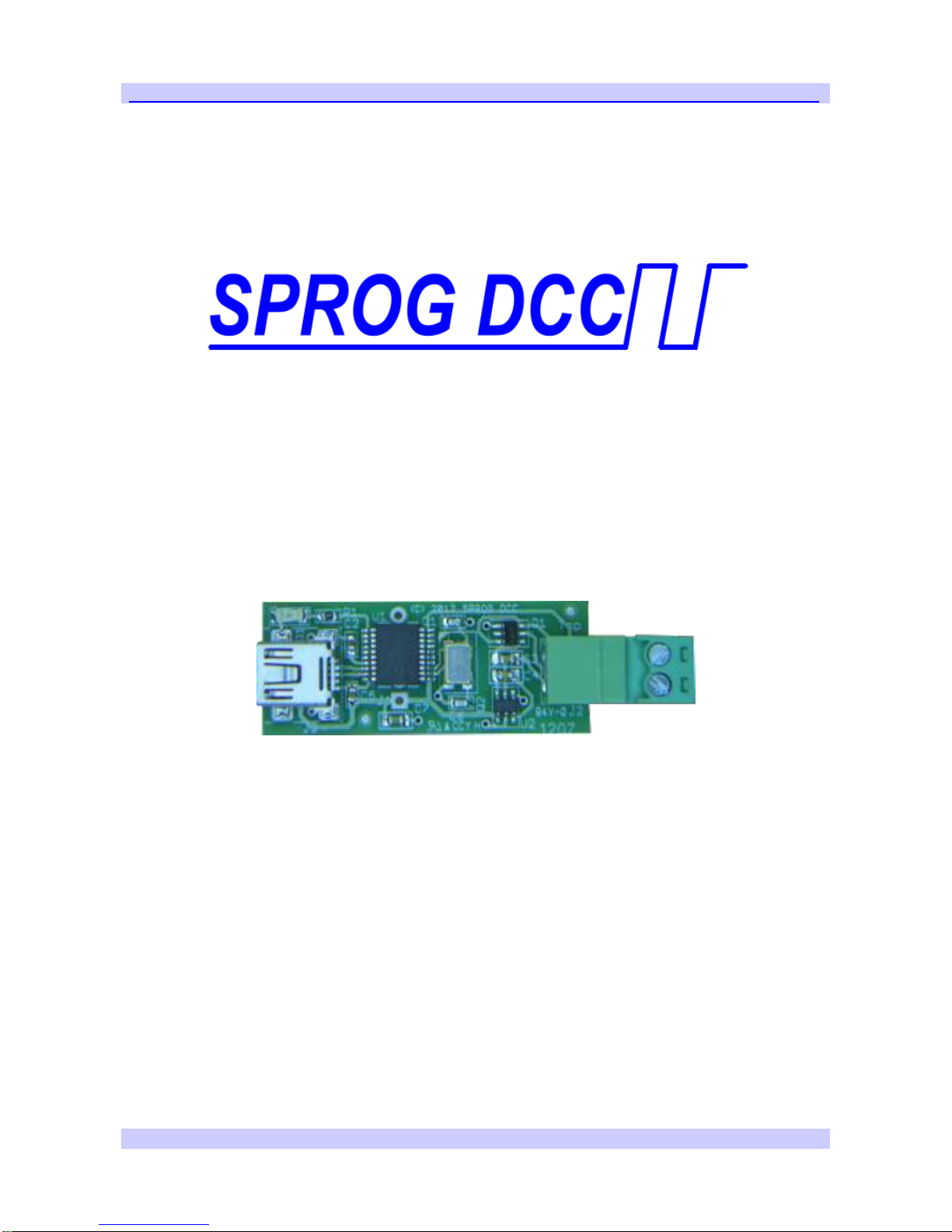
S-Nano DCC Booster Interface
User Guide

S-Nano User Guide 2
Version 1.0 Oct 2012 © Copyright 2012 SPROG DCC
Introduction.....................................................................................4
Requirements...............................................................................4
Features........................................................................................4
Specification/Operating Conditions ..........................................5
Installation.......................................................................................6
Install DecoderPro.......................................................................6
Install S-NANO USB drivers .......................................................6
Drivers for Windows 2000, XP or Vista (with some variations)6
Identify the connection Port.....................................................10
Driver Installation for Windows 7.............................................12
Driver Installation for MacOS...................................................17
Driver Installation for Linux......................................................17
Setting Preferences......................................................................17
Connect the Booster.................................................................19
Getting Started With DecoderPro................................................20
Layout Control with S-NANO.......................................................21
S-Nano Command Station Mode..............................................21
Short (one byte) Versus Extended (two byte) Addressing....22
How Many Locos Can Be Controlled? ....................................23
Determining the S-Nano Firmware Version ...............................24
The SPROG Console....................................................................25
Title Bar......................................................................................26
Command History......................................................................26
Send Command.........................................................................27
Selecting SPROG Operating Modes........................................27
Speed Step Modes.....................................................................27
Current Limit..............................................................................27

S-Nano User Guide 3
Version 1.0 Oct 2012 © Copyright 2012 SPROG DCC
Set ZTC Mode.............................................................................27
Set Blueline Mode......................................................................27
Unlock Firmware........................................................................27
Save............................................................................................27
Updates to the S-Nano Firmware................................................28
Returning Your S-Nano for Update..........................................28
Firmware Update Using the Bootloader..................................28
Connecting S-Nano to SBOOST Boosters.................................32
Example 1...................................................................................32
Example 2...................................................................................33
Connecting S-Nano to Other boosters.......................................34
Troubleshooting ...........................................................................35
Useful Links ..................................................................................36

S-Nano User Guide 4
Version 1.0 Oct 2012 © Copyright 2012 SPROG DCC
Introduction
S-Nano is a DCC interface for connection between the USB port of a
personal computer or similar device and a DCC booster. S-Nano transforms a
DCC booster into a computer controlled DCC command station by formatting
data packets from USB (sent by appropriate software running on the
computer) into correctly timed DCC data packets.
S-Nano is not a decoder programmer, although “ops-mode” or “on-the-main”
programming is still possible depending on the features of the controlling
software.
S-Nano is supported by JMRI project (http://jmri.sourceforge.net/) which, by
use of the java programming language, allows platform independent support
of a wide range of DCC hardware. The JMRI software is shareware available
as a free download.
Requirements
DecoderPro from http://jmri.sourceforge.net/ or the optional CD-ROM
USB A to Mini B cable
DCC booster with NMRA input
Features
USB powered –no external power supply required
USB interface for easy connection to PC
USB activity LED shows communication with the PC
Cross-platform support –Windows, Linux, MAC

S-Nano User Guide 5
Version 1.0 Oct 2012 © Copyright 2012 SPROG DCC
Specification/Operating Conditions
Parameter
Minimum
Nominal
Maximum
Units
Note
DCC Output voltage
10V
V
1
Operating
Temperature Range
25
°C
Table 1Specification/Operating Conditions
Notes:
1. DCC output voltage depends upon the load imposed by the booster
input(s).

S-Nano User Guide 6
Version 1.0 Oct 2012 © Copyright 2012 SPROG DCC
Installation
The following steps are required to install S-Nano before you can use it for
the first time:
Install DecoderPro 2.14 or later (Will also install the Java Runtime
Environment (JRE) if necessary)
Install S-Nano USB drivers
Edit DecoderPro preferences
Connect the booster
This document gives brief installation instructions for the Windows Operating
System, versions 2000, XP or 7, or for MacOS 10.4 and newer. For further
instructions and for instructions to install the JRE and DecoderPro on Linux,
please refer to the Install Guides on the JMRI website at
http://jmri.sourceforge.net/download
Install DecoderPro
DecoderPro should be installed from the CD-ROM or a downloaded copy.
The CD includes the latest production version at the time of supply.
A newer version of DecoderPro than that supplied on the CD-ROM may be
available from the JMRI download page http://jmri.sourceforge.net/download
This user guide assumes you are using version 3.0, or later.
To install from the CD-ROM, browse to the directory specific to your operating
system to find the JMRI installer. For example, if your CD-ROM drive is D: on
Windows, double click on the file D:\Windows\JMRI.3.0-r20870.exe.
Install S-NANO USB drivers
Use the supplied USB cable to connect S-NANO to the host computer. The
power LED should be lit.
There are four possible choices set out below, for earlier Windows systems,
Windows 7, MacOS 10.4 and later, or Linux. Select the right section for your
computer and operating system.
Drivers for Windows 2000, XP or Vista (with some variations)
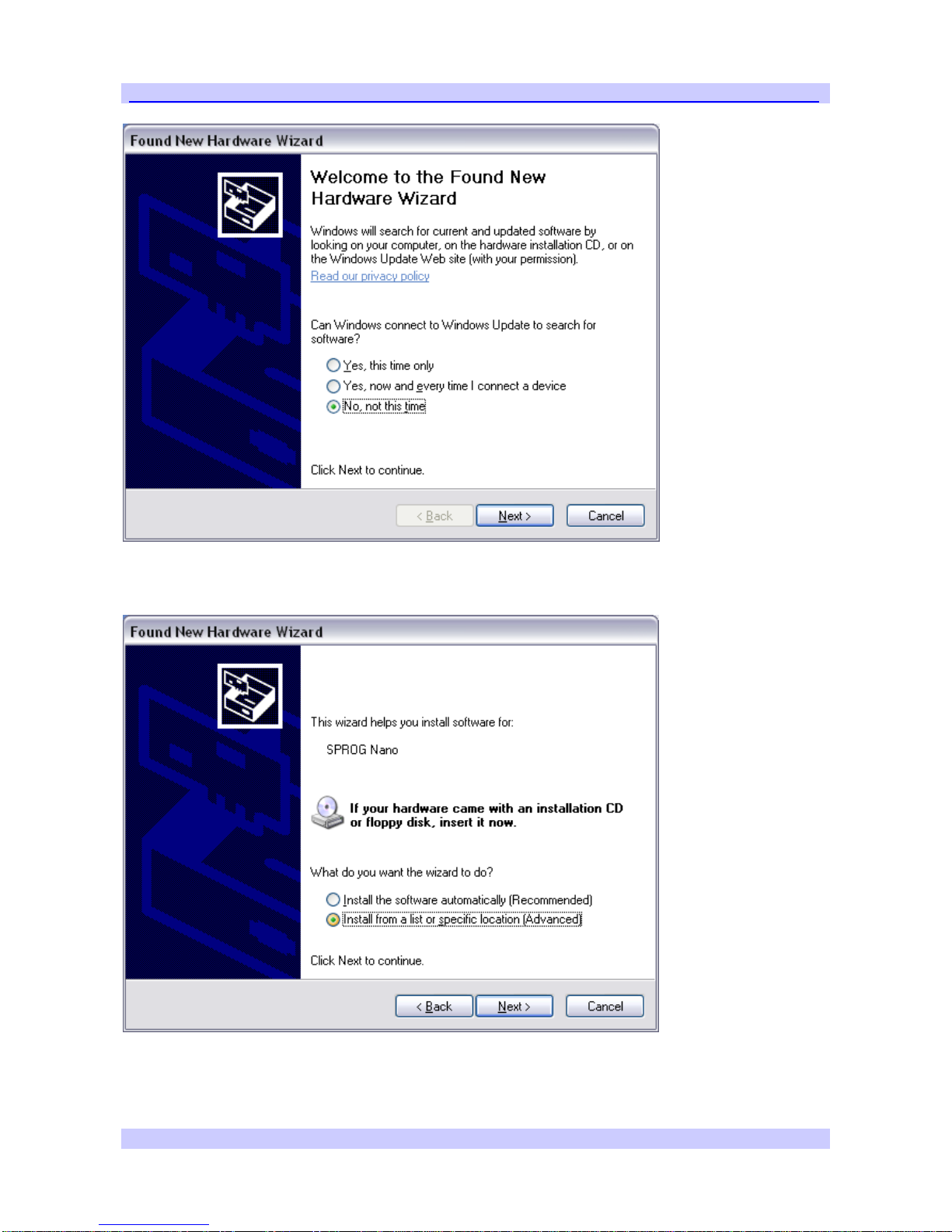
The first time you connect the S-Nano you should see the “Found new
Hardware Wizard”. Follow the steps below to install the S-NANO drivers.
S-Nano User Guide 7
Version 1.0 Oct 2012 © Copyright 2012 SPROG DCC
Click “No, not this time” then click “Next >”.
Click “Install from a list or specific location” then click “Next >”.
S-Nano User Guide 8
Version 1.0 Oct 2012 © Copyright 2012 SPROG DCC
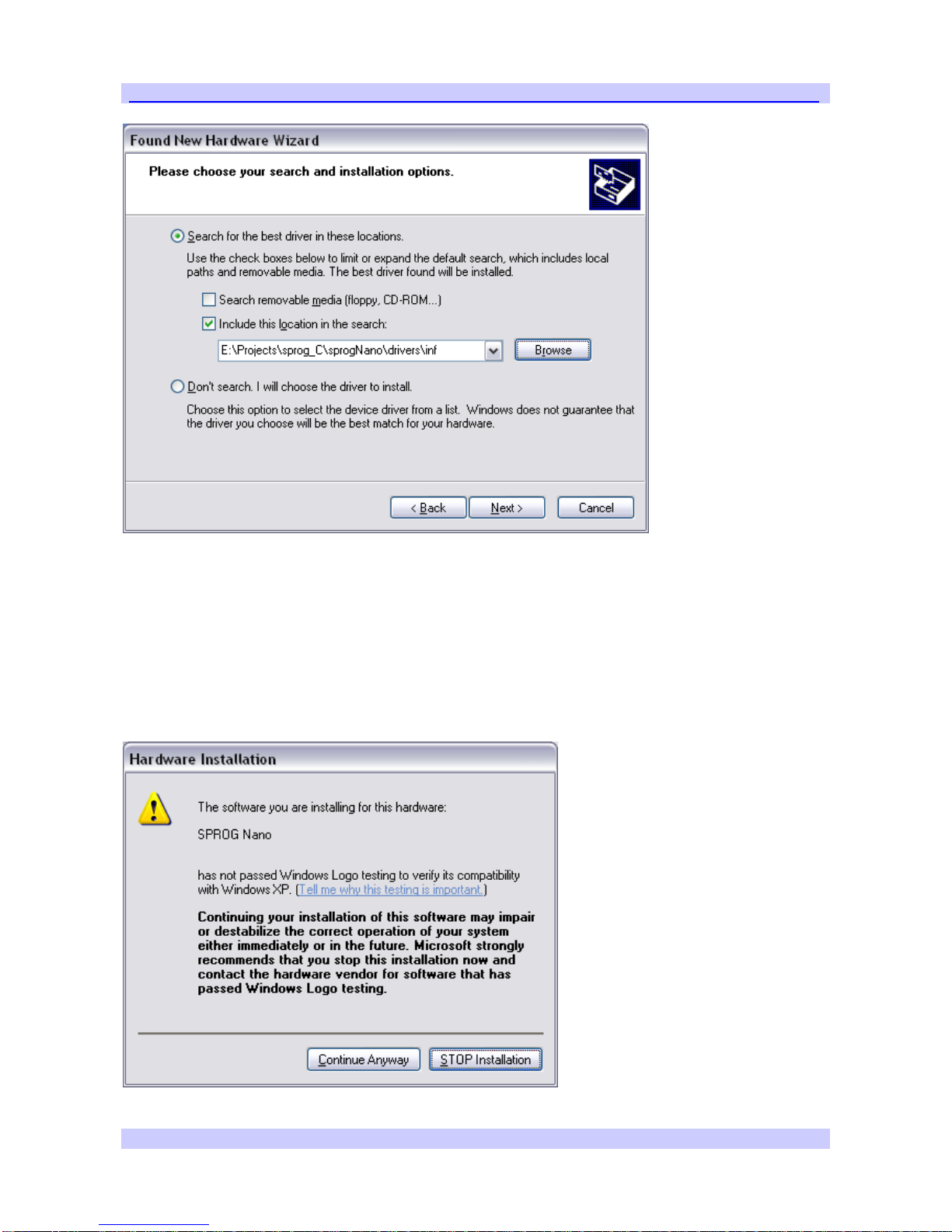
Click “Search for the best driver in these locations” then “Include this location
in the search” and then click the Browse button to find the driver directory on
the CD-ROM supplied with S-NANO.
If your CD-ROM drive is E:\, for example, this directory will be
E:\USB\sprogNano\inf
Click “Next >”.

S-Nano User Guide 9
Version 1.0 Oct 2012 © Copyright 2012 SPROG DCC
The base drivers are fully compatible with WindowsXP. To make them S-
Nano specific, the .inf files are edited which, unfortunately, causes this
dialogue to appear.
Click “Continue Anyway” and wait for the installation to complete.
S-Nano User Guide 10
Version 1.0 Oct 2012 © Copyright 2012 SPROG DCC
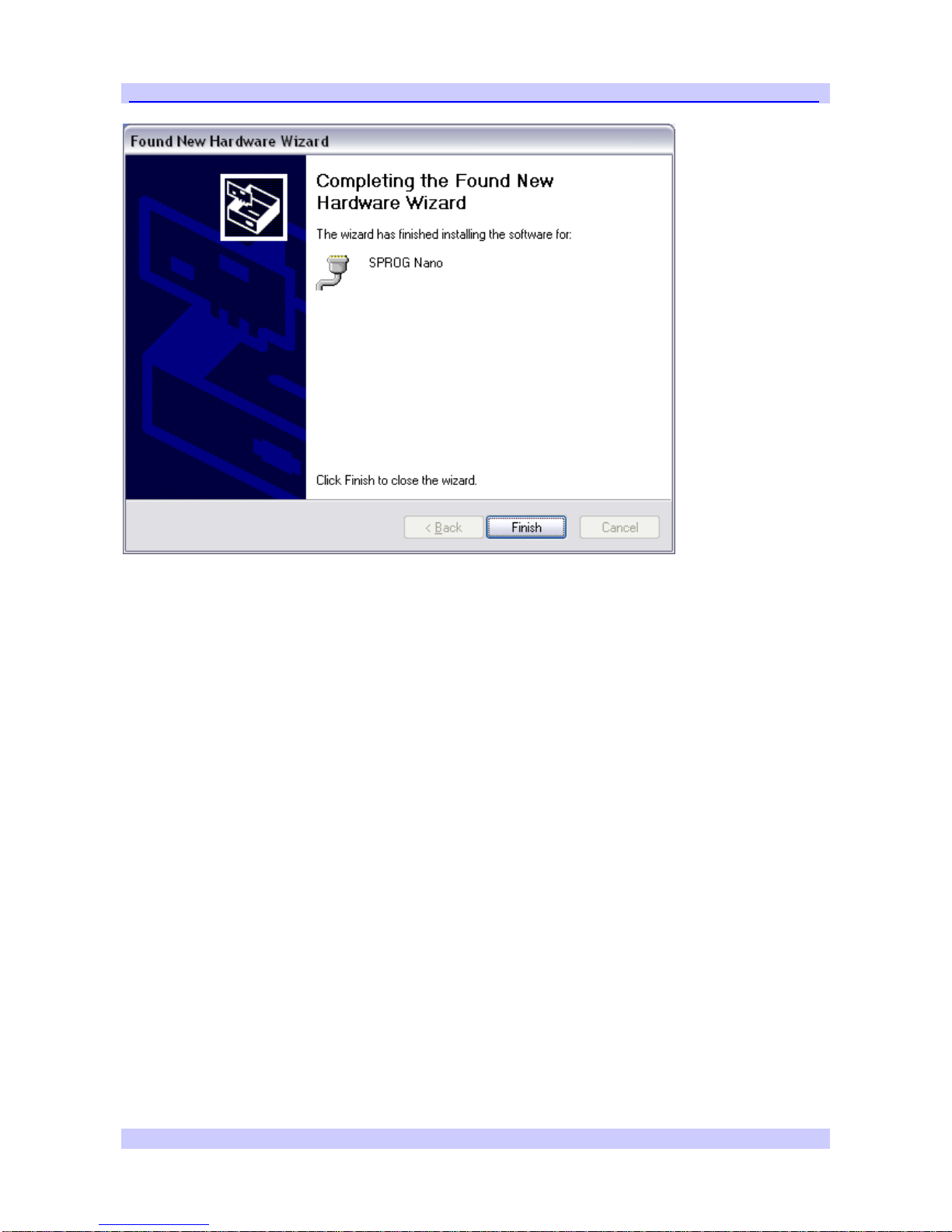
Click “Finish”
Identify the connection Port
The next step is to ascertain which COM port was assigned to S-NANO
during the driver installation. Open the System Properties from the Windows
Control Panel (you may need to switch to classic view in Control Panel).
Alternatively, right click on the Desktop “My Computer” Icon and select
Properties.
Select the Hardware tab:
Indice
Manuali Apparecchiature di registrazione popolari di altre marche


Strymon
Strymon NIGHTSKY Manuale utente

Mitsubishi Electric
Mitsubishi Electric 16CH DIGITAL RECORDER DX-TL5000U Manuale utente

Tews Technologies
Tews Technologies TPMC465 Manuale utente

Honeywell
Honeywell Excel 50 Manuale utente

SeaLevel
SeaLevel COMM+8.LPCI Manuale utente

Arturia
Arturia AUDIOFUSE STUDIO Manuale utente


