Order no. 900237.030 V1.0 Page 4
GENERAL INFORMATION
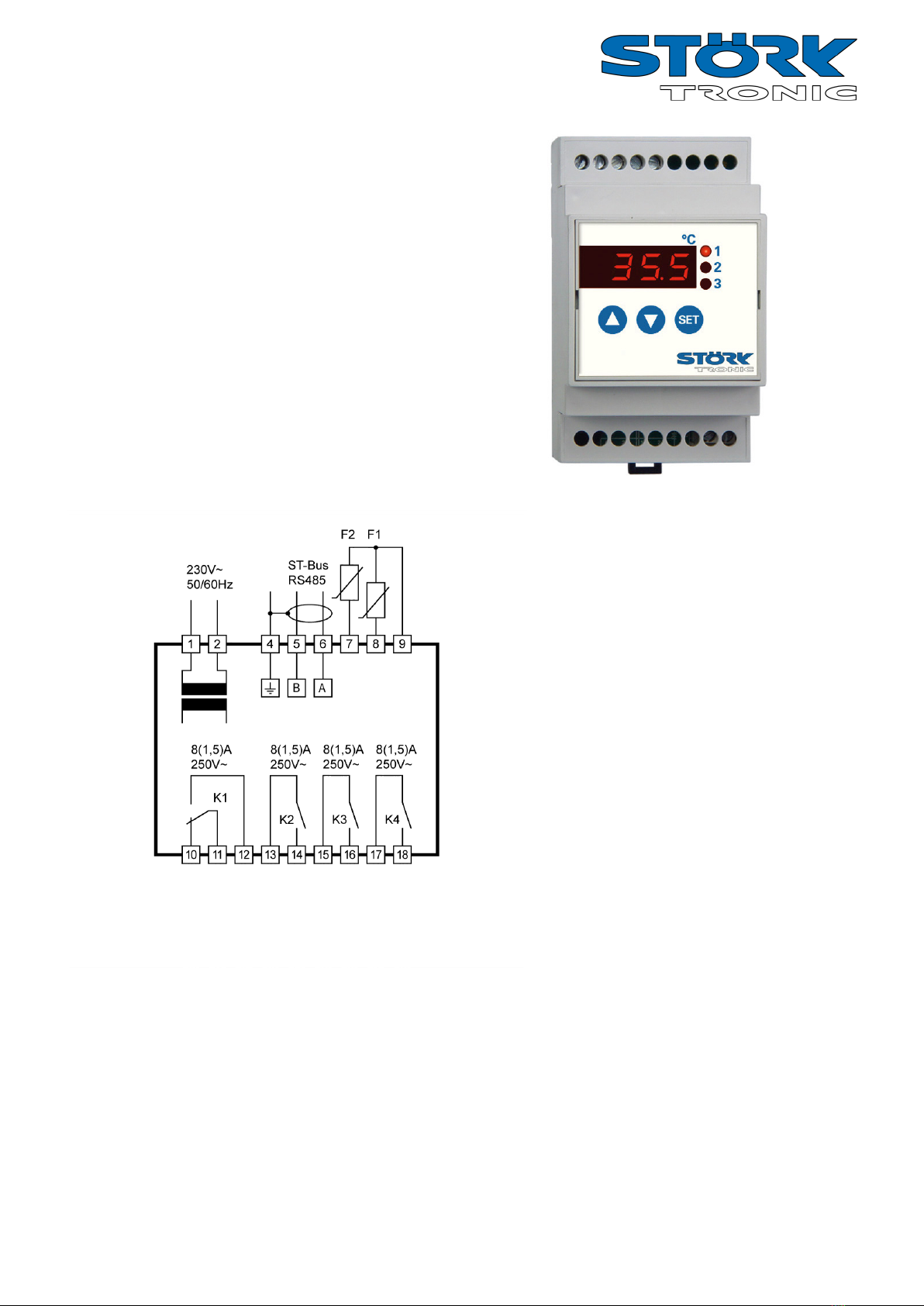
The ST……112 controllers are designed for general
use in refrigerating plants.
Depending on the existing hardware, up to four
temperature sensors can be connected. These can
either be used for capturing the cold store
temperature, evaporator temperature, super-frost core
temperature, the temperature of a second control
circuit or the temperature of the condenser. The type,
function, offset and weighting of each sensor can be
configured separately via parameters. Additionally, an
analogue input (4..20mA) can be made available for
capturing pressure levels, e.g. for condenser/fan
control, provided that the required hardware is
available.
The max. four digital inputs can also be configured
separately, depending on the hardware installed.
Possible functions include: standby, door contact,
high-pressure or low-pressure switch.
Depending on the hardware, up to eight relay outputs
are possible the functions of which can be configured
as required via parameters. Please refer to the
specifications of the hardware installed to ensure that
the relays are not overloaded. Also refer to the circuit
diagram in the corresponding device manual.
All parameters can also be accessed via the RS485
interface. If an internal clock is provided in the
hardware, the corresponding functions, e.g. defrosting
or night-time increase/decrease of setpoint, can be set
and started via parameters.
CONTROL KEYS
Key T1: UP ( up-arrow )
By pressing this key the parameter or parame-
ter value is increased. A further function of the
key can be set with parameters .
Key T2: DOWN ( down-arrow )
By pressing this key the parameter or parame-
ter value is decreased. A further function of the
key can be set with parameter .
Key T3: SET
While SET key is pressed, the setpoint is indi-
cated. The function of the key can be set with
parameter (unchangeable in this case).
The cooling controller is generally controlled using the
buttons UP, DOWN and SET. The standard display
indicates the temperature of the cold store (actual
temperature value). Press SET button to switch over
the display to the required cold store temperature
(setpoint temperature).
The setpoint temperature can only be changed by
pressing buttons SET and UP or SET and DOWN at
the same time. While pressing the buttons, the
changing setpoint temperature is displayed. After
changing the setpoint temperature and releasing the
buttons, the actual temperature is displayed again.
This is the standard setting method.
In addition to setting the temperature value, the
buttons UP and DOWN perform other functions, too.
Pressing the UP for 3 seconds will trigger a non-
standard defrosting operation of the refrigerating
plant. In the case of an alarm (with buzzer triggered),
the DOWN button can be used for acknowledging the
buzzer sound.