Stack Motorsport DVL Manuale utente

Part No. ST542113-002
Motorsport DVLs
User Guide


Preface
Stack DVL User Guide i
Preface
Congratulations
Thank you for choosing the Stack DVL. This solid-state
recorder will give you many opportunities to make video
recordings in environments where ordinary video recorders
cannot be used.
Purpose of this User Guide
This user guide will help you install and use the Stack DVL.
It explains how to set up and configure the system for your
application.
Related Products From Stack
If you need information about other Stack products, these
can be obtained from Stack or from your local Stack dealer.
Products available from Stack include :-
Tyre Pressure Monitoring Systems
Digital Video-loggers & Digital Video Recorders
Event Recorders
Multi-function Recorders (MFRs)
Data Analysis Software
Multi-function Displays (MFDs)
Pro-control & Professional Auxiliary Gauges
Intelligent Tachometers & Integrated Displays
Analogue & Digital Sensors
Health & Usage Monitoring Systems (HUMS)
Stack ® is a registered trademark of Stack Limited.
Information in this publication is subject to change without notice and
does not represent a commitment on the part of Stack Limited. No
responsibility is accepted for error or omission.
Copyright © 2011 Stack Limited

Contents
ii Stack DVL User Guide
Contents
Chapter 1. Introduction 1
Chapter 2. Essential User Information 3
Video Standard 4
Using a New Compact Flash Card 4
Playing a Recording 4
Before Making a Recording 4
Deleting Files 5
Chapter 3. Installation 6
CLUBMAN-3 Wiring 8
PRO-4 Wiring 10
Chapter 4. Operation 13
To make a recording: 13
To play a recording: 16
Operation with a new Compact Flash Card 17
Formatting a Compact Flash Card 18
Deleting Files 18
Corrupted Compact Flash Cards 18
Chapter 5. Compact Flash Cards 20
Chapter 6. Configuration 21
PC Connection 21
System Information 23
Video Setup 24
Camera Configuration 27
Audio Setup 30
Advanced AGC 31
Data Recorder 33
Record Control 35
G Sensors 37
Ports 37
Tools 39
Chapter 7. Video and Data Systems 41
Controlling Synchronised Video 41
Manual recording control 42

Contents
Stack DVL User Guide iii
Recording Lamp 43
Recommended Vehicle System Power connections 43
Downloading Video 43
Chapter 8. Troubleshooting 46
Chapter 9. Specifications 47
Appendix A. Mounting Template 49
Appendix B. Wiring Harness Diagrams 51
CLUBMAN-3 Harness (ST918119) 51
PRO-4 System Harness (ST918118) 52
PRO-4 Monitor Harness (ST918114) 52
PRO-4 Input Harness (ST918107) 53
Power Harness (ST918078) 53
Control / Status Harness (ST918105) 54
Appendix C. Upgrading the Firmware 55
Appendix D. Service and Support 58
Stack Web-site 58
Contacting your Dealer 58
Stack Contact Details 61
Index 62

Chapter 1. Introduction
Stack DVL User Guide 1
Chapter 1. Introduction
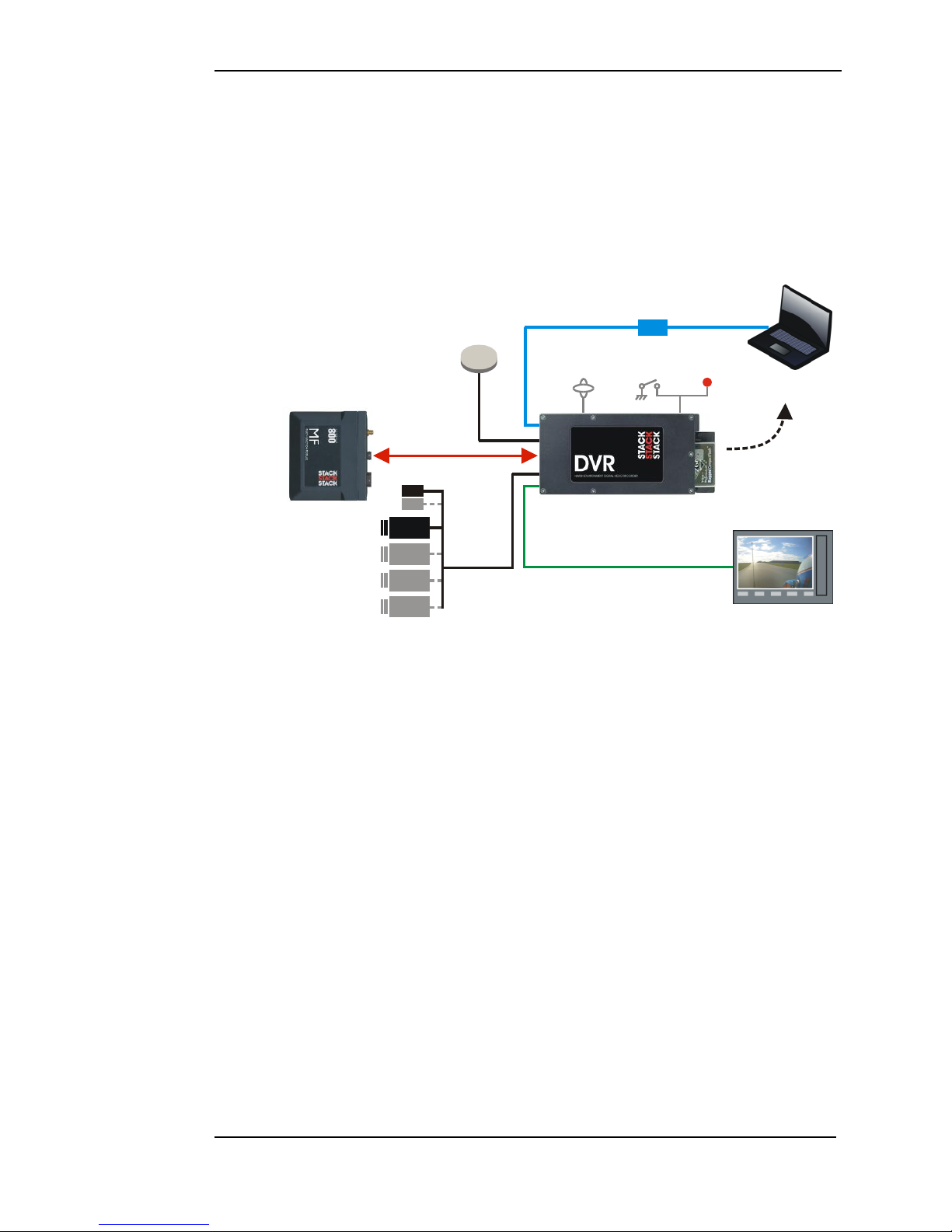
The DVL is part of Stack's third generation Digital Video
Recorder range. Specially designed for harsh environments,
they provide the optimum solution for capturing audio and
video on the move. Now they record data too...
Monitor
CAM 1
CAM 2
CAM 4
CAM 3
ECU
MIC 2
MIC 1
Record
Lamp
Record
Switch
Built-in 3-axis
Accelerometer
USB
Laptop with
Configuration Software
& DataPro
Audio/Video Out
GPS
Receiver
Audio/Video In
Removable
CF
Card to PC
STACK DIGITAL VIDEO RECORDER
STACK
MULTI-FUNCTION
MODULE
Typical DVL Application
Stack's Digital Video Recorders employ broadcast standard
MPEG-2 video compression to record high quality real-time
video and audio direct to a Compact Flash (CF) card. The
card is easily removed and played on a PC or laptop using a
standard media player application. Recordings can also be
copied to DVD for playback on either a PC or DD player.
A data overlay feature is available so that date, time and GPS
data may be stamped onto the recorded video. Connecting
the DVR directly by CAN-bus to a Stack Data System allows
up to 128 channels of data, including GPS and the internal
3-axis G sensor channels, to be recorded alongside the video
and audio. The recording can be viewed and analyzed in the
supplied Stack DataPro analysis software.
Stack DVLs feature a rugged machined aluminum housing
specifically designed and manufactured to protect the unit in
harsh and extreme environments. The unit is compact and

Chapter 1. Introduction
2 Stack DVL User Guide
durable with no moving parts (other than the sealed CF card
access door) and is capable of operating where normal VCRs
or DV recorders can not. Its anti-vibration and shock-
resistant abilities are perfect for consideration as commercial
off-the-shelf (COTS) equipment. Stack DVLs have been
successfully used in many demanding applications such as
motorsport, military vehicles, aerospace, marine and many
more.
CLUBMAN-3 is perfect for applications that don't require
full environmental protection whilst PRO-4 is a fully
waterproof unit with Motorsport “AS” connectors and a
higher operating temperature range. Both models have an
A/V output for connection to an external monitor.
Recording can be triggered automatically using the built-in
3-axis G sensor, from the Stack MF module or using the
included remote control record trigger switch with status
LED.
Stack DVLs provide superior high-quality video recording in
real time over a wide range of bit rates suitable for different
applications –up to 20 Mbps is available, quality equivalent
or better than DV tape.
Chapter 2. Essential User Information
Stack DVL User Guide 3
Chapter 2. Essential User Information
Please read the important information in this chapter before
using the Stack DVL.
CLUBMAN-3 DVL Standard Components
Quantity
Description
1
ST8310 CLUBMAN-3 Module
1
ST918119 CLUBMAN-3 System Harness
1
ST918105 Switch and Lamp Harness
1
ST169049 USB DVL to PC Lead
1
ST918119 Power lead
1
ST169021 Audio/Video Lead
1
ST920039 DVR Configuration Utility Software
PRO-4 DVL Standard Components
Quantity
Description
1
ST8311 PRO-4 Module
1
ST918118 PRO-4 System Harness (red)
1
ST918107 PRO-4 Input Harness (yellow)
1
ST918114 PRO-4 Audio/Video Harness (blue)
1
ST918119 Power lead
1
ST918105 Switch and Lamp Harness
1
ST920039 DVR Configuration Utility Software
Optional Components
Quantity
Description
1
or
ST918129 Expansion harness for ST8100, ST8130 etc
ST918130 Expansion harness for MF, MFR or MFD etc
up to 4
Bullet Camera (ST8393 PAL or ST8394 NTSC)
up to 4
ST918106 CAM plug to BNC & Power Harness
up to 4
ST169047 2 metre Camera Extension Cable
up to 4
ST39008x Camera Mount
1
Microphone Kit
Compact Flash (CF) Card
1
ST995 GPS Receiver

Chapter 2. Essential User Information
4 Stack DVL User Guide
Video Standard
The DVL can be configured to either the PAL or NTSC
video standard to match the camera which is connected.
!Only PAL and NTSC are currently supported.
Using a New Compact Flash Card
The DVL will only operate with a Compact Flash card
formatted with a FAT32 File System. Before using a new
card, check its File System by inserting it into a PC running
Windows XP or Vista and display the disk properties by
right clicking the disk icon in “My Computer”. If supplied
as FAT16, reformat to FAT32 (see page 17).
Playing a Recording
The files produced by the DVL are fully MPEG-2 compliant.
They may be played directly from the card by inserting it
into a PC with a suitable Compact Flash card slot or adapter.
However, better replay results are usually obtained by
transferring the file to the PC‟s hard drive (see page 16).
Before Making a Recording
Before a recording session clear the Compact Flash card so
that maximum space is available. Deleting files can cause
the write/read speed of the removable Compact Flash card to
degrade but a format will restore its performance. A format
can be achieved using a PC running Windows XP or Vista.
Right-click on the disk icon in “My Computer” and select
“Format”. Ensure the “File system” is set to “FAT32”,
choose the “Quick Format” option and then click “Start” (see
page 17).
Alternatively click on the “Information” tab in the DVR
Configuration Utility and select “Format”. (see page 23)
Indice
Altri manuali Stack Registratore digitale