
Stagg STK-520 Manuale utente
USER MANUAL
ELECTRONIC KEYBOARD
STK-520
16
14
15

2
USER MANUAL
STK-520
CONTENT
GENERAL GUIDE 2
INTRODUCTION 5
CARE OF YOUR KEYBOARD 5
POWER SUPPLY
5
- Using batteries
- Using the AC adaptor
CONNECTIONS 6
- The headphones jack
- The sustain jack.
- The Aux. Out jack
- The MIDI IN/OUT
ports
PLAY DEMO SONGS
7
- Listen to a particularly demo song
- Play along with the demo song
BASIC OPERATION 9
- Selecting & playing voices
- Sustain voice effect
- Pitch bend
- Digital Signal Processor (DSP)
AUTO-ACCOMPANIMENT 12
- Selecting a style
- Playing the selected style
- To start the style with introductory pattern
- To stop the with ending phrase
- Use synchro to start the style
- Select the Fill-in and change Style Variation
- Accompaniment Volume
- Auto Bass Chord (A.B.C)
- Set the Tempo
FUNCTION SELECT
15
1. Transpose
2. Tune
3. MIDI Channel
4. Touch Response
5. Octave
6. Modulation/Portamento
MIXER CONTROL 17
MEMORIZE PANEL SETTINGS 17
RECORD
18
- Getting ready to record
- Start Recording
- Stop Recording
- Playback
ONE TOUCH SETTING (O.T.S) 19
MIDI
20
SPECIFICATIONS
21
3USER MANUAL
STK-520
16
14
15
1
2
3
4
56
79
8
10
20 21 22 23
11
12
13
14 15
16
17
18
19
24
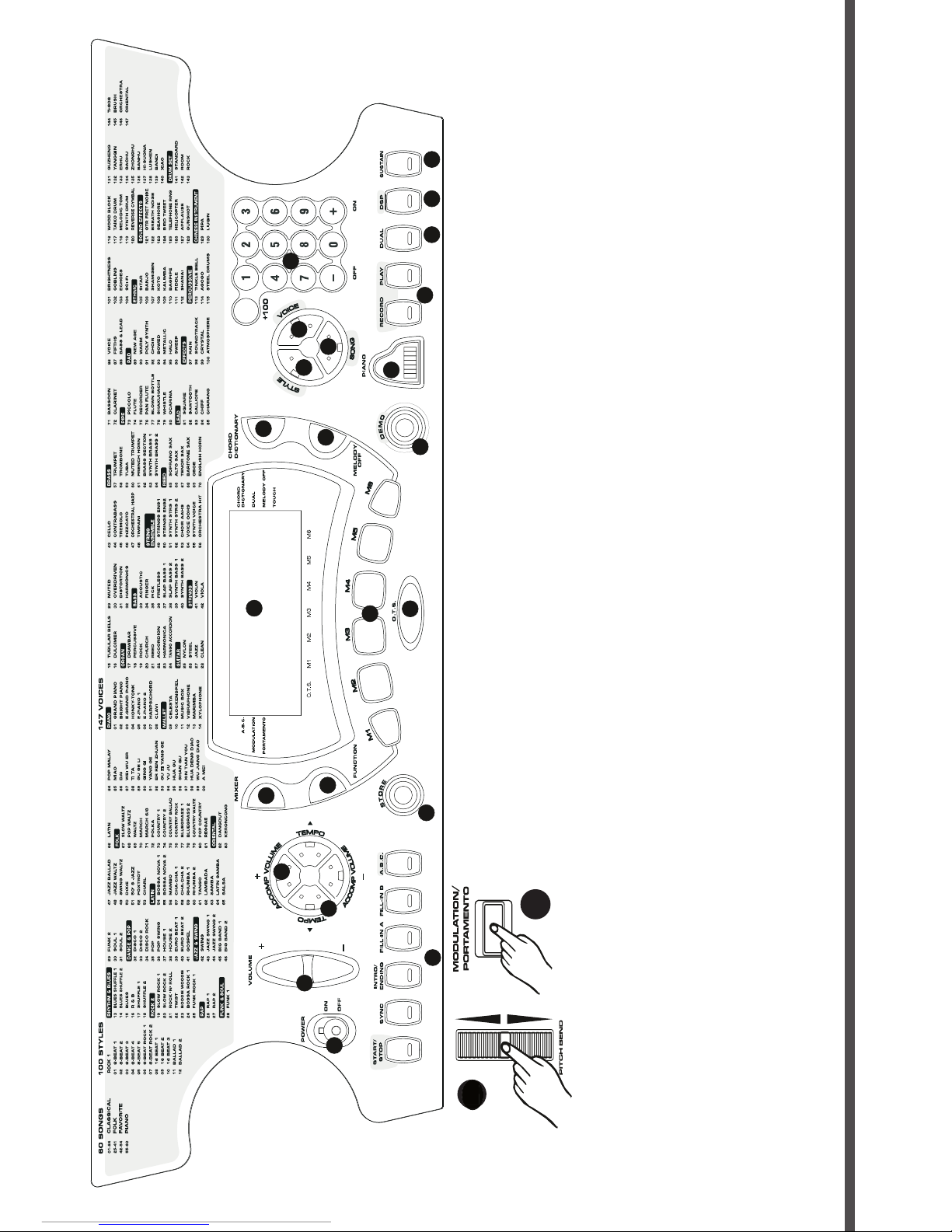
1
POWER SWITCH
2
MASTER VOLUME +/-
3
TEMPO +/-
4
ACCOMP VOLUME +/-
5
ACCOMPANIMENT
CONTROL
- START/STOP
- SYNC
- INTRO/ENDING
- FILL-IN A
- FILL-IN B
- A.B.C.
6
STORE
7
MIXER
8
FUNCTION
9
LCD
10
MEMORY 1-6
11
O.T.S.
12
CHORD DICTIONARY
13
MELODY OFF
14
STYLE
15
VOICE
16
SONG
17
NUMERIC KEYPAD
18
DEMO
19
PIANO
20
RECORD/PLAY
21
DUAL
22
DSP
23
SUSTAIN
24
P
ITCH BEND
25
P
ORTAMENTO
25
24
2424
24
4
USER MANUAL
STK-520
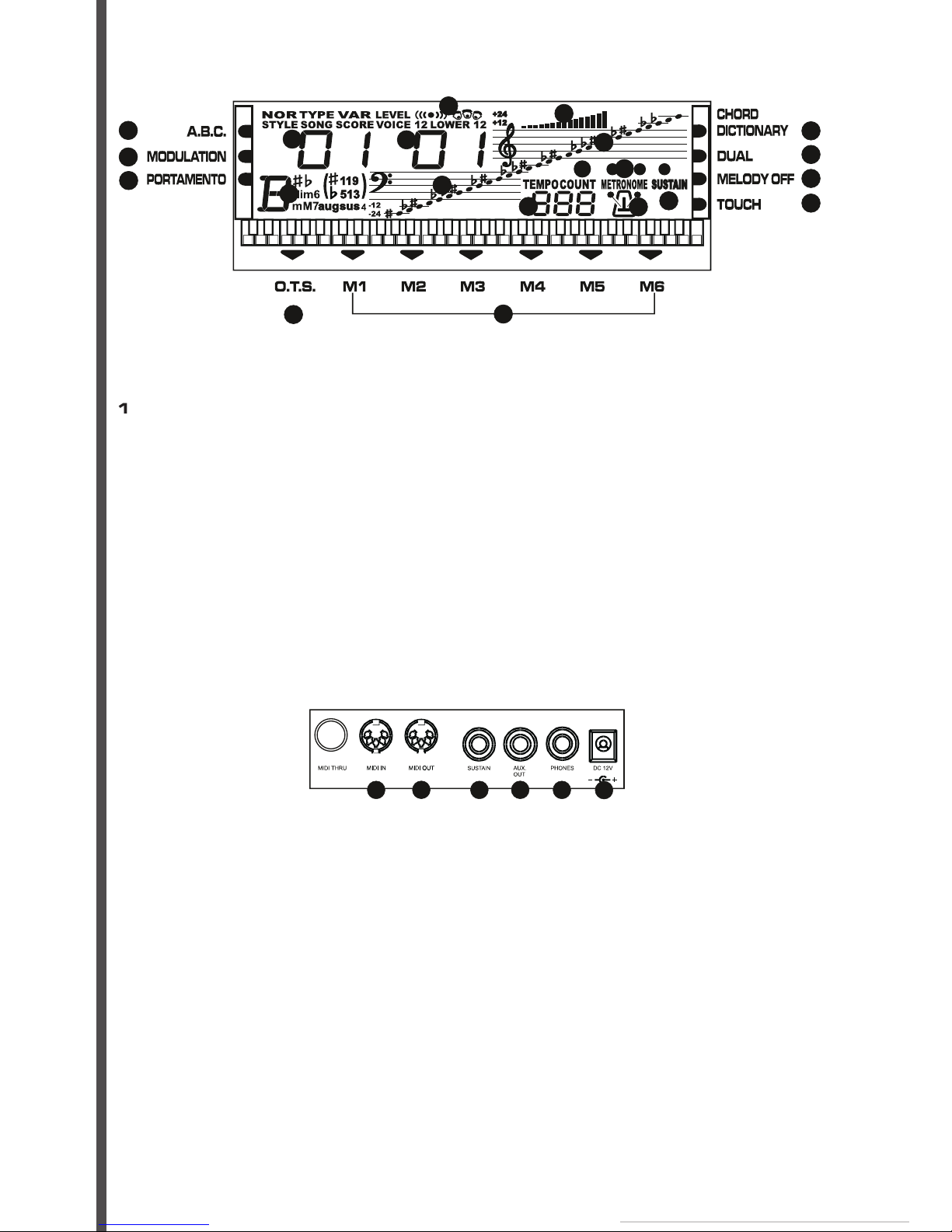
1
MIDI IN PORT
2
MIDI OUT PORT
3
SUSTAIN JACK
4
AUX. OUT JACK
5
PHONES JACK
6
DC 12V JACK
123456
REAR PANEL
1
2
3
45
67
89
10
11
12
13
14
15
16
17
18
19
20
LCD DISPLAY
1
A.B.C.
2
MODULATION
3
PORTAMENTO
4
STYLE/SONG
5
LOWER/VOICE 1/
6
VOICE 2
7
DSP
8
VOLUME
9CHORD
10 BASS CLEF
11 TREBLE CLEF
12 BEAT
13 TEMPO
14 METRONOME
14 SUSTAIN
15 CHORD DICTIONARY
16
DUAL
17
MELODY OFF
18
TOUCH
19
O.T.S.
20
MEMORY 1-6
3. LCD DISPLAY
2. REAR PANEL
5USER MANUAL
STK-520
INTRODUCTION
Thank you for purchasing the
electronic keyboard. This keyboard provides you with the following features and functions:
• 147 PCM (Pulse Code Modulation) Voices + Drum and Percussion Sounds
• 100 Styles
• 60 Demo Songs with playing along feature
• Auto Accompaniment with Normal, Fingered and Single Finger control modes
• One Touch Setting (OTS)
• Record and Playback
• MIDI compatibility
CARE OF YOUR KEYBOARD
Your keyboard will give you years of playing pleasure if you follow the simple rules below:
• Do not expo
se the keyboard to the high temperature, direct sunlight, and excessive dust places
• Avoid physical shocks caused by dropping, bumping, or placing heavy objects on the keyboard.
• Never use cleaners such as alcohol or thinner to clean the keyboard.
• Always turn power off when making any connections
.
POWER SUPPLY
This keyboard can be powered by current from a standard household wall outlet (by using the specifi ed
AC adaptor INCLUDED) or by batteries
(NOT INCLUDED)
. Always turn off the keyboard when you are
not using it.
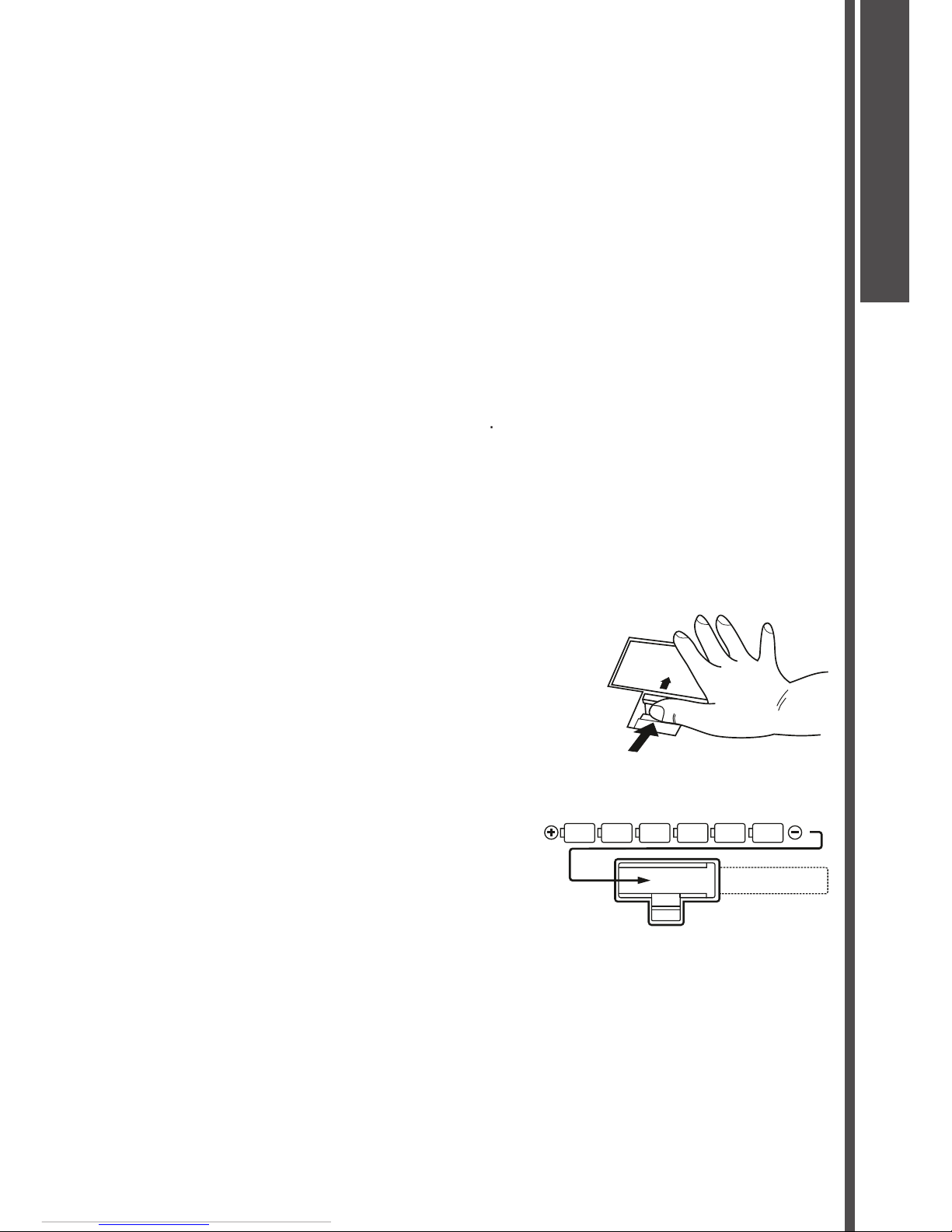
Using batteries
Always turn off the keyboard before loading or replacing batteries.
To load batteries:
1.
Remove the battery compartment cover.
2.
Load six
«D size»
(SUM-1 or R20) batteries into the battery compartment, being careful to follow
the polarity markings on the cabinet.
3.
Replace the compartment cover, make sure that it locks fi rmly in place.
Important battery information:
Any of the following symptoms indicate low battery power. Replace batteries as soon as possible
whenever any of the following occurs.
Dim, diffi cult to read display.
Abnormally low speaker/headphone volume.
Distortion of sound output.
Sudden power failure when playing at high volume.
Abnormal rhythm or demo song plays.
Dimming of the display when playing at high volume.
OPEN
INTRODUCTION
6
USER MANUAL
STK-520
Cautions:
Improper handling of batteries can cause them to burst and leak, which creates the danger of personal
injury or damage of the keyboard. Be sure to note the following precautions:
Never mix batteries of different types.
Never mix old batteries with the new ones.
Replace batteries as soon as possible after any sign of running out.
Remove the batteries from the keyboard when not using for an extended period of time.
Using the AC adaptor
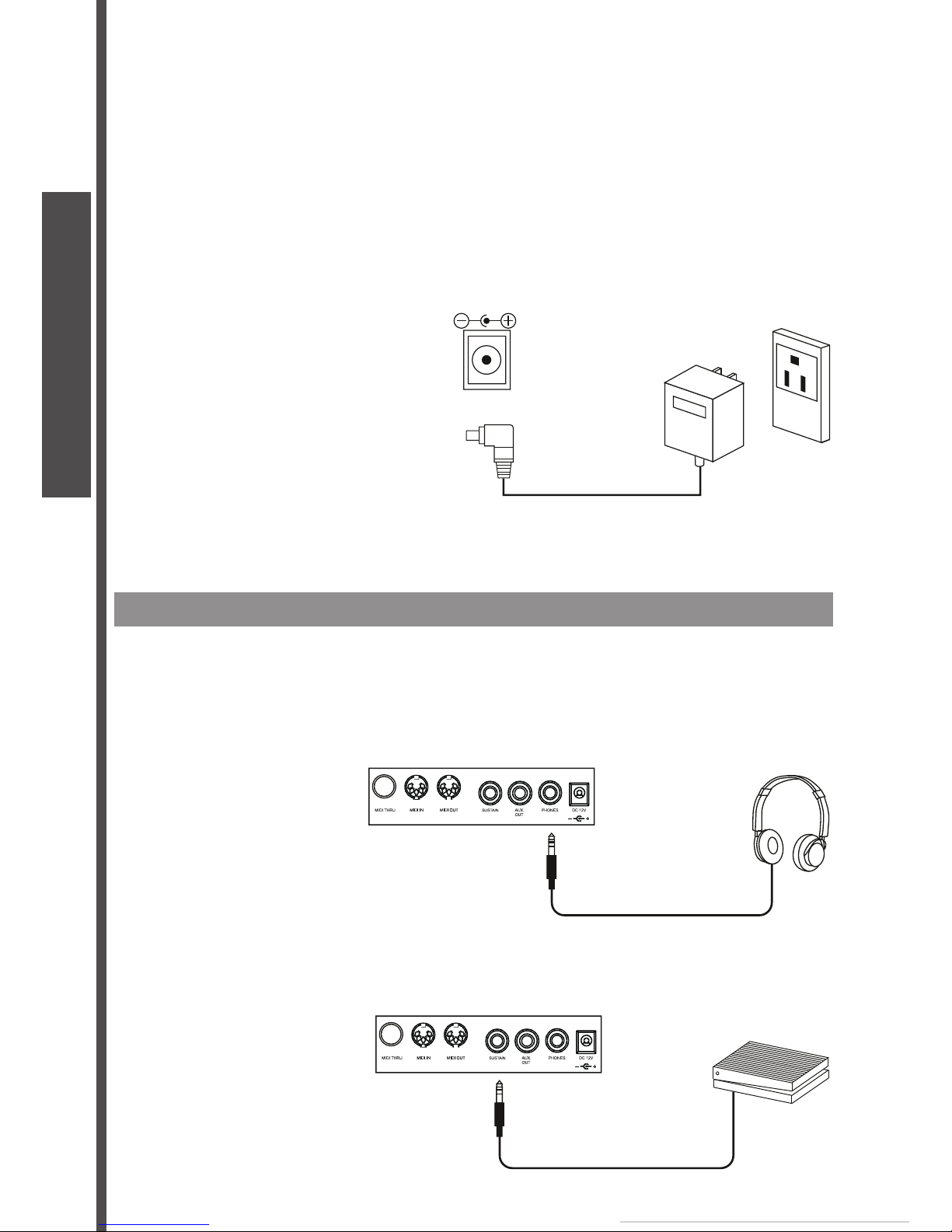
Use only the specifi ed AC adaptor for this keyboard. The adaptor shall be 12V DC output, 2200mA, and
center positive type. Turn off the keyboard before you connect the adaptor into the AC wall outlet and
the cord into the unit.
Cautions:
•
Use only the specifi ed AC adaptor. Use of another type of adaptor creates the danger of fi re and electronic
shock.
•
For safety sake, unplug the AC adaptor from the wall outlet when leaving the keyboard unattended for a
long time
CONNECTIONS
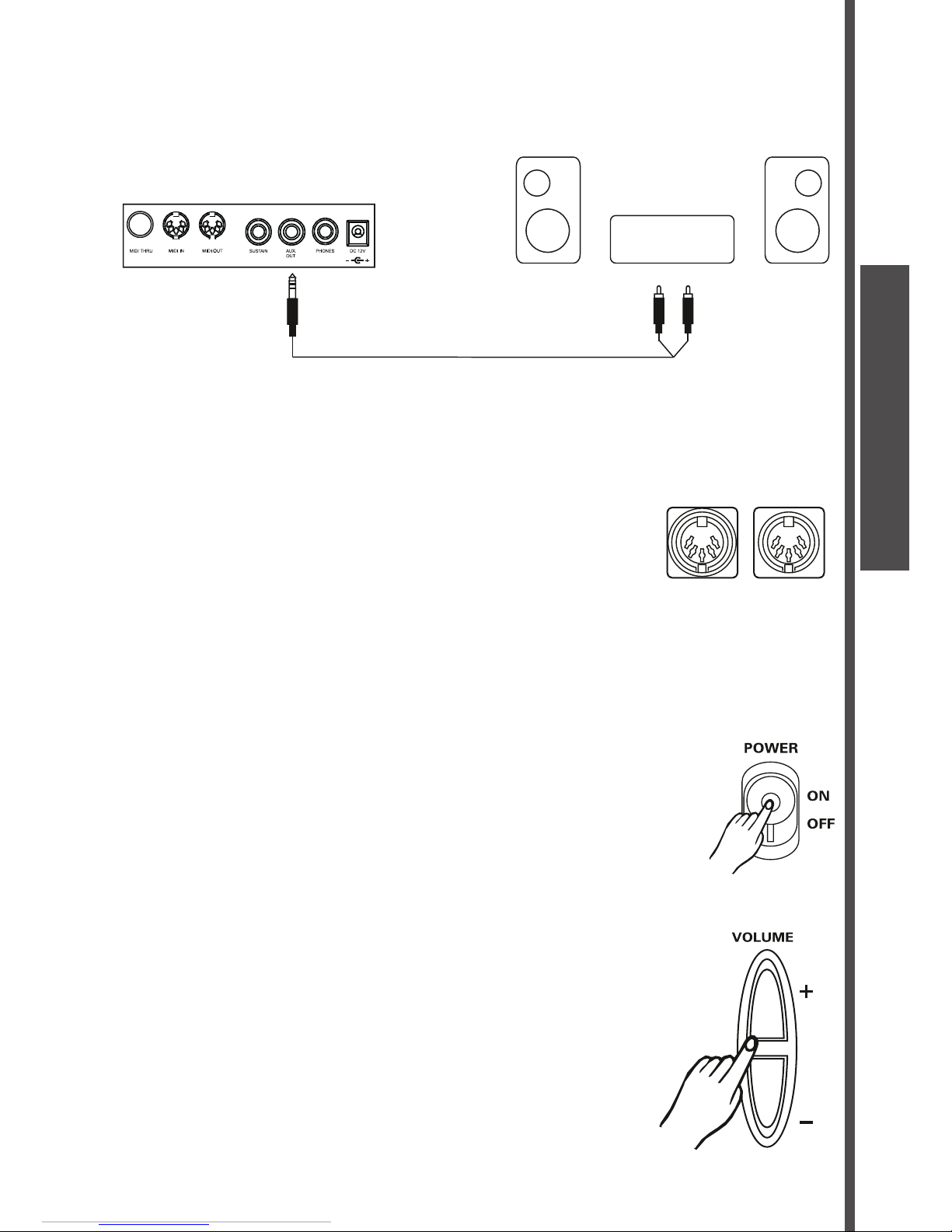
The headphones jack
A standard pair of stereo headphones can be plugged in PHONES jack for private practice or late night
playing. The internal speaker system is automatically shut off when the headphones are plugged into
the PHONES jack.
The sustain jack
An optional foot switch can be plugged into the SUSTAIN jack for sustain control. The foot switch
functions like the pedal on a piano-press for sustain, release for normal sound.
DC 12V
CONNECTIONS
7USER MANUAL
STK-520
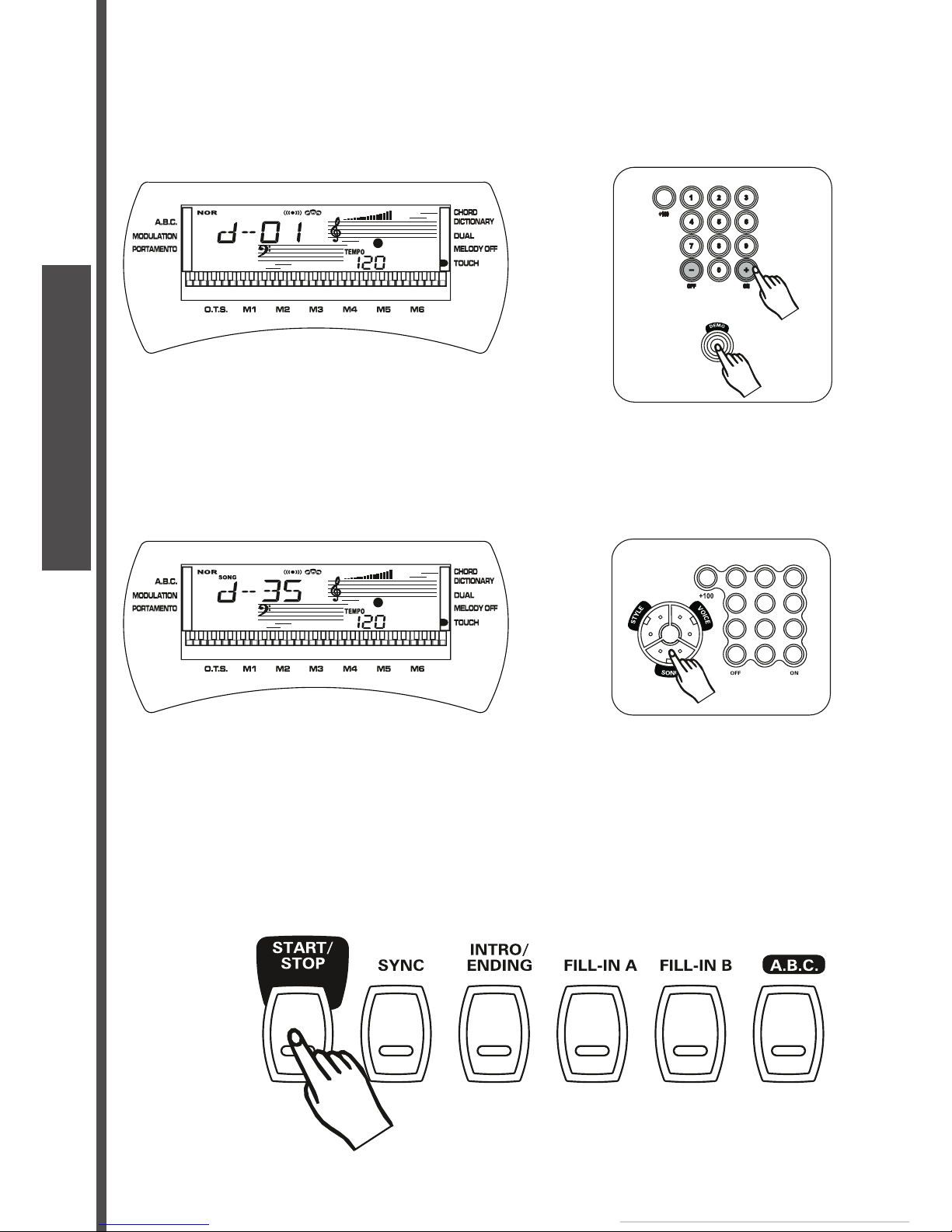
The AUX.OUT jack
The AUX.OUT jack delivers the output of the keyboard for the connection to an external amplifi er. Using
audio cord, plug into AUX.OUT jack located on the rear panel. Then plug the other end of the cord into
LINE IN or AUX.IN of the amplifi er.
The MIDI IN/OUT ports
The MIDI IN connector receives MIDI data from an external MIDI device. The MIDI OUT connector
transmits MIDI data generated by the keyboard to an external MIDI device.
PLAY DEMO SONGS
A selection of 60 demo songs come built-in for your listening pleasure or play along fun.
They will give you a good idea of what your keyboard can do.
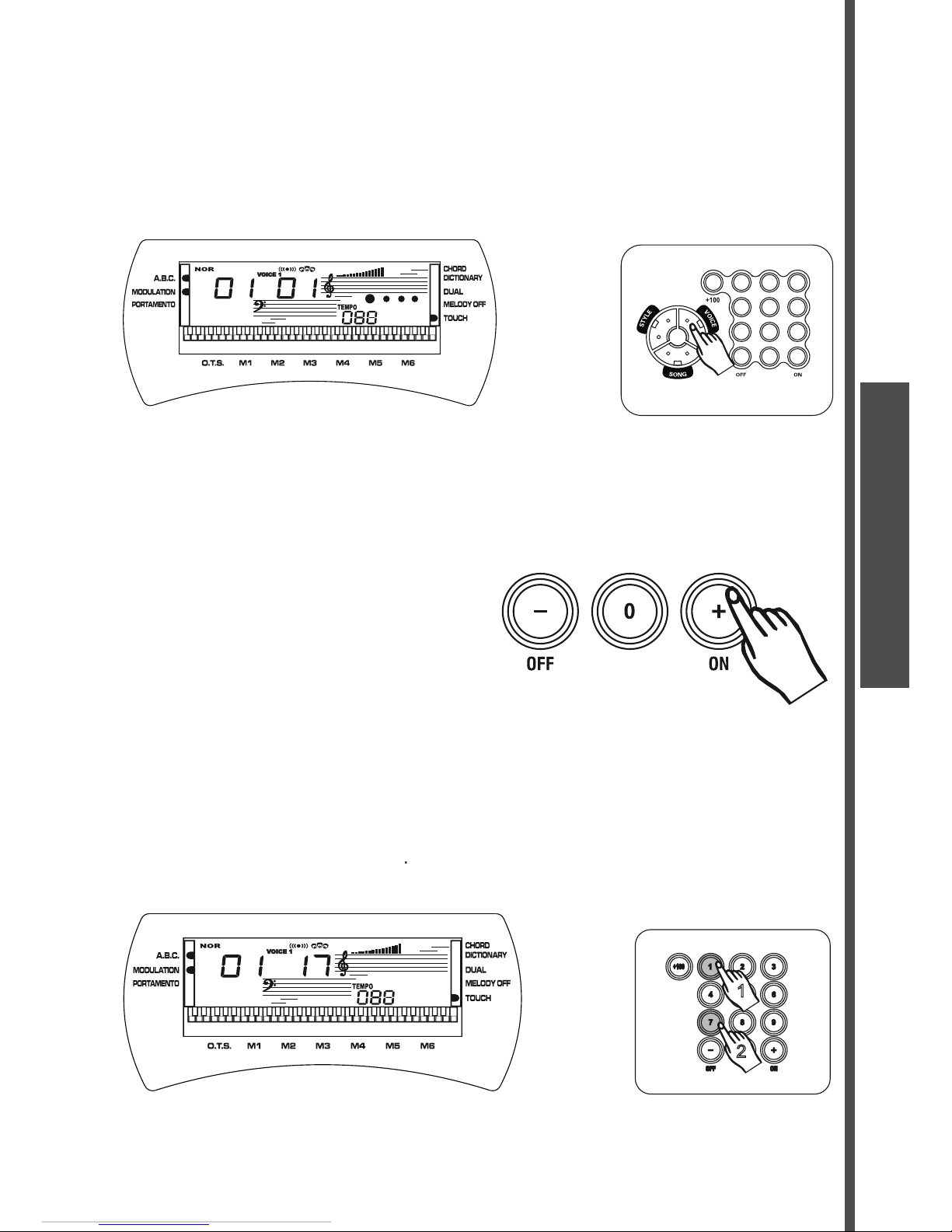
1.
Turn the power ON by pushing the
[POWER]
switch upwards.
2.
Adjust the volume to a appropriate level by pressing the
[VOLUME+/-]
button.
Stereo
System
MIDI OUTMIDI IN
PLAY DEMO
8
USER MANUAL
STK-520
3.
Press the
[DEMO]
button . The keyboard starts to play the demo songs. While the keyboard is
playing the demo song, you can press the
[-/OFF]
or
[+/ON]
button to step to the next demo song in
the corresponding direction.
Press the
[DEMO]
button again to stop the play.
Listen to a particular demo song
1.
Select the
SONG
mode by pressing the
[SONG]
button.
2.
Use the NUMBER buttons to input the two-digit number of a demo song. For example, to select 35
input 3 and then 5.
3.
Press the
[START/STOP]
button to start playing the demo song. The song will play in endless loop,
re-starting after it reaches the end. Press the
[START/STOP]
button again to stop the play.
PLAY DEMO
9USER MANUAL
STK-520
BASIC OPERATION
Selecting & playing voices
The keyboard has 147 PCM voices and percussion kits that you can select and play on the keyboard.
Before you select a voice, make sure you have selected
VOICE
mode. Press the
[VOICE]
button to
select the
VOICE
mode.
The [-/OFF] and [+/ON] buttons:
When the
VOICE
mode is selected, these buttons step up or down through the voices list. Press these
buttons briefl y to step to the next voice in the corresponding direction, or hold the button to scroll
rapidly through the voices in the corresponding direction. The selected voice number shows in the
display.
The number buttons:
The number buttons can be used to directly enter the number of the desired voice, thereby immediately
selecting that voice without having to step through a number of other voices.
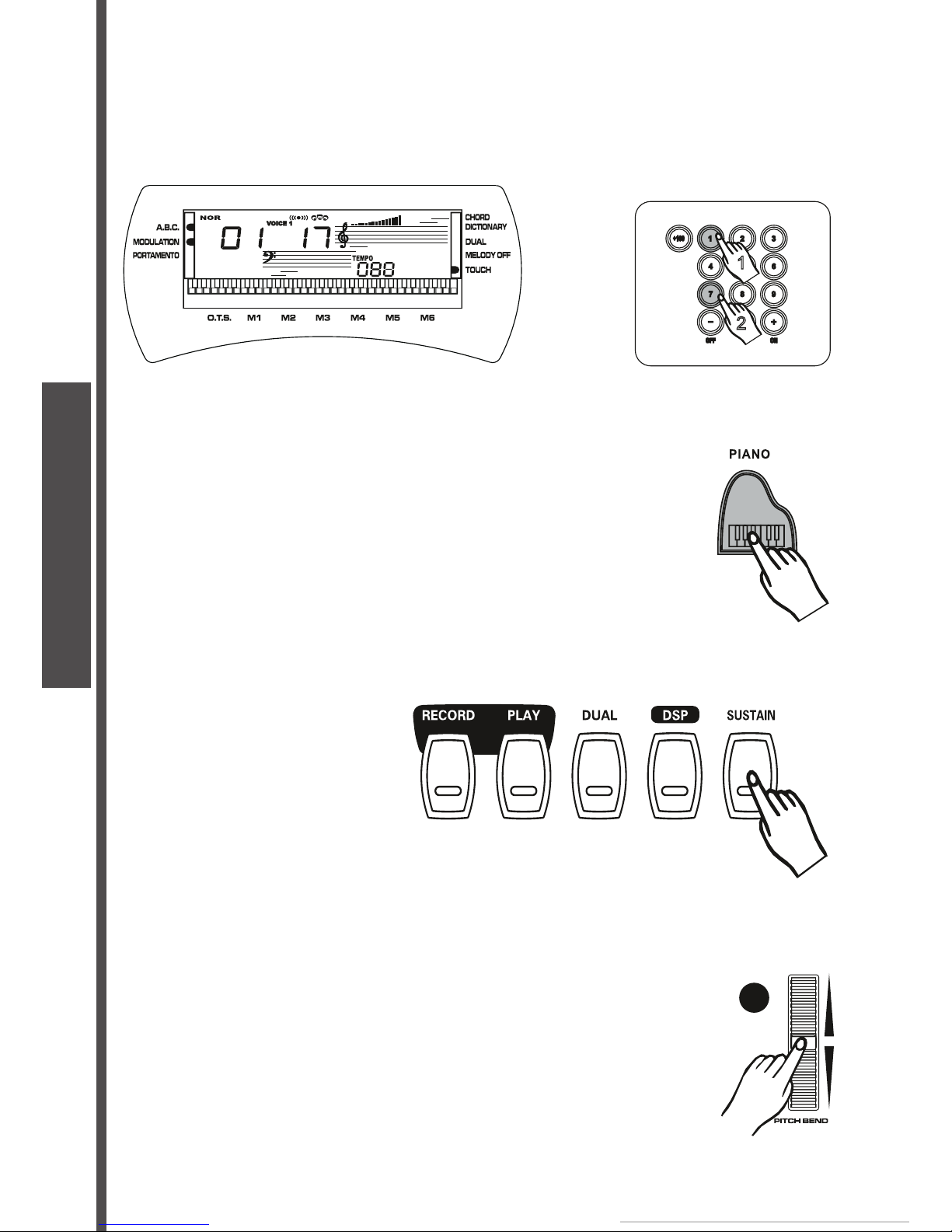
Two-digit voice number are selected simply by entering the two digits in sequence - e.g. to select
voice number 17, briefl y press the
[1]
button and then the
[7]
button. Three digit voice number
- e.g.
to select voice number 100,
are entered by fi rst pressing the
[+] and [1]
buttons, then press the
remaining two digits in sequence
[0],
[0]
.
1
2
BASIC OPERATION
10
USER MANUAL
STK-520
Dual voice:
To create a dual voice effect, use the number buttons to input the fi rst voice digits. Pressing the
[DUAL]
button, a word
VOICE 2
appears in the display. Then input the selected second voice digits. Press the
[DUAL]
button again to turn this function off, and a word
VOICE 1
appears in the display.
Instant select Piano voice:
You can select the piano voices immediately by pressing the
[PIANO]
button. Press the
[PIANO
]
button again to return to the previously selected voice.
Sustain voice effect
You can add a sustain voice effect to the overall of the sound simply by pressing the
[SUSTAIN]
button.
Press the
[SUSTAIN]
button again to turn this function off.
Pitch bend
The
[PITCH BEND]
wheel allows the pitch of notes played on the electronic keyboard to be bent up or
down. Roll the wheel away from you to bend up, and towards you to bend down. The pitch bend range
is from -2 to +2 in semitone.
24
1
2
BASIC OPERATION
Indice


