
Standard Horizon SSM-BT10 Manuale utente

SSM-BT10

Supplied Accessories
• Ear chip
• Ear hook
• USB Cable*
• Operation Manual (This Manual)
*USB cable is designed to charge this product. Do not use it with other
products.
Specications
Communication System: Bluetooth specication Ver 4.1
Output: Bluetooth specication Power Class 2
Compatible Bluetooth Proles: HSP/HFP
Dimensions: 60mm (W) x 15.2mm (H) x 22mm (D)
Weight (approx.): 0.42oz (12g)
Operating Temperature Range: -4°F to 140°F (-20℃to +60℃)
Charging Temperature Range: 32°F to 113°F (0°C to +45°C)

1
Safety Precautions (Be Sure to Read)
Do not use this product while riding a bicycle or driving a car. Accidents
can result.
For hands-free operation, use the transceiver VOX function.
Do not charge the battery in a hot location such as near a heater or un-
der the sun.
Charge the battery in a place where the ambient temperature is in the range
of 32°F to 113°F (0°C to +45°C).
Do not use in a wet environment or touch with wet hands.
An electric shock, or failure may result.
Do not disassemble or make any alteration to this product.
An injury, electric shock, or failure may result.
Keep this product out of the reach of children.
Injury to the child, or damage to this device may result.
The Bluetooth®wordmark and logo are registered trademarks owned by
Bluetooth SIG, Inc. and are used under license by Yaesu Musen Co., Ltd.
2
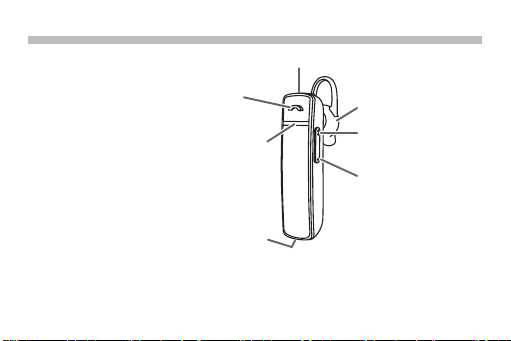
Control & Connection
Speaker
LED
Multi Function Button (MFB)
• Power ON: Press and hold for 3 seconds.
• Power OFF: Press and hold for 5 seconds.
When the VOX function of the
connected radio is not activated,
each press switches the transceiver
transmit and receive PTT.
To temporarily mute the TX audio
while the paired transceiver is
operating in VOX function, disable
the SSM-BT10 microphone by
pressing VOL (+) and VOL (-) simultaneously.
Press VOL (+) and VOL (-) simultaneously to enable the microphone again.
USB jack
VOL (+) Button
• Turn up the volume
VOL (-) Button
• Turn down the volume
MIC
3
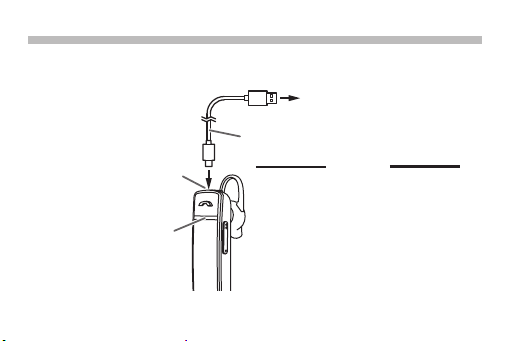
Battery Charging
If the LED ashes in red before or during the rst use, charge the battery.
RED: Charging
BLUE: Charge Complete
USB jack
USB Cable (supplied)
Caution
Connect to a commercially
available USB charging
adapter
Charge completely in 3 hours.
The SSM-BT10 cannot be used
while charging.
Charging for more than the
specified time may degrade the
built-in battery.
Do not charge with any other than
the supplied USB cable.
•
•
•
•
4
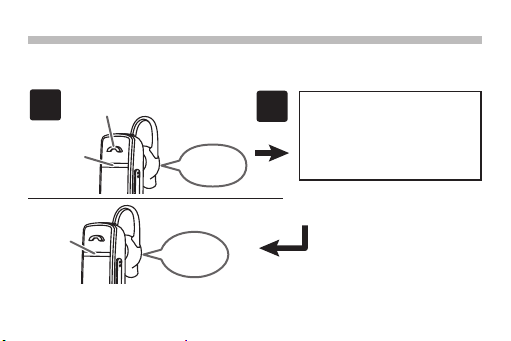
2
Connected
Blinks
Blue
Power ON
Blinks red
and blue
Press and hold for 3 seconds
to turn ON
1
Pair the “SSM-BT10” with
the connected radio.
For the pairing procedure,
refer to the Transceiver
Operating Manual.
Paring is complete when
the SSM-BT10 LED blinks
blue. (illustration on the
left). Go to “How to com-
municate” (page 6).
If not connected, the power will be turned OFF after about 3 minutes.
When connecting to a radio for the rst time -Pairing-
It is necessary to register (pair) this product to the transceiver. Before it
will operate with it.
5
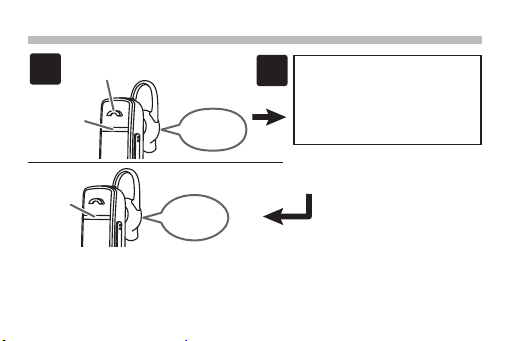
Activate the Bluetooth func-
tion of the connecting radio.
For operation, refer to the
Transceiver Operating Ma-
nual.
2
Connected
Blinks
Blue
Power ON
Blinks red
and blue
Press and hold for 3 seconds
to turn ON
1
When connecting to a previously paired transceiver
Connection is complete
when SSM-BT10 LED
blinks blue. (illustration
on the left. Go to “How to
communicate” (page 6).
Caution
The SSM-BT10 is designed for YAESU Bluetooth compatible transceiv-
ers. Operation with other Bluetooth compatible devices (such as smart-
phones and PCs) is not guaranteed.
6
1
3
4
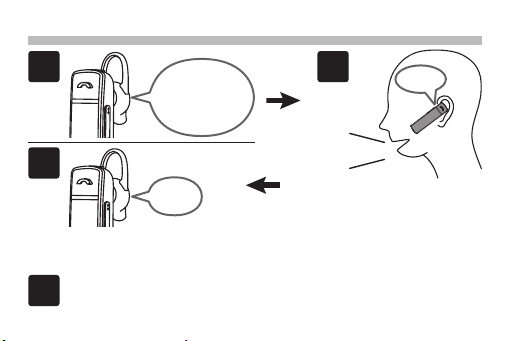
How to communicate - Using the wireless VOX function -
When you start talking,
the earphone will make a
beep and the transceiver
will automatically switch to
TX. Continue speaking in
a normal voice to transmit.
When no voice is detected, the
earphone will beep and the trans-
ceiver will return to RX mode.
Press and hold the multifunction button for 5 seconds, to turn
SSM-BT10 OFF.
beep!
OK!
2
In RX mode, the
received audio
will be heard in
the earphone.
beep!
7
1
4
5
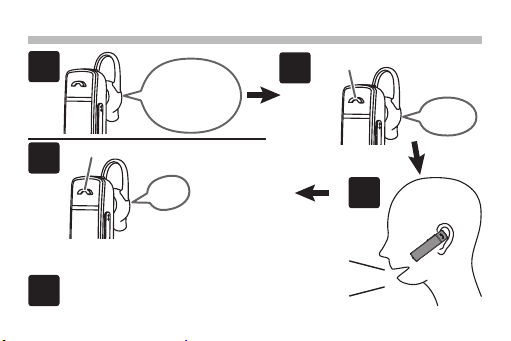
Caution
Be sure to press the multi
function button when you nish
talking. If you forget to press it,
transmission will continue.
How to communicate -Normal case-
Press and hold the multifunction button
for 5 seconds, to turn SSM-BT10 OFF.
In RX mode, the
received audio
will be heard in
the earphone.
3
OK!
Press again briefly to return to receive.
beep!
When transmitting
press briefly.
beep!
2

8
List of typical operations
To Do this LED Announce/Beep
Turn ON. Press and hold the [MFB]
for 3 seconds.
Blinks RED and
Blue Power ON
Turn OFF. Press and hold the [MFB]
for 5 seconds. Glow RED Power OFF
Connect with
transceiver (First
time).
1. Press and hold the
[MFB] for 3 seconds.
2. Perform pairing opera-
tion with the transceiver.
Blinks RED and
Blue (connecting)
Blinks Blue (After
connection)
Connected
(When connected)
Connect with
transceiver
(Second and sub-
sequent times).
Press and hold the [MFB]
for 3 seconds.
Blinks RED and
Blue (connecting)
Blinks Blue (After
connection)
Connected
(When connected)
Turn up the
Volume. Press the VOL (+) button. - -
Turn down the
Volume. Press the VOL (-) button. - -
Indice


