
Stardom SOHOTANK ST2-WABC Manuale utente
ST2-WABC
ST2-SB2
Two Bay SATA Drive Storage Enclosure

2
8
14
20
26
32
38
»
SOHOTANK ST2 Series User Manual
.......................................
»
SOHOTANK ST2 Benutzerhandbuch
........................................
»
SOHOTANK ST2 Manuel d'utilisation
........................................
»
Manual de Usuario de SOHOTANK ST2
....................................
»
SOHOTANK ST2 系列產品使用說明
.........................................
»
SOHOTANK ST2 シリーズユーザーマニュアル
..........................
»
SOHOTANK ST2 Series 시리즈 사용 설명서
.............................
SOHOTANK ST2 Series User Manual
English
Deutsch
Français
Español
中文
日本語
한국어
Forewords
Thank you for purchasing STARDOM products. This manual will introduce the STARDOM
SOHOTANK ST2 Series. Before using your SOHOTANK ST2, please read this manual
thoroughly. Although all information contained in this user manual has been carefully veried
before publishing, however, the actual product specification will be based on the time of
delivery from STARDOM. Any updates to the product specications or relevant information
may be found on www.stardom.com.tw. Products are subject to change without prior
notications.
If you have any questions regarding the products of STARDOM, or you would like to know
the latest product information, user manual update, or rmware update, please contact your
local supplier or visit www.stardom.com.tw for further information.
Copyright © RAIDON TECHNOLOGY, INC. All rights reserved.
Table of Contents
1. Package Contents and Product Views
2. Environmental Requirements
3. Hardware Requirements and Precautions
4. Hardware Installation
5. Visual Status Indicator Denitions
6. Introduction of the STARDOM Host Adapters
2
SOHOTANK ST2 Series User Manual
English
Deutsch
Français
Español
中文
日本語
한국어
1.Package Contents and Product Views
Open the package and you should nd the following :
ST2-WABC ST2-SB2
ST2-WABC x 1
(with removable drive tray enclosed x 2)
ST2-SB2 x 1
(with removable drive tray enclosed x 2)
AC Power Cable x 1 AC Power Cable x 1
User Manual x 1 User Manual x 1
Accessory Kit x 2 Accessory Kit x 2
FireWire 800 (1394b) Cable x 1 eSATA Cable x 1
FireWire 400 (1394a) Cable x 1 USB2.0 Cable x 1
USB2.0 Cable x 1
Please make sure that the contents listed above are not damaged or missing. If there are
damages or missing items, please contact your supplier immediately.
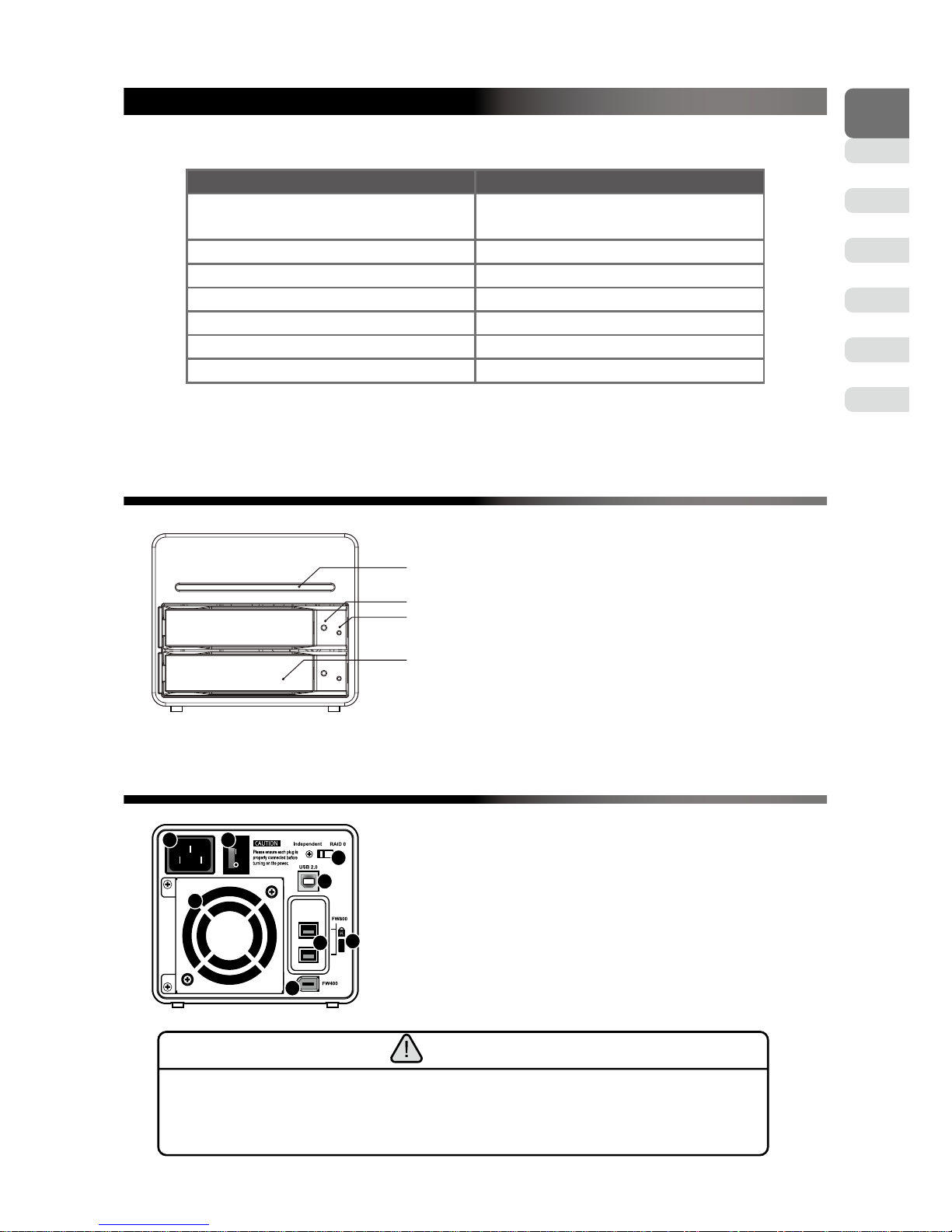
ST2 Series Front View
Power indicator
Key access opening
Hard drive status indicator
Removable drive tray
ST2 Series Rear View
1 2
3
8
5
7
6
4
ST2-WABC
1. Power socket
2. Power switch
3. Cooling fan
4. Anti-theft cord slot
5. FireWire 800 (1394b) interface connection
6. FireWire 400 (1394a) interface connection
7. USB2.0 interface connection
8. Storage mode switch
Note :
Only one interface connection may be used at once per one computer system.
The secondary FireWire 800 (1394b) connection is used to connect to other FireWire 800
(1394b) devices.
3
SOHOTANK ST2 Series User Manual
English
Deutsch
Français
Español
中文
日本語
한국어
1 2
3
4
5
6
7
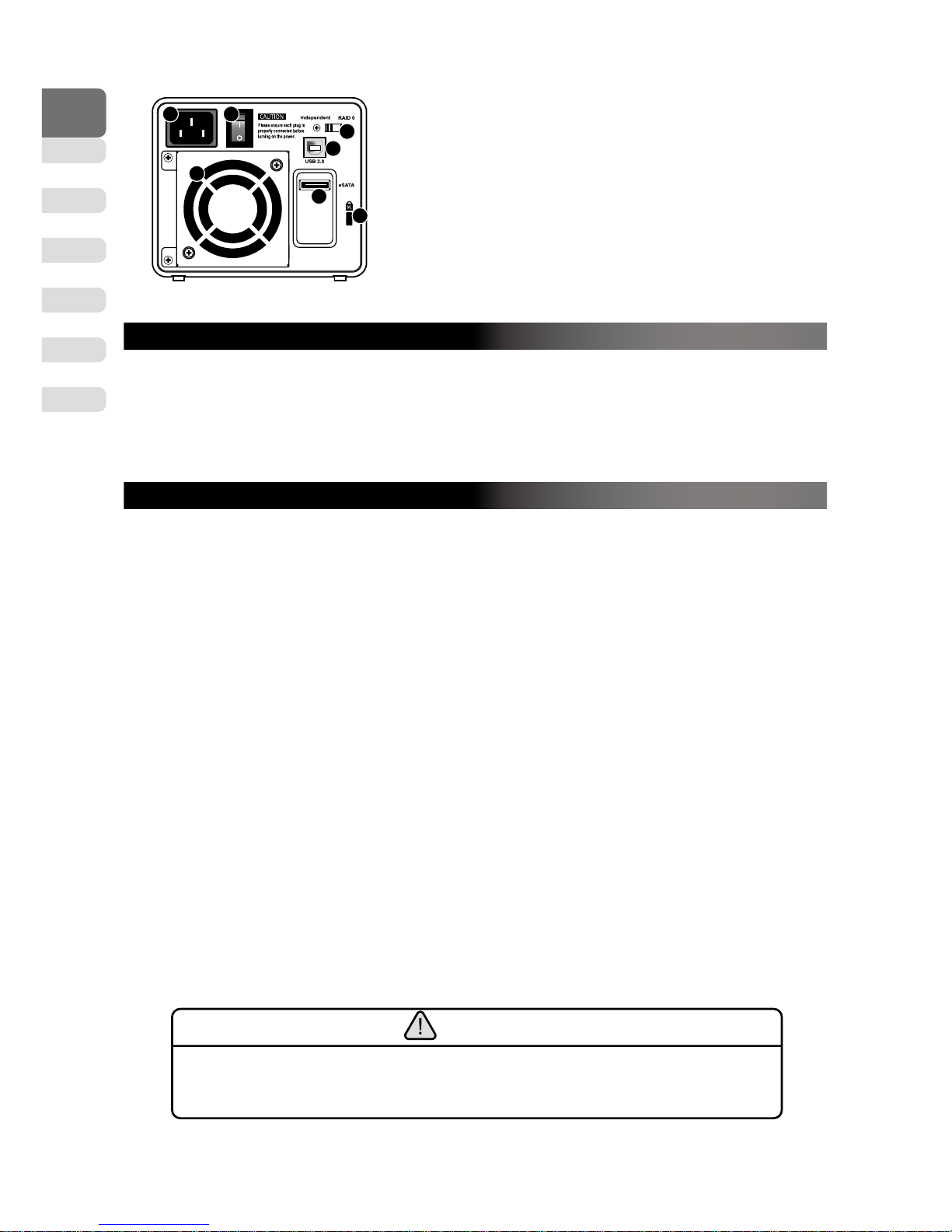
ST2-SB2
1. Power socket
2. Power switch
3. Cooling fan
4. Anti-theft cord slot
5. USB2.0 interface connection
6. eSATA interface connection
7. Storage mode switch
2.Environmental Requirements
Operating Temperature : 0 ~ 40 ℃ (32 ~ 104 F)
Storage Temperature : -10 ~ 70℃ (14 ~ 158 F)
Line Voltage: 100 ~ 240V AC
3.Hardware Requirements and Precautions
1. Only one interface connection may be used at once per computer system.
2. You are strongly advised to set the storage mode (the default is the Independent mode)
before using the ST2.
3. Under the independent mode, the ST2 series allows you to install two hard drives of
different model specications and capacities; however, we do recommend that you use
two hard drives of the same model specications and brand.
4. Please make sure that the two hard drives are free from bad blocks or defects prior to
installation in order to avoid system crashes or data loss.
5. The actual storage capacity of ST2 series recognized by the system may differ from the
total capacity stated on the hard drives combined once the drives have been formatted.
6. Whenever turning off or unplugging the ST2 series from your computer system becomes
necessary, always remember to safely remove it from your operating system before
powering off the device.
7. It is highly recommended for users to back up important data contained within the ST2
unit on a regular basis or whenever the user feels necessary to a remote or a separate
storage device. Stardom will not be responsible for any lost of data caused during the
use of the unit or the recovery of the data lost.
Note :
Once the drive mode conguration has been completed, re-conguration using the same hard
drives to set the drive mode will result in complete data loss. If you must change the drive
mode, make sure to backup all data prior to the mode change.
4
SOHOTANK ST2 Series User Manual
English
Deutsch
Français
Español
中文
日本語
한국어
4.Hardware Installation
Please follow the instructions below to complete the hardware installation:
Step 1 Open the package and take out the product making sure that all the enclosed
contents are not damaged or missing. Should you nd damages or missing
contents, please contact your supplier immediately.
Step 2 Place the system on a stable surface. Ensure that it is well ventilated without
blockage to the vent and kept away from areas near water and damage prone
areas.
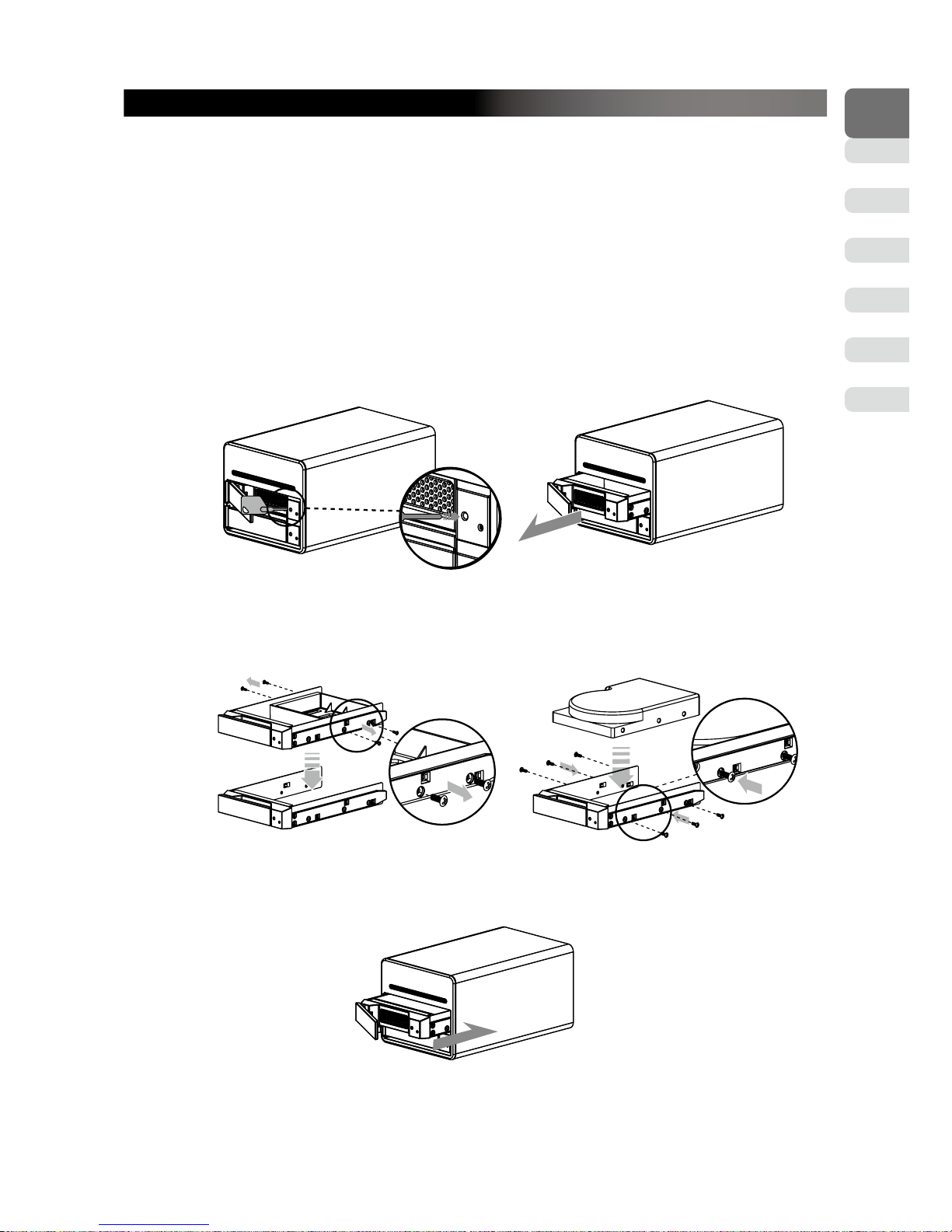
Step 3 Use the key included in the accessory kit and inserted into the key access opening
to eject the removable drive tray latch and extract the removable drive tray.
Step 4 Mount your hard drives onto the removable drive tray and secure it with the
screws included in the accessory kit to avoid any damage to the hard drive due to
accidental movements.
Step 5 When the hard drive installation has been completed, insert the hard drive tray into
the system horizontally and secure the latch into place.
5
SOHOTANK ST2 Series User Manual
English
Deutsch
Français
Español
中文
日本語
한국어
Step 6 Use the preferred cable included to connect your computer to the relative interface
connection on the ST2 unit.
When your computer has booted, your operating system should recognize the hard drive(s)
automatically. After the hard drive(s) has been successfully recognized, please follow the hard
drive formatting instructions given by the operating system. Once the formatting of the hard
drive(s) has been completed, the hard drive will be ready for use.
5. Hard Drive Status Indicator Denitions
The front hard drive status indicator allows you to clearly understand the operation status
of the enclosed hard drives.
1. When the hard drive status indicator is off, this means hard drive is not present.
2. When the hard drive status indicator consistently lights blue, this means the hard drive
is present and is on idling.
3.
When the hard drive status indicator blinks purple, this means the hard drive is present and
being accessed for operation.
6. Introduction of the STARDOM Host Adapters
If you require a host adapter to be used with this system, please log onto www.stardom.
com.tw to nd the recommended adapter or contact STARDOM for more information.
7.Frequently Asked Questions
Q1. Which drive format should I choose to format the hard drives in the ST2?
A : It depends on the computer system you most often use. See the below suggestions:
1. Use NTFS format for Windows 2000/XP/Vista/Windows 7 system
2. Use HFS+ (Mac OS Extended) format for a Mac OS X system
3. Choose FAT32 format if you’ll use the ST2 in both Windows and Mac environments
(the maximum size of one single le may not exceed 4 GB).
Q2. Why can’t my ST2-SB2 reach the transfer performance speed of 200 MB/s via e-SATA
interface as stated on your website?
A : 1. Please rst check if your PCI-E SATA host adapter would only support PCI-E (1X).
This type of host adapters cannot reach the transfer performance speed beyond 135
MB/s.
2.
It is recommended to purchase STARDOM SJ20-x8 (PCI-E 8X) host adapter to
enhance the transfer speed performance via e-SATA.
3. The ST2-SB2 will need to be set to the RAID 0 mode also.
6

SOHOTANK ST2 Benutzerhandbuch
English
Deutsch
Français
Español
中文
日本語
한국어
Vorwort
Vielen Dank für den Kauf eines STARDOM Produkts.Diese Anleitung beschreibt die
STARDOM SOHOTANK ST2 Produktserie. Lesen Sie diese Anleitung bitte gründlich durch,
bevor Sie Ihren Pro Drive benutzen.
Obwohl alle in dieser Gebrauchsanweisung enthaltenen Informationen vor dem Druck
sorgfältig überprüft wurden, basieren Sie tatsächlichen Produktspezikationen jedoch
auf dem Zeitpunkt der Lieferung durch STARDOM. Sämtliche Aktualisierungen der
Produktspezikationen oder relevante Informationen können auf www.stardom.com.tw
gefunden werden. Die Produkte sind Änderungen ohne vorherige Benachrichtigung
vorbehalten.
Copyright © RAIDON TECHNOLOGY, INC. All Rechte vorbehalten
Inhaltsverzeichnis
1. Packungsinhalt und Produktansichten
2. Betriebsbedingungen
3. Hardwarevoraussetzungen und Vorsichtsmaßnahmen
4. Hardwareinstallation
5. Beschreibung der visuellen Statusanzeige
6. Beschreibung des STARDOM Host Adapters
8

SOHOTANK ST2 Benutzerhandbuch
English
Deutsch
Français
Español
中文
日本語
한국어
1.Packungsinhalt und Produktansichten
Öffnen Sie das Paket und Sie sollten die folgenden Dinge vornden:
ST2-WABC ST2-SB2
ST2-WABC x 1
(mit integriertem Wechselrahmen x 2)
ST2-SB2 x 1
(mit integriertem Wechselrahmen x 2)
AC Stromkabel x 1 AC Stromkabel x 1
Gebrauchsanweisung x 1 Gebrauchsanweisung x 1
Zubehörset x 2 Zubehörset x 2
FireWire 800 (1394b) Kabel x 1 eSATA Kabel x 1
FireWire 400 (1394a) Kabel x 1 USB2.0 Kabel x 1
USB2.0 Kabel x 1
Bitte stellen Sie sicher, dass die oben aufgelisteten Inhalte nicht beschädigt sind oder
fehlen. Falls Schäden oder fehlende Inhalte festgestellt werden, kontaktieren Sie bitte
umgehend Ihren Händler.
ST2 Serie Vorderansicht
Netzanzeige
Schlüsselzugangsöffnung
Festplatten-Statusanzeige
Wechselrahmen
ST2 Serie Rückansicht
1 2
3
8
5
7
6
4
ST2-WABC
1. Netzbuchse
2. Netzschalter
3. Kühllüfter
4. Steckplatz für Kensingtonschloss
5. FireWire 800 (1394b) Anschlüsse
6. FireWire 400 (1394a) Anschluss
7. USB2.0 Anschluss
8. Speichermodus Schalter
Hinweis :
Pro Computersystem kann immer nur ein Anschluss genutzt werden.
Der sekundäre FireWire 800 (1394b) Anschluss wird zum Anschluss anderer FireWire 800
(1394b) Geräte verwendet.
9
Questo manuale è adatto per i seguenti modelli
5
Indice
Lingue:
Altri manuali Stardom Allegato

Stardom
Stardom SOHOTANK ST4 Series Manuale utente

Stardom
Stardom iTANK ZT1-B31BP Manuale utente

Stardom
Stardom Sohoraid SR5-WBS2 Manuale utente

Stardom
Stardom DeckTank DT4-SB2 Manuale utente

Stardom
Stardom MR2-WB3 Manuale utente

Stardom
Stardom SOHORAID ST8-TB3 Manuale utente

Stardom
Stardom SOHOTANK ST5610 Manuale utente

Stardom
Stardom SOHOTANK ST4-SB3 Manuale utente

Stardom
Stardom U2F-B32 Manuale utente

Stardom
Stardom DR8-TB Manuale utente


