
Sun King SK-735 Manuale utente

封面封底128克铜版纸,表面过环保漆
内页70g书写纸,全黑白印刷
尺寸:210x142mm
说明书
注意
最后保修内容
做到封底
www.sunking.com
USER MANUAL
MODEL:
SK-735, SK-737,
SK-738, SK-739
24/32/40/43 INCH TV


3
TABLE OF CONTENTS
4. IMPORTANT SAFETY INSTRUCTIONS
5. ASSEMBLING AND PREPARING
6, 7. BATTERY CONTROL UNIT
8. KNOW YOUR TV
9. TV, BATTERY CONTROL UNIT & ANTENNA CONNECTION
10. REMOTE CONTROL
11. OPERATING THE TV
12. SWITCH ON THE TV
SELECT DTV INPUT SOURCE
13. AUTO TUNE CHANNELS
WHEN TV IS TUNING
14. FREE TO AIR CHANNEL LIST
15. PLAYING CONTENT USING USB
16. CHECKING SIGNAL INFORMATION
17. CHANGE VOLUME, CHANGE CHANNEL
18. PICTURE MODE, SOUND MODE
19. TROUBLESHOOTING
TABLE OF CONTENTS

4
IMPORTANT SAFETY INSTRUCTIONS
Always comply with the following precautions to avoid dangerous situations and ensure peak performance of your product.
Read these instructions.
Keep these instructions.
Heed all warnings.
Follow all instructions.
Do not use this apparatus near
water.
Refer all servicing to qualified service
personnel. Servicing is required when
the apparatus not operating normally
or has been damaged in any way such
as; the power-supply cord or plug is
damaged, liquid has spilled into it,
objects have fallen into it, or it has been
dropped.
Do not expose to liquid drops or
splashes and do not place objects filled
with liquids, such as vases, cups, etc. on
or over the apparatus (e.g. on shelves
above the unit).
Clean only with a dry cloth.
Do not block any ventilation
openings. Install in accordance with
the manufacturer’s instructions.
Do not install near any heat sources
such as radiators, heat registers,
stoves, or other apparatus (including
amplifiers) that produce heat.
Only use attachments/
accessories specified by the
manufacturer.
IMPORTANT SAFETY INSTRUCTIONS

5
INSTALLATION PROCEDURE
ASSEMBLING AND PREPARING
1. Open the package and make sure all the accessories are included.
2. Attach the stand to the TV set.
3. Connect an external device to the TV set.
Unpacking
Check your product box for the following items. If there are any missing accessories, contact the local dealer where you
purchased your product. The illustrations in this manual may differ from the actual product and item.
• Do not use any unapproved items to ensure the safety and product life span.
• Any damages or injuries caused by using unapproved items are not covered by the warranty.
*A 10 mm (0.39 inches)
*B 18 mm (0.7 inches)
• The items supplied with your product may vary depending on the model.
• Product specifications or contents of this manual may be changed without prior notice due to upgrade of
product functions.
• For an optimal connection, HDMI cables and USB devices should have bezels less than 10 mm (0.39
inches) thick and 18 mm (0.7 inches) width.
• Use an extension cable that supports USB 2.0 if the USB cable or USB memory stick does not fit into
your TV’s USB port.
CAUTION
NOTE
ASSEMBLING AND PREPARING

6
BATTERY CONTROL UNIT
BATTERY CONTROL UNIT

7
BATTERY CONTROL UNIT INTERFACE
SUN KING™ HOME SYSTEM KEYPAD
SUN KING™ HOME SYSTEM GSM
Sun King™ Home System keypad works as our normal lamps, tokens / keycodes need to be manually entered for it to work.
Clients need to pay via mobile money, receive keycodes, input the keycode into the system, turn it ON, then operate.
Sun King™ Home System GSM is GSM enabled. Meaning it can communicate with the controlling platform, (i.e. Angaza) by
pressing the sync button (which is only visible in the GSM unit). It can be traced or located using satellite signals the same
way as mobile phones. It can also be operated remotely, turning on / off without interacting with the unit physically. When
clients pay Angaza automatically communicates with the units.
BATTERY CONTROL UNIT
1
5 6 7 8
2 3 4
3 4 5 6
1 2
1. GSM signal status
2. Status LED: PAYG indication blinks when keys are pressed
3. Keypad
4. Sync button
5. PAYG days indicator
6. Battery status indicator
7. Solar charge status indicator
8. Long press to switch ON or OFF
1. Status LED: PAYG indication blinks when keys are pressed
2. Keypad
3. PAYG days indicator
4. Battery status indicator
5. Solar charge status indicator
6. Long press to switch ON or OFF

8
KNOW YOUR TV
KNOW YOUR TV
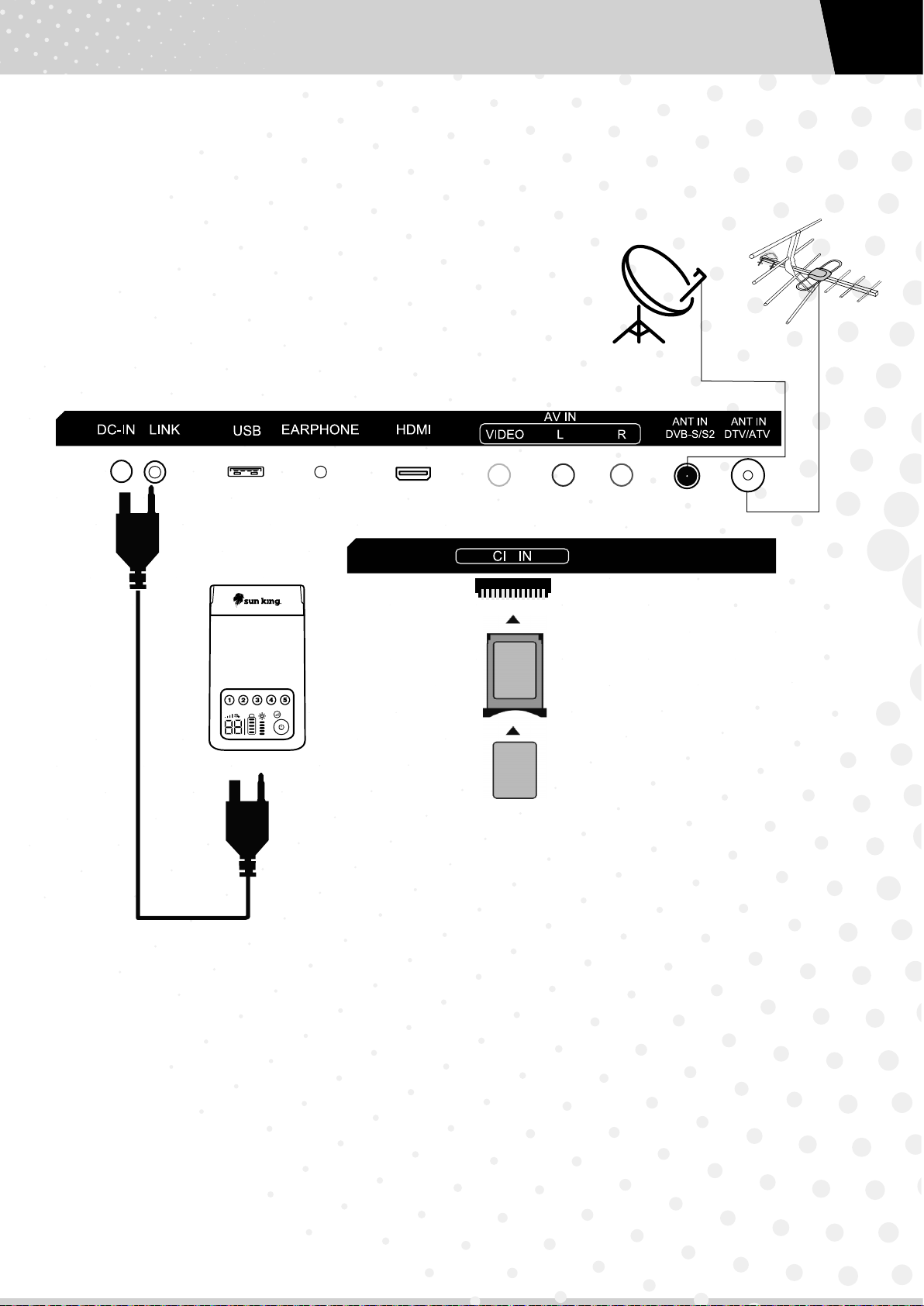
1. TV POWER CABLE CONNECTION PORT Connects your TV to the battery control unit
2. FLASH DISK CONNECTION PORT Connects your TV to external USB devices
3. EARPHONES CONNECTION PORT Connects your TV to an external sound output such as earphones
4. HDMI PORT CONNECTION Connects your TV via HDMI cable
5. VIDEO PORT CONNECTION Connects your TV to an external video/sound source
6. ANT IN DVB-S/S2 Connects your TV to satellite dish
7. ANT IN DTV/ATV Connects your TV to DVB-T/T2, or DVB-C, or analogue aerial to get
clear channel reception
8. CI SLOT Insert the CI card to this slot, to watch the scrambled TV channels
from CI card vendor
TV cable is firmly fixed to the TV then
connected to the battery control unit.
Antenna or satellite cable is
connected to the right port.
1
IMPORTANT
8
HDMIEARPHONEUSBDC-IN LINK LRVIDEO
ANT IN
DVB-S/S2
ANT IN
DTV/ATV
AV IN
1 2 3 4 5 6 7
6 7
9
TV, BATTERY CONTROL UNIT & ANTENNA CONNECTION
TV, BATTERY CONTROL UNIT AND ANTENNA CONNECTION
1. Connect your TV to the battery control unit using the TV cable.
2. Connect your TV to the aerial or satellite dish.
3. Power on the battery control unit.
4. When the TV cable is connected properly to the TV, and the TV is powered by the remote controller or by the power
button on the TV, the power indicator light on the bottom of the TV will glow GREEN.
5. If you subscribe to the pay TV service, you will get one CI module (a big card), along with a smart card (small card). Insert
this CI module to CI slot to watch the related pay channels.
Smart Card
CI Module
Questo manuale è adatto per i seguenti modelli
3
Indice


