
Sure Electronics BTC115A Manuale utente
BTC115A User Manual
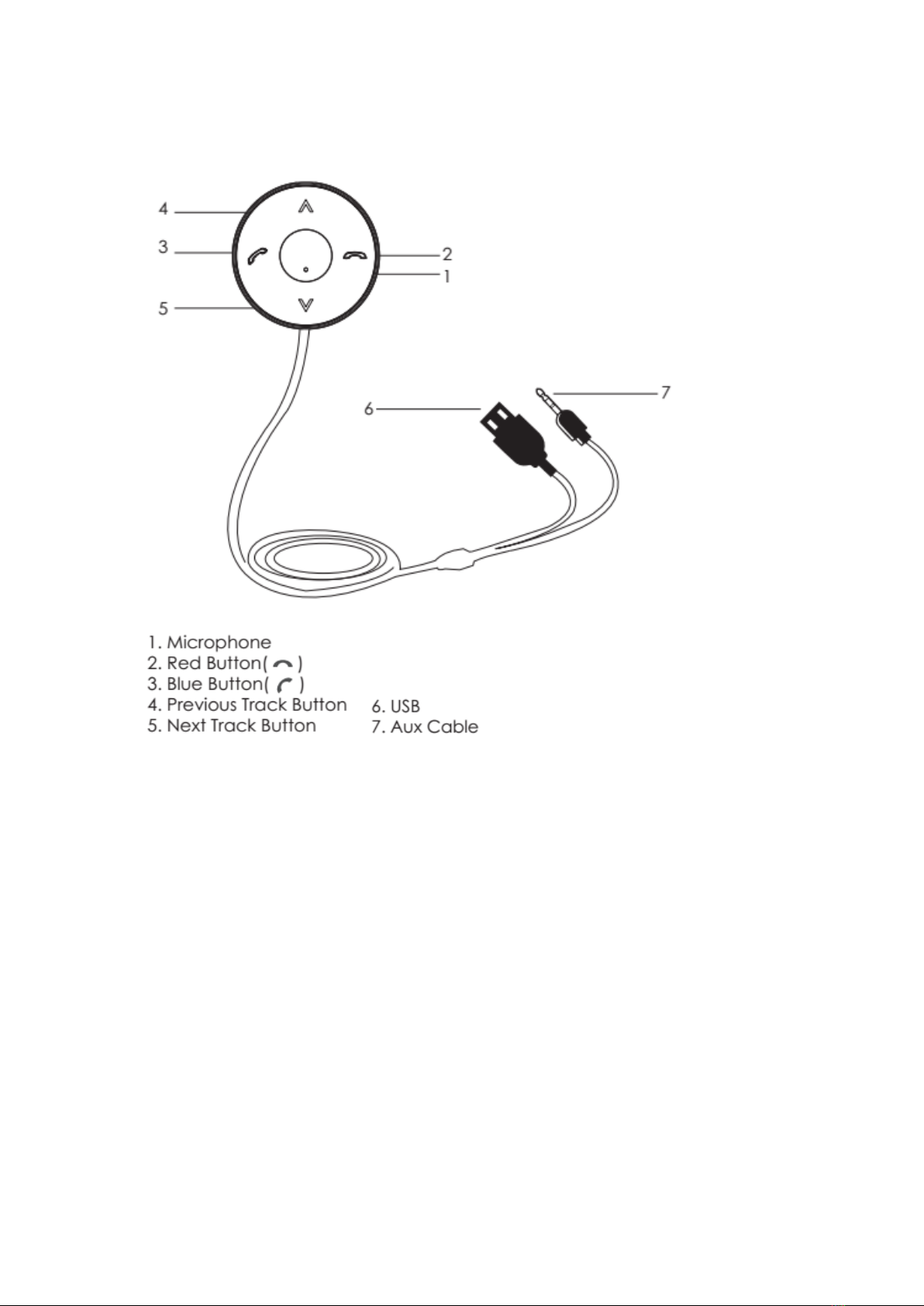
Product Feature
Installation
Caution: Do not place the BTC115A car kit in positions that causes driving hazard or
visual interference.
1. Locate a smooth and at surface on thedashboard to install the mounting plate.
Take extra precaution to ensure the car kit and the cables do not obstruct driver's
operation or become the safe concern in any way.
2. Wipe clean the intended installation area.
3. Peel off the sticker covered on the back of the mounting disc and attach it to the
installation area on dashboard.
4. Place the BTC115A car kit onto the mounting disc with microphone facing front for
optimal clarity. BTC115A Car kit can be detached from the mounting disc when
needed.

Connecting to the power source & Audio output
1. Plug the USB charging cable to the car charger adapter and plug the adapter into
the cigarette lighter socket of your vehicle.
2. Plug the auxiliary cable into the auxiliary port of the car audio system.
3. Turn on the car stereo and set the input source to AUX.
Switching On /Off
BTC115A Car Kit powers on and off along with the ignition of the car.
Press & hold the MFB for 3 seconds to turn BTC115A car kit on or off.
BTC115A Car Kit will automatically enter into pairing mode when power on, red and
blue LED light flashes alternately.
If the BTC115A car kit is disconnected with the paired mobile phone, it will enter into
pairing mode again. If no connection in 10 minutes, it will shut down automatically.
BTC115A Car Kit recognizes the previous paired device and will re-connect when it' s
powered on. To reset, press and hold both Previous Track and Next Track buttons
simultaneously for 5 seconds to enter into the pairing mode.
Pairing
1. Turn on the car kit to enter pairing mode automatically. The LED indicator will
flash in red and blue alternatively.
2. Activate the bluetooth feature on the mobile phone and set the media device to
'search for" or “add” new bluetooth devices.
3. Select " BTC115A" from the list of found devices to pair. If applicable. enter '0000'
as passkey.
4. LED indicator will turn to solid blue when connection is completed.
5. If pairing fails, remove the excessive unused Bluetooth devices from a list of paired
devices and re-start the pairing process from step l.
Siri or Voice Command
In the standby mode, press & hold the “Blue” button for 2 seconds to activate the

voice command function on Andriod or iOS devices. Refer to the phone manual for
detailed instruction if applicable.
Managing Phone Calls
Adjust the call volume directly from the car audio system or from the phone device.
Answer/End call: Briefly press Blue button.
Reject incoming call: Briefly press Red button.
Redial the last number: Double dick the Blue button.
Mute/Unmute: Press and hold the Previous Track button for 1.5 seconds.
Transfer calls between BTC115A car kit and phone:
Press and hold the Blue button for 1.5 seconds in the calling.
Music Control
Play/Pause music: Briefly press Red button.
Play next/previous song: Press Next Track /Previous Track Button in the music.
Multi-Point Connectivity
1. Disconnect BTC115A car kit from the first paired mobile phone by disable the
bluetooth function on the moible phone. BTC115A Car kit will enter into the pairing
mode again automatically.
2. Enable the bluetooth feature on the 2nd moible phone & search for BTC115A car
kit and pair.
3.Enable the bluetooth feature on the first paired Mobile phone. BTC115A Car kit
will be connected with both mobile phones now.
4.After first pairing with two mobile phones, BTC115A Car Kit will re-connect one
mobile phone only when it' s powered on,but you need to re-connect the second
mobile phone manually.
Handling Phone Call Under Multi-Connection
While you are talking on first paired mobile,and there is a incoming call on second
mobile.Double press Red button to reject the incoming call of second mobile.Double

press Blue button to answer the second mobile phone call and hold the first phone
call or transfer between two mobiles.Short press MFB to end the phone call.
Maintenance and Warning
Warning: keep the device away from children, the package may contain choking
hazard such as mouting disc, stainless steel clip, or cigarette lighter adapter.
Do not use the device if there is any water damage as it may cause short circuit or
electric shocks.
NOTE: This equipment has been tested and found to comply with the limits for a
Class B digital device, pursuant to part 15 of the FCC Rules. These limits are
designed to provide reasonable protection against harmful interference in a
residential installation. This equipment generates uses and can radiate radio
frequency energy and, if not installed and used in accordance with the instructions,
may cause harmful interference to radio communications. However, there is no
guarantee that interference will not occur in a particular installation. If this
equipment does cause harmful interference to radio or television reception, which
can be determined by turning the equipment off and on, the user is encouraged to
try to correct the interference by one or more of the following measures:
- Reorient or relocate the receiving antenna.
- Increase the separation between the equipment and receiver.
-Connect the equipment into an outlet on a circuit different from that to which the
receiver is connected.
-Consult the dealer or an experienced radio/TV technician for help
Changes or modifications not expressly approved by the party responsible for
compliance
could void the user's authority to operate the equipment.
This device complies with Part 15 of the FCC Rules. Operation is subject to the
following
two conditions:
(1) this device may not cause harmful interference, and
(2) this device must accept any interference received, including interference that may
cause undesired operation.
Indice
Altri manuali Sure Electronics Accessori per automobili


