T-Fal 5252 Manuale utente

Réf : 5252
September 2004
Ref. : 3306879
Document subject to modification • Document sujet à modification • Documento sujeto a modificaciones
Réalisation : Espace Graphique

Instructions for use
Mode d’emploi
Modo de empleo
T-FAL Corporation, P. O. BOX 2001, PINE BROOK NJ 07058
Groupe SEB Canada Inc., 455 Finchdene Square, Scarborough, Ontario, M1X 1B7
G.S.E.B. Mexicana, S.A. de C.V. Goldsmith 38-401, Piso 4, Polanco Chapultepec,
Miguel Hidalgo - C.P. 11560 MEXICO D.F. RFC GSB 910719 5A0

2
3
4
5
6
a
7
g
h
d
1
f
e
c
b
i
9*
8*
11
10*
12*
14*
13*
*according to model - selon modèle - según modelo

Eng
1
SAFETY INSTRUCTIONS
• Safety of this appliance complies with the technical regulations and norms in force.
• Make sure that the network voltage corresponds to that indicated on the appliance.
• Considering the diversity of the norms in force, check whether the appliance is used in a coun-
try other than that in which it was purchased. Have it verified by an authorized service station.
• Use a stable work platform, protected from water projections.
• Do not carry or move the equipment when in use.
• Do not unplug the equipment by pulling the cord.
INSTRUCTIONS ON THE POWER CORD
• The electrical cord is short in a manner as to reduce the risks of injury that could occur if one
gets entangled or if one trips on a longer cord.
• This equipment has a polarized plug (one prong is wider than the other). In order to reduce the
risk of electric shock, this plug has been designed in such a manner that it can be connected
to the current socket in just one way. If the plug cannot be inserted into the current socket
properly, invert the pins. If the problem persists, call a qualified electrician.
Do not try to modify the socket in any way.
• Certain precautions are imposed if you are using an extension cord:
(a) Electric power of your extension cord should at least be equal to that of your toaster oven.
(b) The extension cord should be kept beyond the reach of children and should be kept in such
a way that no one trips on it or is injured by it.
(c) The extension should be equipped with a ground cable if the plug of the cable of your equip-
ment is equipped with a ground electrode.
IMPORTANT SAFEGUARDS
A certain number of basic rules, especially those mentioned below, should be respected
while using electrical appliances:
• Read all the usage instructions and follow them carefully.
• The appliance is not intended for use by young children or infirm persons without close supervision.
• Young children should be supervised to ensure that they do not play with the appliance.
• Do not keep the appliance within the reach of children.
• Never allow the appliance to be operated without supervision. Remain close to the oven when
it is in use.
• Do not use the appliance for a purpose other than that for which it has been designed.
• Do not touch the metallic or hot parts of the oven while it is in use. Use the buttons and the
handle. Use oven mitts, if necessary.
• Do not immerse the electrical cord, the current socket or the appliance in water or any other
liquid so as to avoid electric shocks.
• Always attach plug to appliance first, then plug cord into the wall outlet.
• To turn off the oven, press stop and unplug it.
• Unplug the appliance when not in use and before cleaning it. Wait for the equipment to cool
before cleaning or putting it away.
• Do not use the appliance if:
- it has a defective cord,
- the equipment falls and presents visible damages or functioning defects.
In all these cases, the equipment should be sent to the nearest after-sales service center autho-
rized by T-FAL, in order to avoid all risks.
Consult the guarantee card.

2
• This equipment has a polarized plug (one prong is larger than the other): in order to reduce the
risk of electric shock, this plug has been designed to connect to the current socket in just one-
way. If the plug cannot be inserted into the current socket properly, invert the pins. If the pro-
blem persists, call a qualified electrician. Do not try to modify the socket in any way.
• Use of accessories, not recommended by the manufacturer, may be dangerous.
• Do not allow the cord to hang from the table or working surface or touch the hot parts of the
appliance.
• Do not place the appliance on or close to a source of heat (cooking plate, oven, hot gas, elec-
tric burner, etc).
• Do not cover the appliance when in use.
• Bread may burn, therefore the toaster oven must not be used near or below curtains and other
combustible materials. It should be attended when in use.
• Do not operate the appliance under wall-mounted furniture, a shelf, or close to inflammable
materials such as: blinds, curtains, hangings...
• If some parts of the product catch fire, never try to extinguish flames with water.
Unplug the appliance and smother the flames with a damp cloth. Never try to open the oven’s
door in case of fire in the appliance.
• Do not keep inflammable products close to or under the furniture where the appliance is
placed.
• Oversize foods or metal ustensils must not be inserted in a toaster oven as they may create a
fire or risk of electric shock.
• Unplug the appliance: if a functioning defect occurs, after every use, before changing its posi-
tion and before washing it.
• Do not use metallic buffers or abrasive, cleaning agents. Metallic particles may come off and
touch the electrical parts of the equipment and lead to a short circuit.
• Use the appliance only indoors.
• While product is not in use, do not stock accessories other than those recommended by the
T-FAL manufacturer in the appliance. Extreme caution should be exercised when using contai-
ners constructed of other than metal or glass.
• Do not place any of the following materials in the oven: paper, cardboard or plastic.
• Do not use the appliance as a heat or drying source.
• The appliance should always be in an upright position, never horizontal, tilted or upside down.
• Do not insert anything in the ventilation inlets and do not block them.
• Remove the crumbs from the crumb tray regularly. Do not cover the crumb collector with alu-
minum sheets. This would lead the equipment to overheat. Do not cover the crumb tray or any
part of the oven with metal foil. This wil cause overheating of the oven.
• This appliance has been designed only for domestic usage. The manufacturer is not
responsible or liable for any kind of professional usage, which is inappropriate or non-
compliant with the recommended usage method.
• Any interventions other than cleaning and maintenance should be entrusted to the nearest,
authorized T-FAL service center (see the enclosed list).
• The user should not repair any part so as to eliminate the risk of domestic accident, fire or
electrocution. Only qualified personnel of the authorized T-FAL service center should carry out
repairs.
KEEP THESE INSTRUCTIONS
IN A SAFE PLACE
Eng


3
Eng
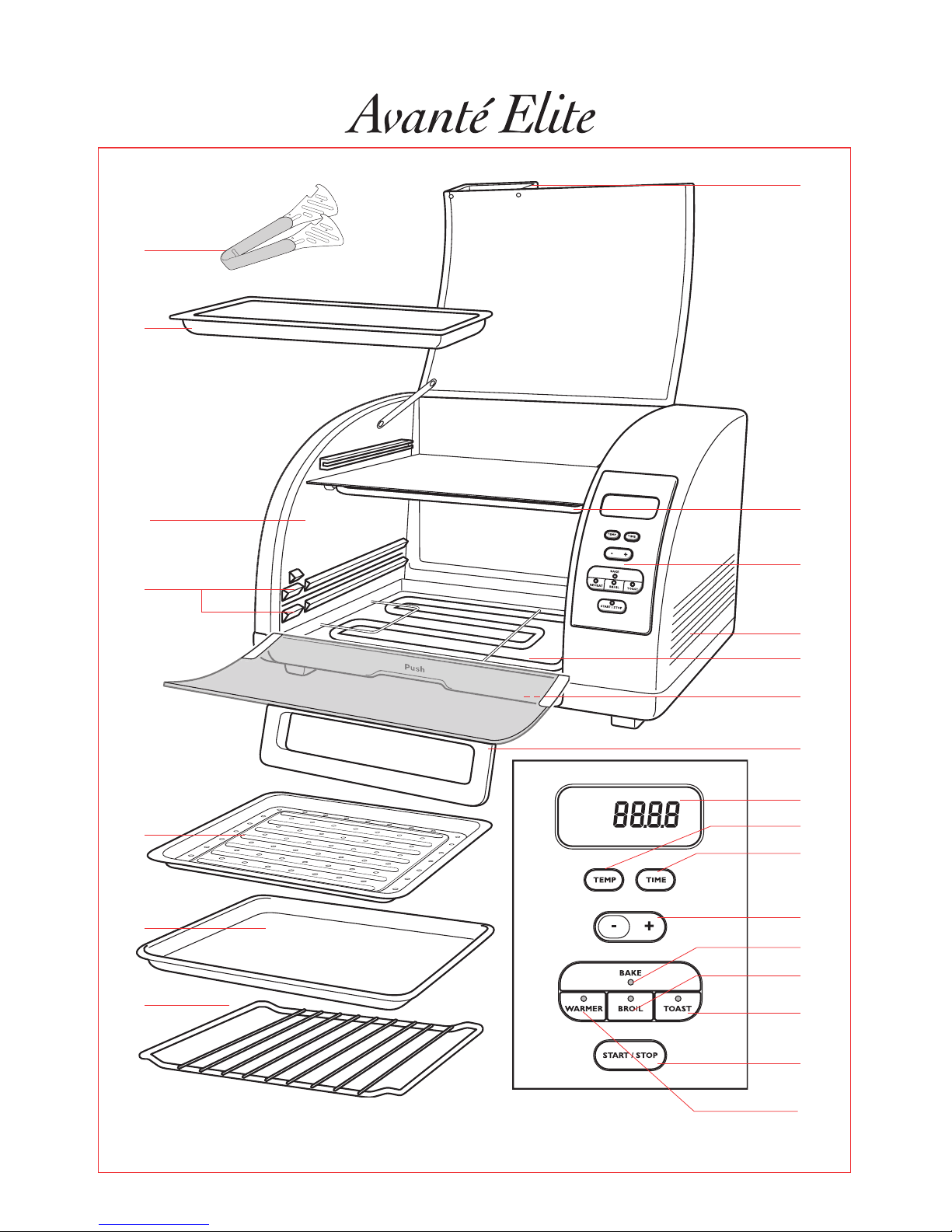
Appliance features
Advantages
1Integrated handle in reheat oven door
2Top heating element
3Control panel
a) Display
b)Temperature setting button
c) Cooking time setting button
d)“+” or “-” adjustment button
e)BAKE function, baking/roasting
f)WARMER function (reheat
compartment)
g)BROIL function
h)TOAST function
i) START/STOP button
4Ventilation holes
5Bottom heating element
6Crumb tray drawer
7Integrated handle in main oven door
8Bread tong*
9Aluminium baking tray for top reheat
compartment*
10 Aluminium sides*
11 Shelf supports
12 Aluminium broiling tray*
13 Aluminium baking tray for main
compartment*
14 Reversible rack*
Your Avanté Elite toaster oven offers you the following advantages:
• 2 ovens for greater cooking flexibility and for reheating dishes of all kinds.
• 6-slice capacity for easy browning of your toast and bagels.
• A multifunction toaster oven for cooking, heating or grilling/broiling. The top oven is an
useful extra feature to help prepare complete meals!
• A reversible grilling rack and 2 shelf positions allow you to vary the grill height and position
your dishes or loaves perfectly for the desired cooking results.
• A thermostat that can be precisely adjusted from 150°F to 500°F (25°F increments).
• The crumb collector drawer is easy to remove using its push / pull exterior handle.
• Aluminium baking trays are suitable for all types of dishes.
• Aluminium baking tray for cooking of your meats and grilled foods.
• A user-friendly display for ease and precision in using the electronics.
*according to model

4
Eng
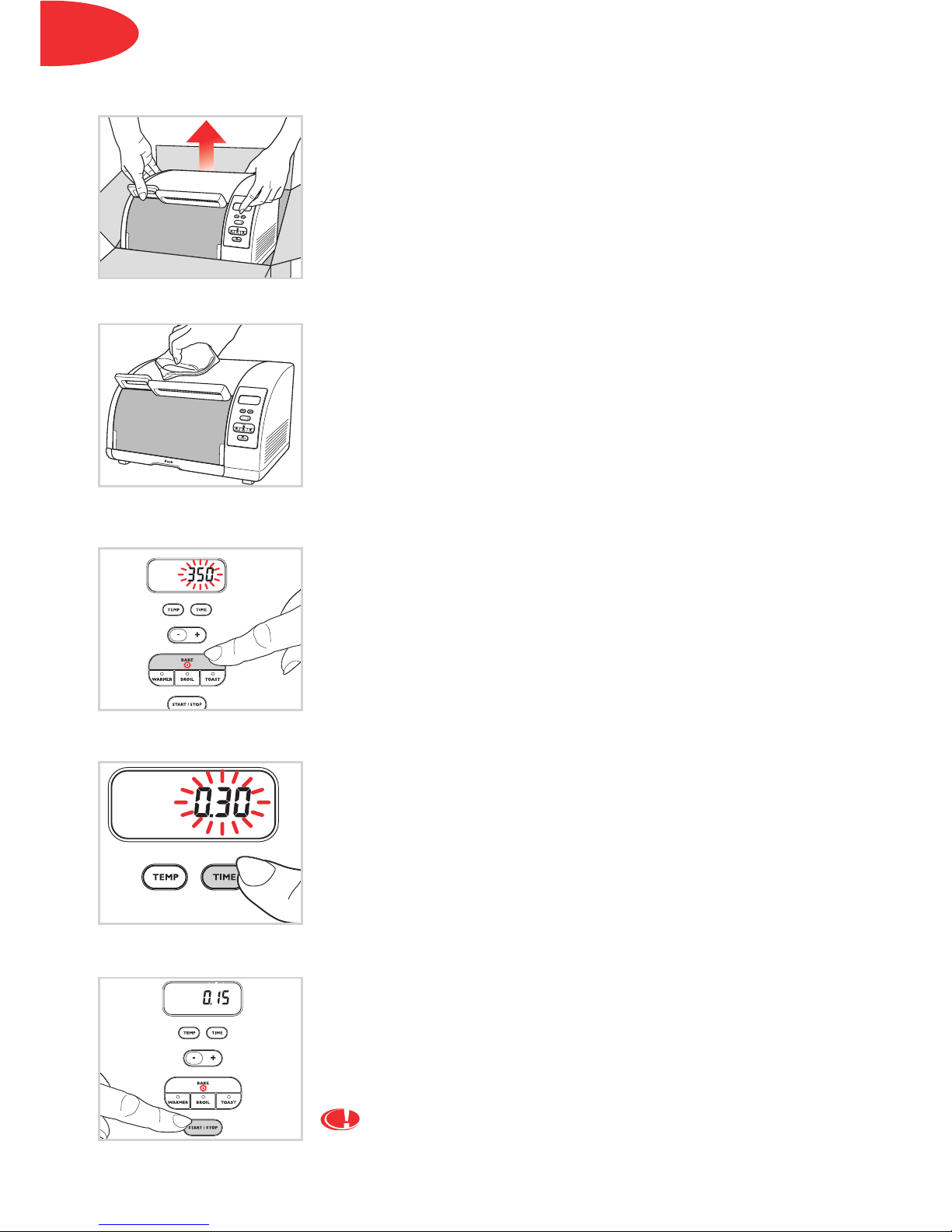
• Unpack the appliance and remove all self-adhesive stickers.
• Read the instructions for use and follow them carefully.
• Pull out all the accessories* (grill, broiling and baking trays) and
wash them in warm, soapy water. Rinse and dry carefully.
• Unroll the power cable completely.
• Wipe over the outside of the appliance with a damp cloth and
dry off any excess moisture.
• Plug in the toaster oven. It will beep.
To eliminate the “new” smell, run the appliance empty, with
open doors, for 15 minutes:
Select the temperature:
• Press the “BAKE” button. Pilot light in the “BAKE” button
appears.
• The default temperature of 350°F will be shown blinking on the
display.
• Press on “+” to select a temperature of 500°F.
Select the cooking time:
• Press the “TIME” button. Pilot light in the “TIME” button
appears. In so doing, the temperature setting is entered in the
system.
• The default setting of “0:30” (30 minutes) will appear blinking on
the display.
• Press on the “-” button until the cooking time is set to 15 minutes.
• Press “START”. The appliance will beep and the oven will start.
• The time will be counted down in one-minute intervals.
• At the end of the cooking time, the appliance will beep three
times and the oven will turn off.
You may well observe smoke escaping from the oven. This
is normal and will progressively disappear with use.
Before first use
*according to model

5
Eng
BAKE
(the two heating elements operate with temperature control)
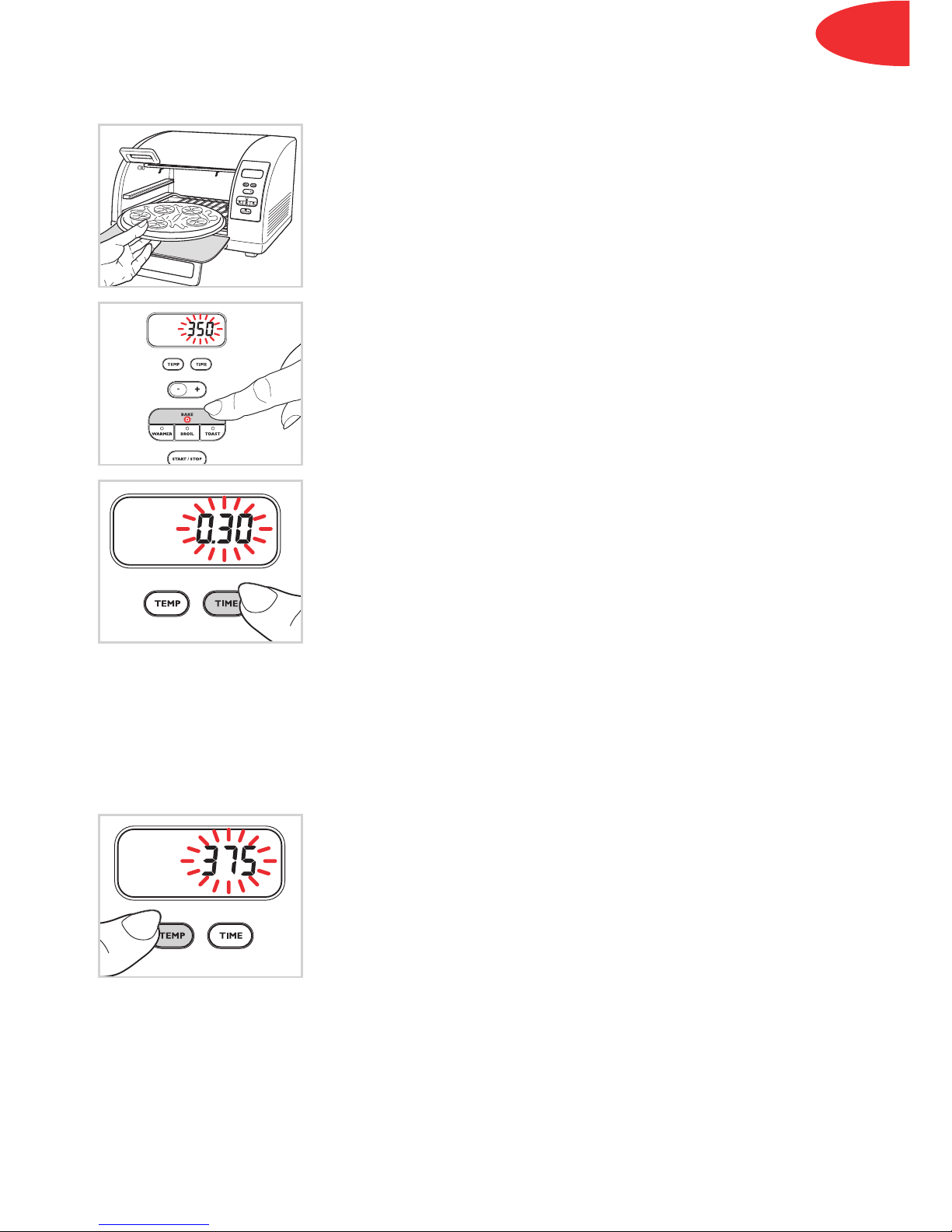
To cook all your dishes:
• Place your dishes in the main oven at the desired height.
• Close the door.
Select the temperature:
• Press the “BAKE” button. Pilot light in the “BAKE” button
appears.
• The default temperature of “350°F” will be shown blinking on the
display.
• Press the “+” or “-” buttons to select your temperature. The
temperature can be changed in 25°F increments.
• The display will continue to blink.
Select the cooking time:
• Press the “TIME” button. Pilot light in the “TIME” button
appears. In so doing, the temperature setting is entered in the
system.
• The default setting of “0:30” (30 minutes) will appear blinking on
the display.
• Adjust the cooking time according to your recipe by pressing
the “+” or “-” buttons.
• Press “START”. The appliance will beep and cooking will start.
• The time will be counted down in one-minute intervals.
• At the end of the cooking time, the appliance will beep three
times and cooking will stop.
• You can stop the cooking at any time by pressing the “STOP”
button.
Changing the temperature before confirming the programming:
• After setting the cooking time, press the “TEMP” button. Pilot
light in the “TEMP” button appears.
• The temperature already selected is shown blinking on the
display.
• Press the “+” or “-” buttons to select the new temperature.
• The display will continue to blink.
• Press “START”; the appliance will beep and cooking will start.

6
Eng
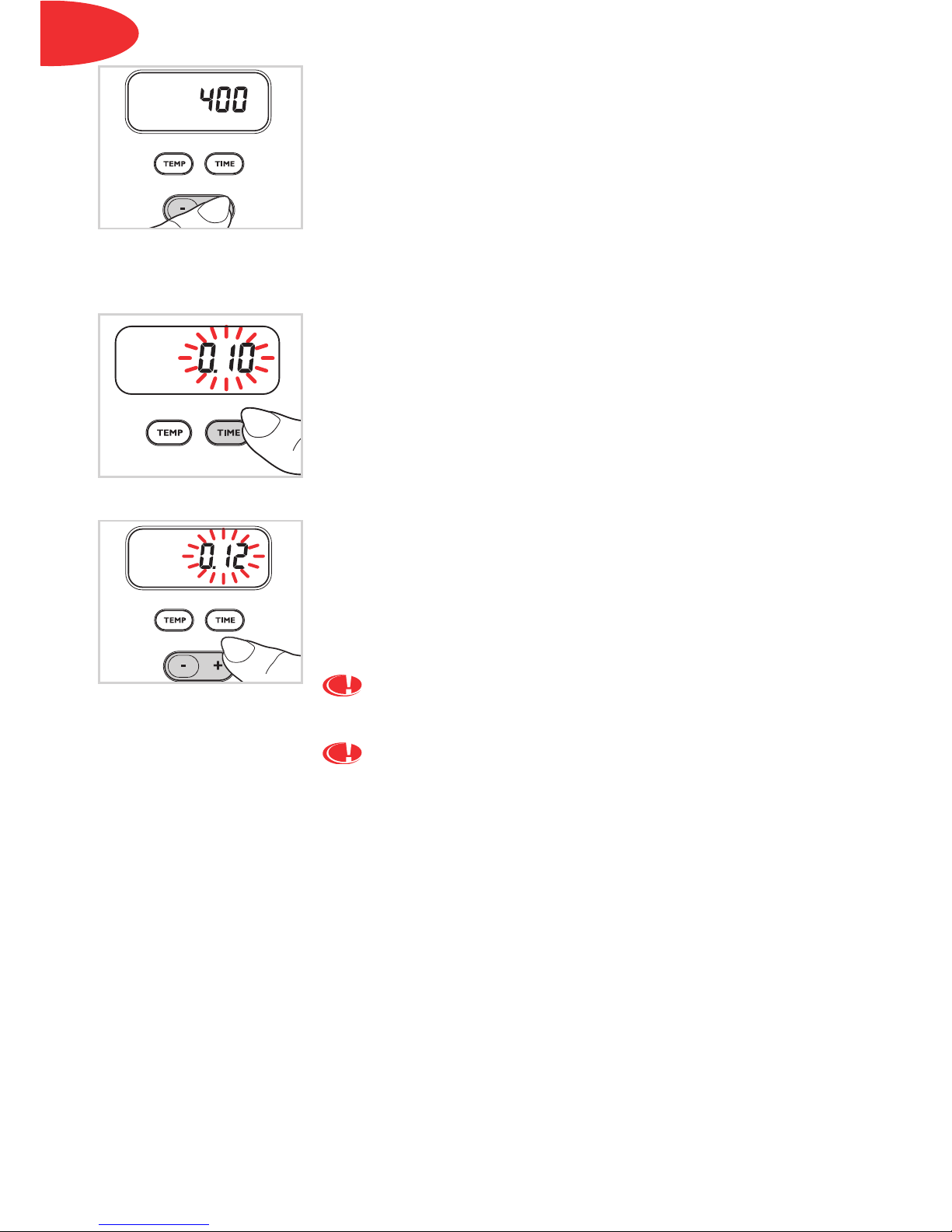
Changing the temperature during cooking:
• The cooking time is counting down.
• Press the “TEMP” button; pilot light in the “TEMP” button
appears. The current temperature setting will be displayed.
• Cooking continues.
• Press the “+” or “-” buttons to select the new temperature.
• Press the “TEMP” button again to enter the temperature in the
system.
• The display will show the remaining cooking time.
Changing the time during cooking:
• The cooking time is counting down.
• Press the “TIME” button; pilot light in the “TIME” button
appears. The time display will start to blink.
• Cooking continues.
• Set the new cooking time as desired by pressing the “+” or “-”
buttons.
• Press the “TIME” button again to enter the new time in the
system.
• The display will show the new remaining cooking time.
When the main compartment is in use, the top oven is
hot!
When the top compartment is in use, the main oven is
hot!

7
Eng
BROIL/Grill function
(For this setting only the top heating element is used. There are two grill settings: fast grilling,
“HI”, and slow grilling, “LO”)
For healthier cooking of your meat, sausages, etc.
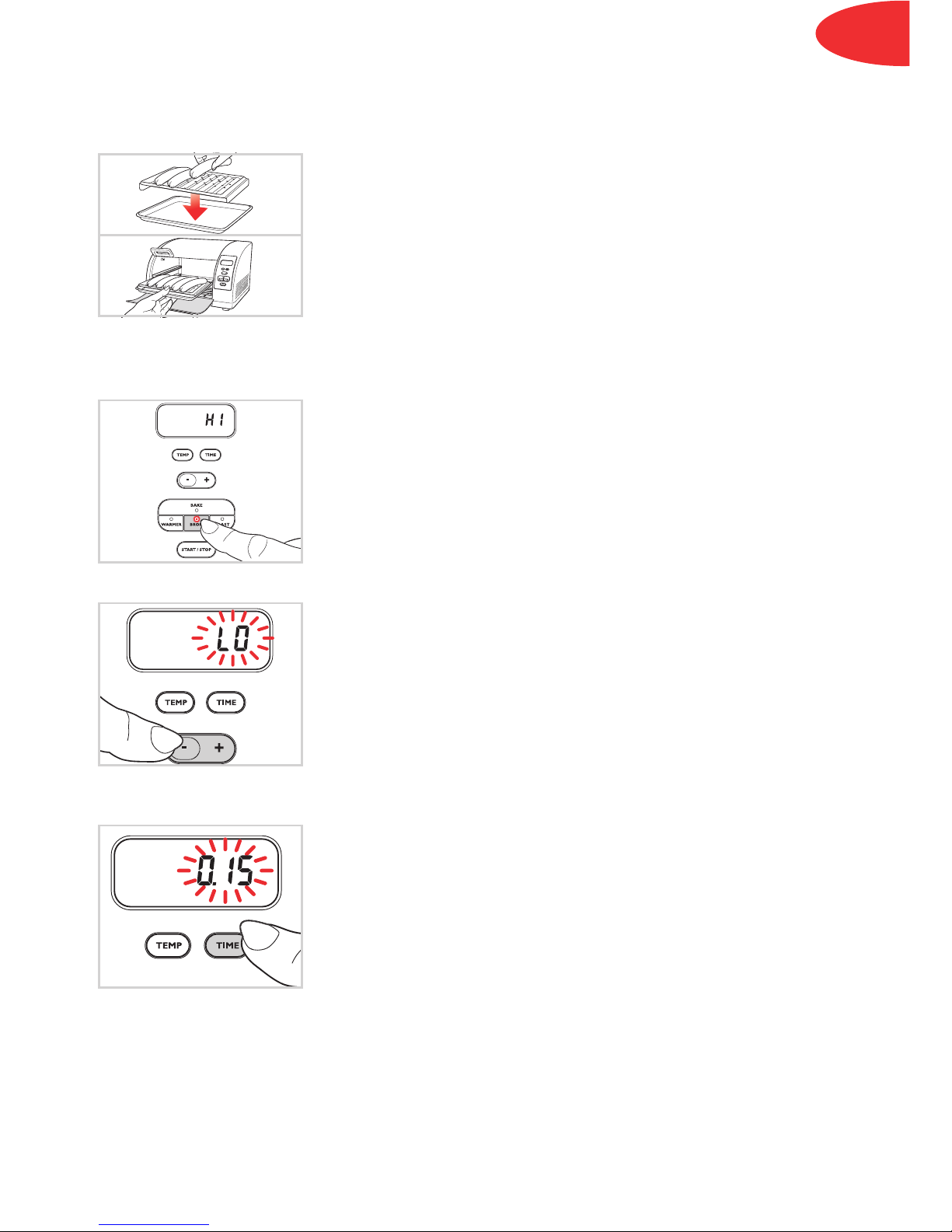
• Place the broiling tray in the baking pan with the four corner
dimples facing up, such that the broiling surface is raised away
from the baking pan.
• Arrange your food on top of the broiling tray.
• Place trays with food on the shelf grill. The shelf should be
adjusted for a minimum 1 inch space between the food and the
top element.
• Close the door.
Choosing the grill setting:
• If desired, press the “BROIL” button. Pilot light in the “BROIL”
button appears.
• The display will show “HI”, the fast, default setting of the grill.
• Press the “-” button to reduce the grill temperature and “LO” will
appear on the display.
• The display will blink.
Setting the cooking time:
• Press the “TIME” button to confirm the grill setting. Pilot light in
the “TIME” button appears.
• The default setting of “0:15” (15 minutes) will appear blinking on
the display.
• Adjust the cooking time according to your recipe by pressing
the “+” or “-” buttons.
• Press “START”. The appliance will beep and cooking will start.
• The time will be counted down in one-minute intervals.
• At the end of the cooking time, the appliance will beep three
times and cooking will stop.
• You can stop the cooking at any time by pressing the “STOP”
button.
Questo manuale è adatto per i seguenti modelli
1
Indice
Lingue:
Altri manuali T-Fal Forno