Taga Harmony HTA-25B Manuale utente

HTA-25B
HYBRID INTEGRATED AMPLIFIER
Instruction Manual
Edition 10-2020

2
Introduction
Thank you for purchasing this TAGA Harmony amplier.
TAGA Harmony hybrid amplier is a combination of two dierent techniques to create
an amplier in one device: the World of tubes and the World of transistors.
TAGA Harmony HTA-25B is a 25W / 4Ω high-delity but still aordable hybrid
integrated amplier utilizing two 6P1 and two 6N1 tubes in the preamp section
and transistors at the output. This solution ensures a very warm, linear and lifelike
sound with high dynamic presentation at the same time.
The high class, gold-plated speaker terminals oer almost lossless audio signal
transmission to the speakers.
The HTA-25B oers a variety of dierent connections both wired and wireless:
• 2 analog inputs with gold-plated sockets.
• USB input to quickly and easily play music from a USB ash drive
(supports MP3 / WMA / WAV and APE les).
• Bluetooth® - to wirelessly stream music from smartphones, tablets or computers.
• PREAMPLIFIER output for external recording device or powered speakers
or subwoofer.
• Headphones output for those who prefer discrete listening.
The removable IEC power cable gives an option to upgrade your system
with a premium audiophile power cable in any time.
The HTA-25B combines the analog sound of tubes with the power of transistors
to give the best sound at the price!
Cleaning
Do not use strong or abrasive cleaners. Use a damp, soft cloth for cleaning.
Specications and the latest instruction manual edition
Full technical specications and the latest edition of the instruction manual
are available on www.TagaHarmony.com.

3
Contents
Safety Instructions 4
Front and Rear Panel 6
Hooking Up Speaker Cables 7
Hooking Up the Amplier 8
Operation 10
Play from a USB Flash Drive 12
Bluetooth® Connection 13
Additional Information 14
Specications 16

4
Safety Instructions
IMPORTANT
READ THIS SECTION CAREFULLY BEFORE PROCEEDING!
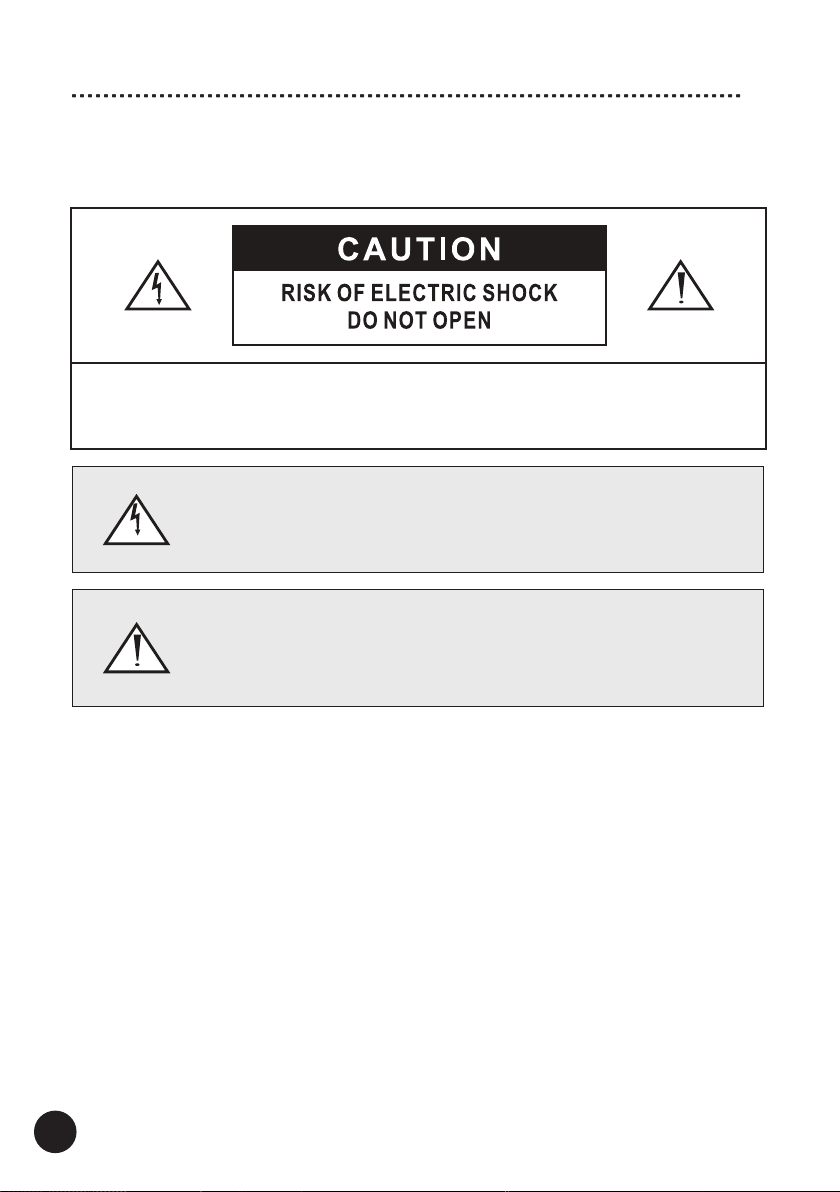
WARNING: TO REDUCE THE RISK OF FIRE OR ELECTRIC SHOCK, DO NOT EXPOSE THIS PRODUCT TO
RAIN OR MOISTURE. DO NOT REMOVE COVER (OR BACK). NO USER-SERVICEABLE PARTS INSIDE.
REFER SERVICING TO QUALIFIED SERVICE PERSONNEL.
WARNING: TO REDUCE THE RISK OF FIRE OR ELECTRIC SHOCK, DO NOT
EXPOSE THIS APPARATUS TO RAIN OR MOISTURE, AND OBJECTS FILLED WITH
LIQUIDS, SUCH AS VASES, SHOULD NOT BE PLACED ON THIS APPARATUS.
CAUTION: TO PREVENT ELECTRIC SHOCK, FULLY AND SECURELY INSERT
THE POWER CABLE PLUG INTO THE POWER OUTLET, AND POWER CABLE
CONNECTOR INTO THE UNIT SOCKET (IF THIS UNIT IS NOT EQUIPPED WITH AN
INTEGRATED [ATTACHED] POWER CORD).
CAUTION: FOR CONTINUED PROTECTION AGAINST RISK OF FIRE, REPLACE
THE FUSE (IF THE UNIT IS EQUIPPED WITH A USER REPLACEABLE FUSE) ONLY
WITH THE SAME AMPERAGE AND VOLTAGE TYPE. IN CASE WHEN THE UNIT IS
NOT EQUIPPED WITH A USER REPLACEABLE FUSE - REFER REPLACEMENT TO
QUALIFIED SERVICE PERSONNEL.
WARNING: THE UNIT MAY BECOME HOT. ALWAYS PROVIDE ADEQUATE
VENTILATION TO ALLOW FOR COOLING. DO NOT PLACE THE UNIT NEAR
A HEAT SOURCE, OR IN SPACES THAT CAN RESTRICT VENTILATION.
An exclamation mark in a triangle is intended to alert the user to the presence
of important operating and maintenance (servicing) instructions in the literature
accompanying the appliance.
The triangle containing a lightning symbol is intended to alert the user to the presence
of uninsulated dangerous voltages within the product’s enclosure that may be of
sucient magnitude to constitute a risk of electric shock to persons.
EN_safety_02-20_1

5
Safety Instructions
1. Read Instructions - All the safety and operating instructions
should be read before the product is operated.
2. Retain Instructions - The safety and operating instructions should
be retained for future reference.
3. Heed Warnings - All warnings on the product and in the operating
instructions should be adhered to.
4. Follow Instructions - All operating and use instructions should
be followed.
5. Cleaning - Unplug this product from the power outlet before
cleaning. Do not use liquid cleaners or aerosol cleaners.
6. Water and Moisture - Do not use this product near water - for
example, near a bath tub, wash bowl, kitchen sink or laundry tub;
in a wet basement; or near a swimming pool; and the like. These
precautions also apply to the power cord.
7. Accessories - Do not place this product on an unstable cart,
stand, tripod, bracket or table. The product may fall, causing seri-
ous injury to a child or adult and serious damage to the product.
Use only with a cart, stand, tripod, bracket or table recommended
by the manufacturer or sold with the product. Any mounting of
the product should follow manufacturer’s instructions and should
use a mounting accessory recommended by the manufacturer.
8. Ventilation - This unit may be equipped with slots and openings
in the cabinet (housing) which are provided for ventilation and
to ensure reliable operation of the product and to protect it from
overheating and these openings must not be blocked or covered.
The openings should never be blocked by placing the product
on a bed, sofa, rug or other similar surface. This product should
be not placed in a built-in installation such as a bookcase or
rack unless proper ventilation is provided or the manufacturer’s
instructions have been adhered to. For products equipped with a
separate power supply unit, leave at least 5cm (2in.) of free space
on all sides and the top of the power supply.
9. Power Sources - This product should be operated only from the
type of power source indicated on the marking label (placed on
the product and/or, if applicable, on a separate power supply
unit). If you are not sure of the type of power supply in your home,
consult your product dealer or local power company. For products
intended to operate from battery power or other sources, refer to
the operating instructions.
10. Grounding and Polarity - some units for proper operation or
to take full advantage of their capabilities may require to be
connected to a grounded power outlet – refer to the user manual
for more information.
Some units may have markings for the live (L) and neutral (N)
conductors for power - in order to take full advantage of capa-
bilities of such products, it is recommended to properly connect
the polarity according to the markings on the unit - refer to the
user manual for more information. Connecting the polarity not in
accordance with the markings will not aect the durability and
reliability of the device.
11. Power-cord Protection - Power supply cords should be routed
so that the are not likely to be walked on or pinched by items
placed upon or against them, paying particular attention to cords
at plugs, convenience receptacles and the point where they exit
from the product.
12. Lighting - For added protection for this product during a lighting
storm or when it is left unattended and unused for long periods
of time, unplug it from the wall outlet and disconnect the antenna
or system cables. This will prevent damage to the product due to
lighting and power-line surges.
13. Overloading - Do not overload wall outlets, extension cords or
integral convenience receptacles as this can result in a risk of fire
or electric shock.
14. Object and Liquid Entry - Never push objects of any kind into this
product through openings as they may touch dangerous voltage
points or short-out parts that could result in a fire or electric
shock. Do not expose this apparatus to dripping or splashing and
ensure that no objects filled with water, such as vases are placed
on the apparatus.
15. Servicing - Do not attempt to service this product yourself as
opening or removing covers may expose you to dangerous
voltage or other hazards. Refer all servicing to qualified service
personnel.
16. Damage Requiring Service - Unplug this product from wall outlet
and refer servicing to qualified personnel under the following
conditions:
• when power supply cord or plug is damaged;
• if liquid has been spilled or objects have fallen into the product;
• if the product does not operate normally by following the oper-
ating instructions. Adjust only those controls that are covered by
the operating instructions as an improper adjustment of other
controls may result in damage and will require extensive work
by a qualified technician to restore the product to its normal
operation;
• if the product has been dropped or damaged in any way;
• if the product exhibits a distinct change in performance - this
indicates a need for a service.
1 7. Replacement Parts - when replacement parts are required, be
sure the technician has used replacement parts specified by the
manufacturer or with the same characteristics as the original
part. Unauthorized substitutions may result in fire, electric shock
or other hazards.
18. Safety Check - Upon completion of any service or repairs to this
product, ask the service technician to perform safety check to
determine that the products is in proper operating condition.
19. Wall of ceiling mounting - The product should be mounted to a
wall or ceiling only as recommended by the manufacturer.
20. Heat - The product should be situated away from heat sources
such as radiators, heat registers, stoves or other products (includ-
ing amplifiers) that produce heat.
21. [Refer to products equipped with vacuum tubes] Tube Cage or
cover - For your safety and to protect the vacuum tubes this
product may be equipped with the factory installed vacuum tube
cage or cover.
It is not recommended to remove the cage or cover unless it is
required to change the vacuum tubes.
When the cage or cover is removed - do not touch the vacuum
tubes - they may be hot and burn the skin!
22. Operating Environment - Operating environment temperature and
humidity of the unit: +5°C to +35°C (+41°F to +95°F); less than
85% RH (cooling slots not blocked).
EN_safety_02-20_1

6
Front and Rear Panel
Front Panel
1. Power Switch (ON and OFF) and Power Status Indicator (around the Power Switch)
2. USB Port
3. Headphone 3.5 mm (1/8") Output
4. USB and Bluetooth® Knob (Play/Pause, Next/Previous)
5. Input Selector (USB, CD, Bluetooth, LINE)
6. USB/ Bluetooth® Input Led Indicator
7. Signal Level Meter
8. Treble Regulator
9. Bass Regulator
10. Volume Regulator
Rear Panel
11. CD Stereo RCA Input
12. LINE Stereo RCA Input
13. Preamplier Stereo RCA Output
14. Speaker Right Channel Output (Speaker Connectors)
15. Speaker Left Channel Output (Speaker Connectors)
16. Power Cable Input and Fuse Box
A blown fuse should be only exchanged for exactly the same type
as indicated on the rear amplier panel.
The Power Cable should be disconnected!

7
Hooking Up Speaker Cables
Before connecting make sure that your amplier is turned o.
Do not let bare speaker wires touch each other or any metal part
of this unit it can damage this amplier and/or speakers.
This may void your warranty.
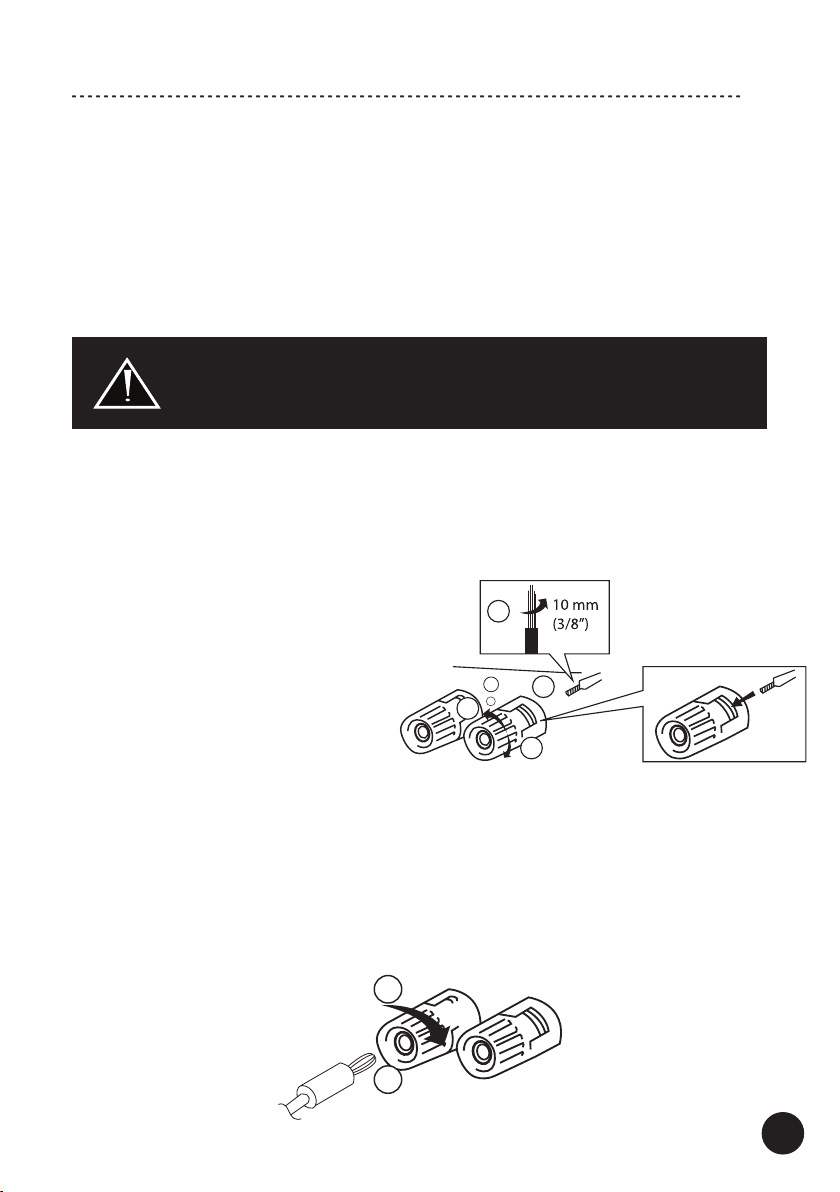
The Speaker Connectors can accommodate up to 10AWG speaker cables as well
as most of popular plugs (banana etc.). It is recommended to leave about 150 cm
(5 feet) of extra cable at the amplier end to facilitate positioning and installation of the
amplier. Do not use staples, nails or other metal objects to secure the cables.
You will get the best sound quality and least amount of hum by keeping the cables
away from other electrical wires and cables.
Pay attention to connecting the polarity of the amplier correctly with the speakers
in each speaker group (speakers should be connected RED + with RED + amplier
connector, BLACK – with BLACK – amplier connector).
Please refer to your speaker instruction manual for more information.
2
4
3
+
-L
1
1. Tighten the speaker connector.
2. Insert the banana plug into the end of the corresponding connector.
1
2
Banana plug
Connecting speaker cables
Speaker cables have 2 conductors. Each conductors should be connected
to a separate speaker connector - mind the polarity while connecting.
For each conductor:
1. Remove approximately 10 mm (3/8”)
of insulation from the end of the
conductor. Twist the bare wires rmly
together.
2. Loosen the speaker connector.
3. Insert the bare wires of the conductor
into the gap of the speaker connector.
4. Tighten the speaker connector.
Connecting via banana plug
Mind the polarity while connecting.
Note! An insert hole for the banana plug in some speaker connectors maybe secured
with a plastic plug - make sure to remove this plastic plug before inserting the banana
plug.

8
Hooking Up the Amplier
USB Flash Drive
CD player etc. FM/AM tuner, etc.
Smartphone,
tablet, etc.
Right speaker Left speaker
External power amplier,
powered speakers etc.
Speaker
cables
Interconnect RCA
Interconnect RCA
Headphones
Interconnect RCA

9
1. Make sure the amplier is turned o (the Power Switch and the Power Cable
is removed from the wall outlet).
2. Turn the Volume Regulator to MIN (max counter clockwise).
3. Using speaker cables (not supplied with this product) connect your speakers to the
SPEAKERS OUT connectors located on the rear panel.
Check “Hooking Up Speaker Cables” for more details.
4. If you want to play music from analog audio source devices (CD player, satellite or
FM tuner,video console etc.): using RCA interconnect cables (not supplied with this
product) connect them to the analog inputs on the rear panel (CD, LINE).
5. If you want to play digital audio les connect a USB Flash Drive (no supplied with this
product) to the USB Port on the front panel.
Make sure that this amplier supports the les you want to play.
Check “Play from a USB Flash Drive” for more details.
6. Preamplier Output (PRE-OUT): this amplier is equipped with the preamplier
output. Using RCA interconnect cables (not supplied with this product) you can
connect to it an external amplication device (power amplier, powered speakers,
active subwoofer etc.) or a recording device (CD recorder etc.).
Check "Preamplier Output Connection (PRE-OUT)" for more details.
7. If you want to listen to music via headphones: connect the headphones to the
Phones output. Check "Headphones connection (PHONES)" for more details.
8. If you want to stream music via Bluetooth® from compatible devices check
“Bluetooth® Connection” for more details.
9. Your amplier is ready for operation.
Hooking Up the Amplier
Only speakers within range of impedance 4 - 8Ω may be connected to
this amplier. Connecting speakers outside this range may damage this
amplier and/or speakers. This may void your warranty.

10
Operation
1. Plug the Power Cable to the amplier and into the electrical outlet.
2. Turn on the amplier – press the Power Switch (the Power Switch ).
The Power Status Indicator around the Power Switch should turn on in a few
seconds.
If it does not, it means that the amplier is working under in abnormal condition
(a protection mode) – turn o the power, unplug the Power Cable and check
whether some of the cables are not short circuited.
After xing the cables turn the amplier on.
3. Using the Input Selector knob select which audio source you want to play
(corresponding to the selected input).
Make sure the audio source is properly connected to the front and rear panel
inputs.
4. Turn on your audio source and start playback.
5. Regulate volume on the amplier to adjust the level of sound.
Note! Check “Additional Information” for other useful operating instructions.
High volume levels may damage this amplier and/or speakers.
This may void your warranty.
Distortion and sound quality worsening may occur when the knob is in
the maximum position. It may damage the amplier and/or speakers.
This may void your warranty.
VOLUME regulator:
Using the Volume Regulator on the front panel you can adjust the sound volume from
minimum (the knob – max counterclockwise) to maximum (the knob – max clockwise).
TREBLE regulator:
You can adjust treble output of the amplier. The default: the knob is in the center
position: the marker on the knob in the vertical position.
Turn the knob counterclockwise (-) to decrease the amount of high frequencies.
Turn the knob clockwise to increase the amount of high frequencies (+).
BASS regulator:
You can adjust bass output of the amplier. The default: the knob is in the center
position: the marker on the knob in the vertical position.
Turn the knob counterclockwise (-) to decrease the amount of low frequencies.
Turn the knob clockwise (+) to increase the amount of low frequencies (+).
Using the BASS / TREBLE regulators at high volume levels
may damage this amplier and/or speakers. This may void your warranty.
Altri manuali per Harmony HTA-25B
1
Indice
Altri manuali Taga Amplificatore