Tanita PW-650MA Manuale utente

Read this Instruction Manual carefully and keep it for future reference.
Medical Weighing Equipment
Instruction Manual
Temperature Range : 5 to 35°C/41 to 95°F
Relative Humidity Range : 30 to 80%
(without condensation)
Maximum Altitude : 2,000m ASL/6,500ft ASL
Atmospheric Pressure Range : 86 to106kPa
Temperature Range : -10 to 60°C/14 to 140°F
Relative Humidity Range : 10 to 90% (without condensation)
Atmospheric Pressure Range : 70 to 106kPa
<Storage/Transport Conditions><Usage Conditions>
To avoid malfunctions, avoid storing the equipment in a location that is
subject to direct sunlight, significant temperature changes, dampness, large
amounts of dust, the risk of vibration or impact, or near naked flames.
*The pictured stand is not for sale.
*Images in this manual are for illustrative purposes only.
PW-650MA

2
Intended use
Efficiency
・This equipment has been calibrated as a precision weighing instrument and can be
used to certify weights and/or business transactions.
・It can be used to obtain reference data during medical examinations, such as periodic
checkups, and can help the prevention of obesity.
Measurements can be taken quickly and easily, causing minimal inconvenience to the
patient during measurements.

3
Contents
For Your Safety ……………………………… 4
Part Names/Accessories……………………… 9
Preparations Before Use……………………… 11
Before use
How to Use …………………………………… 16
Measuring Weight ………………………………… 16
Weight Lock Mode ………………………………… 16
Using Tare…………………………………………… 17
Using a Preset Tare………………………………… 17
Canceling the Preset Tare Temporarily ………… 19
Changing the Preset Tare Weight ………………… 19
Various Settings ……………………………… 20
Time Settings ……………………………………… 20
External Output Settings
…………………………… 22
Confirmation Software Version Number ………… 23
How to use
Output Data Format…………………………… 24
Troubleshooting ……………………………… 26
Specifications ………………………………… 27
If necessary

Warning
Caution
This mark indicates actions that are prohibited.
This mark indicates instructions that must always be followed.
This section explains precautionary measures to be taken to avoid injury to the patients and
operators of this equipment, and to prevent damage to property. Please familiarise yourself with
this information to ensure safe operation of this equipment.
The PW-650MA is not diagnostic equipment. In order to make an accurate diagnosis, in addition to
the result of PW-650MA, the doctor in charge should conduct appropriate examinations and consider
the results.
Failure to follow instructions highlighted with this mark could result in
death or severe injury.
Prohibited
Prohibited
Warning
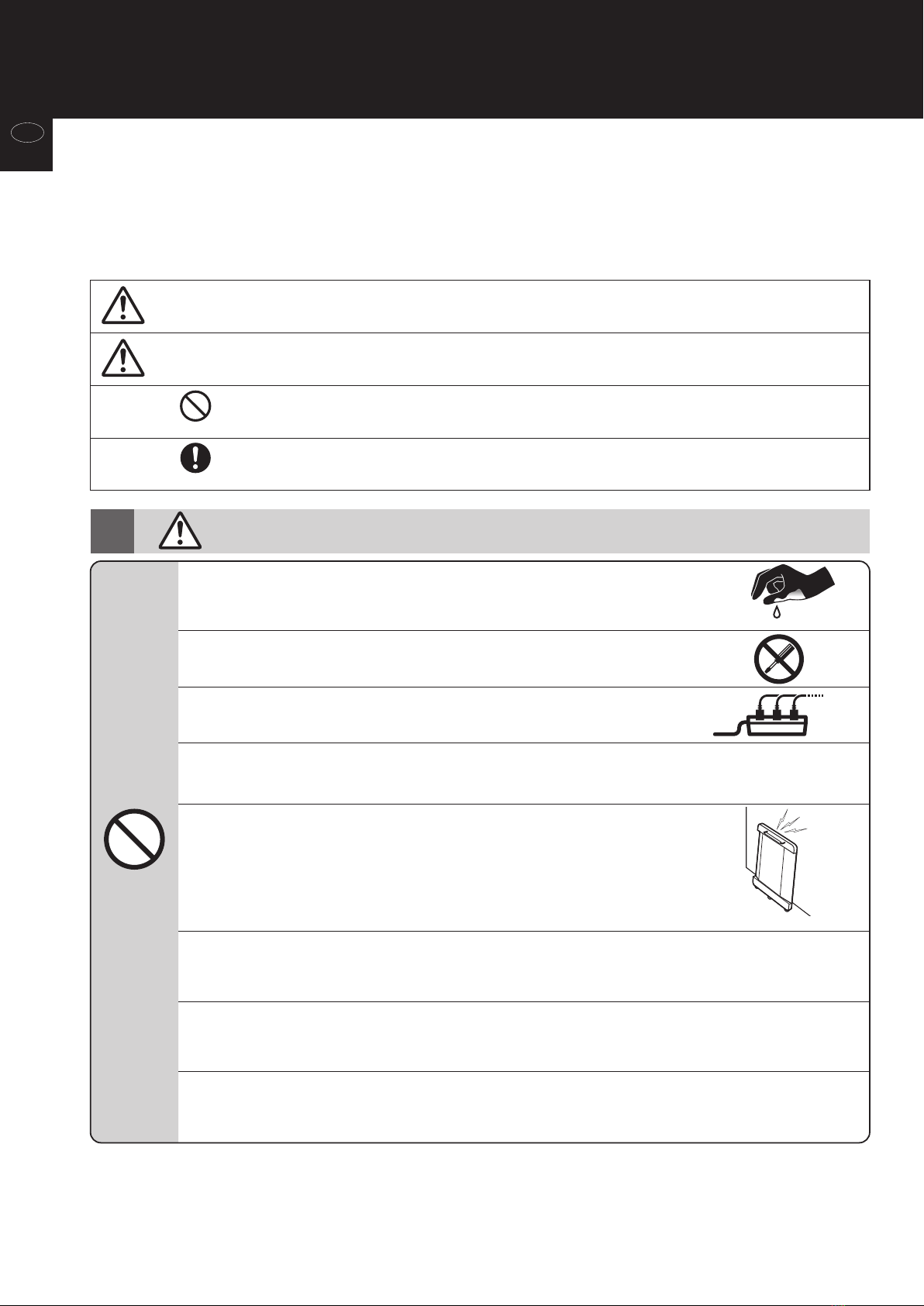
Do not modify this equipment.
There is a risk of electrocution or injury, and precise analysis cannot be guaranteed.
Do not move or install this equipment alone.
There is a risk of injury.
When pulling to move and install this equipment, make to do so with two people or more.
Do not release your hands from the equipment while moving.
Do not stand barefoot on the equipment.
This equipment does not stand alone.
There is a risk of tumble and injury.
This equipment is a weighing scale that measures while in a wheelchair.
There is a safety risk when using it in any other way.
Do not store leaned against a wall.
Doing so may cause it to fall over when you touch it, leading to serious injury.
Make sure to leave the equipment flat when storing. Take safety into consideration,
leaning it between objects or walls so that it won’t fall over.
Do not use the equipment if you have any kind of wound or inflammation on any part of your body
that comes into direct contact with the equipment.
Do not use multiple adapters.
This may result in fire.
Do not handle the plug with wet hands.
This may result in electric shock, fire, or current leakage.
When using batteries, please do not touch the DC jack.
Failure to follow instructions highlighted with this mark could result in
injury or damage to property.
Required
For Your Safety
4
Before use
en

Prohibited
Do not jump on the equipment.
Do not tilt the equipment.
Do not use this equipment near other products that emit electromagnetic waves.
Do not insert fingers into any of the gaps or holes.
Do not apply force to the display.
The screen may break and cause injury.
Do not use the monitor if you have any kind of wound or inflammation on any part of your body
that comes into direct contact with the monitor.
Do not use rechargeable batteries.
Do not use old batteries together with new batteries, or a mix of different types of batteries at the same time.
Doing so may cause battery fluid to leak or the batteries to become excessively hot and rupture, resulting in
damage to the equipment or injury.
Caution
If you do not intend to use this equipment for a long period of time, or if you always use AC adapter,
remove the batteries before storage.
Interpretation of analysis results (e.g. evaluation of measurements and formulation of exercise
programs based on results) must be performed by a professional.
Weight loss measures and exercise based on self-analysis could be harmful to your health.
Always follow the advice of a qualified professional.
This equipment is designated a Class B IT device (mainly for systems intended to be used in indoor
environments) and is CE (EMC) certified, but it may affect devices that are sensitive to
electromagnetic waves.
If connecting a computer or peripheral devices to this equipment, please use devices complying with
IEC60601-1 (EN60601-1). Power must be supplied from a medical isolation transformer for IEC60950
(EN60950) devices. Keep a distance of 1.5m between units during operation. Failure to do so may cause
electric shock to subjects or malfunction.
Stand clear of the subject during measurement to ensure accuracy.
Wipe off the equipment if dust accumulates or it becomes dirty.
Clean the equipment after each use.
Use the included AC adapter (ATM012T-W090V).
Do not lean against the equipment.
Unplug the AC adapter from the equipment when moving it.
The data provided by this equipment should be interpreted by a licensed professional.
This equipment may only be operated by healthcare professionals.
Continually monitor both the subject and the equipment for anomalies.
If an anomaly in the subject or equipment is discovered, take appropriate action, such as stopping the
equipment, while ensuring the safety of the subject.
Required
Avoid using on subjects with allergies to metals.
Allergic reactions may be caused by the stainless steel used in the electrodes of this equipment.
Assist persons with disabilities.
Another person should assist persons with disabilities who may not be able to take a measurement alone.
Be sure that the batteries are inserted in the corrected orientation.
If the batteries are inserted incorrectly, fluid may leak from the batteries and damage the floor.
5
Before use
en

Avoid measuring in multiple locations with greatly differing temperatures.
This may cause inaccurate measurements. Allow the equipment to stand for at least
2 hours before using if it is moved to a new location with a temperature difference of
20°C/36°F or more.
Do not move during measurement.
This causes inaccurate measurements.
Use the equipment under the same conditions and in the same position as much
as possible for accurate tracking of changes.
Readings are affected by the level of hydration and position of the body.
Please use at the same time of day each time, under the same conditions and in the same
body position.
Do not apply your full weight to the rail.
Doing so may cause incorrect measurement.
Required
Prohibited
For Accurate Measurements
Do not take measurements while using transmitting devices such as mobile phones,
as these may affect readings.
Use in a stable location.
Errors in measurements may occur if the equipment is used in an unstable location.
For Your Safety (continued)
6
Before use
en

Required
Regular Maintenance
TANITA recommends that each facility conduct periodic checks of each unit.
Update settings, replace items, or call for service as necessary according to the results
of the visual inspections. Do not use the unit if you see any signs of damage.
Equipment that has been damaged must be checked for proper operation by qualified
personnel before using again.
1. Check the following at least daily:
•
Check that the unit is on a stable and level surface, e.g. on firm flooring, not on a thick carpet
• Date and time settings
2. Visually inspect the following at least weekly:
• Inspect the display for any damage or contamination
• Inspect all cables, cords, and connector ends for damage or contamination
• Inspect all safety-related labeling for legibility
• Inspect all accessories (electrodes, etc.) for wear or damage
3. Visually inspect the following at least monthly:
• Mounting screws
Do not wipe the equipment with corrosive chemicals (benzene, cleaner, etc.).
Please use a mild detergent to clean the equipment.
7
Before use
en

Usage Precautions
Required
For Your Safety (continued)
1. Make sure to clear the area of obstacles and be careful of slanted or uneven flooring and move
slowly.
2. The platform can also be rotated while balanced on the middle caster.
Use the middle caster when rotating.
When installing
3. Holding the handling, use the casters for support and softly lower the equipment.
Be careful not to crush your feet while doing this.
4. Make sure all four of the adjustable feet on the equipment contact the floor.
Failure to do so may cause incorrect measurement.
5. Make sure nothing is in between the equipment and the floor.
Failure to do so may cause incorrect measurement.
When using
1. Do not overexert yourself to measure by yourself.
2. Be very careful when using a wheelchair.
Certain kinds of wheelchairs cannot be put on the platform or may make it difficult to get on
and off.
When lifting
1. When pulling the equipment to move it after use, first disconnect the AC adapter and
connecting cable.
Failure to do so may lead to breaking the equipment when moving it.
2. Holding the handle, slowly pull the platform while supporting it with the casters.
Rotate the handle to the outside when pulling.
Overexertion by lifting may lead to back injury and pain.
*Especially when lifting the platform, its weight may cause it to fall over.
*This product must be installed by at least two people.
*This product is designed as a stationary equipment.
*This product is not intended to be moved by the operator.
8
Before use
en

Control Unit
DC Jack for AC Adapter
Battery Compartment
Connector
Connecting Cable
Handle
Level Gauge
Measurement Area
Platform
Caster x 3 Adjustable Feet x 4
Rail
Connector Attachment
Part Names/Accessories
□Instruction Manual □AC Adapter
Accessories
9
Before use
en

Manufacturer
(Date of manufacture)
For indoor use only
Serial number
NAWI accuracy class III
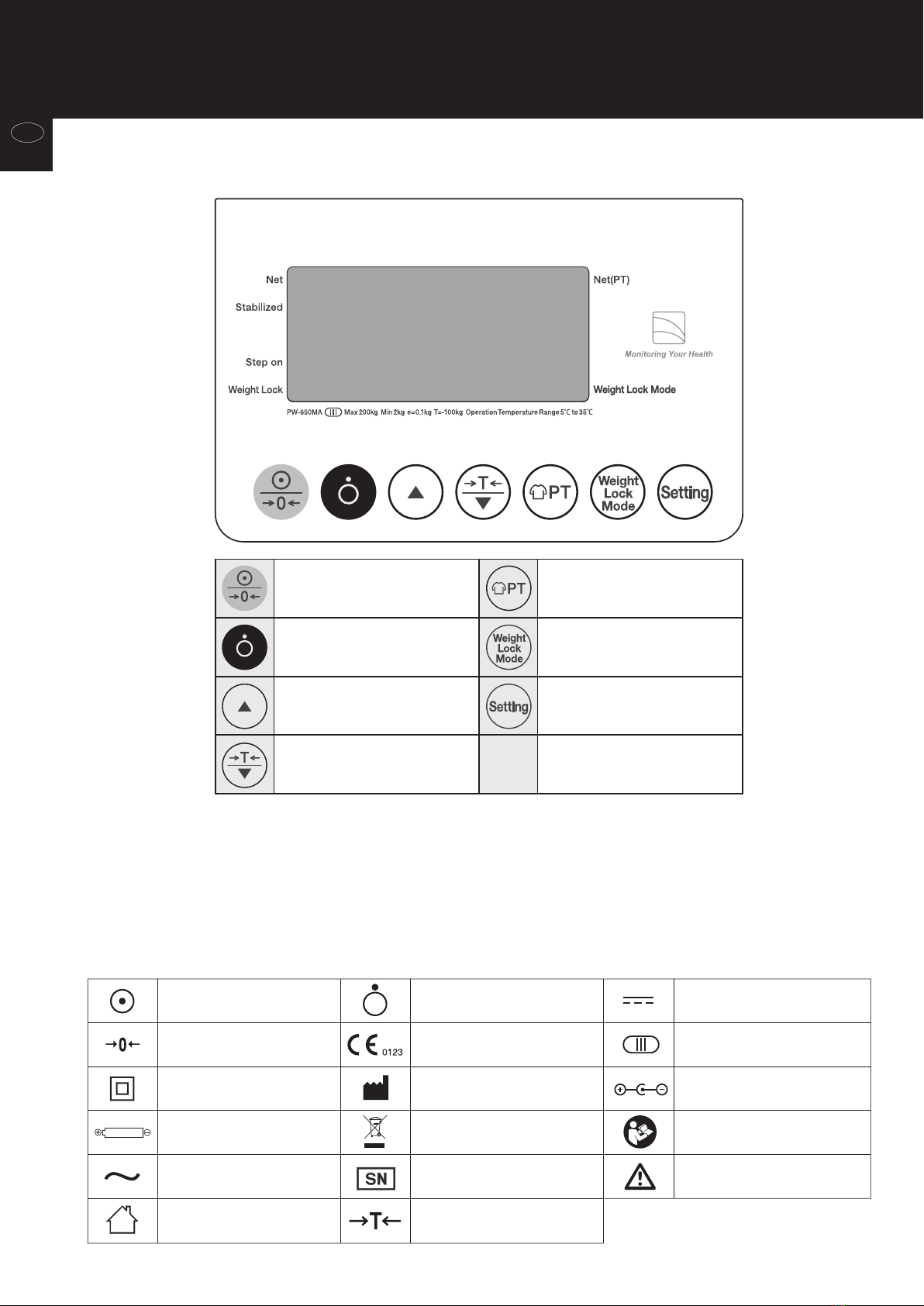
STEP ON : Start measuring weight.
Net / Net(PT) : Indicates that the tare value is input.
Weight Lock Mode : Indicates that the Weight Lock function is activated.
Weight Lock : Indicates that the Weight is locked.
Stabilized : Indicates that the displayed figure has stabilized.
Turn power ON /
Scale reset to zero
Tare /
Decrease numerical value
Turn Weight Lock
function ON/OFF
Input Preset Tare value
Turn power OFF
Increase numerical value Setup various functions
Symbols and their Meanings
Control Panel
Power On Power Off
Tare function
Zero reset
Class II Equipment
Polarity of a battery
Alternating current
Conformity with Medical
Device Directive 93/42/EEC
Direct current
Polarity of d.c. power
connector
WEEE - Waste Electrical and
Electronic Equipment Directives
Caution
Refer to the attached notes.
See the instructions
(continued)
Part Names/Accessories
10
Before use
en
Indice
Altri manuali Tanita Scala

Tanita
Tanita UM-061 Manuale utente

Tanita
Tanita UM-051 Manuale utente

Tanita
Tanita KD-407 Manuale utente

Tanita
Tanita KP-601 Manuale utente

Tanita
Tanita HD 370 Manuale utente

Tanita
Tanita BD-815U Manuale utente

Tanita
Tanita BF-681 Manuale utente

Tanita
Tanita BC-730 Manuale utente

Tanita
Tanita InnerScan BC-1000plus Manuale utente

Tanita
Tanita HD-351 Manuale utente

Tanita
Tanita KD-320 Manuale utente

Tanita
Tanita TBF-551 Manuale utente

Tanita
Tanita 1584 Manuale utente

Tanita
Tanita KP-601 Manuale utente

Tanita
Tanita BC-545F Manuale utente

Tanita
Tanita 4800 Manuale utente

Tanita
Tanita BF-574 Manuale utente

Tanita
Tanita InnerScan BC-551 Manuale utente

Tanita
Tanita UM-050 Manuale utente

Tanita
Tanita InnerScan BC-554 Manuale utente