
Targa DP-5200x Manuale utente

DP-5200x
DVD Player
USER’S MANUAL

1
User’s Manual
FEATURES OF DP-5200x DVD PLAYER
Full discs playback compatibility: DVD,MPEG4,DVD±R,DVD±RW, DVCD, MP3, CD-DA, HDCD , Picture CD.
Excellent AV effect:
1. Composite video, S-Video and component video output. Built-in progressive output enables a higher resolution of
the pictures.
2. Supports PAL or NTSC system with aspect ratio of 4:3 or 16:9. Fiber optical and coaxial audio outputs are also
available.
Totally supports multi view-angle, multi-language, multi-subtitle and multi screen mode for DVD discs.
Supports parental lock control that prevents children to watch unsuitable scenes.
Friendly-interfaced WINDOWS setup menu.
Displays the JPEG picture files.
MP3 three-dimensional (3D)dynamic playback interface.
Possesses agile zoom function, and pictures can be zoomed during playback.
NTSC/PAL/AUTO compatible, no compression of pictures.
Dynamic screen saver function.
Supports setup of video quality.
Software update automatically.
Supports USB and Card reader.
Supports NERO.
Notes: "Dolby" and the double-D symbol are trademarks of Dolby Laboratories Licensing Corporation. Manufactured
under license from Dolby laboratories.
Confidential unpublished works. C 1992-1997 Dolby Laboratories. Inc. All rights reserved.

2
PLEASE READ THIS MANUAL COMPLETELY BEFORE OPERATING THIS UNIT AND KEEP IT FOR FUTURE
REFERENCE.
Safety Precautions
CAUTION: This symbol alerts the user that ¡dangerous voltage¡ exists in the player
cabinet with the risk of electric shock to persons.
CARE: This symbol alerts the user that important operating and maintenance
instructions exist in manual.
WARNING: To reduce the risk of fire or electric shock, do not expose this player to rain or moisture. Dangerous high voltages
are present inside the cabinet. Do not open the cabinet, the player should be repaired by the qualified maintenance
person only.
CAUTION: This DVD player employs a laser system.
To ensure proper use of this product, please read this user’s manual completely and keep it for future reference.
Should the unit require maintenance, please contact an authorized service center.
To prevent direct exposure to laser beam, do not try to open the cabinet, or the laser beam may hurt your eyes.
WARNING: Without agreement of our company or any organization authorized by our company, any change or alteration to this
product may bring inconvenience to you. Refer all serving to qualified service personnel. Servicing is required
when the unit has been damaged in any way, such as power supply cord or plug is damaged, liquid has been spilled
or objects have fallen into the unit, the unit has been exposed to rain or moisture, does not operate normally or has
been dropped.
Position of the label
Important Safety Instructions
Do not take apart or modify
this unit. Clean only with dry
cloth.
Do not place any metal or
liquid on or near this unit to
avoid the risk of fire or
electric shock.
Do not place any metal or
inflammable object into
the cabinet.
CAUTION
RISK OF ELECTRIC SHOCK
DO NOT OPEN
Disposal of your old appliance
1. When this crossed-out wheeled bin symbol is attached to a product it means the product is covered by the European
Directive 2002/96/EC.
2. All electrical and electronic products should be disposed of separately from the municipal waste stream via
designated collection facilities appointed by the government or the local authorities.
3. The correct disposal of your old appliance will help prevent potential negative consequences for the environment
and human health.
4. For more detailed information about disposal of your old appliance, please contact your city office, waste disposal
service or the shop where you purchased the product.

3
User’s Manual
Do not use the broken
power cord or the power
plug.
Do not plug or unplug the
power when the hand is
wet.
Plug in completely. Protect the
power cord for being walked on
or pinched.
Clean the power plug
periodically.
Turn off this unit and unplug it
while lines wear out.
Shut down this unit and unplug it if
liquid has been spilled, or objects
have fallen into the cabinet.
Do not expose this unit to
direct sunlight or in
abnormal hot place.
Do not situate this unit in the dusty
or moist place.
Do not situate this unit under any
heavy object or in unventilated
place.
Do not put this unit in a
shaky slope or a vibrating
place.
Do not use disc with
scratches or deformation.
Only use attachments/accessoires
specified by the manufacturer.
- Do not defeat the safety purpose of the grounding-type plug. If the provided plug does not fit into your
outlet, consult an electrician for replacement of the obsolete outlet.
- The wall outlet must be easily accessible.
- To completely disconnect the device from the electrical power, unplug the power cord.
- Do not use any extension cords.
Shut down this unit and
unplug it if the player smoke,
sound unusual or during
lightning storms or when
unused for a long periods of
time.
4
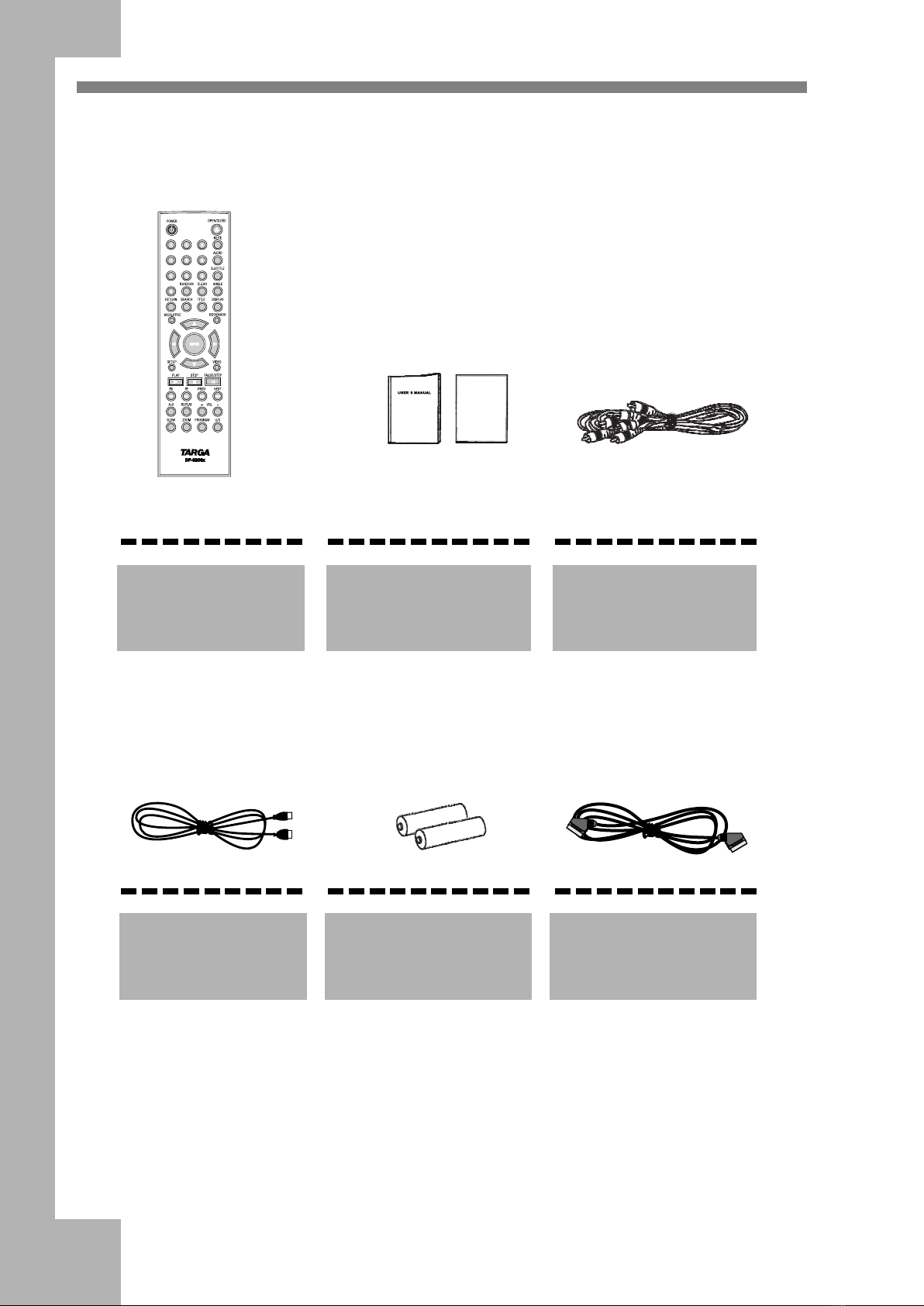
Accessories Open the package of this DVD player,make sure the following accessories
attached with the product:
WARRANTY CARD
Remote Control User's Manual,
Maintenance Card
Audio/Video Cable
USB Cord Battery x2 SCART Cord

5
User’s Manual
I Introduction
Features of the DVD player ............................................................................................................................... 1
Safety Precautions .............................................................................................................................................. 2
Important Safety Instructions .......................................................................................................................... 2-3
Accessories ......................................................................................................................................................... 4
II Connections
Control Button Layout..................................................................................................................................... 6-9
Front Panel/Rear Panel ....................................................................................................................................... 6
DVD VFD .......................................................................................................................................................... 7
Remote Control .................................................................................................................................................. 8
Preparations/Operation of the Remote Control .................................................................................................. 9
Connecting to a TV ..................................................................................................................................... 10-11
Connecting to an Audio System .................................................................................................................. 12-13
The Amplifier System ...................................................................................................................................... 13
Connecting to an Amplifier with Digital Input Port ......................................................................................... 14
III Playback
Playback a Disc ........................................................................................................................................... 15-18
Basic Playback ................................................................................................................................................. 15
Playback Control ......................................................................................................................................... 16-17
Set Hot Button .................................................................................................................................................. 17
DVD Functions ................................................................................................................................................. 17
Volume Control ................................................................................................................................................ 18
Mp3 and MPEG4 /NERO/DivX Playback ....................................................................................................... 18
JPEG Picture Display ....................................................................................................................................... 18
SD/MMC/SM/MS/CF/MD/XD/USB Memory Stick Play ............................................................................... 18
Screen Saver Function ...................................................................................................................................... 18
USB/External HDD Play .................................................................................................................................. 18
IV Function Setup
Function Setup ............................................................................................................................................. 19-21
V Others
Notes on Discs .................................................................................................................................................. 22
Notes on Service ............................................................................................................................................... 23
Specifications ................................................................................................................................................... 24
6
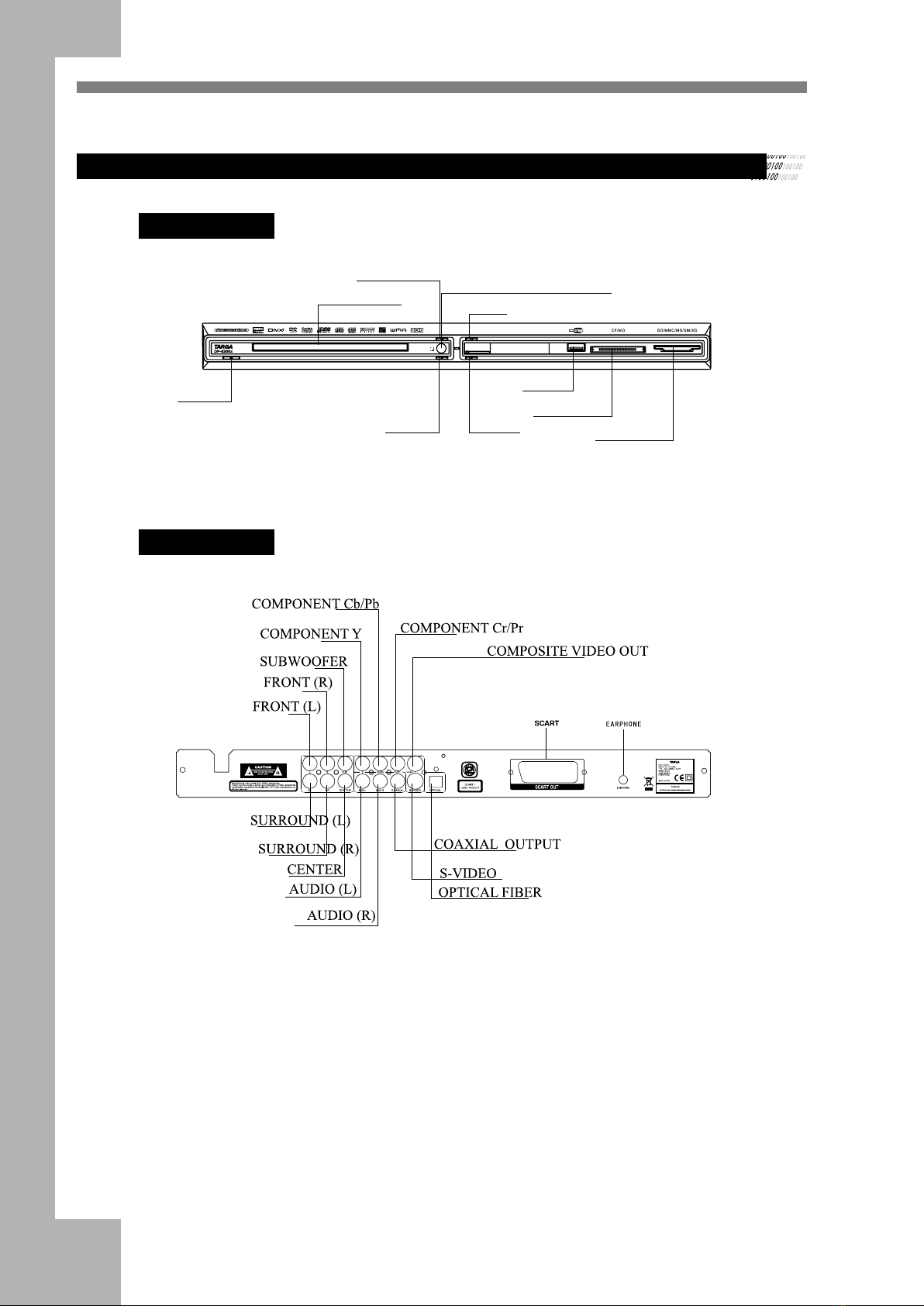
Front Panel/Rear Panel
Front Panel
POWER
DISC TRAY
REMOTE CONTROL WINDOW
OPEN/CLOSE
STOP
PLAY PAUSE
USB
CARD SLOT
CARD SLOT
Rear Panel

7
User’s Manual
DVD VFD
DVD VFD
DVD INDICATOR
DOLBY INDICATOR
PBC INDICATOR
MP3/MP4 INDICATOR TIME INDICATOR
REPEAT PLAYBACK INDICATOR
PLAY/PAUSE INDICATOR
ANGLE INDICATOR
VCD INDICATOR
REPEAT A-B
Notes:
It is normal if some VFD indicators disappear in playing procedure without harm.

8
Remote Control
1. POWER: switch DVD player on or go to standby mode
2. PROGRAM: program playback
3. AUDIO:audio language selector
4. ANGLE: select DVD camera angle
5. SUBTITLE:subtitle language selector
6. MENU/PBC:access menu of a disc / open or close the PBC(VCD2.0 or SVCD)
7. ZOOM: enlarge video image
8. DIRECTION BUTTONS: select an item
9. ENTER: acknowledge selection
10. MUTE: mute sound
11. STOP: stop playback
12. PLAY: start playback
13. FB: fast reverse playback
14. FF: fast forward playback
15. REPEAT: repeat chapter, track, title or disc
16. A-B: repeat a specific segment
17. VOL: volume up +; volume down -
18. SLOW: slowly playback
19. PAUSE/STEP:pause and step playback
20. PREV: go to a previous chapter or track
21. NEXT: go to a next chapter or track
22. BOOKMARK:Bookmark playback
23. SEARCH: go to a specific scene
24. TITLE: title of a DVD disc
25. DISPLAY: to display information of a disc
26. SETUP: setup function
27. VIDEO: switch video output
28. CLEAR: clear input
29. 0-9 numerical key: select numbered items
30. U/C:switch the DVD/USB/CARD
31. OPEN/CLOSE: open or close tray
32. RETURN
33. RANDOM:Random playback

9
User’s Manual
Preparations for the Remote Control
Insert the batteries into the remote control, and you can use it
to operate DVD player.
1Open the cover
2Insert batteries
Make sure to match the + and - to the
mark inside the battery compartment.
3Close the cover.
Notes on the Remote Control
Direct the remote control at the remote sensor of the DVD
player.
Do not drop or give the remote control a shock.
Do not leave the remote control near an extremely hot or
humid place.
Do not spill water or put anything wet on the remote control.
Do not open the remote control.
Operating with the Remote Control
This section shows you how to use the remote control.
Point the remote control at the remote sensor
and press the buttons.
30 30
Distance: Within 7m from the front of the
remote sensor.
Angle: About 30¡in each direction of the
remote sensor.
Do not expose the remote sensor of the DVD
player to a strong light source such as direct
sunlight or illumination. If you do so, you
may not be able to operate the DVD player
with the remote control.
Notes on Batteries
Improper use of batteries may cause battery leakage and
corrosion. To operate the remote control correctly, follow
the instructions below.
Do not insert the batteries into the remote control in the
wrong direction.
Do not leave the discarded or exhausted batteries in the
remote control.
Do not use different types of batteries together, or mix
old and new batteries.
If you do not use the remote control for a long period of
time, remove the batteries to avoid possible damage from
battery corrosion.
If the remote control does not function correctly or if the
operating range becomes reduced, replace all batteries
with new ones.
If battery leakage occurs, wipe the battery liquid from the
battery compartment, then insert new batteries.
The battery can last for about 1 year when normally used.
Dispose worn-out batteries not with your domestic waste.
Please contact your local government for disposal
practices in your area.
Indice
Altri manuali Targa Lettore DVD


