Teac DVTV5190F Manuale utente

TV
+
WARRANTY INFORMATION INSIDE. PLEASE READ
OWNER S MANUAL
IMPORTANT!
www.teac.com.au
51 cm colour television
DVTV5190FDVTV5190F

TEAC PRODUCT WARRANTY PERIOD
Warranty Terms & Conditions
Please read thiswarranty card.
Keep your purchasereceipt to enableyou to proceedquickly in theevent of aWarrantyService.
1. TEAC warrantsto the originalretail purchaser only, that thisproduct is freefrom defects inmaterial and
workmanship under normaldomestic use andauthorises free serviceduring the warrantyperiod at any
TEAC AuthorisedCentre only.TEAC warranty onlyapplies to products purchased, used and serviced in
Australia.
2. Subject tothe terms herein,this warranty effectivelycovers the equipment as specified inthe Warranty
Periods Table from thedate of purchase.
3. Allparts, except theexternal cabinet, arewarranted as specifiedin Warranty Periods Table, and willbe
repaired or replacedat the solejudgement of TEAC.
4. Normal customermaintenance as describedin the owner’smanual is notcovered by this warranty (such as
cleaning VCR headsetc.)
5. This warrantydoes not apply to equipment showing abuse, damage or that it mayhave been tampered
with, altered orrepaired outside anyTEAC AuthorisedService Centre. If so, the warranty will be void.
*Yournearest AuthorisedTEAC Service Centre is listedin your OwnersManual
6. In theevent that thisunit or anydefective parts mustbe returned to TEAC Service Centres,a copy ofthis
warranty certificate andof your purchasereceipt must beenclosed to bea valid warranty. Such
equipment or partsmust be sentfreight prepaid tothe nearest authorisedTEAC Service Centre.After the
repair, theunit will beavailable for collection by the owner or it willbe returned tothe owner.The
warranty does notcover freight orinsurance. In allcases of in-transitdamages or loss, a claim must be
filed against thecarrier by thepurchaser.
7. In homeservice will onlybe provided aspart of this warranty if all the following conditions are met;
a) The productis a Colour Television of 51cm screensize or over.
b) The productis within the warranty period.
c) The productis located withinthe normal service area of the local TEAC ServiceProvider.
In any othersituation or circumstance,where an inhome service callis made, a service fee will be
charged by theService Provider.
8. TEACTotal Carein home serviceand installation isavailable at competitiverates.
9. No oneis authorised toassume any liabilityon behalf ofTEAC or imposeany obligation onit, in
connection with thesale of anyequipment other thanas stated inthis warranty and outlined above.
10. In noevent will TEACbe responsible or liable for indirector consequential damagesfrom interrupted
operations or othercauses.
11. Warranty is nottransferable to any subsequent purchaser ifthe product issold during thewarranty period,
Televisions /Plasma 106 cmand above 1Year (In-Home Service Included)
LCD televisions 56cmand above 1Year (In-Home Service Included)
Televisions -51cmand above 1Year (In-Home Service Included)
Televisions under51 cm 1Year (No In-Home Service)
Digital Set Top Boxes 1Year (No In-Home Service)
VCR 1Year (No In-Home Service)
DVD 1Year (No In-Home Service)
Audio Systems 1Year (No In-Home Service)

WARRANTY PROCEDURES
If you haveany other queriesregarding service or warranty please contactthe TEAC Service Centrein
your State.
Please keep this information for your own records.
Please refer to the owner s manual to ensure that you have followed the correct installation and
operating procedures.
1. Read owner s manual carefully.
2. If you require Warranty Service, please contact the TEAC Service Center.
3. Please have your purchase receipt as your proof of purchase and the following details completed for
a valid Warranty.
4. Please ensure that your product is packed appropriately upon return to the service center.
Owner s Name
Owner s Address
Postcode
Model Name/No. Serial No.
Dealer s Name
Dealer s Address
Postcode
www.teac.com.au
For Australia market only

CONTENTS
Before Operation
Basic operation
Safety and Precautions...............................................................................2
Installation...................................................................................................3
Aerial connection........................................................................................3
Preparation of the remote control...............................................................3
Function buttons and external sockets.....................................................4
Front panel of the TV set...........................................................................4
Rear panel of the TV set.............................................................................4
Using the remote control............................................................................5
Switching the TV set on/off........................................................................6
Watching TV ................................................................................................7
Watching TV program................................................................................7
Program swap and auto scan functions.....................................................8
Searching channel.......................................................................................9
Full automatic mode.................................................................................9
Semi-automatic search............................................................................10
Manual fine tune......................................................................................11
Program skip ...........................................................................................12
Convenient picture and sound control functions...................................13
Multiple picture modes ...........................................................................13
Black stretch and noise reduce................................................................14
Mute and Fade ........................................................................................15
Time functions............................................................................................16
Clock setting and timer on/off functions................................................16
Sleep timer and program preset ...........................................................17
Setup function .........................................................................................18
Screen saver and Calendar.....................................................................18
AVL .........................................................................................................19
Organise function......................................................................................20
Seting the lock...........................................................................................21
DVD Operation
Basic Playback..........................................................................................23
Advanced Playback...................................................................................24
Special Function Playback - JPEG, MP3 and Kodak Picture discs......25
DVD System Setup....................................................................................27
Playable Discs...........................................................................................31
Disc Protection and DVD Characteristics...............................................32
Others
Connection to the external audio and video equipment.......................33
Troubleshooting guide ...........................................................................34
Specifications............................................................................................36

Safety and Precautions
To ensure safe and reliable operation of the TV set ,please observe the following precaution, operation and maintenance.
Attention:
1.Pay attention to the power supply cord before installing
the TV set. Do not hang anything on the cord, and avoid treading on the cord.
2.The slots on the housing back are designed for ventilation to ensure reliable operation of the TV set and prevent
overheating. They must never be covered or blocked. The TV set must not be placed near a heat source or it
might be damaged.
3.The outdoor antenna must not be erected close to HV lines or other power supply lines. Use extreme care when
erecting the antenna and not to touch live wires or injury may occur.
4.This TV set can only use the supply voltage and frequency indicated on the back of the housing. If your power
supply does not comply with them, please consult with the service personnel.
5. Do not let any object fall into the ventilation openings of the TV set housing, nor let any liquid flow into the
machine via the openings.
6. Do not subject the TV set to rain, or use it in a damp environment. When cleaning dust, be sure to remove the
power supply plug from its socket first. Do not clean the housing directly with liquid detergent, use a damp cloth.
Be sure to remove the power supply plug from its socket and remove the antenna plug during a thunderstorm or
when it will not be used for long time, to avoid components being damaged by lightning.
7. If you use an indoor antenna, do not let it touch any electrical appliance, or normal reception of TV programs
may be affected.
Safety:
1.Do not remove the back of the housing by yourself, as high voltages inside the unit are dangerous. If it is
necessary to open the back, ask a technician with specialized service experience.
2.Remove the power supply plug from its socket in case of the following conditions, and consult with service
personnel.
(1)The power cord or plug are damaged or shows cracking.
(2)Any object has fallen into or liquid flown into the TV set.
(3)The performance of TV set has deteriorated significantly or there is damage on the housing.
(4)The TV set will not operate normally according to the instructions.
3.Please remove the power supply plug from its socket when the TV set will not be used for a long period of
time.
CAUTION:
Use of controls, adjustments or procedures other than
those specified herein may result in hazardous radiation exposure.
CAUTION: TO REDUCE THE RISK OF ELECTRIC
SHOCK, DO NOT REMOVE COVER(OR
BACK). NO USER SERVICEABLE PARTS
INSIDE. REFER SERVICING TO QUALIFIED
SERVICE PERSONNEL.
The lightning flash with arrowhead symbol, with an equilateral triangle is intended to alert
the user to the presence of Uninsulated dangerous voltage Within the product s enclosure
that may be of sufficient magnitude to constitute a risk of electric shock to the person.
The exclamation mark within an equilateral triangle is intended to alert the user to the
presence of important operating and maintenance (servicing) instructions in the literature
accompanying the appliance.
WARNING: TO REDUCE THE RISK OF FIRE
OR ELECTRIC SHOCK, DO NOT
EXPOSE THIS APPLIANCE TO
RAIN OR MOISTURE.
CAUTION
DO NOT OPEN
DO NOT OPEN
RISK OF ELECTRIC SHOCK
!
!
This appliance has a serial number on the rear
panel. Please record the serial number and retain
it for your records.
Serial Number:___________

Installation
1.First read carefully the relevant instructions in Safety and precautions .
2.Place the TV set in a room where there is no direct sunlight on it. Any light reflecting from the screen will cause fatigue
of your eyes.
3.Use gentle indirect lighting for comfortable watching. The best distance of watching is 5~7 times the screen height.
4.Keep a space of 10cm or over between the TV set and wall for good ventilation.
5.Never put the TV set in a place with excessive temperature or moisture, to avoid damage or failure of its components.
A color TV set is likely to be affected by magnetic fields causing color distortion. If the TV set is moved while on, turned
or affected by a magnetic object nearby, turn off the power supply and wait for at least 1 hour before turn it on. That is to
ensure that the automatic demagnetizing circuit will operate eliminating adverse effects of magnetism on color purity.
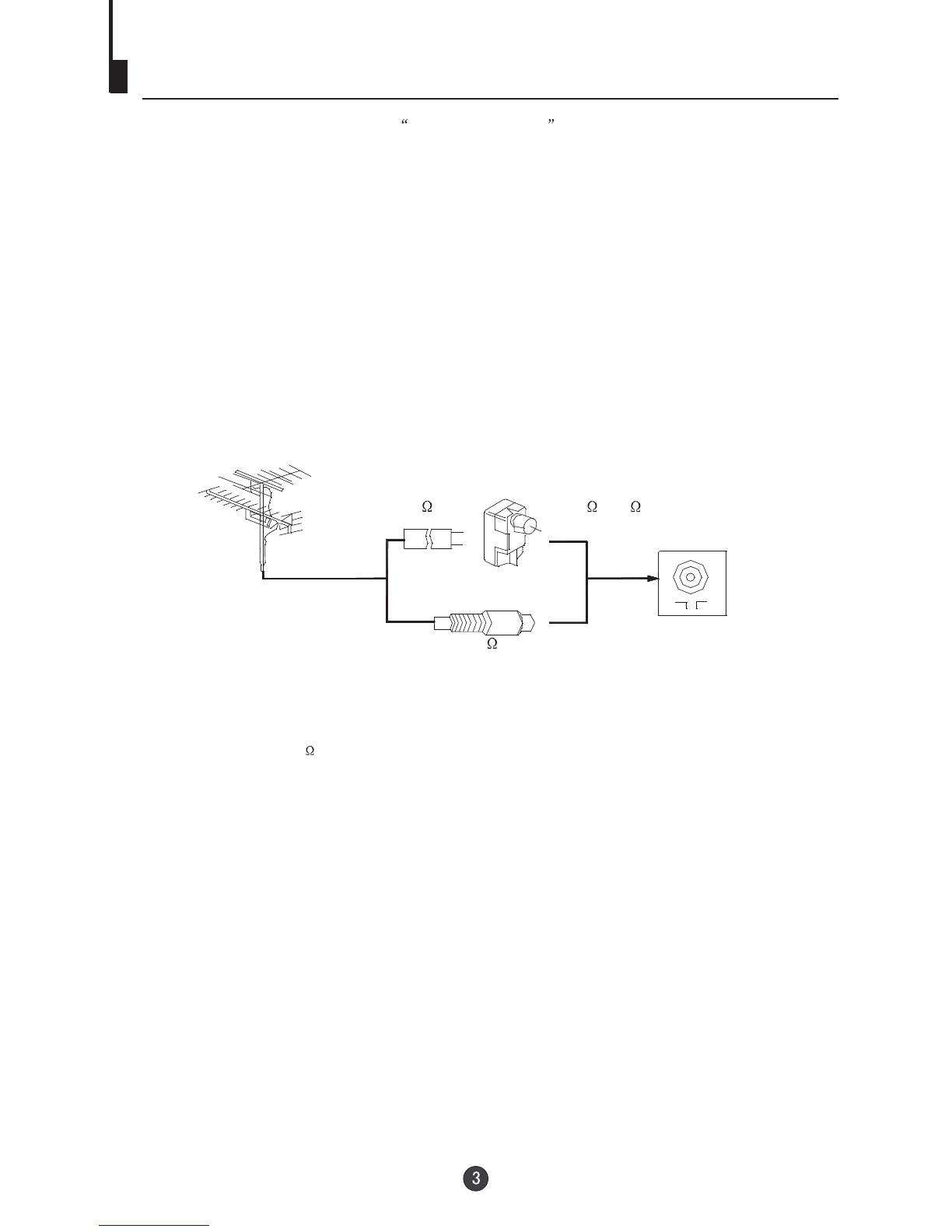
For good reception use an outdoor antenna. The recommended type and location of antennas varies between different areas.
Notes:
1.Connect the outdoor antenna as shown above.
2.It is suggested to use 75 coaxial cable to eliminate
interference or noise.
3.The cable must not be tied together with supply cords.
Automatic demagnetizing
Antenna connection
Preparing the remote controller
1Remove the battery cover of remote controller.
2Load two AA type batteries into the chamber observing the correct polarity.
Precautions operating the remote controller
1.Direct the remote controller to the infrared receiver window of the TV set.
2.Do not press the keys on the remote controller continuously.
3.If the remote controller will not be used for long time or if the batteries have
depleted, please remove them to prevent leaking.
4.Never throw batteries into fire and properly dispose of the used batteries.
5.Take care not to drop, damp or dismantle the remote controller.
Parallel flat cable
(300 )
Impedance adaptor
(300 -75 )
Antenna input
(75 )

Function Buttons and External Sockets
Front panel the TV setFront panel the TV set
Rear panel of the TV set
VIDEO L-AUDIO-R
TV/DVD MENU V- V+ P- P+
Video R/LAudio
The DVD Player
Power Indicator
Signal Receiver
TV/DVD Switching
Menu
Volume up/ down
Channel Position up/down
Open/close the DVD
Stop the DVD
Power Switch
Play the DVD
DVD component
Y terminal
DVD component Cb terminal
DVD component Cr terminal
OUT
IN
VIDEO L RAUDIO
YCbCr
Audio left channelinput terminal
Audio right channelinput terminal
Audio left channeloutput terminal
Audio right channeloutput terminal
Antenna input socket
Video input terminal
Video output terminal
COAXIAL
COAXIAL
OUT
IN
VIDEO
LR
AUDIO
YCbCr
COAXIAL

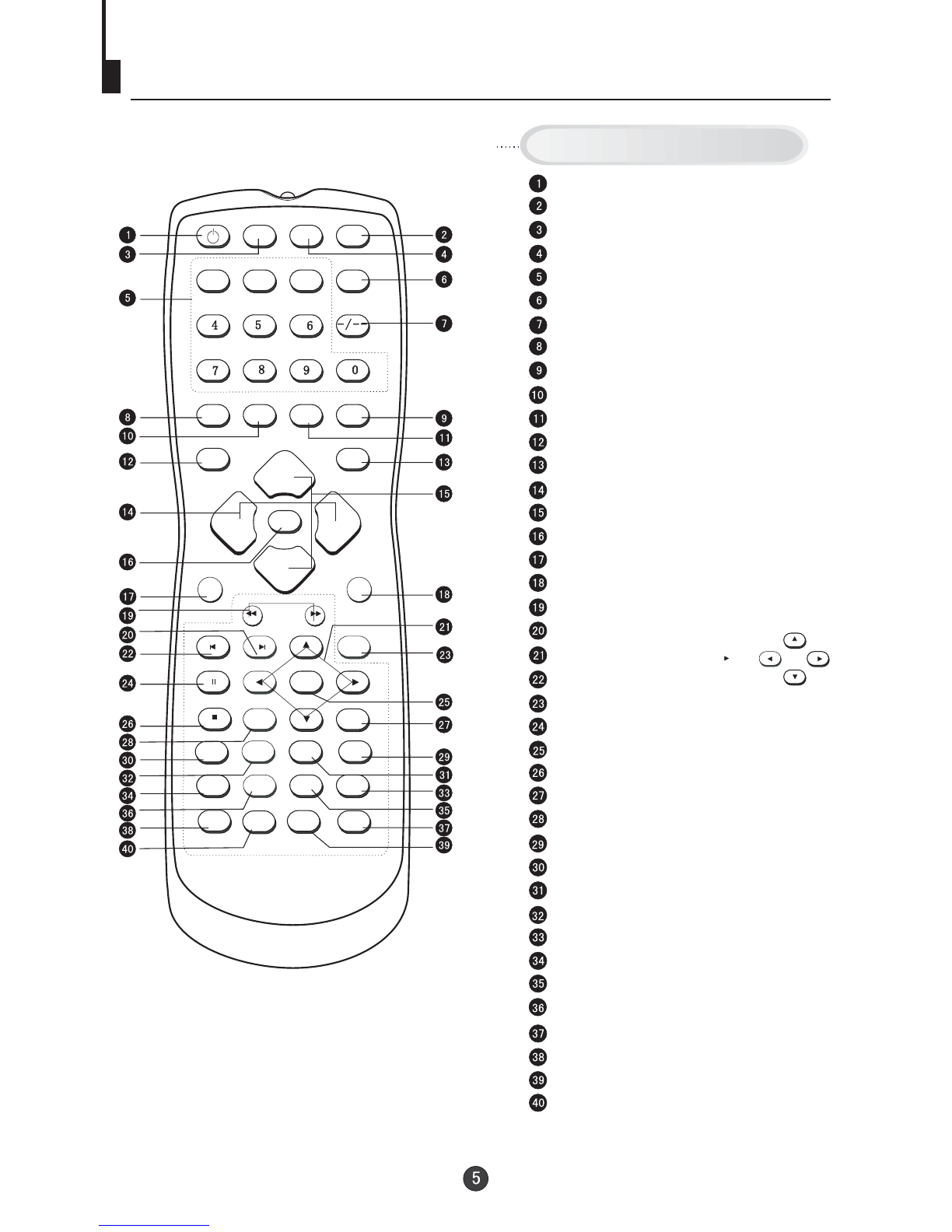
Using the Remote Control
DVD/TV OPEN/CLOSE
NEXTPREV
REV FWD
STOP
PAUSE/STEP
D.MENU
P+
P-
PLAY/ENTER
VOL+
VOL+
VOL-
SETUP
SETUP
CAPTION
CAPTION
A-B REPEAT
123
PROGRAM
TITLE/PBC
TITLE/PBC
ANGLE
CALENDAR
AUDIO
MENU
MUTE
SCAN
SWAP
EXIT
TV/AVP.STD
TIME
SLOW
CALL
POWER
SL
SEARCH
H.LOCK
I-II
D.CALL
10+
DVD SEARCH
DVD SETUP
Stand By
DVD Open/close
TV/DVD
Mute
Number Buttons
(Not available)
Digital Selector
Call Screen Display
Former Program
Exit TV Menu
Time Menu
Picture Mode
TV/AV Exchange
Volume Adjust
Channel Selection
TV MENU
Calendar
Scan through TV channels
DVD FAST REVERSE / FAST FORWARD
DVD NEXT
DVD Cursor Move button
DVD PREVIOUS
H.LOCK
DVD PAUSE/STEP
DVD PLAY/ENTER
DVD STOP
DVD MENU
1O+
DVD SUBTITLE
DVD SLOW
DVD REPEAT
DVD PROGRAM
DVD ANGLE
DVD TITLE
DVD AUDIO
(Not available)
DVD Status display CALL
Buttons on the remote control
DVD A-B REPEAT
UP
DOWN
LEFT RIGHT

4
AUTO
BG
Switching on/ off the TV set
Switching the TV set on/ off
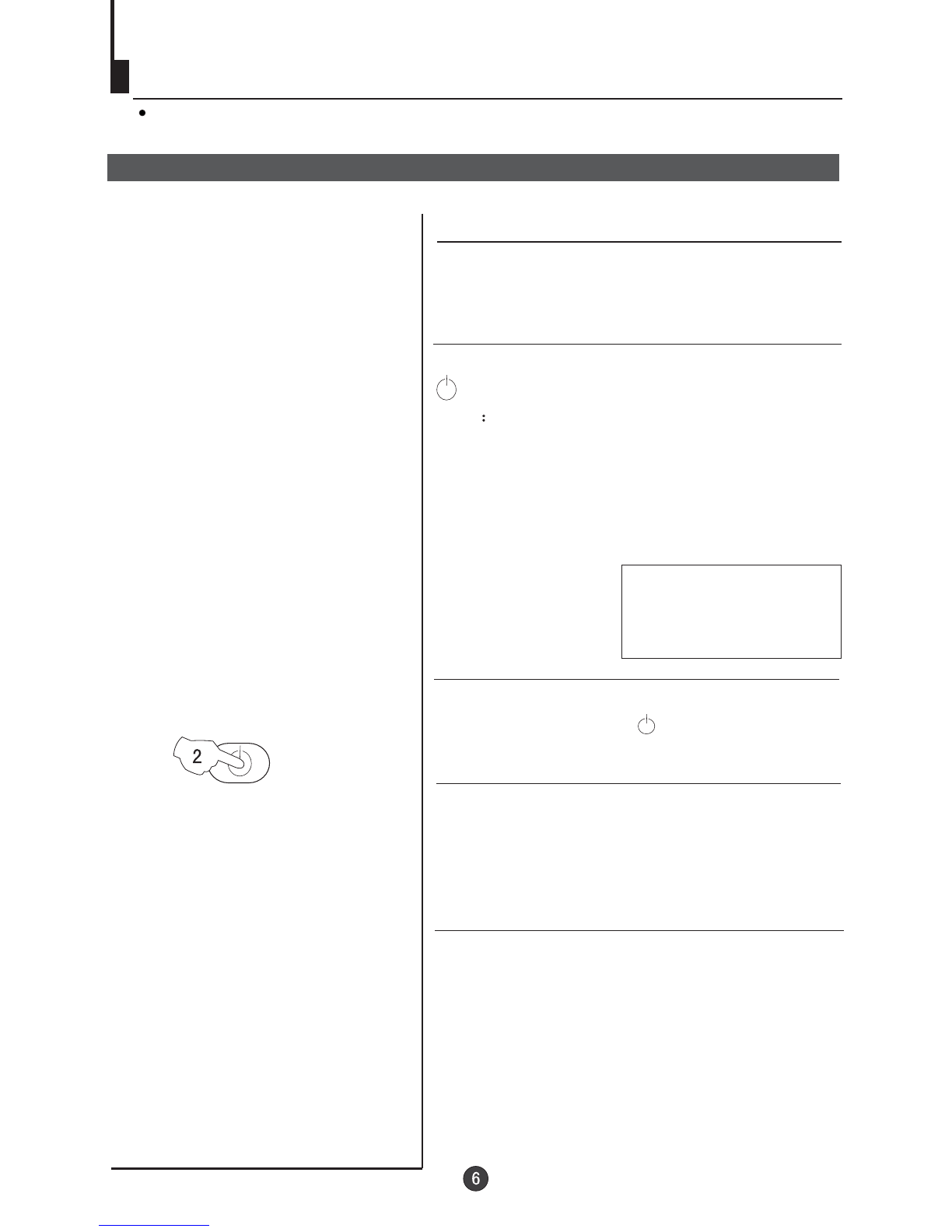
2 If the indicator is lighting in red, press the button
on the remote control again.
Note
1 When you can't operate the TV set with a
remote control, you can turn it pressing
the P+ on the TV set (Child Lock must
be turned off).
on by
/- buttons
2 If you want to change to standby mode,
press down the button on the remote
control. Press again to switch back on.
3 If you want to fully switch off the power supply
for the TV set, please press the power switch
button on the front panel.
Auto switch off function
POWER
This section explains the use of the power button and remote handset
to turn your unit on and off.
1 Press the AC power switch on the front of the
TV. The power indicator will light.
If transmissions are finished for the day, the
Automatic Power Off feature will put the TV to
standby automatically. The Automatic Power
Off feature will not operate in AV mode or
when the background is set to off (see page
18).

Watching TV
Watching TV programs
How to select TV program
Select the desired program
Select the desired sound
You can watch a TV program on a channel which has been tuned to a broadcast.
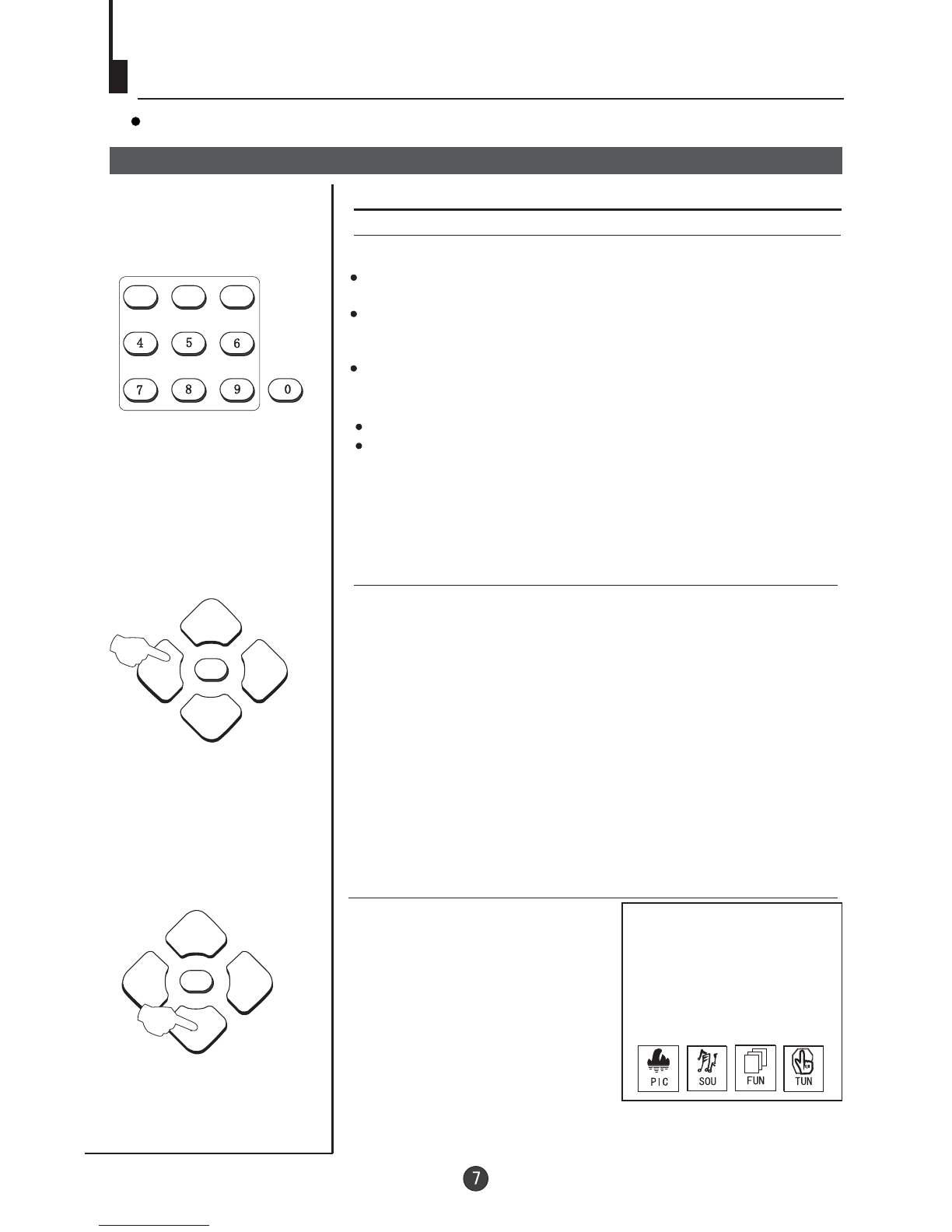
1 Using number buttons
2 Using the P+/- buttons
Press the P+button to increase channel number.
Press the P-button to decrease channel number.
Press the VOL-/+ buttons on the remote or the front of the
TV set to adjust the volume level. The range is 0~100. When
the volume buttons are pressed the volume level is
displayed automatically on the TV screen.
Directly enter the channel number with the numeric keypad
on the remote control.
To select channel numbers between 10 ~ 99 press [-/--] button
and enter the two digit channel number
To select channel numbers between 100 ~ 218 press [-/--] button
twice and enter the 3 digit channel number
123
How to select the menu
Press the MENUbutton and
the menus willappear at the
bottom of thescreen. The
PIC icon willinitially be
flashing. Each subsequent
press of themenu button
will highlight SOU(sound),
FUN (function), TUN
(tuning) icons respectively.
Press the P-button to display
the appropriate menu.PressEXIT to exit.
P+
P-
VOL+
VOL-
MENU
P+
P-
VOL+
VOL-
MENU
Altri manuali per DVTV5190F
1
Indice
Altri manuali Teac Combinazione TV DVD