
Technovision THD003 Manuale utente

MediaPlayer
THD003
User Manual
Movie Photo Music

Content
I. Main Features.......................................................................................................1
1.1.Applications....................................................................................................... 1
1.2.Display format..................................................................................................1
1.3. Supported Languages.................................................................................. 3
II. Remote control.................................................................................................. 4
III.SETUP MENU...................................................................................................... 7
IV. Interface port..................................................................................................... 9
V. Operation Manual...........................................................................................12
5.1 Boot auto-play............................................................................................... 12
5.2 Custom control display........................................................................................... 12
5.3 Pictures Sync playback(BGM).......................................................................13
5.4 Custom function............................................................................................14
5.5 Other functions’ operation manual........................................................ 15
5.5.1 RS232 control display.............................................................................15
5.5.2 Button control display………………………………………………………………24
5.5.3 Motion sensor display..................................................... 27
VI. Pin definition of button interface......................................... 29
VII. Setting of picture playback................................................ 30

1
THD003 isahighperformance1080pFullHDmediaplayer.
I. Main Features
1.1 Applications
Ideal replacement for Blue Ray and DVD video players.
Ideal playback unit for Large LCD and Plasma display.
High Definition Information Display for Resorts, Hotels, Restaurants, Shopping
Malls, Airports, etc.
HD Video player for Museums and Science Center exhibits.
HD Video player for Interactive traveling exhibit.
HDVideoinformationsystemforThemeParks.
1.2 Display format
1.2.1 Supported audio code:
LPCM, digital coaxial and optical 5.1 channels, stereo double track.
1.2.2 Supported audio files:
MP3, WAV, OGG, FLAC, AAC, LC-AAC
1.2.3 Supported picture format:
JPEG, BMP, GIF, PNG

2
1.2.4 Supported subtitles format:
SRT, SMI, SUB, SSA, IDX+SUB
1.2.5 Supported video code:
MPEG1/2/4, H.264, AVC, VC1, WMV, RM/RMVB, DivX3/4/5/6, Xvid3/4/5/6
1.2.6 Supported video files:
RM/RMVB, AVI, TS, M2TS, MTS, MKV, MOV, FLV, DVD-ISO, BD-ISO, MPG,
DAT, ASF, TP, TRP, WMV, IFO, SWF, 3GP, EVO, DIVX, MP4, OGM
1.2.7 Video Format:
A. Apple quick time AVC (xxx.mov) at up to 35 mbps:
The video size is up to 1080p (1920X1080) and average bit rate is 35mbps
with peaks at up to 50mbps.
B. Mpeg2 HD (xxx.ts, xxx.m2ts) at up to 40 mbps:
The player supports Mpeg2-HD xxx.ts and xxx.m2ts files (main profile@high
level).The video size is up to 1080p (1920X1080) and bit rate is 40mbps.The
player supports both CBR and VBR encoding.
C. Windows media HD (xxx.avi,xxx.wmv) at up to 35 mbps:
The player supports windows media HD VC-1 files xxx.avi (AP@L3). The
video size is up to 1080p (1920X1080) and average bit rate is 35mbps with
peaks at up to 50mbps.For continuous 24/7 loop file only, limit the average bit
rate to 25mbps.

3
D. Panasonic and Sony HD camcorder (xxx.mp4):
The player plays files created by Panasonic and Sony HD camcorders. These
HD camcorders record video using AVC-HD file format (h.264).
E. Flip Video HD movie file (xxx.mp4):
The player supports movie files that have been created using Flip Video hand
held HD recorder. Files created are mpeg4 HD, xxx.mp4.
F. Digital camera movie file (xxx.mp4,xxx.avi):
The THD003 supportsmoviefilesxxx.mp4,xxx.avi,xxx.movthathavebeen
created using regular Digital cameras (with movie recording capability).
G. DVD and Mpeg2 video:
The player supports standard DVD file xxx.vob and also regular Mpeg2 file.
H. VIDEO OUTPUT (all are ON simultaneously):
The player has 2 video output: HDMI and Composite. When playing, these
video outputs are simultaneously ON regardless of the video setting and file
being played
1.3 Supported Languages
English, Espaňol, Français, Deutsch, Italiano, Dutch.

4
II. Remote control
All procedures in this manual can be carried out using the remote control buttons.
See the following for details on each button and its function:
No.
Name
Function
1
Power
Power button:
Press to POWER on or off the device
2
Title
Title button:
Press to view the title of DVD
3
Info
Info button:
Press to view the current channel information.
4
Mute
Mute button:
Press to mute audio output, and press again to resume.
5
Numeric
Numeric button:
Press to enter channel numbers or numeric input when changing settings
6
Repeat
Repeat button:

5
Press REPEAT 1 / ALL to set repeat option - Chapter, Title or Off.
7
Time seek
Time seek button;
Press to jump to a specific point on the disc or title. Specify the point using
Title, Chapter and Time.
8
TV Mode
TV Mode button;
Press to switch between NTSC Interlaced, NTSC Progressive,
PAL Interlaced, and PAL Progressive.
9
Home
Home button;
Press to Return the main menu
10
Menu
Menu button;
Press to enter the main menu
11
Slow
Slow button:
Press to playback in slow motion. Three motion settings are available.
Five slow motion levels (3/4, 1/2, 1/4, 1/8, 1/16x) are available.
Press to resume regular playback.
12
Setup
Setup button:
Press to access the Setup Menu directly to change system settings.
13
Zoom
Zoom button:
Press to zoom in/out when playing back photos or Video programs.
Photo zoom levels: 2X, 4X, 8X, 16X;
Video zoom levels: 2X, 3X, 4X, 8X.
14
Left (Arrow)
Press the arrow button to navigate the menus
15
Right (Arrow)
Press the arrow button to navigate the menus
16
Up (Arrow)
Press the arrow button to navigate the menus
17
Down (Arrow)
Press the arrow button to navigate the menus
18
OK
OK button:
Press to select confirm in menus.
19
Vol -
Vol - button:
Press to reduce the volume.

6
20
Vol+
Vol + button:
Press to increase the volume.
21
Audio
Audio button:
Press to select an audio track on a HDD or USB file.
22
Subtitle
Subtitle button:
Press to activate available subtitles when play the DIVX file.
DivX subtitle supported: SRT,SMI,SUB,SSA format file
23
Resume
Resume button;
Press to resume play
24
Angle
Angle button:
Press to view angle of DVD
25
Pause
Pause button:
Press to pause playback of a DVD or HDD title.
26
Return
Return button:
Press to return to the previous screen when navigating the menus.
27
Stop
Stop button:
Press to stop playback.
28
FR
Fast Rewind button:
Press to fast rewind the current playback.
Press repeatedly to select faster rewind speeds.
29
FF
Fast Forward button:
Press to fast forward the current playback.
Press repeatedly to select fast forward speeds.
30
Previous
Previous button:
1. Press to go the prev. on a HDD or USB file when playing music.
2. Press to page up the file list at Browser.
3. When play photo, the button is enable; play Movie and Mp3 file, the
button is disable.
31
Next
Next button:
1. Press to go the next on a HDD or USB file when playing music.
2. Press to page down the file list at Browser.
3. When play photo, the button is enable; play Movie and Mp3 file, the
button is disable.

7
III. SETUP MENU
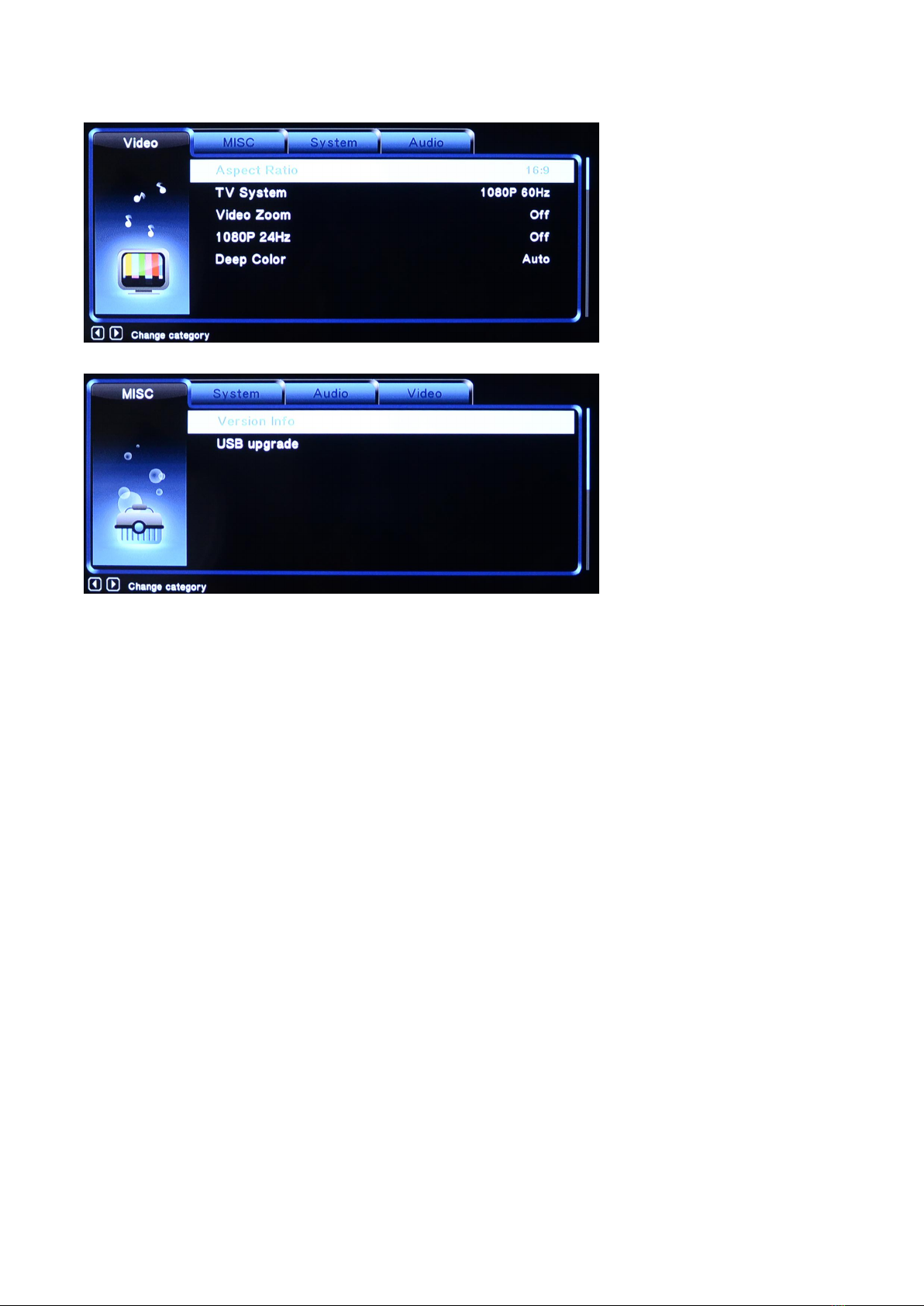
8
Indice
Altri manuali Technovision Lettore multimediale


