
TeeJet Boompilot Matrix Pro 570G Manuale utente

BOOMPILOT® SETUP GUIDE
Automatic Boom Section Control


iii
Setup Instructions for BoomPilot®
98-05243 R0
Table of Contents
BOOMPILOT® WITH MATRIX® PRO V
GENERAL INFORMATION FOR YOUR MATRIX® PRO 1
Setup Option Information ............................................................................................................ 1
Drop Down Menu Selections ...................................................................................................... 1
Keyboard Entry Screen .............................................................................................................. 2
GPS IS REQUIRED 3
GPS Type ...........................................................................................................................4
GPS Port ...........................................................................................................................4
External Receiver Minimum Conguration Requirements .......................................................... 4
GPS Status ........................................................................................................................5
PRN ............................................................................................................................................ 5
GGA Requirements .................................................................................................................... 6
Receivers .................................................................................................................................... 6
BOOMPILOT CONFIGURATION USING YOUR MATRIX® PRO 7
Vehicle Setup ......................................................................................................................... 8
Vehicle Type ......................................................................................................................9
Antenna Height ......................................................................................................................... 9
Direction to Boom ..........................................................................................................10
Distance to Boom ..........................................................................................................10
BoomPilot - SmartCable or SDM ......................................................................................... 11
#Number of Boom Sections .............................................................................................12
Guidance Width .............................................................................................................12
Spray Width ....................................................................................................................13

iv www.teejet.com
Overlap ............................................................................................................................14
Delay On ..........................................................................................................................14
Delay Off .........................................................................................................................15
BoomPilot - Single Boom Setup .......................................................................................... 16
Guidance Width .............................................................................................................17
Spray Width ....................................................................................................................17

v
Setup Instructions for BoomPilot®
98-05243 R0
BOOMPILOT® WITH MATRIX® PRO
Copyrights
© 2011 TeeJet Technologies. All rights reserved. No part of this document or the computer programs described
in it may be reproduced, copied, photocopied, translated, or reduced in any form or by any means, electronic or
machine readable, recording or otherwise, without prior written consent from TeeJet Technologies.
Trademarks
Unless otherwise noted, all other brand or product names are trademarks or registered trademarks of their
respective companies or organizations.
Limitation of Liability
TEEJET TECHNOLOGIES PROVIDES THIS MATERIAL “AS IS” WITHOUT WARRANTY OF ANY KIND, EITHER
EXPRESSED OR IMPLIED. NO COPYRIGHT LIABILITY OR PATENT IS ASSUMED. IN NO EVENT SHALL
TEEJET TECHNOLOGIES BE LIABLE FOR ANY LOSS OF BUSINESS, LOSS OF PROFIT, LOSS OF USE OR
DATA, INTERRUPTION OF BUSINESS, OR FOR INDIRECT, SPECIAL, INCIDENTAL, OR CONSEQUENTIAL
DAMAGES OF ANY KIND, EVEN IF TEEJET TECHNOLOGIES HAS BEEN ADVISED OF SUCH DAMAGES
ARISING FROM TEEJET TECHNOLOGIES SOFTWARE.
Safety Information
TeeJet Technologies is not responsible for damage or physical harm caused by failure to adhere to the
following safety requirements.
As the operator of the vehicle, you are responsible for its safe operation.
The BoomPilot is not designed to replace the vehicle’s operator.
Do not leave a vehicle while the BoomPilot is engaged.
Be sure that the area around the vehicle is clear of people and obstacles before and during engagement.
The BoomPilot is designed to support and improve efciency while working in the eld. The driver has full
responsibility for the quality and work related results.

vi www.teejet.com

1
Setup Instructions for BoomPilot®
98-05243 R0
GENERAL INFORMATION FOR YOUR MATRIX® PRO
The Matrix Pro is used to congure the vehicle and its implements including auto steering and tilt.
Setup Option Information
Press the icon of any menu item to display a denition and range values of that item. To
remove the information box, press anywhere on the screen.
Figure 1-1: Example of Information Text Box
Cong-> Lightbar
Brightness
Mode
LED Spacing 1.50 ft
Swath
50%
Cong-> Lightbar
Brightness
Mode
LED Spacing 3,50 m
Swath
50%
The distance illustrated by the
illuminated LED’s can be customized.
Input the desired spacing as required or
individual preference.
LED Spacing
Drop Down Menu Selections
Press DOWN arrow to access the list of options. Use the UP/DOWN arrows or slide
bar if necessary to scroll through the extended list. Select the appropriate option. To close the
list without selecting an option, press anywhere on the screen outside the drop down menu.
Figure 1-2: Example of Drop Down Menu
Cong-> Vehicle
12.50 ft
0.00 ft
Backward
Vehicle Type
Ant Height
Dir to Boom
Dist to Boom
Front Wheel
Front Wheel
Articulated
Tracked
Cong->Implement
Num Sections
Spray Width
Guidance Width 75.00 ft
75.00 ft
15
7
8
9
10
11
12
13
14
15
2www.teejet.com
Keyboard Entry Screen
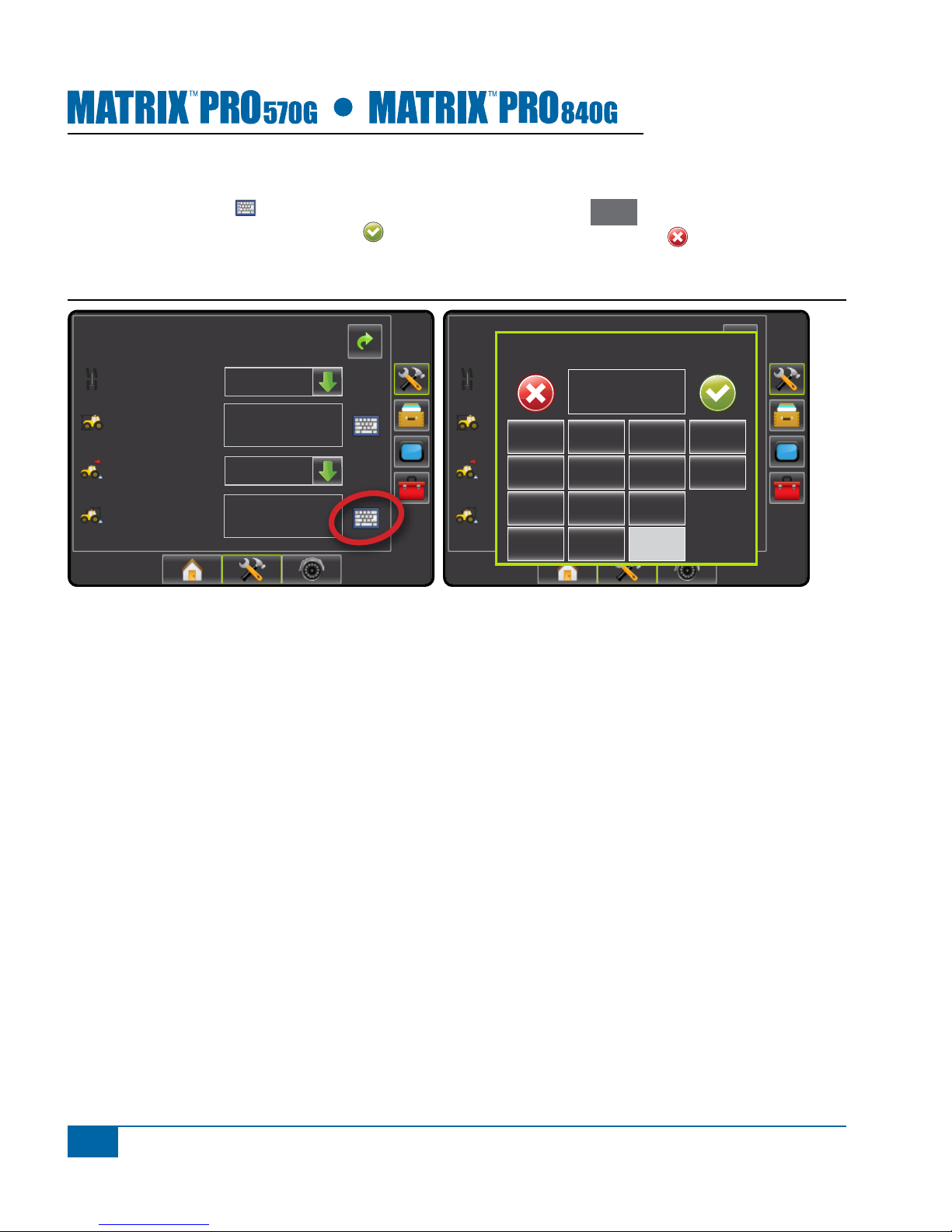
Press the KEYPAD icon to use a numeric keypad to enter a value. Press Clear to erase
the existing value. Press the ACCEPT icon to save the settings or the CANCEL icon to
leave the keypad without saving
Figure 1-3: Example of Keyboard
Cong-> Vehicle
12.50 ft
0.00 ft
Front Wheel
Backward
Vehicle Type
Ant Height
Dir to Boom
Dist to Boom
Cong-> Vehicle
12.50 ft
0.00 ft
Front Wheel
Backward
Vehicle Type
Ant Height
Dir to Boom
Dist to Boom
Dist to Boom (ft)
123
0.00
Clear
4 5 6 <--
789
0 . +/-
3
Setup Instructions for BoomPilot®
98-05243 R0
GPS IS REQUIRED
GPS is used to congure GPS Type and GPS Port.
NOTE: These settings are required for auto steering and tilt sensor operation, as well as proper implement
operation.
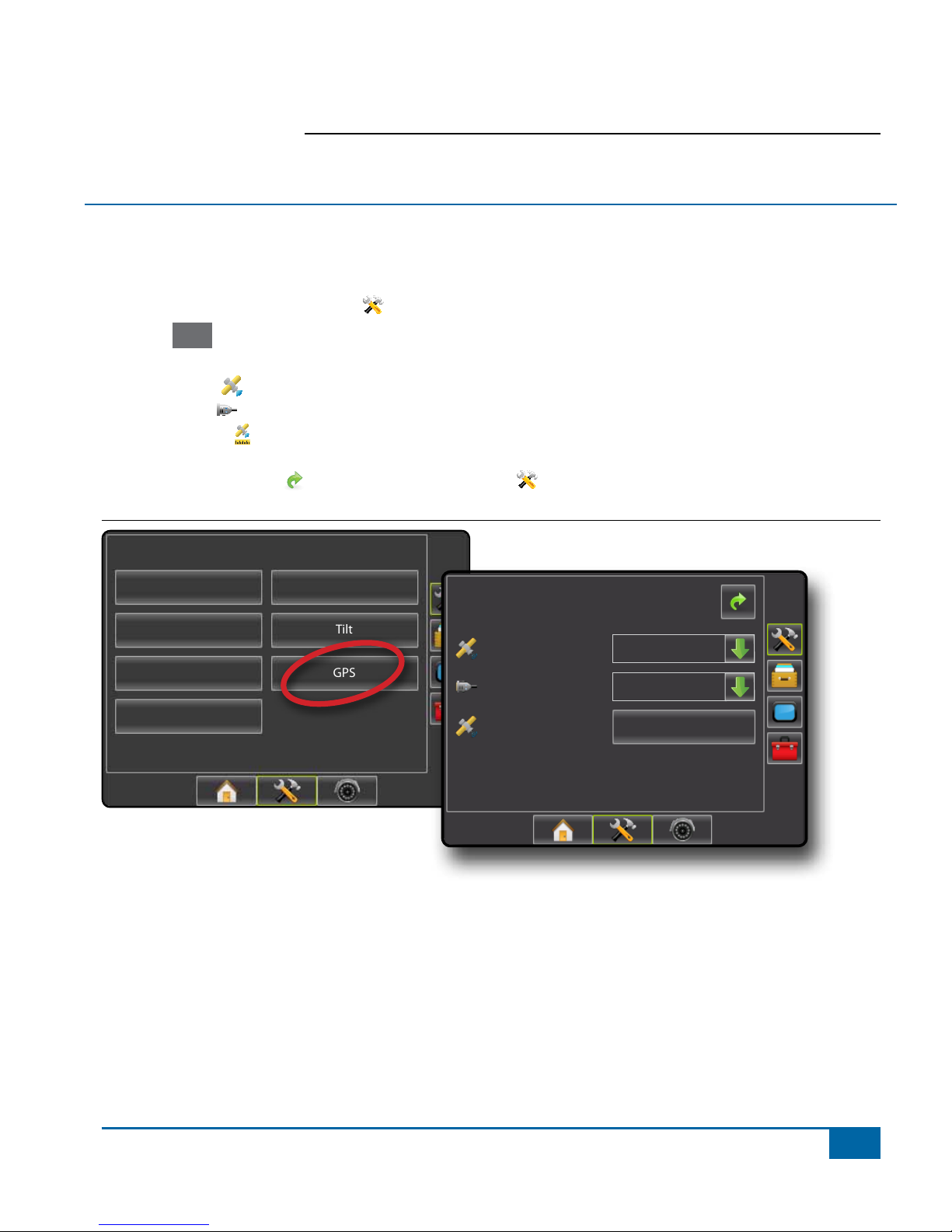
1. Press CONFIGURATION side tab .
2. Press GPS .
3. Select from:
►GPS Type – select GPS source transmissions
►GPS Port – sets (D)GPS COM port
►GPS Status – displays information for TeeJet Customer Service use on GGA/VTG (Data Rates),
Number of Satellites, HDOP, PRN, GGA Quality, GPS Receiver and Receiver Version.
4. Press RETURN arrow or CONFIGURATION side tab to return to the main Conguration screen.
Figure 1-4: Tilt
Conguration
Vehicle Implement
AutoSteer Tilt
Lightbar GPS
Video
Cong->GPS
GPS Status
GPS Port
GPS Type
Information
Internal
GPS/DGPS

4www.teejet.com
GPS Type
GPS Type customizes the system to accept GPS
source or DGPS source transmissions.
1. Press DOWN arrow to access the list of
options.
2. Select:
►GPS Only – uncorrected signals
►DGPS Only – differentially corrected signals
►GPS/DGPS – either type of signal
►GPS+GLONASS – uncorrected signals from
both the GPS and GLONASS systems
Figure 1-5: GPS Type
Cong->GPS
GPS Status
GPS Port
GPS Type
Information
Internal
GPS/DGPS
GPS Only
DGPS Only
GPS/DGPS
GPS+GLONASS
GPS Port
GPS Port sets port transmission to Internal or External.
1. Press DOWN arrow to access the list of
options.
2. Select:
►Internal – use the internal (D)GPS (if equipped)
and transmit out
►External – receive external (D)GPS data
NOTE: Working with GPS signals such as Omnistar
HP/XP or RTK will require GPS port to be set
to External.
Figure 1-6: GPS Port
Cong->GPS
GPS Status
GPS Port
GPS Type
Information
GPS/DGPS
Internal
Internal
External
External Receiver Minimum Conguration
Requirements
Before the Matrix will connect and work with an
external GPS receiver, these minimum conguration
requirements must be met.
Serial Port Settings
Baud rate: 19,200
Data Bits: 8
Parity: None
Stop Bits: 1
Serial Port connection requirements
Male 9 pin RS-232 serial cable
NOTE: May require Null modem adapter depending
on pin out of receiver.
NMEA Strings
GGA 5 Hz
Optional VTG 5 Hz, 2 Hz, Off
ZDA 0.2 Hz
Altri manuali per Boompilot Matrix Pro 570G
1
Questo manuale è adatto per i seguenti modelli
1
Indice


