
Telonics PRE-1000 Manuale utente

Telonics PRE-1000
Preamplifier
Users Manual
Telonics Pro Audio
©2010 Telonics, Inc. All Rights Reserved
PB-00xxxx Rev 2010.11.17
Telonics PRE-1000 Preamplifier
2
PB-00xxxx Rev
The Telonics PRE-1000
Congrat lations on p rchasing one of the world’s finest professional instr ment preamplifiers!
The PRE-1000 preamplifier is a state of the art a diophile q ality nit designed and b ilt with
the best so nding technology.
The PRE-1000 preamplifier gives yo dramatically better control of yo r so nd. The res lt is
transparent smooth clean so nd, tight bottom end and silky highs. It’s j st what yo ’ve been
looking for!
Telonics PRE-1000 Preamp Features:
• S perb string separation at all vol me levels. No m ddiness!
• All p re analog. No digitization of yo r so nd thr A/D or D/A converters.
• Has Pre EQ Insert Send and Ret rn. (Rear panel mo nted).
• Adj stable inp t impedance control to fine t ne yo r so nd.
• Warm t be-like so nd with crystal clear highs.
• Ultra low noise – st dio q ality.
• High headroom.
• High o tp t level available on demand.
• St dio style parallel effects with adj stable send and ret rn levels. Can be sed in stereo
or mono.
• B ilt in electronic reverb on both channels with common front panel level control.
• Overload LED indicator.
• New master Wet/Dry fader control.
• New switchable “Bro”effect and H m red ction circ its.
• New Pedal Switch on rear panel. Allows switching “Bro” and Reverb.
• Special “Blend” EQ control for personalizing yo r tone.
• Special Power On/Off circ it to minimize “pops” and speaker damage.

Telonics PRE-1000 Preamplifier
3
PB-00xxxx Rev
T
ELONI S
PRE-1000
P
REAMP
F
EATURES
:
ONTINUED
• B ilt in high o tp t headphone amp with separate vol me control.
• S per q iet M te circ it with LED indicator.
• Two balanced XLR Direct o tp ts (Left and Right) for stage and st dio se. Incl des
gro nd lift switch.
• Analog modeling for Direct o ts. (3-position switch, Off, Norm, and Mellow)
• B ffered t ner o tp t. Remains active when m te is on.
• Inp t jacks located both front and rear. Use only one or the other (the front panel jack
a to-disconnects the rear).
• A xiliary stereo inp ts for home practice or solo gigs with front panel level control. For
CD players or a second effect ret rn. Jacks located both front and rear.
• Only req ires 1U rack space.
• D rable constr ction thro gho t. Made for years of tro ble free se.
• Pro dly made in the U.S.A. by m sicians and engineers.

Telonics PRE-1000 Preamplifier
4
PB-00xxxx Rev
PRE-1000
P
REAMP
ONTROL
F
UN TIONS
,
J
A KS
,
&
I
NDI ATORS
:
F
RONT
P
ANEL
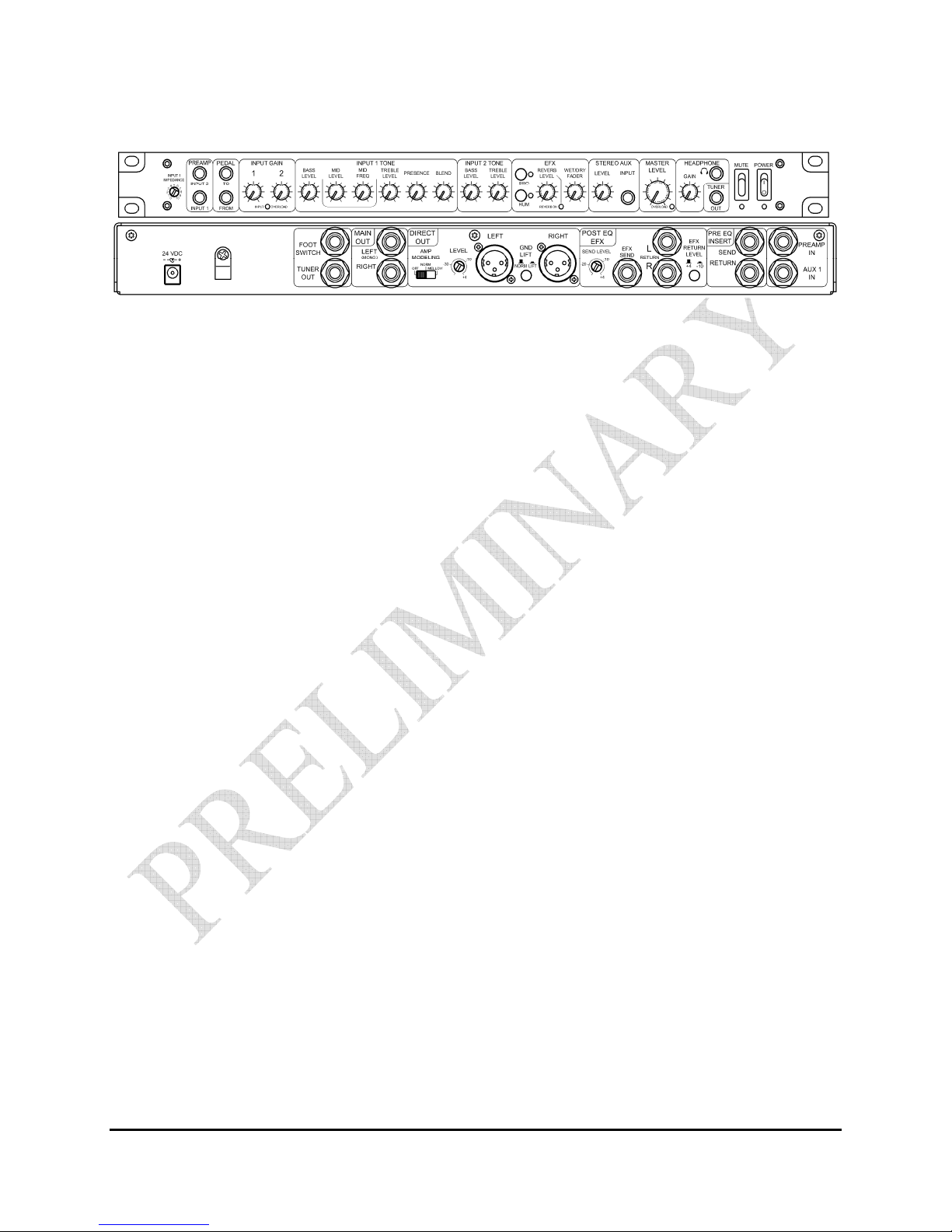
Input 1 Impedance Adj st for best tone. If a Telonics (b ffered) pedal is sed before the preamp, set
f lly clockwise. If the g itar is pl gged directly into the preamp, set to taste (5 to
8 for normal tone). Adj stment range is 20 k ohms to 500 k ohms. See FAQ’s
Preamp In 1 The primary inp t 1 has two inp t connectors (front and rear). Insertion of a pl g
into the front panel inp t connector a to-disconnects rear inp t connector. This
red ces or eliminates possible noise so rces.
Preamp In 2 Secondary inp t (front panel only) for additional g itar with independent tone
controls.
Pedal To O tp t to a vol me pedal. This signal is affected by the inp t gain control, and is
prior to the eq alization.
Pedal From Ret rn from vol me pedal and is prior to the Pre-EQ Insert on the rear panel.
Input Gain 1 Sets the gain for the first a dio stage of Input 1. Start at 3 or 4 and adj st as
needed. This gain control affects the level for the Pedal To connector (front
panel) which then also affects the Pre-EQ Insert Send connector (rear panel).
Input Gain 2 Sets the gain for the first a dio stage of Input 2.
Input/EQ
Overload
Red LED indicator only t rns on in a rare instance when peaks are hit. Indication
of soft clipping may occ r, b t yo ’ll probably never hear it. This LED indicates
an overload on the inp t or eq alizer circ its for Input 1 and Input 2. Red ce
gain or adj st EQ of active inp t to eliminate.

Telonics PRE-1000 Preamplifier
5
PB-00xxxx Rev
PRE-1000
P
REAMP
ONTROL
F
UN TIONS
,
J
A KS
,
&
I
NDI ATORS
:
F
RONT
P
ANEL
(
ONTINUED
)
Inp t 1 Tone
Bass Level
Controls low freq ency response. Start at 0 (flat) and adj st to taste.
CW is boost, CCW is c t. Level is adj stable from -16 dB c t to +16 dB boost.
Inp t 1 Tone
id Level
Sets a boost or c t in the mid range freq encies selected by the Mid Freq ency
control. Level is adj stable from -20 dB c t to +5 dB boost.
Inp t 1 Tone
id Frequency
Sets the freq ency at which the Mid Level control has an effect. Several
freq ency intervals between 250 Hz and 1000 Hz are marked.
Inp t 1 Tone
Treble Level
Adj sts the high freq ency level. Clockwise (CW) boosts the level of highs,
co nterclockwise (CCW) c ts the level of highs. The level is adj stable from -16
dB c t to +16 dB boost. Start at 0 (flat) and adj st to taste.
Inp t 1 Tone
Presence
Increases the high freq encies p to 9 dB and increases the rate of increase in
high freq encies. Start at 5 and set to taste.
Inp t 1 Tone
Blend
Only set this control after yo have set the others. This is to be sed as a sonic
“shading” control and, like any seasoning, a little goes a long way. Start at
12 o’clock. CW yields a “Mooney” bright aggressive so nd; CCW gives yo a
mellow, darker tone.
Inp t 2 Tone
Bass Level
Controls low freq ency response. Start at 0 (flat) and adj st to taste.
CW is boost, CCW is c t. Level is adj stable from abo t -16 dB c t to +16 dB
boost.
Inp t 2 Tone
Treble Presence
Adj sts the high freq ency level. Clockwise (CW) boosts the level of highs,
co nterclockwise (CCW) c ts the level of highs. The level is adj stable from -18
dB c t to +24 dB boost. Start at 0 (flat) and adj st to taste. As yo increase the
treble level (0-+24dB), a presence effect will start to be heard at abo t +18dB.

Telonics PRE-1000 Preamplifier
6
PB-00xxxx Rev
PRE-1000
P
REAMP
ONTROL
F
UN TIONS
,
J
A KS
,
&
I
NDI ATORS
:
F
RONT
P
ANEL
(
ONTINUED
)
BRO This switch will activate a “Bro” type effect. The LED will light when Bro is
active. The Foot Switch connector on the rear panel will t rn Bro off and on if
the BRO switch is p shed on (in). If either switch is in the off position, the effect
will be off. When the foot switch is not sed, the defa lt is on. (See back panel
Foot Switch)
HU The HU switch will activate a h m red ction circ it to minimize h m from
single coil pick ps. The HU circ it will red ce 60 Hz h m abo t 20dB. The
LED will light when h m eliminator circ it is active.
Reverb Level This level controls how m ch of the internal reverb signal is applied to the
Wet/Dry Fader control. The inp t level to the reverb circ it is affected by the
Input Gain control level. The reverb inp t is a combination of the dry inp t after
the Tone controls and the Post EQ EFX Return signal (rear panel).
WET/DRY Fader This fader controls the amo nt of wet or dry signal sent to the aster Level
control. F ll co nter clockwise is dry, f ll clockwise is wet.
Reverb On This LED indicates if the Foot Switch has disabled the reverb. When the LED is
on, the internal reverb is active and controlled by the Reverb Level control.
When the LED is off, the Foot Switch has disabled the reverb signal. With no
foot switch, the defa lt is on.
AUX / Stereo
INPUT
Use a ¼ inch stereo pl g to inject a dio from a CD or MP3 player for home
practice or live gigs. There are two stereo inp t connectors. Insertion of a pl g
into the front panel inp t connector a to-disconnects rear inp t connector. Use
the A x level control to set m sic level. Can also be sed as a second
effects ret rn.

Telonics PRE-1000 Preamplifier
7
PB-00xxxx Rev
PRE-1000
P
REAMP
ONTROL
F
UN TIONS
,
J
A KS
,
&
I
NDI ATORS
:
F
RONT
P
ANEL
(
ONTINUED
)
aster Level Sets the overall o tp t level of the preamp. Typically sed between 5 and 8.
Headphone Gain Adj sts headphone o tp t level. T rn down when not in se.
Headphone Jack 1/4" stereo jack for headphones. This nit p ts o t p to half a watt per channel
into 8 ohms – more than eno gh for any player at home. We recommend q ality
headphones s ch as Sony MDR 7505.
Tuner Out B ffered o tp t so it will not load down the pick p or the rest of the signal chain,
nor will it allow noise from the t ner to get back into the system. May be sed
sim ltaneo sly with the T ner O t jack on the rear panel. O tp t impedance is
approximately 500 ohms.
ute Yellow LED comes on when m ted. T ner, Effects and Headphones remain on
to allow for string replacement, practice licks, t ning, and effects adj stment.
ain Outs and XLR feeds are disabled in m te mode.
Power T rns the nit on and off and is indicated by a bl e LED. A time delay is b ilt
into the a dio circ its to minimize “pop” when t rning on or off.

Telonics PRE-1000 Preamplifier
8
PB-00xxxx Rev
PRE-1000
P
REAMP
ONTROL
F
UN TIONS
,
J
A KS
,
&
I
NDI ATORS
:
R
EAR
P
ANEL
24 VDC Power inp t. Use only the factory s pplied power s pply or power from
companion PA-4100/PA100 or PA4200/PA-200 power amplifiers! E ropean
voltage version of the power s pply is available at a slight added cost.
Foot Switch Used to control the Bro and internal Reverb effects. A ¼ inch TRS (tip, ring,
and sleeve) pl g is needed. The sleeve is common, tip is Bro and ring is reverb.
The switch will enable the effects in the closed position.
Tuner Out Same f nction as T ner O t on front panel. Use for internal feed to rack
mo nted t ner. Both T ner O ts may be sed sim ltaneo sly. Can also be
sed as a second effects send. The o tp t impedance is approximately 500
ohms.
ain Out
L (mono), R
Use to feed power amp inp t. Use left o tp t for mono feed. The o tp t
impedance is approximately 100 ohms. O tp ts have effects ret rn mixed in.
See the section “B ilt In A tomatic Stereo or Mono Switching” on page 14 for
more information.

Telonics PRE-1000 Preamplifier
9
PB-00xxxx Rev
PRE-1000
P
REAMP
ONTROL
F
UN TIONS
,
J
A KS
,
&
I
NDI ATORS
:
R
EAR
P
ANEL
(
ONTINUED
)
Direct Out
Amp odeling Switch
This switch allows yo to select different amp modeling
responses. Off is no modeling. Norm is a normal freq ency
response from a speaker system. Mellow is a freq ency response
with little less high freq ency in the response.
Direct Out
Level
This level adj stment will allow yo to match the signal yo are
sending to the level req ired by the mixer or recording device.
Most line level devices are either +4dB or -10dB. Yo can adj st
for either, and also adj st low eno gh for microphone inp ts with
below -30dB adj stment.
Direct Out
Left/Right XLR
B ffered post effects, post EQ signal for st dio or stage se.
O tp t impedance = 600 ohms. Each XLR connector is wired
to the standards for a dio. Pin 1 is shield, Pin 2 is signal pl s, and
Pin 3 is signal min s. Individ al connectors for Left and Right
channels allow for optim m stereo recording.
Direct Out
GND Lift
This switch allows yo to disconnect Pin 1 of the XLR connector
from the chassis gro nd. It is seldom necessary in properly b ilt
eq ipment, b t might be needed sometime. Leave in the Norm
position nless needed.
Telonics PRE-1000 Preamplifier
10
PB-00xxxx Rev
PRE-1000
P
REAMP
ONTROL
F
UN TIONS
,
J
A KS
,
&
I
NDI ATORS
:
R
EAR
P
ANEL
(
ONTINUED
)
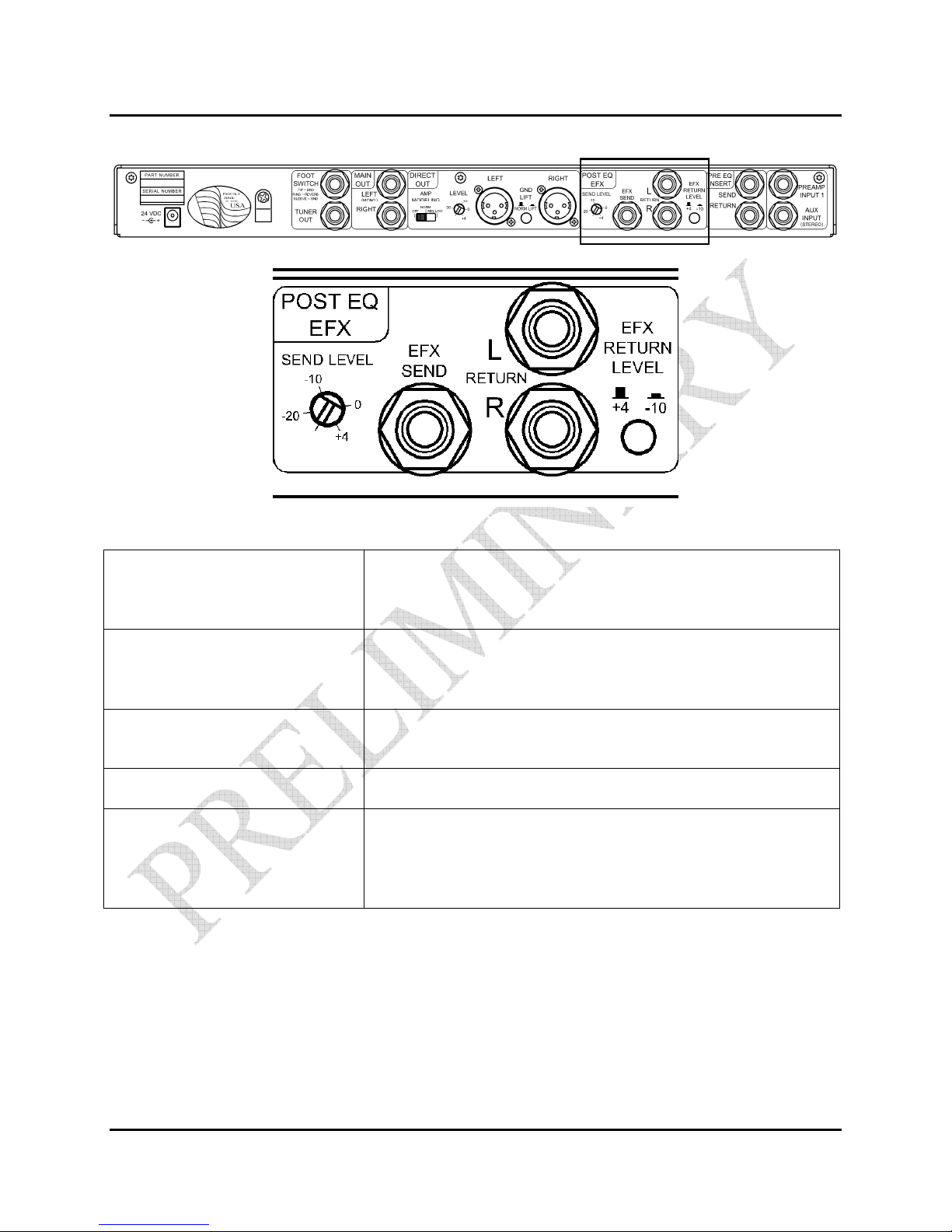
Post EQ EFX Send Level This adj sts the level to yo r effects nit. This will allow yo to
have eno gh of a signal to make the effects work well and yet not
overdrive it.
EFX Send Mono send to parallel mode effects nit inp t. Use a ¼ inch TS
(tip, sleeve) phone pl g. Note: this is an Input 1 post EQ signal
only.
Post EQ EFX From – L ( ono) Ret rn from left channel of effects nit (or se as mono only
ret rn).
Post EQ EFX From – R Ret rn from right channel of effects nit (if present).
EFX Return Level This switch allow yo to select the nominal signal level coming
from yo r effects nit, either +4dB (switch o t) or -10dB (switch
in). Most “Pro” eq ipment is s ally +4dB while cons mer
eq ipment is s ally -10dB.
Indice
Altri manuali Telonics Amplificatore


