Telular Phonecell SX5e GSM Manuale utente

8/20/03 Part Number 56023504
PHONECELL®SX5e GSM
• Fixed Wireless Terminal
• Fixed Wireless Terminal with Fax
• Fixed Wireless PBX Terminal
• Fixed Wireless Modem
900/1800 MHZGSM
850/1900 MHZGSM
USER MANUAL

Phonecell®SX5 GSM ii User Manual
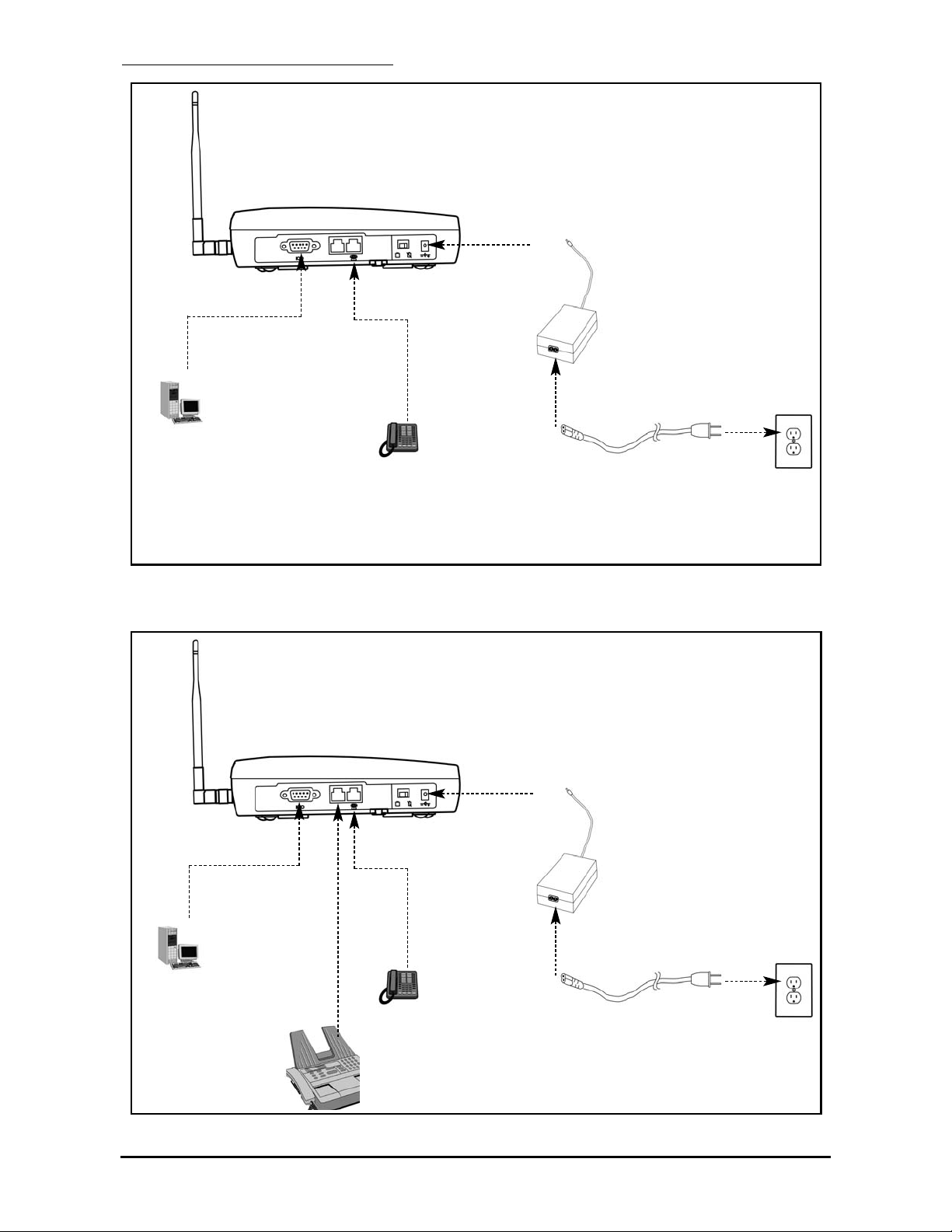
QUICK CONNECTION GUIDE
SX5 Fixed Wireless Terminal with Optional Analog Fax
SX5 Fixed Wireless Terminal

Phonecell®SX5 GSM iii User Manual
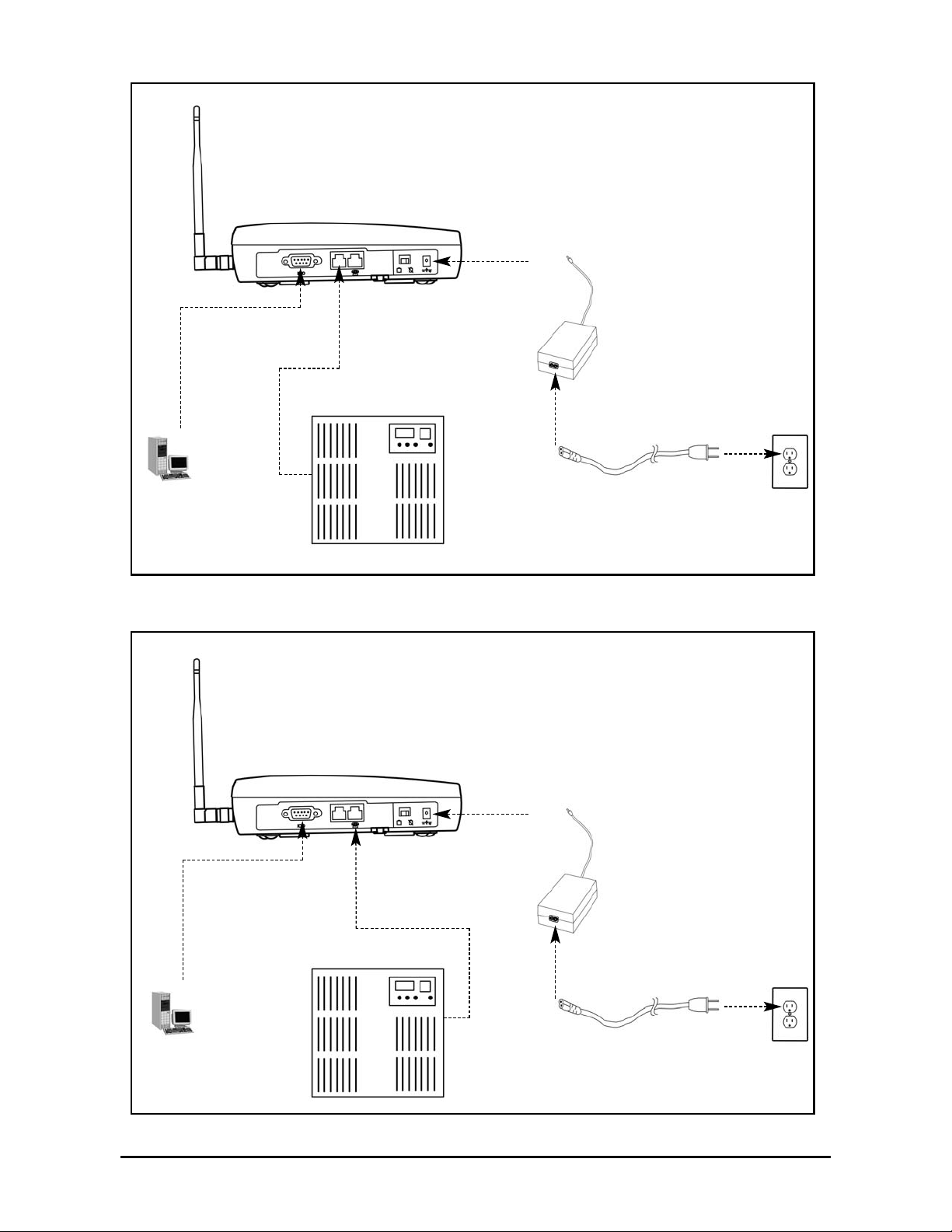
Extension Side
Trunk Side
SX5 Fixed Wireless PBX Terminal (attached to Extension side of PBX)
SX5 Fixed Wireless PBX Terminal (attached to Trunk side of PBX)

Phonecell®SX5 GSM iv User Manual
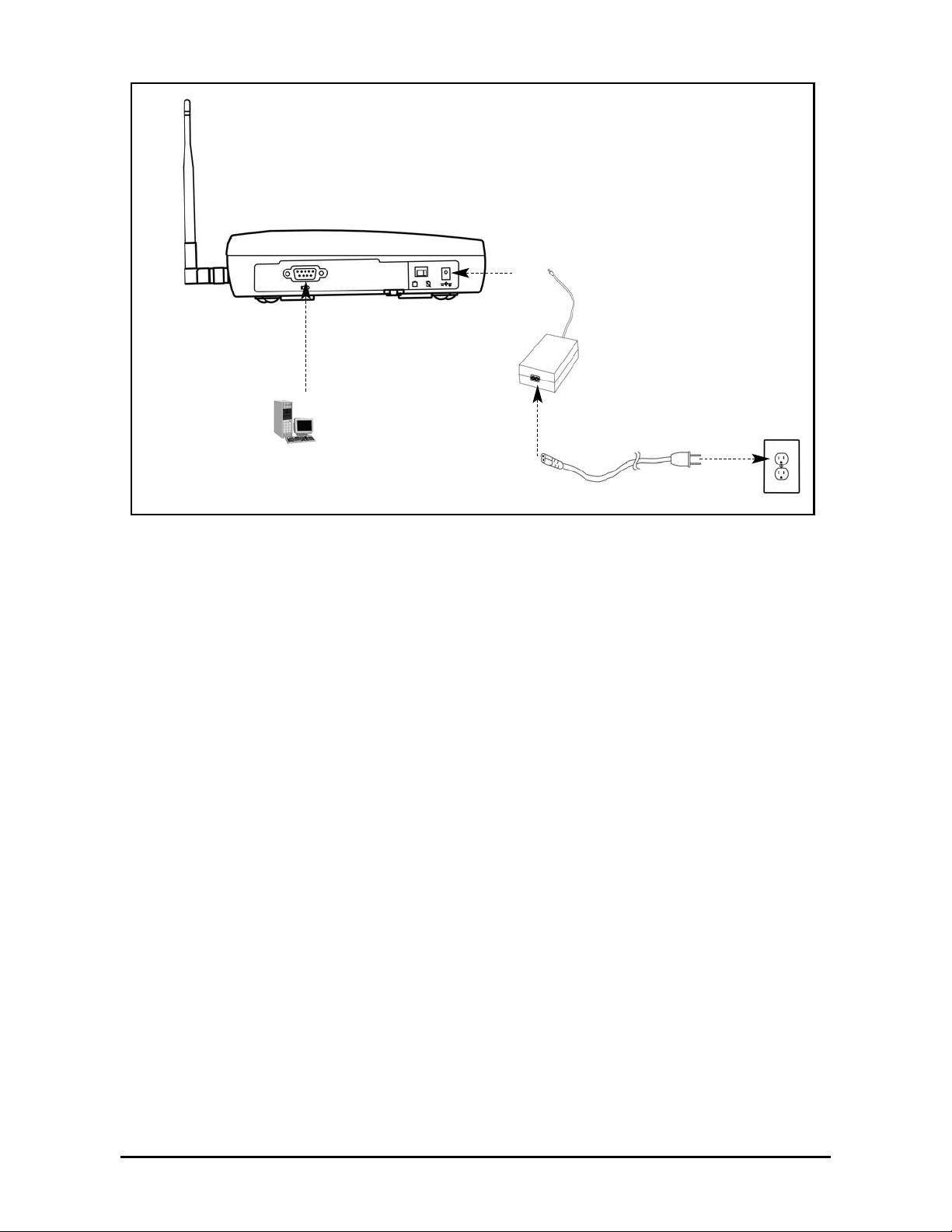
SX5 Fixed Wireless Modem

Phonecell®SX5 GSM v User Manual
Before installing the Phonecell®SX5, carefully remove the contents from the shipping carton
and check for evidence of shipping damage. If damage is found, contact your Authorized
Telular Distributor or shipping agent immediately.
SAFE OPERATION INSTRUCTIONS
IMPORTANT! Before installing or operating this product, read the SAFETY INFORMATION
section of this manual.
••Install the unit indoors.
••Install the unit on a hard, flat surface for proper ventilation.
••Do not expose the unit to rain or moisture.
••Do not place the unit on or close to sources of heat.
IMPORTANT NOTICES
TERMS AND CONDITIONS FOR USE OF PHONECELL®PRODUCTS ("Product")
These Terms and Conditions are a legal contract between you and Telular Corporation for the title to
and use of the Product. BY RETAINING AND USING THE PRODUCT AFTER RECEIPT OF IT,
YOU AGREE TO THE TERMS AND CONDITIONS INCLUDING WARRANTY DISCLAIMERS,
LIMITATIONS OF LIABILITY AND INDEMNIFICATION PROVISIONS BELOW. IF YOU DO NOT
AGREE TO THE TERMS AND CONDITIONS, DO NOT USE THE PRODUCT AND IMMEDIATELY
RETURN THE UNUSED PRODUCT FOR A COMPLETE REFUND. You agree to accept sole
responsibility for any misuse of the Product by you; and, in addition, any negligent or illegal act or
omission of your or your agents, contractors, servants, employees, or other users of the Product so
long as the Product was obtained from you, in the use and operation of the Product.
INDEMNIFICATION OF TELULAR CORPORATION ("TELULAR")
YOU SHALL INDEMNIFY, DEFEND AND HOLD HARMLESS TELULAR FOR ANY OF THE COST, INCLUDING REASON-
ABLE ATTORNEYS' FEES, AND FROM CLAIMS ARISING OUT OF YOU, YOUR CLIENTS' OR OTHER THIRD PARTIES'
USE OR OPERATION OF THE PRODUCT: (i) FOR MISUSE OR IN A MANNER NOT CONTEMPLATED BY YOU AND
TELULAR OR INCONSISTENT WITH THE PROVISIONS OF THIS MANUAL; (ii) IN AN ILLEGAL MANNER OR AGAINST
PUBLIC POLICY; (iii) IN A MANNER SPECIFICALLY UNAUTHORIZED IN THIS MANUAL; (iv) IN A MANNER HARMFUL
OR DANGEROUS TO THIRD PARTIES; (v) FROM CLAIMS BY ANYONE RESPECTING PROBLEMS, ERRORS OR MIS-
TAKES OF THE PRODUCT; OR (vi) COMBINATION OF THE PRODUCT WITH MATERIAL, MODIFICATION OF THE
PRODUCT OR USE OF THE PRODUCT IN AN ENVIRONMENT NOT PROVIDED, OR PERMITTED, BY TELULAR IN
WRITING. THE PARTIES SHALL GIVE EACH OTHER PROMPT NOTICE OF ANY SUCH COST OR CLAIMS AND COOP-
ERATE, EACH WITH THE OTHER, TO EFFECTUATE THIS INDEMNIFICATION, DEFENSE AND HOLD HARMLESS.
PLEASE SEE THE IMPORTANT NOTICES SECTION OF THIS MANUAL FOR
IMPORTANT INFORMATION ON USE, WARRANTY AND INDEMNIFICATION
CONTENTS
Telular Corporation
Corporate Headquarters
647 North Lakeview Parkway
Vernon Hills, Illinois 60061, USA
Technical Support
Tel: 847-247-9400 • Fax: 847-247-0021
E-mail: support@telular.com • http://www.telular.com
Phonecell®SX5 GSM FWT Spike Antenna
Part Number 56023504 ©2003 Telular Corporation, All Rights Reserved
Power Supply
AC Power Cord

Phonecell®SX5 GSM vi User Manual
TABLE OF CONTENTS
QUICK CONNECTION GUIDE ......................................................................................ii
IMPORTANT NOTICES..................................................................................................v
Technical Support.......................................................................................................v
SETUP............................................................................................................................1
Install the SIM Card ...................................................................................................1
Emergency Batteries..................................................................................................2
SX5 Location and Installation ....................................................................................3
Wall Mounting.............................................................................................................3
Connect the SX5 to AC Power...................................................................................4
Attach a Telephone to the SX5 ..................................................................................4
GETTING TO KNOW YOUR SX5..................................................................................5
LED Status Indicators ................................................................................................5
Important Dial Tones ..................................................................................................6
CALL FUNCTIONS ........................................................................................................7
Making Calls...............................................................................................................7
Receiving Calls ..........................................................................................................7
Ending Calls ...............................................................................................................7
In-Call Features..........................................................................................................7
SX5 USER FEATURES..................................................................................................8
Messages (Voice Mail and Text Messages)...............................................................8
Audio Settings ............................................................................................................8
Dial Settings ...............................................................................................................8
SIM Settings...............................................................................................................9
Caller ID .....................................................................................................................9
Setting Time and Date .............................................................................................10
Reset User Factory Defaults....................................................................................10
Dialing Prefix Setup .................................................................................................10
SUPPLEMENTARY SERVICE FEATURES (NETWORK DEPENDENT)....................11
Call Waiting ..............................................................................................................11
Calling Line Identification Presentation ....................................................................11
Calling Line Identification Restriction .......................................................................11
Connected Line Identification Presentation .............................................................12
Connected Line Identification Restriction.................................................................12
Call Forwarding ........................................................................................................12
Call Barring ..............................................................................................................13
Multiparty Call Features ...........................................................................................14
DATA FEATURES ........................................................................................................15
Connecting to a Computer .......................................................................................15
Dial-Up Connections ................................................................................................15
Automatic Baud Rate Fallback Control....................................................................15
Digital Fax Setup......................................................................................................16
GPRS (Packet Data) Connections...........................................................................16
Analog Modem Support ...........................................................................................16

SX5 GSM FWT WITH FAX ..........................................................................................19
Set SX5 for Analog Fax ...........................................................................................19
Connect SX5 for Dual Jack Mode............................................................................19
Connect SX5 for Single Jack Mode .........................................................................19
Fax Timing Adjustments ...........................................................................................19
Analog Fax Bypass ..................................................................................................20
SX5 GSM PBX FWT ....................................................................................................21
Trunk Side PBX Connection (Trunk Mode)..............................................................21
Extension Side PBX Connection (Extension Mode) ................................................21
PBX Command Summary........................................................................................23
Auto-Routing Setup (GSM to Extension) .................................................................24
Two-Stage Extension Side Dialing (Extension to GSM) ..........................................24
SX5 TROUBLESHOOTING .........................................................................................25
CONFORMANCE STATEMENTS ................................................................................26
SAFETY INFORMATION .............................................................................................26
WARRANTY .................................................................................................................29
APPENDIX A: PC SERIAL PORT SETUP FOR CS FAX AND DATA........................31
Phonecell®SX5 GSM vii User Manual

SETUP
Install the SIM Card
The SX5 requires a Subscriber Identity Module (SIM) for normal operation. The service provider
supplies the SIM card, which carries the account information needed to operate the SX5. If you
don’t have a SIM card, contact your service provider. The SIM compartment is on the back of the
SX5 - see Figure 1.
HINT: Make sure your carrier disables SIM PIN1 or you will have to enter the PIN every time the
unit powers on. See the SX5e User Features section of this manual for more information.
1. Disconnect the power supply. The power supply must be disconnected whenever a SIM Card
is installed.
2. Remove the SIM compartment cover by removing the screw - see Figures 1 and 2.
3. Open the SIM compartment holder.
4. Line up the SIM card with the arrow on the SIM card holder - see Figure 2.
5. Gently insert the SIM card in the slot of the SIM card holder.
6. Close the SIM card holder.
NOTE: Do not force the SIM card holder shut. Make sure the SIM card is aligned properly
with the directional arrow on the holder.
7. Reattach the SIM compartment cover with the screw.
Phonecell®SX5 GSM 1User Manual
SIM
Compartment
Cover
SIM Card
Holder
SIM Card
Cover Screw
Figure 2 - Install the SIM Card.Figure 1 - SIM compartment.

Emergency Batteries
Install Batteries
1. Remove the battery access door screw located on the bottom of the unit - see Figure 3.
2. Press the battery access door tabs and remove the battery access door.
3. Install 4 “AA” alkaline batteries (not supplied) - see Figure 3.
4. Reinstall the battery access door using the screw.
5. Turn the AC/Battery switch to battery operation - see Figure 4.
NOTE: The SX5 does not support rechargeable batteries.
Battery Operation
The unit will not automatically switch from AC to battery upon loss of AC power. The AC/Battery
switch must be changed manually - see Figure 4. Battery power will provide up to three hours of
standby and 90 minutes of talk time, depending on the SX5 model.
Phonecell®SX5 GSM 2User Manual
AC/Battery Switch
Figure 4 – SX5 AC/Battery switch.
Battery Position AC Position
WARNING!
Only “AA” alkaline batteries are to be used with the Phonecell®SX5.
Use of any other batteries may result in fire and/or other damage to the unit.
!
Battery
Access
Door
Battery Access
Door Screw
Figure 3 – SX5 battery installation.

Phonecell®SX5 GSM 3User Manual
SX5 Location and Installation
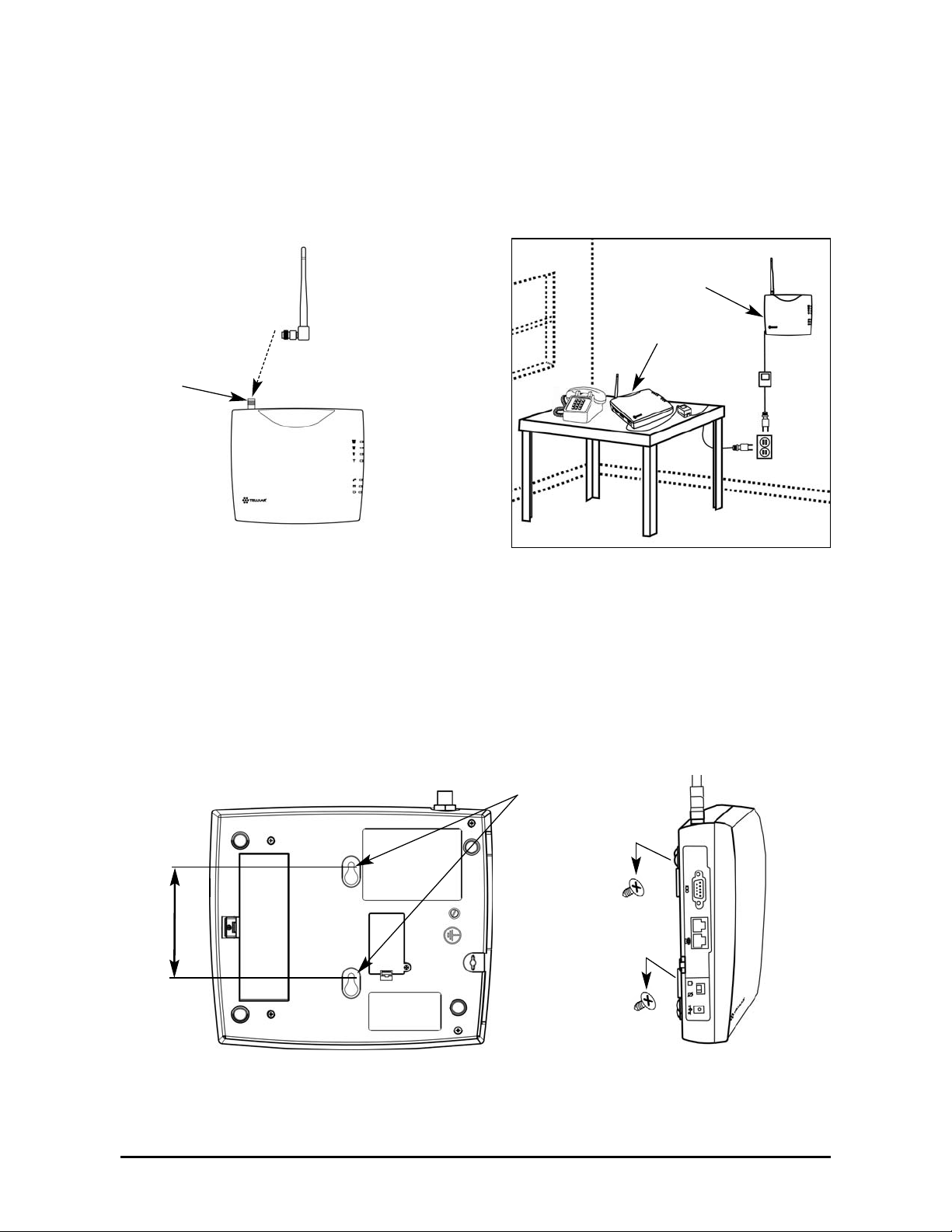
The SX5 comes with a standard spike antenna (TNC) - see Figure 5. For optimal signal
strength, choose a location that is above ground and as close to windows (or exterior walls) as
possible - see Figure 6. Cellular signal strength is displayed by the Received Signal Strength
Indicator (RSSI) LED on the unit - See the How to Use the LED Status Indicators section of this
manual.
1. Connect the antenna to the terminal - see Figure 5.
2. Finger-tighten the antenna. Do not over-tighten the antenna.
Wall Mounting
1. Mark two hole locations 98,5 mm (3-7/8 inches) vertically apart and drill two holes into the
wall.
2. Install the screws (not supplied) into the wall, leaving a gap (approximately 3 mm (1/8 inch))
between screw head and wall.
3. Align the mounting holes with the screws and mount the SX5 onto the screws - see Figures
7 and 8.
Figure 6 – Typical SX5 installation.
Wall Mount
Figure 5 –
SX5 antenna connection.
Spike
antenna
TNC Antenna
Connector
Table Mount
Figure 7 – SX5 mounting holes. Figure 8 – Mount the SX5 onto the screws.
Mounting Holes
98,5 mm (3 7/8”)
Indice
Altri manuali Telular Modem