TerraTec TerraCAM 2move 1.3 Manuale utente

English Manual
Version: 05.11.02

2 TerraCAM 2move 1.3 (English )
CE Declaration
We:
TerraTec Electronic GmbH, Herrenpfad 38, D-41334 Nettetal, Germany
hereby declare that the product:
TerraCAM 2move 1.3
to which this declaration refers is in compliance with the following standards or standardizing
documents:
1. EN 55022 Class B
2. EN 55024
The following are the stipulated operating and environmental conditions for said compliance:
residential, business and commercial environments and small-company environments.
This declaration is based on:
Test report(s) of the EMC testing laboratory
The information in this document is subject to change without notice and shall not be deemed as a warranty by the
seller. No warranties, express or implied, are made with regard to the quality, suitability or accuracy of this docu-
ment. The manufacturer reserves the right to change the contents of this document and/or the associated products
at any time without the provision of prior notice to specific persons or organizations. The manufacturer shall not be
held liable for damages of any kind arising from the use, or the inability to use this product or its documentation,
even if the possibility of such damage is known. The information in this document is subject to copyright. All rights
are reserved. No part of this manual may be reproduced or transmitted in any form or for any purpose without the
express written permission of the copyright holders. Product and brand names contained in this document are used
for identification purposes only. All registered trademarks, product designations or brand names used in this
document are the registered property of their respective owners.
©TerraTec®Electronic GmbH, 1994-2002. All rights reserved (05.11.02).

TerraCAM 2move 1.3 (English ) 3
Contents
Preface ................................................................................................................................. 4
Key features ........................................................................................................................ 4
Package contents..............................................................................................................5
System requirements ........................................................................................................5
Technical Data ..................................................................................................................5
Hardware overview ...............................................................................................................6
Operation ..............................................................................................................................7
Installing the batteries ......................................................................................................7
On / Off.............................................................................................................................7
Taking pictures..................................................................................................................7
Functions menu ................................................................................................................7
The individual operating modes at a glance ........................................................................ 8
Installing the TerraCAM 2move 1.3 ........................................................................................ 9
Installing DirectX 8.1............................................................................................................ 9
Installing the drivers............................................................................................................ 9
Storing images and videos...................................................................................................10
Overview of functions ..........................................................................................................12
LiveVideo recording .............................................................................................................13
Driver settings .....................................................................................................................16
Video recording filters ........................................................................................................16
Video recording properties ................................................................................................. 17
Brief description of the applications. ...................................................................................18
Medi@Show: Slide shows for the Internet or your desktop.................................................18
Photo Express 4.0SE: Say cheese! ......................................................................................18
Cool 360: the panorama view .............................................................................................18
Photo Explorer 6.0: don't lose your overview ......................................................................18
LiveVideo Mail: The living greeting card..............................................................................18
CD-Key MediaShow/VideoLive Mail ...................................................................................18
Service at TerraTec...............................................................................................................19
Broken?!............................................................................................................................ 20
General terms and conditions of service .........................................................................21

4 TerraCAM 2move 1.3 (English )
Preface
Thank you for choosing a TerraTec product. The TerraCAM 2move 1.3 combines the functional-
ity of a digital camera, a camcorder and a WebCam. We're convinced that the TerraCAM
2move 1.3 will be both very useful and a lot of fun for you for a long time to come.
The following is a brief overview of the features of your new TerraCAM 2move 1.3.
Key features
· digital camera, camcorder and Webcam
· 1280 x 1024 and 640 x 480 pixel image file sizes
· 320 x 240 pixel video file size
· webcam mode 640 x 480 pixels ~25fps, 320 x 240 pixels 30fps
· internal 16 MB flash memory
(at least 240 VGA 640x480 images or 60 1.3 megapixel images
under ideal conditions, 400 VGA images or 100 1.3 megapixel images
at least 4 minutes of QVGA video, under ideal conditions 5 minutes)
· 1/2" color sensor, 1280 x 1024 pixels
· 24-bit color depth
· self-timer with acoustic signal
· automatic white balance
· automatic exposure
· automatic power-off
· low power requirements
· 1.5 m USB cable
· 2 AAA batteries, 1.5V
· weight approx. 82 g
· 24-month warranty
Please return the registration card to us at the earliest possible opportunity or register online
at http://www.terratec.net/register.htm. This is important for support and hot-
line services.

TerraCAM 2move 1.3 (English ) 5
Package contents
· TerraCAM 2move 1.3 with base
· wrist strap
· CD-ROM with software and drivers
· USB connector cable
· manual / quick reference
· accompanying service request form
· registration card
· batteries
System requirements
· 1 free USB port
· Pentium 200 MHz or higher
· 32 MB RAM
· CD-ROM drive (to install drivers/software)
· Windows 98 / 98SE / ME / 2000 / XP
Technical Data
· 1/2" color sensor, 1280 x 1024 pixels
· focal range from 1 m to infinity
· focal length: f= 9.86mm
· aperture: F 3.0
· field angle: 53°
· maximum resolution: 1280 x 1024 Pixel
· built-in 16 MB flash memory
· up to 24-bit color depth
· 1.5 m USB cable
· 2 AAA batteries, 1.5V
· weight approx. 82 g
· 24-month warranty

6 TerraCAM 2move 1.3 (English )
Hardware overview
x
y
{
~
}
|
z
uShutter
vLens
wBase
xHolder for wrist strap
yViewfinder
zOn / Off
{Function display
|Menu button
}USB interface
~Battery compartment

TerraCAM 2move 1.3 (English ) 7
Operation
Installing the batteries
Open the battery compartment ~and insert two AAA 1.5V batteries. Ensure that the batteries
have the correct polarity.
On / Off
To switch on your TerraCAM 2move 1.3, simply use the On / Off zswitch. The number of pic-
tures or videos already taken will be shown in the display. If the TerraCAM 2move 1.3 is not
being used, it will automatically switch off after 20 seconds to save energy.
Taking pictures
Turn your TerraCam 2move 1.3 on. Look through the viewfinder ywith either eye. Next, press
the shutter uwith your index finger. The camera will make a sound and the first picture will
be saved.
Functions menu
Use the menu button |to select the desired operating mode. You can also use it to check the
amount of free memory.
In its default setting, your 2move 1.3 takes pictures with a resolution of 1.3 megapixels. Press
the menu button for two seconds to reduce the resolution to 640 x 480. You will hear an
acoustic signal and a “VGA” icon will appear on the display. Repeat the process to switch the
resolution back to 1.3 megapixels.
Press the menu button to select an action. An icon will appear on the display for each of the
available actions. Pressing the button once activates the self-timer, another press activates
video recording, and so on.

8 TerraCAM 2move 1.3 (English )
The individual operating modes at a glance
· Photo
· Self-timer
· Video
· Delete
· Delete all
· 50 Hz mode
· Memory
The following icons will appear on the display:
Self-timer
Press the shutter. The camera will then automatically take a picture after about ten
seconds.
Video (camcorder) mode
Press and hold the shutter button to record a video.
Delete
Press the shutter twice to delete the last picture.
Delete all
Press the shutter twice to delete all pictures.
50HZ 50Hz mode
Press the shutter when taking pictures under 50 Hz artificial light.
Memory
This icon indicates the amount of free memory.

TerraCAM 2move 1.3 (English ) 9
Installing the TerraCAM 2move 1.3
Installing DirectX 8.1
Frequently we realize that things don't always go as planned. With DirectX 8.1, Microsoft de-
livers a whole range of enhancements and bugfixes.
Please install theses updates first!
Installing the drivers
Please do not connect your TerraCAM 2move 1.3 to your PC at this time!
1. Please close all active applications.
2. Insert the driver CD-ROM in your CD-ROM drive.
3. Choose your language.
4. Click to start the driver installation.
5. Follow the instructions which will then be displayed.
The following messages will appear during the installation in Windows 2000/XP:
Continue the installation. The driver can be installed despite the lack of signature. The missing signature
has no effect on the quality or functionality of the driver.
6. Restart your PC.
7. Connect the USB cable to the socket of your TerraCAM 2move 1.3 and connect the other
end to a free USB port on your PC.
8. Follow the instructions which will then be displayed.
When the installation is complete, the TerraCAM 2move 1.3 will be available in all relevant
applications.
The TerraCAM 2move 1.3 will be listed in the Device Manager under “Imaging devices” as the
“TerraCAM 2move 1.3” and “TerraCAM 2move 1.3 Video Capture”.

10 TerraCAM 2move 1.3 (English )
To open the Device Manager, press and hold the Windows key (with the Windows logo) and
press the Pause key. This will open the System Properties window. In Windows 98SE or ME,
click the “Device Manager” tab; in Windows 2000 or XP, click the “Hardware” tab and the
“Device Manager” button.
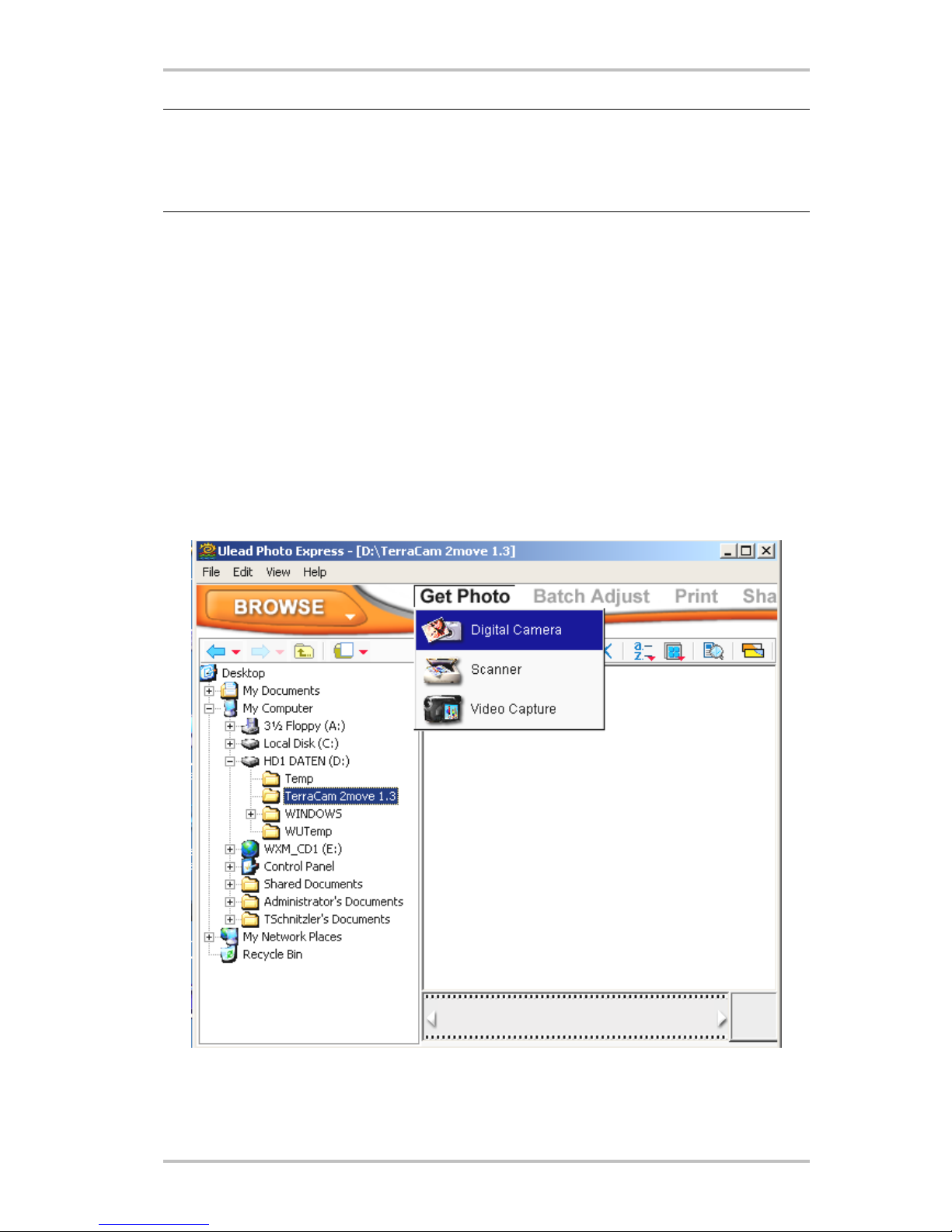
Storing images and videos
We recommend installing Ulead PHOTO EXPRESS. You can find the program on the included
installation CD. Of course, you can also use your favorite graphics program to load your im-
ages and video on your computer. The graphics program must have a TWAIN interface for this
purpose, however.
You can then address the TerraCAM 2move 1.3 via the TWAIN interface as if it were a scanner.
If you would like to use Ulead PHOTO EXPRESS, please follow these instructions:
After the installation is complete, launch Photo Express. You will find the program under Start
-> Programs -> Ulead Photo Express 4.0 SE -> Ulead Photo Express 4.0 SE. Click Get Photo -->
Digital Camera.
Select the TerraCam 2move 1.3 as your data source. Click “Acquire” to display the contents of
the TerraCam.
Altri manuali per TerraCAM 2move 1.3
1
Indice