
Tesco Hudl Manuale utente

HudlUserGuide

Contents Unlocking
Security
Sleeping
Switching off
Sound
Docking a micro-SD card
First use
How does the touchscreen
work?
Entering text or numbers
Typing with Swype
Correcting text
Entering text by speaking
Zoom
Panning
Portrait or landscape viewing
Quick access, status and settings
Home page
Home page apps
Home page wallpaper
Apps
Launching an app
Moving home page apps
Getting more apps
Adding or removing Home page
apps
Widgets
Introduction
What can I do with Hudl?
Unpacking
Carton Contents
Controls and Connections
Portable/Mains operation
Battery level indication
Connecting power
First charge
Battery care
Switching on

Browsing the Internet
YouTube and social networking
Email
The Tesco App
Using the camera
Clock application
Music, photos and video
Transferring files using Windows
Explorer
Playing Music
Viewing your photos and videos
Backing up your data
Device settings > Overview
Device settings > Wireless and
networks
Device settings > Device
Device settings > Personal
Device settings > Accounts
Device settings > System
Connecting accessories
Troubleshooting
Specifications
For further reference…
Contents

Introduction
Congratulations on the purchase of your Hudl.
Hudl is fully portable, and powered by an internal
rechargeable battery. The supplied charger can
fully charge it in 3 hours.
It includes built in wi-fi to connect to your wireless
network and bluetooth to connect to suitable
headphones, speakers and other accessories.
Hudlincludesofflashmemorymostofwhich
isavailableforyourdataAmicroSDportenables
youtodockamicroSDcardandexpandthe
memoryavailablefurtherbyupto
This user guide will help you understand how
to interact with Hudl and how it will respond to
your actions.
It will also provide you with instructions for some of
the more popular apps that are bundled with Hudl,
and help you to understand the settings that you
can change.
However, this is just the start of the story, you can
personalise Hudl by adding more applications from
the store or just by downloading media that you like.

WhatcanIdowithHudl?
If you have access to the Internet via a Wi-Fi
connection you can use it to stay in touch through
email and social networking, you can search the
Internet or browse for videos on Youtube.
You can load your choice of music, digital photos,
movies or e-books into the built-in memory which
can be expanded if required.
Once your files are loaded you can play music*,
browse photos* read books* or watch movies*
on the " display screen. You can choose to play
sound through the built-in speakers or connect a
pair of headphones (not supplied).
*Compatible file formats only.
The touch-sensitive screen will zoom in and out and
will display full qwerty or numeric keyboards when
text or number entry is required.
Quick links on-screen enable you to easily switch
between screens you have recently used or to
return to the Home page.
The dual built-in cameras enable you to take photos
or videos and also to make video phone calls or
messaging (suitable applications will be required).
In addition, many compatible gaming, leisure or
business applications are available and can be
ordered and installed directly from the online store.
Hudl comes pre-loaded with useful Tesco apps
that can help you shop online, browse blinkbox for
movies and music or manage your Clubcard account.

Unpacking
Carefully unpack the unit. If it is damaged,
please return it to your nearest Tesco store for
replacement. Remember to take your purchase
receipt with you.
Retain the Quick Start Guide and Safety and legal
information sheet. If you pass the unit on to a third
party make sure you pass on these items.
We suggest you retain the packaging. If you
dispose of it, do so having regard to recycling
regulations in your area.
Cartoncontents
The carton should contain:
— Hudl
— AC adaptor/charger
— Micro-USB cable
— Quick Start Guide
— Safety and legal information leaflet
If any items are missing or damaged, contact your
nearest TESCO store for a replacement. Have your
receipt ready when you call. Retain the packaging.
If you dispose of it, do so having regard to recycling
regulations in your area.

ControlsandConnections
HDMI outlet. Connect to an HDMI
TV to view movies and photos with a
suitable cable (not supplied).
Front camera.
Headphone socket. The speakers are
switched off when headphones are
connected.
Sleep/Power button.
Volume control.
Micro-SD card slot. Dock a micro-SD
card into the slot to expand the
memory for your media.
USB/charging connector.
Portable/Mainsoperation
When fully charged, Hudl will operate from an
internal battery, or can be powered and charged
from the mains by the supplied AC adapter.
Batterylevelindication
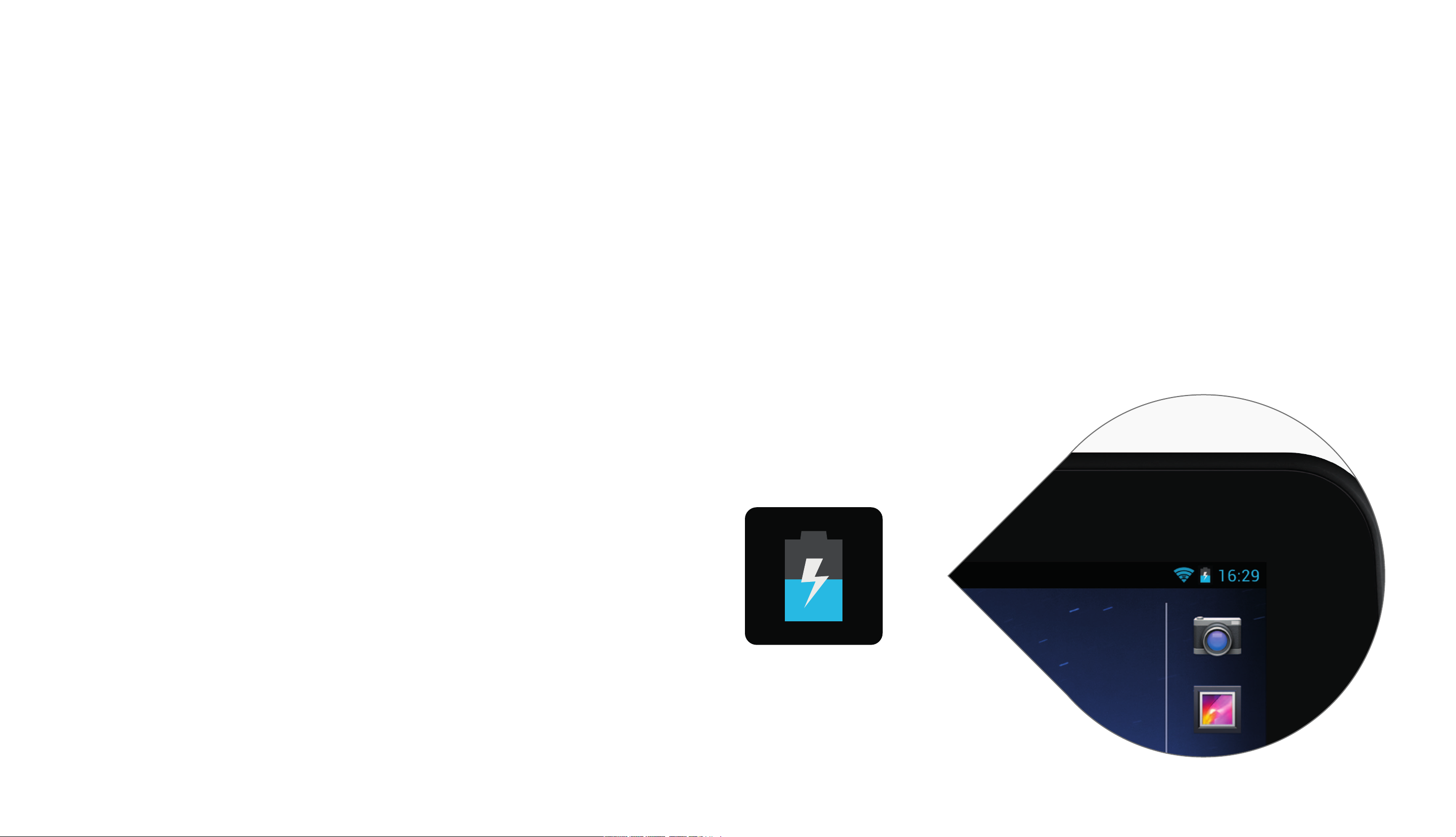
The battery level indicator is shown in the status
area in the top, right corner of the screen.
The battery level is shown in the battery symbol.
The blue level in this example shows half-charge.
The flash shown in the example will appear when
the battery is charging.
Connectingpower
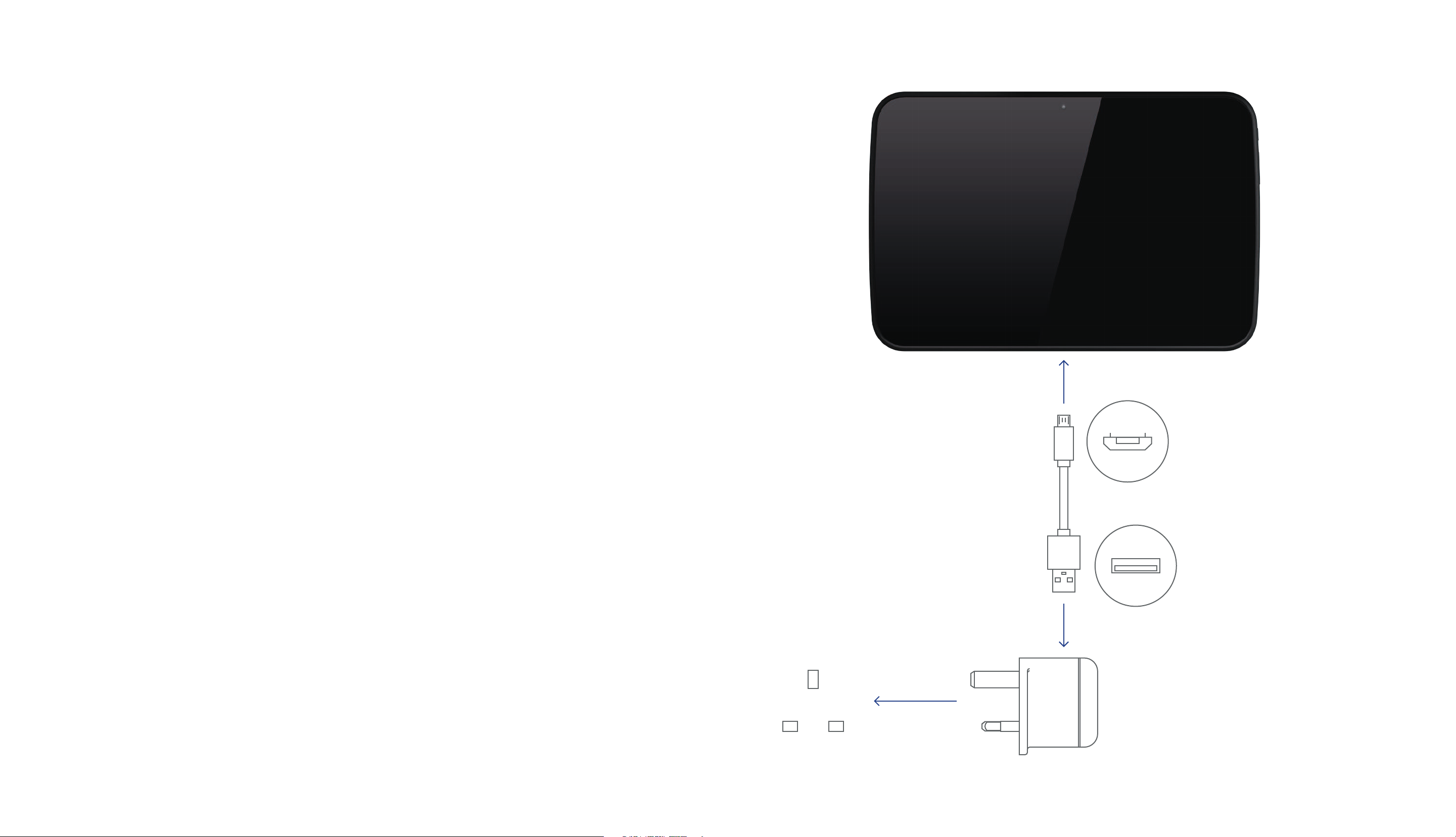
Plug the USB cable into the USB port on the
AC adapter/charger.
Connect the cable to the micro-USB port on
the Hudl.
Check that the mains voltage marked on the
rating plate of the AC adapter/charger is the
same as the voltage in your area.
Plug the AC adaptor into an AC outlet and
switch the mains power on.
Hudl will start to charge.
You can use Hudl while the charger is
connected.
Note Hudl will also charge when connected to
a computer via a USB connection.

Firstcharge
Ensure that you have enough time available
(approximately hours) to fully charge the battery
when you connect the charger for the first time.
Batterycare
To ensure maximum life from the battery in your
Hudl, follow these guidelines:
— Discharge the battery completely twice a year.
— If it hasn’t been used for a long period of time,
discharge the battery completely, then fully
charge it for hours before use.
— Never charge Hudl for more than hours.
— Never recharge the battery below C.
— Avoid recharging the battery in direct sunlight
or near a radiating heat source.
Altri manuali per Hudl
1
Indice
Altri manuali Tesco Tavoletta


