
Tesoro Gandiva Manuale utente
Quick Start Guide
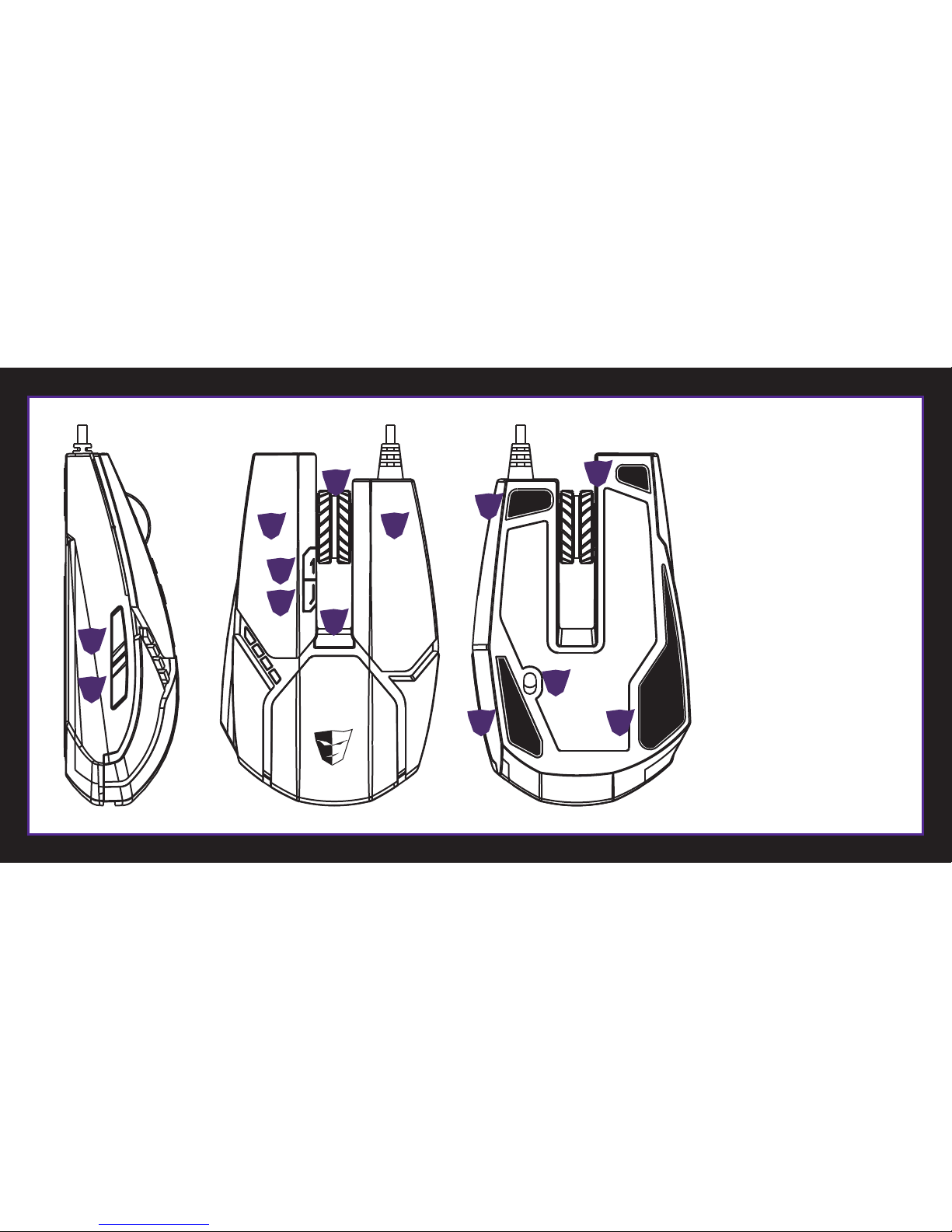
A
B
C
G
H
I
J
D
E
F
Key Features
Left Button
Right Button
Scroll
Back
Forward
DPI + Button
DPI - Button
DPI Cycle Button
Gaming Grade Laser Sensor
Teflon Feet
AB
C
E
G
F
H
J
J
J
J
I
D

Welcome to TESORO World
Congratulations on purchasing your very own TESORO GANDIVATM 8200 DPI LASER GAMING MOUSE- a gaming mouse designed mainly for RTS games while
engineered to suit the needs of all gamers. GANDIVATM features full color programmable illumination effect and user friendly UI. It is the mouse of choice for
optimizing the gaming experience.
TESORO GANDIVATM
Laser Gaming Mouse Quick Start Guide
Package Contents
•TESORO GANDIVATM Laser Gaming Mouse x 1. •TESORO GANDIVATM Quick Start Guide x1.
•TESORO Products Brochure x1.
NOTICE: The quick start guide with registration code and worldwide warranty card on the bottom page, please keep it for after service.
System Requirements
•PC system with built-in at least (1) x USB.
•Compatible with windows®XP / Vista / 7 / 8 .
•50MB of free hard disk space.
1
1
Installation
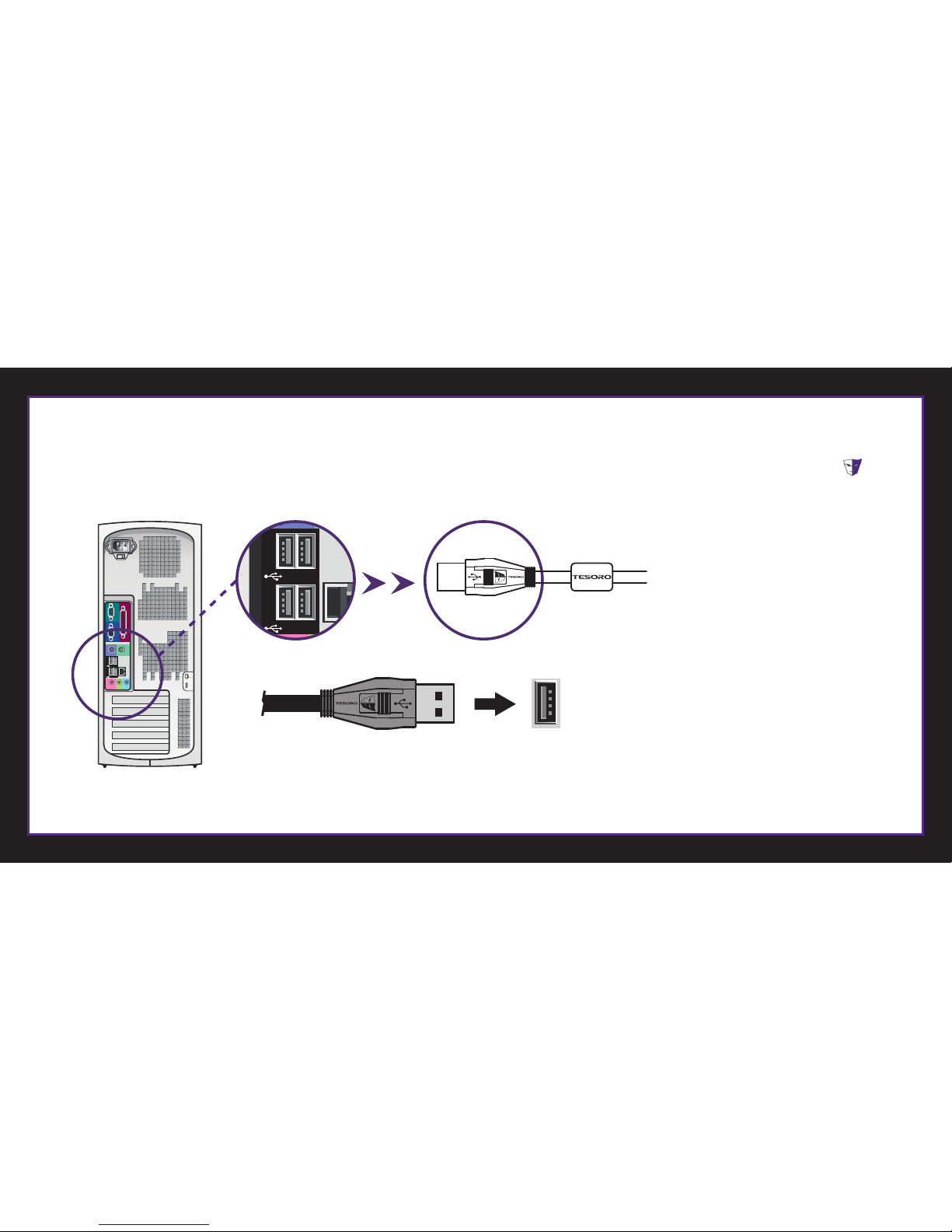
1. Plug in TESORO GANDIVATM into USB port of your computer.
2. Download TESORO GANDIVA software from the Tesoro website. Once the download is completed, unzip the package to the folder of your choice.
3. Click on the “setup.exe” the setup instruction will guide you through the setup process; click finish button to restart your computer. TESORO icon will be
displayed on the lower right taskbar when completed.
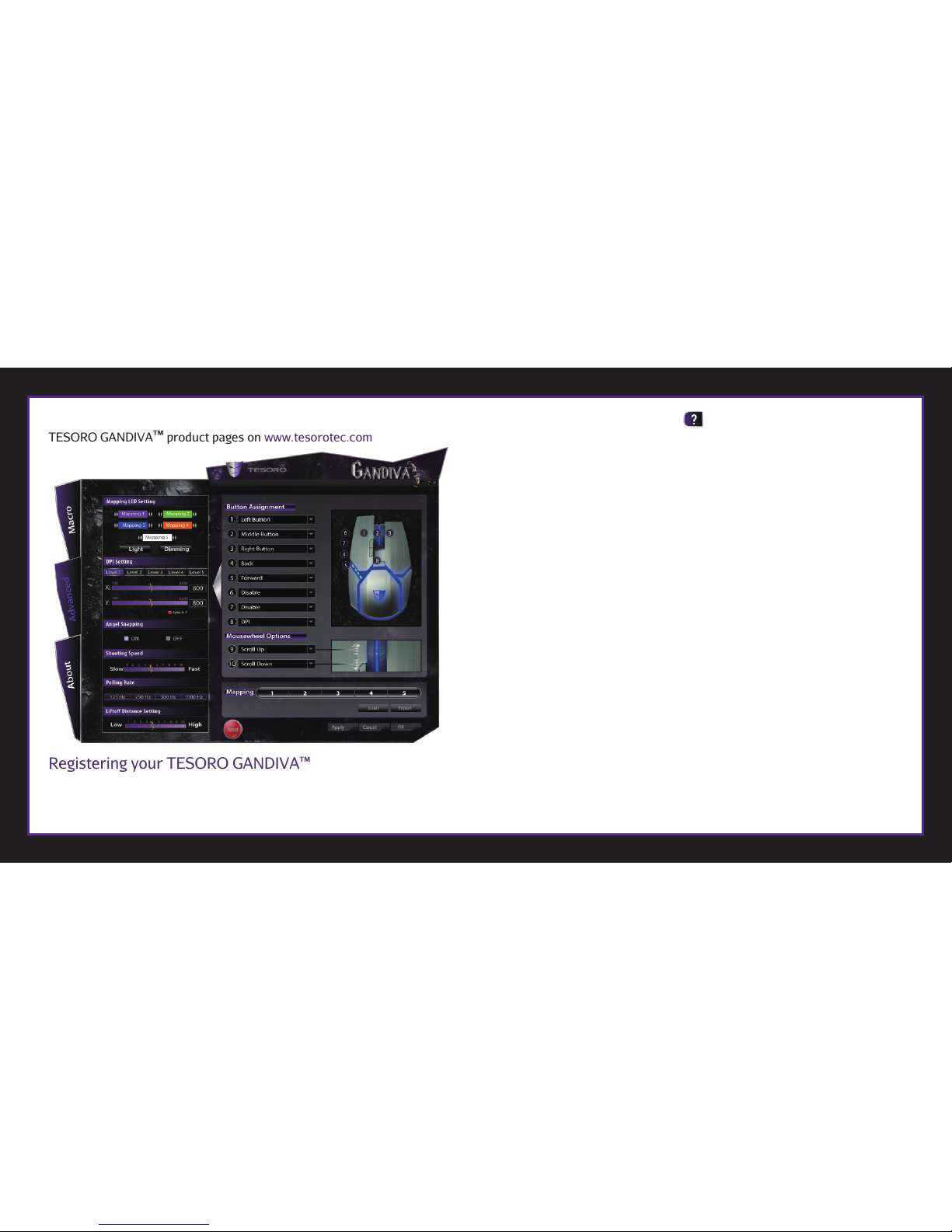
To get more help or profile macro keys setup for TESORO GANDIVATM, please enter the application program to click on the top right-hand corner, or visit
TESORO GANDIVATM product pages on www.tesorotec.com
Registering your TESORO GANDIVATM
Visit www.tesorotec.com to register.
1 year limited manufacturer warranty.
Free online technical support.

Français
Principales caractéristiques
A. Bouton gauche C. Defilement E. Avance G. Bouton de choix DPI - I. Capteur laser de categorie Jeu
B. Bouton droit D. Retour F. Bouton de choix DPI + H. Bouton de choix DPI cycle J. Pied en teflon
Contenuto della confezione
•Souris de jeu laser GANDIVATM x1
•Guide de demarrage rapide x1
•Brochure TESORO x1
NOTICE: Le guide de démarrage rapide avec code d'enregistrement et carte de garantie internationale en bas de page, veuillez les conserver pour le service après vente.
Requisiti di sistema
•Systeme PC avec au moins 1 x USB integre
•Compatible avec Windows®XP / Vista / 7 / 8
•50 Mo d'espace disque dur libre
Installation
1. Brancher la TESORO GANDIVATM sur un port USB de votre ordinateur.
2. Téléchargez le logiciel TESORO GANDIVA du site Web de Tesoro. Une fois le téléchargement terminé, décompressez le package vers le dossier de votre choix.
3. Cliquer sur "setup.exe", les instructions d’installation vous guide a travers le processus d'installation ; cliquer sur le bouton Terminer pour redemarrer votre ordinateur.
4. L’icone TESORO s’affiche dans le coin inferieur droit de la barre de taches.
Pour obtenir davantage d’aide ou plus de configuration de touches macro pour la TESORO GANDIVA, veuillez entrer dans le programme d’application pour cliquer sur dans le coin
superieur droit , ou visiter les pages sur le produit TESORO GANDIVA sur www.tesorotec.com
Enregistrez votre TESORO GANDIVATM
Rendez-vous sur www.tesorotec.com
1 an de garantie fabricant limitée.
Support technique gratuit en ligne

Deutsch
Hauptmerkmale
A. Linke Taste C. Rollen/Blattern E. Vor G. Taste fur Wechsel des DPI-Werts - I. Laser-Sensor fur Gaming
B. Rechte Taste D. Zurück F. Taste fur Wechsel des DPI-Werts + H. Taste fur Wechsel des DPI-Werts zyklus J. Teflon-Fuse
Inhalt des Produktkartons
•1 TESORO GANDIVATM Laser-Gaming-Maus
•1 Kurzbedienungsanleitung
•1 TESORO-Broschure
HINWEIS: Die Schnellstartanleitung enthalt den Registrierungs code und die weltweit gultige Garantiekarte auf der letzten Seite; bitte fur Kundenservice aufbewahren.
Systemvoraussetzungen
•PC-System mit mind. 1 USB-Port
•Kompatibel zu Windows®XP / Vista / 7 / 8
•50 MB freier Plattenplatz
Installation
1. TESORO GANDIVATM an USB-Port des Computers anschliesen.
2. Laden Sie die TESORO GANDIVA Software von der Tesoro-Website herunter. Sobald der Download abgeschlossen ist, entpacken Sie die Datei in den Ordner Ihrer Wahl.
3. Auf "setup.exe" klicken; auf dem Bildschirm erscheinen Anweisungen zur Installation; zum Neustart des Computers auf “Fertig” klicken.
4. Das TESORO-Symbol erscheint nach Abschluss der Installation rechts unten in der Task-Leiste.
Weitere Informationen oder Hinweise zur Konfiguration der Makrotasten fur TESORO GANDIVATM erhalten Sie im Programm oder durch Klicken auf rechts oben oder auf den Seiten
zu TESORO GANDIVATM auf www.tesorotec.com.
TESORO GANDIVATM registrieren
Registrieren Sie sich bitte unter www.tesorotec.com, um Folgendes zu beziehen:
1 Jahr eingeschrankte Produktgarantie
Kostenloser technischer Online-Support Fonctions principales

Deutsch
Hauptmerkmale
A. Linke Taste C. Rollen/Blattern E. Vor G. Taste fur Wechsel des DPI-Werts - I. Laser-Sensor fur Gaming
B. Rechte Taste D. Zurück F. Taste fur Wechsel des DPI-Werts + H. Taste fur Wechsel des DPI-Werts zyklus J. Teflon-Fuse
Inhalt des Produktkartons
•1 TESORO GANDIVATM Laser-Gaming-Maus
•1 Kurzbedienungsanleitung
•1 TESORO-Broschure
HINWEIS: Die Schnellstartanleitung enthalt den Registrierungs code und die weltweit gultige Garantiekarte auf der letzten Seite; bitte fur Kundenservice aufbewahren.
Systemvoraussetzungen
•PC-System mit mind. 1 USB-Port
•Kompatibel zu Windows®XP / Vista / 7 / 8
•50 MB freier Plattenplatz
Installation
1. TESORO GANDIVATM an USB-Port des Computers anschliesen.
2. Laden Sie die TESORO GANDIVA Software von der Tesoro-Website herunter. Sobald der Download abgeschlossen ist, entpacken Sie die Datei in den Ordner Ihrer Wahl.
3. Auf "setup.exe" klicken; auf dem Bildschirm erscheinen Anweisungen zur Installation; zum Neustart des Computers auf “Fertig” klicken.
4. Das TESORO-Symbol erscheint nach Abschluss der Installation rechts unten in der Task-Leiste.
Weitere Informationen oder Hinweise zur Konfiguration der Makrotasten fur TESORO GANDIVATM erhalten Sie im Programm oder durch Klicken auf rechts oben oder auf den Seiten
zu TESORO GANDIVATM auf www.tesorotec.com.
TESORO GANDIVATM registrieren
Registrieren Sie sich bitte unter www.tesorotec.com, um Folgendes zu beziehen:
1 Jahr eingeschrankte Produktgarantie
Kostenloser technischer Online-Support Fonctions principales
Italiano
gratuitoFunzioni principali
A. Tasto sinistro C. Scorrimento E. Avanti G. Tasto DPI - I. Sensore laser da gioco
B. Tasto destro D. Indietro F. Tasto DPI + H. Tasto DPI ciclo J. Pianta di Teflon
Contenuto della confezione
•1 Mouse laser da gioco GANDIVATM
•1 Guida rapida
•1 Brochure TESORO
AVVERTENZA: La guida rapida con codice di registrazione e scheda di garanzia valida in tutto il mondo sulla pagina pulsanti va conservata in caso di assistenza successiva.
Requisiti di sistema
•Sistema PC con almeno 1 porta USB integrata
•Compatibile con Windows®XP / Vista / 7 / 8
•50MB di spazio libero su disco
Installazione
1. Collegare TESORO GANDIVATM alla porta USB del computer.
2. Scaricare il software TESORO GANDIVA dal sito web Tesoro. Al termine del download, decomprimere il pacchetto sulla cartella desiderata.
3. Fare clic su "setup.exe"; le istruzioni guideranno lungo la procedura d’installazione; fare clic su Finish (Fine) per riavviare il computer.
4. Al termine, nell’angolo in basso a destra della barra delle applicazioni sara visualizzata l’icona TESORO .
Peer ottenere assistenza oppure i profili di configurazione dei tasti macro di TESORO GANDIVATM, accedere al programma applicativo oppure fare clic su,nell’angolo in alto a destra ,
oppure visitare le pagine del prodotto TESORO GANDIVATM all’indirizzo www.tesorotec.com
Registrazione di TESORO GANDIVATM
Visitare www.tesorotec.com per la registrazione ottenere:
1 anno di garanzia limitata del costruttore
assistenza tecnica gratuita online

Español
Caracteristicas
A. Boton izquierdo C. Desplazar E. Avanzar G. Boton de cambio de DPI - I. Sensor laser para juegos
B. Boton derecho D. Atras F. Boton de cambio de DPI + H. Boton de cambio de DPI ciclo J. Pies de teflon
Contenido del paquete
•Raton para juegos laser GANDIVATM x1
•Guia de inicio rapido x1
•Folleto TESORO x1
AVISO: la guia de inicio rapido contiene el codigo de registro y la tarjeta de garantia internacional en la pagina inferior. Conservela por si necesitara atencion tecnica.
Requisitos del sistema
•PC con al menos 1 puerto USB integrado
•Compatible con Windows®XP / Vista / 7 / 8
•50 MB de espacio disponible en disco duro
Instalacion
1. Enchufe el raton TESORO GANDIVATM en un puerto USB de su PC.
2. Descargue el software TESORO GANDIVA del sitio web de Tesoro. Una vez que se complete la descarga, descomprima el paquete en la carpeta deseada.
3. Haga clic en el archivo "setup.exe". El programa de instalacion le guiara por los pasos a traves del proceso de instalacion. Haga clic en el boton Finalizar para reiniciar el equipo.
4. El icono de TESORO se mostrara en la barra de tareas en la parte inferior derecha y, a continuacion, el proceso se completara.
Para obtener mas ayuda o informacion sobre la configuracion de las teclas de macro de perfil para TESORO GANDIVATM, entre en el programa de aplicacion y haga clic en el icono que
se encuentra en la esquina superior derecha o visite las paginas del producto TESORO GANDIVATM en el sitio Web www.tesorotec.com.
Registrar su dispositivo TESORO GANDIVATM
Visite el sitio de registro Web www.tesorotec.com para obtener lo siguiente:
Garantia limitada del fabricante de un ano
Soporte tecnico en linea gratuitoFunzioni principali

Dutch
Hoofdfuncties
A. Linkerknop C. Scrollen E. Vooruit G. Knop DPI- I. Lasersensor van spelkwaliteit
B. Rechterknop D. Terug F. Knop DPI+ H. Knop DPI-cyclus J. Teflon-poten
Inhoud pakket
- TESORO GANDIVATM -laserspelmuis x 1
- Snelstarthandleiding x 1
- TESORO-brochure x 1
MEDEDELING: De snelstarthandleiding met registratiecode en wereldwijde garantiekaart staat op de onderste pagina; bewaar dit voor service in de toekomst.
Systeemvereisten
•PC-systeem met tenminste ingebouwd 1 x USB
•Compatibel met Windows®XP / Vista / 7 / 8
•50MB vrije ruimte op de harde schijf
Installatie
1. Steek TESORO GANDIVATM in de USB-poort van uw computer.
2. Download TESORO GANDIVA -kaart -software van de Tesoro-website. Wanneer de download gereed is,pakt u het pakket uit naar uw gewenste map.
3. Klik op “setup.exe” en de installatie-instructie begeleidt u door het installatieproces; klik op de knop Finish (Voltooien) om uw computer te herstarten.
4. TESORO-pictogram wordt na voltooiing weergegeven in de taakbalk rechtsonder.
Voor meer hulp of installatie van macrotoetsen voor profiel voor TESORO GANDIVATM, opent u het applicatieprogramma en klik op in de rechter bovenhoek of ga naar de TESORO
GANDIVATM - productpagina's op www.tesorotec.com
Registreren van uw TESORO GANDIVATM
Ga naar www.tesorotec.com om te registreren
Beperkte fabrikantgarantie van 1 jaar
Gratis online technische ondersteuning
Indice
Altri manuali Tesoro Topo


