Texas Instruments OPT3006EVM Manuale utente

1
SBOU181–October 2016
Submit Documentation Feedback Copyright © 2016, Texas Instruments Incorporated
OPT3006EVM User's Guide
PicoStar is a trademark of Texas Instruments.
Windows, Windows 7 are registered trademarks of Microsoft Corporation.
All other trademarks are the property of their respective owners.
User's Guide
SBOU181–October 2016
OPT3006EVM User's Guide
This user’s guide describes the characteristics, operation, and use of the OPT3006EVM evaluation
module. The user's guide discusses how to set up and configure the software and hardware, and reviews
various aspects of the program operation. Throughout this document, the terms evaluation board,
evaluation module, and EVM are synonymous with the OPT3006EVM. This document also includes an
electrical schematic, printed circuit board (PCB) layout drawings, and a parts list for the EVM.
Contents
1 Overview ..................................................................................................................... 3
1.1 OPT3006EVM Kit Contents ....................................................................................... 3
1.2 Related Documentation from Texas Instruments............................................................... 4
2 Hardware...................................................................................................................... 5
2.1 Theory of Operation ................................................................................................ 6
2.2 Hardware Overview................................................................................................. 6
3 Software....................................................................................................................... 8
3.1 Hardware Requirements........................................................................................... 8
3.2 Software Installation................................................................................................ 8
3.3 Launching the Software .......................................................................................... 10
3.4 Software Operation ............................................................................................... 11
4 Schematic, PCB Layout, and Bill of Materials.......................................................................... 15
4.1 Schematic .......................................................................................................... 15
4.2 PCB Layout ........................................................................................................ 17
4.3 Bill of Materials .................................................................................................... 20
List of Figures

www.ti.com
2SBOU181–October 2016
Submit Documentation Feedback
Copyright © 2016, Texas Instruments Incorporated
OPT3006EVM User's Guide
1 Hardware Included With Kit ................................................................................................ 3
2 Hardware Setup.............................................................................................................. 5
3 OPT3006EVM Block Diagram ............................................................................................. 6
4 Typical Hardware Connection.............................................................................................. 7
5 Typical Response After Connecting OPT3006EVM to Computer..................................................... 7
6 Software-Installation Files .................................................................................................. 8
7 Software-Installation Launch............................................................................................... 9
8 Software-Installation Prompts.............................................................................................. 9
9 Main Operation Screen.................................................................................................... 10
10 Hardware Error Message ................................................................................................. 10
11 Power Indicators............................................................................................................ 11
12 I2C Address Selection...................................................................................................... 11
13 Register x00 Button and Recorded Values............................................................................. 12
14 Register x01 Control and Status Register Bits......................................................................... 12
15 Registers x02 and x03 Lux Limit Controls .............................................................................. 12
16 Simulated Screen Backlight Dimmer .................................................................................... 12
17 Lux vs Sample Number Plot.............................................................................................. 13
18 Re-Initialize Button......................................................................................................... 13
19 Data Logging Setup and Enable ......................................................................................... 14
20 Read All Button on the Register Map Tab with Example Output .................................................... 14
21 OPT3006EVM Schematic, Including MHR046 FPCB................................................................. 15
22 FPCB MHRS046 Schematic, Containing the OPT3006 .............................................................. 16
23 PCB Top-Layer Assembly Drawing...................................................................................... 17
24 PCB Bottom-Layer Assembly Drawing.................................................................................. 17
25 PCB Top Layer ............................................................................................................. 18
26 PCB Bottom Layer ......................................................................................................... 18
27 MHR046 FPCB Top Layer................................................................................................ 19
28 MHR046 FPCB Bottom Layer ............................................................................................ 19
29 MHR046 FPCB Assembly Drawing...................................................................................... 19
List of Tables
1 OPT3006EVM Kit Contents ................................................................................................ 3
2 Related Documentation..................................................................................................... 4
3 OPT3006EVM BOM ....................................................................................................... 20
4 MHR046 FPCB BOM ..................................................................................................... 20

www.ti.com
Overview
3
SBOU181–October 2016
Submit Documentation Feedback Copyright © 2016, Texas Instruments Incorporated
OPT3006EVM User's Guide
1 Overview
The OPT3006 is an ambient light sensor (ALS) with a digital output integrated circuit in an ultra-thin
PicoStar™ package form factor, allowing the device to fit into tiny spaces. The OPT3006 is mounted on a
flexible PCB (FPCB), which contains an example cutout that allows light to illuminate the sensor. The
OPT3006 uses a two-wire interface that works with the I2C protocol, making this device ideal for many
applications. The OPT3006EVM is a Platform for evaluating the performance of the OPT3006 device
under various conditions. The OPT3006EVM consists of two PCBs. The first PCB is the SM-USB-DIG
Platform that communicates with the computer, provides power, and sends and receives appropriate
digital signals. The second PCB is the OPT3006EVM: a rigid PCB with a mounted FPCB that contains the
OPT3006 device.
1.1 OPT3006EVM Kit Contents
Table 1 summarizes the contents of the OPT3006EVM kit. Figure 1 shows the included hardware. Contact
the Texas Instruments Product Information Center nearest you if any component is missing. It is highly
recommended that you also check the OPT3006 product folder on the TI web site at www.ti.com to verify
you have the latest versions of the released software.
Table 1. OPT3006EVM Kit Contents
Item Quantity
OPT3006EVM 1
SM-USB-DIG Platform 1
USB extension cable 1
Figure 1. Hardware Included With Kit

Overview
www.ti.com
4SBOU181–October 2016
Submit Documentation Feedback
Copyright © 2016, Texas Instruments Incorporated
OPT3006EVM User's Guide
1.2 Related Documentation from Texas Instruments
The following documents provide information regarding Texas Instruments' integrated circuits used in the
assembly of the OPT3006EVM. This user's guide is available from the TI web site under literature number
SBOU181. Any letter appended to the literature number corresponds to the document revision that is
current at the time of the writing of this document. The latest revision can be found by clicking the link
Table 2 and is also available from the TI web site, the Texas Instruments' Literature Response Center at
(800) 477-8924, and the Product Information Center at (972) 644-5580. When ordering, identify the
document by both title and literature number.
Table 2. Related Documentation
Document Literature Number
OPT3006 product data sheet SBOS698
SM-USB-DIG_Platform user's guide SBOU098

www.ti.com
Hardware
5
SBOU181–October 2016
Submit Documentation Feedback Copyright © 2016, Texas Instruments Incorporated
OPT3006EVM User's Guide
2 Hardware
Figure 2 shows the system setup for the OPT3006EVM. The computer runs the graphical user interface
(GUI) software that communicates with the SM-USB-DIG Platform over a USB connection. The SM-USB-
DIG Platform translates the USB commands from the computer into power, I2C, SPI, and general-purpose
input/output (GPIO) commands for the OPT3006EVM. The OPT3006EVM does not require any additional
components to operate.
Figure 2. Hardware Setup

OPT3006
FPCB:
MHR04610-Pin
Female
SM-USB-Dig
Connector
Five
100-mil spaced
test points
I2C Interface and ground
Interrupt
VDUT Supply
(Switched +3.3 V Power)
Hardware
www.ti.com
6SBOU181–October 2016
Submit Documentation Feedback
Copyright © 2016, Texas Instruments Incorporated
OPT3006EVM User's Guide
2.1 Theory of Operation
A block diagram of the OPT3006EVM hardware is shown in Figure 3. The OPT3006EVM contains an
FPCB (labeled MHR046), with a mounted OPT3006. This FPCB has a cutout that allows light to pass
through and illuminate the sensor. The OPT3006EVM also contains connections for the power, I2C, and
an interrupt signal. For evaluation purposes, the board also has a 5-pin header that allows the
OPT3006EVM to be connected to hardware other than the SM-USB-DIG Platform.
Figure 3. OPT3006EVM Block Diagram
2.2 Hardware Overview
If not already assembled, the basic hardware setup for the OPT3006EVM involves connecting the
OPT3006EVM to the SM-USB-DIG Platform and then connecting the USB cable. This section presents
the details of this procedure.
CAUTION
Many of the components on the OPT3006EVM are susceptible to damage by
electrostatic discharge (ESD). Customers are advised to observe proper ESD
handling precautions when unpacking and handling the EVM, including the use
of a grounded wrist strap at an approved ESD workstation.

www.ti.com
Hardware
7
SBOU181–October 2016
Submit Documentation Feedback Copyright © 2016, Texas Instruments Incorporated
OPT3006EVM User's Guide
2.2.1 Typical Hardware Setup
Connect the right-angle female socket on the OPT3006EVM to the right-angle male header on the SM-
USB-DIG Platform, as shown in Figure 4. Take special care to make sure that the two 10-pin sockets
directly align with each other. Plug the female USB-A cable to the SM-USB-DIG Platform and then plug
the male USB-A cable into the computer.
NOTE: Always connect the two boards together before connecting the USB cable to avoid any
issues if the connectors are misaligned.
Figure 4. Typical Hardware Connection
Figure 5 shows the typical response when the SM-USB-DIG is plugged into the USB port of the computer
for the first time. Typically, the computer responds with a Found New Hardware, USB Device pop-up
dialog window. The pop-up window then typically changes to Found New Hardware, USB Human Interface
Device. This pop-up indicates that the device is ready to be used. The SM-USB-DIG Platform uses the
human interface device drivers that are part of the Windows®operating system.
Figure 5. Typical Response After Connecting OPT3006EVM to Computer
In some cases, the Add Hardware Wizard appears. If this installation prompt occurs, allow the device
manager to install the human interface device drivers by clicking Yes at each request to install the drivers.

Software
www.ti.com
8SBOU181–October 2016
Submit Documentation Feedback
Copyright © 2016, Texas Instruments Incorporated
OPT3006EVM User's Guide
3 Software
This section describes the installation and operation of the OPT3006EVM software. The OPT3006 is
essentially identical to the OPT3001, but in a smaller package form factor; thus, the OPT3001EVM
software is used to interact with the OPT3006EVM.
3.1 Hardware Requirements
The OPT3006EVM software has been tested on the Windows 7®operating system (OS) with United
States regional settings. The software should function correctly on other Windows operating systems.
3.2 Software Installation
The OPT3006EVM evaluation software is available on the OPT3006EVM product folder at www.ti.com as
a zip file. To install the software, download the zip file to your computer, and uncompress. The
uncompressed folder contains the files shown in Figure 6. Launch the OPT3006EVM installation file,
setup.exe, as shown in Figure 6 . Remember that the software references the OPT3001, but does work
with the OPT3006.
Figure 6. Software-Installation Files

www.ti.com
Software
9
SBOU181–October 2016
Submit Documentation Feedback Copyright © 2016, Texas Instruments Incorporated
OPT3006EVM User's Guide
The OPT3006EVM software then begins the installation process, as shown in Figure 7.
Figure 7. Software-Installation Launch
Follow the prompts as shown in Figure 8 to install the OPT3006EVM software.
Figure 8. Software-Installation Prompts
The OPT3006EVM GUI software is now installed.

Software
www.ti.com
10 SBOU181–October 2016
Submit Documentation Feedback
Copyright © 2016, Texas Instruments Incorporated
OPT3006EVM User's Guide
3.3 Launching the Software
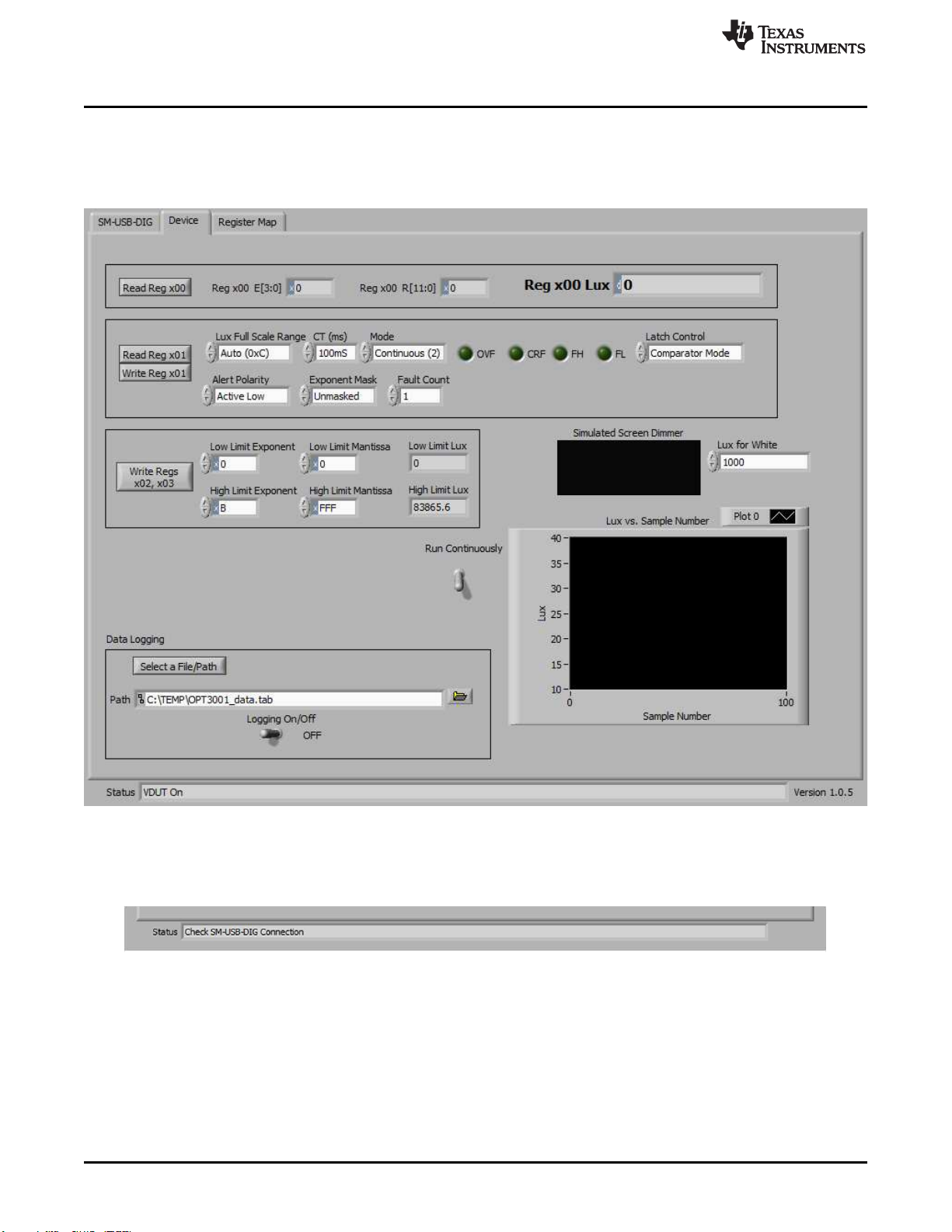
With the OPT3006EVM properly connected (see Figure 4), launch the EVM GUI software from the
Windows Start menu. It is located in a folder titled OPT3006EVM. The software launches with a screen
similar to that shown in Figure 9.
Figure 9. Main Operation Screen
If the message shown in Figure 10 appears when the OPT3006EVM GUI software is launched, disconnect
all components of the OPT3006EVM kit, and repeat the hardware assembly and connection instructions.
Figure 10. Hardware Error Message
Questo manuale è adatto per i seguenti modelli
2
Indice
Altri manuali Texas Instruments Accessori

Texas Instruments
Texas Instruments IWRL6432BOOST Manuale utente

Texas Instruments
Texas Instruments AWR1642 Manuale utente

Texas Instruments
Texas Instruments SLVP089 Manuale utente

Texas Instruments
Texas Instruments UCC28060EVM Manuale utente

Texas Instruments
Texas Instruments OPT8241 Manuale utente

Texas Instruments
Texas Instruments TAP6203A1 Manuale utente

Texas Instruments
Texas Instruments TPS53125EVM-599 Manuale utente

Texas Instruments
Texas Instruments DAC8555EVM Manuale utente

Texas Instruments
Texas Instruments THS4012 Manuale utente

Texas Instruments
Texas Instruments TPS60230EVM-047 Manuale utente